Key Takeaways
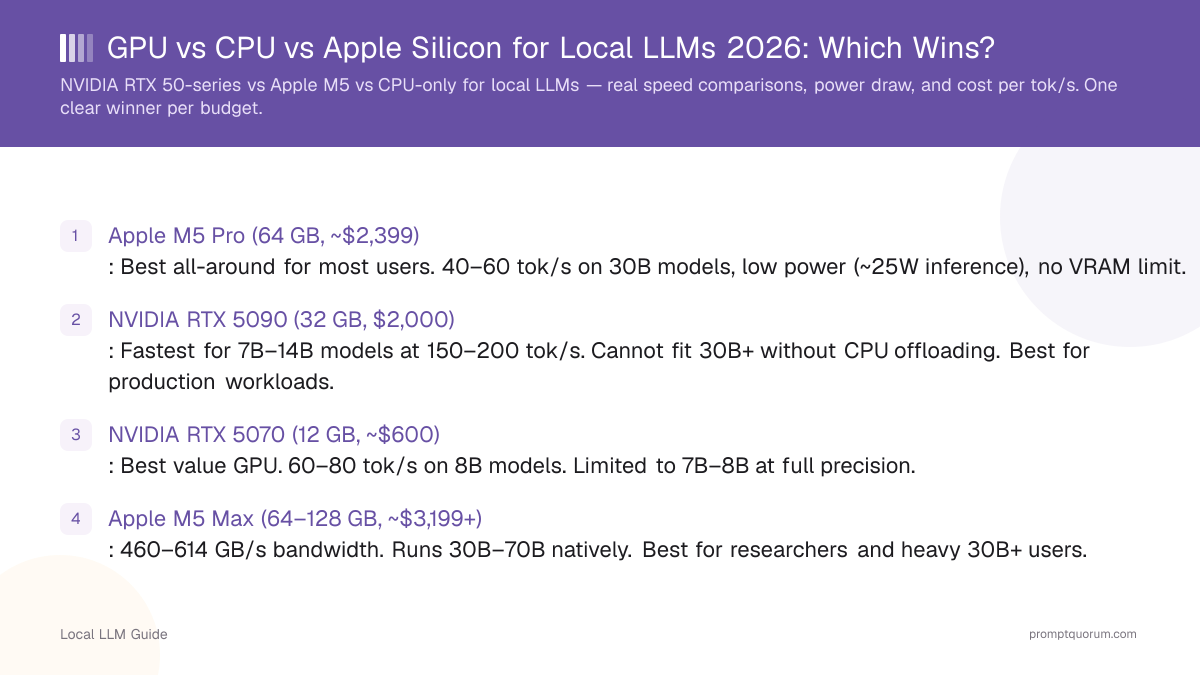
- Apple M5 Pro (64 GB, ~$2,399): Best all-around for most users. 40–60 tok/s on 30B models, low power (~25W inference), no VRAM limit.
- NVIDIA RTX 5090 (32 GB, $2,000): Fastest for 7B–14B models at 150–200 tok/s. Cannot fit 30B+ without CPU offloading. Best for production workloads.
- NVIDIA RTX 5070 (12 GB, ~$600): Best value GPU. 60–80 tok/s on 8B models. Limited to 7B–8B at full precision.
- Apple M5 Max (64–128 GB, ~$3,199+): 460–614 GB/s bandwidth. Runs 30B–70B natively. Best for researchers and heavy 30B+ users.
- CPU-only (modern Ryzen/Intel): 10–20 tok/s on 7B models with fast DDR5 RAM. Viable for occasional use, impractical for real-time chat.
- Winner verdict: For most people, Apple M5 Pro 64 GB is the winner — larger models than any single GPU, less cost than a GPU build, 10× less power. Choose RTX 50-series only for maximum speed on 7B–14B or production workloads.
📍 In One Sentence
For local LLMs: Apple M5 Pro 64GB (~$2,399) is the best all-around at 40–60 tok/s on 30B models; RTX 5090 32GB (~$2,000) is fastest for 7B–14B (150–200 tok/s) but can't fit 30B+; RTX 5070 12GB (~$600) offers the best GPU value; CPU-only is 10–20 tok/s on 7B.
💬 In Plain Terms
GPUs are fastest for smaller models (under 14B) because they have huge compute bandwidth. Apple Silicon chips win for larger models (30B+) because they pair memory and compute in one chip with low power draw. CPU-only is the slowest but works on any laptop — expect slow output for large models.
Performance Comparison: Speed, Bandwidth, and Cost
*Requires CPU offloading — significant speed penalty and quality degradation at low bit-widths
Hardware | Qwen3 8B | Qwen3 30B | Power | Cost |
|---|---|---|---|---|
| RTX 5090 (GPU, 32 GB GDDR7) | 150–200 tok/s | Not possible* | ~450W | $2,000 |
| RTX 5080 (GPU, 16 GB GDDR7) | 100–130 tok/s | Not possible* | ~360W | $1,000 |
| RTX 5070 Ti (GPU, 16 GB) | 80–100 tok/s | Not possible* | ~300W | $750 |
| RTX 5070 (GPU, 12 GB) | 60–80 tok/s | Not possible* | ~250W | $600 |
| MacBook Pro M5 Pro (36–64 GB, 307 GB/s) | 40–60 tok/s | 20–30 tok/s | ~25W | $2,399+ |
| MacBook Pro M5 Max (64–128 GB, 460–614 GB/s) | 60–80 tok/s | 35–50 tok/s | ~35W | $3,199+ |
| Mac mini M5 base (16–32 GB, 200 GB/s) | 25–35 tok/s | Offload* | ~15W | $599+ |
| Intel Core Ultra 9 / AMD Ryzen 9 (CPU, DDR5) | 10–20 tok/s | 3–5 tok/s | ~65W | Included |
When to Choose GPU (RTX 50-Series)
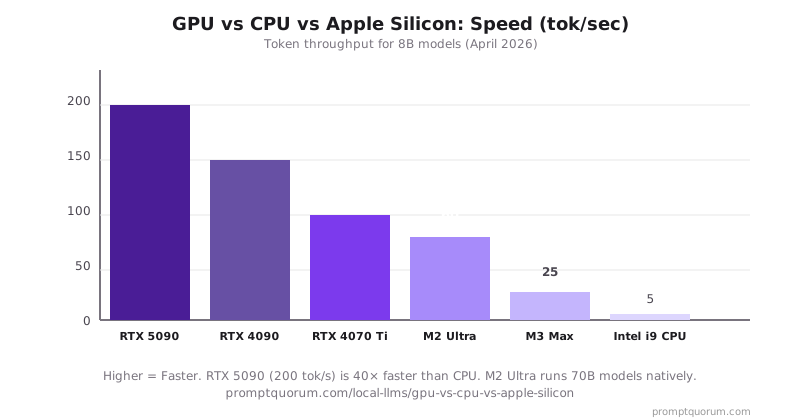
Choose an NVIDIA RTX 50-series GPU when you need maximum speed on 7B–14B models or run production workloads 24/7.
- RTX 5090 (32 GB GDDR7, 1,792 GB/s): 150–200 tok/s on 8B models. $2,000. Best for production pipelines, fine-tuning, and speed-critical applications.
- RTX 5080 (16 GB GDDR7): 100–130 tok/s on 8B. $1,000. Good balance of speed and cost for 8B–13B.
- RTX 5070 Ti / 5070 (12–16 GB): 60–100 tok/s on 8B. $600–$750. Best value for single-user chat and coding.
- CUDA ecosystem advantage: vLLM, llama.cpp, LM Studio all natively optimized. Fastest inference at native precision.
- Hard limit: No RTX 50-series card fits 30B models at full quality (requires 20+ GB VRAM). Offloading to system RAM creates 5–10× speed penalty.
Power draw is the key trade-off: RTX 5090 pulls 450W at load vs 25W for M5 Pro. At 0.35 USD/kWh, RTX 5090 costs ~$55/month extra in electricity at 8 hrs/day.
When to Choose Apple Silicon (M5)
Choose Apple Silicon M5 when you need to run 14B–70B models, value energy efficiency, or use macOS as your primary OS.
- M5 base (16–32 GB, 200 GB/s): Runs 7B–8B natively at 25–35 tok/s. $599+ (Mac mini). Good entry point.
- M5 Pro (36–64 GB, 307 GB/s): Runs up to 30B natively at 20–30 tok/s. ~$2,399 (MacBook Pro). Best all-around value.
- M5 Max (64–128 GB, 460–614 GB/s): Runs 30B–70B natively at 35–50 tok/s. ~$3,199+. Best for researchers and heavy 70B workloads.
- Unified memory advantage: No VRAM ceiling. A 64 GB M5 Pro fits 30B models natively; a 128 GB M5 Max fits 70B models natively.
- Apple claims: 4× faster LLM inference vs M4 for the M5 generation.
- MLX framework: Apple's MLX is optimized for Apple Silicon. Qwen3 models run excellently on MLX. DeepSeek-R1 14B performs well.
Trade-off: Cannot match RTX 5090 raw speed on 7B. Slower for fine-tuning. No CUDA-only tools.
When CPU-Only Is Enough
CPU-only inference is viable if you only need occasional responses and run small models (7B Q4).
- Modern Intel Core Ultra 9 / AMD Ryzen 9 with DDR5-5600: 10–20 tok/s on Qwen3 8B or Llama 3.2 8B. Usable for non-interactive batch tasks.
- Older CPU / DDR4: 5–8 tok/s. Noticeable latency (5–8 seconds per response) makes interactive chat unpleasant.
- Zero extra hardware cost: If you already own a capable desktop, llama.cpp or Ollama work immediately.
- Power draw: CPUs at full inference load pull 65–125W — less than a GPU, more than Apple Silicon.
CPU inference works for: document summarization batch jobs, overnight processing, occasional Q&A. Avoid CPU-only for real-time chat, coding assistants, or models larger than 8B.
Memory Bandwidth: The Real Speed Bottleneck
LLM inference is memory-bound, not compute-bound. Token generation speed is limited by how fast you can load model weights from memory. Higher memory bandwidth = faster token generation.
The formula: Inference speed ≈ Memory bandwidth ÷ Model weights in memory
- RTX 5090 at 1,792 GB/s is the fastest single-GPU bandwidth available in 2026.
- M5 Max at 460–614 GB/s matches or exceeds RTX 5080 on bandwidth — with 128 GB unified memory vs 16 GB VRAM.
- M5 Pro at 307 GB/s is the sweet spot: enough bandwidth for 30B models, half the cost of M5 Max.
- CPU DDR5 at 89 GB/s is 20× slower than RTX 5090 but 4× faster than DDR4 — a meaningful upgrade for CPU inference.
- Unified memory advantage: No CPU↔GPU transfer overhead. M5 Pro holds a 30B model entirely in its 64 GB pool.
Platform | Memory Bandwidth | Effective Speed (8B) |
|---|---|---|
| RTX 5090 (GDDR7) | 1,792 GB/s | 150–200 tok/s |
| RTX 5080 (GDDR7) | 960 GB/s | 100–130 tok/s |
| RTX 5070 (GDDR7) | 672 GB/s | 60–80 tok/s |
| M5 Max (unified, 128 GB) | 460–614 GB/s | 60–80 tok/s |
| M5 Pro (unified, 64 GB) | 307 GB/s | 40–60 tok/s |
| M5 base (unified, 32 GB) | 200 GB/s | 25–35 tok/s |
| DDR5-5600 RAM (CPU only) | 89 GB/s | 10–20 tok/s |
| DDR4-3200 RAM (CPU only) | 51 GB/s | 5–8 tok/s |
Cost Per Tok/s: True Value Analysis
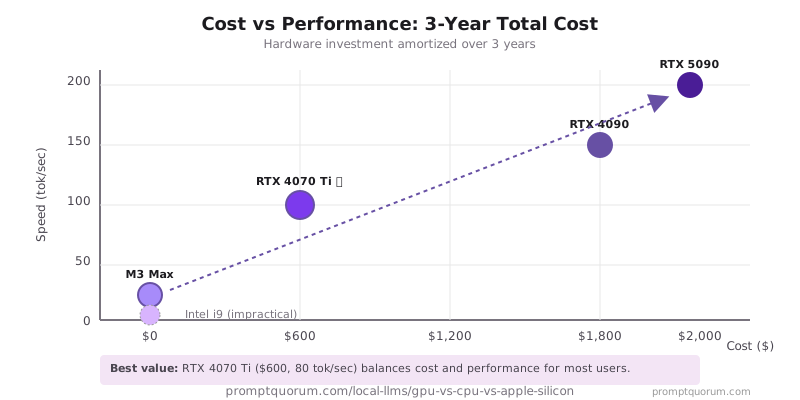
Cost per tok/s compares hardware value: initial cost divided by sustained token speed.
RTX 5070 has the best cost-per-tok/s for pure speed. M5 Pro wins on energy: at $0.15/kWh running 8 hrs/day, M5 Pro costs ~$1.10/month vs ~$16.50/month for RTX 5090.
If you already own a Mac with M5 Pro, the cost-per-tok/s is effectively $0 for the hardware portion.
Hardware | Initial Cost | Tok/s (8B) | Cost per tok/s | Power (inference) |
|---|---|---|---|---|
| RTX 5090 (32 GB) | $2,000 | 175 | $11.4 | 450W |
| RTX 5070 (12 GB) | $600 | 70 | $8.6 | 250W |
| M5 Pro MacBook Pro (64 GB) | $2,399 | 50 | $48 | 25W |
| M5 Max MacBook Pro (128 GB) | $3,199 | 70 | $46 | 35W |
| CPU (modern DDR5 desktop) | Included | 15 | $0 | 65W |
Platform Decision Guide
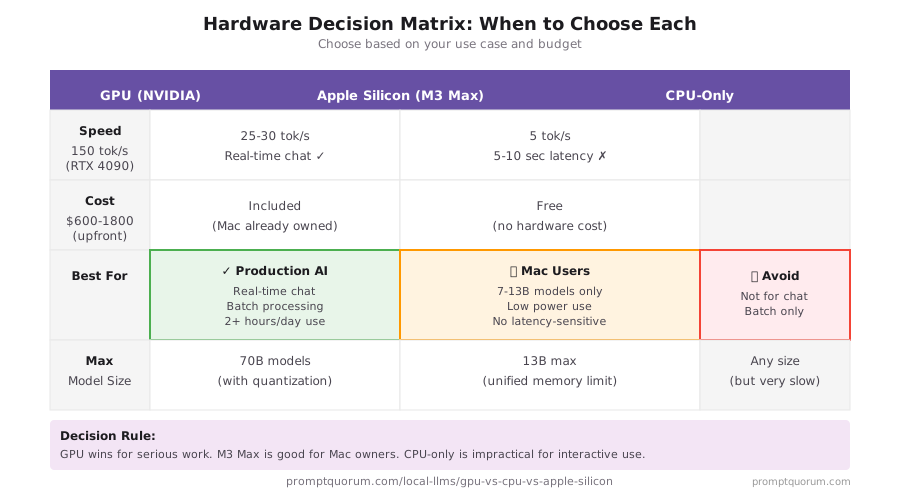
Decision framework based on model size, budget, and use case:
- Choose RTX 5090 / 5080: Maximum speed on 7B–14B, production pipelines, fine-tuning, 24/7 server workloads.
- Choose RTX 5070 / 5070 Ti: Best GPU value for single-user chat and coding at 7B–13B. $600–$750.
- Choose M5 Pro (64 GB): Best all-around for most users. Runs 30B natively, low power, macOS workflow. ~$2,399.
- Choose M5 Max (128 GB): Research use, 70B models natively, maximum Apple Silicon performance. ~$3,199+.
- CPU-only: Zero extra investment, occasional 7B use, batch processing overnight.
Common Mistakes in Hardware Choice
- Choosing GPU for 30B+ models. No RTX 50-series card fits 30B in VRAM. Offloading to RAM creates 5–10× speed penalty. Use M5 Pro or M5 Max instead.
- Assuming M5 base (16 GB) is enough. It fits 7B only. For 14B models you need 32 GB; for 30B you need 64 GB (M5 Pro).
- Ignoring power cost for always-on GPU servers. RTX 5090 at 8 hrs/day = ~$200/year in electricity at $0.15/kWh. M5 Pro = ~$14/year.
- Buying RTX 5090 for 8B chat. RTX 5070 at $600 delivers 70 tok/s on 8B — 80% of the speed at 30% of the cost.
- Expecting CPU to be viable for real-time chat. Even 20 tok/s feels slow. 5–8 tok/s on DDR4 is unusable for interactive use.
Frequently Asked Questions
Is GPU or CPU better for running local LLMs?
For real-time inference, NVIDIA GPU is faster: RTX 5070 runs 8B models at 60–80 tok/s vs 10–20 tok/s on a modern CPU with DDR5. However, Apple M5 Pro at 40–60 tok/s also outperforms CPU and adds the ability to run 30B models natively.
Can Apple Silicon run local LLMs?
Yes. Apple M5 series runs 7B models at 25–80 tok/s depending on chip tier. M5 Pro (64 GB) runs 30B models natively at 20–30 tok/s — something no consumer GPU can match. M5 Max (128 GB) runs 70B models natively at 35–50 tok/s.
What is the minimum GPU VRAM for local LLMs?
12 GB VRAM (RTX 5070) runs 7B–8B models at Q4–Q8 quantization smoothly. 16 GB (RTX 5080) handles 13B models. 24–32 GB is needed for 30B models, but no single consumer GPU fully fits 30B — use Apple M5 Pro 64 GB instead.
How much faster is GPU vs CPU for LLM inference?
RTX 5090 is 8–15× faster than a modern CPU with DDR5 for 8B models (175 tok/s vs 15 tok/s). The gap comes from memory bandwidth: 1,792 GB/s (GDDR7) vs 89 GB/s (DDR5). Apple M5 Pro at 307 GB/s lands between the two at 40–60 tok/s.
Is it worth buying a GPU just for local LLMs?
RTX 5070 ($600) amortized over 3 years costs less than OpenAI API fees for heavy users running 2+ hours per day. At 70 tok/s it handles real-time chat and coding assistance. If you need 30B+ models, M5 Pro is better value despite higher upfront cost.
What is memory bandwidth and why does it matter for LLMs?
LLM inference is memory-bound. Token speed ≈ memory bandwidth ÷ model weights. RTX 5090: 1,792 GB/s. M5 Max: 460–614 GB/s. M5 Pro: 307 GB/s. DDR5 CPU: 89 GB/s. This is why Apple Silicon with unified memory can run large models efficiently despite lower raw bandwidth than top GPUs.
Which Apple Silicon chip is best for local LLMs in 2026?
M5 Pro (64 GB, 307 GB/s) is the best all-around for most users — runs 30B models natively at 20–30 tok/s for ~$2,399. M5 Max (128 GB, 460–614 GB/s) for 70B models at 35–50 tok/s (~$3,199+). Avoid M5 base (16 GB) for anything beyond 7B.
Can Apple Silicon run 30B and 70B models?
M5 Pro (64 GB) runs 30B models natively at 20–30 tok/s. M5 Max (128 GB) runs 70B models natively at 35–50 tok/s. These are real throughput numbers without CPU offloading — no consumer GPU can match this for 30B+.
Is RTX 5090 worth $2,000 for local LLMs?
Only if your workflow is 7B–14B models at maximum speed or you run production inference pipelines. For most users, RTX 5070 ($600) provides 80% of the speed at 30% of the cost. For 30B+ models, M5 Pro is the better choice regardless of budget.
How does power consumption compare between GPU and Apple Silicon?
RTX 5090 draws ~450W at inference load. M5 Pro draws ~25W. At 8 hrs/day and $0.15/kWh, that is $200/year (RTX 5090) vs $14/year (M5 Pro). For home users and anyone paying commercial electricity rates, M5 Pro's power efficiency is a meaningful cost advantage.
How fast is LLM inference on an Intel MacBook Pro (i9, 16 GB RAM)?
Slower than Apple Silicon and slower than a modern DDR5 desktop. Intel MacBook Pros have no unified-memory GPU path for llama.cpp — inference runs CPU-only over DDR4, which has roughly 38–45 GB/s of dual-channel bandwidth vs. 89 GB/s for a modern DDR5 desktop CPU. Using the memory-bandwidth ÷ model-size formula above, a quantized 7B model (~4.5 GB at Q4) lands around 8–10 tok/s theoretical, 4–7 tok/s realistic once CPU compute overhead is factored in. 16 GB total RAM also caps you near 7B–8B at Q4 with headroom left for the OS — don't expect to run 13B+ models without heavy swapping and a big speed penalty.
What is the difference between pp tok/s and tg tok/s?
pp tok/s (prompt processing) measures how fast the model ingests your input prompt — the "prefill" phase, which is compute-bound and scales well with parallel hardware like GPUs. tg tok/s (token generation) measures how fast it generates each new output token — the "decode" phase, which is memory-bandwidth-bound (see the bandwidth formula above). GPUs typically show a large pp/tg gap (fast prefill, generation limited by bandwidth); Apple Silicon's unified memory keeps the two closer together. When comparing benchmarks, always check which number you're reading — pp and tg can differ by 5–20× on the same hardware.
Sources
- NVIDIA GPU Specifications — RTX 40/50 series GPU specs, VRAM, memory bandwidth.
- Apple M3 Performance — M5 Max unified memory architecture and inference performance.
- vLLM Benchmarks — Production LLM inference throughput benchmarks.
- Different hardware produces different token rates, but all inference benefits from structured prompts. Long-context requests require different techniques than short ones: context windows explained covers strategies for any hardware.