Key Takeaways
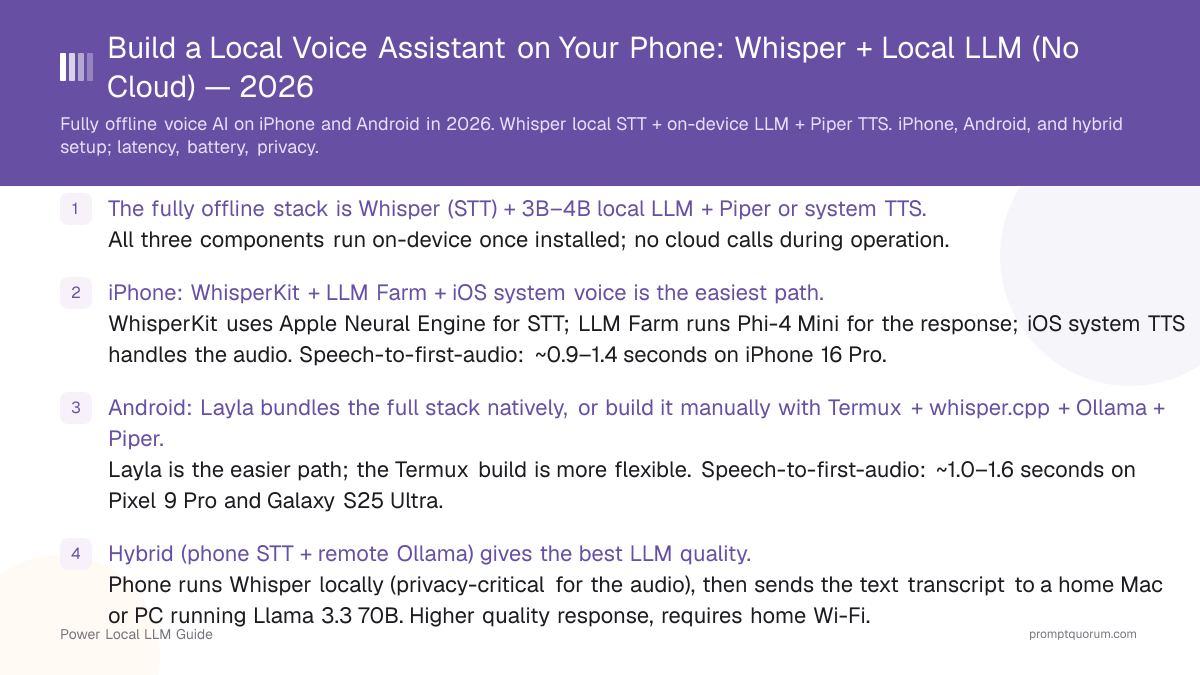
- The fully offline stack is Whisper (STT) + 3B–4B local LLM + Piper or system TTS. All three components run on-device once installed; no cloud calls during operation.
- iPhone: WhisperKit + LLM Farm + iOS system voice is the easiest path. WhisperKit uses Apple Neural Engine for STT; LLM Farm runs Phi-4 Mini for the response; iOS system TTS handles the audio. Speech-to-first-audio: ~0.9–1.4 seconds on iPhone 16 Pro.
- Android: Layla bundles the full stack natively, or build it manually with Termux + whisper.cpp + Ollama + Piper. Layla is the easier path; the Termux build is more flexible. Speech-to-first-audio: ~1.0–1.6 seconds on Pixel 9 Pro and Galaxy S25 Ultra.
- Hybrid (phone STT + remote Ollama) gives the best LLM quality. Phone runs Whisper locally (privacy-critical for the audio), then sends the text transcript to a home Mac or PC running Llama 3.3 70B. Higher quality response, requires home Wi-Fi.
- Whisper Small (~466 MB) is the mobile sweet spot. ~12% WER on common speech, ~150–300 ms STT latency. Whisper Medium (~1.5 GB) is more accurate (~9% WER) but slower; Whisper Tiny (~75 MB) is faster but error-prone above background noise.
- Battery drain is significant — about 25–35% per hour of active conversation on flagship phones. For all-day use, plug in or use the hybrid path (only STT runs on the phone, dropping drain to ~10–15% per hour).
- This is a real Siri replacement for users who prefer privacy over feature breadth. What you give up: web search, smart-home integration with proprietary clouds, system action coverage. What you gain: works offline, no telemetry, no account.
Quick Facts
- STT engine: Whisper.cpp (cross-platform), WhisperKit (iOS, Apple Neural Engine optimised), Sherpa-ONNX (Android, ONNX runtime).
- LLM: Phi-4 Mini (3.8B) on flagship phones; Qwen3 1.7B or SmolLM 2 1.7B on older devices.
- TTS: Piper TTS (open-source, ~50 MB per voice), iOS system TTS (AVSpeechSynthesizer), Android system TTS.
- iPhone apps: WhisperKit, Whisper Transcription (Aiko developer), LLM Farm, PocketPal AI.
- Android apps: Layla (bundled stack), Termux + whisper.cpp + Ollama, Sherpa-ONNX demo apps.
- Speech-to-first-audio target: under 2 seconds = "feels usable"; under 1 second = "feels native".
- Battery (1 hour active): iPhone 16 Pro ~25–35%; Pixel 9 Pro / Galaxy S25 Ultra ~25–40%.
Which Voice Assistant Stack Should You Build?
For most users on flagship phones: the on-device path is the right call. It is fully private, works offline, and produces usable results in under 1.5 seconds. Use the hybrid path only if you specifically need 70B-class quality and accept the home-Wi-Fi dependency.
📍 In One Sentence
Build a fully offline voice assistant by stacking Whisper (STT), a 3B–4B local LLM (Phi-4 Mini or Gemma 3 4B), and Piper or the system TTS — speech-to-first-audio of 0.9–1.6 seconds on flagship phones in 2026.
💬 In Plain Terms
A voice assistant has three jobs: turn your speech into text, generate a reply, and speak the reply back. With Whisper for the first step, a small local LLM for the second, and Piper or the phone's built-in voice for the third, you can do all three on the phone with no internet. The whole loop takes about 1 second on a recent iPhone or Android flagship — fast enough that it feels like talking to Siri, but everything stays on the device.
Decision: Which Voice Assistant Stack?
Use a local LLM if:
- •You want full privacy and offline operation → fully on-device (iPhone or Android path)
- •You travel often and want voice on planes / no-signal areas → fully on-device
- •You're a journalist, healthcare worker, or lawyer → fully on-device for source / patient / client confidentiality
- •You're a developer prototyping an offline voice workflow → fully on-device
Use a cloud model if:
- •You need 70B+ model quality (complex reasoning) → hybrid path (phone STT + remote Ollama at home)
- •You need real-time web search or live data → cloud assistant (no local equivalent in 2026)
- •You need deep integration with proprietary clouds (Google Calendar, iCloud, etc.) → keep using Siri / Google Assistant for those tasks
Quick decision:
- →iPhone simplest path: WhisperKit + LLM Farm + iOS voice
- →Android simplest path: Layla (bundled stack)
- →Best quality: hybrid (phone STT + home Ollama 70B)
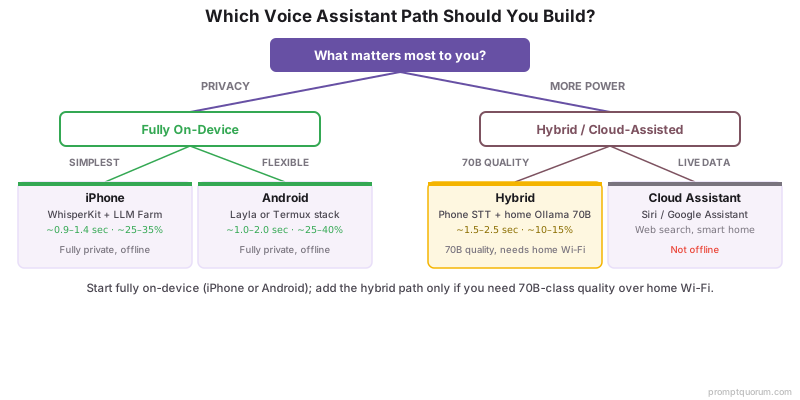
💡Tip: Start with the fully on-device path even if you eventually want hybrid. The on-device setup teaches you the moving parts (STT, LLM, TTS) and works without any home-server dependency. Once it's running, swapping the LLM call from local to a remote Ollama URL is a 1-line change.
Voice Assistant Stack Comparison
Three viable stacks in 2026, each tuned for a different priority: simplicity (Layla), Apple-native polish (WhisperKit + LLM Farm), or LLM quality (hybrid). All three run STT and TTS on-device; the hybrid moves only the LLM step to a home machine.
📍 In One Sentence
Pick iPhone (WhisperKit + LLM Farm + iOS voice) for simplicity on iOS, Android (Layla) for simplicity on Android, or hybrid (phone STT + home Ollama) for best LLM quality.
💬 In Plain Terms
The latency numbers below are speech-to-first-audio — the time from when you stop talking to when the assistant starts answering. Under 2 seconds feels usable; under 1 second feels native. Battery is the percentage drained over 1 hour of active back-and-forth conversation.
Stack | Latency (speech → first audio) | Battery (1 hr active) | Best for |
|---|---|---|---|
| iPhone (WhisperKit + LLM Farm) | ~0.9–1.4 sec (16 Pro / 17 Pro) | ~25–35% | iOS users wanting Apple-native polish |
| Android (Layla, bundled) | ~1.0–1.6 sec (Pixel 9 Pro, Galaxy S25 Ultra) | ~25–40% | Android users wanting one-app simplicity |
| Android (Termux + whisper.cpp + Ollama + Piper) | ~1.2–2.0 sec | ~30–40% | Power users wanting full control |
| Hybrid (phone STT + home Ollama 70B) | ~1.5–2.5 sec (Wi-Fi dependent) | ~10–15% | 70B-class quality, home-network use |
💡Tip: Latency is dominated by the LLM "first token" step, not by Whisper or TTS. To cut latency, use a smaller LLM (Qwen3 1.7B in place of Phi-4 Mini drops the LLM step from ~600 ms to ~250 ms). The trade-off is shorter, less-detailed responses.
The Three-Component Stack: STT + LLM + TTS
Speech-to-text, the LLM, and text-to-speech are three independent components that you can swap individually. Optimising any one of them (smaller Whisper, faster LLM, lower-latency TTS) reduces total latency.
- STT — Whisper.cpp / WhisperKit / Sherpa-ONNX. Whisper Small (~466 MB) is the standard mobile choice — ~12% word error rate (WER) on common speech, ~150–300 ms STT latency for a 5-second utterance. Whisper Medium (~1.5 GB) drops WER to ~9% but doubles latency. Whisper Tiny (~75 MB) is fast but error-prone above moderate background noise. WhisperKit (iOS) uses the Apple Neural Engine for ~30–40% lower STT latency than vanilla Whisper.cpp.
- LLM — Phi-4 Mini, Gemma 3 4B, Llama 3.2 3B. Phi-4 Mini (3.8B Q4_K_M, ~2.7 GB) is the recommended default on flagship phones. Time-to-first-token is ~400–800 ms on iPhone 16 Pro for a short prompt — the largest single contributor to overall latency. For older or RAM-constrained devices, Qwen3 1.7B (~1.1 GB) is faster (~200–400 ms TTFT) at the cost of shorter, simpler responses.
- TTS — Piper TTS or system TTS. Piper (Rhasspy project, open-source) supports 30+ languages, ~50 MB per voice, ~100–200 ms first-audio latency, and runs on iOS, Android, Linux, macOS, Windows. System TTS (AVSpeechSynthesizer on iOS, TextToSpeech on Android) has lower latency (~50–100 ms) but a more robotic voice on older OS versions. iOS 18+ and Android 14+ system voices are noticeably better than earlier OS versions.
- Voice activity detection (VAD). Most apps use Silero VAD or webrtcvad to detect when you stop talking. A 200–500 ms silence window is the typical end-of-utterance threshold. Too short → cuts you off mid-sentence; too long → adds latency. 300 ms is a reasonable default.
- The full pipeline: mic capture → VAD detects end of speech → Whisper transcribes → LLM generates reply → TTS speaks. Streaming the LLM tokens to TTS as they arrive is what makes "first audio" arrive in under 1 second on flagship phones — the alternative (wait for full LLM reply, then speak) doubles perceived latency.
💡Tip: If your stack feels sluggish, profile each step: log the duration of (mic → STT done), (STT done → LLM first token), (LLM first token → TTS first audio). One step usually dominates. On flagship phones in 2026, it is almost always the LLM time-to-first-token (~400–800 ms). Switch to a smaller LLM for faster perceived latency.
iPhone Setup: WhisperKit + LLM Farm (5 min)
The simplest fully-offline iPhone voice assistant in 2026: WhisperKit (or Whisper Transcription) for STT, LLM Farm for the LLM, and iOS system TTS for the voice. Total setup time is 5–10 minutes plus model download time.
- 1Install WhisperKit-based app from App Store (e.g., "Whisper Transcription" by Aiko developer, free) — provides on-device transcription using Apple Neural Engine. Alternatively, build the WhisperKit reference app from GitHub (Argmax / WhisperKit).
- 2In WhisperKit / Whisper Transcription: download the "Small" model (~466 MB). Tiny is faster but inaccurate; Medium is more accurate but slower.
- 3Install LLM Farm from the App Store (free). In LLM Farm: tap Models → "Add Model from URL" → paste a Hugging Face URL for Phi-4 Mini Q4_K_M (or use the in-app library if available). Model is ~2.7 GB.
- 4Wire them together via iOS Shortcuts: create a Shortcut with these actions — (1) Record Audio (or accept Audio input from Share Sheet), (2) Transcribe with Whisper Transcription, (3) Generate Text with LLM Farm (if exposed) or Private LLM (~£10, has a Shortcuts action), (4) Speak Text using iOS system voice.
- 5Assign the Shortcut to a Lock Screen widget, Action Button (iPhone 15 Pro and newer), or "Hey Siri, run [shortcut name]". The Action Button gives the lowest-latency hands-free trigger.
- 6Test: hold the Action Button → speak → release. STT runs (~200 ms) → LLM generates (~600 ms first token, streams to TTS) → first audio plays at ~0.9–1.4 sec total. Tweak the VAD silence threshold in the Shortcut if it cuts you off.
⚠️Warning: LLM Farm does not currently expose a Shortcuts action. To use the iOS Shortcuts pipeline, you will need Private LLM (~£10 one-time) which does expose a "Generate Text" action. The Shortcuts approach is what makes the iPhone path "5 minutes" — without Shortcuts, you have to chain the apps manually.
Android Setup: Layla or Termux Stack (5–15 min)
Two Android paths: Layla (5-minute bundled-stack approach) or Termux + whisper.cpp + Ollama + Piper (15-minute manual approach with more control). Both run fully offline once configured.
- Path A — Layla (5 min): install Layla from the Play Store, download a model (Phi-4 Mini or Gemma 3 4B), enable voice mode in settings. Layla bundles whisper.cpp for STT, the local LLM for the response, and uses the Android system TTS. The simplest path; trade-off is less configurability.
- Path B — Termux stack (15 min):
- Install Termux from F-Droid (not Play Store; Play Store version is outdated).
- In Termux:
pkg update && pkg install git cmake clang ffmpeg. - Build whisper.cpp:
git clone https://github.com/ggerganov/whisper.cpp && cd whisper.cpp && makeand download the Small model:bash ./models/download-ggml-model.sh small. - Install Ollama (Termux ARM build):
curl -fsSL https://ollama.com/install.sh | sh. Pull a model:ollama pull phi4-mini. Start the server:ollama serve. - Install Piper:
pip install piper-tts(in a Termux Python venv) and download a voice (piper-tts --download-voice en_US-amy-lowfor example). - Wire the pipeline with a small Python script that reads from
arecord, runs whisper.cpp on the audio, sends the transcript to Ollama at localhost:11434, and pipes the response to Piper. Or use Tasker to chain shell commands triggered by a button or quick-tile.
💡Tip: For Path B, use Termux:Widget to create a home-screen shortcut that runs the voice-assistant script. One tap on the widget triggers the full pipeline. Pair with a Bluetooth button or a Tasker quick-tile for hands-free invocation. The Pixel 9 Pro and Galaxy S25 Ultra Action / Side keys can also trigger Tasker actions.
Hybrid Setup: Phone STT + Remote Ollama
The hybrid stack moves only the LLM call to a home machine, keeping STT and TTS on-device. This gives access to 70B-class models (Llama 3.3 70B, Qwen3-Coder 32B) while preserving privacy for the audio (which never leaves the phone — only the text transcript is sent over your home Wi-Fi).
iOS Shortcut: hybrid voice assistant (Action Button trigger)
“1. Record Audio → save to temp file. 2. Transcribe with Whisper Transcription → output: transcript text. 3. Get Contents of URL → URL: 192.168.1.20:11434/api/generate, Method: POST, JSON body: {"model":"llama3.3:70b","prompt":"[transcript]","stream":false} → output: response text. 4. Speak Text → input: response text, voice: iOS system voice. Assign to Action Button. Hold to record; release to send. First audio plays in ~1.5–2.5 sec.”
Tasker: Android hybrid voice assistant
“1. Variable: %TRANSCRIPT = (output of whisper-cli on recorded audio file). 2. HTTP Request: URL 192.168.1.20:11434/api/generate, Method POST, Body {"model":"llama3.3:70b","prompt":"%TRANSCRIPT","stream":false}. 3. Variable: %REPLY = (parsed "response" field from JSON). 4. Say: %REPLY (Android system TTS or Piper if installed). Trigger via quick-tile, Bluetooth button, or Side-key long-press on Pixel 9 Pro.”
- 1On the home machine (Mac, PC, or NAS): install Ollama. Pull a 70B model:
ollama pull llama3.3:70b(requires ~40 GB free disk + ~48 GB RAM or 24 GB GPU VRAM). - 2Bind Ollama to your local network:
OLLAMA_HOST=0.0.0.0:11434 ollama serve. Note the home machine's local IP (e.g., 192.168.1.20). - 3On the phone, configure your voice assistant pipeline (iOS Shortcut or Android Tasker) to send the Whisper transcript via HTTP POST to `192.168.1.20:11434/api/generate` instead of the local LLM call.
- 4TTS still runs on the phone (Piper or system voice) using the response text from the home machine.
- 5Result: Whisper STT runs on-phone (audio never leaves the device), home Ollama generates a 70B-quality response in ~600–1200 ms, TTS speaks on-phone. Total latency ~1.5–2.5 seconds — slightly higher than fully on-device but with much better LLM quality.
💡Tip: For lowest-latency hybrid, set Ollama to streaming mode ("stream":true) and stream tokens to TTS as they arrive instead of waiting for the full response. iOS Shortcuts cannot stream natively, but a small Tasker plugin or a custom iOS app can. With streaming, perceived "first audio" latency drops by 200–400 ms even though total response time is the same.
Latency Budget: Where the Seconds Go
On flagship phones in 2026, the LLM time-to-first-token dominates total latency — typically 50–60% of the speech-to-first-audio time. Optimising the LLM step has more impact than tuning Whisper or TTS.
Step | Typical Time (iPhone 16 Pro, on-device) | Notes |
|---|---|---|
| VAD end-of-utterance detection | ~200–500 ms | Tunable; 300 ms default. Counts toward perceived latency. |
| Whisper Small STT (5-sec utterance) | ~150–300 ms | WhisperKit ~30–40% faster via Apple Neural Engine. |
| LLM time-to-first-token (Phi-4 Mini) | ~400–800 ms | Largest contributor. Smaller model = faster. |
| TTS first audio (Piper or system) | ~100–200 ms | System TTS slightly faster than Piper. |
| Total speech-to-first-audio | ~0.9–1.4 sec | Under 2 sec = "feels usable"; under 1 sec = "feels native". |
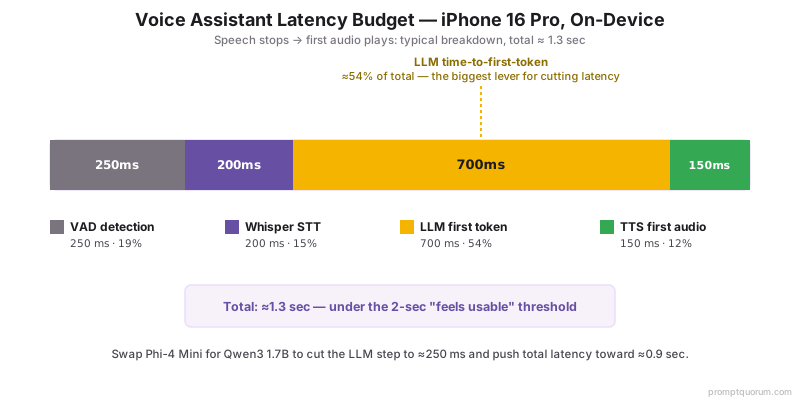
💡Tip: To get under 1 second total: use Whisper Tiny (75 MB, ~80 ms STT) + Qwen3 1.7B (~250 ms TTFT) + system TTS (~80 ms first audio). Total ~600–800 ms on iPhone 16 Pro. The trade-off is shorter, less-coherent LLM responses and lower STT accuracy in noisy environments. Worth it if responsiveness is your top priority.
Accuracy and Battery Drain Over 1 Hour
Whisper Small achieves ~88% accuracy on common speech in moderate background noise; Whisper Medium reaches ~91% but doubles latency. Battery drain over 1 hour of active conversation is ~25–35% on iPhone 16 Pro and ~25–40% on flagship Android.
- Whisper accuracy by model size (LibriSpeech-clean WER, lower is better): Tiny ~7.5%, Small ~3%, Medium ~2.4%, Large v3 ~1.8%. In real-world noisy conditions: Tiny degrades to ~15–20% WER, Small to ~10–14%, Medium to ~7–10%, Large v3 to ~5–7%.
- Cloud Whisper vs local Whisper: OpenAI's cloud Whisper API uses Large v3 by default (~2% WER on clean speech). Local Whisper Small on a phone is ~3% WER on the same audio — close enough that for everyday assistant use, the difference is imperceptible.
- Battery drain (1 hour active conversation, screen on): iPhone 16 Pro ~25–35%; iPhone 17 Pro ~22–30%; Pixel 9 Pro ~30–40%; Galaxy S25 Ultra ~28–38%. Hybrid mode drops phone drain to ~10–15% per hour because only STT runs locally.
- Thermal throttling: sustained on-device LLM inference triggers thermal throttling after ~10–15 min on iPhone (chip surface ~38°C); ~15–20 min on flagship Android (better thermal mass on tablets and large phones). Throttling drops tokens/sec by 30–50%, which extends LLM latency from ~600 ms to ~900 ms first-token.
- Mitigation for long sessions: plug in to a charger, place phone face-up on a hard surface (not in your hand), or switch to hybrid mode. Phone-as-microphone uses a fraction of the energy of phone-as-everything.
⚠️Warning: A 1-hour all-local voice session can drain your phone battery by 30–40%. For all-day or in-car use, plan for charging. The hybrid path (only STT on-device) is the realistic option for ambient, always-on voice assistants — the home machine handles the heavy lifting.
Hands-Free: Shortcuts, Tasker, CarPlay, Android Auto
Hands-free invocation depends on the trigger mechanism, not the voice stack. iOS uses Shortcuts with the Action Button or "Hey Siri, run [shortcut]"; Android uses Tasker with the Side Key, quick-tile, or Bluetooth buttons.
- iPhone Action Button (iPhone 15 Pro and newer): assign a Shortcut that triggers the voice pipeline. Hold the Action Button to start recording; release to send. Lowest-latency hands-free trigger on iPhone in 2026.
- iPhone "Hey Siri, run [shortcut name]": wakes Siri (~500 ms), then runs the Shortcut. Adds latency vs Action Button but works hands-free at any time the phone is unlocked.
- Android Side Key / Bixby key (Galaxy): assign a Tasker action via the Galaxy Modes & Routines settings or Bixby key remap apps. Press to trigger.
- Android Tasker quick-tile: add a quick-tile to the notification shade that runs the voice script. Two-swipe trigger from the lock screen.
- Bluetooth buttons (e.g., Flic, generic media buttons): pair with iOS or Android, configure to trigger the voice Shortcut / Tasker task. True hands-free (button on a desk, on a steering wheel, in a pocket).
- CarPlay / Android Auto: these use the system Siri / Google Assistant by design — neither exposes a third-party voice assistant API in 2026. The workaround for CarPlay is to use a Shortcut bound to a CarPlay action button (limited Shortcut support); for Android Auto, use Tasker to trigger via Bluetooth media button. Neither is as polished as the system assistants.
💡Tip: For in-car use without CarPlay / Android Auto integration: pair a small Bluetooth button (Flic, AirShou, generic media remote) and clip it to the steering wheel. Press to trigger the offline voice assistant — it works without internet, never sends audio to a cloud, and answers in ~1.5 seconds. The trade-off vs CarPlay is no UI on the car display, audio-only.
Privacy Guarantees: Truly Offline vs Cloud-Assisted
A voice assistant is "truly offline" only if mic audio, transcripts, and TTS audio all stay on the device with no network calls. Many apps marketed as "private" still send transcripts or telemetry to a cloud — verify with airplane mode or a network monitor before trusting.
- How to verify "truly offline": put the phone in airplane mode and use the assistant. If it works at full quality, it is truly offline. If it degrades or fails, some step depends on a cloud service.
- Audio capture: mic data should be processed locally and never written to disk or sent anywhere. Whisper, WhisperKit, and Sherpa-ONNX all run STT in memory and discard audio after transcription.
- LLM inference: if the response is generated by a local model (Phi-4 Mini, Gemma 3, Llama 3.2) on the phone, no prompt leaves the device. If the assistant uses a "cloud-assisted" mode (Apple Intelligence Private Cloud Compute, Google's on-device-first then cloud-fallback), transcripts may be sent to a server under specific conditions — check the app's privacy policy.
- TTS: Piper and system TTS are fully on-device. Some "premium" cloud voices (ElevenLabs, OpenAI TTS) require sending the response text to a server — avoid these for true offline.
- Hybrid path privacy posture: in hybrid mode, audio stays on the phone (Whisper local), but the text transcript is sent to your home Ollama server over your home Wi-Fi. This is local-network-only, not cloud — the data stays inside your network. Acceptable for most privacy-conscious users; not equivalent to fully on-device for the strictest threat models.
- App-specific notes (May 2026): WhisperKit and whisper.cpp are open-source and verifiably offline. Layla runs locally by default (verify in airplane mode). LLM Farm and PocketPal AI run inference fully on-device. Apple Intelligence has both an on-device and Private Cloud Compute mode — disable PCC in Settings for fully on-device operation.
💡Tip: If full offline operation is critical (journalist / source confidentiality, healthcare, legal): prefer open-source apps (WhisperKit reference build, whisper.cpp via Termux, Layla) where you can audit network behaviour. Closed-source apps (even those marketed as "private") may add cloud features in future updates without obvious user notification.
Common Mistakes
- Using Whisper Tiny for everything. Tiny is fast (~80 ms STT) but error-prone in noisy environments (~15–20% WER vs Small at ~10–14%). Tiny is acceptable for short commands in quiet rooms; use Small for general-purpose voice assistants.
- Wait-for-full-LLM-response before TTS starts. This doubles perceived latency. Stream LLM tokens to TTS as they arrive — Piper supports streaming input, system TTS supports incremental speech. First audio should play after the LLM's first sentence, not after the full response.
- Running on-device LLM in a hot environment. Thermal throttling kicks in within minutes in direct sun or inside a hot car, dropping tokens/sec by 30–50% and pushing latency past 2 seconds. Use the hybrid path or keep the phone cool.
- Trusting "private" without verification. "Private" and "local" are marketing terms in 2026 — some apps that claim local processing still phone home for analytics, model updates, or cloud-fallback transcription. Verify with airplane mode before relying on it for sensitive use.
- Building the Termux Android stack on a low-RAM device. Termux + whisper.cpp + Ollama + Piper consumes ~4 GB of system RAM at peak. Devices with 6 GB or less RAM will OOM-kill components mid-conversation. Use Layla on low-RAM Android, or stick with the iPhone path.
Sources
- Whisper.cpp — github.com/ggerganov/whisper.cpp (cross-platform Whisper, including Android and iOS builds).
- WhisperKit (Argmax) — github.com/argmaxinc/WhisperKit (Apple Neural Engine optimised Whisper for iOS / macOS).
- Piper TTS (Rhasspy) — github.com/rhasspy/piper (open-source neural TTS, mobile-capable, 30+ languages).
- LLM Farm — github.com/guinmoon/LLMFarm (iOS app for running GGUF models locally).
- Layla (Android) — Play Store listing and developer documentation (bundled local LLM stack with voice support).
Frequently Asked Questions
Is Whisper or Piper better for a local voice assistant?
They're not competitors — they do opposite jobs. Whisper converts your speech into text (speech-to-text); Piper converts the assistant's text response into speech (text-to-speech). A local voice assistant needs both, not one instead of the other: Whisper handles the input side, Piper (or the system TTS) handles the output side. If you're comparing TTS options specifically, Piper is lightweight and runs fully offline with 30+ language voices — the system TTS built into iOS/Android is the other local option.
How accurate is local Whisper vs cloud Whisper?
Whisper Small running locally on a phone achieves ~3% WER on clean speech; OpenAI's cloud Whisper (Large v3) achieves ~2%. In noisy environments, local Small drops to ~10–14% WER while cloud Large v3 drops to ~5–7%. For everyday voice-assistant use, the local accuracy is close enough to be imperceptible. For dictation of long-form text where every word matters, cloud or local Medium / Large is preferable.
Can a local voice assistant replace Siri completely?
For private Q&A, drafting, and summarisation: yes, with comparable or better quality than Siri's on-device features. For system actions (open apps, set timers, control HomeKit), launch web searches, or live data (weather, sports scores): no — Siri's integration with iOS and Apple services is not replicable by a third-party local stack in 2026. Many users keep both: Siri for system actions, local stack for private Q&A.
Does this work with CarPlay or Android Auto?
Limited. CarPlay and Android Auto are designed around the system Siri / Google Assistant; neither exposes a third-party voice-assistant API. Workarounds: use a Shortcut bound to a CarPlay action button (limited Shortcut support), or pair a Bluetooth button (Flic, generic media remote) and trigger Tasker / Shortcuts via that. Neither matches the polish of the system assistants for in-car use.
How do I trigger it hands-free?
iPhone: hold the Action Button (iPhone 15 Pro and newer) to invoke the Shortcut, or say "Hey Siri, run [shortcut name]". Android: use the Side Key or Bixby key on Galaxy phones, a Tasker quick-tile, or a paired Bluetooth button. For true ambient hands-free (always-listening wake word), the local stack does not match Siri / Google Assistant in 2026 — the phone's system wake-word detector is not exposed to third-party apps.
Can it handle multi-language conversations?
Yes, but with caveats. Whisper auto-detects the input language and supports 99 languages. Local LLMs vary: Phi-4 Mini handles English well and the major European languages reasonably; Qwen3 has strong multilingual support including Chinese; Gemma 3 supports 100+ languages. For TTS, Piper has voices in 30+ languages; system TTS depends on the OS language packs you have installed. Mid-conversation language switching works in Whisper but may confuse the LLM.
Does background noise break local STT?
Whisper Tiny degrades significantly above moderate noise (~15–20% WER); Small handles café-level noise reasonably (~10–14% WER); Medium and Large handle most realistic environments well. For noisy use (cars, public transit), use Whisper Medium if your phone has the RAM, or apply VAD aggressively (only transcribe when speech is detected, ignore between utterances).
How do I integrate with smart home devices locally?
Pipe the LLM's response through a parser that detects intents (e.g., "turn off the kitchen lights") and call your local smart home hub's API directly — Home Assistant has a REST API at your local IP, and Apple HomeKit integration works via the Shortcuts "Control Home" actions. Avoid cloud smart-home integrations (Alexa, Google Home) if you want a fully offline pipeline.
Can I customise the voice (TTS)?
Yes. Piper TTS has 100+ community-trained voices in 30+ languages, downloadable as ~50 MB voice models. iOS Voice Shortcuts let you pick from system voices including the higher-quality Premium voices (download in Settings → Accessibility → Spoken Content → Voices). Android system TTS supports voice packs from Google or third parties. Custom voice cloning (your own voice or a specific persona) requires a separate TTS toolchain (Coqui, Tortoise TTS) — not yet practical on-device in 2026.
Does battery life take a major hit?
Yes — about 25–40% per hour of active conversation on flagship phones. For occasional voice queries, the impact is small. For all-day or always-on use, plug in or use the hybrid path (only STT runs on-device, dropping drain to ~10–15% per hour). Background passive listening with wake-word detection is not currently feasible on third-party local stacks at acceptable battery cost.
Will iOS 19 or Android 16 break this setup?
Unlikely for the core stack (Whisper, local LLM, TTS) — these are user-space apps that depend on standard APIs (mic capture, TTS, network). What may break: Shortcuts integrations if Apple changes the Shortcuts API; Termux on Android if Android 16 tightens background process restrictions further (Android has been tightening these every release). Keep apps updated and verify after each major OS update.