Key Takeaways
- Nine layers, 88 projects, one map. Runtimes, desktop apps, web UIs, coding assistants, RAG systems, agent frameworks, voice/multimodal, mobile clients, and specialized productivity plugins — almost every popular project in 2026 fits in exactly one layer.
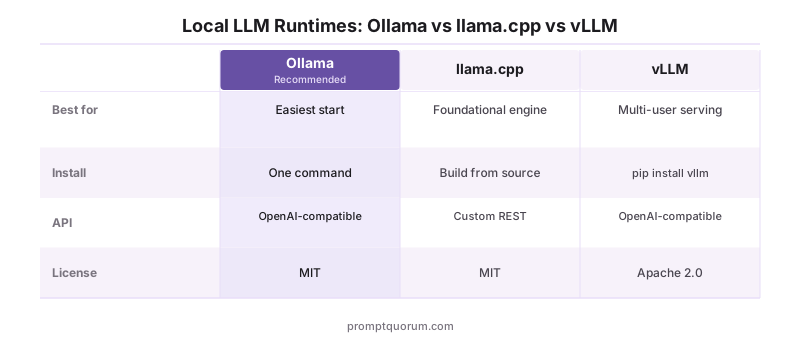
- Pick a runtime first. Ollama is the right default for ~95% of readers; llama.cpp is the foundational engine underneath most other tools; vLLM is the production-serving pick for multi-user setups.
- Most layers above the runtime are optional. A desktop app OR a web UI is enough for chat. Add a coding harness only when you want IDE integration; add a RAG system only when you want to chat with your own documents; add an agent framework only when one-shot calls stop being enough.
- Licence matters for commercial use. MIT and Apache 2.0 dominate the ecosystem. AGPL appears on a handful of UIs (text-generation-webui, KoboldCpp, Jan, SillyTavern) — fine for personal use, more deliberate for commercial deployments. The "License" column below names every one explicitly.
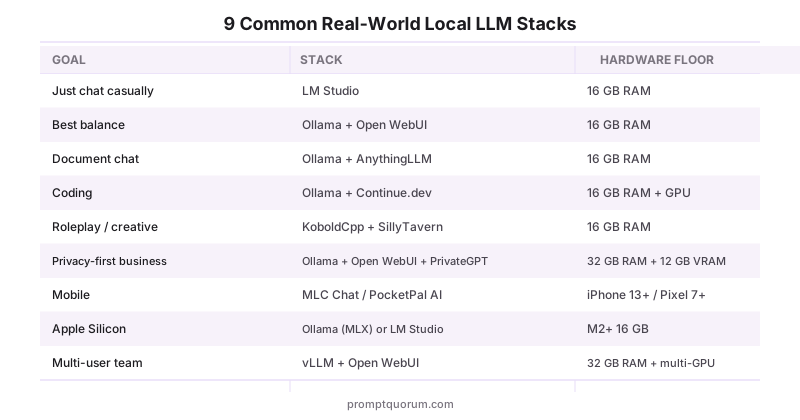
- Multi-tool stacks are normal. Ollama + Open WebUI + AnythingLLM + Continue.dev is a single-machine setup that covers chat, RAG, and coding without compromise. The "Common Real-World Stacks" table below names the recipes that actually work in 2026.
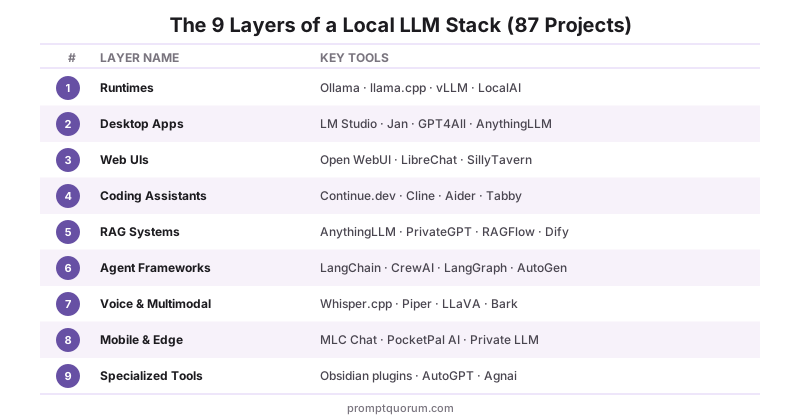
1. Local LLM Runtimes & Inference Engines
A runtime is the engine that loads model weights into memory and turns prompts into tokens. It is the first decision in a local-LLM stack and the one that constrains everything above it — every desktop app, web UI, and coding harness ultimately calls a runtime. Ollama dominates user-facing share in 2026 because it ships an OpenAI-compatible API and a one-command install; llama.cpp is the C++ engine underneath most of the others; vLLM is the right pick when you need to serve concurrent users on a real GPU.
Ollama
- Link:
- ollama.com
- Description:
- Easiest overall — one-command install, OpenAI-compatible API, huge model library
- License:
- MIT
llama.cpp
- Description:
- Foundational C++ engine behind most other tools, runs anywhere including Apple Silicon
- License:
- MIT
vLLM
- Description:
- High-throughput serving for multi-user GPU deployments
- License:
- Apache 2.0
LocalAI
- Link:
- localai.io
- Description:
- Drop-in OpenAI API replacement supporting multiple backends
- License:
- MIT
TensorRT-LLM
- Description:
- NVIDIA-optimized inference for enterprise GPU rigs
- License:
- Apache 2.0
MLC LLM
- Link:
- mlc.ai/mlc-llm
- Description:
- Mobile and edge device deployment runtime
- License:
- Apache 2.0
SGLang
- Description:
- Structured inference serving for agent pipelines
- License:
- Apache 2.0
ExLlamaV2
- Description:
- Fast quantized inference optimized for RTX GPUs
- License:
- MIT
KoboldCpp
- Description:
- Lightweight llama.cpp wrapper with built-in UI
- License:
- AGPL 3.0
Llamafile
- Description:
- Single-file portable LLM execution by Mozilla
- License:
- Apache 2.0
MLX-LM
- Description:
- Apple Silicon-native runtime by Apple research
- License:
- MIT
Deeper guide: llama.cpp vs Ollama vs vLLM
2. Desktop GUI Apps
Desktop apps wrap a runtime in a chat interface and a model browser. They are where most non-technical users start because there is no terminal step — download, click, chat. LM Studio, Jan, and GPT4All hold the bulk of the user base in 2026; AnythingLLM doubles as a desktop app and a RAG layer; Open Interpreter is the outlier that lets a local model drive your computer.
LM Studio
- Link:
- lmstudio.ai
- Description:
- Most polished GUI, built-in HuggingFace model browser, server mode
- License:
- Free (closed)
Atomic Chat
- Link:
- atomic.chat
- Description:
- Offline desktop and mobile chat app with one-click local agents
- License:
- Apache 2.0
Jan
- Link:
- jan.ai
- Description:
- Privacy-focused offline ChatGPT clone, fully open-source
- License:
- AGPL 3.0
GPT4All
- Link:
- nomic.ai/gpt4all
- Description:
- Beginner-friendly with strong CPU-only support
- License:
- MIT
AnythingLLM
- Link:
- anythingllm.com
- Description:
- RAG and document chat with built-in vector store
- License:
- MIT
Msty
- Link:
- msty.app
- Description:
- Clean consumer UX, multi-provider support
- License:
- Free (closed)
Cherry Studio
- Link:
- cherry-ai.com
- Description:
- Multi-provider desktop AI with extensive customization
- License:
- AGPL 3.0
Backyard AI
- Link:
- backyard.ai
- Description:
- Character chat and roleplay desktop client
- License:
- Free (closed)
Enchanted
- Description:
- Native macOS/iOS minimal Ollama client
- License:
- Apache 2.0
h2oGPT
- Description:
- Enterprise-feature-heavy desktop and server
- License:
- Apache 2.0
Open Interpreter
- Description:
- Lets local LLM control your computer and execute code
- License:
- AGPL 3.0
Deeper guide: LM Studio vs Jan vs GPT4All
3. Web UIs & Browser Frontends
Web UIs are self-hosted ChatGPT clones — same conversational surface, but you point them at a runtime running on your own machine or LAN. They are the natural choice when you want multi-device access (laptop, phone, tablet hitting one server) or team usage. Open WebUI dominates the self-hosted segment in 2026, with LibreChat as the team-features alternative and SillyTavern as the dedicated roleplay UI.
Open WebUI
- Link:
- openwebui.com
- Description:
- Most popular self-hosted ChatGPT-like UI with built-in RAG
- License:
- BSD 3-Clause
LibreChat
- Link:
- librechat.ai
- Description:
- Multi-model ChatGPT alternative with team features
- License:
- MIT
text-generation-webui
- Description:
- Power-user UI with extensive plugin ecosystem
- License:
- AGPL 3.0
SillyTavern
- Description:
- Roleplay and character chat with lorebooks
- License:
- AGPL 3.0
LobeChat
- Link:
- lobehub.com
- Description:
- Modern polished UI with plugin marketplace
- License:
- MIT
Big-AGI
- Description:
- Advanced multi-provider frontend with personas
- License:
- MIT
NextChat
- Description:
- Lightweight web chat, simple deployment
- License:
- MIT
Page Assist
- Description:
- Browser sidebar AI for Chrome and Firefox
- License:
- MIT
Chatbox
- Link:
- chatboxai.app
- Description:
- Cross-platform desktop and web client
- License:
- GPLv3
Deeper guide: SillyTavern vs Agnai vs RisuAI
4. Coding Assistants & IDE Integrations
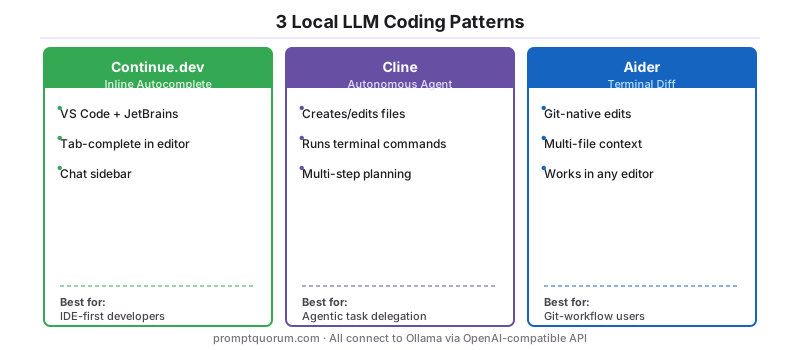
Coding assistants connect a local LLM to your editor or terminal via OpenAI-compatible APIs. The choice is mostly about workflow primitive: autocomplete-in-editor (Continue.dev), autonomous agent edits (Cline, OpenHands), or git-native diff edits at the terminal (Aider). All three patterns work against any runtime that speaks the OpenAI Chat Completions protocol — Ollama is the most common backend in 2026.
Continue.dev
- Link:
- continue.dev
- Description:
- VS Code and JetBrains autocomplete and chat with local models
- License:
- Apache 2.0
Aider
- Link:
- aider.chat
- Description:
- Terminal pair programmer with multi-file edit support
- License:
- Apache 2.0
Cline
- Link:
- cline.bot
- Description:
- Autonomous coding agent for VS Code
- License:
- Apache 2.0
Tabby
- Link:
- tabby.tabbyml.com
- Description:
- Self-hosted GitHub Copilot alternative
- License:
- Apache 2.0
CodeGPT
- Link:
- codegpt.co
- Description:
- IDE integrations across multiple editors
- License:
- MIT
OpenHands
- Description:
- AI software engineer agent (formerly OpenDevin)
- License:
- MIT
Cursor (local mode)
- Link:
- cursor.com
- Description:
- AI-first code editor with local model support
- License:
- Free (closed)
Twinny
- Description:
- Free Copilot alternative for VS Code
- License:
- MIT
Deeper guide: Continue.dev vs Cline vs Aider
5. RAG & Document Chat Systems
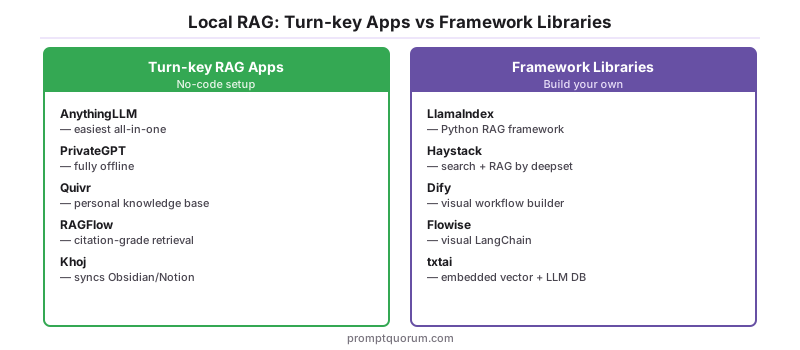
RAG (Retrieval-Augmented Generation) systems combine a local LLM with an embedding model and a vector store so the model can answer from your own documents.** The split is between turn-key apps (AnythingLLM, PrivateGPT, Quivr, Khoj) that "just work" and framework libraries (LlamaIndex, Haystack, txtai) that you build on. RAGFlow has gained share in 2026 specifically for documents that need citation-grade retrieval.
AnythingLLM
- Link:
- anythingllm.com
- Description:
- Easiest all-in-one personal RAG with workspaces
- License:
- MIT
PrivateGPT
- Description:
- Fully offline enterprise-leaning RAG
- License:
- Apache 2.0
Quivr
- Description:
- Self-hosted personal knowledge assistant
- License:
- Apache 2.0
Khoj
- Link:
- khoj.dev
- Description:
- Personal AI second brain, syncs with Obsidian and Notion
- License:
- AGPL 3.0
Dify
- Link:
- dify.ai
- Description:
- AI workflow builder with RAG and agent support
- License:
- Modified Apache 2.0
Flowise
- Link:
- flowiseai.com
- Description:
- Visual LangChain workflow builder
- License:
- Apache 2.0
Langflow
- Link:
- langflow.org
- Description:
- Visual AI orchestration with RAG components
- License:
- MIT
LlamaIndex
- Link:
- llamaindex.ai
- Description:
- RAG framework / Python library — foundation for custom builds
- License:
- MIT
Haystack
- Link:
- haystack.deepset.ai
- Description:
- Search and RAG framework by deepset
- License:
- Apache 2.0
RAGFlow
- Link:
- ragflow.io
- Description:
- Deep document understanding for RAG with citation extraction
- License:
- Apache 2.0
txtai
- Description:
- Embedded vector + LLM database in one library
- License:
- Apache 2.0
Deeper guide: AnythingLLM vs PrivateGPT vs Open WebUI
6. Agent Frameworks & Orchestration
Agent frameworks turn one-shot LLM calls into multi-step workflows — plan, act, observe, repeat. LangChain remains the general-purpose default; CrewAI and AutoGen specialise in role-based multi-agent setups; LangGraph is the right pick when state management matters across long-running flows. All eight frameworks below run cleanly against a local Ollama backend.
LangChain
- Link:
- langchain.com
- Description:
- General-purpose LLM application framework
- License:
- MIT
LlamaIndex
- Link:
- llamaindex.ai
- Description:
- RAG-focused agent and data framework
- License:
- MIT
CrewAI
- Link:
- crewai.com
- Description:
- Multi-agent role-based workflows
- License:
- MIT
AutoGen
- Description:
- Microsoft multi-agent orchestration framework
- License:
- CC-BY-4.0 / MIT
Semantic Kernel
- Description:
- Microsoft enterprise orchestration SDK in C#/Python/Java
- License:
- MIT
LangGraph
- Description:
- Stateful graph-based agent workflows
- License:
- MIT
Letta (formerly MemGPT)
- Link:
- letta.com
- Description:
- Long-term memory agents
- License:
- Apache 2.0
Pydantic AI
- Link:
- ai.pydantic.dev
- Description:
- Type-safe agent framework built on Pydantic
- License:
- MIT
Deeper guide: Local AI Agents With MCP
7. Voice, Speech & Multimodal
Voice and multimodal stacks extend a local LLM beyond text — speech in (STT), speech out (TTS), and vision. Whisper.cpp and faster-whisper own the local STT layer; Piper and Coqui share the TTS layer with XTTS v2 dominating voice cloning; LLaVA and Ollama vision models cover the vision side. A fully-offline voice assistant is buildable from this layer plus a small chat model.
Whisper.cpp
- Description:
- Local speech recognition, runs on CPU or GPU
- License:
- MIT
faster-whisper
- Description:
- Fast Whisper transcription via CTranslate2
- License:
- MIT
Piper TTS
- Description:
- Lightweight local text-to-speech
- License:
- MIT
Coqui TTS
- Description:
- Open-source voice synthesis with multiple model options
- License:
- MPL 2.0
XTTS v2
- Description:
- Voice cloning with multilingual support
- License:
- CPML
Bark
- Description:
- Generative voice with non-speech sounds
- License:
- MIT
StyleTTS 2
- Description:
- High-quality natural-sounding TTS
- License:
- MIT
LLaVA
- Link:
- llava-vl.github.io
- Description:
- Local vision + language model
- License:
- Apache 2.0
Ollama vision models
- Link:
- ollama.com
- Description:
- Local vision via Ollama (Llama 3.2 Vision, Llava, etc.)
- License:
- Various
Deeper guide: Build a Local Voice Assistant on Your Phone
8. Mobile & Edge Clients
Mobile clients run a quantised model directly on the phone using Apple Neural Engine, Qualcomm NPU, or pure CPU inference. The MLC LLM project is the foundational layer; consumer apps (PocketPal AI, Private LLM, LLM Farm, Layla) wrap it with a chat UI. Flagship phones in 2026 run 2-4B models at usable speeds (8-15 tokens/sec); 7B is on the edge of feasibility for top-tier hardware.
MLC Chat
- Link:
- mlc.ai/mlc-llm
- Description:
- Cross-platform mobile LLM runtime
- License:
- Apache 2.0
PocketPal AI
- Description:
- Free iOS and Android local LLM client
- License:
- MIT
Private LLM
- Link:
- privatellm.app
- Description:
- Polished iOS and macOS local LLM app
- License:
- Paid (closed)
LLM Farm
- Description:
- iOS local LLM with model browser
- License:
- MIT
Layla
- Link:
- layla-network.ai
- Description:
- Android-first local LLM app
- License:
- Free (closed)
Maid
- Description:
- Open-source Flutter mobile LLM app
- License:
- MIT
Enchanted
- Description:
- Native iOS/macOS Ollama client
- License:
- Apache 2.0
Chapper
- Link:
- prevolut.uk
- Description:
- Native Ollama and LM Studio mobile client
- License:
- Free
RikkaHub
- Description:
- Open-source Android local AI
- License:
- MIT
AnythingLLM Mobile
- Link:
- anythingllm.com
- Description:
- Remote access to your local AnythingLLM workspace
- License:
- MIT
Deeper guide: Best Local LLM Apps for iPhone in 2026
9. Specialized & Productivity Tools
Specialized tools embed local LLMs into apps you already use — note-taking platforms (Obsidian, Logseq, Joplin), autonomous task agents (AutoGPT, BabyAGI, MetaGPT), and roleplay frontends (Agnai, RisuAI). These are not generic chat surfaces; they are workflow-specific integrations that assume you already have a host app and a runtime.
Smart Connections
- Description:
- Obsidian semantic search and chat plugin
- License:
- GPL 3.0
Copilot for Obsidian
- Description:
- Obsidian local LLM chat plugin
- License:
- AGPL 3.0
Text Generator
- Description:
- Obsidian content generation plugin
- License:
- MIT
logseq-copilot
- Description:
- Logseq plugin for local and cloud LLM chat, same author as Obsidian Copilot
- License:
- AGPL 3.0
BMO Chatbot
- Description:
- Obsidian chatbot with local LLM
- License:
- MIT
Joplin AI
- Link:
- joplinapp.org
- Description:
- Joplin notes with local AI integrations
- License:
- MIT
AutoGPT (local)
- Description:
- Autonomous task agent with Ollama support
- License:
- MIT
BabyAGI
- Description:
- Lightweight autonomous agent
- License:
- MIT
MetaGPT
- Description:
- Multi-agent software company simulation
- License:
- MIT
Agnai
- Link:
- agnai.chat
- Description:
- Roleplay frontend with character cards
- License:
- MIT
RisuAI
- Description:
- Mobile-friendly roleplay frontend
- License:
- GPL 3.0
Deeper guide: Local LLM With Obsidian in 2026
Common Real-World Stacks
For readers who do not want to read nine categories, pick the closest stack and copy it. Each row pairs a real goal with a tested combination and the hardware floor it actually runs on.
| Goal | Stack | Hardware floor |
|---|---|---|
| Just chat casually | LM Studio standalone | 16 GB RAM, no GPU |
| Best balance for power users | Ollama + Open WebUI | 16 GB RAM, optional GPU |
| Document chat | Ollama + AnythingLLM | 16 GB RAM, optional GPU |
| Coding | Ollama + Continue.dev | 16 GB RAM + GPU recommended |
| Roleplay / creative | KoboldCpp + SillyTavern | 16 GB RAM, GPU recommended |
| Privacy-first business | Ollama + Open WebUI + PrivateGPT | 32 GB RAM + 12 GB VRAM |
| Mobile / on-the-go | MLC Chat or PocketPal AI | iPhone 13+ / Pixel 7+ |
| Apple Silicon | Ollama (MLX backend) or LM Studio | M2/M3/M4/M5 with 16+ GB unified |
| Multi-user team | vLLM + Open WebUI | 32+ GB RAM + multi-GPU |
How This Directory Stays Current
This directory is reviewed every six months and patched between reviews — last updated July 2026, next scheduled refresh November 2026. The most recent pass reverified every link and corrected several project names and licences: Faraday is now Backyard AI, the maintained Coqui TTS fork moved to Idiap, and Cherry Studio is AGPL 3.0. Inclusion criteria: project is actively maintained (commits in the last 90 days), has a verifiable open-source licence or a clear commercial-use statement, and either holds meaningful user share in 2026 or fills a layer that would otherwise be empty. Projects that go inactive for more than two release cycles are removed; new entrants that pass the criteria are added at the next review. To suggest a project for inclusion, open an issue or PR against the PromptQuorum repository — include the project URL, licence, and a one-sentence description in the format above.
Sources
- ggml-org/llama.cpp GitHub — primary source for runtime architecture and supported models.
- Ollama Library — official model catalogue and runtime documentation.
- LM Studio Documentation — feature reference for the dominant desktop GUI.
- Open WebUI Documentation — feature reference for the dominant self-hosted web UI.
- Hugging Face Hub — primary location for downloading model weights consumed by every runtime listed above.
- awesome-local-llm GitHub list — community-maintained inventory used as a sanity check for project inclusion.
Frequently Asked Questions
What is the difference between a local LLM runtime and a desktop app?
A runtime (Ollama, llama.cpp, vLLM) is the engine that loads model weights and serves an API — typically OpenAI-compatible. A desktop app (LM Studio, Jan, GPT4All) is a chat UI that calls a runtime under the hood. Some apps bundle their own runtime (LM Studio embeds llama.cpp), others require you to install a runtime separately (Open WebUI calls Ollama). The runtime decides what is possible; the app decides what is convenient.
Can I use multiple tools from this list at the same time?
Yes — most stacks combine 2-4 tools. A common setup: Ollama as the runtime, Open WebUI for chat, AnythingLLM for document chat, and Continue.dev for coding — all four run against the same Ollama instance on a single machine. The "Common Real-World Stacks" table above lists the recipes that work without conflict.
Which tools work fully offline with no telemetry?
Ollama, llama.cpp, vLLM, Jan, GPT4All, Open WebUI, AnythingLLM, PrivateGPT, Continue.dev, Aider, KoboldCpp, Llamafile, MLX-LM, and most of the AGPL/MIT-licensed apps in this directory work fully offline once the model is downloaded. LM Studio and several closed-source tools have optional analytics that can be disabled in settings — verify by running a packet capture once after install. Browser-based UIs (Open WebUI, LibreChat) are local-only when configured to use a local backend.
Are any of these commercial-licensed (not free for commercial use)?
A handful: LM Studio, Msty, Backyard AI, Layla, and Cursor are closed-source — generally free to use but not redistributable, and commercial terms vary. Private LLM is paid. AGPL-licensed tools (Jan, KoboldCpp, text-generation-webui, SillyTavern, Khoj, Open Interpreter, Copilot for Obsidian) are free for any use including commercial, but the AGPL terms require source disclosure if you modify and host them publicly. Apache 2.0 and MIT projects (the majority) are usable in any context including commercial without attribution constraints beyond the licence text.
Which tools support Apple Silicon (M-series chips) natively?
Ollama, llama.cpp, MLX-LM, LM Studio, Jan, Enchanted, GPT4All, MLC Chat, AnythingLLM, and most Electron/Tauri apps run natively on Apple Silicon and use the Metal backend. MLX-LM is Apple-specific and the fastest for large models on M-series. vLLM, TensorRT-LLM, and ExLlamaV2 are NVIDIA-focused and either do not run or run poorly on Apple Silicon — for Apple users, Ollama with the Metal backend is the default.
Do all these tools support GGUF model format?
GGUF is the native format for llama.cpp and any tool that wraps it (Ollama, LM Studio, Jan, GPT4All, KoboldCpp, Llamafile). vLLM and TensorRT-LLM use their own optimised formats (typically AWQ or FP16) for higher throughput. ExLlamaV2 uses EXL2 quantisation. MLX-LM uses MLX-converted weights. Most listed tools accept GGUF; a few (vLLM, TensorRT-LLM, ExLlamaV2, MLX-LM) require a one-time conversion step from the original Hugging Face weights.
Which tools are best for users with no coding experience?
GPT4All has the simplest install (one click, runs on 8 GB RAM). LM Studio is the most feature-rich without requiring a terminal. Jan is the most privacy-conscious of the no-code options. For document chat without command-line work, AnythingLLM is the easiest. All four are listed in the Desktop GUI Apps category above.
Can I run these tools on a server and access them remotely?
Most server-capable tools (Ollama, vLLM, LocalAI, Open WebUI, LibreChat, PrivateGPT, AnythingLLM) expose an HTTP API and bind to a network interface configurable in settings. Standard pattern: run Ollama on a home server or VPS, run a UI on your laptop or phone pointing at the server's IP. Treat the API like any web service — bind to localhost behind a reverse proxy, or to a private network with proper authentication. Open WebUI ships with multi-user support out of the box.
Which tools support multi-user / team setups?
Open WebUI, LibreChat, h2oGPT, AnythingLLM (with admin features enabled), and Dify are designed for multi-user use, with role-based access and per-user conversation history. vLLM is the right serving layer underneath when concurrent inference matters — it batches requests across users for throughput unattainable on Ollama at concurrency above ~3.
How often does this directory get updated?
Every six months — last updated July 2026, the next scheduled refresh is November 2026. Mid-cycle changes (a project goes inactive, a new tool gains meaningful share, a licence changes) get patched into the existing entry. Entirely new categories or layers wait for a refresh to keep the structure stable. The "Sources" section above lists the community indexes used to spot-check what the ecosystem is actually doing between refreshes.