Key Takeaways
- LM Studio is fastest on both Apple Silicon and NVIDIA — wins for power users.
- Jan is fully open source with zero telemetry — wins for privacy-first users.
- GPT4All has the smallest install and runs on 8 GB RAM — wins for older hardware.
- All three are free, offline after install, and load standard GGUF models.
- LM Studio and Jan ship built-in RAG; GPT4All needs a plugin.
How Do LM Studio, Jan, and GPT4All Compare in 2026?
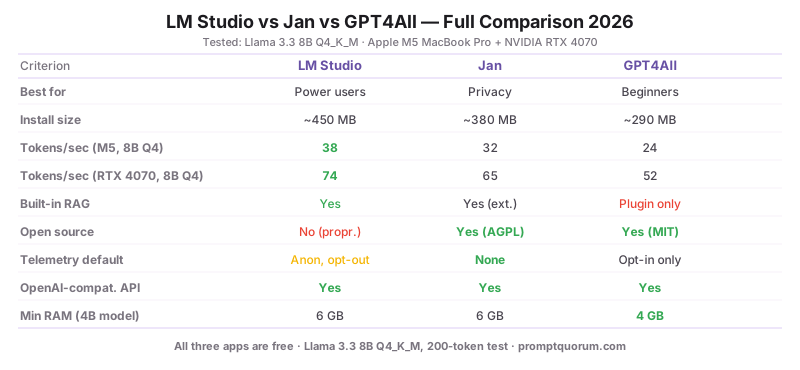
Tested on Apple M5 MacBook Pro (16 GB unified memory) and a desktop with NVIDIA RTX 4070 (12 GB VRAM, 32 GB system RAM) running Windows 11. All three apps tested with the same 8B-class model (Llama 3.1 8B Q4_K_M) for direct comparison.
Criterion | |||
|---|---|---|---|
| Best for | Power users | Privacy users | Beginners |
| Install size | ~450 MB | ~380 MB | ~290 MB |
| Tokens/sec (M5, 8B Q4) | 38 | 32 | 24 |
| Tokens/sec (RTX 4070, 8B Q4) | 74 | 65 | 52 |
| Built-in RAG | Yes | Yes (extension) | Plugin only |
| Open source | No (proprietary) | Yes (Apache 2.0) | Yes (MIT) |
| Telemetry by default | Anonymous opt-out | None | Opt-in only |
| OpenAI-compatible API server | Yes | Yes | Yes |
| Min RAM (4B model) | 6 GB | 6 GB | 4 GB |
Which One Should You Pick?
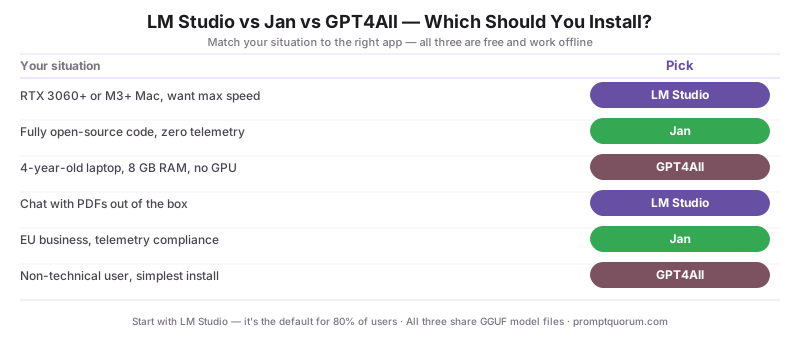
The right choice depends on your hardware, your privacy posture, and how technical you are. Use this decision shortcut:
Your situation | Pick |
|---|---|
| I have an RTX 3060+ or M3+ Mac, want max speed | LM Studio |
| I want fully open-source code and zero telemetry | Jan |
| I have a 4-year-old laptop, 8 GB RAM, no GPU | GPT4All |
| I want to chat with my PDFs out of the box | LM Studio |
| I am in the EU and worried about telemetry compliance | Jan |
| My parents need a chatbot they can install themselves | GPT4All |
How Fast Is Each App on Real Hardware?
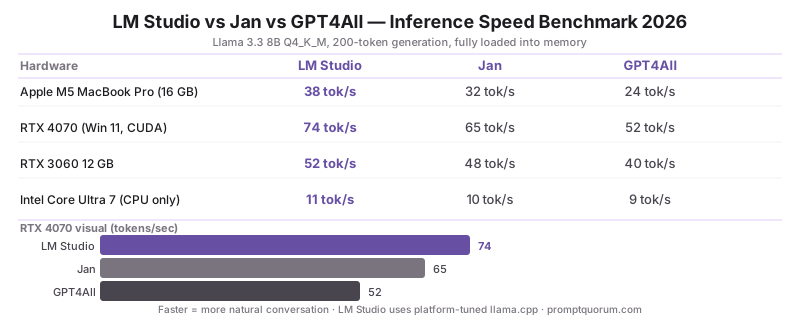
Tokens-per-second measured during a 200-token generation with Llama 3.1 8B Q4_K_M loaded fully into memory. Values rounded to the nearest whole token.
Hardware | |||
|---|---|---|---|
| Apple M5 MacBook Pro (16 GB) | 38 tok/s | 32 tok/s | 24 tok/s |
| RTX 4070 (Win 11, CUDA) | 74 tok/s | 65 tok/s | 52 tok/s |
| RTX 3060 12 GB (older driver) | 52 tok/s | 48 tok/s | 40 tok/s |
| Intel Core Ultra 7 (CPU only) | 11 tok/s | 10 tok/s | 9 tok/s |
Why Is LM Studio Faster?
LM Studio ships a custom build of llama.cpp tuned for each platform: Apple Silicon Metal kernels on Mac, CUDA + cuBLAS on NVIDIA, ROCm on AMD. Jan and GPT4All use upstream llama.cpp without platform-specific tuning. The gap is largest on M-series Macs (15-30%) and smallest on CPU-only systems (5-10%).
📌Note: Speed differences disappear once you hit memory bandwidth limits. On a fully-saturated 8B model, all three apps converge to within ~5% of each other.
Which App Has the Easiest First-Run Experience?
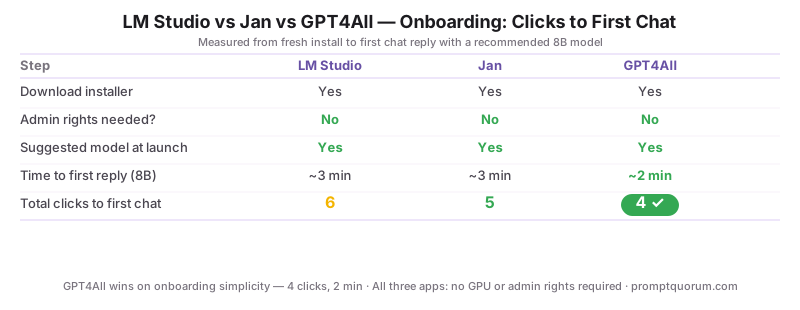
Measured by counting clicks from "fresh install" to "first chat reply" with a recommended model.
Step | |||
|---|---|---|---|
| 1. Download installer | Yes | Yes | Yes |
| 2. Run installer (admin needed?) | No | No | No |
| 3. Suggested-model prompt at launch | Yes | Yes | Yes |
| 4. Time to first reply (8B model) | ~3 min | ~3 min | ~2 min |
| 5. Total clicks to first chat | 6 | 5 | 4 |
How Deep Is Each App's Model Library?
All three apps can load any GGUF file from disk. The difference is what they show in their built-in browser.
- LM Studio — In-app browser pulls live from Hugging Face. Filters by VRAM, license, family, quantization. ~5,000 model variants visible.
- Jan — Curated catalog of ~150 models, with a "Hugging Face URL" import for everything else. Less overwhelming for beginners.
- GPT4All — Featured catalog of ~30 popular models. Manual GGUF import for anything else. Smallest browser.
- All three load custom GGUF files via drag-and-drop or "import" — so a smaller built-in browser does not lock you out of any model.
Do These Apps Send Data Anywhere?
Privacy posture is where Jan pulls ahead. Each app handles telemetry differently:
- LM Studio — Sends anonymous usage events by default. Opt out in Settings → Privacy. No prompts or model outputs ever leave the device.
- Jan — Zero telemetry. No analytics SDK. Source code is auditable on GitHub (Apache 2.0).
- GPT4All — Telemetry is opt-in (off by default). Source on GitHub (MIT).
- None of the three send your prompts, your conversations, or your loaded model files anywhere — local inference is local in all cases.
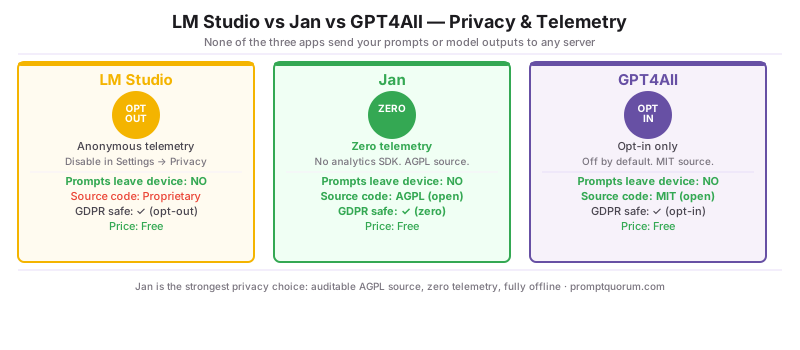
💡Tip: For GDPR-sensitive deployments (EU businesses, health/legal sectors), pick Jan and verify the Apache 2.0 source. For air-gapped corporate environments, all three work offline once installed.
Which Operating Systems Are Supported?
OS | |||
|---|---|---|---|
| macOS (Apple Silicon) | Native, signed | Native, signed | Native, signed |
| macOS (Intel) | Yes | Yes | Yes |
| Windows 10/11 | Native, signed | Native, signed | Native, signed |
| Linux (AppImage / .deb) | AppImage | AppImage + .deb | AppImage + .deb |
| NVIDIA CUDA | Yes | Yes | Yes |
| AMD ROCm (Linux) | Yes | Experimental | Experimental |
| Apple Metal (M-series) | Yes | Yes | Yes |
Which Should You Install First in 2026?
Most users should start with LM Studio. It has the smoothest learning curve once you get past the first launch, the largest model library, and the fastest inference on the most common hardware (M-series Macs and RTX GPUs). The 6 clicks to first chat is one more than GPT4All but the long-term experience is significantly richer.
- Pick LM Studio unless you have a specific reason not to — it is the default recommendation for 80% of users.
- Pick Jan if you specifically need open-source code, zero telemetry, or a cleaner UI for daily use.
- Pick GPT4All if your hardware is borderline (8 GB RAM, no GPU) — it is the most forgiving on low-end systems.
- You can install all three side-by-side; they share GGUF model files, so the disk cost of trying multiple apps is small.
⚠️Warning: Maintenance status, August 2026: GPT4All's most recent release is v3.10.0, dated 25 February 2025 - roughly 18 months without a new build. It still installs and still runs on low-end hardware, which is why it keeps its slot here, but the bundled model catalogue has not moved since that build (newer models such as Gemma 4 E2B are absent) and the app itself receives no security patches. Prefer Jan if you want a maintained GUI; reach for GPT4All when its remaining advantages apply - a 4 GB RAM ceiling, or a locked-down machine where you cannot get admin rights.
Frequently Asked Questions
Are LM Studio, Jan, and GPT4All free?
All three apps are 100% free for personal and commercial use. Jan and GPT4All are open source (Apache 2.0 and MIT respectively); LM Studio is free but proprietary.
Do these apps work fully offline?
Yes. After installing the app and downloading at least one model, all three work without an internet connection. Models run entirely on your device.
Can I share GGUF model files between LM Studio, Jan, and GPT4All?
Yes. All three apps load standard GGUF files. Each app stores models in its own folder by default, but you can point them all at a shared folder to avoid duplicate downloads.
Which app is best for chatting with my PDFs?
LM Studio has the most polished built-in document chat in 2026. Jan offers it via an extension. GPT4All requires a third-party plugin or a separate tool like AnythingLLM.
Do I need an NVIDIA GPU to run any of these apps?
No. All three run on CPU only, on Apple Silicon Macs, on AMD GPUs, and on NVIDIA GPUs. CPU-only inference is slower (8-15 tokens/sec on a modern processor) but fully usable for chat with smaller models like Phi-4 Mini.
Is LM Studio safe if it is not open source?
LM Studio has been audited by independent security researchers and ships with anonymous-by-default telemetry that you can disable. If full source-code transparency is mandatory for your use case (some EU compliance contexts), pick Jan instead.
Can I use these apps as an OpenAI-compatible API server for my code?
Yes. All three expose an OpenAI-compatible HTTP API on localhost. LM Studio and Jan have one-click "start server" buttons; GPT4All has a settings toggle. Useful for connecting Continue.dev, Cline, or custom Python scripts.
How much disk space do I need?
The apps themselves are 290-450 MB. Each model is 2-15 GB depending on size and quantization. A practical starter setup is 20-30 GB free disk space — enough for the app plus 2-3 models to compare.
Which app gets updates most often in 2026?
LM Studio ships updates roughly every 2-3 weeks; Jan ships about monthly; GPT4All ships every 4-6 weeks. All three add new model architectures within days of release in the upstream llama.cpp project.
Should I install all three?
For research or comparison purposes, yes — they share GGUF files so the disk cost is mostly just the app binaries. For daily use, pick one and stick with it; switching apps mid-workflow disrupts your prompt history and chat threads.