Key Takeaways
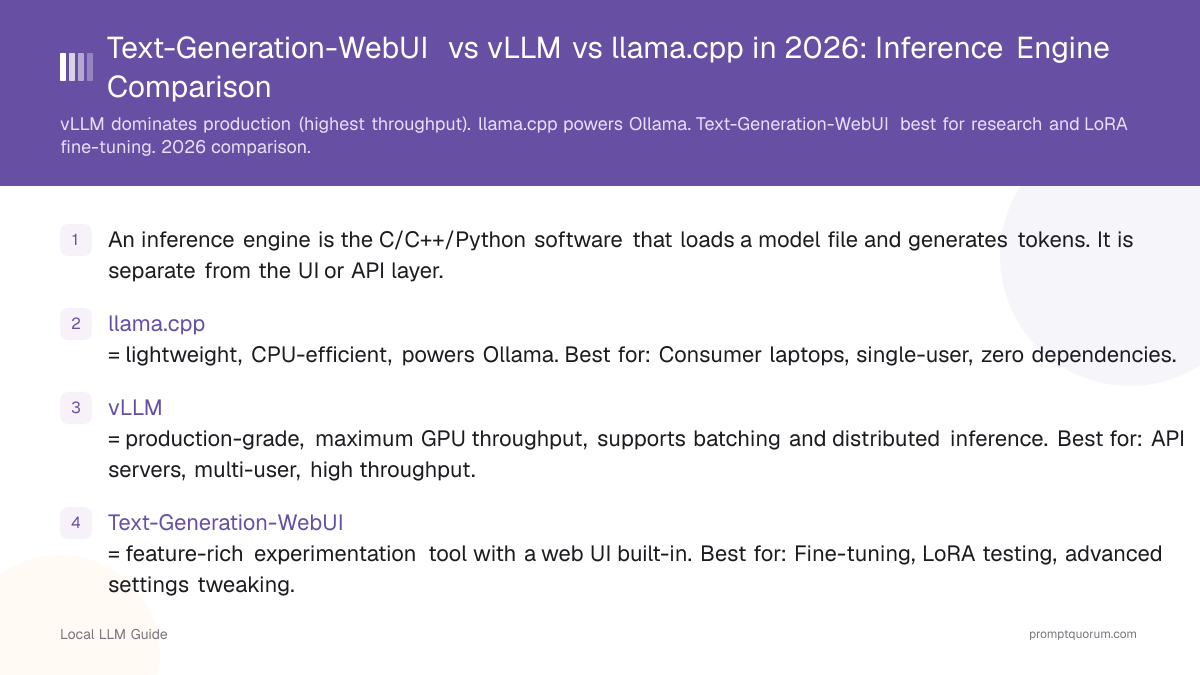
- An inference engine is the C/C++/Python software that loads a model file and generates tokens. It is separate from the UI or API layer.
- llama.cpp = lightweight, CPU-efficient, powers Ollama. Best for: Consumer laptops, single-user, zero dependencies.
- vLLM = production-grade, maximum GPU throughput, supports batching and distributed inference. Best for: API servers, multi-user, high throughput.
- Text-Generation-WebUI = feature-rich experimentation tool with a web UI built-in. Best for: Fine-tuning, LoRA testing, advanced settings tweaking.
- vLLM leads production use (with SGLang gaining share for the largest deployments), llama.cpp leads consumer use, and Text-Generation-WebUI leads research/fine-tuning.
📍 In One Sentence
llama.cpp is the lightest inference engine and powers Ollama, vLLM is the fastest for high-throughput production APIs, and Text-Generation-WebUI is the most feature-rich for research and experimentation -- pick based on whether you need portability, throughput, or flexibility.
💬 In Plain Terms
These three tools all run AI models locally, but for different jobs. llama.cpp is the lean engine that quietly powers Ollama under the hood -- great for personal use. vLLM is built for serving many users at once as fast as possible, which is why companies use it in production. Text-Generation-WebUI is the tinkerer's tool, with the most knobs to turn for research and fine-tuning experiments.
What Is an Inference Engine?
An inference engine is the software component that loads a pre-trained model file and executes the mathematical operations needed to generate text. It is different from a chat interface (like Open WebUI or Enchanted UI) or an API layer (like Ollama's REST API).
A typical local LLM deployment has three layers:
1. Model file (e.g., llama-3.1-8b.gguf) -- the neural network weights.
2. Inference engine (e.g., llama.cpp, vLLM) -- loads the model and generates tokens.
3. Interface or API (e.g., REST API, web chat, VS Code extension) -- lets you interact with the engine.
Ollama itself is primarily a wrapper around llama.cpp with an OpenAI-compatible API. vLLM is an inference engine without a built-in UI. Text-Generation-WebUI is an inference engine with a built-in web UI.
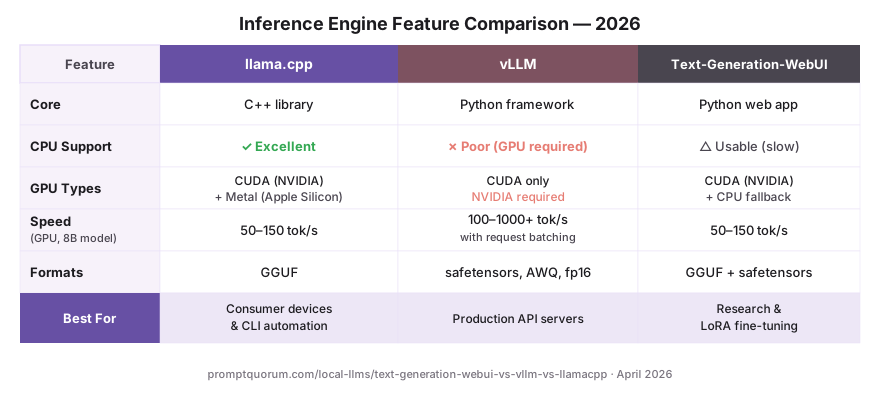
Feature Comparison: llama.cpp vs vLLM vs Text-Generation-WebUI
Feature | |||
|---|---|---|---|
| Type | C++ library (lightweight) | Python framework (production) | Python app (experimentation) |
| GPU Support | NVIDIA, AMD, Apple Metal | NVIDIA (best), AMD ROCm, Intel, CPU | NVIDIA, AMD, CPU |
| CPU Inference | Excellent | Poor | Good |
| Throughput (tokens/sec) | Medium (1-100) | Very high (100-1000+) | Medium (1-100) |
| Batch Support | Limited | Full (batches of 100+) | Limited |
| Built-in Web UI | No | No | Yes |
| LoRA Fine-tuning | Not directly | Limited | Built-in |
| Quantization Formats | GGUF (GGML legacy) | Full precision, 8-bit, 4-bit | GGUF, safetensors, fp16 |
| Setup Difficulty | Via Ollama (easy) | pip install (medium) | GitHub clone (medium) |
| Price | Free | Free | Free |
Understanding llama.cpp: The Foundation
llama.cpp is a C++ implementation of LLM inference, originally written to run Meta's Llama model on consumer hardware without GPU acceleration. It remains the most lightweight and portable inference engine.
Why llama.cpp dominates consumer use:
- Minimal memory overhead -- can run on 8 GB RAM with CPU alone.
- Supports multiple GPU backends (NVIDIA, AMD, Apple Metal, Intel).
- GGUF format: a quantized model format that compresses 70B models to 20-40 GB.
- Powers Ollama internally -- you are using llama.cpp whenever you run Ollama.
llama.cpp is not a full application; it is a library. You interact with it through Ollama (the most common way) or through other tools that integrate it. If you want to use llama.cpp directly for advanced tuning, you need to compile it and interact with it via command-line tools or Python bindings.
Understanding vLLM: The Production Standard
vLLM is a Python framework designed for high-throughput inference on GPU clusters. It optimizes for serving models via API, with support for batching, distributed inference, and advanced scheduling.
Why vLLM dominates production:
- Paged Attention: vLLM uses a novel memory layout that improves GPU utilization from ~20% to ~70%, dramatically increasing throughput.
- Batch processing: Can process 50-100 prompts simultaneously, serving more users per GPU.
- Distributed inference: Split a 70B model across multiple GPUs automatically.
- Wide model support: Works with any HuggingFace model (Llama, Qwen, Mistral, Phi, etc.).
VLLM remains the most widely deployed production engine, though SGLang (also built on Paged Attention) has gained adoption at the largest scale for its faster structured-output and multi-model serving. The trade-off for vLLM is hardware breadth in practice: it also runs on AMD ROCm, Intel and CPU (and experimentally on Apple Silicon), but NVIDIA remains by far the best-optimised path, and its CPU performance stays well behind llama.cpp.
# Install vLLM
pip install vllm

# Run a model via API
vllm serve meta-llama/Llama-3.2-3B-Instruct \
  --host 0.0.0.0 --port 8000 \
  --gpu-memory-utilization 0.9

# Now accessible at http://localhost:8000/v1/completions
Understanding Text-Generation-WebUI: The Researcher's Tool
Text-Generation-WebUI (also called oobabooga) is a full-featured Python application with a web interface for experimenting with models. It combines inference with built-in tools for fine-tuning, LoRA training, embedding generation, and advanced prompt testing.
Naming note: the project was renamed to TextGen in 2026 and the repository moved to `github.com/oobabooga/textgen`. The old URL still redirects and the start scripts are unchanged, so existing installs and guides keep working. Most of the community still calls it text-generation-webui or oobabooga.
The 4.x releases widened it well beyond a research-only tool: vision-model support, tool-calling, an Anthropic-compatible API alongside the OpenAI-compatible one, a native Electron desktop app (4.7.3, May 2026), llama.cpp tensor parallelism, and MTP speculative decoding with a live tokens/sec readout (4.9, May 2026).
Why researchers use Text-Generation-WebUI:
- LoRA fine-tuning built-in: Train custom LoRA adapters on top of base models without needing external training scripts.
- Multiple inference engines: Can switch between llama.cpp, GPTQ, exllama, and other backends.
- Character roleplay: Built-in system for creating and testing character personas.
- API exposure: Exposes a FastAPI interface for programmatic use.
- Extension ecosystem: Community-built extensions for custom workflows.
Text-Generation-WebUI is more of a research and experimentation tool than a production server. Setup is more involved (requires GitHub clone and Python dependency management), but once running, it is extremely powerful for development.
How Fast Is Each Engine? Throughput Comparison?
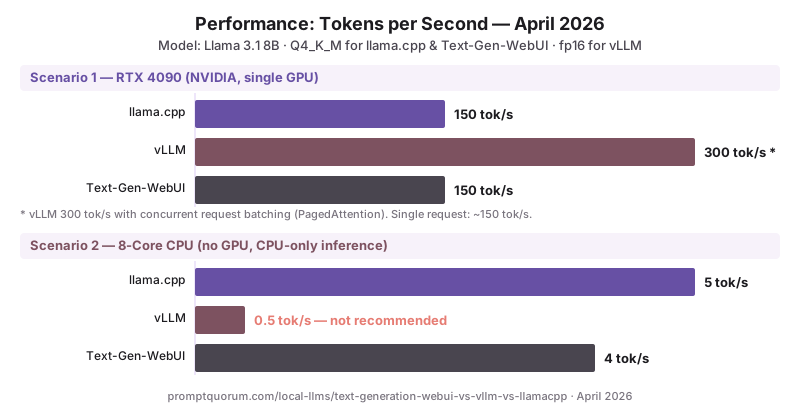
Throughput (tokens per second) depends on the model size, hardware, and engine optimization. Here are real-world benchmarks on consumer hardware:
Scenario | |||
|---|---|---|---|
| Llama 3.2 3B on RTX 4090 (GPU) | 150 tokens/sec | 300 tokens/sec (with batching) | 150 tokens/sec |
| Llama 3.2 3B on 8-core CPU | 5 tokens/sec | 0.5 tokens/sec (unusable) | 4 tokens/sec |
| Llama 4 Scout on 2× RTX 4090 | 20 tokens/sec (single GPU) | 100 tokens/sec (distributed) | 20 tokens/sec |
| Phi-3 3.8B on M4 MacBook Pro | 30 tokens/sec | Experimental (llama.cpp far faster) | 25 tokens/sec |
Which Engine for Production Deployments?
vLLM is the production standard (alongside SGLang for the largest deployments). Most companies running local LLM APIs in production use vLLM because of its throughput optimization and batching support. A single vLLM instance can serve 50+ concurrent users on one GPU, vs. 1-2 for llama.cpp.
However, production choice depends on your constraint:
- Serving 100+ requests/day with limited GPU: Use vLLM (best throughput).
- Serving with only CPU or Apple Silicon: Use llama.cpp via Ollama (best CPU support).
- Using Llama models specifically: Either llama.cpp or vLLM works; vLLM is faster.
- Using diverse model formats (GPTQ, GGUF, safetensors): Text-Generation-WebUI supports all; vLLM requires full precision or specific quantization formats.
When Should You Choose Each Engine?
Use this decision framework:
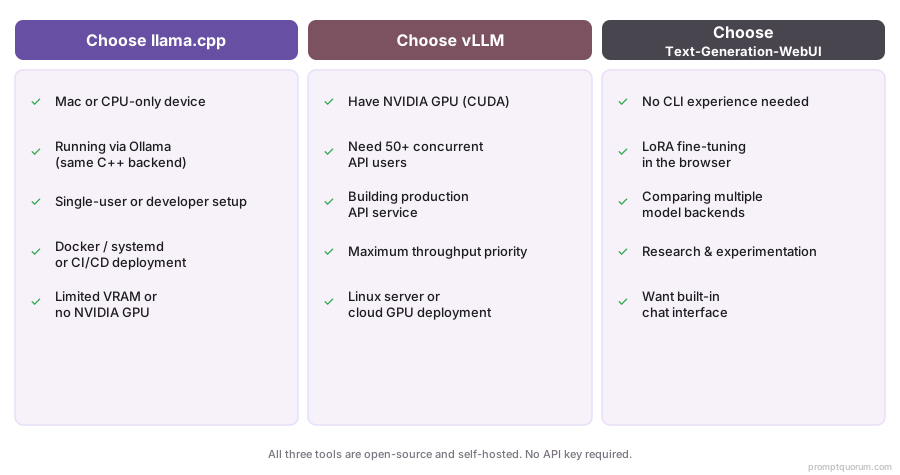
- llama.cpp (via Ollama): You are a consumer, non-developer, or deploying on CPU/Apple Silicon. Best overall ease-of-use.
- vLLM: You are serving an API with 50+ concurrent users, you have NVIDIA GPUs, and you need maximum throughput. Production standard.
- Text-Generation-WebUI: You are fine-tuning models, testing LoRA adapters, or experimenting with advanced inference settings. Best for research.
Inference Engine Choice by Region
The choice of inference engine has direct implications for regional compliance and enterprise deployments across different regulatory jurisdictions.
- EU / GDPR: For EU enterprise deployments, vLLM running on-premises keeps all inference within EU infrastructure -- no tokens, prompts, or outputs leave your servers. For German BSI IT-Grundschutz compliance, vLLM is the recommended production engine because it provides structured audit logging via Prometheus metrics (/metrics endpoint), and all model versions are pinnable via HuggingFace model IDs for compliance documentation. Mistral models (Mistral AI, France, Apache 2.0) are the EU-preferred choice for vLLM production deployments -- EU origin, clean licence, strong performance. vLLM command: `vllm serve mistralai/Mistral-7B-Instruct-v0.3`
- Japan (METI): METI AI governance requires documenting inference infrastructure. vLLM's structured Prometheus metrics satisfy audit trail requirements better than llama.cpp's stdout logging. For Japanese enterprise deployments, Qwen3 8B via vLLM is the recommended stack -- native Japanese tokenization plus production throughput. vLLM command: `vllm serve Qwen/Qwen3-8B-Instruct`
- China: Under China's Data Security Law (数据安全法), all inference must remain on-premises for sensitive data. vLLM is compatible with Alibaba Cloud A10 and A100 GPU instances. Qwen3 (Alibaba) models are natively optimized for vLLM and provide the best Chinese-language throughput. For Chinese enterprise production: vLLM + Qwen3 14B on Alibaba Cloud is the standard stack.
Common Mistakes With Inference Engines
- Thinking you need to choose between Ollama and these engines. Ollama uses llama.cpp internally. You are not choosing Ollama vs vLLM; vLLM is an alternative *backend* to Ollama, not a chat app. Both have their purpose.
- Assuming vLLM is faster on CPU. vLLM has poor CPU performance; llama.cpp is 10× faster on CPU. Check your GPU availability before choosing vLLM.
- Running vLLM on a laptop GPU. vLLM is optimized for datacenter GPUs (RTX 4090, A100). On consumer GPUs, the overhead of vLLM's batching scheduler can actually slow single-request performance. Stick with llama.cpp for laptops.
- Forgetting that inference throughput is not the same as user experience latency. vLLM can batch 100 requests, but each request still takes time to generate its tokens. High throughput does not mean low latency.
- Installing dependencies wrong for Text-Generation-WebUI. The GitHub instructions assume you have Git, Python 3.10+, and pip installed. On Windows, this often fails silently. Always verify Python version before cloning.
Common Questions About Inference Engines
Can I switch inference engines without changing my model?
Mostly yes. Model files in GGUF format work with llama.cpp (Ollama) and Text-Generation-WebUI. vLLM requires full precision or specific quantization formats. HuggingFace safetensors models work with all three.
Which engine is best for Mac?
llama.cpp via Ollama. It has excellent Apple Silicon (M-series) optimization. vLLM does not support Metal (Apple GPU), so CPU performance is poor. Text-Generation-WebUI works on Mac but is slower than Ollama.
Is vLLM part of Ollama?
No. Ollama uses llama.cpp internally. vLLM is a separate inference engine by UC Berkeley. They serve different purposes: Ollama is for simplicity; vLLM is for production throughput.
Can I use vLLM without GPU?
Technically yes, but it is unusably slow. vLLM is designed for GPU. For CPU-only deployments, use llama.cpp (Ollama).
Does Text-Generation-WebUI scale to production?
Not recommended. Text-Generation-WebUI is a research tool, not a production server. It lacks features like load balancing, monitoring, and distributed inference that production services need. Use vLLM for production.
What is Paged Attention and why does it matter?
Paged Attention is vLLM's memory management system that borrows virtual memory concepts from operating systems. Instead of allocating a fixed contiguous block of GPU memory per request, it allocates memory in pages that can be shared and reused across requests. This improves GPU memory utilization from ~20% to ~70%, allowing vLLM to serve 3-4× more concurrent users per GPU compared to naive attention implementations. It is the core reason vLLM outperforms llama.cpp in multi-user scenarios.
Which engine should I use if I only have 8GB RAM?
llama.cpp via Ollama. At 8 GB total RAM, a 7B model at Q4_K_M uses ~4.7 GB. llama.cpp handles this well at ~5 tok/sec on CPU or ~80 tok/sec on a dedicated GPU. vLLM requires significantly more overhead and performs poorly on consumer RAM. Text-Generation-WebUI is also workable but adds more overhead than Ollama.
Can I run vLLM and Ollama on the same machine?
Yes, if VRAM is sufficient. Run them on different ports (vLLM default: 8000, Ollama default: 11434). A typical configuration: Ollama handles quick single-user chat requests, vLLM handles batch API requests. However, both cannot load the same model simultaneously without doubling VRAM. Manage which service is active based on your workload.
Sources
- Gerganov, G. (2024). "llama.cpp GitHub." https://github.com/ggerganov/llama.cpp -- C++ inference engine source code and quantization documentation.
- vLLM Team. (2024). "vLLM GitHub." https://github.com/vllm-project/vllm -- Production inference engine source code and API server documentation.
- Kwon et al. (2023). "Efficient Memory Management for Large Language Model Serving with PagedAttention." https://arxiv.org/abs/2309.06180 -- Original Paged Attention paper explaining vLLM's memory management approach.
- oobabooga. (2024). "Text-Generation-WebUI GitHub." https://github.com/oobabooga/text-generation-webui -- Source code and installation guide for Text-Generation-WebUI.