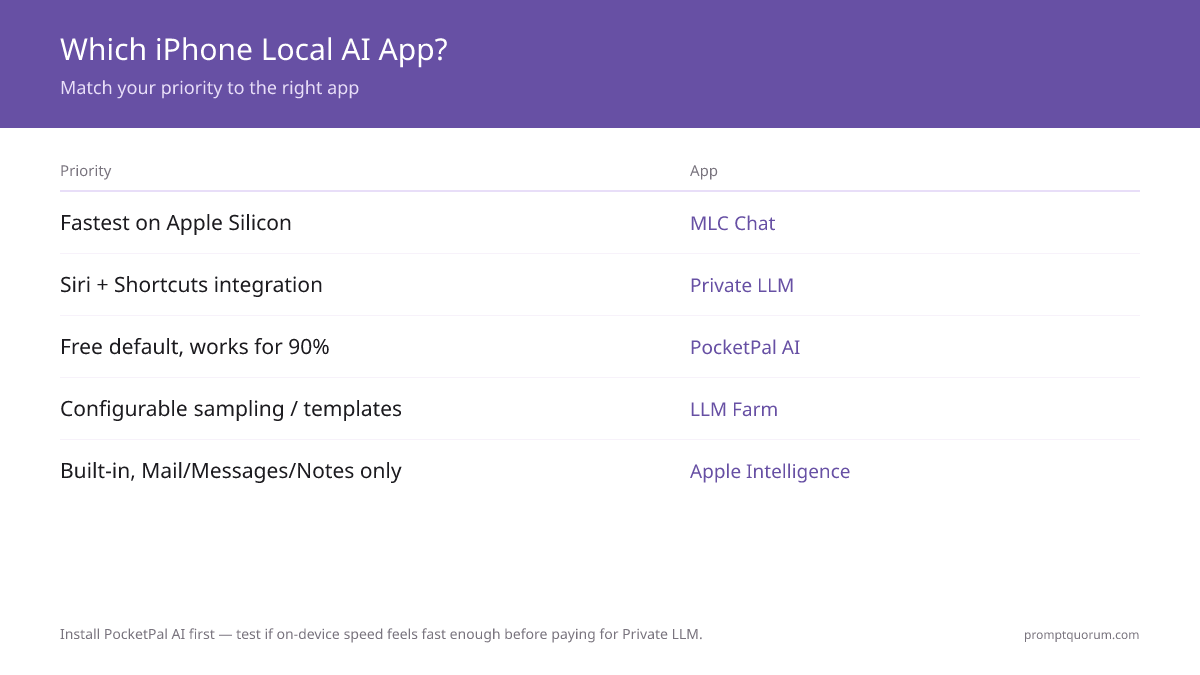
Key Takeaways
- PocketPal AI is the best free default. Open-source, App Store install, supports any GGUF model from Hugging Face. Runs Phi-4 Mini at ~10–15 tokens/sec on iPhone 16 Pro. Recommended starting point for most iPhone users.
- Private LLM is the best paid option ($4.99 one-time, no subscription). One purchase covers iPhone, iPad, and Mac with Family Sharing. Curated model library, iOS Shortcuts integration, and Siri "Hey Siri, ask Private LLM" support.
- Locally AI is the free MLX-based alternative, now developed by the LM Studio team. Runs Llama, Gemma, Qwen, and DeepSeek models on Apple MLX, works with iOS Shortcuts, and can expose Apple's own on-device foundation model as a chat interface.
- MLC Chat is Metal-accelerated but dormant. Its MLC LLM engine still generates ~25–35% faster than llama.cpp-based apps on the same hardware, but the app has not been updated since late 2024, so its model library predates Phi-4 Mini and Gemma 3.
- LLM Farm was delisted from the App Store in August 2025. Its own README calls it "temporarily unavailable". It remains open-source and build-from-source via Xcode, and stays the most configurable option (mirostat, chat templates) for developers.
- Apple Intelligence is on-device but not a separate app. Apple's ~3B foundation model powers system features (Writing Tools, Smart Reply, Notification Summaries). Since iOS 26, third-party apps can call it via the Foundation Models framework, and Shortcuts can prompt it with the "Use Model" action.
- Recommended model for iPhone 16 Pro / 17 Pro: Phi-4 Mini (3.8B Q4_K_M, ~2.7 GB). Best balance of quality and speed for the 8 GB+ RAM tier. Older iPhones with 6 GB RAM (iPhone 14 Pro): Qwen3 1.7B or SmolLM 2 1.7B.
Quick Facts
- Apps compared: PocketPal AI, Private LLM, Locally AI (by LM Studio), MLC Chat, Apple Intelligence (system) — plus LLM Farm, delisted from the App Store in August 2025.
- Test devices: iPhone 16 Pro (A18 Pro, 8 GB RAM) and iPhone 17 Pro (A19 Pro, 12 GB RAM).
- Inference engines: llama.cpp (PocketPal AI, LLM Farm), Apple MLX (Locally AI), MLC LLM with Metal (MLC Chat), proprietary on-device runtime (Private LLM, Apple Intelligence).
- Minimum iPhone for 3B+ models: iPhone 14 Pro (A16, 6 GB RAM) for 1.7B; any 8 GB+ iPhone (15 Pro, 16 series, 16e, 17 series) for 3B–4B.
- Best free app overall: PocketPal AI — App Store, open-source, model flexibility.
- Best paid app overall: Private LLM — $4.99 one-time (iPhone + iPad + Mac), Shortcuts + Siri support.
- Offline: All five run fully offline once the model is downloaded; no cloud calls.
Which iPhone App Should You Install First?
For most users: PocketPal AI from the App Store, then download Phi-4 Mini (3.8B Q4_K_M). This combination works on iPhone 14 Pro and newer, costs nothing, and produces usable output for everyday chat, summarisation, and quick drafting. Choose a different app only when you have a specific need it does not cover.
📍 In One Sentence
For most iPhone users in 2026, install PocketPal AI (free, App Store) and download Phi-4 Mini — it covers everyday chat, summarisation, and drafting on any iPhone with 6 GB+ RAM.
💬 In Plain Terms
Five iPhone apps run AI fully on your phone in 2026. PocketPal AI is the best free starting point — install it, download a 2.7 GB model file once, and you have a private chat assistant that works on the train without WiFi. Private LLM is the paid option if you want Siri to talk to the local model. Locally AI, from the LM Studio team, is the free modern alternative with Shortcuts support. MLC Chat is fast but no longer updated. Apple Intelligence is built into iOS but not a chat app. PocketPal AI fits 90% of use cases.
Decision: Which iPhone Local AI App?
Use a local LLM if:
- •You want a free chat AI that works offline → PocketPal AI
- •You want Siri to talk to your local model → Private LLM
- •You want a free MLX app with Shortcuts and Apple Foundation Models access → Locally AI
- •You want maximum Metal-accelerated speed and accept an older model library → MLC Chat
- •You only need writing assistance in Mail / Messages / Notes → Apple Intelligence (built-in)
Use a cloud model if:
- •You need 70B+ model quality (Llama 3.3 70B, GPT-5.5 tier) → use cloud or remote-connect to a home machine
- •You need access to GPT-5.5, Claude Opus, or Gemini specifically → cloud apps (these are not available locally)
- •You need real-time vision or multimodal output beyond text → cloud (on-device multimodal is limited in 2026)
Quick decision:
- →Free + works for 90% of users: PocketPal AI
- →Paid + iOS-native integration: Private LLM
- →Free + LM Studio ecosystem: Locally AI
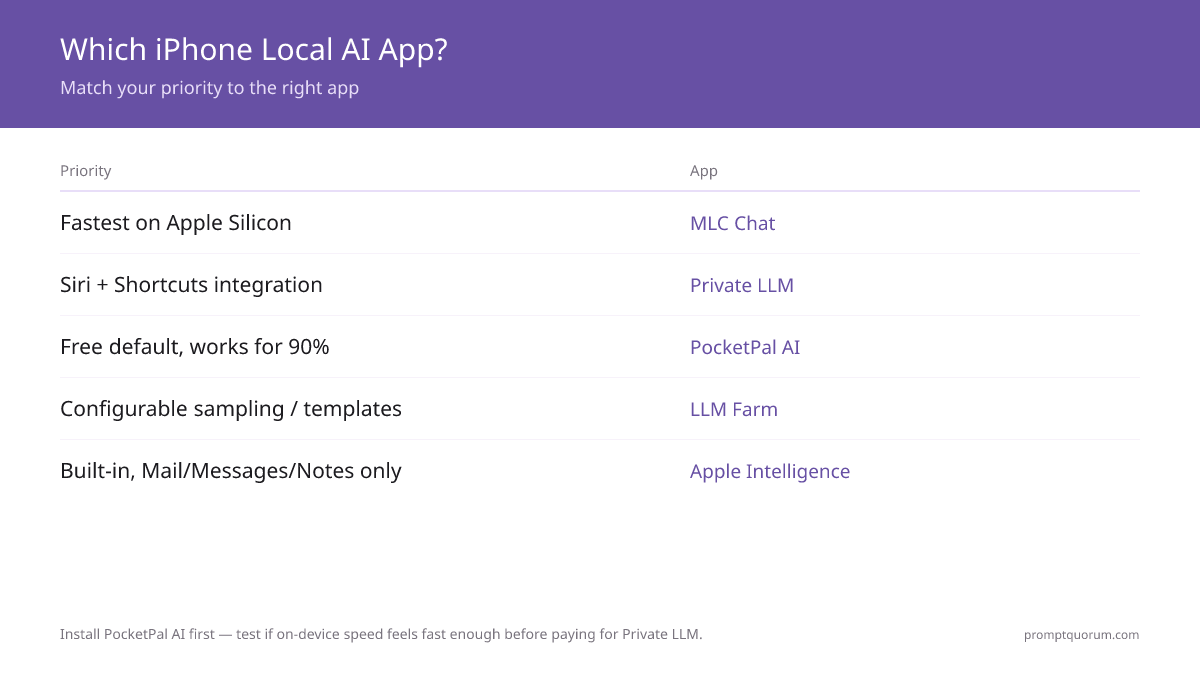
💡Tip: Install PocketPal AI first, even if you plan to pay for Private LLM later. Use PocketPal AI to test whether on-device inference on your iPhone tier feels fast enough for your use case. If yes, decide whether the iOS Shortcuts and Siri integration in Private LLM is worth $4.99. If no, you saved $4.99 finding out before paying.
iPhone App Comparison Table
The five apps differ on three axes that matter to most users: cost, model flexibility, and integration with iOS. Speed differences exist but are smaller than the gap between any of these apps and a cloud LLM.
📍 In One Sentence
PocketPal AI is the best free default, Private LLM is the best paid option, Locally AI is the free MLX pick from the LM Studio team, MLC Chat is Metal-fast but dormant, Apple Intelligence is system-integrated.
💬 In Plain Terms
The choice usually comes down to three things: do you want to pay for Siri integration (Private LLM), do you want the LM Studio ecosystem with Shortcuts for free (Locally AI), or do you want maximum raw speed and accept an older model library (MLC Chat). For everything else, PocketPal AI is the default. The numbers in the table assume Q4_K_M quantisation — the standard for mobile inference in 2026.
App | Cost | Tokens/sec (Phi-4 Mini, 16 Pro) | Privacy | Best for |
|---|---|---|---|---|
| PocketPal AI | Free (open-source) | ~10–15 | Local-only, no telemetry | Free default for most users |
| Private LLM | $4.99 one-time | ~10–14 | Local-only, opt-in analytics | iOS Shortcuts + Siri integration |
| Locally AI | Free (LM Studio team) | N/A — MLX catalog (no Phi-4) | Local-only, no data collection | MLX + Shortcuts, LM Studio link |
| MLC Chat | Free (open-source) | N/A — library predates Phi-4 | Local-only, no telemetry | Metal speed, older model set |
| LLM Farm | Free (build from source) | ~10–15 | Local-only, no telemetry | Power users (App Store delisted) |
| Apple Intelligence | Free (built into iOS) | N/A (system feature) | Local + opt-in Private Cloud Compute | Mail, Messages, Notes assistance |
Note on Apple Neural Engine (ANE) vs Metal vs MLX: PocketPal AI and LLM Farm use llama.cpp with Metal Performance Shaders for inference, which runs on the GPU. MLC Chat uses MLC LLM with deeper Metal optimisation, achieving 25–35% higher tokens/sec on the same hardware for the models it supports. Locally AI uses Apple MLX, Apple's own open-source array framework, which reaches similar GPU efficiency on Apple Silicon. Apple Intelligence uses ANE specifically for the system ~3B model, which is more power-efficient but less flexible than Metal-based inference. Since iOS 26, third-party apps can call that system model through the Foundation Models framework — Locally AI does exactly this — but custom GGUF/MLX models still cannot directly target the ANE.
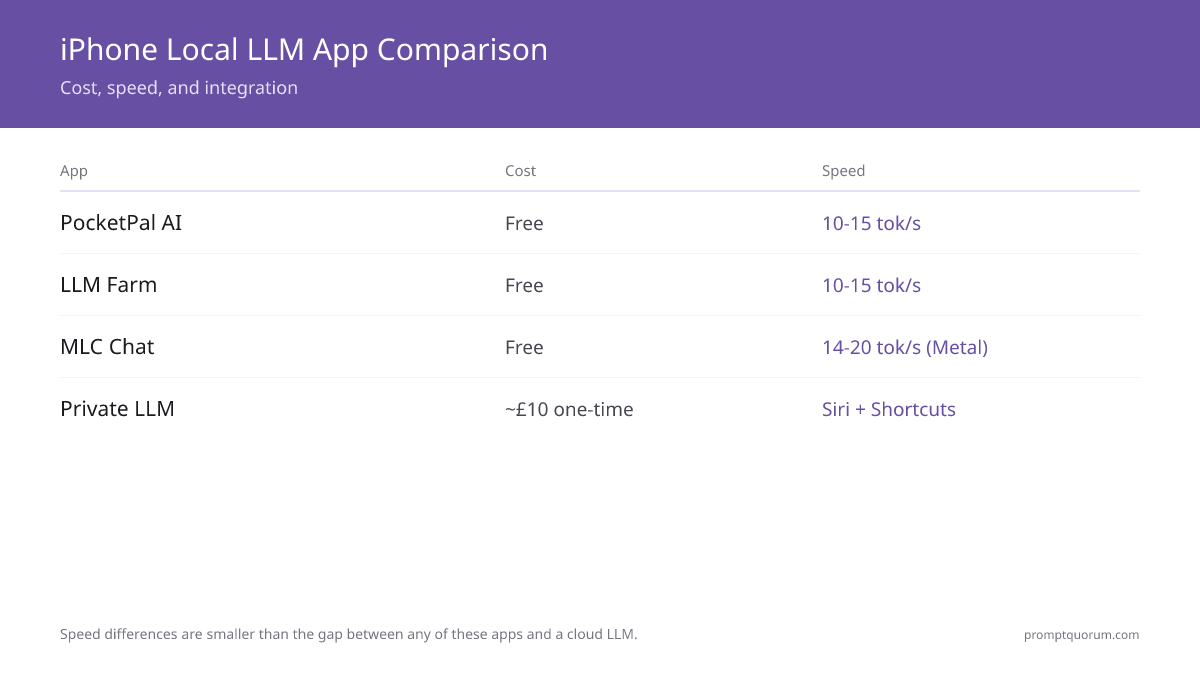
💡Tip: Tokens/sec figures assume Q4_K_M quantisation (the standard for mobile inference in 2026) and an idle iPhone with no other heavy apps running. Background apps reduce throughput by 10–30%. Tokens/sec on iPhone 17 Pro is roughly 20–30% higher than iPhone 16 Pro thanks to A19 Pro improvements.
PocketPal AI: Free Open-Source Default
PocketPal AI is the recommended starting point for most iPhone users in 2026. It is free, open-source (GitHub: a-ghorbani/pocketpal-ai), available on the App Store, and supports any GGUF model from Hugging Face. The app uses llama.cpp under the hood with Apple Silicon optimisations.
- What it is: an iOS app that runs GGUF models locally using llama.cpp. No subscription, no telemetry, no account required.
- Install: App Store → "PocketPal AI". Free download.
- Adding a model: in the app, tap Models → "Add from Hugging Face" → search (e.g. "phi-4-mini-instruct-Q4_K_M") → tap to download. The model is stored in the app's local storage (~2.7 GB for Phi-4 Mini Q4).
- Generation speed (iPhone 16 Pro): Phi-4 Mini ~10–15 tok/sec, Llama 3.2 3B ~12–18 tok/sec, Gemma 3 4B ~7–10 tok/sec, Qwen3 1.7B ~18–24 tok/sec.
- Best for: users who want a free, App Store-installable, no-account chat app that supports any community-released GGUF model.
💡Tip: The PocketPal AI model picker has a "Recommended" filter that shows models verified to fit on your device's RAM. For an iPhone 16 Pro (8 GB RAM), the picker recommends Q4_K_M variants of models up to ~4B parameters. Trust this filter — running an oversized model leads to iOS killing the app mid-response.
Private LLM: Paid Option with iOS Integration
Private LLM is the strongest paid iPhone option in 2026 ($4.99 one-time, no subscription). It is App Store only and ships with a curated library of optimised models. Its differentiator is iOS integration: Shortcuts actions and a "Hey Siri, ask Private LLM" voice command.
- What it is: a paid iOS app with a curated model library and deep iOS integration. Uses a proprietary on-device runtime optimised for Apple Silicon.
- Install: App Store → "Private LLM". One-time purchase $4.99 (no subscription).
- Curated model library: ~30 models pre-tested and optimised for iPhone, including Llama 3.2 3B, Phi-4 Mini, Mistral Small Instruct, and several uncensored variants. Less flexibility than PocketPal AI but no risk of installing a model that crashes.
- iOS Shortcuts: Private LLM exposes a "Generate Text with Private LLM" action that you can chain into Shortcuts automations. Useful for triggering local AI from a button on your home screen or via NFC tags.
- Siri integration: "Hey Siri, ask Private LLM [your question]" routes the prompt to the on-device model and reads the answer back. Works without an internet connection. Latency is higher than the chat UI (~3–5 seconds before audio starts).
💡Tip: Private LLM is a universal purchase: the $4.99 one-time price covers iPhone, iPad, and Mac in a single buy, and Apple Family Sharing extends it to up to six family members. No subscription and no in-app purchases — the listed price is the total cost.
Locally AI: LM Studio's Free MLX App
Locally AI is a free, privacy-focused chat app now developed by the LM Studio team, built on Apple's own MLX framework instead of llama.cpp. It is the newest serious entrant in this category and the only app here that exposes Apple's on-device foundation model as a chat interface.
- What it is: an iOS/iPadOS/macOS app using Apple MLX for inference, developed by the team behind the desktop LM Studio app.
- Install: App Store → "Locally AI". Free, no account required, 100% offline.
- Model library: Llama 3.2, Gemma 2/3/4, Qwen 3, DeepSeek, LFM 2.5, Bonsai, Ministral 3, and Apple Foundation Models — a broader and more current catalog than MLC Chat's.
- iOS Shortcuts: exposes a Shortcuts action, matching Private LLM's automation support at zero cost.
- LM Link: an optional feature that connects to LM Studio running on a Mac over an end-to-end encrypted link, letting the iPhone app hand off to a larger model on a home machine when needed.
- Requirements: iOS/iPadOS 18.1+ (Apple Silicon-class efficiency benefits most on iPhone 15 Pro and newer).
💡Tip: Locally AI is the only app in this guide that can put Apple's own on-device foundation model behind a normal chat window — useful if you want to test what Apple Intelligence's model can do without hunting through Writing Tools menus. For third-party GGUF-style flexibility, PocketPal AI still has the larger model catalog.
MLC Chat: Apple Silicon Optimisation
MLC Chat (from the MLC LLM project) remains the Metal-acceleration reference app on iPhone, but the app itself has not shipped an update since late 2024. It is free, open-source, and runs models compiled by the MLC LLM toolchain rather than standard GGUF — that compiled-model requirement is also why its catalog has not kept pace with PocketPal AI or Locally AI.
- What it is: the iOS reference app from the MLC LLM project, demonstrating MLC LLM's Metal-accelerated inference on Apple Silicon.
- Install: App Store → "MLC Chat". Free.
- Speed advantage (architecture-level): MLC LLM's Metal-accelerated engine generates ~25–35% faster than llama.cpp-based apps on the same iPhone for models both support — but the app's own model list predates current picks like Phi-4 Mini and Gemma 3, so this advantage is untestable on 2026's recommended models without a self-compiled build.
- Model library: limited to models the MLC LLM project compiled before the app went dormant — Llama 3.2 3B, RedPajama, and similar 2024-era releases. Not every Hugging Face GGUF works, and no current-generation small model ships in the App Store build.
- Best for: developers already invested in the MLC LLM toolchain who are willing to compile their own model, or who specifically need one of the pre-2025 models it already ships.
⚠️Warning: Because the App Store build of MLC Chat has not been updated since late 2024, do not expect Phi-4 Mini, Qwen3, or Gemma 3 to appear in its picker. If you want current-generation models with Metal-class GPU efficiency today, Locally AI (Apple MLX) or PocketPal AI (llama.cpp with Metal Performance Shaders) are the actively maintained alternatives.
LLM Farm: Delisted but Still Configurable
LLM Farm was removed from the App Store and TestFlight in August 2025 — its own GitHub README describes the app as "temporarily unavailable" on both. The project (GitHub: guinmoon/LLMFarm) is still open-source and has seen GitHub issue activity into 2026, but new users can no longer install it from the App Store; it must be built from source via Xcode.
- What it is: an iOS app from developer @guinmoon that runs GGUF models with extensive configuration options, previously distributed on the App Store.
- Current availability: not installable from the App Store or TestFlight as of this refresh. Source code remains public and buildable.
- Building from source: clone the repository, open in Xcode, and build to a device with a free or paid Apple Developer account — the standard sideloading workflow for any open-source iOS app without an App Store listing.
- Configuration exposed (when built): temperature, top-p, top-k, mirostat sampling, repeat penalty, system prompt per model, chat template selection, context window length.
- Best for: developers comfortable building an app from source in Xcode who specifically want mirostat sampling controls. Everyone else should use PocketPal AI or Locally AI, both fully App-Store-installable and free.
⚠️Warning: Do not expect an App Store link for LLM Farm to work — treat any such link found elsewhere as outdated. Building from source requires Xcode and basic familiarity with iOS code signing. If that is more setup than you want, PocketPal AI covers the same "flexible free chat app" use case without leaving the App Store.
Apple Intelligence: System-Integrated On-Device AI
Apple Intelligence runs Apple's own ~3B foundation model on-device on iPhone 15 Pro and newer (A17 Pro chip with 8 GB RAM minimum). It is not a chat app by default — it powers system features in Mail (Smart Reply), Messages (writing tools), Notes (summarisation), and Notification Summaries. Since iOS 26, Apple's Foundation Models framework lets third-party developers call that same on-device model directly, and apps like Locally AI now use it to expose a genuine chat interface on top of it.
- Where it lives: integrated into iOS 18+ (Foundation Models framework added in iOS 26). Enable in Settings → Apple Intelligence & Siri.
- Hardware requirement: iPhone 15 Pro / 15 Pro Max, iPhone 16 series, iPhone 16e, iPhone 17 series. Earlier iPhones (14 and below) do not support Apple Intelligence.
- On-device features: Writing Tools (rewrite, summarise, proofread) inside any text field, Smart Reply in Mail and Messages, Notification Summaries, Genmoji generation.
- Foundation Models framework (iOS 26+): a native Swift API giving developers direct access to the same on-device model with a few lines of code — this is how Locally AI surfaces it as a chat option, and how the Shortcuts "Use Model" action can route a prompt to it, to Private Cloud Compute, or to ChatGPT.
- Private Cloud Compute: for tasks beyond the on-device model's capability, Apple Intelligence falls back to Private Cloud Compute (PCC) — Apple-operated servers running larger models with cryptographic guarantees that no user data is retained. PCC is opt-in and can be disabled.
- How it relates to chat apps: Apple Intelligence is a complement, not a replacement. Its system features handle text rewriting and summarisation inside iOS apps; PocketPal AI, Private LLM, Locally AI, and MLC Chat provide a dedicated chat interface for arbitrary questions — and Locally AI can now put Apple's own model behind that same kind of interface.
💡Tip: If Apple Intelligence is your only need (rewriting emails, summarising notifications), you do not need a separate chat app. If you want to ask the model questions like "explain quantum tunnelling in simple terms" or "draft a project plan for X", install a chat app — either a dedicated one like PocketPal AI, or Locally AI, which can front Apple's own on-device model with a chat window.
Models by iPhone Tier
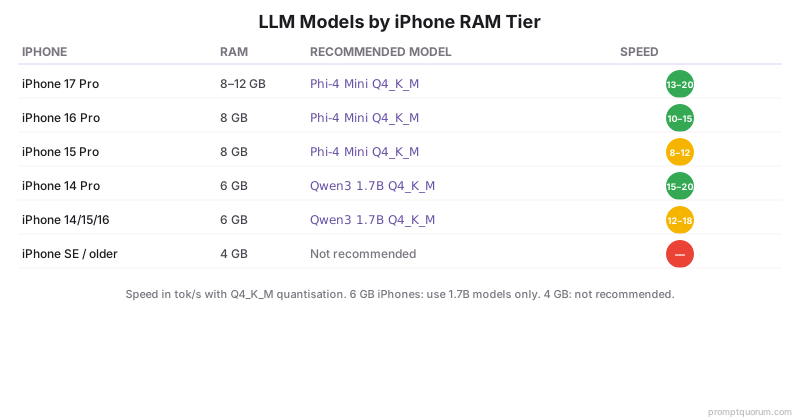
iPhone RAM determines the model size ceiling — not the chip generation. A 6 GB iPhone (14 Pro, 15) can comfortably run 1.7B models; an 8 GB+ iPhone (15 Pro, 16 series, 16e, 17 series) runs 3B–4B models comfortably and 7B models slowly. For the broader model landscape across all hardware (not just mobile), see Best Local LLMs in 2026.
iPhone Tier (Year, RAM) | Recommended Model | Download Size | Expected Speed |
|---|---|---|---|
| iPhone 17 Pro (2025, 12 GB) | Phi-4 Mini or Llama 3.2 3B (Q4_K_M) | ~2.5–2.7 GB | ~13–20 tok/sec |
| iPhone 16 Pro / 16 Pro Max / 16e (2024–2025, 8 GB) | Phi-4 Mini (3.8B Q4_K_M) | ~2.7 GB | ~10–15 tok/sec |
| iPhone 15 Pro / Pro Max (2023, 8 GB) | Phi-4 Mini (3.8B Q4_K_M) | ~2.7 GB | ~8–12 tok/sec |
| iPhone 14 Pro / Pro Max (2022, 6 GB) | Qwen3 1.7B or SmolLM 2 1.7B (Q4_K_M) | ~1.1 GB | ~15–20 tok/sec |
| iPhone 14 / 15 / 16 (non-Pro, 6 GB) | Qwen3 1.7B or SmolLM 2 1.7B (Q4_K_M) | ~1.1 GB | ~12–18 tok/sec |
| iPhone SE / older (4 GB) | Not recommended for on-device LLM | — | — |
💡Tip: For older 6 GB iPhones, Qwen3 1.7B is the best balance of model size and quality in 2026. SmolLM 2 1.7B (HuggingFace) is comparable. Both produce coherent short-form responses (1–3 paragraphs) but struggle with multi-step reasoning. Do not install Phi-4 Mini on a 6 GB iPhone — it nominally fits but iOS will kill the app under any other memory pressure.
Battery Drain and Thermal Throttling
On-device LLM inference on iPhone is CPU/GPU-intensive and produces heat. Active inference (model generating tokens) draws ~3–5 W; sustained generation will throttle the chip and drain the battery roughly 20–30% per hour on iPhone 16 Pro.
- Battery drain (active chat): ~20–30% per hour on iPhone 16 Pro running Phi-4 Mini. iPhone 17 Pro drains slightly faster due to higher peak power but offsets with finishing the workload sooner.
- Thermal throttling kicks in after ~10–15 minutes of continuous generation. When the chip hits ~38°C surface temperature, iOS reduces clock speeds, dropping tokens/sec by 30–50%. Letting the phone cool restores full speed.
- Mitigation: keep the iPhone face-up on a hard surface (not in your hand or pocket) during long inference sessions to allow heat dissipation. A passive heat sink case helps but is rarely necessary for short interactions.
- Phantom drain: if you leave a chat app open in the background after generation, RAM stays allocated but no inference runs — battery impact is minimal. Closing the app fully reclaims the ~3 GB of RAM.
- MagSafe charging during inference: acceptable on iPhone 17 Pro and 16 Pro (both have improved thermal designs). On iPhone 15 Pro, the combination of charging and inference can hit thermal limits faster — prefer to charge afterwards.
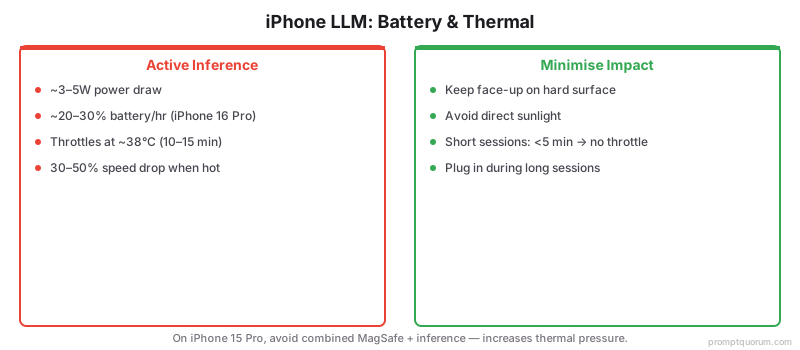
⚠️Warning: Do not run on-device LLM inference on an iPhone in direct sunlight or in a hot car. The combination of ambient heat and inference workload pushes the chip past thermal limits within minutes, triggering aggressive throttling and potentially the "iPhone needs to cool down" warning. The chat app does not crash, but generation slows to a crawl.
iOS Shortcuts, Siri, and Sideloading
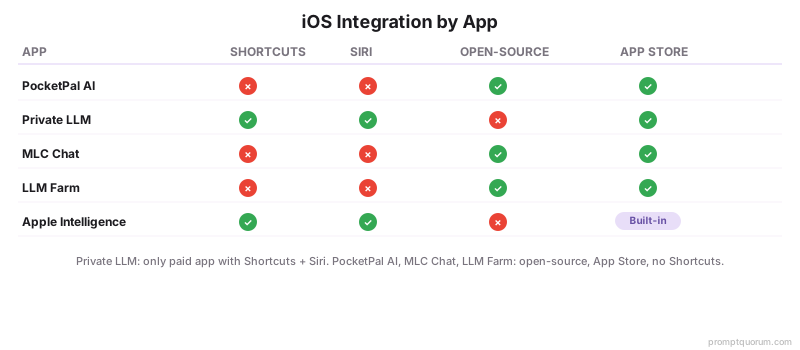
iOS integration varies significantly by app. Private LLM and Locally AI both expose Shortcuts actions; PocketPal AI and MLC Chat are standalone chat apps with no Shortcuts actions in 2026.
Private LLM Shortcut: summarise selected text
“1. Action: "Get Selected Text" (iOS Share Sheet input). 2. Action: "Generate Text with Private LLM" → Prompt: "Summarise the following text in three bullet points: [Selected Text]" → Model: Phi-4 Mini. 3. Action: "Show Result" or "Copy to Clipboard". Add to Share Sheet so you can run it on any selected text in any app, fully offline.”
Apple Intelligence Shortcut: rewrite for tone
“1. Action: "Get Clipboard". 2. Action: "Use Model" → Model: On-device → Prompt: "Rewrite this in a professional, concise tone: [Clipboard]". 3. Action: "Copy to Clipboard". Assign to a Lock Screen widget for one-tap rewriting of anything you copy.”
- Private LLM exposes a "Generate Text with Private LLM" Shortcuts action and a "Hey Siri, ask Private LLM [question]" voice trigger. The most iOS-native of the paid chat apps.
- Locally AI exposes a Shortcuts action for free, and can route a Shortcut to Apple's own on-device foundation model via its Foundation Models framework integration — no Siri voice trigger, but Shortcuts automation without paying.
- PocketPal AI is a standalone chat app — no Shortcuts action, no Siri integration. You open the app and chat. Plans for Shortcuts support are tracked in the GitHub issues but not shipped.
- MLC Chat is a reference app for the MLC LLM project — minimal iOS integration and no update since late 2024. No Shortcuts action.
- LLM Farm is delisted from the App Store (August 2025) and, when built from source, has no Shortcuts action.
- Apple Intelligence integrates with iOS Shortcuts via the "Use Model" action (iOS 18.4+, expanded in iOS 26 alongside the Foundation Models framework). This routes a prompt to the on-device model, Private Cloud Compute, or ChatGPT (configurable). The on-device output can be chained into other Shortcuts actions.
- Sideloading: PocketPal AI, Private LLM, Locally AI, and MLC Chat are on the App Store and require no sideloading or jailbreak; Apple Intelligence is built into iOS. LLM Farm is the exception — installing it now requires building from source in Xcode. EU users can also install App Store apps via alternative marketplaces under DMA in 2026, but the app itself is identical.
💡Tip: For hands-free use while driving or cooking, Private LLM's "Hey Siri, ask Private LLM" is the only on-device option that works without touching the phone. Apple Intelligence supports voice via Siri but only for system tasks (writing, summarising, app actions) — it does not expose general Q&A like the chat apps do.
Common Mistakes
- Installing a model larger than your iPhone's RAM allows. A 7B model on an 8 GB iPhone runs at ~3–5 tokens/sec and crashes when iOS reclaims memory for another app. Stick to the recommended model for your iPhone tier (3B–4B for 8 GB devices, 1.7B for 6 GB devices).
- Expecting cloud-AI quality from on-device models. Phi-4 Mini (3.8B) is impressive for its size but not GPT-5.5. Use it for chat, summarisation, drafting, and quick Q&A — not multi-step reasoning, complex code generation, or nuanced creative writing.
- Running inference in direct sunlight or a hot car. Thermal throttling kicks in within minutes. Generation slows by 30–50%, and you may see the "iPhone needs to cool down" warning. Run inference at room temperature.
- Leaving 3+ chat apps installed with 3 GB models in each. You will burn ~10 GB of storage on duplicate models. Pick one app and one model; uninstall the others until you are sure you need them.
- Assuming Apple Intelligence has no chat interface at all. That was true through iOS 18, but since iOS 26 apps like Locally AI can front Apple's on-device model with an actual chat window via the Foundation Models framework. The system features (Writing Tools, Smart Reply) still are not a chat UI on their own.
- Looking for LLM Farm on the App Store. It was delisted in August 2025. Searching the App Store for it wastes time; use PocketPal AI for the same free/flexible use case, or build LLM Farm from source in Xcode if you specifically need its exposed mirostat controls.
Sources
- PocketPal AI — github.com/a-ghorbani/pocketpal-ai (open-source iOS app).
- Private LLM — App Store listing and developer documentation.
- Locally AI — App Store listing (LM Studio team, Apple MLX-based).
- MLC Chat / MLC LLM project — llm.mlc.ai (Metal-accelerated iOS deployment).
- LLM Farm — github.com/guinmoon/LLMFarm (open-source iOS app; App Store/TestFlight listing temporarily unavailable per project README).
- Apple Intelligence and on-device foundation models — Apple Machine Learning Research and Apple Developer documentation (Foundation Models framework, introduced iOS 26).
Frequently Asked Questions
Can iPhone really run a 7B model?
Technically yes on iPhone 15 Pro and newer (8 GB RAM), but not at usable speed. A 7B Q4 model on iPhone 16 Pro generates at ~3–5 tokens/sec — frustrating for chat. iOS also tends to kill the app when other apps need memory. Use 3B–4B models (Phi-4 Mini, Llama 3.2 3B, Gemma 3 4B) for everyday on-device chat. For 7B+ quality, remote-connect to a home Mac or PC running Ollama.
Does local AI drain my iPhone battery?
Yes — actively running inference draws ~3–5 W and drains the battery roughly 20–30% per hour on iPhone 16 Pro. For occasional chat (a few prompts), the impact is small. For sustained use (long conversation, multiple summarisation tasks), keep the iPhone plugged in. The model itself sitting in RAM with no inference running has negligible battery impact.
Will my iPhone get hot using local AI?
Yes, after about 10–15 minutes of continuous generation. The chip surface reaches ~38°C and iOS throttles clock speeds, dropping tokens/sec by 30–50%. To minimise this: keep the iPhone face-up on a hard surface (not in your hand) during long sessions, and avoid direct sunlight. Short interactions (under 5 minutes) rarely cause noticeable heat.
Can I use Siri with a local model?
Yes, with Private LLM ($4.99 one-time). Saying "Hey Siri, ask Private LLM [question]" routes the prompt to the on-device model and Siri reads the answer back — fully offline. PocketPal AI, Locally AI, and MLC Chat do not have Siri voice integration in 2026, though Locally AI does support Shortcuts automation. Apple Intelligence integrates with Siri but only for system tasks (writing, summarising, app actions), not general Q&A.
Do these apps work on iPhone SE or older iPhones?
Limited. iPhone SE (4 GB RAM) is below the practical threshold for on-device LLMs in 2026. iPhone 14 / 15 (non-Pro, 6 GB RAM) can run 1.7B models (Qwen3 1.7B, SmolLM 2 1.7B) but not 3B+. iPhone 14 Pro and 15 Pro (6–8 GB RAM) can run 3B models like Phi-4 Mini at 8–12 tokens/sec. For older iPhones, the better path is remote-connecting to a home Mac or PC.
Can I sync chat history between iPhone and Mac?
Not in PocketPal AI, Private LLM, or MLC Chat — chat history is stored locally per device, with no iCloud sync. Private LLM and Locally AI are both universal purchases/downloads that run natively on Mac too, but history still does not sync between the iPhone and Mac copies. For cross-device chat history, the practical approach is to run Open WebUI on a home Mac and access it from both iPhone and Mac browsers — Open WebUI stores chat history server-side.
Are these apps available outside the App Store?
PocketPal AI is open-source and can be built from source via Xcode, but the App Store build is the standard distribution. LLM Farm is the exception that now requires building from source — it was delisted from the App Store and TestFlight in August 2025. Private LLM, Locally AI, and MLC Chat are App Store only. EU users can install App Store apps via alternative marketplaces under DMA in 2026, but the underlying app is identical.
Do any of them require jailbreak?
No. PocketPal AI, Private LLM, Locally AI, MLC Chat, and Apple Intelligence all run on stock iOS. Building LLM Farm from source in Xcode also does not require jailbreak — it uses standard developer sideloading, not a jailbreak exploit. Jailbreaking is not required and not recommended for any of these apps.
Can I use local AI in iOS Shortcuts?
Yes, via Private LLM (a "Generate Text with Private LLM" action), Locally AI (a free Shortcuts action), or Apple Intelligence (the "Use Model" action, iOS 18.4+, expanded in iOS 26). PocketPal AI and MLC Chat do not have Shortcuts actions in 2026. Locally AI is the only free option with both Shortcuts support and access to Apple's own on-device model.
How does local AI compare to the ChatGPT app on iPhone?
On-device models (Phi-4 Mini, Llama 3.2 3B) remain meaningfully behind frontier cloud models for complex reasoning, broad world knowledge, and multimodal tasks, but are faster on simple queries (no network round-trip) and fully private. The honest tradeoff: local AI for routine and private tasks; ChatGPT or another cloud app for occasional hard questions. Many users in 2026 keep both and choose per query.
Is LLM Farm still safe to use if it is no longer on the App Store?
The source code is public on GitHub and still receives issue activity into 2026, so it is not abandoned, but it is no longer reviewed by Apple's App Store process once built from source and sideloaded. If you do not specifically need its mirostat sampling controls, PocketPal AI covers the same free/flexible/open-source use case while staying on the App Store with Apple's standard app review.