Key Takeaways
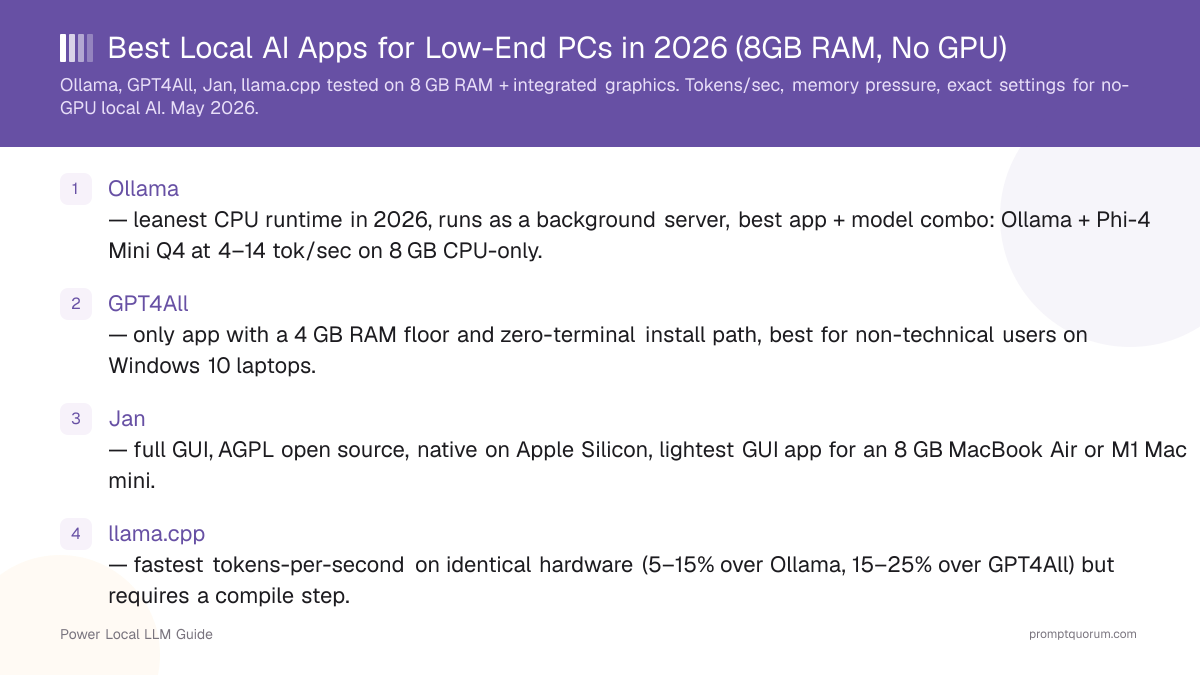
- Ollama — leanest CPU runtime in 2026 (v0.33.1, August 2026), runs as a background server, best app + model combo: Ollama + Phi-4 Mini Q4 at 4–14 tok/sec on 8 GB CPU-only.
- Jan — full GUI, Apache 2.0 open source, native on Apple Silicon, lightest GUI app for an 8 GB MacBook Air or M1 Mac mini, and the no-terminal pick now that GPT4All has gone quiet.
- llama.cpp — fastest tokens-per-second on identical hardware (5–15% over Ollama, 15–25% over GPT4All) but requires a compile step.
- GPT4All — still the only app with a 4 GB RAM floor and a no-admin install path, but its last release was v3.10.0 on 25 February 2025, so treat it as a fallback rather than a first choice.
- Best model on 8 GB / no-GPU: Phi-4 Mini 3.8B at Q4_K_M for balance, SmolLM 2 1.7B Q4 for max speed, Llama 3.2 1B Q5 for smoothest chat feel.
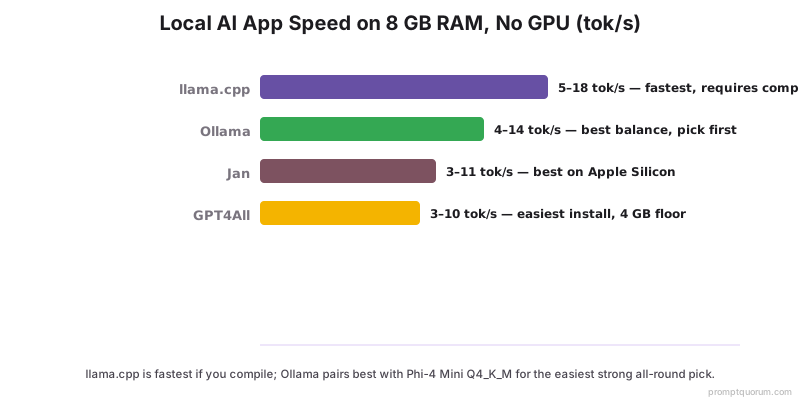
- Speed ranking on identical CPU: llama.cpp > Ollama > Jan > GPT4All. The gap is 15–25%, not 2–3×.
- Do not run 7B+ models on 8 GB RAM — context-window pressure plus the operating system itself will trigger swap and crater throughput by 5–10×.
How Do Ollama, GPT4All, Jan, and llama.cpp Compare on 8 GB RAM, No GPU?
Ranges below are aggregated from llama.cpp upstream benchmark threads, Hugging Face model card numbers, and r/LocalLLaMA test reports on 8 GB integrated-graphics laptops (Intel UHD 620 / Iris Xe / Ryzen 5 5500U vega / Apple M1 8 GB). Tokens/sec is measured on 200-token generations after model load, default context window 2048 unless noted. Versions checked August 2026: Ollama v0.33.1, Jan v0.7.9, GPT4All v3.10.0 (released February 2025 — no newer build since).
📍 In One Sentence
On an 8 GB RAM laptop with no dedicated GPU, Ollama with Phi-4 Mini Q4_K_M is the best all-round local AI setup — fastest generation speed among the no-code options, lowest thermal load, and the widest model library.
💬 In Plain Terms
On a low-end PC with 8 GB RAM and no GPU: install Ollama, run ollama pull phi4-mini, then ollama run phi4-mini. You get 4–14 tokens per second depending on your CPU — slow but usable for tasks where you send a prompt and wait for the response. For a no-terminal alternative, Jan installs like a normal app and curates its model list to models that fit in 8 GB.
App | Min RAM | Best model (8GB constraint) | Tokens/sec (CPU-only) | Heat | Verdict |
|---|---|---|---|---|---|
| Ollama | 6 GB | Phi-4 Mini Q4_K_M | 4–14 tok/s | Low | Best balance — pick first |
| Jan | 6 GB | Gemma 4 E2B Q4_K_M | 3–11 tok/s | Medium | Best GUI — no-terminal pick |
| llama.cpp | 4 GB | SmolLM 2 1.7B Q4_K_M | 5–18 tok/s | Low | Fastest if you compile |
| GPT4All | 4 GB | Llama 3.2 1B Q4_0 | 3–10 tok/s | Low | Fallback — no release since Feb 2025 |
📌Note: Apple M1 8 GB consistently outperforms 8 GB x86 laptops across all four apps in this table. If you have access to an Apple Silicon Mac, it is the best low-RAM hardware for local AI — the unified memory architecture gives the model access to the full 8 GB without the OS overhead penalty that Windows and Linux laptops face.
Which One Should You Pick?
The right app depends on whether you can use a terminal, whether you are on Windows or Mac, and how old your CPU is. Use this decision shortcut:
Your situation | Pick |
|---|---|
| Windows 10 laptop, 8 GB RAM, no terminal experience | Jan |
| Modern Ryzen / Intel 12th-gen, 8 GB, comfortable with terminal | Ollama |
| MacBook Air M1 / Mac mini M1 8 GB | Jan or Ollama |
| Linux laptop, want maximum tokens/sec | llama.cpp |
| 4 GB RAM machine (sub-spec) | GPT4All + Llama 3.2 1B Q4_0 |
| Older Intel Core i5-8250U / i7-7700U class CPU | Ollama + SmolLM 2 1.7B |
| Chromebook with Linux dev mode | llama.cpp + SmolLM 2 |
| Work laptop where you cannot install drivers | GPT4All (no driver / no admin rights install) |
💡Tip: When in doubt, start with Ollama. It runs on every OS, pulls models from a simple `ollama pull [model-name]` command, and exposes an OpenAI-compatible API if you want to integrate other tools later. If the terminal is a dealbreaker, Jan is the right alternative — same models, no command line, and still actively released. Reach for GPT4All only if you are on 4 GB of RAM or cannot get admin rights to install anything else.
How Fast Is Each App on Real Low-End Hardware?
Tokens-per-second on representative 8 GB RAM, no-discrete-GPU machines, August 2026. Numbers are community-reported ranges from llama.cpp upstream benchmark threads, Hugging Face model card data, and r/LocalLLaMA hardware-tagged tests. Each cell is the typical range across reported runs at default settings; outliers excluded.
Hardware | Model | Ollama | Jan | llama.cpp | GPT4All |
|---|---|---|---|---|---|
| Intel Core i5-8250U + UHD 620 (2018 ultraportable) | Phi-4 Mini Q4_K_M | 4–6 tok/s | 3–5 tok/s | 5–7 tok/s | 3–5 tok/s |
| AMD Ryzen 5 5500U + Vega 7 (2021 budget) | Phi-4 Mini Q4_K_M | 8–11 tok/s | 7–9 tok/s | 9–13 tok/s | 6–9 tok/s |
| Intel Core Ultra 5 125H + Arc iGPU (2024 mid-range) | Gemma 4 E2B Q4_K_M | 10–14 tok/s | 9–12 tok/s | 12–18 tok/s | 8–11 tok/s |
| Apple M1 8 GB (MacBook Air 2020) | Llama 3.2 1B Q5_K_M | 28–40 tok/s | 26–38 tok/s | 32–48 tok/s | 20–30 tok/s |
| Apple M1 8 GB | Phi-4 Mini Q4_K_M | 12–18 tok/s | 11–17 tok/s | 14–20 tok/s | 9–14 tok/s |
| Intel Core i5-8250U | SmolLM 2 1.7B Q4_K_M | 10–14 tok/s | 9–13 tok/s | 12–16 tok/s | 8–12 tok/s |
📌Note: Apple Silicon dominates this table because the M1 unified memory architecture lets the GPU and CPU share the same RAM at high bandwidth. On x86 laptops without a discrete GPU, integrated graphics is rarely worth the offload overhead — see the iGPU section below.
Why Does 8 GB RAM Feel So Tight, and When Does the Laptop Throttle?
On 8 GB RAM, the operating system already eats 2.5–3.5 GB before any model loads, leaving 4.5–5.5 GB for the model and its KV cache. That ceiling is what makes Phi-4 Mini (3.8B Q4 ≈ 2.5 GB) the practical sweet spot and rules out any 7B model at any quantization for sustained use.
- Working set vs. system RAM: A model file on disk is smaller than its loaded working set. Phi-4 Mini Q4_K_M is ≈ 2.5 GB on disk but ≈ 3.0–3.5 GB in RAM once you add the KV cache for a 2048-token context. Cut the context to 1024 and you save ≈ 400 MB.
- Swap death: When working set exceeds physical RAM, macOS and Linux start paging to SSD. Tokens-per-second drops 5–10× and the laptop becomes unresponsive. Watch
vm_stat(Mac) orfree -h(Linux) — if swap is climbing during inference, switch to a smaller model immediately. - Thermal throttling on ultraportables: Fanless and single-fan laptops (MacBook Air M1, XPS 13, Surface Laptop Go) hit thermal limits within 3–5 minutes of sustained inference and step CPU clocks down 20–35%. Tokens/sec drops correspondingly.
- Context length is a memory tax: Default 4096 context allocates a 4096-token KV cache up front. On 1B models that is 200–300 MB; on 4B models it is 600–900 MB. Cut to 1024 unless you actually need long input.
- Background apps matter more than CPU model: A Chrome window with 20 tabs is 1–2 GB. Slack is 400–600 MB. On 8 GB RAM, closing those before loading a 4B model is the biggest single tokens/sec win available.
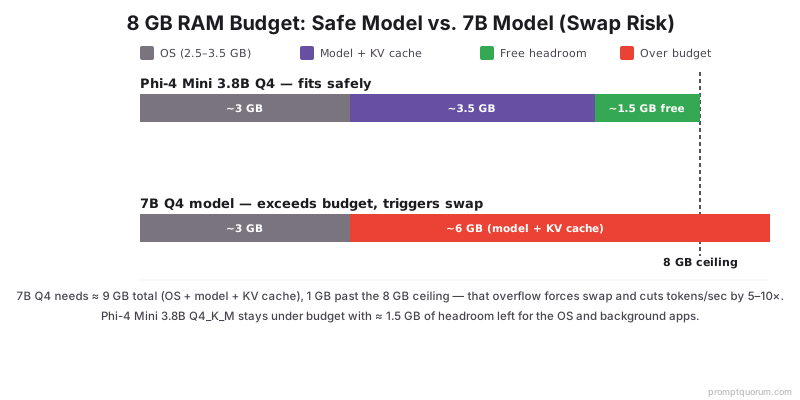
⚠️Warning: Do not load any 7B model on 8 GB RAM, even at Q2. Q2 7B is ≈ 2.5 GB on disk but the working set plus 2048 context lands at ≈ 5.5 GB, which crosses into swap on most Windows / Linux systems. The result is a 5–10× speed drop and frozen UI.
Which Model and Quantization Should You Load in Each App?
On 8 GB RAM with no discrete GPU, stay under 4B parameters at Q4_K_M or below. Q4_K_M is the standard quantization in 2026 — it loses ≈ 1% perplexity vs. FP16, fits in half the RAM, and is the default for most GGUF builds on Hugging Face. Listed by app:
- Ollama:
ollama pull phi4-mini(Phi-4 Mini 3.8B Q4_K_M, ≈ 2.5 GB) is the default recommendation. For max speed,ollama pull smollm2:1.7b(≈ 1.0 GB). For chat polish,ollama pull llama3.2:1b-instruct-q5_K_M(≈ 0.85 GB). - Jan: Use the curated catalog → "Gemma 4 E2B Instruct Q4_K_M" (≈ 2 GB, Google's on-device Gemma 4 variant) on Apple Silicon, or "Phi-4 Mini Q4_K_M" on x86. Jan also accepts a Hugging Face URL paste for any GGUF.
- GPT4All: Use the in-app model browser → "Llama 3.2 1B Instruct Q4_0" (≈ 0.7 GB) for the lightest install, or "Phi-4 Mini Q4_K_M" if RAM allows. GPT4All defaults are tuned conservatively, so every visible entry runs — but the catalog has not moved since the v3.10.0 build of February 2025, so newer models such as Gemma 4 E2B are not in it.
- llama.cpp: Download GGUF directly from Hugging Face —
bartowski/Phi-4-mini-instruct-GGUF,bartowski/SmolLM2-1.7B-Instruct-GGUF, orbartowski/Llama-3.2-1B-Instruct-GGUF. Run with./llama-cli -m model.gguf -p "..." -c 1024 -t 4. - Avoid on 8 GB / no-GPU: any 7B model at any quantization, any model above Q5_K_M (negligible quality gain, double the RAM cost), and any base model — always pick
-instructor-chatvariants for usable output.
💡Tip: Q4_K_M is not the same as Q4_0. Q4_K_M uses a smarter mixed-precision scheme and is ≈ 5–10% better quality at the same size. Pick Q4_K_M whenever both are available.
What Settings Buy You 30–60% More Tokens/Sec on Low-End PCs?
Default settings are tuned for 16 GB RAM and a discrete GPU. On 8 GB CPU-only, three knobs matter most: context length, batch size, and thread count. Tuned together they are worth 30–60% more tokens/sec on the same hardware.
- Context length — the biggest single win. Cut from 4096 (default) to 1024. In Ollama:
OLLAMA_NUM_CTX=1024 ollama run phi4-mini. In llama.cpp:-c 1024. RAM saving: 400–900 MB depending on model. Tokens/sec gain: 10–20%. - Thread count — match physical cores, not logical. Older CPUs (i5-8250U, Ryzen 5 5500U) have 4 physical / 8 logical cores. Set threads = 4, not 8. In llama.cpp:
-t 4. In Ollama:OLLAMA_NUM_THREAD=4. Hyperthreading hurts inference because both threads compete for the same FP/SIMD unit. - Batch size for prompt processing — set to 8 on weak CPUs. llama.cpp:
--n-batch 8. Default 512 thrashes the L2 cache on 4-core CPUs. Tokens/sec gain on 4B models: 15–25%. - KV cache quantization — set to q8_0 to halve KV RAM. llama.cpp:
--cache-type-k q8_0 --cache-type-v q8_0. RAM saving: 150–400 MB at 1024 context, more at higher contexts. Quality impact: imperceptible. - Disable mlock on swappy systems. llama.cpp
--no-mlock. On 8 GB systems, locking the model in RAM prevents the OS from making smart caching decisions. Counter-intuitive but consistently faster on Windows 10/11 with 8 GB. - Use AVX2 builds explicitly. Most prebuilt llama.cpp / Ollama binaries auto-detect AVX2 / AVX-512 and switch on the right kernel. If you compiled yourself, pass
-DGGML_AVX2=ON. AVX-512 detection:cat /proc/cpuinfo | grep avx512. AVX-512 buys another 10–15% on supported CPUs (Ice Lake / Tiger Lake / Rocket Lake / Zen 4+).
💡Tip: Stack all five tweaks and you typically see 35–55% more tokens/sec on the same model and same hardware. The single biggest win is the context cut from 4096 → 1024, which also slashes the time-to-first-token on a cold prompt.
Is Integrated Graphics Worth Using for Local AI?
On most 8 GB RAM laptops the answer is no — keep inference on the CPU. Integrated graphics share system RAM, so offloading layers does not give you extra memory; it just adds an offload-overhead penalty. Three exceptions worth knowing:
- Apple Silicon (M1/M2/M3/M4) — yes, always. The unified memory architecture means the "GPU" sees the same RAM at the same bandwidth as the CPU. Ollama, Jan, and llama.cpp all auto-use Metal acceleration on Mac with no flag needed. This is why an M1 8 GB outruns most 8 GB Windows laptops by 2–3×.
- Intel Arc iGPU (Meteor Lake / Lunar Lake / Arrow Lake) — sometimes. Intel Core Ultra chips (Ultra 5 125H, Ultra 7 155H, Ultra 7 258V) ship with an Arc iGPU that supports OpenVINO and SYCL acceleration. llama.cpp with
-DGGML_SYCL=ONis 30–60% faster than CPU-only on these. Setup is non-trivial. - AMD Ryzen 7000/8000 with Radeon 700M/800M iGPU — experimental. ROCm support on integrated Radeon is partial and finicky in 2026. CPU-only is the safer pick unless you enjoy debugging driver stacks.
- Older Intel UHD / Iris Plus / AMD Vega — skip. These iGPUs lack the FP16 throughput and memory bandwidth to beat a modern AVX2 CPU kernel. Stay on CPU.
💡Tip: The simplest test to check if your iGPU is worth using: run the same model on CPU-only vs. iGPU-accelerated for 10 generations and compare tokens/sec. On Apple Silicon, iGPU is always faster. On x86 integrated graphics, the answer is device-specific — test rather than assume.
Common Mistakes
Five mistakes that kill performance on 8 GB / no-GPU systems, with the fix for each:
- Mistake 1: Loading a 7B model "because Q4 fits on disk." The disk file is smaller than the loaded working set. 7B Q4 ≈ 4.4 GB on disk, ≈ 5.5–6.5 GB in RAM with a 2048 context, which crosses the 8 GB ceiling and triggers swap. Fix: stay at 4B or below. Phi-4 Mini Q4_K_M is the highest-quality model that consistently fits.
- Mistake 2: Leaving the context window at 4096. Default 4096 reserves a KV cache that adds 400–900 MB on top of the model. Fix: set context to 1024 unless you actually need long input.
OLLAMA_NUM_CTX=1024(Ollama),-c 1024(llama.cpp). - Mistake 3: Running with Chrome, Slack, and Spotify open. Each of those eats 0.5–2 GB. On 8 GB RAM, you have ≈ 5 GB after the OS. Background apps push you into swap before the model even loads. Fix: close everything except the AI app and a notes window before inference.
- Mistake 4: Picking Q8_0 "for quality." On 1B–4B models the quality difference between Q4_K_M and Q8_0 is below human-perceptible threshold for chat use, but Q8 doubles RAM cost and halves tokens/sec. Fix: stay on Q4_K_M unless you have a measurable benchmark showing Q8 helps your task.
- Mistake 5: Assuming a Raspberry Pi 4 is enough. 4 GB RAM and a 1.5 GHz Cortex-A72 can technically run TinyLlama 1B at 1–3 tok/sec, but the experience is unusable for chat. Fix: Raspberry Pi 5 with 8 GB RAM is the realistic ARM SBC floor — and even there, an 8 GB x86 laptop is faster.
💡Tip: All five mistakes have the same root cause: assuming desktop settings apply to a constrained laptop. Every default (context 4096, Q8 quality, all threads) is tuned for a machine with 16–32 GB RAM and a discrete GPU. On 8 GB CPU-only, you need to actively override the defaults. Think of the settings section in this guide as the "low-end PC preset" — apply all five tweaks before your first run.
Frequently Asked Questions
Can I run local AI on 4 GB RAM?
Yes, but only with sub-2B models like Llama 3.2 1B Q4_0 (≈ 0.7 GB on disk) or SmolLM 2 360M (≈ 0.25 GB on disk). GPT4All is the only GUI app of the four that lists 4 GB as its official minimum — llama.cpp also runs in 4 GB but ships as a command-line binary with no installer minimum. Expect 3–8 tok/sec on a modern CPU and noticeably more sluggish UI behavior because the OS has almost no headroom.
Does an old Intel CPU work for local AI?
Anything with AVX2 (Haswell, 2013, or newer) works in 2026. The practical floor is an Intel Core i5-8250U or older Ryzen 5 2500U, where Phi-4 Mini Q4 runs at 4–6 tok/sec. CPUs without AVX2 (pre-2013 Intel, original AMD Bulldozer) will load but run at 1–2 tok/sec, which is unusable for chat.
Will local AI brick my laptop?
No. Local inference is a normal user-space process — it cannot damage hardware. The worst-case outcome is the laptop running hot (90–100°C on ultraportables) and throttling, which the firmware protects against automatically. To avoid this, use a cooling pad on prolonged sessions, keep the room under 25°C, and stop inference if the chassis is uncomfortable to touch.
Is integrated graphics enough?
On Apple Silicon (M1+) it is more than enough — unified memory makes the iGPU effectively a low-end discrete GPU. On Intel Core Ultra (Meteor Lake / Arrow Lake) it can give 30–60% extra speed if you set up SYCL. On older Intel UHD / Iris Plus / AMD Vega, integrated graphics is slower than the CPU and not worth using.
Which model is fastest on CPU only?
Llama 3.2 1B Q4_0 and SmolLM 2 1.7B Q4_K_M are the fastest usable models. Llama 3.2 1B reaches 25–50 tok/sec on Apple M1 and 12–25 tok/sec on a modern Ryzen / Intel CPU. SmolLM 2 is similar speed with slightly more polished writing. Anything larger than 4B parameters is unlikely to feel fast on CPU-only systems.
Does adding RAM help more than upgrading the CPU?
On 8 GB systems, going to 16 GB is the single biggest practical upgrade because it unlocks 7B–8B models like Mistral Small Q4 and Qwen3 8B Q4. CPU upgrades give 20–50% more tokens/sec; the RAM upgrade gives 2–4× quality (jumping from 1B–4B to 7B–8B). If you can do only one, add RAM.
Can I run local AI on a Chromebook?
Only if Linux dev mode (Crostini) is available. The four apps in this guide all run in the Linux container — llama.cpp compiled from source is the most reliable on ARM Chromebooks, while x86 Chromebooks (Intel-based) work with Ollama or GPT4All. Performance maps to the underlying CPU; an Intel Core i3 / i5 Chromebook behaves like the equivalent Windows laptop.
Does Windows 10 still work for local AI in 2026?
Yes. All four apps support Windows 10 22H2. Ollama, Jan, and GPT4All ship signed Windows installers; llama.cpp ships prebuilt Windows binaries on its GitHub releases. Note that the GPT4All installer you download today is still the February 2025 v3.10.0 build, so prefer Ollama or Jan for a machine you intend to keep using. The end of Windows 10 mainstream support in October 2025 does not prevent installation, but security updates have ended, so consider a Linux dual-boot or Windows 11 upgrade for long-term use.
What's the cheapest laptop that runs local AI well?
A used 2021–2022 ThinkPad T14 or Dell Latitude 5430 with 16 GB RAM and a Ryzen 5 5500U or Intel i5-1235U costs €350–450 in 2026 and runs Phi-4 Mini Q4 at 8–14 tok/sec. Cheaper still: any 8 GB Apple M1 MacBook Air at €450–550 used, which beats most x86 laptops on tokens/sec thanks to unified memory.
Is GPT4All still safe to install in 2026?
It installs and runs fine, but its most recent release is v3.10.0 from 25 February 2025 — roughly 18 months without a new build. Practically that means no new model architectures in the bundled catalog and no security patches to the app itself, which matters more on a work machine than a personal one. Use it when its two remaining advantages apply — a 4 GB RAM ceiling, or a locked-down laptop where you cannot install anything needing admin rights — and use Jan otherwise.
Can I use a Raspberry Pi for local AI?
A Raspberry Pi 5 with 8 GB RAM runs Llama 3.2 1B Q4 at 4–7 tok/sec — usable but slow. A Pi 4 4 GB caps out at around 2 tok/sec on TinyLlama 1B. For real chat use, an 8 GB x86 laptop or M1 MacBook Air is faster, cheaper used, and easier to set up. Pi makes sense only for embedded, edge, or always-on workloads.