Key Takeaways
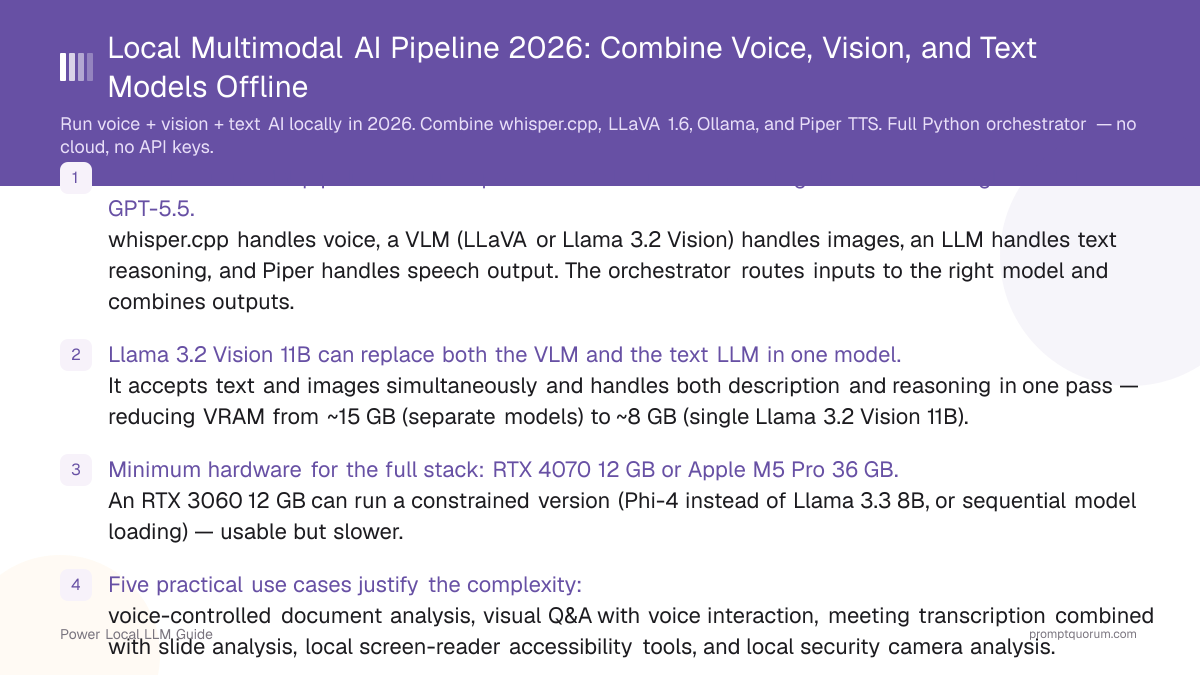
- A local multimodal pipeline is four separate models orchestrated together — not a single model like GPT-5.5. whisper.cpp handles voice, a VLM (LLaVA or Llama 3.2 Vision) handles images, an LLM handles text reasoning, and Piper handles speech output. The orchestrator routes inputs to the right model and combines outputs.
- Llama 3.2 Vision 11B can replace both the VLM and the text LLM in one model. It accepts text and images simultaneously and handles both description and reasoning in one pass — reducing VRAM from ~15 GB (separate models) to ~8 GB (single Llama 3.2 Vision 11B).
- Minimum hardware for the full stack: RTX 4070 12 GB or Apple M5 Pro 36 GB. An RTX 3060 12 GB can run a constrained version (Phi-4 instead of Llama 3.1 8B, or sequential model loading) — usable but slower.
- Five practical use cases justify the complexity: voice-controlled document analysis, visual Q&A with voice interaction, meeting transcription combined with slide analysis, local screen-reader accessibility tools, and local security camera analysis.
- Async orchestration is essential for acceptable performance. STT and vision can run in parallel when both audio and image inputs are available — the text LLM waits for both, then generates a combined response.
- Streaming LLM output to TTS reduces perceived latency by 0.3–0.7 seconds. Start generating audio from the first completed sentence while the LLM is still writing the rest of the response.
- This is not GPT-5.5. Separate models produce "seams" — the vision model's description passes as text to the LLM, losing some cross-modal reasoning. Quality on complex multimodal tasks is below frontier closed models but adequate for structured document and clear photo tasks.
Quick Facts
- Total VRAM for full stack: ~15 GB (whisper 3 GB + LLaVA 7B 6 GB + Llama 3.1 8B 6 GB). Piper runs on CPU.
- Simplified stack (Llama 3.2 Vision 11B): ~8 GB VRAM — handles both vision and text reasoning in one model.
- Voice latency (Whisper small, RTX 4070): ~200–500 ms STT. 500–1500 ms LLM first token. 100 ms Piper TTS.
- Image processing latency (LLaVA 7B, RTX 4070): ~2–5 seconds per image depending on resolution and prompt.
- No real-time video: VLMs process individual frames, not continuous video streams. For video, extract frames at 1 FPS and process each.
- Same Ollama instance for VLM + LLM: Ollama can serve Llama 3.2 Vision as both the vision model and the text model, saving VRAM.
- All components MIT or Apache 2.0 licensed (whisper.cpp MIT, LLaVA MIT, Llama 3.1 8B Llama 3 Community License, Piper MIT).
What Is a Multimodal AI Pipeline?
A multimodal AI system accepts multiple types of input (voice, images, text) and produces multiple types of output (text, speech). The cloud equivalent is GPT-5.5 — a single model that accepts audio, images, and text in any combination.
- Cloud approach (GPT-5.5): One giant model trained on all modalities simultaneously. Cross-modal reasoning is learned during training — the model can reason about the relationship between image content and voice queries natively.
- Local approach (this guide): Separate specialized models for each modality, connected by an orchestrator. More modular and cheaper to run, but produces "seams" — vision model output is serialized to text before being passed to the LLM.
- Why build local: Privacy (medical images, proprietary documents, confidential screenshots), cost (zero per-query fees), offline capability (no internet required after model download), customization (swap any component).
- Modular advantage: You can upgrade any one component independently. When a better local STT model ships, replace only the STT layer. When a better VLM ships, swap only the vision model — the rest of the pipeline is unchanged.
Cost: Local Pipeline vs Cloud APIs (Monthly)
At moderate usage (100+ queries/day), a local multimodal pipeline pays for itself in 3–6 months. At light usage (10 queries/day), break-even extends to 12–18 months.
📍 In One Sentence
A local multimodal pipeline costs $0/month in API fees after the one-time hardware investment ($600–3,500), with break-even against GPT-5.5 API costs ($135–225/mo) in 3–18 months depending on query volume.
Usage | GPT-5.5 API | Google Cloud | Local |
|---|---|---|---|
| 100 voice queries/day | $90–150/mo | $60–120/mo | $0 |
| 50 image analyses/day | $45–75/mo | $30–60/mo | $0 |
| Combined (typical) | $135–225/mo | $90–180/mo | $0 |
| Hardware (one-time) | $0 | $0 | $600–3,500 |
| Break-even | — | — | 3–18 months |
The local pipeline pays for itself in 3–6 months at moderate usage (100+ queries/day). At light usage (10 queries/day), the break-even extends to 12–18 months.
Architecture Overview
The local multimodal pipeline uses a router-orchestrator pattern: inputs are typed at the boundary, routed to the appropriate model, and the outputs are combined by the orchestrator before generating the final response.
- Input types: Microphone audio (voice), camera or file image (vision), keyboard text (text).
- Router logic: Detect input type at the boundary. Audio → STT model. Image → VLM. Text → LLM directly. If both audio and image arrive together, process in parallel and combine.
- Model registry: Each input type maps to a handler function that calls the appropriate model and returns a text description/transcript.
- Orchestrator: Collects all model outputs, combines them into a single prompt for the text LLM, gets the LLM response, and routes it to TTS for voice output or to the screen as text.
- Output types: Voice response (Piper TTS), text on screen, or structured data (JSON) for integration with other systems.
- Parallel processing: STT and VLM can process simultaneously — an audio query about an image can have both processed in parallel, reducing total latency by 40–60% vs. sequential processing.
The Component Stack
Full stack with VRAM requirements and role of each component.
📍 In One Sentence
The full local multimodal stack uses ~15 GB VRAM: Whisper large-v3 (3 GB) + LLaVA 1.6 7B (6 GB) + Llama 3.1 8B (6 GB); Piper TTS runs on CPU at no VRAM cost.
💬 In Plain Terms
You can cut VRAM to 8 GB by using Llama 3.2 Vision 11B as both the vision model and the text model — it handles photos AND conversation in one model, while Whisper still does voice and Piper still does speech output.
Layer | Tool | Model | VRAM | Role |
|---|---|---|---|---|
| STT | whisper.cpp | Whisper large-v3 | ~3 GB | Voice → text transcript |
| Vision | Ollama | LLaVA 1.6 7B | ~6 GB | Image → text description |
| Reasoning | Ollama | Llama 3.1 8B Q4 | ~6 GB | Text → text response |
| TTS | Piper | en_US-lessac-medium | CPU only | Text → voice output |
| Total (separate models) | ~15 GB | Full pipeline |
💡Tip: Use Llama 3.2 Vision 11B instead of separate LLaVA + Llama 3.1 8B to cut VRAM to ~8 GB. Llama 3.2 Vision handles both image description and text reasoning in one model, eliminating the need for a separate VLM.
💡Tip: Alternative VLM: Qwen2-VL 7B (~6 GB VRAM) — stronger than LLaVA on multilingual OCR and document understanding. Recommended if processing Chinese, Japanese, or Korean documents.
Hardware Tiers for Multimodal
Five hardware configurations, ordered by capability and VRAM. Each supports a different subset of the full multimodal stack.
Entry
- GPU:
- RTX 3060 12 GB
- RAM:
- 16 GB
- Can Run:
- STT + Phi-4 (vision separately, sequential)
- Latency (voice query + image):
- 5–10 sec
Mid
- GPU:
- RTX 4070 12 GB
- RAM:
- 32 GB
- Can Run:
- Full stack with 7B models (LLaVA 7B + Llama 3.1 8B, tight fit)
- Latency (voice query + image):
- 3–6 sec
High
- GPU:
- RTX 4090 24 GB
- RAM:
- 64 GB
- Can Run:
- Full stack with 13B VLM + 8B LLM simultaneously
- Latency (voice query + image):
- 2–4 sec
Apple Mid
- GPU:
- M5 Pro 36 GB
- RAM:
- 36 GB unified
- Can Run:
- Full stack with 8B models via Metal (recommended). Qwen2-VL 7B + Llama 3.1 8B fits comfortably in 36 GB with room for Whisper large-v3.
- Latency (voice query + image):
- 2–4 sec
Apple High
- GPU:
- M5 Max 128 GB
- RAM:
- 128 GB unified
- Can Run:
- Full stack with 70B models — best local quality
- Latency (voice query + image):
- 1–3 sec
Latency is measured from end of voice query to start of TTS playback, including image processing if an image is present.
💡Tip: The M5 Max with 128 GB unified memory is the ultimate local multimodal platform. It can run Whisper large-v3 (3 GB) + Llama 3.2 Vision 90B (~64 GB) + Piper TTS simultaneously — the 90B vision model is the highest-quality local VLM available, approaching GPT-5.5 on document and photo tasks. No discrete GPU setup can match this without multi-GPU configurations costing 2–3× more.
Use Case 1: Voice-Controlled Document Analyzer
Speak a question about a document image; the pipeline transcribes your voice, processes the document visually, and reads the answer aloud. This is the core use case for combining STT + VLM + LLM + TTS.
- Example: Photograph an invoice and say "What is the total amount due and the payment deadline?"
- Pipeline: Whisper transcribes the question → image sent to LLaVA or Llama 3.2 Vision → VLM extracts invoice text and structure → LLM combines question + VLM output → Piper reads the answer aloud.
- Prompt: "Here is an image: [VLM description]. The user asks: [transcript]. Answer the question based on the image content."
- Best VLM: MiniCPM-V 2.6 or Llama 3.2 Vision 11B for invoice/document OCR accuracy.
- Privacy value: Medical records, legal documents, financial statements — processed entirely locally with no data leaving the machine.
Use Case 2: Visual Q&A Assistant
Point a camera at an object or scene, ask a question verbally, and receive a spoken answer. This use case is the closest local equivalent to Google Lens with voice interaction.
- Applications: Warehouse inventory (photograph a shelf, ask "How many units of SKU-4429 are present?"), field inspection (photograph machinery damage, ask "Is this safe to operate?"), accessibility (describe objects for visually impaired users).
- Implementation: Capture a camera frame (OpenCV
cv2.VideoCapture(0).read()), save as JPEG, pass to VLM alongside the Whisper transcript. - Best models: LLaVA 1.6 7B or Llama 3.2 Vision 11B for general object/scene understanding.
- Latency: 3–6 seconds for image capture + VLM processing + LLM + TTS on RTX 4070. Reduce with smaller VLM (Moondream 2 for simple object identification).
Use Case 3: Meeting Transcription + Slide Analysis
Run Whisper continuously during a meeting to build a transcript, while periodically capturing slide screenshots for VLM analysis. At the end, combine transcript + slide content for a local summary and action items — zero cloud, zero data exposure.
- STT: Run faster-whisper in streaming mode during the meeting. Accumulate segments into a transcript buffer.
- Vision: Every time a new slide appears (detect via screen capture diff), capture a screenshot and pass to LLaVA for description.
- Combination: At end of meeting (or on-demand), pass transcript + slide descriptions to Llama 3.1 8B: "Summarize this meeting and list action items. Here is the transcript: [...]. Here are the slide contents: [...]."
- Output: Voice-read summary (Piper TTS) + text file saved locally.
- GDPR value: Entire meeting processing is local. No audio, transcript, or slides sent to any cloud service. Compliant for legal, medical, and corporate contexts.
Use Case 4: Local Accessibility Tool
A local multimodal pipeline can serve as a screen reader and voice-controlled UI assistant for users with visual or motor impairments — running offline without privacy concerns of cloud accessibility services.
- Screen reader: Capture a screenshot every 2 seconds → LLaVA describes what is on screen → Piper reads it aloud. Add voice commands (Whisper) to control what to describe next.
- Voice navigation: Whisper transcribes voice commands → LLM interprets intent → execute keyboard/mouse actions via pyautogui. No internet required.
- Privacy benefit: Users with disabilities often use accessibility tools in sensitive contexts (medical portals, financial accounts). A local tool ensures no screen content is transmitted to third parties.
- Low-connectivity use: Works in hospitals, government buildings, and areas with restricted internet — important for institutional accessibility deployments.
- Model choice for accessibility: Moondream 2 for fast screen descriptions (2 GB VRAM, ~1 sec per frame). LLaVA 7B for richer descriptions (6 GB VRAM, ~3 sec per frame).
Use Case 5: Local Security Camera Analysis
Capture frames from an IP camera, run motion detection locally, and trigger VLM analysis only when movement is detected — without cloud camera services or third-party video storage.
- Frame capture: Use OpenCV to capture a frame every 5–10 seconds from an IP camera via RTSP (
cv2.VideoCapture("rtsp://camera-ip:554/stream")). For USB cameras, use device index 0. - Motion detection: Compute the diff between consecutive frames with
cv2.absdiff(). Skip frames below the motion threshold — this avoids unnecessary VLM calls on static, empty scenes. - VLM analysis: When motion is detected, send the frame to the VLM: "Describe what is happening. Is there a person? What are they doing?"
- Alert output: If the response indicates a person or anomaly, trigger a local desktop notification and a Piper TTS announcement ("Person detected at front door"). No cloud notification service required.
- Privacy advantage: Ring and Nest send video to AWS and Google servers respectively. This setup keeps all footage on your hardware — no subscription, no third-party video storage, no data sharing with external services.
- Best VLM for speed: Moondream 2 for fast frame processing (~1 second per frame, ~2 GB VRAM) or LLaVA 7B for richer scene descriptions (~3 seconds per frame, ~6 GB VRAM).
- Hardware note: A dedicated Mac Mini M5 (~$600) running this stack 24/7 consumes ~15–25W idle — less annually in electricity than a Ring Doorbell Pro subscription.
Building the Python Orchestrator
An async Python orchestrator routes inputs to the right model and combines outputs. Using asyncio allows STT and vision processing to run in parallel.
#!/usr/bin/env python3
"""Local multimodal orchestrator: voice + vision + text, all offline."""

import asyncio
import base64
import subprocess
import tempfile
import sounddevice as sd
import soundfile as sf
import numpy as np
import requests

OLLAMA_URL = "http://localhost:11434/api/generate"
WHISPER_BIN = "./whisper.cpp/main"
WHISPER_MODEL = "./whisper.cpp/models/ggml-small.bin"
VISION_MODEL = "llava:7b"        # or "llama3.2-vision" for combined VLM+LLM
TEXT_MODEL = "llama3.1:8b"
PIPER_VOICE = "voices/en_US-lessac-medium.onnx"
SAMPLE_RATE = 16000

async def transcribe_audio(audio: np.ndarray) -> str:
    """Convert audio array to text using whisper.cpp."""
    with tempfile.NamedTemporaryFile(suffix=".wav", delete=False) as f:
        sf.write(f.name, audio, SAMPLE_RATE)
        loop = asyncio.get_event_loop()
        result = await loop.run_in_executor(None, lambda: subprocess.run(
            [WHISPER_BIN, "-m", WHISPER_MODEL, "-f", f.name, "--no-timestamps", "--no-prints"],
            capture_output=True, text=True
        ))
    return result.stdout.strip()

async def describe_image(image_path: str) -> str:
    """Get text description of an image using local VLM via Ollama."""
    with open(image_path, "rb") as f:
        image_b64 = base64.b64encode(f.read()).decode("utf-8")
    loop = asyncio.get_event_loop()
    response = await loop.run_in_executor(None, lambda: requests.post(
        OLLAMA_URL,
        json={
            "model": VISION_MODEL,
            "prompt": "Describe the content of this image in detail, including any text visible.",
            "images": [image_b64],
            "stream": False,
        },
    ))
    return response.json()["response"]

async def reason(transcript: str, image_description: str | None = None) -> str:
    """Generate a response combining transcript and optional image description."""
    if image_description:
        prompt = (
            f"The user asked (via voice): {transcript}\n\n"
            f"The image shows: {image_description}\n\n"
            "Answer the question based on the image content. Be concise — 2-3 sentences."
        )
    else:
        prompt = transcript
    # Note: /api/generate is for single-turn queries.
    # For multi-turn conversation with context, use
    # /api/chat with a messages array instead.
    loop = asyncio.get_event_loop()
    response = await loop.run_in_executor(None, lambda: requests.post(
        OLLAMA_URL,
        json={"model": TEXT_MODEL, "prompt": prompt, "stream": False},
    ))
    return response.json()["response"]

async def speak(text: str) -> None:
    """Convert text to speech using Piper TTS."""
    with tempfile.NamedTemporaryFile(suffix=".wav", delete=False) as f:
        await asyncio.get_event_loop().run_in_executor(None, lambda: subprocess.run(
            f'echo "{text}" | piper --model {PIPER_VOICE} --output_file {f.name}',
            shell=True, check=True
        ))
        data, sr = sf.read(f.name)
        sd.play(data, sr)
        sd.wait()

async def process_query(audio: np.ndarray, image_path: str | None = None) -> None:
    """Process a multimodal query: transcribe audio and optionally describe image in parallel."""
    if image_path:
        # Run STT and vision in parallel
        transcript, image_desc = await asyncio.gather(
            transcribe_audio(audio),
            describe_image(image_path),
        )
    else:
        transcript = await transcribe_audio(audio)
        image_desc = None

    if not transcript or len(transcript) < 3:
        return

    print(f"You: {transcript}")
    if image_desc:
        print(f"Image: {image_desc[:100]}...")

    response = await reason(transcript, image_desc)
    print(f"Assistant: {response}")
    await speak(response)

async def main():
    print("Multimodal assistant ready. Ctrl+C to stop.")
    while True:
        audio = sd.rec(int(5 * SAMPLE_RATE), samplerate=SAMPLE_RATE, channels=1, dtype="int16")
        sd.wait()
        await process_query(audio)  # Pass image_path="photo.jpg" for image queries

if __name__ == "__main__":
    asyncio.run(main())
Performance Optimization
Key optimizations to achieve acceptable latency on the full multimodal stack:
📍 In One Sentence
The two biggest optimizations are: (1) run STT and VLM in parallel using asyncio when both audio and image are available, and (2) stream LLM output to TTS sentence-by-sentence so audio starts before the LLM finishes.
💬 In Plain Terms
Without parallelism, the pipeline is: STT (0.5s) → VLM (3s) → LLM (1s) → TTS (0.1s) = 4.6s total. With parallel STT + VLM, it becomes: max(STT, VLM) (3s) → LLM (1s) → TTS (0.1s) = 4.1s. Add streaming TTS and the user hears audio at 3.5s instead of 4.6s.
- Parallel STT + VLM: Use
asyncio.gather(transcribe_audio(), describe_image())to run both simultaneously. Saves 0.3–2 seconds depending on STT model size. - Keep models warm: Ollama keeps models in VRAM automatically between requests. whisper.cpp in stream mode stays loaded. Never reload between queries.
- Stream LLM → TTS: Detect sentence boundaries in the streaming LLM output (
.,!,?). Pass each completed sentence to Piper while the LLM continues generating. - VRAM management: If total VRAM is tight, unload the VLM after image processing (Ollama HTTP delete endpoint) before loading the text LLM. Adds ~2–3 seconds but allows 8 GB GPU to handle the full stack.
- Use Llama 3.2 Vision as combined VLM + LLM: Eliminates model switching overhead entirely — one model handles both vision description and text reasoning. Trade-off: slightly weaker on pure text reasoning vs. Llama 3.1 8B.
- TTS first audio target: Piper generates first audio within 50–100 ms of receiving text. Stream one sentence at a time for sub-second perceived TTS latency.
Limitations and Honest Assessment
A local multimodal pipeline is not GPT-5.5. Being clear about the gaps prevents frustration and helps you design around limitations.
- Modality seams: Vision output is serialized to text before passing to the text LLM. The LLM cannot reason directly about image features — it reasons about a text description of the image. This loses information for tasks requiring subtle visual reasoning.
- No real-time video: Local VLMs process single frames, not continuous video. For video, extract frames at 0.5–2 FPS and process sequentially. This means you cannot ask "what just happened in the last 5 seconds of this video."
- VLM quality gap: Local vision models (LLaVA 7B, Llama 3.2 Vision 11B) are behind GPT-5.5 Vision on complex infographics, handwritten text, ambiguous scenes, and tasks requiring broad world knowledge alongside visual understanding.
- VRAM pressure: Running three models simultaneously on a single GPU requires careful VRAM management. On 12 GB GPUs, you are at the edge — model sizes must be carefully chosen to avoid OOM (out of memory) errors.
- Latency vs. cloud: A cloud multimodal call (GPT-5.5) takes 1–3 seconds for audio + image + text. A local pipeline takes 3–8 seconds on comparable hardware — slower, but with full privacy and zero per-query cost.
- Consistency: Local models produce more variable output quality than cloud models with extensive RLHF. Expect occasional hallucinations in both vision descriptions and LLM responses.
Frequently Asked Questions
Can I use a single model for both vision and text reasoning?
Yes. Llama 3.2 Vision 11B handles both image understanding and text reasoning in one model — you can skip the separate LLaVA + Llama 3.1 8B setup. This cuts VRAM from ~15 GB to ~8 GB and eliminates one Ollama API call. The trade-off is slightly weaker performance on pure text reasoning tasks compared to a dedicated Llama 3.1 8B.
How do I handle video input in a local multimodal pipeline?
Extract frames from video using OpenCV (cv2.VideoCapture) and process each frame individually through the VLM. For a 1-minute video at 1 FPS, you get 60 frames — each taking 2–5 seconds to process, so the full video would take 2–5 minutes to analyze. For real-time video monitoring, process only 1 frame every 2–3 seconds and use motion detection to skip static frames. Full video understanding (tracking objects across frames, understanding temporal sequences) is beyond current local VLM capabilities.
What is the minimum GPU VRAM for the full multimodal stack?
On a shared-VRAM setup (all models in VRAM simultaneously), 15 GB is required for Whisper large-v3 + LLaVA 7B + Llama 3.1 8B. With Llama 3.2 Vision 11B replacing both VLM and text LLM, 8 GB VRAM is sufficient. On a 12 GB GPU (RTX 4070), you can run the full separate-model stack at very tight VRAM with small quantization, or use Llama 3.2 Vision 11B for the combined approach. On 8 GB VRAM (RTX 4060), use Llama 3.2 Vision 11B with aggressive quantization (Q3_K) or swap models in/out between vision and text queries.
Can the multimodal pipeline process PDFs?
Not directly — local VLMs accept image input, not PDF input. Convert PDF pages to images first using pdf2image (pip install pdf2image) or pypdfium2 (pip install pypdfium2). Then pass each page image to the VLM separately. For a 10-page PDF, you generate 10 separate image descriptions, then pass all descriptions to the text LLM for a combined analysis or summary. This is slower than native PDF support but produces good results on structured documents.
Is the local multimodal pipeline GDPR compliant for medical or legal use?
A local multimodal pipeline that generates zero network traffic during operation reduces data-transfer risk, but GDPR/HIPAA compliance depends on lawful basis, DPIA, retention policy, and breach procedures—not just data location. To assess compliance: run Wireshark during operation to confirm zero outbound packets from the pipeline process. Log storage is critical — if your orchestrator stores conversation history or image files, those stores are subject to strict retention and access-control requirements. Use ephemeral in-memory storage or encrypted local storage with documented retention policies. For medical/legal use, consult your legal and compliance teams.
Can I add web search to the multimodal pipeline?
Yes. Add a search step between the orchestrator and the text LLM. Use the DuckDuckGo API or a local RAG system (AnythingLLM, PrivateGPT) to retrieve context before the LLM reasoning step. The LLM then reasons over the transcript + image description + search results combined. This adds 0.5–2 seconds to latency but enables answering current-events questions alongside visual analysis.
How much electricity does the full multimodal stack use running 24/7?
Idle with models warm in VRAM: ~50–80W (desktop GPU), ~15–25W (Mac Mini M5 Pro). Active processing: ~150–300W (desktop GPU), ~30–60W (Mac Mini M5 Pro). Monthly cost at $0.15/kWh: approximately $5–15 (Mac Mini) or $15–35 (desktop). This is less than running a cloud API at comparable query volumes — a Mac Mini running the full stack 24/7 costs less in electricity per month than two days of GPT-5.5 API usage at 100 queries/day.
Sources
- whisper.cpp on GitHub — STT component source and documentation.
- faster-whisper on GitHub — Python STT alternative with built-in VAD for streaming.
- LLaVA project page — Vision model architecture and model cards.
- Llama 3.2 Vision model card — Meta's multimodal model supporting image + text reasoning.
- Ollama documentation — Vision model API, multimodal request format.
- Piper TTS on GitHub — TTS output component, voice pack library.
- Coqui TTS on GitHub — Alternative TTS with voice cloning support.