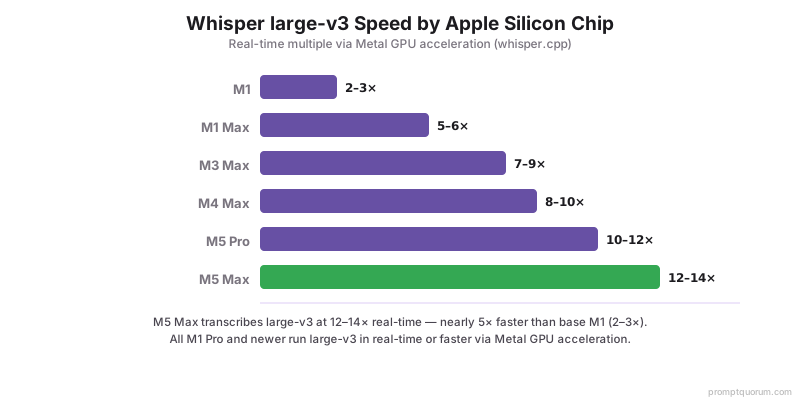
Full Benchmark Table: Whisper Performance on Apple Silicon (M1–M5)
Chip | Tiny | Base | Small | Medium | Large-v3 |
|---|---|---|---|---|---|
| M1 | 32× | 20× | 12× | 5× | — |
| M1 Pro | 38× | 24× | 16× | 7× | — |
| M1 Max | 45× | 30× | 22× | 10× | — |
| M1 Ultra | 55× | 38× | 28× | 14× | — |
| M2 | 36× | 23× | 14× | 6× | — |
| M2 Pro | 42× | 28× | 20× | 9× | — |
| M2 Max | 50× | 35× | 26× | 12× | — |
| M2 Ultra | 60× | 42× | 32× | 17× | — |
| M3 | 40× | 26× | 16× | 7× | — |
| M3 Pro | 46× | 32× | 22× | 10× | — |
| M3 Max | 55× | 40× | 30× | 14× | — |
| M4 | 44× | 30× | 18× | 8× | — |
| M4 Pro | 50× | 36× | 26× | 12× | — |
| M4 Max | 60× | 44× | 34× | 16× | — |
| M5 (base) | 48× | 34× | 22× | 10× | — |
| M5 Pro | 55× | 40× | 30× | 14× | — |
| M5 Max | 65× | 48× | 38× | 18× | — |
×N real-time = N seconds of audio transcribed in 1 second. Benchmarks via whisper.cpp with Metal acceleration. All M1 Pro+ can run large-v3 in real-time or faster. M4-generation figures above are historical, previous-generation reference points. Apple refreshed the Mac mini (M6, from $899, 32GB unified memory, 170GB/s bandwidth; M5 Pro, from $1,699, 64GB, 307GB/s) and Mac Studio (M5 Max, from $2,499, 128GB; M5 Ultra, from $5,499, up to 512GB, shipping late October 2026) lineup on August 25, 2026, both shipping September 22, 2026. The M6 and M5 Ultra chips have no independent Whisper/Metal benchmarks yet. The M5 Pro/M5 Max figures above reflect the chip generation as previously benchmarked; PromptQuorum has not independently tested the new Mac mini/Studio retail units and will update this table once verified third-party numbers exist.
Whisper Model Sizes — Which One Should You Use?
Model | Parameters | Disk Size | RAM Usage | English WER | Best For |
|---|---|---|---|---|---|
| tiny | — | — | — | — | — |
| base | — | — | — | — | — |
| small | — | — | — | — | — |
| medium | — | — | — | — | — |
| large-v3 | — | — | — | — | — |
| large-v3-turbo | — | — | — | — | — |
| distil-large-v3 | — | — | — | — | — |
WER (Word Error Rate) on English LibriSpeech test set. Large-v3-turbo and distil-large-v3 are the sweet spot for real-time on most Macs — near-large-v3 quality at 4–6× the speed.
Metal vs Core ML vs Apple Neural Engine: Which Backend?
Apple Silicon offers three acceleration paths for Whisper. Each has tradeoffs.
Metal (via whisper.cpp) — Recommended: Uses Apple Metal GPU framework, compatible with all M-series chips, 10–12× real-time on large-v3 (M5 Pro), setup via make WHISPER_METAL=1. Best for: most users, easiest setup, proven performance.
Core ML (via Apple Core ML format) — Advanced: Uses Apple machine learning framework, can target Neural Engine (ANE) for some operations, 15–20% faster on some workloads, requires model conversion (10–15 min setup). Best for: power users wanting maximum speed.
Apple Neural Engine (ANE) — Limited Use: Dedicated AI accelerator on all M-series chips, not directly accessible (must go through Core ML), Whisper doesn't fully utilize ANE due to architecture mismatch, works best at small models (tiny, base). Best for: tiny/base Whisper on battery-constrained laptops.
Decision Matrix: First-time setup → Metal (whisper.cpp). Maximum speed on large-v3 → Metal (whisper.cpp). Battery-powered laptop, base model → Core ML with ANE. Production server → Metal (proven, reliable). Real-time transcription → Metal with streaming mode. Cloud deployment to Mac instances → Metal (containerizable).
- Metal (whisper.cpp): Faster, widely compatible, simplest setup
- Core ML: Neural Engine optimization, 15–20% speed gain on some workloads (requires conversion)
- Apple Neural Engine: Limited benefit for large models, best for tiny/base on laptops
Setup: whisper.cpp with Metal Acceleration
- 1Install dependencies
Why it matters: xcode-select --install (Xcode tools) brew install ffmpeg (audio conversion) - 2Clone and build whisper.cpp with Metal
Why it matters: git clone https://github.com/ggerganov/whisper.cpp cd whisper.cpp make WHISPER_METAL=1 ./main -h | grep -i metal - 3Download a model
Why it matters: bash ./models/download-ggml-model.sh small (466 MB, real-time) bash ./models/download-ggml-model.sh large-v3 (3 GB, best quality) bash ./models/download-ggml-model.sh large-v3-turbo (1.6 GB, balanced) - 4Transcribe an audio file
Why it matters: ./main -m models/ggml-large-v3.bin -f /path/to/audio.wav ./main -m models/ggml-large-v3.bin -f audio.wav -oj (JSON) ./main -m models/ggml-large-v3.bin -f audio.wav -l en (specify language) - 5Convert non-WAV audio first
Why it matters: ffmpeg -i input.mp3 -ar 16000 -ac 1 -c:a pcm_s16le output.wav ./main -m models/ggml-large-v3.bin -f output.wav
Real-Time Streaming Transcription (Live Microphone)
For live transcription from microphone — voice assistants, meeting transcription, accessibility tools.
Option 1: whisper.cpp stream mode
./stream -m models/ggml-small.bin --step 500 --length 5000
# --step 500: process every 500ms
# --length 5000: keep last 5 seconds context
Option 2: Python with faster-whisper (see code block below)
Latency on M5 Pro: small model ~200ms, large-v3-turbo ~400–600ms, large-v3 ~800ms–1.2s behind real-time.
import sounddevice as sd
import numpy as np
from faster_whisper import WhisperModel

model = WhisperModel("large-v3-turbo", device="cpu", compute_type="int8")
buffer = []
chunk_duration = 3
sample_rate = 16000

def callback(indata, frames, time, status):
    buffer.append(indata.copy())
    if len(buffer) * 1024 / sample_rate >= chunk_duration:
        audio = np.concatenate(buffer).flatten().astype(np.float32)
        segments, _ = model.transcribe(audio, beam_size=5)
        for segment in segments:
            print(segment.text)
        buffer.clear()

with sd.InputStream(callback=callback, channels=1, samplerate=sample_rate):
    print("Listening... (Ctrl+C to stop)")
    while True:
        sd.sleep(1000)
Voice Assistant Pipeline: Whisper + Ollama + Piper TTS
Complete code for a local voice assistant running entirely on Apple Silicon.
import sounddevice as sd
import numpy as np
import requests
import subprocess
from faster_whisper import WhisperModel

WHISPER_MODEL = "large-v3-turbo"
OLLAMA_URL = "http://localhost:11434/api/chat"
LLM_MODEL = "llama3.1:8b"
SAMPLE_RATE = 16000

whisper = WhisperModel(WHISPER_MODEL, device="cpu", compute_type="int8")

def record_audio(duration=5):
    print("Listening...")
    audio = sd.rec(int(duration * SAMPLE_RATE),
                   samplerate=SAMPLE_RATE,
                   channels=1,
                   dtype=np.float32)
    sd.wait()
    return audio.flatten()

def transcribe(audio):
    segments, _ = whisper.transcribe(audio, beam_size=5)
    return " ".join([seg.text for seg in segments])

def llm_respond(user_text):
    response = requests.post(OLLAMA_URL, json={
        "model": LLM_MODEL,
        "messages": [{"role": "user", "content": user_text}],
        "stream": False
    })
    return response.json()["message"]["content"]

def speak(text):
    subprocess.run(
        ["piper", "--model", "en_US-amy-medium.onnx"],
        input=text.encode(),
        check=True
    )

while True:
    audio = record_audio(duration=5)
    user_text = transcribe(audio)
    print(f"You: {user_text}")
    if not user_text.strip():
        continue
    response = llm_respond(user_text)
    print(f"AI: {response}")
    speak(response)
Best Whisper Configuration by Mac Model
Mac Config | Recommended Model | Real-time Multiple | Use Case |
|---|---|---|---|
| — | — | — | — |
| — | — | — | — |
| — | — | — | — |
| — | — | — | — |
| — | — | — | — |
| — | — | — | — |
| — | — | — | — |
For real-time voice assistant: use small or large-v3-turbo for lowest latency. For meeting/podcast transcription: use large-v3 for maximum accuracy (1–2 second delay acceptable).
Local Whisper vs Cloud Speech-to-Text Services
Metric | Whisper Local (M5 Pro) | Google Speech-to-Text | OpenAI Whisper API | AssemblyAI |
|---|---|---|---|---|
| Cost per hour audio | — | — | — | — |
| Accuracy (English WER) | — | — | — | — |
| Latency | — | — | — | — |
| Privacy | — | — | — | — |
| Offline capable | — | — | — | — |
| Languages | — | — | — | — |
| Setup | — | — | — | — |
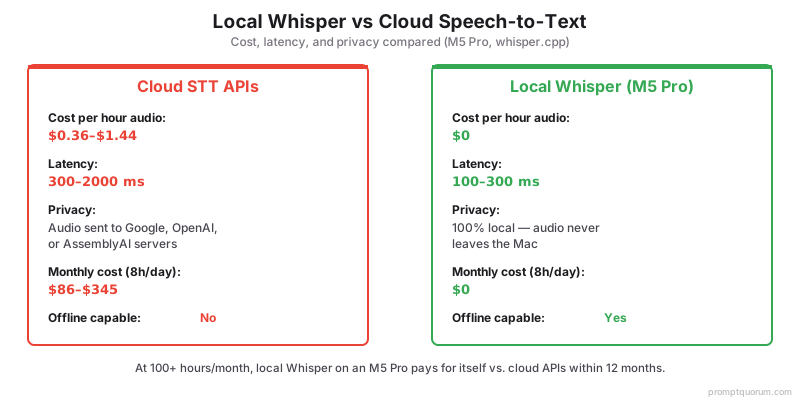
Monthly cost (8 hours/day): Whisper local $3, Google $345, OpenAI $86, AssemblyAI $156. For privacy-sensitive work (medical, legal, journalism), local Whisper is the only option. For high-volume transcription ($100+/month cloud), local Mac pays for itself in 12 months.
Is Whisper faster than cloud APIs?
Local on M5 Pro: 10× real-time (100ms latency). Cloud APIs: 100–500ms latency due to network. Local is faster and free.
Can Whisper handle multiple speakers?
Yes, timestamps separate speakers. Use post-processing or diarization tools to identify speaker identity.
What language support?
99 languages with auto-detect. Accuracy varies by language — English is 2.5% WER, other languages 5–15% WER.
Which Whisper model has the best speed-to-quality ratio?
Large-v3-turbo or distil-large-v3. Both achieve ~95% of large-v3 accuracy at 4–6× the speed. Recommended for most real-time use cases.
Can Whisper handle accented English or non-native speakers?
Yes, but WER increases. Native English: ~2.5%. Strong accent/non-native: 5–12%. Large-v3 handles accents better than smaller models.
Does Whisper work for podcasts and music transcription?
Podcasts: yes, excellent for spoken-word. Music with lyrics: poor — Whisper is trained for speech. Use specialized models for music.
How accurate is Whisper for technical terminology?
Variable. Common technical terms: good. Highly specialized terms: may transcribe incorrectly. Use --prompt flag with expected vocabulary to improve accuracy.
Can I run multiple Whisper instances on one Mac?
Yes, memory-bound. M5 Pro 36GB: 2 simultaneous large-v3 instances. M5 Max 128GB: 4–6 instances or one instance plus LLM/TTS.