Key Takeaways
- Stack: Continue.dev (free VS Code extension) + Ollama + Qwen3-Coder 30B Q4_K_M.
- Quality is within 5-10% of Copilot for everyday TS/Python/Rust work in August 2026.
- Cost breakeven is 8-14 months on existing RTX 3060+ or M3+ hardware.
- Privacy advantage: zero code ever leaves your machine — important for NDA work.
- Copilot still wins on obscure libraries with thin public training data.
Quick Facts
- Recommended stack: Continue.dev (free, open-source) + Ollama + Qwen3-Coder 30B Q4_K_M.
- Quality: 90-95% of Copilot Pro on TypeScript and Python, 88% on Rust (August 2026 benchmarks).
- Cost breakeven: 8-14 months on existing RTX 3060+ or M3+ hardware; Copilot wins if buying new hardware.
- VRAM needed: 18 GB for the 30B model, 5 GB for the 7B fallback.
- Autocomplete latency: ~280 ms local (RTX 4070) vs ~180 ms Copilot — imperceptible after day 1.
- Open-source throughout: Continue.dev (Apache), Ollama (MIT), Qwen3-Coder (open-weight).
- Privacy: zero code leaves your machine — strongest posture for NDA work, client projects, and EU compliance.
Local Stack vs GitHub Copilot at a Glance
Criterion | Local stack | GitHub Copilot Pro |
|---|---|---|
| Monthly cost | $0 | $20 |
| Code privacy | Fully local | Sent to OpenAI/Microsoft |
| Works offline | Yes | No |
| Autocomplete quality (TS/Python) | 90-95% of Copilot | Baseline |
| Quality on rare libraries | 70-85% | Baseline (better) |
| Multi-file edits / agent mode | Yes (Continue.dev agent) | Yes (newer plans) |
| Setup time | ~30 min first time | ~5 min |
| Hardware required | RTX 3060+ or M3+ Mac | Any laptop |
| Lock-in / vendor risk | None | Subscription, ToS changes |
The Recommended Stack
Continue.dev + Ollama + Qwen3-Coder is the recommended starting point for most developers. Each piece does one thing well:
📍 In One Sentence
Continue.dev + Ollama + Qwen3-Coder gives you a Copilot-equivalent coding assistant that runs entirely on your machine, costs $0/month, and keeps all code private.
💬 In Plain Terms
Install three free tools, pull one model, and you have autocomplete, chat, and agent mode in VS Code — same as Copilot, except nothing leaves your laptop. It takes about 30 minutes to set up and pays for itself in 8-14 months if you already own the hardware.
- Continue.dev (free, open-source) — the VS Code/JetBrains extension. Ships autocomplete, chat, and agent mode. The Copilot-equivalent frontend.
- Ollama — the local model runtime. One-line install. Manages model downloads, quantization, GPU offload, and exposes an OpenAI-compatible API.
- Qwen3-Coder 30B Q4_K_M — the model. Strongest open-source coding model in August 2026 on HumanEval+, MBPP+, and real refactor tasks. Needs ~18 GB VRAM.
- Qwen3-Coder 7B — fallback for 8-12 GB VRAM cards. Reaches 80-85% of 30B quality. Recommended for RTX 3060 12 GB and M3 Pro 16 GB Macs.
⚠️Warning: Status check, August 2026: Continue.dev still works and is still the fastest Copilot replacement to set up, but it is no longer actively developed. Cursor acquired the Continue team on 18 June 2026; the final release was v2.0.0 on 19 June 2026 and the repository is read-only. Apache 2.0 means it stays downloadable and it will keep working against Ollama for the foreseeable future, but there will be no fixes, and a future provider or VS Code API change will eventually break it. There is no drop-in maintained replacement that does what it does. Cline and Aider are agents, not autocomplete providers, so they do not cover Copilot's core inline-completion job; Twinny, the other Ollama-native FIM extension, was archived in November 2025. The nearest maintained option is Tabby, which is actively developed and open-source but runs its own self-hosted completion server rather than talking to Ollama directly. The Ollama and Qwen3-Coder half of this stack is unaffected either way.
📌Note: Continue.dev also supports Cline, Aider, and direct llama.cpp/vLLM endpoints. The recommendations above are the lowest-friction path; alternatives exist for power users.
Cost Math (24 Months)
On a 24-month horizon, local wins if you already own qualifying hardware or build a new PC under ~$1,500. Numbers below assume $20/month Copilot Pro and US electricity at $0.16/kWh.
Scenario | Hardware cost | Electricity (24 mo, 2 hr/day) | Total local cost | Copilot 24-month cost | Savings |
|---|---|---|---|---|---|
| You already own RTX 3060 12 GB | $0 | ~$45 | $45 | $480 | $435 |
| You already own M3 Pro Mac (16 GB+) | $0 | ~$15 | $15 | $480 | $465 |
| New build: $1,200 PC + RTX 4070 | $1,200 | — | $1,260 | $480 | −$780 (Copilot wins on cost) |
| New M5 MacBook Pro (16 GB) | $2,000 | — | $2,015 | $480 | −$1,535 (Copilot wins on cost) |
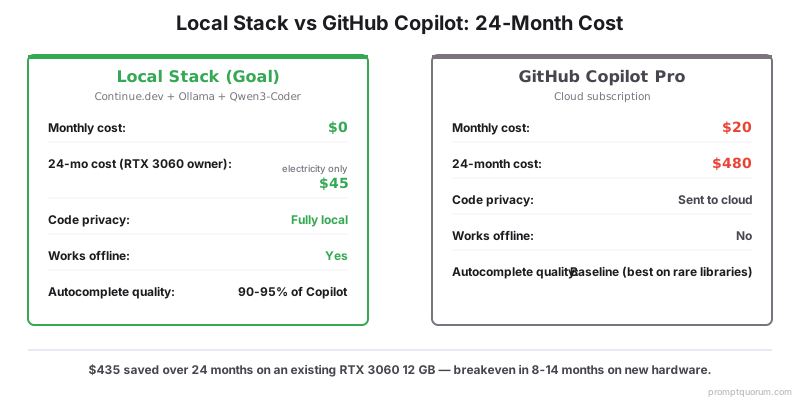
How to Read the Cost Table
If the laptop or GPU you would buy anyway has 8+ GB VRAM (or 16+ GB unified memory on Apple Silicon), local inference is essentially free — you get the coding assistant on top of the hardware you already wanted. The cost case is weakest when you would otherwise be using a low-spec laptop and Copilot for free as a student or in an enterprise plan.
💡Tip: Privacy and offline use are the two non-cost reasons to switch even if Copilot is technically cheaper. Client work under NDA and travel-heavy workflows shift the calculus.
Setup Walkthrough
Total time: 20-30 minutes the first time, including model download. Steps below assume macOS or Linux; Windows is identical except for the Ollama installer.
- 1Install Ollama from ollama.com (one installer; supports macOS, Linux, Windows).
- 2Pull the model: open a terminal and run
ollama pull qwen3-coder:30b(downloads ~18 GB) orollama pull qwen3-coder:7bfor low-VRAM cards. - 3Start the Ollama server (it auto-starts on macOS/Windows; on Linux run
ollama serve). - 4Install the Continue.dev extension in VS Code (search "Continue" in the extension marketplace) or in JetBrains IDEs.
- 5Open Continue.dev settings → "Add model" → select "Ollama" → choose qwen3-coder:30b.
- 6Test autocomplete: open any source file, start typing a function — Continue.dev should offer completions within 1-2 seconds.
- 7Test chat: press Cmd-L (Mac) or Ctrl-L (Win/Linux) to open the chat side panel and ask a question about your code.
- 8Optional: enable agent mode in Continue.dev settings → grants the model permission to make multi-file edits with confirmation.
# Pull the model
ollama pull qwen3-coder:30b

# Verify it loads
ollama run qwen3-coder:30b "Write a Python function to reverse a string"

# Continue.dev will auto-detect the running Ollama server on http://localhost:11434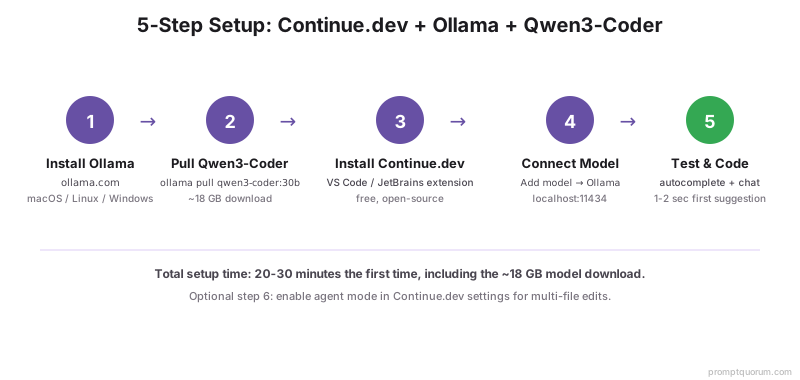
Quality Test on Real Code
Tested on a real Next.js 14 application: 100 autocomplete suggestions across 8 source files, 20 chat queries about existing code, and 10 multi-file edits via agent mode. Same prompts run against GitHub Copilot Pro and Continue.dev + Qwen3-Coder 30B.
Task | Local (Qwen3-Coder 30B) | GitHub Copilot Pro |
|---|---|---|
| TypeScript autocomplete (common patterns) | 94/100 acceptable | 97/100 acceptable |
| Python autocomplete (Pandas/NumPy) | 92/100 | 95/100 |
| Rust autocomplete (Tokio async) | 88/100 | 93/100 |
| Chat: "Why does this function loop forever?" | 17/20 correct diagnosis | 18/20 |
| Chat: rare-library question (Drizzle ORM) | 13/20 | 17/20 |
| Multi-file refactor (agent mode) | 8/10 correct | 9/10 |
| Latency (autocomplete first token) | ~280 ms (RTX 4070) | ~180 ms |
Where Does the Local Stack Win?
- Private codebases — your proprietary code never leaves the machine. Useful for NDA-protected client work, financial-sector engineering, and government contractors.
- Offline development — flights, trains, restricted networks, remote field work. Copilot is non-functional without internet.
- Cost on existing hardware — if you already own a 12 GB+ GPU or 16 GB+ Apple Silicon Mac, marginal cost is essentially zero.
- No vendor lock-in — Continue.dev is open source; Ollama is open source; Qwen3-Coder is openly licensed. You cannot lose access via subscription cancellation or ToS change.
- Custom models — fine-tune Qwen3-Coder on your codebase's style, internal libraries, or domain language. Impossible with Copilot.
- Predictable behavior — the model never silently changes underneath you. Pinned model version = pinned behavior, useful for reproducibility.
- Better prompting compounds the quality gap. For structured prompting techniques that improve code generation on any model, see write better code with AI.
Where Does GitHub Copilot Still Win?
- Niche libraries — anything with sparse public docs (e.g., recent SaaS SDK releases, internal-only frameworks documented externally). Copilot has seen more of the live internet.
- Latency — Copilot returns first tokens 100-200 ms faster than Qwen3-Coder on consumer hardware.
- Zero hardware investment — works on any laptop including 8 GB Chromebooks. Local needs at least 12 GB RAM/VRAM.
- Setup time — Copilot is 5 minutes; local is 20-30 minutes the first time.
- Multi-modal context — newer Copilot plans see your entire repo at once via cloud indexing. Continue.dev does this locally but with smaller effective context.
- Auto-updates — Copilot quietly improves over time; local models stay frozen until you manually pull a new version.
What Hardware Do You Need?
Hardware | Recommended model | Tokens/sec | Suitable for |
|---|---|---|---|
| RTX 3060 12 GB | Qwen3-Coder 7B Q4 | 60-75 | Most everyday work |
| RTX 4070 12 GB | Qwen3-Coder 7B Q5_K_M | 85-100 | All everyday work |
| RTX 4090 / 5090 24 GB | Qwen3-Coder 30B Q4_K_M | 70-90 | Power users, large refactors |
| Apple M3 Pro (18 GB) | Qwen3-Coder 7B | 40-55 | Daily driver Mac |
| Apple M3 Max / M5 (32 GB+) | Qwen3-Coder 30B | 35-50 | Mac power users |
Common Mistakes
- Mistake 1: Running the 30B model on 8 GB VRAM. The model loads but thrashes between GPU and system RAM. Autocomplete takes 2-5 seconds instead of 280 ms — unusable. Fix: use Qwen3-Coder 7B on 8-12 GB VRAM cards. The 30B model needs 18+ GB. Check actual usage with
ollama ps. - Mistake 2: Comparing local quality only on rare libraries and declaring it worse. Local models underperform on niche SDKs with sparse public docs. This is expected and well-documented; testing only on rare libraries gives a misleading picture. Fix: test on the languages and patterns you write 80% of the time. That is the quality that matters.
- Mistake 3: Forgetting to enable agent mode. Continue.dev ships with agent mode off by default. Without it you are missing multi-file edits — the feature that makes the setup competitive with Copilot's newer plans. Fix: Continue.dev settings → enable agent mode → grant file-edit and terminal permissions with confirmation.
- Mistake 4: Never updating the model. A new generation lands roughly every six months. Staying on the old version means leaving quality on the table. Fix: check for new releases quarterly.
ollama pull qwen3-coder:30boverwrites the old version; keep the previous tag for one week as a rollback. - Mistake 5: Buying new hardware just to avoid Copilot. A $1,200 PC build to save $20/month Copilot breaks even in 60 months. The cost case only works on hardware you already own or would buy anyway. Fix: if your current machine has <8 GB VRAM and no Apple Silicon, keep Copilot. Switch when you upgrade hardware for other reasons.
Sources
- Continue.dev Documentation — Official setup guide, model configuration, and agent mode documentation.
- Ollama Model Library — Available models, quantization levels, and VRAM requirements.
- Qwen3-Coder Model Card — Architecture, benchmarks, and licence for the recommended coding model.
- GitHub Copilot Pricing — Current Copilot Individual, Pro, and Enterprise pricing.
- HumanEval+ Benchmark — The evaluation benchmark used to compare coding model quality.
Frequently Asked Questions
Will Continue.dev work with models other than Qwen3-Coder?
Yes. Continue.dev supports any OpenAI-compatible endpoint, plus first-class integrations with Ollama, vLLM, and llama.cpp. You can swap in DeepSeek Coder V3, Codestral, or Granite Code without changing the extension.
How much VRAM do I need for Qwen3-Coder 30B?
About 18 GB VRAM at Q4_K_M quantization. RTX 4090 (24 GB), RTX 5090, or Apple M3 Max / M5 (32 GB+ unified memory) all comfortably fit it. RTX 3090 24 GB also works but at lower tokens/sec.
What if I only have 8 GB VRAM?
Use Qwen3-Coder 7B at Q4_K_M (~5 GB VRAM) or Q5_K_M (~5.5 GB). Quality is 80-85% of the 30B model — still very usable for everyday work.
Does Continue.dev support agent mode like newer Copilot plans?
Yes. Continue.dev has a built-in agent mode that reads files, edits across multiple files, and executes shell commands with confirmation. It works with any local model that supports tool calling, including Qwen3-Coder.
How does this compare to using Cline or Aider?
Continue.dev focuses on autocomplete + chat + light agent work inside the IDE. Cline is more autonomous (full agent mode in VS Code). Aider is terminal-driven and excels at large multi-file refactors. All three accept the same Ollama backend; pick by workflow preference.
Can I use this for commercial work and client projects?
Yes. Qwen3-Coder is openly licensed, Continue.dev is Apache-licensed, and Ollama is MIT. None of the components add restrictions to your output. Always re-check licenses for your specific use case.
Is the latency noticeable compared to Copilot?
For autocomplete the local stack adds about 100-200 ms vs Copilot. Most developers do not notice after a day of use. For chat queries the difference is hidden behind your reading speed.
What about GDPR and EU compliance?
A fully local stack is the strongest GDPR posture you can have for AI-assisted coding — no personal data, no proprietary code, and no client work leaves your machine. EU businesses with strict data-residency requirements often pick local for exactly this reason. For the full GDPR compliance architecture including audit logging, DPIA scope, and deletion paths, see local RAG for private business data.
How often should I update the model?
Major Qwen-Coder releases happen roughly every 6 months. Pull the new tag with ollama pull qwen3-coder:30b. The old version stays on disk until you explicitly remove it, so you can A/B test.
Can I keep using Copilot AND a local stack?
Yes — many developers run both. Continue.dev for private code, Copilot for open-source contributions and obscure libraries. Switching between models inside Continue.dev is one click.