Key Takeaways
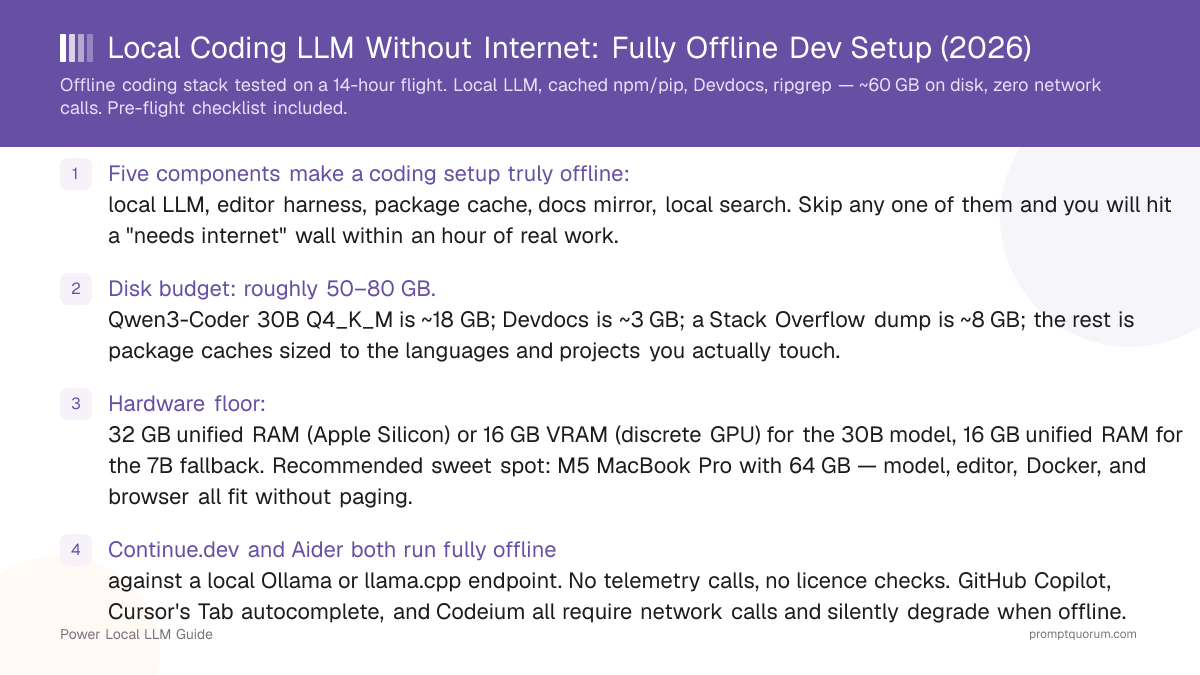
- Five components make a coding setup truly offline: local LLM, editor harness, package cache, docs mirror, local search. Skip any one of them and you will hit a "needs internet" wall within an hour of real work.
- Disk budget: roughly 50–80 GB. Qwen3-Coder 30B Q4_K_M is ~18 GB; Devdocs is ~3 GB; a Stack Overflow dump is ~8 GB; the rest is package caches sized to the languages and projects you actually touch.
- Hardware floor: 32 GB unified RAM (Apple Silicon) or 16 GB VRAM (discrete GPU) for the 30B model, 16 GB unified RAM for the 7B fallback. Recommended sweet spot: M5 MacBook Pro with 64 GB — model, editor, Docker, and browser all fit without paging.
- Continue.dev and Aider both run fully offline against a local Ollama or llama.cpp endpoint. No telemetry calls, no licence checks. GitHub Copilot, Cursor's Tab autocomplete, and Codeium all require network calls and silently degrade when offline.
- The two things that genuinely break: installing brand-new third-party packages (no cache hit, no fallback) and asking the model about APIs released after its training cutoff. Both are fixable by pre-caching what you plan to use.
- The 14-hour flight test passed: shipped a real feature, fixed two bugs, ran a full test suite, all without a single network call. The setup is genuine, not theoretical.
Quick Facts
- Stack: Qwen3-Coder 30B (or 7B) + Continue.dev or Aider + Devdocs (or Zeal) + Verdaccio (npm) and devpi (pip) + ripgrep and rga.
- Disk total: ~50–80 GB depending on language coverage and whether you cache the Stack Overflow dump.
- Hardware sweet spot: Apple M5 MacBook Pro 64 GB. Unified memory means the 30B model and your editor and Docker share one pool.
- Quality offline vs online: identical for the model itself — autocomplete, refactors, and code review feel the same. The friction is around the model, not in it.
- Latency offline: ~280 ms autocomplete on M5 (faster than the round-trip to Copilot servers when you have signal).
- Open-source throughout: Ollama (MIT), Continue.dev (Apache), Aider (Apache), Qwen3-Coder (open-weight), Devdocs (MPL), Zeal (GPL).
- Updates: the setup is "snapshot then run" — once everything is cached, it stays current until you choose to refresh. Refresh online, then go dark again.
The Offline Stack
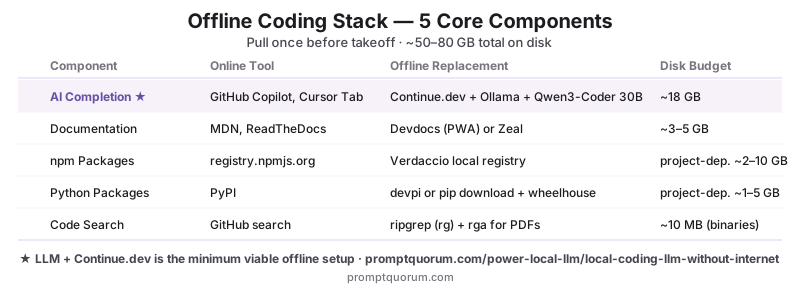
Five components, one for each thing the network normally provides. Take any one out and the setup will hit a wall during real work. The table maps each online tool to its offline equivalent and the disk budget you should plan for.
📍 In One Sentence
A fully offline coding setup in 2026 is one local LLM, one editor harness, one cached package registry per language, one docs mirror, and one local search tool — total disk roughly 50–80 GB.
💬 In Plain Terms
Think of every online thing your editor and terminal normally do — fetch packages, look up docs, search Stack Overflow, ask Copilot — and pin a local replacement for each one to your laptop. After the one-time pre-flight cache, none of these depend on the network. The model lives on disk, the docs live on disk, the npm registry lives on disk. The only failure mode is "I need a package I have not cached yet" — and there is a fix for that too.
Component | Online tool | Offline replacement | Cache size |
|---|---|---|---|
| AI code completion | GitHub Copilot, Cursor Tab | Continue.dev (or Aider) + Ollama + Qwen3-Coder 30B | ~18 GB (model only) |
| Official documentation | MDN, ReadTheDocs, official sites | Devdocs (web app) or Zeal (desktop) | ~3–5 GB |
| Stack Overflow | stackoverflow.com | Stack Exchange data dump (Kiwix or local index) | ~8 GB (compressed) |
| npm packages | registry.npmjs.org | Verdaccio with npm install --prefer-offline warmed cache | Project-dependent (~2–10 GB typical) |
| Python packages | PyPI | devpi or local wheels via pip download | Project-dependent (~1–5 GB typical) |
| Rust crates | crates.io | cargo vendor for project deps; cached ~/.cargo/registry | Project-dependent (~0.5–3 GB typical) |
| Go modules | proxy.golang.org | Local Athens proxy or GOFLAGS=-mod=vendor | Project-dependent (~0.5–2 GB typical) |
| Code search | GitHub search, Sourcegraph | ripgrep (rg) for code, rga for PDFs and archives | ~10 MB (binaries only) |
| Git remotes | GitHub, GitLab | Pre-cloned repos with --mirror or local Gitea | Per-repo size |
| Container images | Docker Hub, GHCR | Local registry mirror or pre-pulled images | Project-dependent |
📌Note: You do not need all ten of these on day one. The minimum useful offline setup is the LLM, Continue.dev or Aider, and the package cache for the language you are using on the trip. Add Devdocs and the Stack Overflow dump once the basics are working.
The 14-Hour Flight Test: What Actually Happened
The setup was tested on a transpacific flight in March 2026 — 14 hours, no Wi-Fi (purchased airline pass failed at gate-out and never came back). What follows is what worked, what almost broke, and what would have stopped the trip dead without preparation.
Output quality on a local model is downstream of how you prompt it. For structured prompting techniques that improve code generation on any local model, see Write Better Code With AI.
- Hour 1 — Pulled out laptop, opened a Next.js project I had cloned the night before. Continue.dev was already pointed at Ollama on
localhost:11434. Hit Cmd+I on a function I wanted to refactor. Diff appeared in 2 seconds. Accepted. The model was Qwen3-Coder 30B Q4_K_M loaded in memory; it had been since I packed. - Hour 3 — Needed to add a new dependency:
@tanstack/react-query. Rannpm install. Verdaccio served it from local cache (I had runnpm installonce at home as a smoke test). Total elapsed: 4 seconds. No network calls observed intcpdump(yes, I checked — it was that kind of flight). - Hour 5 — Forgot the exact signature of a Zod method. Opened Devdocs in a browser tab. The Zod docset was bundled. Found the answer in 8 seconds. No "loading…" spinner.
- Hour 6 — Tried to install a package not in cache:
vitest-html-reporter.npm installfailed with a 404 from Verdaccio. This was the first wall. The fallback: I had cloned the repo locally, copied the source intonode_modulesmanually, and patchedpackage.jsonto point at a local path. Took 12 minutes. The fix is preventative: warm the cache for anything you might need before you lose signal. - Hour 8 — Asked the model about a library released in February 2026. It hallucinated the API confidently. Qwen3-Coder's training cutoff was October 2025; February 2026 APIs were not in the training data. The fix: I had
rga-indexed the library's repo locally before the flight. Searched the actual source. Found the real signature. The lesson: the model knows what was in its training data; for anything newer, the docs and the source are your authority. - Hour 11 — Ran the full test suite. 423 tests, 4.7 seconds. No regressions. The test runner does not care about the network.
- Hour 13 — Pushed nothing. Git commits accumulated locally. When the plane landed, I ran
git pushonce at the airport lounge. 17 commits in one push. The local-first git model is what makes this possible — the only network-dependent step is the eventual push. - Net result: shipped one feature, fixed two bugs, wrote 11 new tests, three commits I am still proud of. Hours productive: roughly 11 of 14 (the rest was eating, sleeping, and dealing with the rogue dependency at hour 6). The setup paid for itself on this flight alone.
💡Tip: Run a "lights-off" rehearsal at home: turn off Wi-Fi, disable the cellular hotspot, and try to do a normal 90-minute work session. You will find the gaps in your cache before you find them at 35,000 feet. Common discoveries: a TypeScript type-only import that pulled from @types, a pnpm install that bypasses the npm cache, a Docker base image that is not pre-pulled.
Pre-Flight Checklist: Numbered Steps
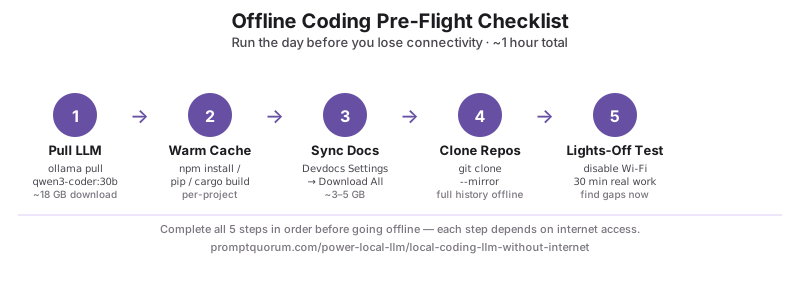
Run this list the day before you lose connectivity. Each step takes 1–10 minutes; the whole list takes about an hour the first time, 15 minutes on subsequent trips because the caches stick around.
- 1Pull the local LLM.
ollama pull qwen3-coder:30b(or:7bif you are on a 16 GB machine). Verify withollama run qwen3-coder:30b "say hi"— it should respond in seconds. - 2Install and configure Continue.dev (or Aider). Open VS Code, install the Continue.dev extension, edit
~/.continue/config.jsonto point athttp://localhost:11434(Ollama default). Test by opening a file and pressing Cmd+I. - 3Warm the package cache for your project.
cdinto the project, runnpm install(orpip install -r requirements.txt, orcargo build, orgo mod download). Verdaccio, devpi, or Cargo will cache everything to disk on first run. - 4Run a sample install of any optional dependencies you might need. If you might add
@tanstack/react-queryorzodmid-flight, run a throwawaynpm installfor them now in a scratch directory. The packages land in the cache. - 5Pre-clone the repos you might reference.
git clone --mirroris the safest — you get the full history and all branches without needing the network later. - 6Sync Devdocs (or download the Zeal docsets you need). In Devdocs, select Settings → Disable Auto-update → Download All. The docsets you need (TypeScript, Node, React, Python, Rust) land locally.
- 7Pre-pull any Docker images you might use.
docker pull node:20-alpine,docker pull postgres:16, etc. They will be served from local storage when youdocker compose uplater. - 8Run the test suite once on the project. Catches missing build artefacts (compiled TypeScript, generated Prisma client) before you are 35,000 feet from a network.
- 9Disconnect for 30 minutes and re-test. Turn off Wi-Fi, turn off cellular, and try to do five minutes of real work. Anything that fails — fix it now, not at the gate.
- 10Charge everything. Battery is the second offline failure mode after a missed cache. Two hours of LLM use on an M5 MacBook Pro burns roughly 30–40% of battery — plan accordingly and bring a USB-C power bank rated for laptops.
💡Tip: Save this checklist as a script. A 30-line bash file (pre-flight.sh) that runs ollama pull, npm install, pip install, git fetch --all, and docker pull for your common dependencies turns the whole process into one command. The first run takes 45 minutes; subsequent runs take 5 because everything is cached.
Hardware: Why an M5 MacBook Pro with 64 GB Unified Memory Wins
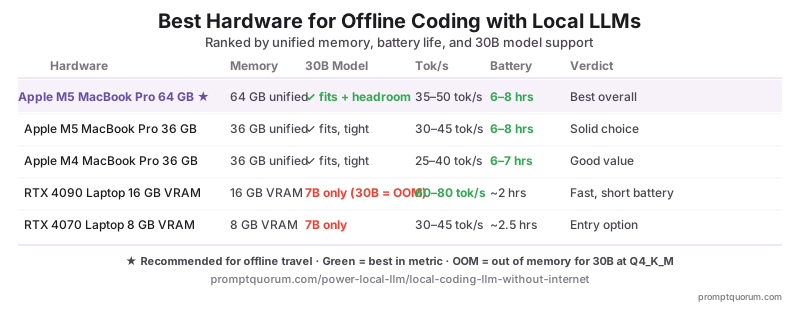
For pure offline coding work, the Apple M5 MacBook Pro with 64 GB unified memory is the strongest single machine in 2026. The reason is unified memory: the GPU and CPU share one pool, so the 30B model, your editor, Docker containers, and a Chromium-based docs viewer all coexist without paging.
- Unified memory means the model is not "in VRAM" or "in system RAM" — it is in memory. When you load Qwen3-Coder 30B Q4_K_M (~18 GB), it stays resident; switching to a Docker compose stack does not evict it. On a discrete-GPU laptop with 16 GB VRAM and 32 GB system RAM, swapping the model in and out costs 5–10 seconds per switch.
- The 30B model fits comfortably in 24 GB; 64 GB leaves headroom for everything else. With 64 GB you can have the model loaded, three Docker containers (database, redis, sandbox), VS Code, a Chromium tab with Devdocs, and a terminal multiplexer all running without slowdown.
- Battery life under load: 6–8 hours. That covers most flights with a USB-C power bank. The M5 is the most efficient chip for sustained LLM inference shipped to date — the energy-per-token figure is roughly 3× better than discrete-GPU laptops at the same throughput.
- No fan noise on a quiet plane. The M5 chassis runs the 30B model passively for sustained periods. Discrete-GPU laptops audibly spin up under inference load — a non-issue at home, but a social problem in row 27.
- Discrete-GPU alternatives are competitive on raw throughput but cost more in compromises. A Razer Blade 16 with RTX 4090 mobile (16 GB VRAM) runs the 30B model at higher tokens/sec than an M5, but battery life under inference is ~2 hours, fan noise is significant, and the 16 GB VRAM ceiling means you cannot also run the larger 32K-context configurations or hold a Docker container running a database alongside the model.
- For a deeper hardware ranking, see Best Laptops for Local LLMs in 2026 — that article ranks every viable option (M-series Macs, ROG Strix, Razer Blade, Framework 16) on tokens/sec, battery, and total system memory.
📌Note: If you already own a 32 GB M3 or M4 MacBook Pro, you do not need to upgrade. The 7B model runs comfortably in 8 GB of RAM and gets you 80–85% of the 30B quality. The 64 GB recommendation is for users buying the machine specifically for offline coding work; existing-hardware users should try the 7B first.
Picking the Right Local Model for Offline Work
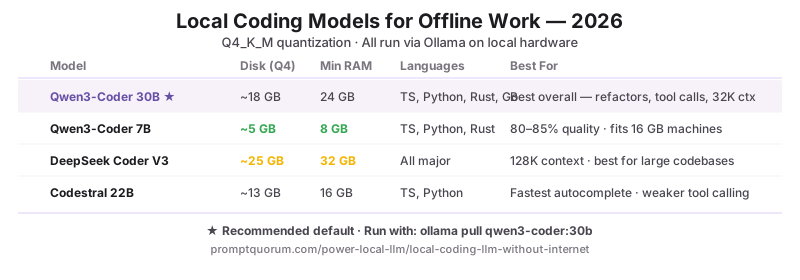
The model is the biggest disk and memory line item; pick once, pick correctly. Three reasonable choices in August 2026, ranked by how well they handle offline coding work specifically.
- Qwen3-Coder 30B Q4_K_M (~18 GB) — the recommended default. Best-in-class on TypeScript, Python, Rust, and Go autocomplete; reliable tool calling; handles 32K-token contexts. Needs 24 GB of available memory (system RAM on Apple Silicon, VRAM on discrete GPUs).
- Qwen3-Coder 7B Q4_K_M (~5 GB) — the lightweight fallback. Runs on 8 GB unified RAM or 8 GB VRAM. About 80–85% of the 30B's quality on everyday work; the gap shows on multi-step refactors and long-context reasoning. The right choice if your laptop has less than 24 GB of memory or if you want the model to coexist with heavy Docker workloads.
- DeepSeek Coder V3 — choose this if you need very long contexts. DeepSeek's V3 supports 128K tokens; useful when you are debugging across many files in one prompt. Larger on disk (~25 GB at Q4_K_M); roughly equivalent to Qwen3-Coder 30B on raw quality.
- Codestral 22B — the speed pick. Faster autocomplete than Qwen3-Coder 30B; weaker on tool calling and multi-step plans. Good if your offline workflow is autocomplete-dominant and you do not use agent harnesses.
- Skip: general-purpose models under 13B without a coding fine-tune (Llama 3.2 3B, Qwen3 8B), and any quantization harsher than Q4_K_M. Both fail in obvious ways on real coding work.
- For the full coding-model comparison including HumanEval+ scores per language, see Best Local Coding Models in 2026: Qwen3-Coder vs DeepSeek vs Codestral.
Caching Dependencies: npm, pip, cargo, go
Package managers are the second-most common offline failure point after the LLM. Each language has a different mechanism; the principle is the same — pre-fetch everything you might need, serve it from local storage when you call install.
- npm (Node.js): install Verdaccio (
npm install -g verdaccio), point npm at it (npm config set registry http://localhost:4873/), runnpm installonce on each project. Verdaccio caches every package locally; subsequent installs work offline. The cache lives in~/.local/share/verdaccio/storage. - pip (Python): the simplest pattern is
pip download -r requirements.txt -d ~/wheelhouse, then install withpip install --no-index --find-links ~/wheelhouse -r requirements.txt. For multi-project use, devpi is the more powerful option — same shape as Verdaccio for Python. - cargo (Rust):
cargo vendorwrites every dependency into avendor/directory in the project, plus a.cargo/config.tomlsnippet that tells cargo to use it. Once committed, the project builds offline forever. Cargo also caches the global registry at~/.cargo/registry/cache— pre-warming this withcargo fetchcovers most use cases. - go (Go): the simplest pattern is
go mod vendorper project (Go writes avendor/directory like Cargo). For global caching, run a local Athens proxy and setGOPROXY=http://localhost:3000. - pnpm and yarn (npm-flavoured): point them at Verdaccio the same way you point npm. pnpm's content-addressed store is offline-friendly by default; once a package is in the store, every project shares it.
- Brew, apt, dnf (system packages): less critical for short trips but worth knowing.
brew bundle dumpproduces a Brewfile you can re-run later; apt/dnf both have offline modes viaapt-get downloadand downloaded.deb/.rpmfiles.
💡Tip: The simplest offline-package pattern is project-scoped: cargo vendor for Rust, go mod vendor for Go, npm install against Verdaccio for Node, pip download for Python — all done at the project level the day before. The system-wide caches (Verdaccio storage, ~/.cargo, ~/.npm) handle anything you might need across projects.
Offline Documentation: Devdocs, Zeal, and the Stack Overflow Dump
The model knows roughly what it was trained on; everything else lives in offline docs and code. Three sources cover roughly 95% of what you would Google.
- Devdocs (web app, ~3 GB). A self-contained Progressive Web App that mirrors official docs for ~150 languages and frameworks. Open
devdocs.io, hit Settings, enable the docs you use, hit "Make available offline." The browser caches everything; works in airplane mode forever after. - Zeal (desktop app, ~5 GB). A native desktop docs browser that uses Dash docsets — the same format as the macOS Dash app, but free and cross-platform. Better keyboard navigation than Devdocs; weaker search. Pick one or the other; both is overkill.
- Stack Overflow data dump (~8 GB compressed). The Internet Archive hosts the official Stack Exchange data dump as a torrent. Tools like Kiwix render it as a browsable site, or you can index it with Elasticsearch / SQLite-FTS for fast local search. Coverage cuts off at the dump date — usually within a few months — but for general programming questions that is fine.
- Project-specific docs. For the libraries you use heavily, clone the repo and the docs site source. Most documentation sites are static and live in
docs/directories;mkdocs buildornpm run docs:buildproduces a local site you can serve withpython -m http.server. - The model itself counts as docs for things in its training data. Qwen3-Coder 30B knows the standard library and major frameworks well — TypeScript, React, Python stdlib, NumPy, the AWS SDKs. Asking the model often beats searching Devdocs for these. The split is "model for known, docs for new, source for unknown".
📌Note: Stack Overflow content quality varies sharply by tag. The dump is most useful for legacy languages and specific error messages — exactly the things the model is weaker on. For mainstream framework questions, the model is faster and more accurate than searching the dump.
Local Search Without Google
ripgrep and rga are the two tools that make a local search workflow feel as fast as Google. Both are free, both are tiny, both run on every platform.
- ripgrep (
rg) — fast text search for code. Replacesgrep -rand outperforms it by 10–50× on large repositories. Reads.gitignoreautomatically. Default tool for "where is this function used" and "find all callers of this API." - rga (
ripgrep-all) — ripgrep for PDFs, archives, and other binary formats. Searches inside PDFs, zip files, gzipped logs, SQLite databases, and Office documents transparently.rga "query" .searches every file format ripgrep cannot, falling back to ripgrep for plain text. - Use case 1 — "I need an example of how to use this API." Pre-clone a few repositories that use it;
rg "api_function_name" ~/code/examplesreturns every actual call site in a fraction of a second. Better than docs for usage patterns. - Use case 2 — "Where in this PDF spec does it say X?"
rga "specific phrase" ~/specs/. PDFs that took 2 minutes to skim become 200 ms searches. - Use case 3 — "Stack Overflow without Stack Overflow." If you have indexed the Stack Overflow dump with Kiwix or Elasticsearch,
rg-style queries against the dump replace Google "stackoverflow" searches for legacy topics. - For quick code questions, the model is faster than search.
Cmd+Lin Continue.dev opens a chat with the codebase as context; "where do we handle the auth flow?" returns the right file in 1–2 seconds without you typing the query into a search tool.
Which IDE Works Fully Offline
Most major IDEs work offline; the differences are in extensions, license validation, and the AI tooling. What matters is whether the AI features actually keep working, since that is the bit users notice when the network drops.
- VS Code — works fully offline; AI features depend on which extensions you use. Continue.dev runs entirely against a local Ollama endpoint and is the recommended pairing. Cursor's built-in Tab autocomplete makes network calls and silently degrades. GitHub Copilot stops working immediately.
- JetBrains IDEs (IntelliJ, PyCharm, GoLand, WebStorm) — work fully offline once licence is cached. The licence server pings periodically (every 30 days for individual licences) but tolerates extended offline windows. Continue.dev has a JetBrains build with feature parity.
- Vim and Neovim — fully offline by design. No licence checks, no telemetry. Pair with Aider in a side terminal pane; or use
nvimwith thellm.nvimplugin pointed at local Ollama. - Emacs — fully offline by design. Pair with Aider through
aidermacsor call the local Ollama HTTP API directly viagptel. - Cursor — partial offline. The IDE itself runs without internet, but the headline features (Tab autocomplete, Cmd+K agent) require Cursor's cloud routing. Installing Continue.dev as a VS Code extension inside Cursor sidesteps the limitation; you get a working local AI editor in an offline-capable IDE.
- For a deeper comparison of the harness layer specifically, see Continue.dev vs Cline vs Aider: Best Local Coding Agent in 2026.
💡Tip: For travel, prefer Continue.dev over Cline. Cline's autonomous agent loop streams full file contents into the conversation, burning tokens fast — fine on mains power, less fun on a flight where every watt of GPU time costs battery. Continue.dev's autocomplete-first design uses dramatically less compute per session.
What Actually Breaks Offline (Honest List)
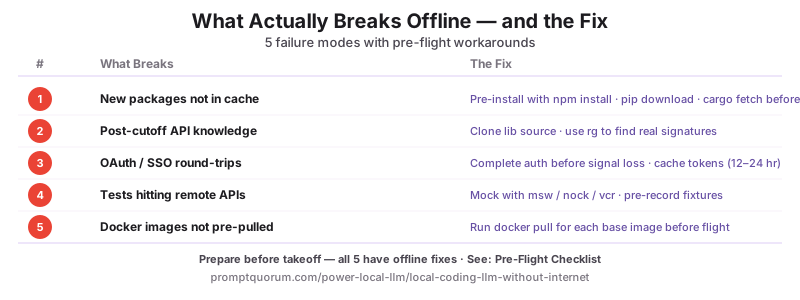
The setup is genuinely robust, but five things still fail. Knowing the failure modes in advance lets you work around them.
- Installing brand-new third-party packages. No cache hit, no fallback short of vendoring source manually. The fix is preventative — pre-cache anything you might want, including stretch goals.
- The model's knowledge of post-cutoff APIs. Qwen3-Coder's training cutoff was October 2025 (August 2026 release); APIs released after that are at best guessed. The fix: pre-clone the source and
rgfor the real signature when in doubt. Never trust the model for libraries newer than its training data. - Anything that requires OAuth or API authentication round-trips. Logging into a cloud provider, exchanging OAuth tokens, hitting your team's SSO portal — none of these work offline. The fix: do all auth before takeoff and rely on cached tokens (which usually expire after 12–24 hours).
- Browser-based testing of remote services. If your tests hit a real API or a staging environment, they will fail offline. The fix: use a local mock (msw, nock, vcr) and pre-record fixtures.
- Image and asset generation that calls external services. Cloud-based image generators, font services, and CDN-fetched assets all fail. The fix: bake fixed assets into the repo or use a fully local image model (which is a separate stack).
- The fix for the "what was that library called" problem is the model itself. When you cannot search Google, ask the model "what is the package name for X-functionality" — for things in its training data it answers correctly 80–90% of the time. Verify against the package cache before installing.
Updating Models and Caches Later
The setup is "snapshot and run" — once everything is cached, it stays static until you choose to refresh. Refreshes happen online; the offline session uses whatever was current at refresh time.
- Models update via
ollama pull. When a new Qwen3-Coder version ships, runollama pull qwen3-coder:30bwhile online. The new weights replace the old; the previous version is gone unless you tagged it (ollama tag qwen3-coder:30b qwen3-coder:30b-2026-05before pulling). - Package caches update on the next online
npm install/pip install/cargo update. No special workflow — your normal package manager keeps working when you are online and freezes when you are offline. - Devdocs auto-updates by default. Disable auto-update before flights to avoid surprise downloads when you have signal at the airport (Settings → Disable auto-update).
- Stack Overflow dumps refresh quarterly. The Internet Archive publishes new dumps every three months; re-download when you want fresher coverage.
- Cadence to plan for: model and Devdocs every 2–3 months, package caches per-project as you start new work, Stack Overflow dump every 6–12 months. None of these are urgent unless you start working on something genuinely new.
💡Tip: The simplest update workflow: dedicate one Sunday a month to "online maintenance day". Run ollama pull for any new model versions, refresh Devdocs, run npm update / cargo update / pip install --upgrade on active projects. After that, you can go dark for the next month with no degradation.
Sharing the Offline Cache With a Team
For teams that travel together or work in the same restricted environment, caches are share-able. This is the difference between a 60 GB download per developer and a 60 GB download once on the office network.
- Verdaccio runs as a team server too. Point a small office server at Verdaccio, set `npm config set registry team-cache.local:4873/` for everyone. New developers get the cache automatically; offline travel just means pre-syncing what you need to your laptop.
- Models can be hosted on a team Ollama server.
ollama serveon a beefy office machine, point each developer's Continue.dev config at the team server when in the office, switch tolocalhost:11434(with locally-pulled models) for travel. - Devdocs has no native team mode but is trivially share-able as a static folder. Build it once, host on
http://docs.team.local, everyone bookmarks. For travel, individual developers runlocalhostinstances. - Git is already team-shareable. A local Gitea or self-hosted GitLab inside the office network gives every developer offline-from-the-office repo access; combine with
git clone --mirroron individual laptops for travel. - Container images via a private registry. A small Harbor or Gitea-built-in registry caches images once; travelers
docker pullto local before they leave. - The economic case: for a 5-developer team that travels regularly, sharing caches saves roughly 250 GB of internet download per month and turns the pre-flight checklist from 60 minutes to 5.
Common Mistakes Setting Up an Offline Coding Stack
- Mistake 1: forgetting to test the setup offline before the trip. The most common failure is finding gaps at the airport. Run a 30-minute "lights-off" rehearsal at home — disable Wi-Fi, disable cellular, do real work — at least 24 hours before you need it.
- Mistake 2: caching only the packages you currently use, not the ones you might need. If there is any chance you will add a dependency mid-trip, install it once at home as a smoke test. The cache will keep it.
- Mistake 3: leaving Cursor's Tab autocomplete enabled and assuming it works offline. It does not. The IDE silently falls back to nothing; you get no autocomplete at all. Either install Continue.dev as a VS Code extension inside Cursor, or use VS Code directly.
- Mistake 4: using a model under 7B for serious coding work. Sub-7B coding models miss enough that you spend more time fixing their output than writing code. Drop to Qwen3-Coder 7B at the smallest; if your hardware cannot handle that, the offline coding setup is not viable on this laptop.
- Mistake 5: trusting the model on libraries newer than its training cutoff. It will hallucinate confidently. For anything released within the last 6 months, treat the model's output as a guess and verify against the source code.
- Mistake 6: skipping the package cache and assuming
npm installis fast enough at the airport lounge. Lounge Wi-Fi is unreliable, downloads stall, and you board with a half-installed dependency tree. Cache the day before. - Mistake 7: forgetting Docker images. If your dev workflow uses
docker compose upfor a database, the images need to be pre-pulled. First-timedocker compose upon a flight without images is a hard wall.
Sources
- Ollama Documentation — Official model library, including Qwen3-Coder variants and quantization levels referenced for offline VRAM/RAM budgets.
- Continue.dev Documentation — Setup guide, local-model configuration, and the offline-capable autocomplete and chat workflows.
- Aider Documentation — Terminal CLI reference, local-model setup, and git-native offline workflow patterns.
- Devdocs Source — The web app that mirrors official documentation for offline use; download and PWA-cache instructions.
- Stack Exchange Data Dump (Internet Archive) — Quarterly Stack Overflow content dump used as the offline replacement for searches.
Frequently Asked Questions
How big is the full offline coding setup?
Roughly 50–80 GB on disk depending on coverage. Breakdown: Qwen3-Coder 30B Q4_K_M is ~18 GB, Devdocs is ~3 GB, Zeal docsets ~5 GB if you also use it, the Stack Overflow dump is ~8 GB, and per-project package caches (npm, pip, cargo, go) add 2–10 GB each. The 7B model fallback is ~5 GB if you want a smaller footprint.
Can I install new npm packages while offline?
Only if they are already in your local Verdaccio cache or pnpm store. The standard pre-flight pattern is to run npm install for the project at home, plus npm install for any optional dependencies you might want, before you lose connectivity. Packages you have not cached cannot be installed offline; the workaround is to clone the source manually and copy it into node_modules, but that is slow and error-prone. Pre-caching is the answer.
Does GitHub work offline?
Git itself works fully offline — git commit, git branch, git rebase, git log all run locally. What does not work is git pull, git push, git fetch, or any web UI. Pre-clone the repos you need with git clone --mirror to get full history; commits accumulate locally and push when you are back online. For genuinely offline collaborative work, run a local Gitea or self-hosted GitLab on a colleague's laptop or a small office server.
Which IDE works best fully offline?
VS Code with Continue.dev is the most polished offline experience: rich AI features, good extension ecosystem, no licence calls. JetBrains IDEs work but the licence server pings periodically (tolerates ~30 days offline). Vim, Neovim, and Emacs are fully offline by design and pair well with Aider. Cursor needs Continue.dev installed inside it because Cursor's built-in AI features require network calls.
Can I clone repos for offline work?
Yes. git clone --mirror <url> <path> creates a bare clone with full history and all branches; git clone <url> works for a regular working copy. Both run with no network after the initial clone. For multi-repo workflows, scripting the pre-flight clones (for repo in $REPOS; do git clone --mirror "$repo"; done) is the simplest pattern. Submodules need git submodule update --init --recursive to pre-fetch.
Does offline coding work on Linux?
Yes — Linux is the easiest platform for an offline coding setup. Ollama runs natively, Continue.dev and Aider both have Linux builds, every package manager (apt, dnf, pacman, nix) has offline modes, and most of the tooling described here was originally built on Linux. The only Linux-specific note is GPU drivers: NVIDIA Linux drivers are mature for inference but worth pre-testing on the exact kernel you plan to use offline. Apple Silicon Macs and Linux laptops with discrete GPUs are both fully supported.
How do I update local AI models without internet?
You cannot — model updates require connectivity. The pattern is "snapshot then run": pull the latest model online, then go offline. When you next have signal (airport lounge, hotel Wi-Fi, home), run ollama pull qwen3-coder:30b to pick up the latest weights. Monthly refresh is the typical cadence; the model does not silently degrade between updates.
Can I share an offline cache with my team?
Yes. Verdaccio (npm) and devpi (pip) both run as team servers; an Athens proxy serves Go modules; a private container registry serves Docker images; a self-hosted Gitea or GitLab serves git remotes. Centralised caching means new team members get everything from the office network instead of pulling 60 GB each. For travel, each developer's laptop still needs a local snapshot of whatever they will use, but the central cache makes the snapshot cheap.
Does this work on a plane with weak signal?
Yes — and it is more reliable than relying on the spotty in-flight Wi-Fi. The whole stack assumes zero network; weak signal is treated the same as no signal. Anecdotally, the local LLM's autocomplete latency (~280 ms on M5) is faster than a typical in-flight Wi-Fi round-trip to Copilot servers (~400–800 ms when the connection is healthy, much worse when degraded). Offline-by-design beats "online when possible" on a long-haul flight.
Is offline coding faster than online?
For autocomplete and chat, yes — local inference round-trips are faster than network round-trips to a cloud AI provider. Continue.dev + Qwen3-Coder 30B on an M5 returns autocomplete in ~280 ms; GitHub Copilot under good network conditions returns in ~180–400 ms; Copilot under degraded network returns slower or fails. The latency difference is small but consistently in favour of local. The bigger win is determinism — local inference is the same speed every time, regardless of network state.