Key Takeaways
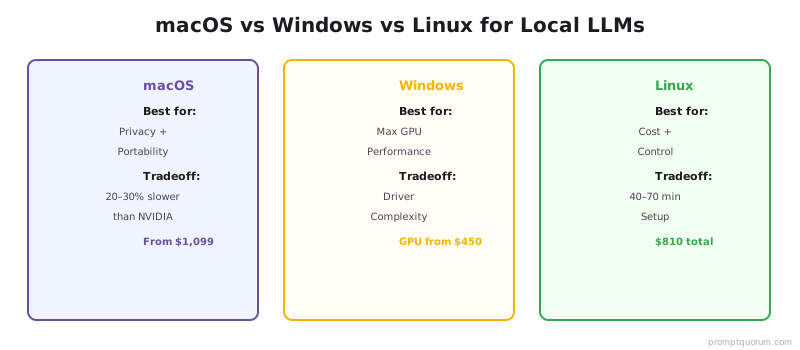
- macOS (Apple Silicon): Zero GPU cost, free Ollama, handles Llama 3.1 8B smoothly. Best for casual/non-technical users.
- Windows (NVIDIA GPU): Industry standard for GPU acceleration. CUDA ecosystem mature. $150-1,600 GPU depending on model size.
- Linux (NVIDIA or AMD GPU): Lowest overhead (10-20% less power than Windows), best for 24/7 servers. Same GPU cost as Windows.
- Inference speed: All three OS produce identical output speed when given the same GPU. Software setup difficulty differs.
- Setup complexity: macOS simplest (Ollama one-click); Windows intermediate (NVIDIA drivers required); Linux requires command-line familiarity.
- Cost per inference: Linux < Windows = macOS (same for GPU-accelerated; macOS cheaper for CPU-only).
- Ecosystem: NVIDIA CUDA available on Windows/Linux (not Mac native). AMD ROCm on Linux/Windows. Apple Metal on macOS only.
- Best choice: Mac for laptop/casual use; Windows for desktop gaming + LLM; Linux for servers.
What Is the Hardware Cost by Operating System?
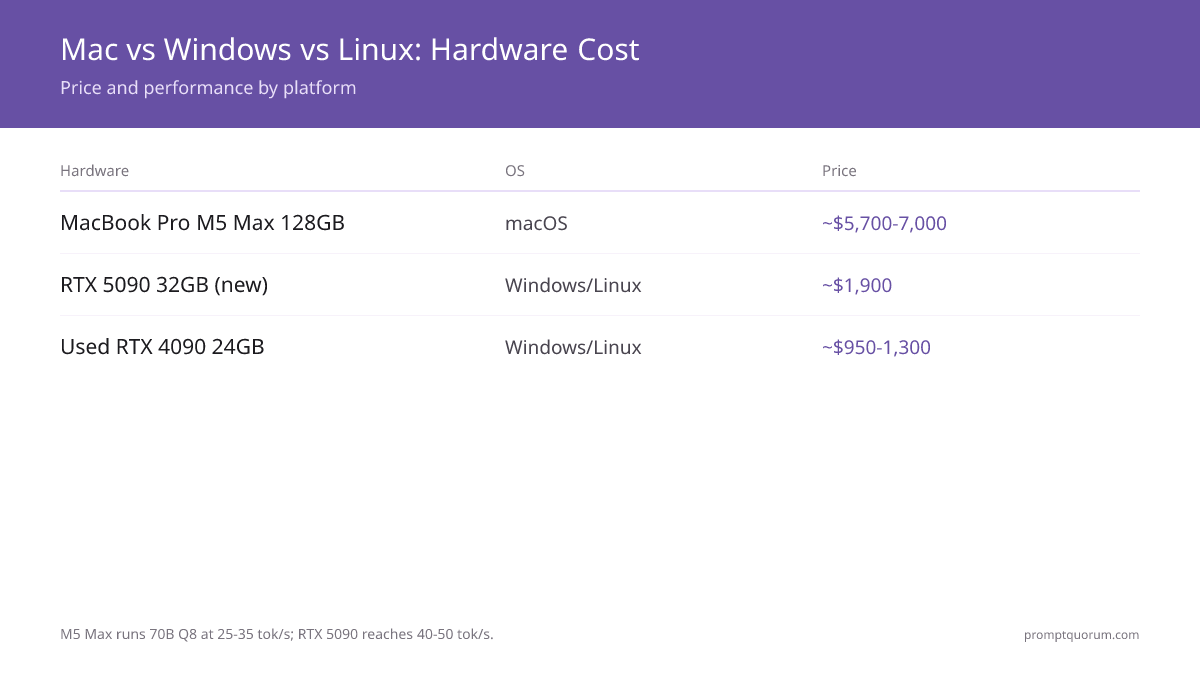
macOS (Apple M5 generation — shipping March 2026): MacBook Pro M5 Pro 64 GB ($2,499–3,199) runs 70B Q4 at 15–20 tok/sec. MacBook Pro M5 Max 128 GB ($3,499–4,999) runs 70B Q8 at 25–35 tok/sec. MacBook Air M5 32 GB ($1,099–1,299) handles 8B smoothly. Total additional cost if upgrading: $0 if you already own a Mac; $1,099+ if buying new.
Windows (NVIDIA GPU required — April 2026):** RTX 5060 Ti 16 GB new ($450–500) runs 70B Q4 at 20–40 tok/sec. RTX 5090 32 GB new ($2,000) runs 70B at 40–50 tok/sec (first consumer single-GPU to run 70B without splitting). Used RTX 4070 ($350), RTX 4090 ($1,000–1,400) still available. Additional cost: $350–2,000.
Linux (NVIDIA or AMD GPU): Bare-metal server ($300–1,000) or reuse old machine + RTX 5060 Ti/5090 ($450–2,000). Same GPU cost as Windows. Additional cost: $150–2,600.
Mac desktop refresh (August 25, 2026): Apple announced Mac mini M6 ($899, 32 GB max unified memory, 170 GB/s bandwidth) and Mac mini M5 Pro ($1,699, 64 GB max unified memory, 307 GB/s bandwidth), both shipping September 22, 2026. Mac Studio also refreshed: M5 Max ($2,499, up to 128 GB) and M5 Ultra ($5,499 starting at 96 GB, configurable to 256 GB or 512 GB — the 512 GB config ships late October 2026 at a price expected well above $10,000). The outgoing Mac mini M4 (from $599) and Mac mini M4 Pro (up to $2,299, 64 GB max) are now the previous generation. RTX 5090 remains the first single-GPU consumer solution for 70B models.
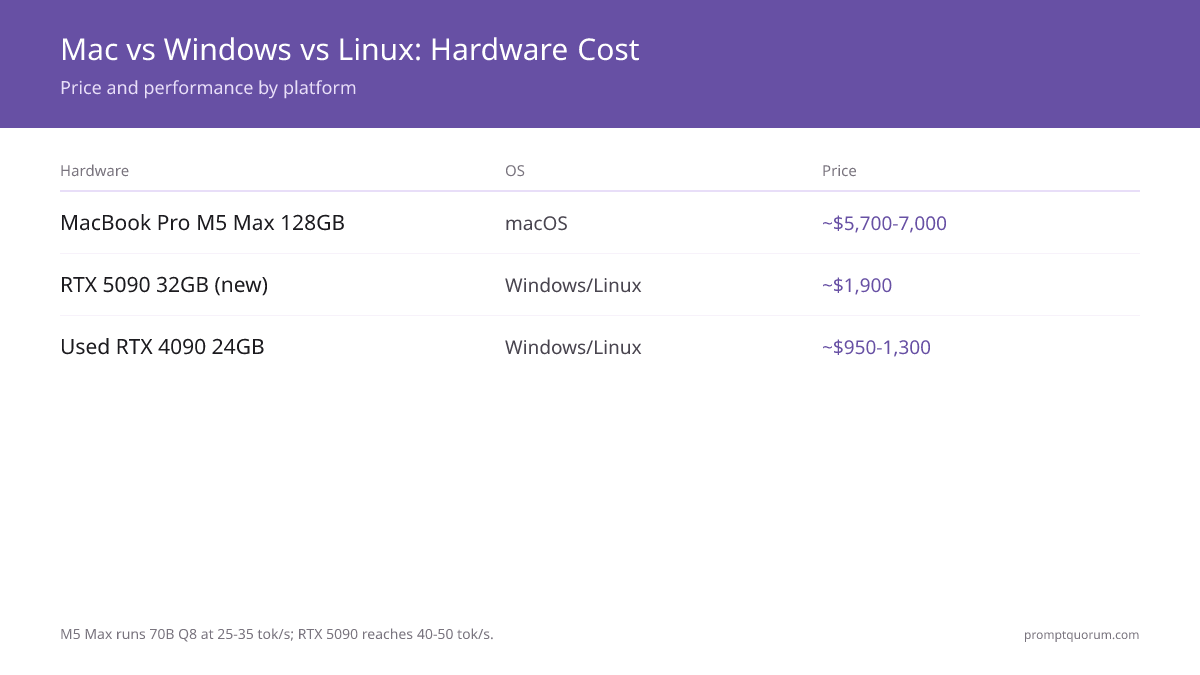
💡Tip: 💡 Pro tip: M5 Max 128 GB vs RTX 5090: M5 Max is 1.3–1.5× slower (25–35 vs 40–50 tok/sec) but costs $400 less, has 4× more memory, and is silent (no GPU fan noise).
What Is the Setup and Complexity?
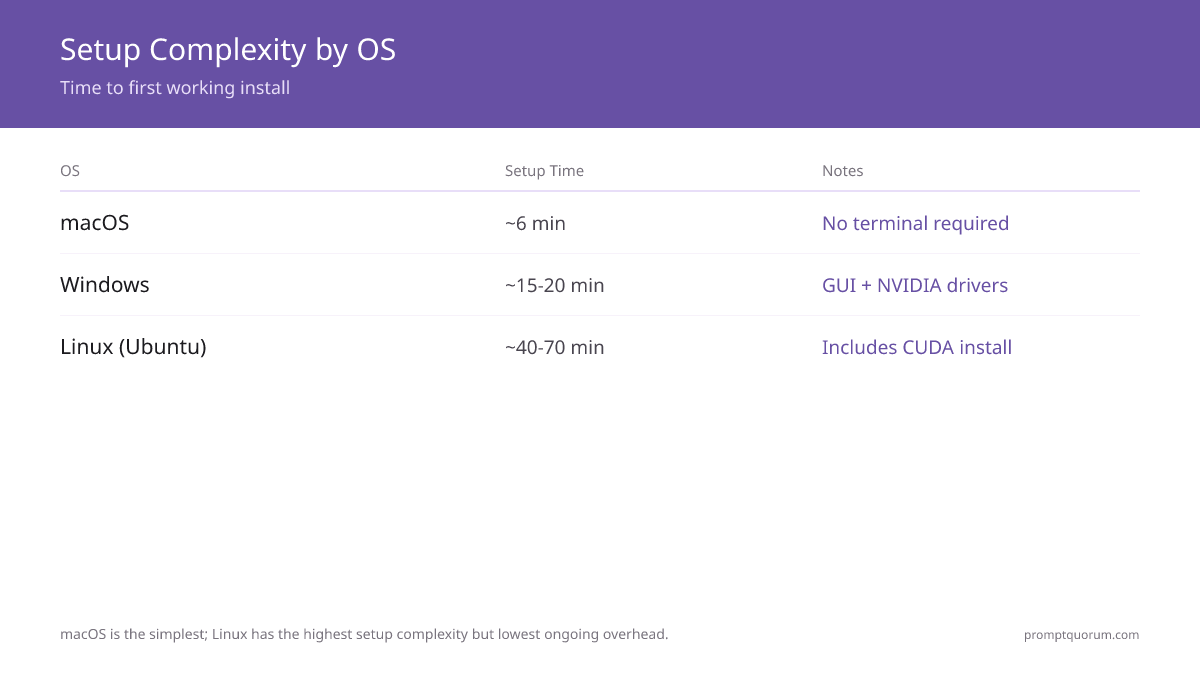
macOS: Download Ollama (1 minute), run app, select Llama 3.1 8B (5 minutes) = 6 minutes total, zero terminal commands. Best for non-technical users.
Windows: Install NVIDIA drivers (5-10 min), download Ollama or LM Studio (5 min), select model (5 min) = 15-20 minutes with GUI (no terminal needed).
Linux (Ubuntu): SSH, install CUDA/cuDNN (20-40 min), install Ollama/vLLM (10 min), configure systemd (10-20 min) = 40-70 minutes. Requires terminal comfort.
Long-term maintenance: macOS (automatic updates), Windows (quarterly driver updates), Linux (system tuning, occasional dependency issues).
💬 In Plain Terms
macOS setup is like plugging in a phone charger (one cable, works). Windows is like assembling flat-pack furniture (instructions matter). Linux is like building a PC from parts (you need to know what you're doing).
🛠️Practice: 🛠️ Best practice: Don't install macOS Sequoia on day-one release; wait 2 weeks for metal driver fixes. GPU support sometimes breaks in point releases.
How Do Inference Speeds Compare?
macOS (Apple M5 generation — March 2026 shipping): M5 Pro (64 GB) runs Llama 3.3 70B Q4 at 15–20 tok/sec. M5 Max (128 GB, 614 GB/s bandwidth) runs 70B Q8 at 25–35 tok/sec — a 4× improvement vs M4 Max (which was impractical for 70B).
Windows + RTX 5090 (32 GB, April 2026): Llama 3.3 70B = 40–50 tok/sec, 8B = 180+ tok/sec. RTX 5090 is the first consumer GPU to handle 70B without quantizing below Q4 or using model splitting.
Windows + RTX 5060 Ti (16 GB, April 2026): Llama 3.3 70B does not fit (need 24 GB minimum). 13B–24B models at 20–40 tok/sec. Good for RTX 4070 equivalent users on a budget.
Linux + RTX 5090 or RTX 5060 Ti: 1–5% faster than Windows due to lower OS overhead. RTX 5090 on Linux reaches 42–53 tok/sec for 70B.
The M5 Max vs RTX 5090 tradeoff: RTX 5090 is 1.3–1.5× faster but costs $500 more, requires a desktop, and draws 450W. M5 Max is silent, turnkey, and has 4× the memory (128 GB vs 32 GB).
📍 In One Sentence
GPU hardware determines inference speed (RTX 5090 at 40–50 tok/sec vs M5 Max at 25–35 tok/sec), not the operating system.

🔍Insight: 🔍 M5 game-changer: Apple's Fusion Architecture (two 3nm dies bonded) delivers 4× faster LLM prompt processing vs M4, narrowing the speed gap with RTX 5090 significantly.
⚠️Warning: ⚠️ Warning: AMD ROCm on Windows is immature. Choose Linux for AMD GPUs; Windows support is 3–6 months behind.
What Tools and Frameworks Are Supported by OS?
Ollama (inference engine): macOS ✓, Windows ✓, Linux ✓. Identical features across all three.
LM Studio (GUI): macOS ✓, Windows ✓. Linux only via Docker (no native GUI).
vLLM (API server): macOS (limited, Apple Metal only), Windows ✓ (CUDA), Linux ✓ (CUDA/ROCm). Best on Linux.
NVIDIA CUDA toolkit: Windows ✓, Linux ✓. macOS ✗ (not supported, only Apple Metal).
PyTorch (deep learning framework): macOS ✓ (Apple Metal backend, slower), Windows ✓ (CUDA), Linux ✓ (CUDA/ROCm). Fastest on Linux/Windows with NVIDIA.
Fine-tuning support: macOS (slow CPU-only or via cloud); Windows ✓ (CUDA accelerated); Linux ✓✓ (best support).

📌Note: 📌 Key point: CUDA only works on Windows/Linux natively. macOS users must use Apple Metal API, which is newer and has fewer libraries.
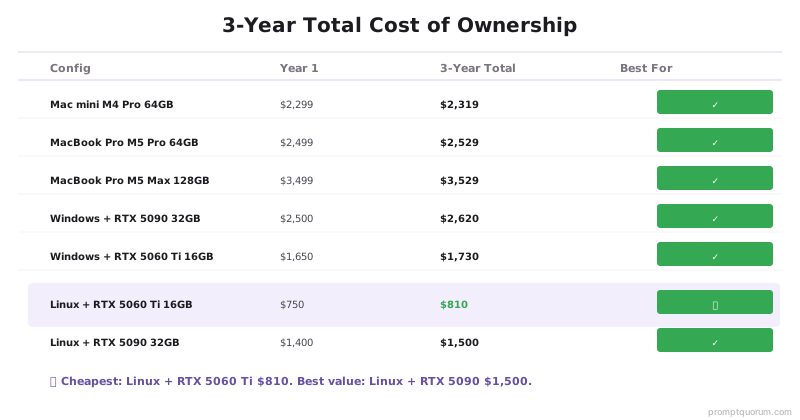
What Is the Total Cost of Ownership Over 3 Years?
| Setup | Year 1 | Year 2–3 | 3-Year Total |
|---|---|---|---|
| MacBook Air M5 (32 GB, existing) | $0 | $20 | $20 |
| MacBook Pro M5 Pro 64 GB | $2,499 | $30 | $2,529 |
| MacBook Pro M5 Max 128 GB | $3,499 | $30 | $3,529 |
| Mac mini M6 32 GB | $899 | $15 | $914 |
| Mac mini M5 Pro 64 GB | $1,699 | $20 | $1,719 |
| Mac Studio M5 Max 128 GB | $2,499 | $30 | $2,529 |
| Windows + RTX 5060 Ti 16 GB | $1,650 | $80 | $1,730 |
| Windows + RTX 5090 32 GB | $2,500 | $120 | $2,620 |
| Linux + RTX 5060 Ti 16 GB | $750 | $60 | $810 |
| Linux + RTX 5090 32 GB | $1,400 | $100 | $1,500 |
Frequently Asked Questions
Can I run Llama 3.3 70B on macOS?
Yes — MacBook Pro M5 Pro (64 GB) runs 70B Q4 at 15–20 tok/sec. M5 Max (128 GB) runs 70B Q8 at 25–35 tok/sec. Mac mini M5 Pro (64 GB, shipping September 22, 2026) uses the same chip and should perform similarly. Mac Studio M5 Max (up to 128 GB) and M5 Ultra (up to 512 GB) handle larger models. The Mac mini M6 (32 GB max) cannot fit 70B; neither can any 32 GB or smaller configuration.
Can I use AMD GPUs instead of NVIDIA?
Windows: Limited (ROCm support improving but 3–6 months behind CUDA). Linux: Excellent ROCm support for RX 7000-series. AMD is 10–20% slower than equivalent NVIDIA for LLM inference. For AMD on Linux: set HSA_OVERRIDE_GFX_VERSION before starting Ollama.
Is Linux harder to set up for beginners?
Yes. macOS: Ollama.app installs in 6 minutes, no terminal. Windows: 15–20 minutes with NVIDIA driver install. Linux: 40–70 minutes, requires terminal (apt, pip, systemctl). If you are not comfortable with command-line: start with macOS or Windows.
Can I switch OS mid-project?
Yes. Models are portable — GGUF files work on all OS. Fine-tuned adapters (LoRA) are also portable. Framework code may need minor path updates. Ollama model storage locations differ by OS but model weights are identical.
Does macOS use less electricity?
Apple Silicon M5 Max under sustained LLM inference draws ~30–40 W. RTX 5090 under load draws ~450 W. Over 3 years at 4 hrs/day active use: M5 Max ~$15 electricity vs RTX 5090 ~$180. macOS wins on power cost, Linux/Windows win on inference speed.
Which OS is best for fine-tuning models?
Linux > Windows > macOS. Linux has best CUDA and DeepSpeed support. macOS M5 can fine-tune 7B via MLX (Apple's ML framework) in ~2 hours — practical for small datasets. For production fine-tuning: Linux with RTX 4090 or better.
Is MacBook Pro M5 Max better than RTX 5090 for 70B models?
RTX 5090 is 1.3–1.5× faster (40–50 tok/sec vs 25–35 tok/sec). But M5 Max has 4× more memory (128 GB vs 32 GB) — enabling 70B at Q8 (higher quality) while RTX 5090 is limited to Q4. M5 Max is silent and turnkey. RTX 5090 requires a desktop build and cooling. Choose M5 Max for quality + convenience. Choose RTX 5090 for raw speed.
Should I buy the new Mac mini M6, Mac mini M5 Pro, or Mac Studio for local LLMs?
Apple announced the refreshed Mac mini and Mac Studio lineup on August 25, 2026, shipping September 22, 2026 (the 512 GB Mac Studio M5 Ultra ships late October 2026). For 8B–13B models: Mac mini M6 ($899, 32 GB max) is the cheapest option. For 70B models: Mac mini M5 Pro ($1,699, 64 GB max, 307 GB/s bandwidth) is the cheapest Apple machine that fits 70B — it uses the same chip as the MacBook Pro M5 Pro, which runs 70B Q4 at 15–20 tok/sec. For 128 GB+ workloads: Mac Studio M5 Max ($2,499) or M5 Ultra ($5,499, up to 512 GB) scale further. The outgoing Mac mini M4 Pro (up to $2,299, 64 GB max) is now the previous generation — buy it only if you find a discount below the new M5 Pro mini price.
What Common Mistakes Should You Avoid When Choosing an OS?
- Assuming macOS can't run big models. M4 Max can run 70B, but slowly. For serious work, macOS is limited to 8B-13B models.
- Buying a Windows PC specifically for LLMs without considering Mac. If you have a Mac, use it; GPU cost dominates the decision.
- Thinking Linux is only for servers. Linux is excellent for home servers/mini PCs and has the lowest cost of ownership.
- Forgetting NVIDIA market dominance. CUDA is the standard; AMD and Apple Metal are smaller ecosystems with fewer tutorials/libraries.
- Believing OS affects inference speed. macOS on Apple Silicon and Windows on RTX 4090 produce different speeds due to hardware, not OS.
⚠️Warning: ⚠️ Don't optimize for "best OS" first. Optimize for hardware you already own. A free Mac beats a $500 Windows + $350 GPU.
Regional Considerations
EU (GDPR): All three OS support local data processing. macOS is compliant by default; Windows requires NVIDIA driver privacy review; Linux offers full transparency.
Japan (APPI): Apple Silicon Macs handle personal data locally (no cloud sync required). Windows and Linux require explicit user consent before cloud backups.
China & Global: Electricity costs vary significantly. European rates ($0.20-0.30/kWh) and Chinese rates ($0.08-0.12/kWh) impact long-term ROI on GPUs.
Sources
- Ollama GitHub Documentation — Official Ollama documentation (April 2026)
- LM Studio System Requirements — LM Studio hardware and OS requirements (April 2026)
- NVIDIA CUDA Toolkit Documentation — Official CUDA setup guide for Windows and Linux
- Offline operation keeps data secure, but untrusted input can still cause problems. Learn prompt injection risks and defenses: prompt injection and security covers attack patterns and mitigation.