Key Takeaways
- Llama 3.3 70B at Q4 = 35 GB (too large for 24GB). At Q3 = 26 GB (still too large). At Q2 = 17 GB (fits!).
- Trade-off: Q2 has noticeable quality loss. ~70% of FP16 quality.
- Speed: 3-5 tokens/sec with 20 GB offloaded to system RAM (ultra-slow).
- Better option: Use 13B model at Q5, or buy a second GPU for layer splitting.
- This is a constraint workaround, not a recommended approach.
📍 In One Sentence
A 70B model, which normally needs 40+ GB of VRAM, can run on a 24 GB card using aggressive Q2-Q3 quantization and layer offloading, but the result is slow at only 3-5 tokens per second -- impractical for real-time chat but usable for batch jobs or experimentation.
💬 In Plain Terms
You can technically squeeze a 70B model onto a 24 GB graphics card, but it's a workaround, not a good experience. The model gets compressed hard and the GPU has to swap parts in and out of memory constantly, so responses trickle out slowly. It's fine if you're running something overnight or just testing whether the model works at all, but not for a live conversation.
The Theoretical VRAM Math
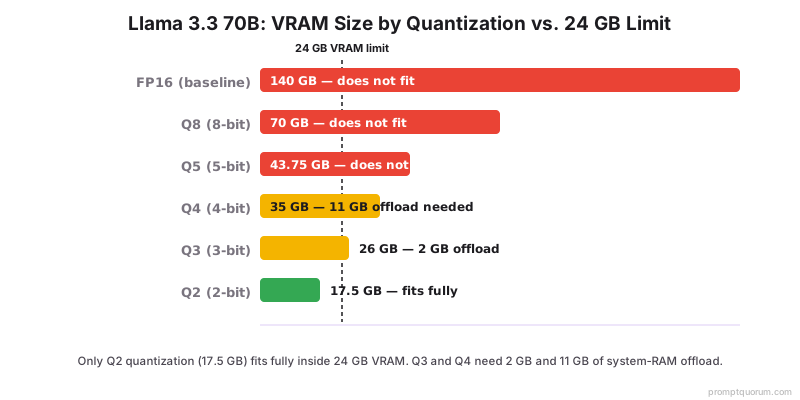
Llama 3.3 70B at various quantizations:
Quantization | Model Size | Fits 24GB? |
|---|---|---|
| FP16 (baseline) | 140 GB | No |
| Q8 (8-bit) | 70 GB | No |
| Q5 (5-bit) | 43.75 GB | No |
| Q4 (4-bit) | 35 GB | No (with offloading: maybe) |
| Q3 (3-bit) | 26 GB | No (barely) |
| Q2 (2-bit) | 17.5 GB | Yes |
Aggressive Quantization: The Primary Tool
To fit 70B in 24GB, you must use Q2 or Q3 quantization.
- Q3: 26 GB (still 2 GB over). Can offload 2 GB to RAM. Slightly better quality than Q2.
- Q2: 17.5 GB (fits!). 70% quality vs FP16. Noticeable degradation but usable.
Download the quantized model: `ollama pull llama3.1:70b-q2` (if available) or use conversion tools like llama.cpp.
Offloading to System RAM
If using Q4 (35 GB) on 24GB GPU, you can offload the remaining 11 GB to system RAM. Speed penalty is severe (10× slower).
Only practical for batch processing where you can wait hours for results.
Practical Setup: Running 70B on 24GB
Step-by-step:
- 1Use Q2 quantization: `ollama pull llama3.1:70b-q2` (if available, else convert with llama.cpp)
- 2Verify VRAM: `nvidia-smi` should show ~18 GB used
- 3Run the model: `ollama run llama3.1:70b-q2`
- 4Expect 3-5 tokens/sec (very slow)
- 5Use only for batch/offline processing, not interactive chat
Realistic Performance Expectations
Running 70B on 24GB VRAM is slow:
Quantization | Speed | Latency | Use Case |
|---|---|---|---|
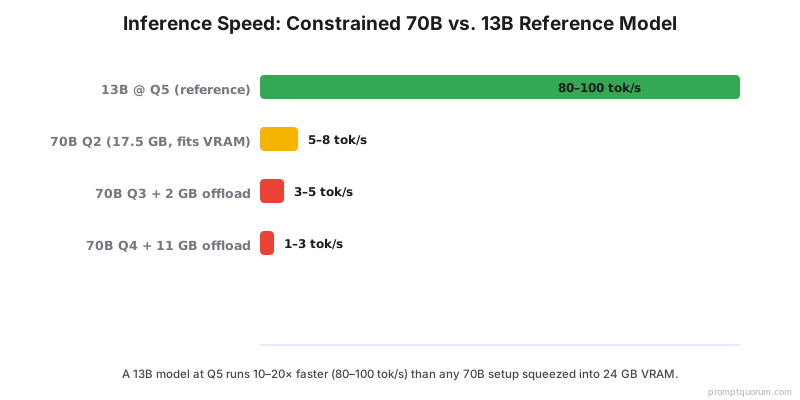
| Q2 (24GB VRAM) | 5-8 tok/sec | 2-4 sec per token | Batch processing only |
| Q3 + offload (24GB) | 3-5 tok/sec | 3-5 sec per token | Extremely limited |
| Q4 + offload (24GB) | 1-3 tok/sec | 5-10 sec per token | Overnight batch only |
Better Alternatives to Constrained 70B
Instead of struggling with 70B on limited VRAM, consider:
- Use a 13B model (Llama 3.3 13B at Q5 = 8 GB, very fast)
- Buy a second RTX 4090 for layer splitting (2× 24GB = 48GB, 100+ tok/sec)
- Use a cloud API (GPT-5.5 for important tasks, local for experimentation)
- Wait for more efficient models (smaller, same quality)
Common Mistakes With Constrained 70B
- Expecting Q2 to be usable for chat. It is not. Quality degradation is too severe for real-time interaction.
- Not measuring actual speed before committing. Test with a small prompt (10 tokens) and verify speed before running large batch jobs.
- Assuming offloading is "free". System RAM is 100× slower than GPU VRAM. Offloading makes inference impractical.
- Not considering alternatives. A 13B model is dramatically faster and often sufficient in quality.
Frequently Asked Questions
Can I actually run a 70B model on a single RTX 4090?
Yes, but with significant caveats. At Q2 quantization (17.5 GB), the model fits in 24 GB VRAM but runs at 5–8 tokens/sec and has ~70% of FP16 quality. At Q4 (35 GB), you need to offload 11 GB to system RAM, dropping speed to 1–3 tokens/sec. Neither is suitable for real-time chat — only offline batch processing.
What quantization is needed to fit 70B in 24 GB VRAM?
Q2 quantization fits in 24 GB (17.5 GB model size). Q3 (26 GB) requires 2 GB of RAM offloading. Q4 (35 GB) requires 11 GB offloading and makes inference very slow. Q5 and above (44–70 GB) cannot fit even with offloading on a 24 GB GPU. Q2 is the only option that runs fully in VRAM.
How slow is a 70B model on 24 GB VRAM?
At Q2 (fully in VRAM): 5–8 tokens/sec. At Q3 with 2 GB RAM offload: 3–5 tokens/sec. At Q4 with 11 GB RAM offload: 1–3 tokens/sec. Compare to a 13B model at Q5 on the same GPU: 80–100 tokens/sec. The 70B constrained setup is 10–20× slower than a properly sized smaller model.
Is it better to use a 13B model than a constrained 70B?
For most tasks, yes. A 13B model at Q5 quantization runs at 80–100 tokens/sec on an RTX 4090 and delivers strong quality. A 70B model at Q2 runs at 5–8 tokens/sec with degraded quality. The 13B wins on speed and often on practical quality due to Q2 degradation. Only use 70B-on-24GB if you need specific 70B capabilities and can tolerate batch-only usage.
What is the best use case for 70B on 24 GB VRAM?
Overnight batch processing — tasks where you submit 100+ prompts and retrieve results hours later. Examples: document analysis, code review batches, dataset annotation. Real-time chat is impractical at 1–8 tokens/sec. For interactive use, a second RTX 4090 ($2,000–$2,600 used market) with layer splitting achieves ~100 tokens/sec — a far better investment.
How do I download Q2 quantized 70B models?
Via Ollama: `ollama pull llama3.1:70b-instruct-q2_K` (availability varies). Via llama.cpp: download GGUF Q2_K files from Hugging Face (search "llama-3.1-70b GGUF"). TheBloke and bartowski publish quantized versions. Verify the model with `nvidia-smi` after loading — VRAM usage should be ~18–20 GB for Q2.
Sources
- llama.cpp Quantization -- github.com/ggerganov/llama.cpp/blob/master/gguf-py/gguf/quants.py
- Model Card: Llama 3.3 70B -- huggingface.co/meta-llama/Llama-3.1-70B