Key Takeaways
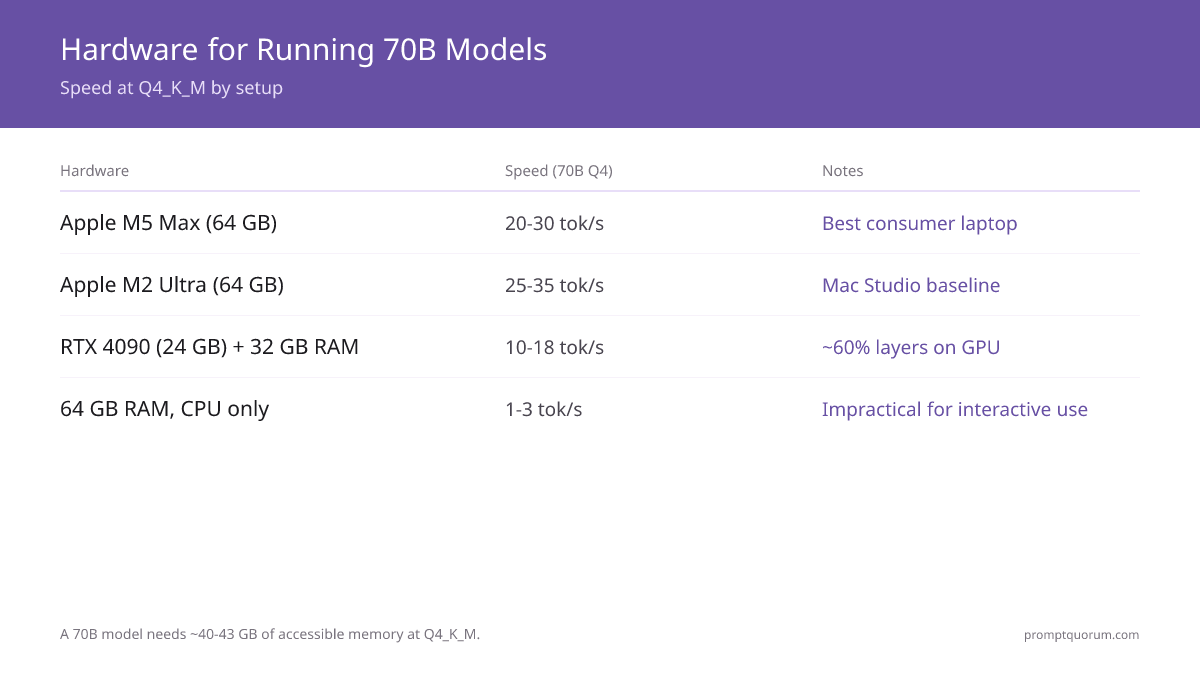
- Q4_K_M quantization: Llama 3.3 70B requires ~40 GB RAM; Qwen3 72B requires ~43 GB RAM.
- Cheapest new hardware: Apple Mac mini M5 Pro (64 GB, $1,699, ships Sept 22, 2026) is the cheapest new full-GPU Apple Silicon path to 70B. The base Mac mini M6 ($899) tops out at 32 GB and cannot run 70B at all.
- Easiest consumer hardware: Apple Mac Studio M2 Ultra (64 GB unified) or M5 Max MacBook Pro (64 GB) -- full GPU acceleration, no layer offloading needed.
- NVIDIA option: RTX 4090 (24 GB VRAM) + 32 GB system RAM with layer offloading in Ollama handles most 70B models, though 20-30% of layers run on CPU.
- CPU-only 70B: possible on 64 GB RAM but produces 1-3 tok/sec -- marginally usable for batch tasks, not for interactive chat.
- A 70B model locally still matches GPT-4 (2023) quality and remains the only consumer-accessible path to that quality tier without cloud costs.
📍 In One Sentence
Running a 70B parameter model locally requires 40-48 GB of RAM at Q4_K_M quantization, achievable on Apple Silicon Macs with 64 GB unified memory, workstations with 64 GB DDR5, or a 24 GB NVIDIA GPU combined with 32 GB system RAM using layer offloading.
💬 In Plain Terms
A 70B model is one of the largest sizes you can realistically run at home, and it needs serious memory -- roughly 40-48 GB. The easiest path is a Mac with enough unified memory, since it shares RAM between CPU and GPU. On a PC, you'll usually need a large graphics card plus extra system RAM to offload the parts that don't fit on the card.
What Hardware Can Actually Run a 70B Local LLM?
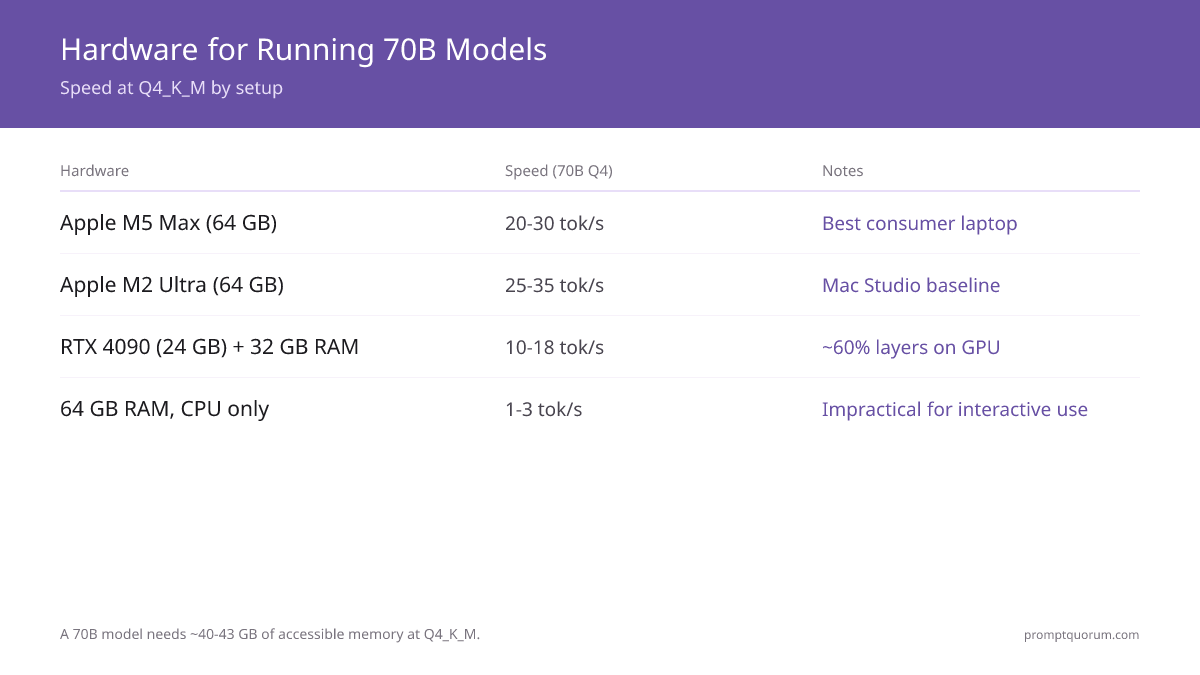
A 70B model at Q4_K_M quantization requires approximately 40-43 GB of memory that is accessible to the inference engine. This can come from GPU VRAM, unified system memory (Apple Silicon), system RAM, or a combination via layer offloading.
Hardware | Can Run 70B? | Speed (70B Q4) | Notes |
|---|---|---|---|
| Apple M5 Max MacBook Pro (64 GB) | Yes -- full GPU | 20-30 tok/sec | Best consumer laptop option |
| Apple Mac Studio M5 Max (64 GB) | Yes -- full GPU | 22-32 tok/sec | New Aug 2026 desktop, $2,499 |
| Apple Mac mini M5 Pro (64 GB) | Yes -- full GPU | Not yet benchmarked | New, ships Sept 22 2026, $1,699 -- cheapest new option |
| Apple Mac mini M6 (32 GB max) | No -- 32 GB max | N/A | New, ships Sept 22 2026, $899 -- too little memory for 70B |
| Apple M2 Ultra (64 GB unified) | Yes -- full GPU | 25-35 tok/sec | Mac Studio baseline config, used/refurb |
| Apple Mac Studio M5 Ultra (256GB+) | Yes -- full GPU | 35-50 tok/sec | New Aug 2026, $5,499+. Q8_0/FP16 with room to spare. |
| NVIDIA DGX Spark (128 GB unified) | Yes -- full GPU | 18-28 tok/sec | Q8_0 fits (70 GB). Best for CUDA workflows. |
| NVIDIA RTX 4090 (24 GB) + 32 GB RAM | Yes -- with offload | 10-18 tok/sec | ~60% layers on GPU, ~40% on CPU |
| NVIDIA RTX 4080 (16 GB) + 32 GB RAM | Partial offload only | 5-10 tok/sec | Only ~35% layers on GPU |
| 64 GB RAM, CPU only | Yes -- CPU only | 1-3 tok/sec | Impractical for interactive use |
How Much RAM Does a 70B Model Need at Each Quantization Level?
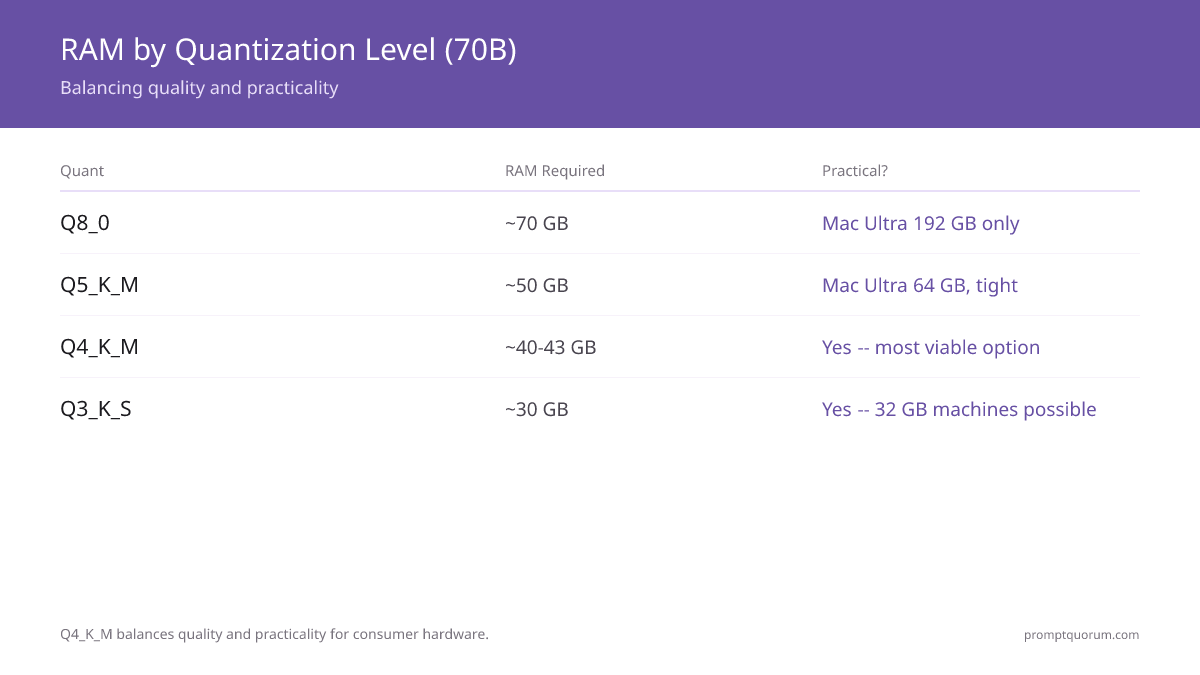
Quantization | RAM Required | Quality | Practical? |
|---|---|---|---|
| FP16 (full precision) | ~140 GB | Reference quality | No -- server only |
| Q8_0 | ~70 GB | Near-lossless | Mac Ultra 192 GB only |
| Q5_K_M | ~50 GB | Minimal loss | Mac Ultra 64 GB, tight |
| Q4_K_M | ~40-43 GB | Low loss -- recommended | Yes -- most viable option |
| Q3_K_S | ~30 GB | Moderate loss | Yes -- 32 GB machines possible |
| Q2_K | ~22 GB | High loss | Not recommended |
Why Is Apple Silicon the Best Consumer Option for 70B Models?
Apple Silicon uses unified memory -- the CPU and GPU share the same physical memory pool. An M5 Max MacBook Pro with 64 GB of unified memory can run a 70B model at Q4_K_M entirely on GPU, achieving 20-30 tok/sec with no layer offloading overhead.
On NVIDIA hardware, the GPU and system RAM are separate. A 24 GB VRAM GPU can only hold ~60% of a Q4_K_M 70B model; the remaining layers run on CPU, creating a memory bandwidth bottleneck that reduces speed to 10-18 tok/sec.
A used Mac Studio M2 Ultra (64 GB, ~$2,000 refurbished) remains the cheapest used path to 70B local inference at usable speed. Apple launched a refreshed Mac Studio lineup with M5 Max and M5 Ultra chips in August 2026: the new Mac Studio M5 Max (64 GB, $2,499) is a full-GPU option, and the Mac Studio M5 Ultra (256 GB or 512 GB, from $5,499) doubles unified memory bandwidth to 1.2 TB/sec, comfortably running 70B models at Q8_0 or FP16 with no quality compromise.
Apple refreshed the Mac mini on August 25, 2026, shipping September 22, 2026, and it changes the cheapest-new-hardware answer again. The Mac mini M5 Pro ($1,699 starting) maxes out at 64 GB unified memory with 307 GB/sec bandwidth and Thunderbolt 5 -- enough to run a 70B model at Q4_K_M entirely on GPU, and $800 cheaper than the Mac Studio M5 Max. The base Mac mini M6 ($899 starting) is a different machine: it maxes out at 32 GB unified memory and 170 GB/sec bandwidth, well short of the 40+ GB a 70B model needs, so it cannot run a 70B model at any quantization level. No independent benchmarks exist yet for either chip -- both ship September 22, 2026.
NVIDIA DGX Spark: 128GB Unified Memory for 70B Models
The NVIDIA DGX Spark ($4,699) is a compact desktop AI computer launched in October 2025, built on the GB10 Grace Blackwell Superchip with 128GB of unified LPDDR5x memory. Its unified memory architecture means GPU and CPU share the same 128GB pool -- similar to Apple Silicon but with CUDA acceleration.
At 128GB unified memory, the DGX Spark runs Llama 3.3 70B and Qwen3 72B at Q8_0 (70GB -- near-lossless quality). Inference speed for 70B at Q8_0 is approximately 18-28 tok/sec.
NVIDIA raised the DGX Spark Founders Edition price from $3,999 to $4,699 in February 2026, citing memory supply constraints -- the same DRAM shortage that has also pushed RTX 50-series GPU prices well above MSRP.
Spec | Value |
|---|---|
| Memory | 128 GB unified LPDDR5x |
| 70B at Q8_0 | Yes -- near-lossless quality |
| 70B inference speed | 18-28 tok/sec |
| Max model size | ~200B parameters at FP4 |
| Price | $4,699 (NVIDIA direct / Amazon) |
| Ollama command | ollama run llama3.3:70b |
How Does NVIDIA GPU + Layer Offloading Work for 70B Models?
Ollama and llama.cpp support splitting a model across GPU VRAM and system RAM. Layers loaded in VRAM run at GPU speed; layers in system RAM run at CPU speed:
# Ollama automatically offloads as many layers as fit in VRAM
# To explicitly control layers:
ollama run llama3.3:70b

# Check how many layers are on GPU:
ollama ps
# Output shows: llama3.3:70b  ...  23/80 GPU layers

# For llama.cpp directly:
./llama-cli -m llama-3.3-70b-q4_k_m.gguf \
  -ngl 40   # number of layers to offload to GPU
  --ctx-size 4096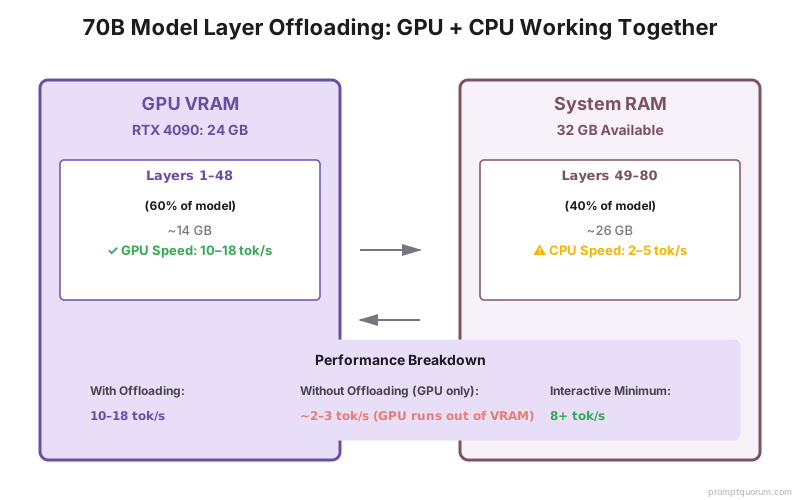
Is CPU-Only 70B Inference Practical?
A 70B model at Q4_K_M on a high-core-count CPU (AMD Threadripper, Intel Xeon) with 64 GB RAM produces 1-3 tokens/sec. At 2 tok/sec, a 200-word response takes approximately 75 seconds.
This is impractical for interactive chat but usable for batch processing -- summarizing documents, generating reports, or processing files overnight. For interactive use, the minimum practical hardware is a machine that can achieve 8+ tok/sec, which requires either Apple Silicon or NVIDIA GPU offloading.
Which 70B Model Should You Run Locally?
Model | MMLU | HumanEval | Best For |
|---|---|---|---|
| Llama 3.3 70B | 82% | 88% | General English tasks, instruction-following |
| Qwen3 72B | 84% | 87% | Coding, multilingual (29 languages) |
| Mistral Large 123B | 84% | 80% | Requires 80+ GB -- workstation only |
Running 70B Models Locally: Regional Context
EU / GDPR: A 70B local model represents the practical ceiling of privately-runnable AI quality. For EU enterprises processing sensitive data -- legal documents, medical records, financial analysis -- a 70B model running on-premises delivers GPT-4 2023 quality with full GDPR compliance. No prompt content, context, or output leaves the organization's infrastructure.
For German BSI and French CNIL compliance: the Mac Studio M2 Ultra (Apple, USA) and NVIDIA DGX Spark (NVIDIA, USA) are both from non-EU vendors. For organizations requiring EU-supply-chain hardware, NVIDIA OEM partners (Dell, HP, Lenovo) produce DGX Spark-compatible GB10 systems with EU support.
Model selection for EU compliance: Mistral Large 123B (Mistral AI, France, Apache 2.0) is the only 70B+ model from an EU-based developer. It requires 80+ GB RAM (workstation only) but provides the strongest EU IP and compliance narrative.
Japan (METI): For Japanese enterprises, Qwen3 72B is the recommended 70B model -- its native Japanese tokenization is 30-40% more efficient than Llama for Japanese text. On a Mac Studio M2 Ultra (64 GB): `ollama run qwen2.5:72b`. METI AI governance requires documenting hardware and model versions. The `ollama ps` output provides exact model identification for compliance records.
China: Qwen3 72B (Alibaba) running locally satisfies data localization under China's Data Security Law (数据安全法) while delivering 84% MMLU quality. Enterprise teams commonly deploy on dual-GPU servers (2× RTX 4090, 48 GB VRAM combined). For CAC compliance: a locally-hosted Qwen3 72B serving internal users is outside the CAC provider definition -- it is not offered as a public service.
What Are the Common Mistakes When Running 70B Models on Consumer Hardware?
Buying a GPU with less than 24 GB VRAM and expecting full 70B performance
An RTX 4070 Ti (12 GB VRAM) can only hold ~30% of a Q4_K_M 70B model in VRAM. The remaining 70% runs on CPU, resulting in 3-5 tok/sec -- barely faster than CPU-only inference. For 70B models, 24 GB VRAM (RTX 4090) is the practical minimum for useful GPU acceleration. Below this, consider running a 34B model instead.
Not using layer offloading in Ollama
By default, if a 70B model does not fit entirely in VRAM, Ollama falls back to CPU-only inference. Set the GPU layers explicitly with `OLLAMA_GPU_LAYERS=999` -- Ollama will offload as many layers as fit in VRAM and run the remainder on CPU, which is significantly faster than all-CPU inference.
Using Q4_K_M when Q3_K_S would fit better on available hardware
On machines with 32-40 GB RAM, Q4_K_M for a 70B model may be too tight (leaving insufficient headroom for the OS). Q3_K_S reduces RAM to ~30 GB at moderate quality loss. Run `ollama ps` after loading the model -- if you see swap usage, drop to Q3_K_S.
Expecting the same speed as Apple Silicon from an NVIDIA offloaded setup
Layer offloading on NVIDIA creates a memory bandwidth bottleneck between VRAM and system RAM. RTX 4090 with offloading produces 10-18 tok/sec vs 20-30 tok/sec on M5 Max. For equal speed, Apple Silicon is the better consumer choice. For CUDA workflows (fine-tuning, custom kernels), NVIDIA is required.
Running Q4_K_M on DGX Spark instead of Q8_0
The DGX Spark has 128GB -- enough for Q8_0 (70 GB). Using Q4_K_M wastes available quality. On any machine with ≥80 GB, run Q8_0 for 70B models.
Buying the base Mac mini M6 expecting it to run a 70B model
The Mac mini M6 ($899) tops out at 32 GB unified memory -- well short of the 40+ GB a 70B model needs at Q4_K_M. It cannot run a 70B model at any quantization level. For 70B on a Mac mini, the Mac mini M5 Pro ($1,699, 64 GB unified memory) is the required tier -- confirm "M5 Pro" and 64 GB before ordering, not the base M6.
Common Questions About Running 70B Models on Consumer Hardware
What is the cheapest hardware that can run a 70B model usably?
The Mac mini M5 Pro ($1,699, 64 GB unified memory, ships September 22, 2026) is set to be the cheapest new hardware that can run a 70B model, undercutting the previous cheapest new option, the Mac Studio M5 Max (64 GB, $2,499), by $800. A used Mac Studio M2 Ultra (64 GB unified memory) for ~$2,000 remains the cheapest used path at a proven 25+ tok/sec. No independent benchmarks exist yet for the Mac mini M5 Pro. An NVIDIA RTX 4090 desktop build (24 GB VRAM + 32 GB RAM) costs ~$3,000-$4,000 total but produces slower inference due to layer offloading. Do not confuse the Mac mini M5 Pro with the base Mac mini M6 ($899) -- the M6 tops out at 32 GB unified memory and cannot run a 70B model.
Can the Mac mini M6 run a 70B model?
No. The Mac mini M6 ($899 starting) maxes out at 32 GB unified memory and 170 GB/sec bandwidth -- far short of the 40+ GB a 70B model requires at Q4_K_M. For 70B on a Mac mini, order the Mac mini M5 Pro ($1,699 starting, 64 GB unified memory, 307 GB/sec bandwidth, Thunderbolt 5) instead. Both ship September 22, 2026, and no independent benchmarks exist yet for either chip.
Can I run a 70B model on two GPUs?
Yes -- llama.cpp and Ollama support multi-GPU inference on NVIDIA hardware. Two RTX 4090s (48 GB total VRAM) fit a Q4_K_M 70B model entirely in VRAM. Ollama handles multi-GPU automatically when multiple GPUs are present. Tensor parallelism in llama.cpp (`--tensor-split`) controls how layers are distributed.
How does 70B local quality compare to GPT-5.5?
On MMLU and HumanEval benchmarks, Llama 3.3 70B (82%, 88%) and Qwen3 72B (84%, 87%) match or slightly exceed GPT-4 (2023) scores. GPT-5.5 (2024) scores higher on reasoning-heavy tasks. For general instruction-following, summarization, and code generation, 70B local models are competitive with GPT-5.5 on most tasks.
Does Ollama support running 70B models automatically?
Yes. Running `ollama run llama3.3:70b` downloads and runs the model with automatic GPU layer offloading. Ollama detects available VRAM and system RAM, offloads as many layers as possible to GPU, and runs the rest on CPU. No manual configuration is required for basic use.
How much electricity does running a 70B model use?
A Mac Studio M2 Ultra running 70B inference draws approximately 30-50 W. An NVIDIA RTX 4090 desktop under load draws 350-450 W. At $0.15 per kWh, continuous 70B inference on an RTX 4090 costs approximately $0.05-0.07 per hour. Apple Silicon is 7-10× more energy-efficient for this workload.
Are 70B models worth it compared to 13B models for everyday tasks?
For complex reasoning, long-document analysis, and nuanced writing, yes -- the quality difference is noticeable. For simple summarization, Q&A, and classification, a 13B or even 7B model produces nearly identical output. Run both on your specific use case with PromptQuorum to quantify the quality difference before investing in 70B hardware.
What is the NVIDIA DGX Spark and is it worth it for 70B inference?
The DGX Spark ($4,699) is NVIDIA's compact desktop AI computer with 128GB unified memory. It runs 70B models at Q8_0 (near-lossless quality) without quantization constraints. Speed: 18-28 tok/sec. Compared to a Mac Studio M2 Ultra (~$2,000 refurb, 64GB): DGX Spark is ~$2,700 more for higher-quality inference and CUDA support. For pure 70B inference, Mac Studio is cheaper. For CUDA workflows (fine-tuning, custom kernels), DGX Spark is better.
Can I fine-tune a 70B model on consumer hardware?
Full fine-tuning requires roughly 3× the inference memory for LoRA fine-tuning (~120-130 GB VRAM). This exceeds all consumer hardware except the DGX Spark (128 GB -- barely feasible for small LoRA runs with 4-bit quantization). For 70B fine-tuning, cloud GPU providers (RunPod, Lambda Labs, Vast.ai) are more practical. Consumer hardware handles 7B-13B fine-tuning reliably.
What is the best quantization for 70B on Apple Silicon?
On 64 GB Mac (M5 Max or M2 Ultra): Q4_K_M (~40 GB) leaves 24 GB for the OS -- comfortable. Q5_K_M (~50 GB) leaves 14 GB -- tight but feasible. Q8_0 (~70 GB) exceeds 64 GB -- only feasible on 96 GB or 128 GB configurations. On 128 GB Mac: Q8_0 is recommended for near-lossless quality at no speed penalty.
Does Ollama automatically choose the best quantization?
No. `ollama run llama3.3:70b` downloads the default Q4_K_M. Specify explicitly for better quality: `ollama run llama3.3:70b:q5_k_m` or `ollama run llama3.3:70b:q8_0`. Check available memory with `ollama ps` after loading -- if the model fits comfortably, upgrade to the next quantization level.
Sources
- llama.cpp GPU Offloading Documentation -- github.com/ggerganov/llama.cpp/blob/master/docs/backend/CUDA.md
- Ollama Model Library -- ollama.com/library/llama3.3
- Apple M5 Max Inference Benchmarks -- github.com/ggerganov/llama.cpp/discussions (community benchmarks thread)
- Meta Llama 3.3 Model Card -- huggingface.co/meta-llama/Llama-3.3-70B-Instruct
- NVIDIA DGX Spark -- nvidia.com/en-us/products/workstations/dgx-spark/