What Is Q4_K_M Quantization?
Quick Answer
Q4_K_M means 4-bit quantization using k-quant (K) compression at medium (M) quality. It is the best default for most models: better quality than Q4_0, smaller than Q8_0.
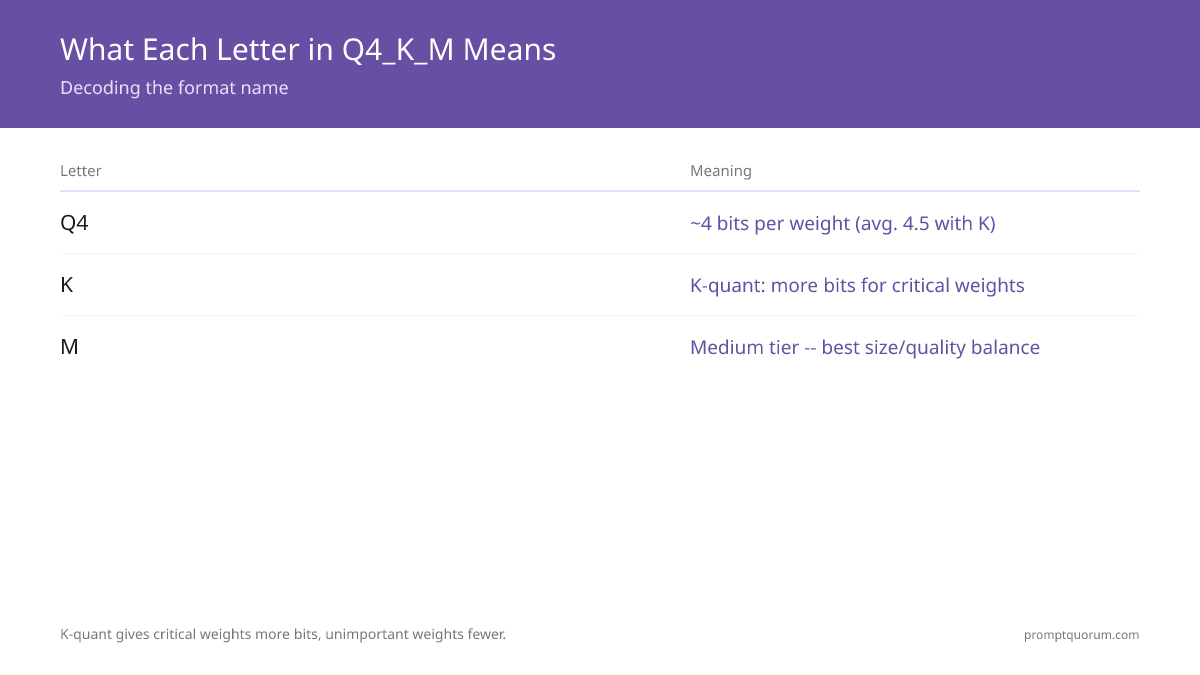
- ▸Q = quantized, 4 = 4-bit, K = k-quant, M = medium
- ▸Better quality than Q4_0 at the same file size
- ▸Use Q4_K_M as your default quantization
Key Takeaways
- ✓Q4_K_M = 4-bit quantization with k-quant compression at medium quality — better than Q4_0 at the same file size
- ✓A 7B model at Q4_K_M fits in ~4.1 GB on disk and needs ~5.5 GB VRAM to run
- ✓Use Q4_K_M as your default — it delivers the best quality-per-gigabyte for most VRAM budgets
What Each Letter in Q4_K_M Means
Q4_K_M exists because old 4-bit formats (Q4_0) lost too much quality on critical weights. K-quant compression solves this by allocating more bits to weights that affect output most, and fewer bits to weights with minimal impact. The result: 5–8% better quality than Q4_0 at the same file size.
The "K" is the key differentiator. K-quant compression applies non-uniform bit allocation — critical weights get more bits, less important ones get fewer. This recovers 5–8% quality compared to the older Q4_0 format at the same file size.
The "M" is the quality setting within k-quant. Q4_K_S (small) is slightly smaller with lower quality. Q4_K_M (medium) is the best balance. Q4_K_L (large) is marginally better but rarely worth the extra size.
K-quant works by clustering weights and assigning bits based on importance. Top-importance clusters get 6 bits per weight. Mid-tier clusters get 4 bits. Low-importance clusters get 3 bits. The "M" tier averages 4.5 bits per weight across the model — explaining why Q4_K_M sits between Q4_K_S and Q5_K_M in both size and quality. For when the M tier is not enough, see Q4_K_M vs Q8_0.
How Q4_K_M Compares to Other Quantizations
The table below shows the tradeoffs for a 7B model. Quality is relative to the full-precision Q8_0 baseline. Unless you have 12+ GB VRAM, Q4_K_M gives the best quality-per-gigabyte.
For a direct comparison of Q4_K_M vs Q8_0, see the Q4_K_M vs Q8_0 decision guide. For the full quantization reference, see the quantization levels comparison.
| Format | File Size (7B) | Quality vs Q8_0 |
|---|---|---|
| Q4_0 | 3.8 GB | Baseline (~87%) |
| Q4_K_M | 4.1 GB | ~92% (+5%) |
| Q5_K_M | 5.0 GB | ~95% (+3%) |
| Q8_0 | 7.7 GB | 100% (reference) |
Quick Answers About Quantization
Is Q4_K_M the same as Q4_0?▾
Which quantization should I use for 8 GB VRAM?▾
What does the 'M' in Q4_K_M stand for?▾
Which models on Ollama use Q4_K_M by default?▾
:q5_K_M or :q8_0 in the model tag to switch quantization.Want the full breakdown?
Read the complete guide →