What is LLM Quantization?
LLM quantization reduces model size by compressing weights from 16-bit to lower precision formats like Q4 or Q8.
- Q2–Q3 → fastest, lowest quality
- Q4 → best balance (recommended)
- Q5–Q6 → higher quality, more RAM
- Q8 → near full precision, slowest
Key Takeaways
- Q4 (4-bit): 87.5% VRAM savings, ~1% quality loss. Use this for everything.
- Q5 (5-bit): 84% VRAM savings, ~0.5% quality loss. Never necessary; Q4 + Q8 bracket Q5.
- Q8 (8-bit): 50% VRAM savings, <0.1% quality loss. For perfectionists with excess VRAM.
- FP32 (32-bit): Full precision, 0% loss, 0% savings. Impractical; skip it.
- Speed: All quantizations run at identical token/sec (memory-bound, not compute-bound).
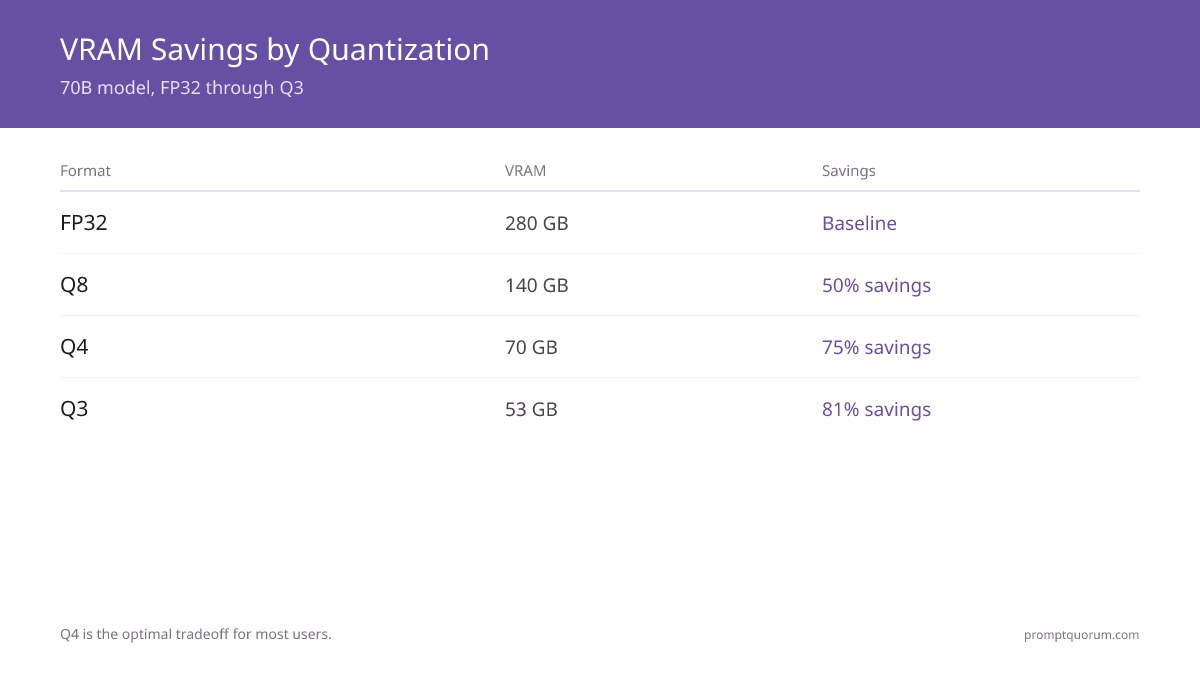
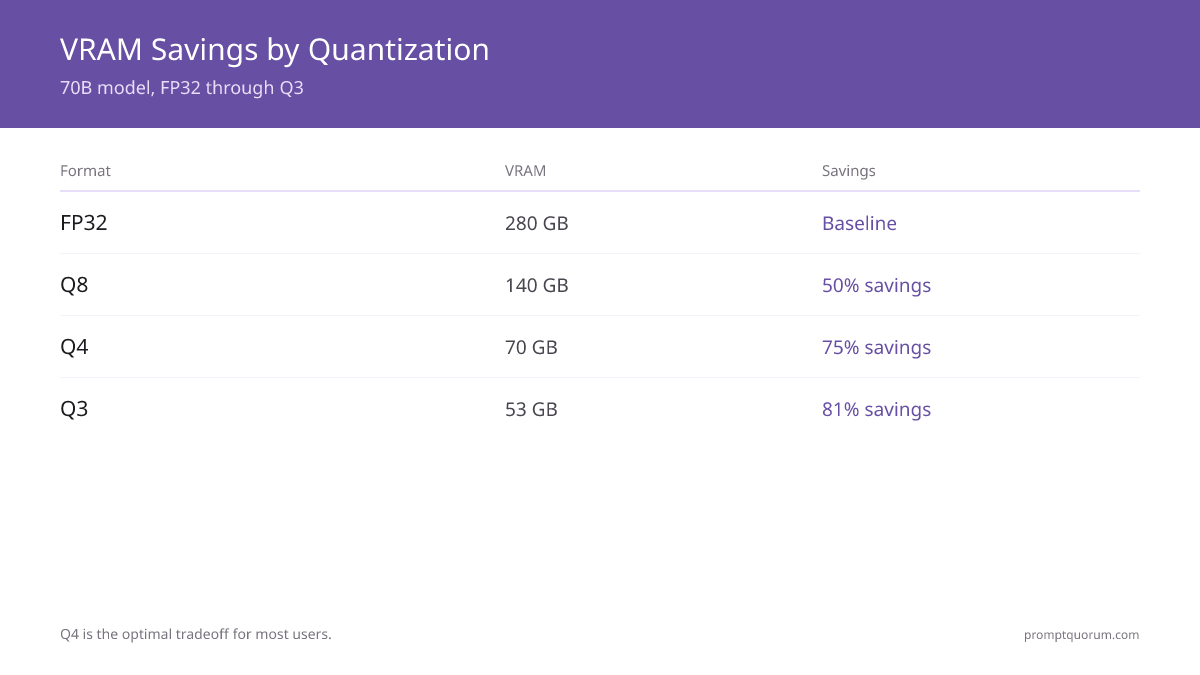
- VRAM usage (70B Llama model): FP32=280GB, Q8=140GB, Q5=88GB, Q4=70GB.
- Recommendation: Use Q4 for 7B-70B. Use Q8 only if you have 32GB+ VRAM and need pristine quality.
- No one uses Q5 because Q4 + small upgrade = better than Q5 + same hardware.
📍 In One Sentence
Q4 quantization is the sweet spot for local LLMs -- it cuts VRAM usage by about 87.5% versus full precision with roughly 1% quality loss, and runs at the same speed as every other quantization level since inference is memory-bound, not compute-bound.
💬 In Plain Terms
Quantization shrinks an AI model so it fits in less memory, similar to compressing a photo. Q4 (4-bit) is the standard choice: it makes the model about 4x smaller with almost no noticeable quality loss. Q5 is not really worth using since Q4 already gets you nearly all the quality at a much smaller size, and Q8 only matters if you have plenty of spare VRAM and want the absolute best output.
Quick Facts
- Q4 VRAM savings: 87.5% vs FP32 (70GB for Llama 3 70B)
- Q4 quality loss: <1.2% on MMLU benchmark
- Q8 VRAM savings: 50% vs FP32 (140GB for Llama 3 70B)
- Speed difference: 0% — all quantizations run at identical tokens/sec
- Q5 verdict: Dead zone — Q4 + larger model = better result at same VRAM
Quantization Levels Compared: Q2 Through Q8
Quantization | RAM Usage | Speed | Quality | Best For |
|---|---|---|---|---|
| Q2 | Very Low | Very Fast | Poor | Experiments |
| Q3 | Low | Fast | Low | Small devices |
| Q4 | Medium | Fast | Good | Most users |
| Q5 | Medium+ | Medium | Very Good | Coding |
| Q6 | High | Slower | Excellent | Accuracy focus |
| Q8 | Very High | Slow | Near FP16 | Benchmarking |
Best Quantization Level by Use Case
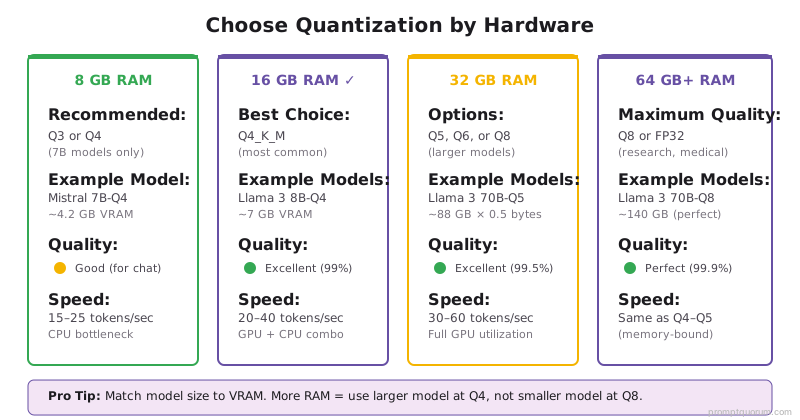
- 8GB RAM: Q3 or Q4 (small 7B models only)
- 16GB RAM: Q4_K_M (recommended for most laptops)
- 32GB RAM: Q5, Q6, or Q8 (larger models, higher quality)
- Maximum accuracy: Q8 (when VRAM is not a constraint)
How Does Quantization Affect VRAM and Speed?
VRAM calculation: Model size (GB) × quantization factor.
Llama 3 70B:
- FP32: 70B × 4 bytes = 280GB (impractical)
- Q8: 70B × 1 byte = 140GB (needs 140GB VRAM)
- Q4: 70B × 0.5 bytes = 70GB (fits RTX 4090 + some overhead)
Speed: All quantizations are memory-bound (waiting for DRAM), not compute-bound.
Tokens/sec is identical across Q2-FP32 on same hardware.
VRAM bandwidth, not computation, is the bottleneck. Quantization saves VRAM, not time.
Quality Loss by Level: MMLU Benchmark Results
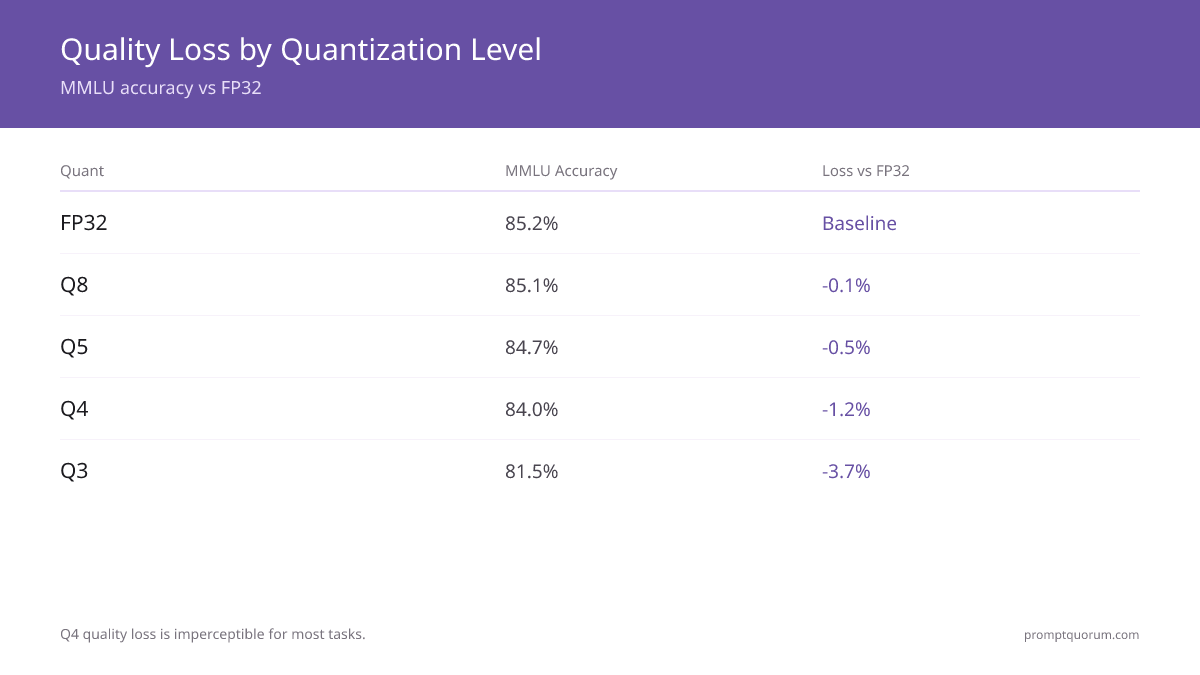
Measured on MMLU benchmark (general knowledge, 57 tasks):
- Llama 3 70B FP32 baseline: 85.2% accuracy.
- Llama 3 70B Q8: 85.1% accuracy (-0.1% loss).
- Llama 3 70B Q5: 84.7% accuracy (-0.5% loss).
- Llama 3 70B Q4: 84.0% accuracy (-1.2% loss).
- Llama 3 70B Q3: 81.5% accuracy (-3.7% loss).
- Real-world impact: Q4 vs Q8 = 1-2% fewer correct answers out of 100 questions.
- For chat/writing: imperceptible difference. For STEM problems: Q8 safer.
When to Use Each Level?
Q4: Default. Use for all models. Sweet spot of compression + quality.
Q5: Never. Wasteful. If you need Q5 quality, use Q4 with slightly larger model. If you have Q5's VRAM (88GB), use Q4 on 70B instead.
Q8: Only if you have 32GB+ VRAM AND model is <70B AND you need perfect accuracy (research, medical use).
Q3: Budget squeeze. 3% quality loss acceptable? Use Q3. Otherwise, upgrade GPU or use smaller model.
Q2: Desperation. Quality loss too high for most. Use only if OOM on Q3.
Why Is Q4 the Industry Standard?
Q4 is optimal because:
1. 87.5% VRAM savings (best ratio).
2. <1.2% quality loss (imperceptible to users).
3. No speed penalty (memory-bound, not compute-bound).
4. Fits consumer hardware (70B on RTX 4090 24GB).
5. Industry standard (HuggingFace, Ollama default to Q4).
Every model released post-2024 includes a Q4 variant for production use.
If a model only has FP32/Q8/Q5, the project is not production-ready.
Common Misconceptions
- Q4 sounds "low quality" because 4-bit seems small. False. 1% quality loss is imperceptible.
- Quantization makes inference slower. False. Speed is identical (memory-bound, not compute-bound).
- I should use Q8 to be safe. False. Q4 is proven, safe, and standard. Q8 is wasteful.
- I need FP32 for accuracy. False. Never true. Q8 is sufficient even for research.
Frequently Asked Questions
What is LLM quantization?
Quantization compresses a model by reducing numerical precision, lowering memory usage and increasing speed.
What is the best quantization level?
Q4_K_M is the best default for most users, balancing performance and quality.
Does quantization reduce accuracy?
Yes, but Q4–Q5 retain most model quality while significantly reducing memory requirements.
Is Q8 worth it?
Only if you need maximum accuracy and have enough RAM. Most users will not benefit from Q8.
Should I use Q4 or Q8 for coding?
Q4. Speed is identical, quality difference is 1%, which is imperceptible for code generation.
Can I use Q3 if I'm tight on VRAM?
Yes. 3% quality loss is acceptable for chat/creative writing. Unacceptable for reasoning/math.
Is there a Q6 or Q7?
Q6 is a standard GGUF level. Q6_K (~6.6 bits) is near-lossless: Q6 vs Q8 is almost a tie on quality while Q6 is smaller, and Q4 vs Q6 favors Q6 on quality (Q4 wins on size and VRAM). Q7 is not standard. Typical ladder: Q4_K_M (best balance), Q5_K_M, Q6_K (near-Q8), Q8_0 (near-lossless).
Which quantization is fastest?
All identical speed (memory-bound). Q2 is slightly faster due to less memory transfer, but difference is <5%.
Can I dequantize Q4 back to FP32?
No, data is lost. Q4 → FP32 interpolation doesn't restore original. Quantization is one-way.
Should I quantize my fine-tuned model?
Yes, after training. Quantize the trained weights to Q4 for deployment.
What does GGUF Q4_K_M mean?
Q4_K_M is a refined Q4 variant using K-quants (mixed precision). The K algorithm preserves more accuracy on attention layers. Q4_K_M is the recommended download on HuggingFace for most models — effectively Q4 with ~0.3% better accuracy at the same VRAM cost.
Does quantization affect context length?
No. Quantization compresses model weights, not the context window. A Q4 model has the same maximum context length (e.g., 128k tokens) as its FP32 counterpart. Context memory (KV cache) is a separate concern from quantization.
Sources
- MMLU Benchmark — OpenAI Evals — Measuring accuracy across Q4/Q8/FP32 quantization levels on 57 reasoning tasks
- Llama 3 Model Card — Meta AI — Official accuracy specifications across quantization levels
- Towards Quantization-Aware Deep Neural Networks (arXiv 2024) — Research on quantization error bounds and K-quant methodology
- Quantization reduces model size but doesn't eliminate output variability. Parameter tuning can compensate for precision loss: temperature and top-p explains sampling strategies.