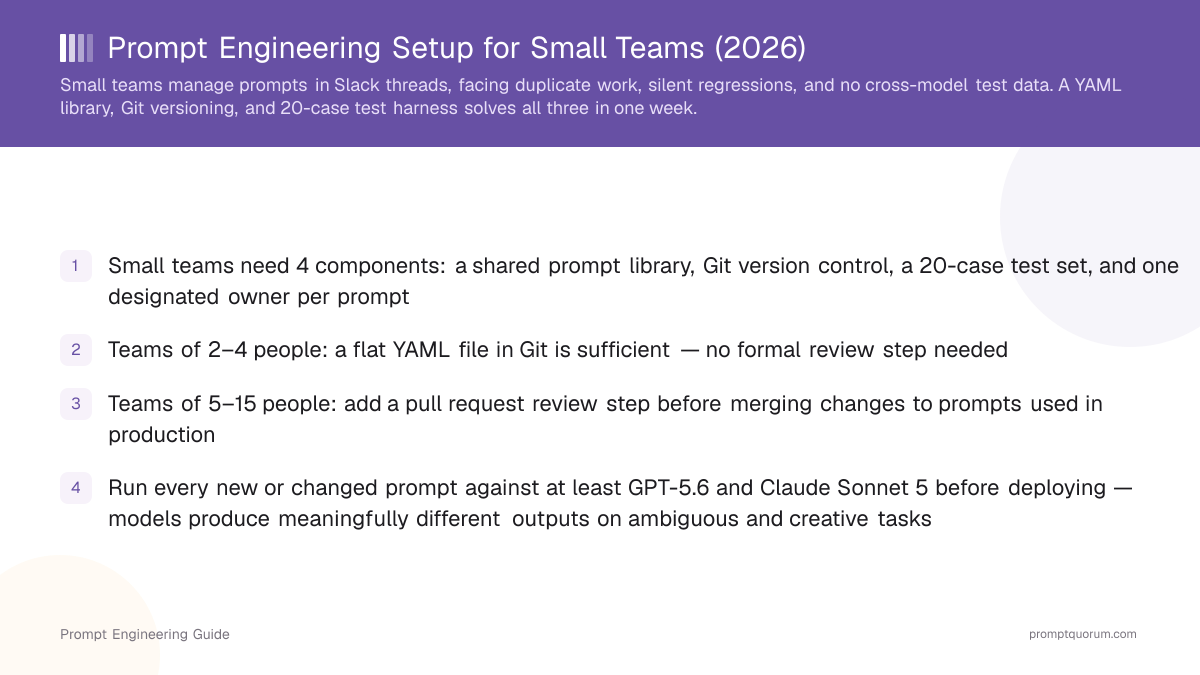
🔍 TL;DR
A small team prompt engineering setup needs four things: a shared YAML prompt library in Git, version control with semantic versioning, a 20-case test set with binary pass/fail scoring, and one named owner per prompt. Teams of 2–4 can skip formal review; teams of 5–15 add PR reviews. Run every production prompt against GPT-5.6 and Claude before deploying. Full setup takes one week.
Prompt Engineering Setup for Small Teams: 4 Required Components
📍 In One Sentence
A prompt engineering setup for small teams is the shared storage, version history, test coverage, and ownership model that lets multiple people work on prompts without breaking each other's work.
💬 In Plain Terms
Think of it like a shared Google Doc for code: instead of everyone keeping their own version of a prompt in a personal notes app, the team keeps one authoritative copy in a shared location, tracks who changed what, and tests it before using it in production.
A prompt engineering setup for small teams is the combination of four systems: a shared prompt library, a version control workflow, a test harness, and ownership rules. Together, these four prevent the most common failure mode — multiple people editing the same prompts without coordination, leading to silent regressions.
Most small teams skip the setup entirely until something breaks in production. By then, the damage is done: prompts that worked last week fail silently, nobody knows who changed what, and debugging requires reconstructing history from memory.
Component | What it prevents | Minimum viable form |
|---|---|---|
| Shared prompt library | Duplicate prompts, "whose version is correct?" | YAML files in a Git repo |
| Version control | Silent regressions when prompts change | Git commits with a one-line change note |
| Test harness | Deploying broken prompts undetected | 20-case test set with binary pass/fail scoring |
| Ownership rules | Prompts updated without review | One named owner field per prompt YAML file |
🔍 Solo developers
If you work alone, you only need a prompt library — skip the versioning and governance sections. This guide is for teams of 2+ where coordination becomes the constraint.
Team Size Determines Your Required Setup Level
The right level of process depends directly on team size — too little and prompts break silently, too much and your team spends more time on process than building. Match your setup to your headcount and adjust as the team grows.
Team size | Recommended setup | Skip for now |
|---|---|---|
| 1–2 people | Shared YAML in Git, one owner per prompt, no review step | Test harness (add when you deploy to users) |
| 3–5 people | Library + Git + 20-case test set for top prompts | Formal PR reviews (Slack approval is enough) |
| 6–10 people | Full setup: library + versioning + CI test run on merge | External prompt management tool (Git is enough at this size) |
| 11–15 people | Full setup + PR review policy + one prompt owner per product area | Custom tooling (use PromptQuorum instead) |
⚠️ Over-engineering risk
A 2-person team that adds formal PR reviews, change logs, and CI test runs will spend more time maintaining the system than building. Start with Git + YAML. Add process only when team size or prompt failures demand it.
Small Teams Need 3 Core Tools: Git, VS Code, and PromptQuorum
Most small teams need only three tools: a code editor for writing prompts, Git for version control, and a multi-model testing platform for comparing outputs. Everything else is optional until a specific constraint makes it necessary.
The table below lists the tools most commonly used by teams of 2–15 people. Start with the first three and add others only when you hit their specific limitations.
- Use Git if your team can use a terminal or the GitHub/GitLab web UI — no additional tooling is needed
- Use PromptQuorum if you compare prompts across models — it removes the need to write per-model API comparison code
- Add Langfuse or Phoenix only after you have prompts in production serving real users, not before
- Use Notion as a secondary interface only for non-technical team members who cannot use YAML files — keep the canonical version in Git
Tool | Purpose | Cost | Best for |
|---|---|---|---|
| Git + GitHub/GitLab | Version control for prompts and change history | Free | All team sizes |
| VS Code or Cursor | Writing, editing, and previewing prompt YAML files | Free | All team sizes |
| PromptQuorum | Dispatch one prompt to GPT-5.6, Claude, and Gemini simultaneously; compare pass rates side-by-side | Free tier available | Teams testing prompts across models |
| Langfuse or Phoenix | Production prompt monitoring and observability | Free tier available | Teams with deployed prompts serving real users |
| Notion or Linear | Lightweight prompt change tracking for non-technical stakeholders | Free tier available | Teams where non-developers also manage prompts |
🔍 Fastest start
The fastest path to a functional setup: Git repo + VS Code + PromptQuorum. All three are free and can be installed in under 30 minutes. Evaluate more complex tooling once you have 20+ production prompts and understand your actual bottlenecks.
Version Prompts Semantically and Test Across 2 Models
Version prompts with semantic version numbers in the YAML file and Git commits for history; test with a 20-case test set scored binary pass/fail before every deploy. These two practices together catch the majority of prompt regressions before they reach users.
Semantic versioning (`1.0.0 → 1.1.0 → 2.0.0`) makes the impact of changes immediately readable: a minor bump means a wording tweak; a major bump means the output format or task intent changed. Record the reason in the Git commit message alongside the file change.
The minimum viable test set is 20 cases. For each case, define the input and a single binary criterion — "pass" means the output satisfies the criterion, "fail" means it does not. Track pass rate as your prompt quality metric over time.
🔍 Minimum test set size
20 cases is the floor — fewer misses too many edge cases. Beyond 50 cases, marginal coverage gains diminish for most small-team production prompts. Start at 20 and expand only when you identify specific failure categories you need to cover.
🔍 Multi-model baseline
Run your test set against both GPT-5.6 and Claude Sonnet 5 before every deploy. Models update without warning — a version bump can silently change pass rates on your specific tasks. See How To Test Prompts Across Models for the full comparison workflow.
Choose GPT-5.6 for Structured Output, Claude Sonnet 5 for Nuance
Start with GPT-5.6 and Claude Sonnet 5 for most tasks — run both and compare pass rates on your specific use case before committing to one model. The right model depends on task type, not general leaderboard rankings.
GPT-5.6 from OpenAI and Claude 4.6 Sonnet from Anthropic are the two most widely used frontier models for production prompt engineering as of April 2026. For documents exceeding 100k tokens, add Gemini 3.1 Pro. For cost-sensitive high-volume tasks, use Claude 4.5 Haiku or GPT-5.6 Luna.
Task type | Recommended model | Why |
|---|---|---|
| Structured output (JSON, classification) | GPT-5.6 | Reliable JSON mode, consistent instruction-following on constrained output formats |
| Long-form writing, nuanced instructions | Claude Sonnet 5 | Handles multi-constraint instructions with fewer literal interpretation errors |
| Code generation and review | GPT-5.6 or Claude Sonnet 5 | Both perform well — run both and compare on your specific codebase and language |
| Documents over 100k tokens | Gemini 3.1 Pro | 1M-token context window; GPT-5.6 and Claude Sonnet 5 both cap at 200k tokens |
| High-volume cost-sensitive tasks | Claude 4.5 Haiku or GPT-5.6 Luna | Both are 10–20× cheaper than flagship models with acceptable quality for many production tasks |
🔍 PromptQuorum for model comparison
PromptQuorum dispatches one prompt to all configured models simultaneously and returns all responses in one view with pass rate tracking — the fastest way for a small team to determine which model performs best on a specific task without writing per-model API comparison code.
Assign One Named Owner to Every Prompt
For teams under 5 people: one named owner per prompt file, changes noted in Git commit messages, no formal review step required. For teams of 5–15: add a pull request review before merging any change to a prompt used in production. These two tiers cover the governance needs of most small teams without adding unnecessary overhead.
The most common governance failure in small teams is not too little process — it is "everyone owns everything." When nobody is individually accountable for a prompt, regressions stay unfixed because everyone assumes someone else will handle it.
- Every prompt YAML file includes a named `owner:` field (GitHub username or email address)
- The owner receives a notification (GitHub/GitLab) when anyone else modifies their prompt
- Any change to the `template:` string must increment the version number, even minor wording changes
- Production prompts must pass their test set before the change is merged to main
- The owner is responsible for keeping the test set current when the prompt scope or success criteria change
⚠️ When NOT to add formal review
Teams of 2–3 people with direct daily communication do not need pull request reviews for prompt changes. A Slack message — "Updated summarise-for-pm to v1.3.0, reason: GPT-5.6 changed how it handles bulleted list formatting" — is sufficient governance at that scale.
Set Up Prompt Engineering in One Week: 6-Step Plan
The fastest path from prompt chaos to a functional team setup is six steps over five working days. Each step has one concrete deliverable — no partial progress, no "we will finish it next sprint."
- 1Day 1 — Audit and assign ownership. List every prompt your team uses. For each, record: where it lives, who wrote it, which model it runs on. Assign one named owner to each prompt. This takes 1–2 hours and immediately exposes prompt sprawl — most teams discover they have 30–50% more prompts than they thought.
- 2Day 2 — Create a shared prompt repository. Create a `/prompts` folder in your existing code repository, or a dedicated new Git repo. Add a `README.md` with the required metadata fields: name, version, owner, model, template, last_tested.
- 3Day 3 — Move your 3 most critical prompts into YAML files. Write them with the full metadata template. Commit to the shared repo with a message like `feat(prompts): migrate summarise-for-pm to library v1.0.0`. These 3 files are your library foundation.
- 4Day 4 — Build a 20-case test set for your most important prompt. Ten happy-path inputs, five edge cases (unusual formatting, long inputs, missing required fields), five adversarial inputs (inputs that attempt to override prompt instructions). Define a binary pass/fail criterion for each. See How To Evaluate Prompt Quality for the scoring framework.
- 5Day 5 — Run your test set across at least 2 models. Use PromptQuorum or your own API calls to run the 20 cases against GPT-5.6 and Claude Sonnet 5. Record the pass rate for each model. This baseline is the most important number your team will track — every future prompt change must match or beat it.
- 6Week 2+ — Extend the library and add review. Move your next 5 critical prompts to YAML files. If your team is 5 or more people, add PR reviews on the `/prompts` folder. Run the full test set in CI on every merge to main. See Build a Prompt Library for scaling guidance beyond 20 prompts.
🔍 The single most important step
If you only do one thing from this guide, do Day 5: establish a multi-model baseline pass rate for your most critical prompt. That one number tells you immediately when a model update, a wording change, or a new edge case has broken something.
5 Common Prompt Engineering Mistakes Small Teams Make
Most small team prompt failures trace back to five repeatable mistakes, each preventable with the components described in this guide.
❌ Storing prompts in Slack, email, or personal notes
Why it hurts: No version history, no shared access, no way to audit what changed when something breaks in production
Fix: Move to YAML files in a shared Git repo on Day 2 of your setup. Even a single flat file with all prompts is better than a Slack thread.
❌ One person owns all prompts
Why it hurts: Creates a single point of failure — that person becomes a bottleneck, and prompts go stale when they are unavailable
Fix: Assign ownership per use case or product area, not by person. Distributing 2–3 owners across functional areas is the right model for most small teams.
❌ Testing only against the model that produced the original prompt
Why it hurts: Misses model-specific failures and breaks silently when you switch models or when the original model updates its weights
Fix: Run every production prompt against at least GPT-5.6 and Claude Sonnet 5 before deploying. Use PromptQuorum to run both simultaneously in one step.
❌ Treating versioning as optional until something breaks
Why it hurts: When a regression appears, reconstructing what changed requires memory instead of a Git log — debugging takes hours instead of minutes
Fix: Commit every prompt change with a semantic version bump and a one-line change note. The habit takes 30 seconds; the payoff when debugging is hours.
❌ Adding enterprise-grade tooling to a team of 3
Why it hurts: Overhead exceeds benefit — teams spend more time maintaining the tool stack than building features that use prompts
Fix: Start with Git + YAML. Add prompt management platforms (Braintrust, PromptHub, Vellum) only when Git's limitations become a real constraint — typically at 10+ people or 50+ production prompts.
Frequently Asked Questions
The most common questions from small teams cover the minimum viable setup, Git vs dedicated tooling, model choice, and how to prevent silent regressions when models update. Each answer includes a concrete threshold or action.
Do small teams need a dedicated prompt engineer?
No. Most small teams assign prompt ownership to whoever builds the feature that uses the prompt — usually a developer or product manager. A dedicated prompt engineer is typically only worth hiring when a team has more than 20 production prompts and prompt quality is a direct revenue driver.
What is the minimum viable prompt engineering setup for a small team?
A /prompts folder in a shared Git repository with YAML files that include four fields: name, version, owner, and model. Everything else — test sets, observability, review processes — is added progressively as the prompt surface area grows.
Should a small team use a prompt management platform or just Git?
For teams under 15 people with fewer than 50 production prompts, Git is sufficient. Prompt management platforms such as Braintrust, PromptHub, and Vellum add value when you need UI-based editing for non-technical stakeholders, automated evaluation runs in CI, or multi-environment promotion from dev to staging to production.
How do we prevent prompts from breaking when models update?
Run your test set when you receive a model update notification from OpenAI or Anthropic. A 20-case test set takes under 60 seconds to run against both GPT-5.6 and Claude Sonnet 5 with PromptQuorum or a simple API script. Set a pass rate threshold — if the score drops below your baseline, investigate before deploying.
Which AI model should a small team standardize on?
Do not standardize on one model. Run your most critical prompts on both GPT-5.6 and Claude Sonnet 5 and choose per task type. GPT-5.6 is more reliable for structured output such as JSON and classification. Claude Sonnet 5 handles nuanced multi-constraint instructions with fewer literal errors. Use Claude 4.5 Haiku or GPT-5.6 Luna for cost-sensitive high-volume tasks.
How many prompts do we need before a shared library is worth building?
Five or more. If your team has fewer than five production prompts, a shared document is sufficient. At five or more, the coordination cost of scattered storage exceeds the one-hour setup cost of a YAML library in Git.
What is a good test set size for a production prompt?
20 cases is the minimum: 10 happy-path inputs, 5 edge cases (unusual formatting, long inputs, missing required fields), and 5 adversarial inputs. Beyond 50 cases, marginal coverage gains diminish for most production prompts unless you are dealing with high-stakes outputs in medical, legal, or financial applications.
How do we handle prompt engineering for non-technical team members?
Use a shared Notion or Google Doc for non-technical stakeholders to draft prompt content, with a developer responsible for structuring it as a YAML file and running tests. PromptQuorum provides a no-code interface for running and comparing prompts without direct API access, making it usable by product managers and designers.
Sources
- OpenAI API Pricing — GPT-5.6 and GPT-5.6 mini input/output token rates used for cost estimates in this article
- Anthropic API Pricing — Claude 4.6 Sonnet and Claude 4.5 Haiku token rates
- Google Gemini API Pricing — Gemini 3.1 Pro context window and token rates
- GitHub: InnerSource Fundamentals — Principles of shared code ownership and governance applicable to shared prompt libraries
- NIST AI Risk Management Framework (AI RMF) — Governance principles for AI systems in organisations of all sizes