关键要点
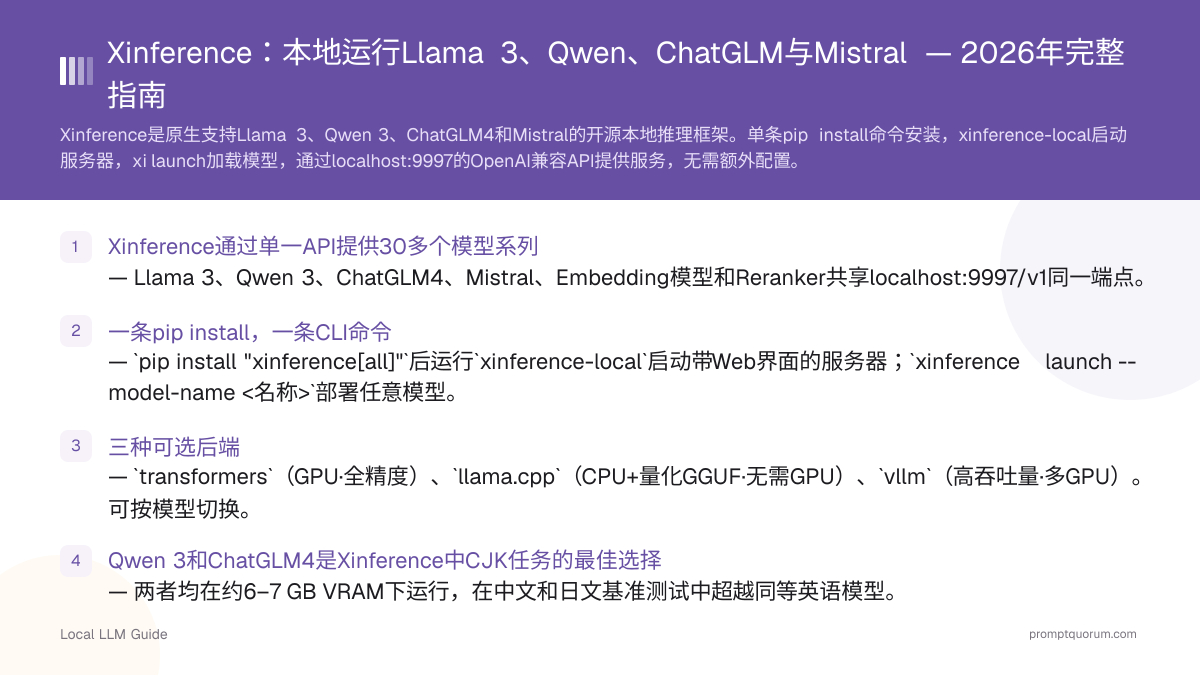
- Xinference通过单一API提供30多个模型系列 — Llama 3、Qwen2.5、ChatGLM4、Mistral、Embedding模型和Reranker共享localhost:9997/v1同一端点。
- 一条pip install,一条CLI命令 — `pip install "xinference[all]"`后运行`xinference-local`启动带Web界面的服务器;`xinference launch --model-name <名称>`部署任意模型。
- 三种可选后端 — `transformers`(GPU·全精度)、`llama.cpp`(CPU+量化GGUF·无需GPU)、`vllm`(高吞吐量·多GPU)。可按模型切换。
- Qwen 3和ChatGLM4是Xinference中CJK任务的最佳选择 — 两者均在约6–7 GB VRAM下运行,在中文和日文基准测试中超越同等英语模型。
- 需要多模型服务、Embedding+Reranking或GPU集群支持时选Xinference,单用户桌面使用选Ollama。
Xinference是什么及其工作原理
Xinference(github.com/xorbitsai/inference)是Xorbits开发的开源LLM和多模态模型服务框架,于2023年开源,最初作为分布式集群的企业推理平台设计。核心理念:按名称注册模型,Xinference自动下载权重、选择合适后端并暴露REST API。无需直接编写模型加载代码。根据中国《数据安全法》(2021年)和《个人信息保护法》(2021年),本地推理确保数据不离开企业内部环境,是处理敏感数据的合规选择。
📍 简单一句话
Xinference是一个开源推理服务器,通过单一OpenAI兼容API原生支持Llama 3、Qwen2.5、ChatGLM4、Mistral等30多个模型系列。
💬 简单来说
可以将Xinference理解为本地AI模型的调度中心。你指定要加载的模型名称,它自动下载并启动,你的应用以与OpenAI API完全相同的方式与其通信——无需修改代码。
- 模型注册表:200多个预注册模型,通过名称(`llama-3.1-instruct`、`qwen2.5-instruct`、`chatglm4`)引用,无需手动管理权重路径。
- 后端抽象:一条命令在transformers、llama.cpp和vLLM后端之间切换——无论使用哪个后端API完全相同。
- 多模型并发:在同一GPU上同时运行Llama 3用于文本生成和BGE Embedding模型用于RAG。
- Web界面:localhost:9997的React仪表盘,无需代码即可启动、查看和停止模型。
- 集群模式:通过在工作节点运行`xinference start --host 0.0.0.0`,监督者+工作者架构可横向扩展到多个GPU节点。
支持的模型系列:Llama 3、Qwen、ChatGLM、Mistral
下表展示了Xinference中最常用的七种模型配置及每种所需的最低VRAM。所有七种共享相同的启动命令模式——只有`--model-name`、`--model-size-in-billions`和可选的`--quantization`会变化。
📍 简单一句话
Xinference原生支持Llama 3.3(8B/70B)、Qwen2.5(7B/72B)、ChatGLM4 9B、Mistral Small v0.3和Mixtral 8x22B——每个均可通过单条CLI命令启动。
💬 简单来说
VRAM是GPU的显存。需要6 GB VRAM的模型需要至少有这么多显存的GPU——例如RTX 3060(12 GB)或RTX 4060(8 GB)。如果GPU较小,使用llama.cpp后端配合Q4量化可将内存需求减少约一半。
模型 | 系列 | VRAM (Q4) | 最佳后端 | 最适用于 |
|---|---|---|---|---|
| llama-3.1-instruct 8B | Meta | ~6 GB | transformers / llama.cpp | 英语通用任务 |
| llama-3.1-instruct 70B | Meta | ~40 GB | vLLM | 高质量英语输出 |
| qwen2.5-instruct 7B | Alibaba | ~6 GB | transformers / llama.cpp | 多语言、CJK、代码 |
| qwen2.5-instruct 72B | Alibaba | ~40 GB | vLLM | 大规模CJK任务 |
| chatglm4 9B | Zhipu AI | ~7 GB | transformers | 中文企业任务 |
| mistral-instruct-v0.3 7B | Mistral AI | ~5 GB | transformers / llama.cpp | 欧洲语言、函数调用 |
| mixtral-instruct-v0.1 8x7B | Mistral AI | ~26 GB | vLLM | 高质量多语言输出 |
Xinference支持Llama 3.3吗?
支持。使用`--model-name llama-3.1-instruct`配合`--model-size-in-billions 8`(8B)或`70`(70B)。CPU或低VRAM环境下切换到`--model-engine llama.cpp`和`--quantization q4_k_m`。
Xinference支持Qwen 3吗?
支持。Qwen2.5 Instruct注册为`qwen2.5-instruct`,提供0.5B至72B的尺寸。7B版本在约6 GB VRAM下运行,处理中文、日文、韩文和英文的质量与Llama 3.1 8B相当。
Xinference支持ChatGLM吗?
支持。ChatGLM3(`chatglm3`)、ChatGLM4(`chatglm4`)和视觉版本ChatGLM4-Vision(`chatglm4v`)均已注册。ChatGLM4 9B是2026年中文任务的推荐选择。
Xinference支持Mistral吗?
支持。`mistral-instruct-v0.3`(7B)和`mixtral-instruct-v0.1`(8x7B MoE)均已注册。对于函数调用和JSON输出,Mistral Small v0.3是Xinference中的最佳小模型选择。
安装Xinference:pip安装与启动服务器
Xinference需要Python 3.9+和pip。`[all]`额外包一次性安装CUDA支持、llama.cpp后端和transformers后端。纯CPU机器使用`pip install xinference`(不带`[all]`),启动模型时添加`--model-engine llama.cpp`。
📍 简单一句话
使用`pip install "xinference[all]"`安装Xinference,运行`xinference-local`启动服务器——Web界面在 http://localhost:9997 打开。
# 完整安装 — CUDA + transformers + llama.cpp 后端
pip install "xinference[all]"

# 纯CPU安装(无需GPU)
pip install xinference

# 启动本地服务器(Web界面在 http://localhost:9997)
xinference-local

# 或绑定到特定主机以供局域网访问
xinference-local --host 0.0.0.0 --port 9997
Xinference需要GPU吗?
不需要。使用llama.cpp后端(`--model-engine llama.cpp`)可在CPU上完全运行量化GGUF模型。性能比GPU推理慢,但可在任何运行Python 3.9+的机器上使用。
如何更新Xinference?
运行`pip install --upgrade xinference`。升级前检查GitHub发布说明中的破坏性变更,特别是在使用集群模式时。
启动Llama 3、Qwen、ChatGLM和Mistral
使用`xinference launch`部署任意已注册模型。模式始终相同:`--model-name`设置模型系列,`--model-size-in-billions`设置参数数量,`--model-engine`选择后端。启动后,Xinference返回用于API调用的模型UID。
📍 简单一句话
使用`xinference launch --model-name <名称> --model-engine transformers --model-size-in-billions <大小>`启动任意Xinference模型——下载完成后立即可通过localhost:9997/v1使用。
# Llama 3.1 8B Instruct (GPU, transformers backend)
xinference launch \
  --model-name llama-3.1-instruct \
  --model-engine transformers \
  --model-size-in-billions 8

# Llama 3.1 8B Instruct (CPU, Q4_K_M quantization)
xinference launch \
  --model-name llama-3.1-instruct \
  --model-engine llama.cpp \
  --model-size-in-billions 8 \
  --quantization q4_k_m

# Qwen3 8B (GPU)
xinference launch \
  --model-name qwen2.5-instruct \
  --model-engine transformers \
  --model-size-in-billions 7

# ChatGLM4 9B (GPU)
xinference launch \
  --model-name chatglm4 \
  --model-engine transformers \
  --model-size-in-billions 9

# Mistral Small Instruct v0.3 (GPU)
xinference launch \
  --model-name mistral-instruct-v0.3 \
  --model-engine transformers \
  --model-size-in-billions 7

# Mixtral 8x22B Instruct (vLLM backend, 需要26+ GB VRAM)
xinference launch \
  --model-name mixtral-instruct-v0.1 \
  --model-engine vllm \
  --model-size-in-billions 46
如何列出Xinference支持的所有模型?
运行`xinference registrations --model-type LLM`查看所有已注册的LLM系列,或打开 http://localhost:9997 的Web界面浏览模型库。
可以在Xinference中同时运行两个模型吗?
可以——用不同的模型名称运行两次`xinference launch`。每个模型有自己的UID和端点。总VRAM预算必须同时覆盖两个模型。
使用OpenAI兼容API
Xinference的API是OpenAI API的直接替代品。将任何OpenAI客户端指向`http://localhost:9997/v1`,将`api_key`设置为任意非空字符串,并使用模型UID(由`xinference launch`返回)作为`model`参数。现有的LangChain、LlamaIndex或自定义OpenAI客户端代码无需修改即可使用。
📍 简单一句话
将base_url设置为http://localhost:9997/v1并使用模型名称作为模型ID,即可将任何OpenAI兼容客户端连接到Xinference。
💬 简单来说
OpenAI兼容API意味着代码无需修改。调用GPT-4的Python代码可以通过Xinference调用Llama 3——只需更换基础URL和模型名称。
from openai import OpenAI

client = OpenAI(
    api_key="not-required",   # Xinference accepts any non-empty string
    base_url="http://localhost:9997/v1"
)

# Chat completion — works for Llama 3, Qwen, ChatGLM, Mistral
response = client.chat.completions.create(
    model="llama-3.1-instruct",
    messages=[
        {"role": "system", "content": "You are a helpful assistant."},
        {"role": "user", "content": "Summarise the GDPR in 3 bullet points."}
    ]
)
print(response.choices[0].message.content)

# Embedding model (run a separate xinference launch for bge-base-en-v1.5 first)
embedding = client.embeddings.create(
    model="bge-base-en-v1.5",
    input="Local LLMs preserve data privacy."
)
print(embedding.data[0].embedding[:5])
Xinference支持流式响应吗?
支持。在`chat.completions.create`调用中设置`stream=True`。Xinference对所有支持的后端实时流式传输token。
可以将LangChain与Xinference一起使用吗?
可以。使用`langchain_openai`中的`ChatOpenAI(base_url="http://localhost:9997/v1", api_key="x", model="llama-3.1-instruct")`。不需要额外的Xinference专用库。
Xinference vs Ollama vs vLLM:如何选择
三种最常见的本地推理框架各自针对不同用户群体。根据主要需求进行选择。对于中国企业合规场景,Xinference的本地推理满足《数据安全法》(2021)和《个人信息保护法》(2021)中数据不出境的要求。金融机构和医疗机构可将Xinference作为符合监管要求的本地AI基础设施。
📍 简单一句话
需要同时提供多种模型类型(LLM+Embeddings+Reranker)或需要原生ChatGLM支持时选择Xinference;单用户桌面便捷使用选择Ollama。
对比项 | |||
|---|---|---|---|
| 最适合 | 团队·多模型·Embeddings+LLM | 单用户桌面·Modelfile工作流 | 高吞吐量GPU服务 |
| 需要GPU? | 不需要(llama.cpp后端) | 不需要(CPU模式可用) | 需要(CUDA/ROCm) |
| 模型切换 | 多模型同时运行 | 每次一个模型(切换) | 每个服务器实例一个模型 |
| Embedding支持 | 支持(BGE、E5等) | 支持(有限) | 不支持(需单独服务器) |
| Web界面 | localhost:9997内置 | 无(使用Open WebUI) | 无 |
| ChatGLM支持 | 原生(chatglm4) | 有限 | 有限 |
Xinference比Ollama更难配置吗?
略难一些。Ollama是单一二进制下载;Xinference需要Python和pip。但两者都能在5分钟内启动。Xinference启动后提供更丰富的多模型环境。
Xinference可以替代vLLM吗?
对于单机服务可以——Xinference可以使用vLLM作为后端(`--model-engine vllm`)并添加Web界面和模型注册表。对于跨多个GPU节点的最大原始吞吐量,专用vLLM部署仍然更快。
常见问题
Xinference是什么?
Xinference(Xorbits Inference)是一个开源模型服务框架,通过OpenAI兼容API在本地运行Llama 3、Qwen、ChatGLM、Mistral等30多个系列。支持GPU、CPU(通过llama.cpp)和多GPU集群部署。
2026年Xinference支持哪些模型?
Xinference注册了200多个模型配置。2026年最受欢迎的是Llama 3.1 8B/70B Instruct、Qwen2.5 8B/72B Instruct、ChatGLM4 9B、Mistral Small Instruct v0.3和Mixtral 8x22B Instruct。运行`xinference registrations --model-type LLM`查看完整列表。
Xinference如何下载模型权重?
每个模型首次`xinference launch`时,Xinference从Hugging Face或ModelScope(可配置)下载权重。权重在本地缓存,后续启动即时完成。设置`XINFERENCE_HOME`控制缓存目录。
Xinference在Windows上运行吗?
可以,通过Python 3.9+的pip运行。llama.cpp后端在Windows CPU上无需额外依赖即可运行。Windows上的GPU支持需要在安装Xinference前安装CUDA 12.x和对应的PyTorch包。
可以将Xinference用于RAG吗?
可以。在LLM旁边启动BGE或E5 Embedding模型(`xinference launch --model-name bge-base-en-v1.5 --model-type embedding`)。两者共享同一API端点——RAG流水线调用Embedding端点进行索引,调用Chat端点进行生成。