Key Takeaways
- CPU-only inference works well for 3–13B models on modern processors with 8–32 GB RAM.
- Best CPU models: Phi-4 Mini (3.8B, 2.3 GB, 12 tokens/sec), Gemma 4 E2B (1.5 GB, 15 tokens/sec), Llama 3.2 3B (2 GB, 10 tokens/sec).
- CPU inference is 10–30× slower than GPU but uses zero dedicated VRAM.
- Enable CPU-only mode in Ollama or llama.cpp with a simple command-line flag.
- CPU inference is ideal for production APIs (no GPU overhead), edge devices, and cost-constrained environments.
📍 In One Sentence
Phi-4 Mini (3.8B) runs at 12 tok/sec on a modern CPU with 2.3 GB RAM — the best CPU-only LLM for interactive use in 2026.
💬 In Plain Terms
CPU-only LLMs are AI models that run entirely on your computer's processor, with no graphics card needed — useful for older PCs, laptops without a GPU, or Raspberry Pi devices.
Can CPUs Run LLMs?
Yes, modern CPUs (Intel i7-10th gen+, AMD Ryzen 5000+, Apple M-series) can run 3–13B models at 8–15 tokens/second. This is 10–30× slower than GPU but doesn't require dedicated VRAM. A CPU with sufficient system RAM (8–32 GB) can run models that would require a $300+ GPU.
CPU inference trades speed for accessibility: you get zero-GPU overhead, perfect stability, and no driver issues. For casual use cases (chatbots answering a few requests/second, offline document processing), CPU-only is practical.
Modern CPUs have AVX-512 or NEON/SVE vector instructions that accelerate matrix math. Tools like llama.cpp and Ollama automatically use these, making CPU inference much faster than naive implementations.
📍 In One Sentence
Modern CPUs can run 3B–7B LLMs at 4–15 tokens per second using Q4_K_M quantization and llama.cpp or Ollama.
💬 In Plain Terms
Yes — any laptop or desktop CPU made after 2018 can run a capable AI model locally. It will be slower than a GPU, but fast enough for tasks where you are not waiting in real time.
Which CPU-Only LLMs Are Best in 2026?
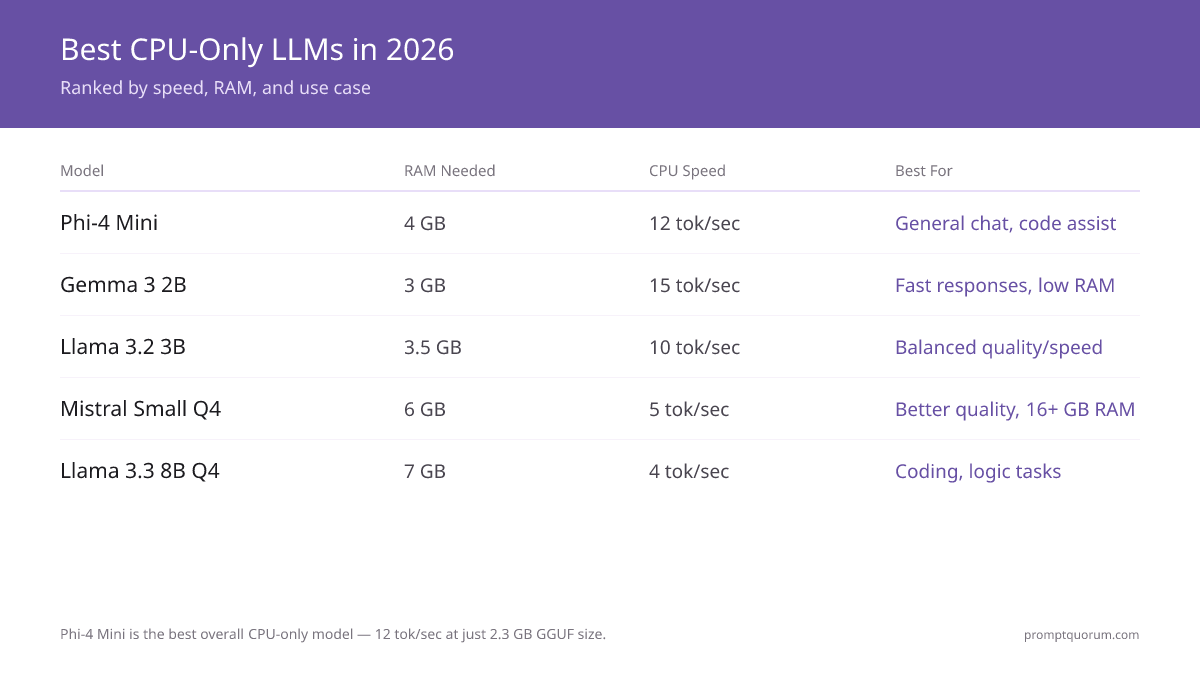
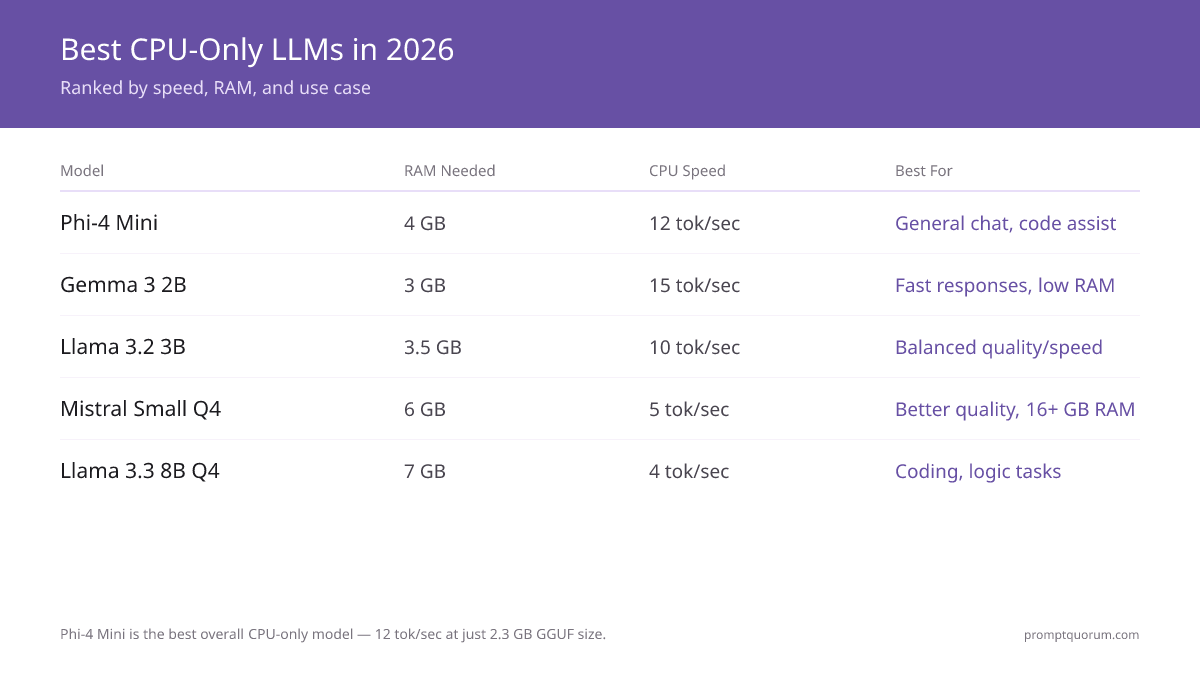
Phi-4 Mini (3.8B, Q4_K_M) is the best overall CPU-only model in 2026 — 12 tokens/sec on a modern CPU with a 2.3 GB RAM footprint. The table below ranks the top 5 by speed, RAM use, and use case, tested on Intel i7-12700 (12-core, AVX-512):
Model | Params | GGUF Size | RAM Needed | CPU Speed | Best For |
|---|---|---|---|---|---|
| Phi-4 Mini | 3.8B | ~2.3 GB | 4 GB | 12 tok/sec | General chat, code assist |
| Gemma 4 E2B | 2B | ~1.5 GB | 3 GB | 15 tok/sec | Fast responses, low VRAM |
| Llama 3.2 3B | 3B | ~2 GB | 3.5 GB | 10 tok/sec | Balanced quality/speed |
| Qwen3 8B | 8B | ~5 GB | 6 GB | 4-5 tok/sec | Best coding on CPU, 76% HumanEval |
| DeepSeek-R1 7B | 7B | ~5 GB | 7 GB | 4 tok/sec | Reasoning, math (chain-of-thought) |
How Fast Is CPU vs GPU Inference?
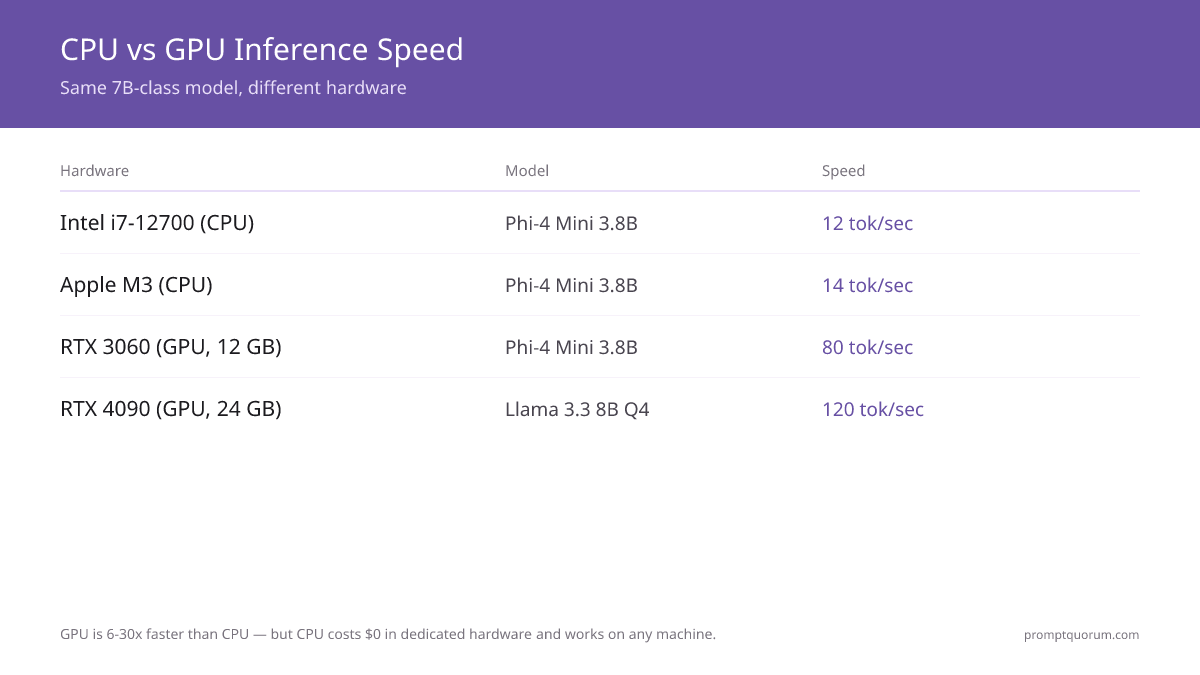
CPU inference runs 5–30× slower than GPU: an i7-12700 achieves 12 tok/sec vs an RTX 3060's 80+ tok/sec on the same 7B model at Q4. For interactive chat, this means 1–2 second response starts on CPU vs under 200 ms on GPU. These benchmarks use standard 2026 hardware via Ollama or llama.cpp:
Hardware | Model | Speed | Notes |
|---|---|---|---|
| Intel i7-12700 (CPU) | Phi-4 Mini 3.8B | 12 tokens/sec | AVX-512 enabled |
| AMD Ryzen 7 5700X (CPU) | Phi-4 Mini 3.8B | 9 tokens/sec | Older AVX2 only |
| Apple M3 (CPU) | Phi-4 Mini 3.8B | 14 tokens/sec | Unified memory advantage |
| RTX 3060 (GPU, 12 GB) | Phi-4 Mini 3.8B | 80 tokens/sec | GPU is 6.7× faster |
| RTX 4090 (GPU, 24 GB) | DeepSeek-R1 7B | 120 tokens/sec | GPU is 30× faster than CPU |
How Much RAM Does Each CPU-Only Model Need?
Rule of thumb: GGUF size + 500 MB overhead = minimum RAM needed. A 2 GB GGUF model needs 2.5–3 GB of free system RAM:
Model | GGUF Size | Min RAM | Comfortable | Context Length |
|---|---|---|---|---|
| Gemma 4 E2B | ~1.5 GB | 2–2.5 GB | 4 GB | 128K |
| Phi-4 Mini 3.8B | ~2.3 GB | 3 GB | 6 GB | 4K |
| Llama 3.2 3B | ~2 GB | 2.5–3 GB | 6 GB | 8K |
| Qwen3 8B | ~5 GB | 5 GB | 8 GB | 32K |
| DeepSeek-R1 7B | ~5 GB | 6 GB | 12 GB | 128K |
How Do You Enable CPU-Only Inference?
Ollama (simplest): Simply run `ollama run phi:mini`. Ollama automatically detects CPU-only on systems without NVIDIA/AMD GPUs and uses system RAM. LM Studio: Open Settings → select "None" under GPU to force CPU mode. Llama.cpp: Use flag `--n-gpu-layers 0` to disable GPU offloading.
ollama run phi:mini
# Ollama auto-detects CPU-only systems
How Do You Maximize CPU Inference Speed?
Q4_K_M quantization, multi-threaded llama.cpp, and AVX2/AVX-512 CPU flags together add 15–25% speed over default Ollama settings. Specific tips:
- Use Q4_K_M quantization — reduces GGUF size by ~70%, minimal quality loss, 10–20% speed increase due to better cache behavior.
- Reduce context window — longer contexts = slower inference. Use `--context 2048` to cap context to 2K tokens.
- Enable multi-threading — Ollama and llama.cpp auto-detect CPU core count. Verify with `nproc` that it matches.
- Use AVX-512 or ARM NEON — modern Intel/AMD/ARM CPUs have vector instructions. Check CPU flags: `cat /proc/cpuinfo | grep avx512` (Linux) or Apple About → System Report (Mac).
- Batch size = 1 — CPU handles single-sequence inference best. Don't attempt multi-batch on CPU.
- Pin threads to cores — on Linux, use `numactl --cpunodebind=0 ollama run phi:mini` to avoid core switching overhead.
When Should You Use CPU Instead of GPU?
Use Case | CPU | GPU |
|---|---|---|
| Real-time chat (sub-1-sec latency) | ❌ Too slow (12 tok/sec = 5 sec for 60 tokens) | ✅ 80+ tok/sec |
| Batch processing (documents, logs) | ✅ Fine (speed doesn't matter) | ⚠️ Overkill |
| Production API (cost-constrained) | ✅ $0 hardware cost | ⚠️ $200+ GPU + electricity |
| Edge device (Raspberry Pi) | ✅ No alternative | ❌ Limited GPU options |
| Development / local testing | ✅ Lower power, quieter | ⚠️ Overkill |
| LLM fine-tuning | ❌ Too slow (hours → days) | ✅ 10–30× speedup |
Frequently Asked Questions About CPU-Only LLMs
How fast is CPU-only inference compared to a GPU?
CPU: 8–15 tokens/sec on modern processors. GPU (RTX 3060): 80 tokens/sec. GPU (RTX 4090): 120+ tokens/sec. CPU is 10–30× slower but requires $0 GPU investment.
What's the smallest model that still produces coherent output on CPU?
Gemma 4 E2B (1.5 GB) produces reasonable responses. Below 2B, quality drops. For best quality on 8 GB RAM, use Phi-4 Mini (3.8B) or Llama 3.2 3B (2 GB).
Can I run a 13B model on CPU?
Yes, with Q4_K_M quantization a 13B model is ~6.5 GB. Needs 8–12 GB system RAM. Speed: ~2–3 tokens/sec. Uncomfortable for interactive use but works for batch processing.
Does CPU inference use the GPU at all?
No. CPU-only mode in Ollama/llama.cpp explicitly disables GPU usage and uses system RAM exclusively.
Is CPU-only inference stable?
Yes, more stable than GPU. No driver crashes, no out-of-memory GPU errors. The only risk is system RAM saturation, which you control by model choice.
Do I need to adjust settings for Apple Silicon CPUs?
No. Ollama auto-detects M1/M2/M3/M4 and uses unified memory efficiently. Apple Silicon is ~10–20% faster than equivalent Intel CPUs due to memory architecture.
How much VRAM does a 7B model need in CPU-only mode?
Zero dedicated VRAM. A 7B model at Q4_K_M quantization (~4.5 GB) needs 5–6 GB of system RAM to run comfortably. This is the core advantage of CPU-only inference — no GPU or VRAM required at all.
Can I fine-tune an LLM on CPU?
Technically yes, but it is impractical. Fine-tuning on CPU runs 10–30× slower than on GPU. Use CPU-only mode for inference only; switch to a GPU for any fine-tuning or training workload.
Can I run multiple models simultaneously on CPU?
Technically possible if RAM allows, but not practical. Running multiple models at once causes memory contention, and both models slow down. Run one model at a time for the best performance.
What are the security risks of CPU-only inference?
CPU-only inference is more secure than cloud inference, since no data leaves the machine and there is no transmission risk. The remaining risks are the same as any local software: keep the OS patched and the physical machine secured, because unencrypted sensitive data can still sit on disk.
Is there a speed difference between Ollama and llama.cpp for CPU inference?
The difference is minimal. Both use the same core CPU optimizations (AVX-512). Any variance of roughly 2–5% comes from differences in thread-management implementation. Start with Ollama's defaults unless you need llama.cpp's finer-grained flags.
Is CPU-only inference practical on an old laptop with 8–10 GB of RAM?
Yes. Gemma 4 E2B (1.5 GB) or Phi-4 Mini (2.3 GB) run efficiently within 8–10 GB of RAM. Expect 3–5 tokens/sec, which is fine for batch processing or a lightweight chatbot but too slow for real-time chat.
Can CPUs run LLMs?
Yes. Modern CPUs (Intel i7-10th gen+, AMD Ryzen 5000+, Apple M-series) can run 3–13B models at 8–15 tokens/second. This is 10–30× slower than GPU but requires no dedicated VRAM.
What is the best CPU-only LLM?
Phi-4 Mini (3.8B, 2.3 GB, 12 tokens/sec) is the best overall. For speed: Gemma 4 E2B (1.5 GB, 15 tokens/sec). For balance: Llama 3.2 3B (2 GB, 10 tokens/sec).
How much RAM do I need for CPU-only inference?
Use the rule: GGUF file size + 500 MB overhead. Phi-4 Mini (2.3 GB) needs 3 GB RAM. Gemma 4 E2B (1.5 GB) needs 2 GB RAM. Qwen3 8B (5 GB) needs 5 GB RAM.
How do I enable CPU-only mode?
In Ollama, simply run: ollama run phi:mini. Ollama auto-detects CPU-only systems. In llama.cpp, use --n-gpu-layers 0. In LM Studio, set GPU to None under Settings.
Is CPU inference practical for production?
Yes, if you don't need real-time latency. Batch processing, asynchronous APIs, and offline workflows all work great on CPU. For interactive chat (sub-1-second latency), use GPU.
Which CPU-only models handle long context best?
Gemma 4 E2B and DeepSeek-R1 7B both carry 128K context windows, the widest of the five models compared here. Qwen3 8B follows at 32K, Llama 3.2 3B at 8K, and Phi-4 Mini — the speed pick — is capped at 4K, so it is the wrong choice if you need to feed in long documents. One caveat that matters more on CPU than on a GPU: a long context is not free. Prompt processing scales with the number of tokens you load, so a 128K window that fits in RAM can still take minutes to fill before the first token appears. If you do not need the whole window, cap it with --context and you will get answers back noticeably faster.
Next steps
- Fastest Local LLMs for Low-End PCs — Old or low-end PC? Best speed-optimized models →
- LLM Quantization Explained — Why Q4_K_M matters for CPU inference speed →
- Best Local LLMs for Coding — Best lightweight coding models that run on CPU →
Why CPU-Only LLMs Matter for Privacy-Sensitive Deployments
EU GDPR: CPU inference on a local device is the highest tier of data privacy compliance. When Phi-4 Mini or Gemma 4 E2B runs on your CPU, inference is fully air-gapped — no API calls, no telemetry, no data residency questions. This satisfies GDPR Article 25 (privacy by design) at the infrastructure level. EU healthcare, legal, and government users increasingly prefer CPU inference for sensitive document workflows where even GPU cloud instances create audit complexity.
Developing markets and offline environments: CPU models work without reliable internet. In regions with unstable connectivity or metered bandwidth, CPU inference enables AI workflows that are impossible with cloud APIs. A Phi-4 Mini GGUF file downloaded once runs indefinitely without internet.
Export-controlled environments: CPUs face no hardware restriction. High-end NVIDIA A100/H100 server GPUs face US export controls to certain countries. Consumer CPUs do not. Organizations in affected regions can run capable 3B–7B models on standard x86 hardware with no import restrictions.
What Are the Common CPU Inference Mistakes?
- Running FP16 instead of Q4_K_M. FP16 Phi-4 Mini needs 7.6 GB RAM vs 2.3 GB at Q4_K_M with negligible quality loss. Always use GGUF quantized models for CPU inference.
- Forgetting to set CPU-only flags in llama.cpp. Without explicit flags, llama.cpp may attempt partial GPU use. Set `--n-gpu-layers 0` for pure CPU mode.
- Using batch size > 1 on CPU. Batching helps GPU throughput but hurts CPU latency. Keep batch size at 1 for interactive chat.
- Choosing too large a model. Phi-4 Mini (3.8B) at 12 tok/sec beats DeepSeek-R1 7B at 4 tok/sec for interactive use. Match model size to CPU speed, not just RAM.
- Not setting thread count. Ollama auto-detects threads, but llama.cpp may default low. Explicitly set thread count to match your CPU core count.