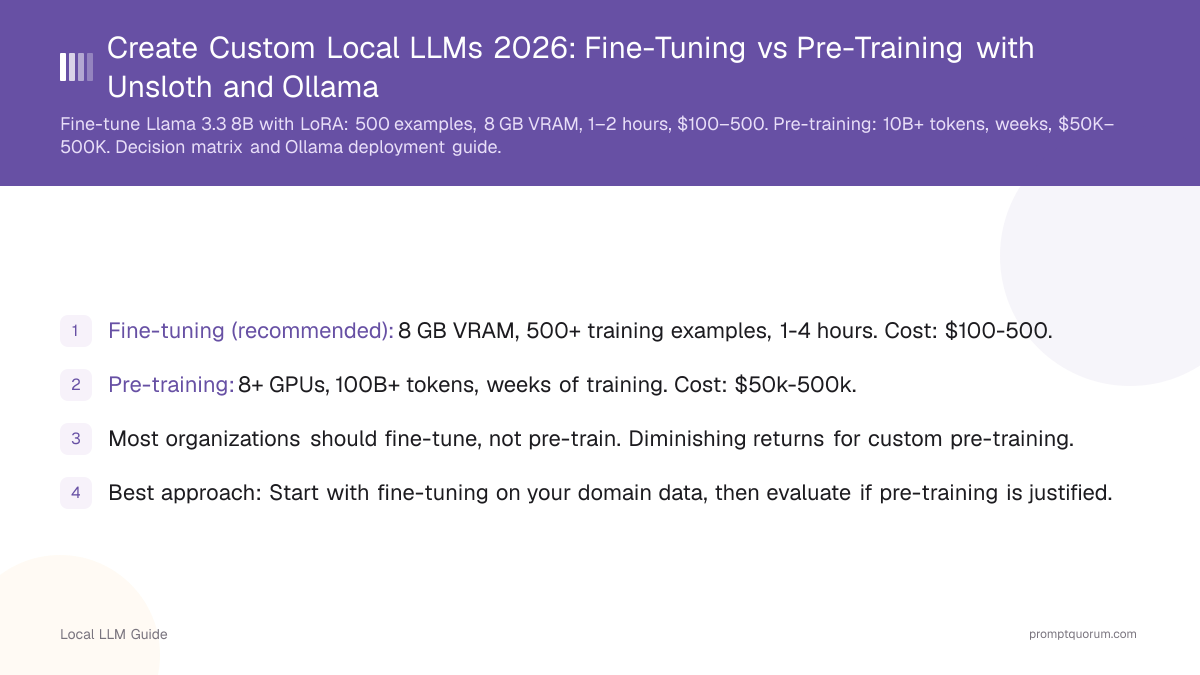
Key Takeaways
- Fine-tuning (recommended): 8 GB VRAM, 500+ training examples, 1-4 hours. Cost: $100-500.
- Pre-training: 8+ GPUs, 100B+ tokens, weeks of training. Cost: $50k-500k.
- Most organizations should fine-tune, not pre-train. Diminishing returns for custom pre-training.
- Best approach: Start with fine-tuning on your domain data, then evaluate if pre-training is justified.
- Pre-training is rarely justified unless you need proprietary model.
📍 In One Sentence
Creating a custom local LLM means either fine-tuning an existing model with LoRA (500 examples, 8 GB VRAM, 1-2 hours, $100-500) or pre-training from scratch ($50K-500K, 10B+ tokens) -- fine-tuning is the practical choice for almost everyone, while pre-training is justified only for rare proprietary needs.
💬 In Plain Terms
Most people who want a custom AI model should fine-tune, not pre-train. Fine-tuning takes an existing model and nudges it toward your specific data or style using a few hundred examples, on a single consumer GPU, in an afternoon. Pre-training builds a model from nothing and costs as much as a house -- it only makes sense if you have a truly unique need that no existing model can be adapted to meet.
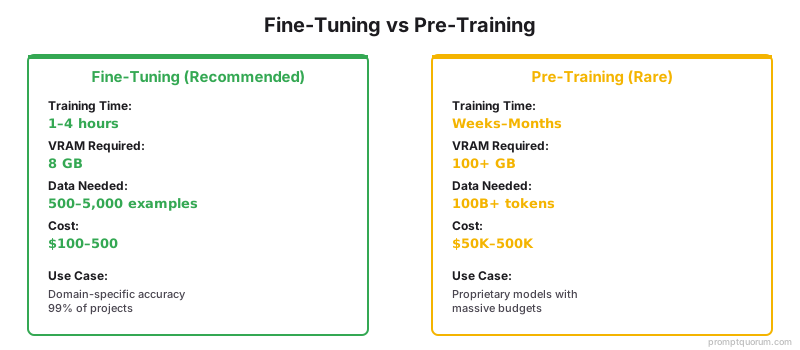
Fine-Tuning vs Pre-Training
Aspect | Fine-Tuning | Pre-Training |
|---|---|---|
| Training time | 1-4 hours | Weeks-months |
| VRAM required | 8 GB | 100+ GB (multi-GPU) |
| Data required | 500-5k examples | 100B+ tokens |
| Cost | $100-500 | $50k-500k |
| Customization | Domain knowledge | Proprietary model |
| When to use | 99% of cases | Rare, specialized needs |
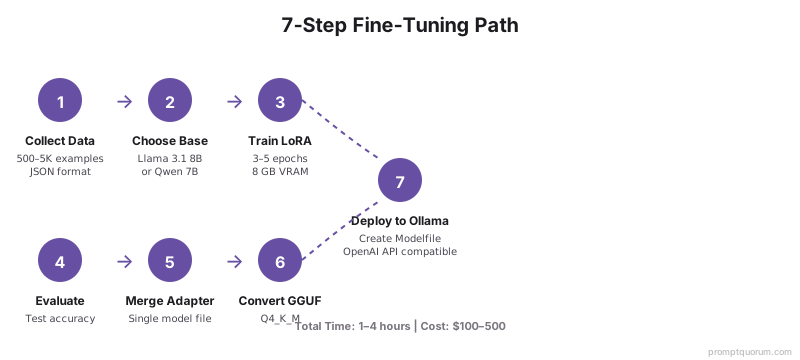
Fine-Tuning Path (Recommended)
- 1Collect 500-5000 domain-specific examples (high quality matters).
- 2Choose base model (Llama 3.1 8B, Qwen 7B, etc.).
- 3Use LoRA for efficient training (4× faster, same quality).
- 4Train for 3-5 epochs on GPU.
- 5Evaluate on test set (precision, recall, custom metrics).
- 6Merge LoRA adapter into base model.
- 7Deploy as production model.
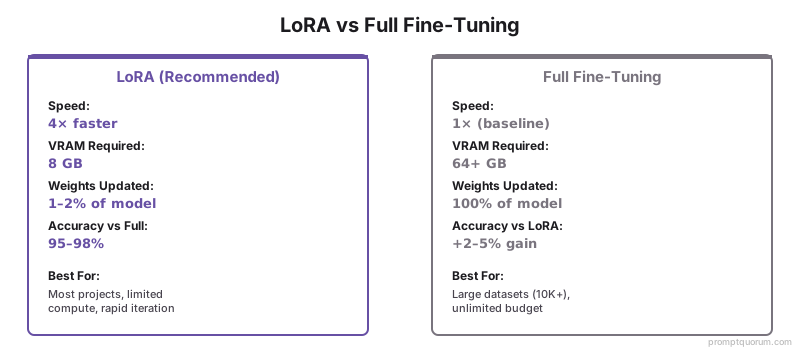
LoRA vs Full Fine-Tuning: Which to Choose?
LoRA (Low-Rank Adaptation) updates only 1–2% of model weights, making it 4× faster and requiring 80–90% less VRAM than full fine-tuning. Full fine-tuning updates all weights and gives marginally better results (2–5% accuracy improvement) but requires 64+ GB VRAM and significant compute.
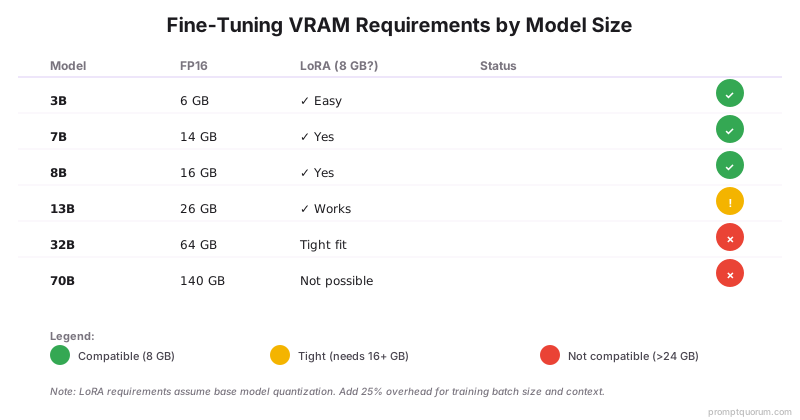
VRAM Requirements by Model Size
Not all models fit in 8 GB VRAM for LoRA fine-tuning. Here's what you can run:
Deploying Your Custom Model to Ollama
After merging the LoRA adapter, deploy to Ollama in 3 steps:
- 1Step 1 — Export to GGUF: Use llama.cpp's convert script to convert your merged model from PyTorch/safetensors format to GGUF. This is essential for Ollama and llama.cpp compatibility. ```bash python convert_hf_to_gguf.py \ --model ./merged-model \ --outfile ./my-custom-model.gguf \ --outtype q4_k_m ```
- 2Step 2 — Create Ollama Modelfile: Define your model's system prompt, parameters, and inference settings. ``` FROM ./my-custom-model.gguf SYSTEM "You are a [your domain] expert..." PARAMETER temperature 0.4 PARAMETER num_ctx 4096 ```
- 3Step 3 — Register and run: Load your model into Ollama for local or API access. ```bash ollama create my-custom-model -f Modelfile ollama run my-custom-model ``` Your fine-tuned model is now accessible via Ollama's OpenAI-compatible API at localhost:11434 — identical to any standard Ollama model. Use with Continue.dev, Open WebUI, or your own application via the Python/Node.js OpenAI SDK.
Pre-Training: When and Why
Pre-training means learning from raw data (books, documents, code). Only justified if:
1. You have >10 billion tokens of unique, valuable data.
2. Pre-trained models consistently fail on your domain.
3. Budget is >$50k (realistic cost).
4. You need proprietary model (competitive advantage).
Example: A genomics company with 500GB of private research data might justify custom pre-training.
Decision Matrix: Which Approach to Use?
Three main approaches exist for custom models. Choose based on your data, budget, and timeline:

Domain Adaptation Strategies
Without full pre-training, improve model performance on your domain:
- Continued pre-training: Take base model, train on your domain data (10B+ tokens). Cheaper than full pre-training.
- LoRA fine-tuning: Most practical. Tune on 500+ examples.
- Prompt engineering: Craft good prompts. Free, but limited.
- RAG: Retrieve documents, provide context. Works without retraining.
- Ensemble: Combine multiple models.
Evaluation Metrics
Measure model quality:
- Task-specific metrics: Accuracy, F1 score, BLEU (for text generation).
- Benchmark tests: Run on standard benchmarks (MMLU, HumanEval).
- Human evaluation: Manual scoring (time-consuming but accurate).
- Business metrics: Does model improve actual business outcomes?
Common Mistakes
- Pre-training without sufficient data. <10B tokens is wasted compute. Fine-tune instead.
- Not evaluating properly. Only training loss is misleading. Test on unseen data.
- Expecting custom model to match GPT-4. Gap between open models and frontier models is large.
- Ignoring inference costs. Larger custom models = higher inference costs. Consider trade-off.
- Skipping the GGUF conversion step. After fine-tuning with Unsloth or HuggingFace, your model is in PyTorch/safetensors format. Ollama and llama.cpp require GGUF. Use llama.cpp's `convert_hf_to_gguf.py` to convert. Without this step, your fine-tuned model cannot run in Ollama, LM Studio, or any GGUF-based inference engine. Always quantize during conversion (Q4_K_M recommended) to reduce file size 3–4×.
Frequently Asked Questions
Can fine-tuning match pre-trained model quality?
Fine-tuned models can exceed base model performance on your specific domain, but they won't match the breadth of knowledge in a larger pre-trained model. Llama 3.1 8B fine-tuned on legal documents will outperform Llama 3.3 70B on legal tasks, but underperform on general knowledge. Fine-tune when domain-specific accuracy matters more than breadth.
How much data do I need to fine-tune effectively?
Minimum 500–1,000 examples for a usable model; 5,000+ for production quality. Data quality matters more than quantity — 1,000 high-quality examples beat 50,000 low-quality ones. Use LoRA for small datasets (500–2,000 examples) and full fine-tuning only with 10,000+ examples.
What's the difference between LoRA and full fine-tuning?
LoRA (Low-Rank Adaptation) updates only a small fraction of weights (~1–2% of model size), making it 4× faster and requiring 80–90% less VRAM. Full fine-tuning updates all weights and gives marginally better results (~2–5% accuracy improvement) but requires significant compute. Use LoRA for most projects; full fine-tuning only when you have the budget.
When should I consider pre-training instead of fine-tuning?
Only if: (1) you have >10 billion tokens of unique data, (2) fine-tuning consistently fails to reach your accuracy target, (3) budget is >$50,000, and (4) you need a proprietary model for competitive advantage. For 99% of organizations, fine-tuning is the right choice.
How do I evaluate if my custom model is production-ready?
Test on 3 dimensions: (1) Task-specific metrics (accuracy, F1, BLEU), (2) Benchmark comparison (run on MMLU or HumanEval to compare against base model), (3) Business metrics (does it improve actual outcomes?). If your fine-tuned model outperforms the base model by 5–10% on your task, it's production-ready.
Can I combine fine-tuning with prompt engineering for better results?
Yes — this is best practice. Fine-tuning handles structural changes (domain language, format); prompt engineering handles specific use cases. A fine-tuned legal model + good prompt engineering will outperform either alone. Start with prompt optimization (free), then fine-tune if needed.
What framework should I use for fine-tuning?
Unsloth (up to 2× faster, per unsloth.ai), Axolotl (flexible), and Hugging Face Transformers (official, most documented) are the main options. Unsloth is recommended for speed; Axolotl for multi-GPU setups. All support LoRA and work with Ollama for deployment.
How do I know if pre-training is worth the cost?
Do this math: (1) Estimate fine-tuning quality gap on your task (e.g., fine-tuning reaches 85%, pre-training might reach 92%). (2) Quantify business value per accuracy point (e.g., +1% accuracy = $10k revenue). (3) If ($50k pre-training cost) < (value of 7% improvement), then pre-train. If not, fine-tune.
Regional Considerations for Custom Models
Custom models present data privacy and regulatory implications that vary by region. Before deploying a fine-tuned or pre-trained model, understand regional compliance requirements:
- Europe (GDPR): Fine-tuning your model on personal data requires data subject consent and documented processing agreements. GDPR Article 5 (data minimization) suggests fine-tuning on anonymized or synthetic data when possible. Pre-trained models on non-EU data may require additional governance before deployment in EU regions.
- Japan (APPI): Japan's Personal Information Protection Act requires explicit consent for training on personal data. Custom models for healthcare or financial services require data residency (processing must occur within Japan). Consider on-premises fine-tuning and deployment.
- China (DSL + CAC): China's Data Security Law and Cyberspace Administration rules require local processing for personal and industrial data. Custom models trained on Chinese data must be trained on Chinese infrastructure. Pre-training models for deployment in China require CAC registration.
- United States: No federal LLM regulation. State-level rules vary; California's laws focus on algorithmic transparency. For financial/healthcare models, regulatory bodies (SEC, FDA, CMS) may impose documentation requirements. Consider audit trails for model changes.
Sources
- Chinchilla Scaling Laws -- Optimal compute allocation for training and inference.
- Instruction Tuning Survey -- Comprehensive review of fine-tuning approaches.
- LoRA: Low-Rank Adaptation -- Efficient fine-tuning method.
- Hugging Face Fine-Tuning Guide -- Official fine-tuning documentation.