Key Takeaways
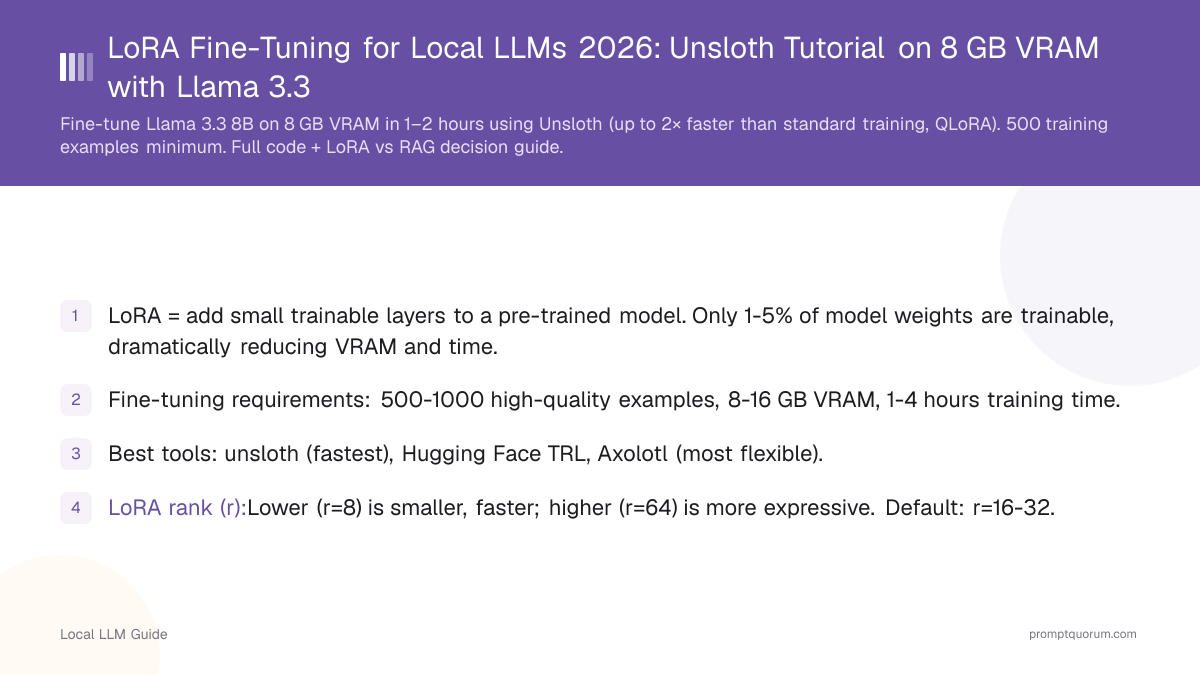
- LoRA = add small trainable layers to a pre-trained model. Only 1-5% of model weights are trainable, dramatically reducing VRAM and time.
- Fine-tuning requirements: 500-1000 high-quality examples, 8-16 GB VRAM, 1-4 hours training time.
- Best tools: unsloth (fastest), Hugging Face TRL, Axolotl (most flexible).
- LoRA rank (r): Lower (r=8) is smaller, faster; higher (r=64) is more expressive. Default: r=16-32.
- LoRA is production-ready and widely supported across inference engines.
📍 In One Sentence
LoRA fine-tuning adapts a pre-trained model to your domain by training small adapter layers (about 0.4% of total weights) instead of retraining the whole model, letting a Llama 3.1 8B fine-tune run on just 8 GB of VRAM in 1-2 hours using Unsloth.
💬 In Plain Terms
Fine-tuning normally means retraining a huge model from scratch, which needs serious hardware. LoRA is a shortcut: instead of touching all the model's weights, it trains a small set of add-on layers that steer the model toward your specific domain or writing style. That's why it fits on consumer GPUs and finishes in a couple of hours instead of days.
How Does LoRA Work?
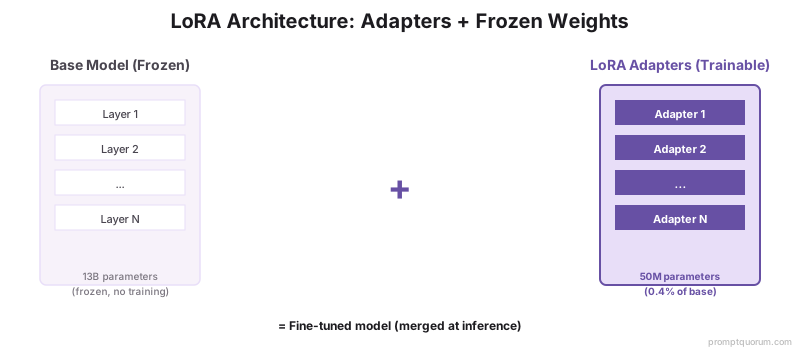
LoRA adds small "adapter" matrices alongside the original model weights. During training, only the adapters are updated. Original weights freeze.
Example: A 13B model has 13 billion weights. LoRA adds only 50 million trainable parameters (~0.4% of original). Training is 100× faster.
At inference, the adapter output is merged with the main model output via matrix multiplication. Minimal speed penalty (~5%).
Result: A domain-specific model that performs better on your tasks, using only 8 GB VRAM instead of 26 GB.
What Is QLoRA (4-Bit Quantized LoRA)?
QLoRA combines LoRA with 4-bit quantization — the base model loads in 4-bit (QLoRA) while only the adapter trains in 16-bit. This halves VRAM requirements:
QLoRA is the default for consumer hardware. Unsloth's `load_in_4bit=True` flag in the code example above enables QLoRA automatically. The 2% quality difference vs full LoRA is negligible for most domain-adaptation tasks.
When to use LoRA (16-bit) over QLoRA (4-bit):
• Tasks requiring maximum precision (medical, legal contract analysis)
• You have 16+ GB VRAM available
• Fine-tuning 3B or smaller models (QLoRA savings are minimal at small sizes)
Method | 7B Model VRAM | 13B Model VRAM | Quality vs Full |
|---|---|---|---|
| Full fine-tuning | 28 GB | 52 GB | 100% (baseline) |
| LoRA (16-bit base) | 16 GB | 30 GB | ~97% |
| QLoRA (4-bit base) | 8 GB | 14 GB | ~95% |

Should You Fine-Tune or Use RAG?
Decision matrix:
Before investing in LoRA fine-tuning, verify that better prompting cannot solve the problem first — prompt engineering is faster, reversible, and model-agnostic. For the full decision framework, see prompt engineering vs fine-tuning: how to decide.
Fine-tuning is one path to keeping a coding workflow productive offline. For the broader offline setup — model, IDE, package cache, docs mirror — see Local Coding LLM Without Internet.
Criteria | Fine-Tuning | RAG |
|---|---|---|
| Documents change frequency | Annual or less | Weekly or more |
| Knowledge requirements | Model needs deep understanding | Retrieval suffices |
| Training data available | Need 500+ high-quality examples | Any documents work |
| Cost (long-term) | One-time ($50-200) | Continuous embeddings |
| Latency | Faster (no retrieval) | Slower (retrieval + LLM) |
| Best for | Code, creative writing, domain style | Knowledge bases, Q&A |
How Do You Prepare Training Data?
Quality training data determines fine-tuning success. Poor data = poor model.
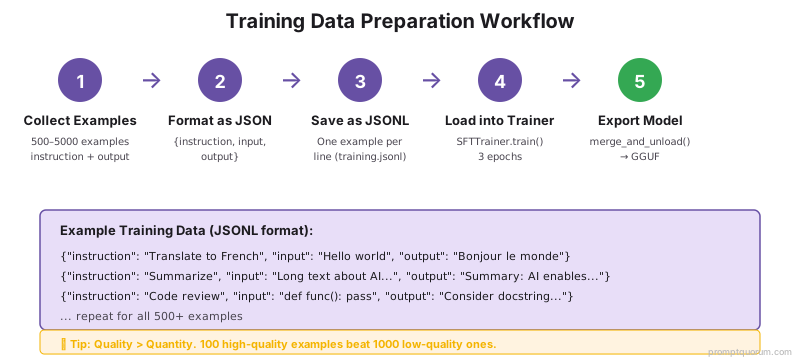
Minimum: 500 examples. Each example = input + expected output.
Optimal: 1000-5000 examples. More data = better accuracy.
Format: JSON or JSONL. Each line = one training example.
[
  {"instruction": "Translate to French", "input": "Hello world", "output": "Bonjour le monde"},
  {"instruction": "Summarize", "input": "Long text...", "output": "Summary..."},
  {"instruction": "Code review", "input": "Python code...", "output": "Review comments..."}
]

# OR instruction-only format:
[
  {"text": "<|user|>Translate to French\nHello<|assistant|>Bonjour"},
  {"text": "<|user|>Summarize\nText<|assistant|>Summary"}
]
Fine-Tuning Setup With Unsloth
Unsloth is the fastest LoRA framework (up to 2× speed vs standard training, per official benchmarks):
# Install unsloth
pip install unsloth[colab-new] xformers bitsandbytes

from unsloth import FastLanguageModel
from datasets import load_dataset

# Load base model with LoRA
model, tokenizer = FastLanguageModel.from_pretrained(
  model_name="unsloth/llama-3.1-8b-bnb-4bit",
  max_seq_length=2048,
  load_in_4bit=True,
  lora_r=16, lora_alpha=32,
  lora_dropout=0.05
)

# Load training data
dataset = load_dataset("json", data_files="training.jsonl")

# Configure trainer
from trl import SFTTrainer
trainer = SFTTrainer(
  model=model,
  tokenizer=tokenizer,
  train_dataset=dataset["train"],
  dataset_text_field="text",
  max_seq_length=2048,
  args=TrainingArguments(
    per_device_train_batch_size=4,
    num_train_epochs=3,
    learning_rate=2e-4,
    output_dir="output"
  )
)

# Train
trainer.train()
Key Hyperparameters for LoRA Fine-Tuning
Hyperparameter | Recommended Value | Typical Range | Effect |
|---|---|---|---|
| learning_rate | 2e-4 | 1e-5 to 1e-3 | Lower = stable, slower convergence |
| lora_r (rank) | 16 | 4 to 64 | Higher = more expressive, slower |
| lora_alpha | 32 | 8 to 256 | Higher = stronger LoRA effect |
| num_train_epochs | 3 | 1 to 10 | More epochs = risk of overfitting |
| batch_size | 4 | 1 to 32 | Larger = faster training, more VRAM |
| warmup_steps | 100 | 0 to 1000 | Gradual LR increase, stabilizes training |
How Do You Evaluate Fine-Tuned Models?
Training loss: Should decrease over epochs. If flat, learning rate may be too low.
Validation loss: Should decrease but stay above training loss (normal). If increases, overfitting.
Manual testing: Run the fine-tuned model on test examples and compare outputs to expected results.
Benchmark tasks: Use standard benchmarks (MMLU, HumanEval) to measure improvement.
What Are the Most Common Fine-Tuning Mistakes?
- Too few training examples. <200 examples often leads to overfitting. Collect at least 500.
- Training for too many epochs. Model memorizes data instead of learning generalizable patterns. Stop at 3-5 epochs max.
- Not validating on unseen data. Always split data into train/validation (80/20). Validate frequently to catch overfitting.
- Using the same data for fine-tuning and evaluation. Reported accuracy is meaningless if evaluated on training data.
- Not saving checkpoints. Training can take hours. Save every epoch so you can recover from crashes.
Common Questions About LoRA Fine-Tuning
How much training data is needed?
Minimum 500 examples, optimal 1000-5000. Quality matters more than quantity. 100 high-quality examples > 1000 low-quality examples.
Can I fine-tune on a laptop?
Yes. Use 4-bit quantization and LoRA. A 7B model requires 8 GB VRAM, training takes 1-2 hours on CPU (slow) or 10-15 min on GPU.
How do I merge LoRA adapters into the base model?
Use unsloth or HF transformers: `model.merge_and_unload()`. Creates a single model file (~3-4 GB for 7B), ready for inference.
Can I combine multiple LoRA adapters?
Yes, with restrictions. Stack adapters for sequential application, or use adapter composition techniques (e.g., DoRA).
Is fine-tuned model quality better than RAG?
For most tasks, yes. Fine-tuned models understand domain concepts deeply. RAG is better when documents are large and change frequently.
What is the difference between LoRA and QLoRA?
LoRA loads the base model in 16-bit and trains small adapter layers. QLoRA loads the base model in 4-bit and trains adapters in 16-bit. QLoRA uses roughly half the VRAM: 8 GB for 7B vs 16 GB for LoRA. Quality difference is ~2% — negligible for most tasks. Unsloth enables QLoRA with `load_in_4bit=True`.
How do I use a LoRA fine-tuned model in Ollama?
After training, merge the adapter into the base model: `model.merge_and_unload()`. Convert to GGUF using llama.cpp's `convert.py`. Create an Ollama Modelfile pointing to the GGUF file: `FROM ./my-finetuned-model.gguf` Then: `ollama create my-model -f Modelfile` and `ollama run my-model`. The fine-tuned model runs identically to any Ollama model.
Can I fine-tune Llama 3.3 70B with LoRA on consumer hardware?
Yes, with QLoRA. Llama 3.3 70B at 4-bit requires ~40 GB VRAM — fits on dual RTX 4090 (2×24 GB) or a single A100 80GB. Training time: 4–8 hours on 1,000 examples. For most users, fine-tuning 7B or 13B models is more practical and yields 90%+ of the 70B quality gain for domain tasks.
Is a fine-tuned model better than RAG for domain knowledge?
For most tasks, yes. Fine-tuned models understand domain concepts deeply. RAG is better when documents are large and change frequently.
What is LoRA and how does it work?
LoRA (Low-Rank Adaptation) adds small trainable adapter layers to a frozen base model. Instead of updating all 7 billion parameters, LoRA trains only the adapter weights (typically 1-10 million parameters). This reduces VRAM requirements by 10-20× and training time from days to hours.
Which tool is best for LoRA fine-tuning?
Unsloth is the fastest option for consumer hardware -- 2× faster than standard training with 70% less VRAM. HuggingFace TRL with PEFT is the most widely used option. Axolotl is best for advanced users who need configuration flexibility.
What file format do LoRA adapter weights use?
LoRA adapters are saved as safetensors files (e.g., adapter_model.safetensors) alongside an adapter_config.json. The total adapter size is typically 50-500 MB depending on rank (lora_r) and the number of layers adapted.
Can I distribute a LoRA fine-tuned model?
You can distribute the LoRA adapter weights separately from the base model. Users must already have the base model downloaded. Check the base model's licence (Meta Llama is permissive for most uses; some models restrict commercial redistribution).
How long does LoRA fine-tuning take on consumer hardware?
On an NVIDIA RTX 4090 (24 GB VRAM): 1,000 examples × 3 epochs = approximately 15-30 minutes. On an Apple M3 Pro (18 GB): approximately 2-4 hours. On CPU only: 8-24 hours depending on model size. Use GPU or Apple Silicon for practical training times.
Sources
- Hu, E. et al. (2021). "LoRA: Low-Rank Adaptation of Large Language Models." arxiv.org/abs/2106.09685 — Original LoRA paper demonstrating 0.4% trainable parameters matching full fine-tuning quality.
- Dettmers, T. et al. (2023). "QLoRA: Efficient Finetuning of Quantized LLMs." arxiv.org/abs/2305.14314 — QLoRA paper: 4-bit quantized base model + 16-bit LoRA adapters halving VRAM requirements.
- Unsloth. (2026). "Train LLMs up to 2× faster with 70% less VRAM (Unsloth)." github.com/unslothai/unsloth — Fastest LoRA framework, supports Llama 3.x, Qwen3, Mistral with up to 2× training speedup.
- Hugging Face. (2025). "TRL: Transformer Reinforcement Learning." github.com/huggingface/trl — SFTTrainer for supervised fine-tuning with LoRA adapter support.
- Test PE link content
- Fine-tuning works best when the foundation is strong. Before investing time in LoRA, ensure your base prompts are optimized: prompt engineering guide covers 80 techniques that improve output quality on untuned models.