Key Takeaways
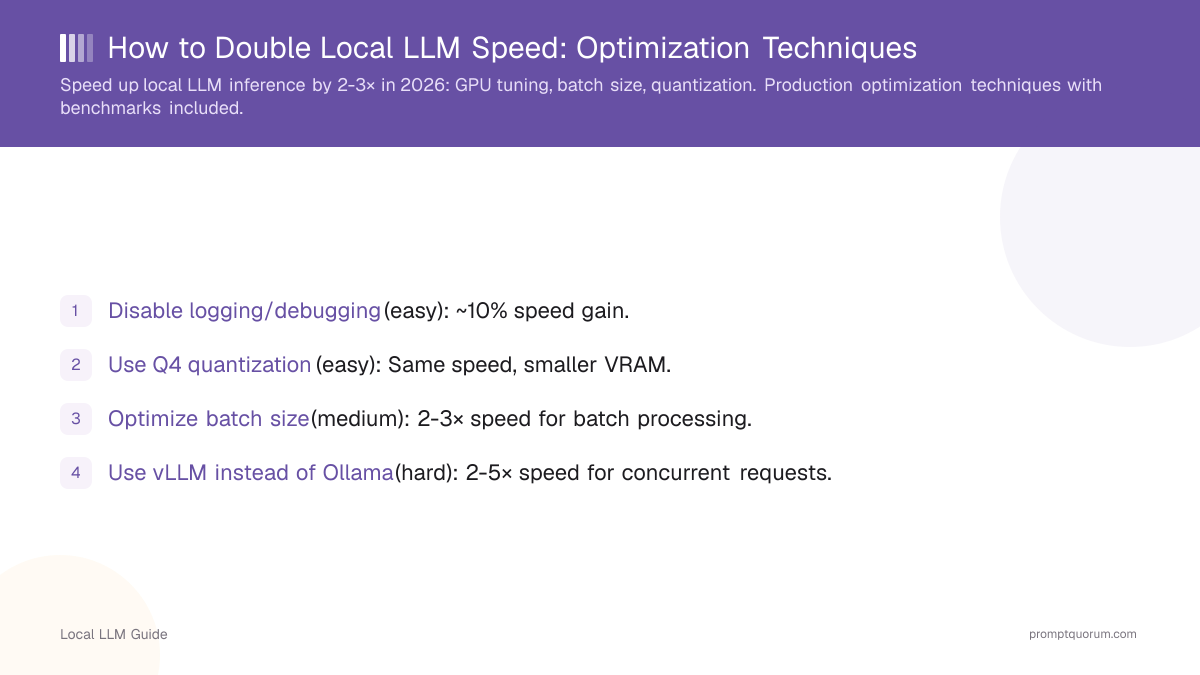
- Disable logging/debugging (easy): ~10% speed gain.
- Use Q4 quantization (easy): Same speed, smaller VRAM.
- Optimize batch size (medium): 2-3× speed for batch processing.
- Use vLLM instead of Ollama (hard): 2-5× speed for concurrent requests.
- GPU memory utilization 90%+ (medium): 15-20% speed gain.
- Combining all techniques: ~2-3× total speedup.
📍 In One Sentence
Local LLMs can run 2-3x faster with no quality loss by combining GPU memory tuning, disabling verbose logging, reducing batch size for single-user chat, choosing a faster inference engine, and matching quantization to your hardware.
💬 In Plain Terms
If your local model feels slow, it's usually a settings problem, not a hardware limit. Turning off debug logging, adjusting how many requests get batched together, picking a leaner inference engine like llama.cpp over a heavier one, and making sure the GPU is actually being used fully can often double your tokens-per-second without changing anything about the model itself.
How Does GPU Memory Utilization Affect Speed?
By default, most tools use 70–80% of GPU VRAM — leaving free memory idle. Increasing to 90–95% improves speed by 15–20% by allowing the engine to pre-allocate more KV cache:
# vLLM: increase GPU memory utilization
vllm serve meta-llama/Llama-3.2-3B-Instruct \
  --gpu-memory-utilization 0.95

# Ollama: environment variable
export OLLAMA_GPU_THRESHOLD=0.95  # Use 95% of GPU
ollama run llama3.2:3b

# LM Studio: Settings → GPU acceleration slider (move to 100%)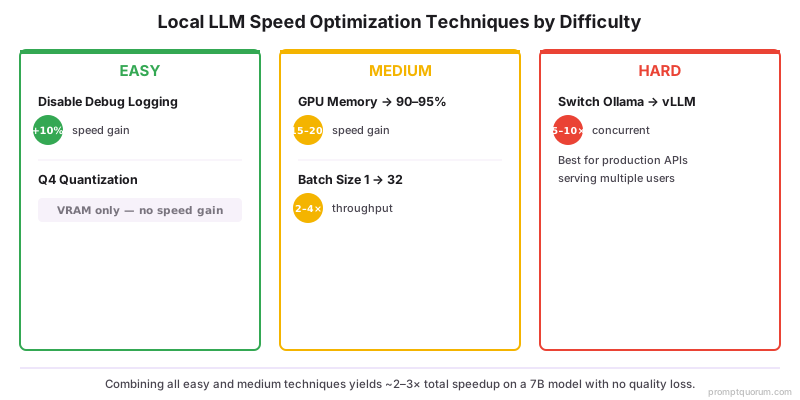
What Batch Size Maximizes Throughput?
For batch processing (multiple prompts), increasing batch size from 1 to 32 yields 2–4× throughput improvement.
Single request = limited pipeline utilization. Batch 32 requests = 2–4× throughput.
Trade-off: Higher latency per individual request (they wait for batch to complete).
Batch Size | Throughput | Latency/Request | Use Case |
|---|---|---|---|
| 1 (single) | 50 tokens/sec | Minimum | Real-time chat |
| 8 | 120 tokens/sec | Acceptable | Light concurrency |
| 32 | 200 tokens/sec | High | Batch API |
| 64+ | 250+ tokens/sec | Very high | Offline batch |
Which Inference Engine Is Fastest: vLLM vs Ollama vs llama.cpp?
vLLM: 5–10× faster than Ollama for concurrent requests — use for production APIs serving multiple users.
llama.cpp: Fastest for single requests on consumer hardware — use for personal local setups.
Ollama: Best developer experience for single-user setups; comparable to llama.cpp for single requests.
Text-Generation-WebUI: Slowest, but most features — for experimentation only, not production.
Does Quantization Actually Speed Up Inference?
On modern GPUs (RTX 40-series), Q4 and Q5 run at the same speed as FP16 — quantize for VRAM reduction, not speed.
Indirect speed benefits of quantization:
- Smaller model file = faster cold-start loading from disk
- Reduced memory bandwidth = slightly faster (10–15%) on older or memory-constrained hardware
Quantization is primarily for VRAM reduction, not raw token throughput.
How Much Speed Can You Realistically Gain?
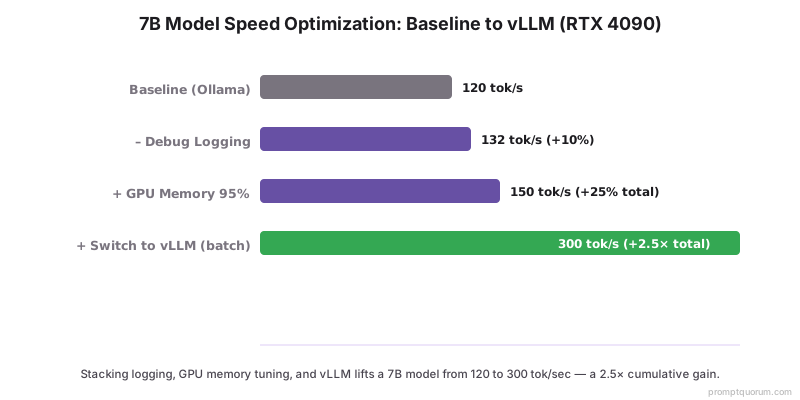
Example: Optimizing a 7B model on RTX 4090 — step by step:
Change | Speed | Cumulative Gain |
|---|---|---|
| Default Ollama (baseline) | 120 tok/sec | — |
| Disable debug logging | 132 tok/sec | +10% |
| GPU memory → 95% | 150 tok/sec | +25% total |
| Switch to vLLM (batch) | 300 tok/sec (batch) | +2.5× (batch) |
| All optimizations combined | 300 tok/sec | +2.5× throughput |
Common Speed Optimization Mistakes
- Pushing GPU memory to 100%. Risks out-of-memory crashes. Safe max is 90-95%.
- Lowering batch size for speed. Batch size does not affect single-request latency. Only helps throughput.
- Over-quantizing for speed. Q4 is roughly the same speed as FP16. Quantize for VRAM, not speed.
- Changing inference engine mid-deployment. Switching Ollama → vLLM → llama.cpp introduces bugs. Pick one, optimize it.
Frequently Asked Questions
What is the single most effective way to speed up local LLM inference?
Switching from Ollama to vLLM for concurrent requests provides the largest single speedup — 5–10× throughput improvement for batch processing. For single requests, increasing GPU memory utilization from 70% to 90–95% yields 15–20% speed gain. Disable debug logging for an additional 10%.
Does batch processing improve single-request latency?
No — batch size affects throughput (total tokens per second across all requests), not single-request latency. To reduce latency on one request, optimize GPU memory utilization and use a faster engine (vLLM or llama.cpp). Larger batches increase per-request wait time.
How much faster is vLLM than Ollama?
For single requests, vLLM and Ollama perform similarly (both reach ~120–150 tok/sec on an RTX 4090 with a 7B model). For concurrent requests, vLLM is 5–10× faster due to continuous batching and PagedAttention. Use Ollama for personal/single-user setups; switch to vLLM for APIs serving multiple users.
Does quantization speed up inference?
Quantization's primary benefit is VRAM reduction, not speed. On modern NVIDIA GPUs (RTX 40-series), Q4 and Q5 run at the same speed as FP16. The indirect speed benefit: a smaller Q4 model loads faster from disk and may allow slightly larger batch sizes within the same VRAM.
What GPU memory utilization should I set for maximum speed?
Set GPU memory utilization to 90–95% in vLLM (`--gpu-memory-utilization 0.92`). This allows the engine to pre-allocate more memory for KV cache, improving throughput. Avoid 100% — it causes OOM crashes when generation exceeds predictions. The 5–10% safety margin is non-negotiable.
Why is my local LLM slower after the first prompt?
The first prompt loads the model into VRAM (cold start), which can take 10–30 seconds. Subsequent prompts run at full speed. Keep the server running (do not restart between sessions). With Ollama, set OLLAMA_KEEP_ALIVE=24h to prevent model unloading after inactivity.
Can CPU-only inference be sped up meaningfully?
Limited gains are possible: use llama.cpp with -t flag to set thread count to physical core count (not logical), enable AVX2/AVX-512 instruction sets, and use Q4_K_M quantization. Realistic ceiling: 8–12 tok/sec on a modern i9. For interactive chat, GPU hardware is the only path to acceptable latency.
How does context length affect inference speed?
Longer context windows slow inference because the attention mechanism scales quadratically with context length. A 4K context prompt is ~4× slower to process than a 1K prompt. Keep system prompts under 500 tokens and use context summarization for long conversations to maintain speed.
What is PagedAttention and why does it speed up vLLM?
PagedAttention is vLLM's KV cache management system. Instead of pre-allocating a fixed memory block per request, it pages memory dynamically — like virtual memory in an OS. This eliminates VRAM fragmentation, allows more concurrent requests, and improves GPU utilization from ~55% (naive) to 90%+.
Is there a speed difference between GGUF and safetensors model formats?
Yes. GGUF (used by llama.cpp and Ollama) is optimized for CPU/consumer GPU inference with built-in quantization. Safetensors (used by vLLM and HuggingFace) is faster for full-precision GPU inference. For RTX 40-series GPUs running FP16, safetensors + vLLM typically outperforms GGUF + Ollama by 10–20%.
Sources
- vLLM Optimization Guide -- docs.vllm.ai/en/dev_guide/performance_tuning.html
- Ollama Performance Tips -- github.com/ollama/ollama/blob/main/docs/troubleshooting.md