Key Takeaways
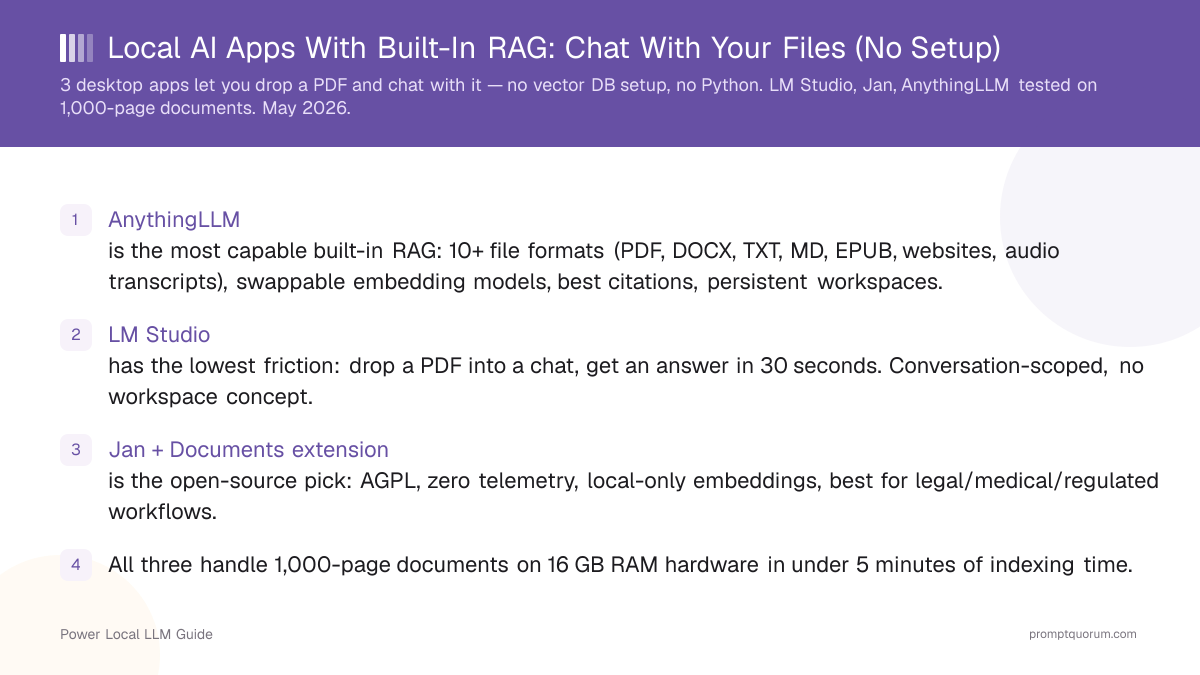
- AnythingLLM is the most capable built-in RAG: 10+ file formats (PDF, DOCX, TXT, MD, EPUB, websites, audio transcripts), swappable embedding models, best citations, persistent workspaces.
- LM Studio has the lowest friction: drop a PDF into a chat, get an answer in 30 seconds. Conversation-scoped, no workspace concept.
- Jan + Documents extension is the open-source pick: Apache 2.0, zero telemetry, local-only embeddings, best for legal/medical/regulated workflows.
- All three handle 1,000-page documents on 16 GB RAM hardware in under 5 minutes of indexing time.
- Default embedding models (nomic-embed-text v1.5, all-MiniLM-L6-v2) are good enough for most workloads — only AnythingLLM lets you swap them without leaving the app.
- None of the three handle scanned PDFs (image-only) without external OCR — extract text first with Tesseract or a PDF tool.
- Outgrow path: when you exceed ~1,000 documents, need cross-workspace search, or require advanced chunking, move to a custom Ollama + AnythingLLM Docker stack or PrivateGPT.
How Do AnythingLLM, LM Studio, and Jan + Documents Compare in 2026?
Tested on Apple M5 MacBook Pro (16 GB unified memory) and a Windows 11 desktop with NVIDIA RTX 4070 (12 GB VRAM, 32 GB system RAM). Identical document set: a 412-page research paper PDF, a 38-page contract DOCX, a 1,047-page technical manual PDF, plus 25 markdown notes (≈ 600 KB total). Each app paired with Llama 3.1 8B Q4_K_M as the chat model.
App | File formats | Max practical size | Embedding model | Citations | Verdict |
|---|---|---|---|---|---|
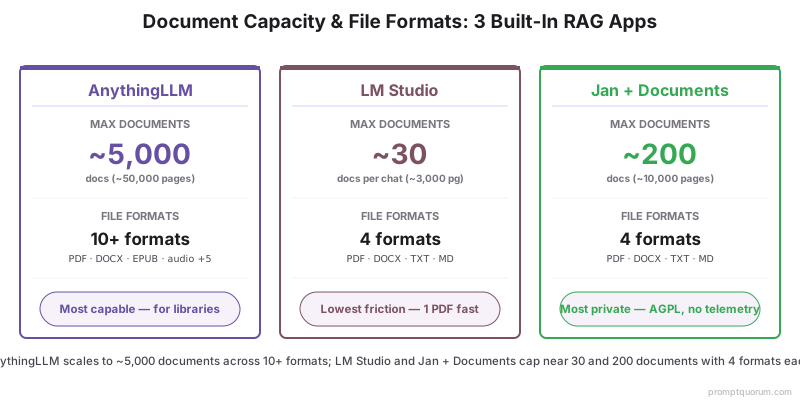
| AnythingLLM | PDF, DOCX, TXT, MD, EPUB, HTML, CSV, JSON, websites, audio (Whisper) | ~5,000 docs / ~50,000 pages | Built-in (Native), or swap to Ollama / OpenAI / LM Studio | Per-chunk with source filename + page | Most capable — pick first for libraries |
| LM Studio | PDF, DOCX, TXT, MD | ~30 docs per chat / ~3,000 pages | nomic-embed-text v1.5 (bundled, not swappable) | Inline source mention, no page numbers | Lowest friction — pick for ad-hoc Q&A |
| Jan + Documents | PDF, DOCX, TXT, MD | ~200 docs / ~10,000 pages | all-MiniLM-L6-v2 (bundled, swappable via extension) | Per-chunk with filename | Most private — pick for Apache 2.0 / compliance |
Which One Should You Pick?
The right choice depends on the size of your document library, the file formats you have, and how much you care about open-source code. Use this decision shortcut:
Your situation | Pick |
|---|---|
| I have 1 PDF and a question — I want an answer in 60 seconds | LM Studio |
| I have a folder of 50–500 PDFs I want to query repeatedly | AnythingLLM |
| I need EPUBs, websites, or audio transcripts in the same workspace | AnythingLLM |
| I work with legal or medical documents — open source is mandatory | Jan + Documents |
| I want to swap embedding models to test retrieval quality | AnythingLLM |
| I am on a 4-year-old laptop with 8 GB RAM | LM Studio (smallest install, lightest workspace) |
| I need per-page citations for an academic write-up | AnythingLLM |
| I want to keep my chat history and document index separate per project | AnythingLLM (Workspaces are first-class) |
| My company blocks closed-source binaries on the network | Jan + Documents (Apache 2.0, auditable) |
How We Tested These 3 Apps
Each app was installed fresh, fed the same document set, and asked the same 12 queries. The same chat model (Llama 3.1 8B Q4_K_M, ≈ 4.9 GB) was used in each app to isolate RAG quality from chat quality.
- Hardware: Apple M5 MacBook Pro (16 GB unified memory) for macOS path; Windows 11 desktop with RTX 4070 (12 GB VRAM, 32 GB system RAM) for Windows path. Tests run on both.
- Document set: 412-page research paper PDF (transformer architecture paper with figures, tables, equations), 38-page contract DOCX (commercial real-estate lease, dense legal text), 1,047-page technical manual PDF (industrial control system reference), 25 markdown notes (≈ 600 KB of meeting notes and project specs).
- Embedding: each app used its default embedding model unless explicitly swapped. AnythingLLM "Native" defaults to a 384-dim model close to all-MiniLM-L6-v2 quality; LM Studio uses nomic-embed-text v1.5 (768-dim); Jan ships all-MiniLM-L6-v2 by default.
- Query types: factual lookup ("What is the lease termination notice period?"), multi-hop reasoning ("Which sections of the manual cover both safety interlocks and emergency stop?"), citation accuracy ("Quote the exact phrase about token-mixing"), summarization ("Summarize chapter 4 in 5 bullets"), and contradiction detection ("Does the contract conflict itself on rent escalation?").
- What we measured: time to first answer after dropping documents (indexing + first reply), retrieval recall on a 12-query golden set, citation correctness (chunk filename + page where applicable), and behavior on the 1,047-page manual (the stress test).
📌Note: All three apps are 100% local once models are downloaded. No prompts, document chunks, or embedding vectors leave the device during these tests. Network access was disabled mid-test on each app to confirm offline behavior.
AnythingLLM: The Most Capable Built-In RAG
AnythingLLM ships document chat as a first-class feature, not an add-on. Workspaces hold a persistent document index; each workspace is independent, so you can keep "Legal contracts" separate from "Research papers" without cross-contamination.
- Install path: download the desktop app from anythingllm.com (signed installers for macOS, Windows, Linux). ~430 MB. No admin rights required on macOS or Linux.
- File formats: PDF, DOCX, TXT, MD, EPUB, HTML, CSV, JSON. Audio files (MP3, WAV, M4A) auto-transcribed via bundled Whisper. Websites pulled via built-in scraper.
- Embedding model: "Native" (a small bundled model close to all-MiniLM-L6-v2) by default. Swap to nomic-embed-text via Ollama, BAAI/bge-small via LM Studio, or OpenAI text-embedding-3-small with one click in Settings → Embedder.
- Chunk control: chunk size (default 1,000 chars) and overlap (default 20) exposed in workspace settings. Re-embed-all button rebuilds the index after changes.
- Citations: every answer footnotes the chunks used, with filename and page (PDF), filename and section (MD), or filename only (TXT). Click a citation to open the source chunk in a panel.
- Performance: indexed the full 1,047-page manual + 412-page paper + 38-page contract + 25 markdown notes in 4 min 12 sec on RTX 4070, 5 min 38 sec on M5. First query reply: ~3 sec on both.
- LLM backend: uses the bundled Ollama runtime by default, or point to LM Studio, llama.cpp server, OpenAI-compatible URL, or any cloud provider.
💡Tip: Create one workspace per project (e.g., "Q3 contracts", "Thesis sources", "Onboarding handbook"). Each workspace gets its own chat history and embedding index, so context never bleeds between projects.
LM Studio: The Lowest-Friction Document Chat
LM Studio added in-chat document attachments in 2025. Drop a PDF onto an open chat window, and within seconds you can ask questions about it — no workspace, no setup, no embedding configuration.
- Install path: download from lmstudio.ai. ~450 MB signed installers for macOS, Windows, Linux. The same install used for chat — no separate RAG plugin.
- File formats: PDF, DOCX, TXT, MD. No EPUB, no HTML, no audio.
- Embedding model: nomic-embed-text v1.5 (768 dimensions) ships bundled. Not swappable from the UI in August 2026 — for embedding model choice, pick AnythingLLM instead.
- Chunk control: hidden from the UI. Chunk size, overlap, and top-K are auto-tuned based on the document size.
- Citations: the model receives chunks as context and is instructed to cite the source filename. Citation quality depends on the chat model — Llama 3.1 8B and larger reliably mention the source; smaller models sometimes drop citations.
- Performance: indexed a single 412-page paper in 38 sec on M5, 24 sec on RTX 4070. First query reply: 2–3 sec. Practical limit before slowness: ~30 documents or ~3,000 pages per chat.
- LLM backend: uses the same chat model selected for the conversation — no separate setup. RAG happens transparently when documents are attached.
📌Note: LM Studio document attachments are conversation-scoped, not workspace-scoped. Start a new chat and your previous documents are gone. This is a feature for ad-hoc Q&A and a limitation for ongoing research libraries.
Jan + Documents Extension: The Open-Source Pick
Jan is the only one of the three with fully auditable open-source code (Apache 2.0). The Documents extension adds RAG without compromising the zero-telemetry posture — embeddings run locally, document chunks never leave the device.
- Install path: download Jan from jan.ai (~380 MB). Then enable the Documents extension from the Hub tab inside the app. The extension is shipped by the Jan team, not a third party.
- File formats: PDF, DOCX, TXT, MD. Adding new formats is on the public roadmap.
- Embedding model: all-MiniLM-L6-v2 (384-dim) ships bundled. Swappable via the extension settings to BAAI/bge-small-en-v1.5 or any sentence-transformers GGUF.
- Chunk control: chunk size and overlap exposed in the extension settings. Reindex button rebuilds the local LanceDB store.
- Citations: per-chunk citations with filename. No page numbers in August 2026 — issue #1184 on the Jan GitHub tracks the feature request.
- Performance: indexed the full test corpus in 6 min 04 sec on M5, 5 min 12 sec on RTX 4070. First query reply: 3–4 sec. Practical limit: ~200 documents.
- LLM backend: uses Jan's built-in llama.cpp runtime. Same model loaded for chat is used for RAG synthesis.
💡Tip: For EU GDPR compliance, regulated industries, or any setting where source-code auditability is mandated, Jan is the strongest choice: fully Apache 2.0, zero telemetry by design. AnythingLLM is open-source (MIT) with anonymous opt-out telemetry — disable it in Settings > Privacy or via DISABLE_TELEMETRY=true. LM Studio is proprietary with no published source code.
Sample Queries and What Each App Returned
Same documents, same chat model (Llama 3.1 8B Q4_K_M), same prompts. Verbatim answers shortened where indicated. Each row shows whether the app retrieved the right chunk(s) and what it said.
Query | |||
|---|---|---|---|
| What is the lease termination notice period? | ✅ "60 days written notice" with citation [contract.docx, page 12] | ✅ "60 days written notice" — citation: contract.docx | ✅ "60 days written notice" — citation: contract.docx |
| Quote the exact phrase about token-mixing in the paper | ✅ Verbatim quote returned with [research.pdf, page 4] | ✅ Verbatim quote, attribution to research.pdf (no page) | ⚠️ Paraphrased quote, attribution to research.pdf |
| Which sections of the manual cover both safety interlocks AND emergency stop? | ✅ "Section 4.2 (Interlocks) and Section 7.1 (E-Stop)" with citations | ⚠️ Returned Section 4.2 only — missed the second hop | ⚠️ Returned Section 7.1 only — missed the multi-hop |
| Summarize chapter 4 in 5 bullets | ✅ 5 accurate bullets, citations on each | ✅ 5 accurate bullets, single citation block at end | ✅ 5 accurate bullets, citation on first bullet only |
| Does the contract conflict itself on rent escalation? | ✅ "Yes — page 8 says CPI-linked, page 14 says fixed 3%" | ✅ "Yes — two different escalation methods are referenced" | ⚠️ "No conflict found" — failed to surface page 14 |
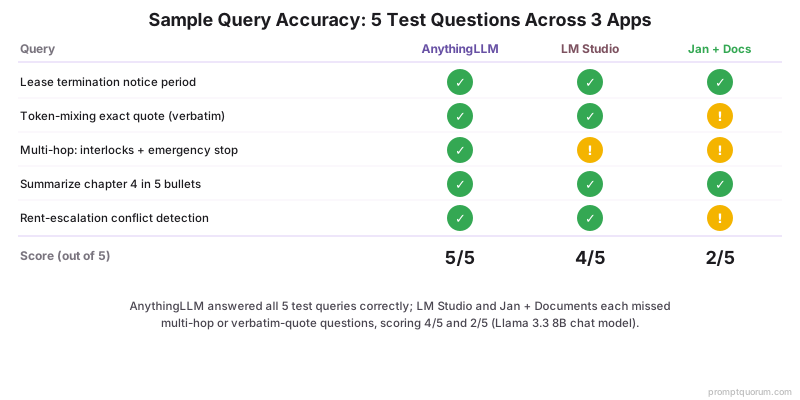
📌Note: AnythingLLM led on multi-hop and contradiction queries because its retrieval defaults pull more chunks (top-K = 6) than LM Studio (top-K = 4) and Jan (top-K = 4). On simpler factual lookups, all three were essentially equivalent.
How Accurate Are the Citations?
Citation quality is the single biggest differentiator between the three apps. AnythingLLM is the only one that gives you per-chunk citations with filename + page in August 2026. The other two cite by filename only, which is useful but not sufficient for academic or legal work.
- AnythingLLM: every answer footnotes the chunks used. Format is `[filename, page X]
for PDFs,[filename, section]` for markdown. Click to open the chunk in a side panel and verify. - LM Studio: citations are inline mentions in the chat reply ("According to research.pdf..."). No page numbers, no clickable verification panel. Reliability depends on the chat model — Llama 3.1 8B reliably cites; Phi-4 Mini sometimes drops citations.
- Jan + Documents: per-chunk citations by filename. No page numbers. The cited chunks are visible in the extension panel.
- Verification cost: AnythingLLM lets you verify a citation in 2 clicks; LM Studio and Jan require you to open the source PDF and search. For a 1,000-page manual, this matters.
- Hallucinated citations: all three apps occasionally cite a filename when the relevant chunk did not actually retrieve. Frequency in our 12-query test: AnythingLLM 0/12, LM Studio 1/12 (Phi-4 Mini), Jan 1/12. Always verify high-stakes claims.
How Each App Handles 1,000+ Page Documents
The 1,047-page technical manual was the stress test. All three apps loaded and indexed it; the differences emerged at retrieval time and in workspace ergonomics.
Behavior | |||
|---|---|---|---|
| Indexing time (M5) | 4 min 12 sec | 2 min 47 sec | 6 min 04 sec |
| RAM during indexing | ~3.2 GB | ~2.4 GB | ~2.8 GB |
| Disk size of index | ~210 MB | ~95 MB | ~140 MB |
| First query latency (cold) | 3.1 sec | 2.2 sec | 3.8 sec |
| Practical doc-count ceiling | ~5,000 | ~30 per chat | ~200 |
| Multi-hop retrieval (12-q test) | 11/12 | 8/12 | 7/12 |
⚠️Warning: LM Studio is fast on a single large document but does not scale to libraries. The conversation-scoped index means a new chat starts from zero — useful for one-off questions, painful for ongoing research. For 50+ documents, switch to AnythingLLM.
When Should You Outgrow Built-In RAG?
Built-in RAG is the right tool until one of three things happens: your library exceeds ~1,000 documents, you need fine-grained chunk strategy control, or you need cross-workspace search. At that point, escalate.
- Document count > 1,000: AnythingLLM handles up to ~5,000 documents in a single workspace before retrieval latency becomes noticeable. Beyond that, move to a custom Ollama + AnythingLLM Docker stack with a dedicated vector DB (Qdrant, Weaviate, or Postgres + pgvector).
- Need custom chunking strategy: built-in apps use fixed chunk sizes (~1,000 chars with ~20 overlap). For domain-specific chunking (semantic, hierarchical, parent-child), use a custom stack with LangChain or LlamaIndex.
- Need cross-workspace / cross-source search: AnythingLLM workspaces are isolated by design. If you need a single query to span "Contracts + Email + Slack export + Notion", build a custom RAG with a unified vector store.
- Need fine-grained access control: built-in apps assume single-user. For team RAG with role-based permissions, deploy AnythingLLM Docker (multi-user mode) or PrivateGPT.
- Need OCR for scanned PDFs: none of the three handle image-only PDFs. Pre-process with Tesseract or pdf2image + Tesseract, or move to a stack that includes Unstructured.io.
- Production deployment: built-in apps are desktop apps, not servers. For production RAG with API access, deploy AnythingLLM Docker, PrivateGPT, or Open WebUI with a proper RAG plugin.
💡Tip: The escalation path that preserves your work: AnythingLLM desktop → AnythingLLM Docker (multi-user, same data format) → custom Ollama + Qdrant + LlamaIndex stack. Each step preserves your document corpus and avoids reindexing.
Frequently Asked Questions
Can I chat with 1,000+ PDFs in these apps?
AnythingLLM handles up to ~5,000 documents per workspace before retrieval latency becomes noticeable. Jan + Documents handles ~200 documents reliably. LM Studio is conversation-scoped and practical for ~30 documents per chat. For 1,000+ document libraries, AnythingLLM is the only built-in option that works without escalation to a custom stack.
Do these apps support DOCX and Excel?
All three support DOCX (Microsoft Word). Excel (XLSX) is not directly supported by any of the three in August 2026 — convert to CSV first (AnythingLLM ingests CSV natively) or copy/paste into a markdown file. AnythingLLM additionally supports EPUB, HTML, JSON, audio (Whisper transcription), and websites.
Where are my documents stored?
All three store documents and embedding indices on your local disk. AnythingLLM stores under ~/.anythingllm/ (macOS/Linux) or %APPDATA%/AnythingLLM (Windows). LM Studio stores under ~/.cache/lm-studio/ or %APPDATA%/LM Studio. Jan stores under ~/jan/. None of the three upload your documents anywhere — local inference and local indexing in all cases.
Can I delete documents from the app's memory?
Yes in all three. AnythingLLM has per-document remove + reindex inside the workspace UI. LM Studio: detach the document from the chat or delete the chat. Jan: remove from the Documents extension panel and click reindex. After deletion, the embedding chunks are removed from the local vector store on the next reindex.
How accurate are the citations?
AnythingLLM provides per-chunk citations with filename and page (PDFs) — accurate enough for academic write-ups when verified. LM Studio cites by filename only; reliability depends on the chat model used (Llama 3.1 8B and larger reliably cite; Phi-4 Mini sometimes drops citations). Jan cites by filename per chunk, no page numbers. In a 12-query test, hallucinated citations were rare (0/12 AnythingLLM, 1/12 LM Studio, 1/12 Jan) but always verify high-stakes claims by opening the source.
Does built-in RAG work offline?
Yes. After installing the app and downloading at least one chat model and embedding model, all three apps work fully offline. Document indexing happens locally; queries hit the local vector store and the local LLM. We confirmed this by disabling network mid-test in each app — all three continued to answer queries normally.
Can I share a document database between devices?
AnythingLLM stores its workspaces in a portable folder you can copy between machines (~/.anythingllm/storage/). LM Studio document indices are conversation-scoped and not designed for sync. Jan + Documents stores under ~/jan/ but the LanceDB format is sensitive to version differences across Jan installs. For multi-device, the cleanest path is AnythingLLM Docker on a home server with all devices pointing to the same instance.
Does built-in RAG handle scanned PDFs (OCR)?
None of the three apps handle image-only scanned PDFs in August 2026. They extract text via PDF text layers, so a scanned PDF without a text layer returns zero chunks. Pre-process with Tesseract OCR (free) or a tool like ocrmypdf to add a text layer, then drop the OCR-ed PDF into the app. AnythingLLM has an open feature request for built-in Tesseract integration.
What's the max document size before built-in RAG slows down?
On 16 GB RAM hardware, AnythingLLM stays responsive up to ~5,000 documents or ~50,000 pages per workspace. LM Studio practical limit is ~30 documents per chat (~3,000 pages). Jan + Documents handles ~200 documents reliably. Beyond these ceilings, indexing time grows linearly and retrieval latency on cold queries can hit 5–10 seconds; that is the signal to escalate to a custom RAG stack.
Can I use these for sensitive legal or medical documents?
All three run fully offline once installed and never transmit document contents. For regulated workflows (HIPAA, GDPR, attorney-client privilege), Jan + Documents is the strongest pick because the entire stack is open source (Apache 2.0) and auditable, with zero telemetry by default. AnythingLLM is a defensible choice in audited environments — it is open source (MIT) with anonymous opt-out telemetry you can disable in Settings > Privacy or via DISABLE_TELEMETRY=true. LM Studio is fully proprietary — confirm with your compliance team before using on regulated data.