Key Takeaways
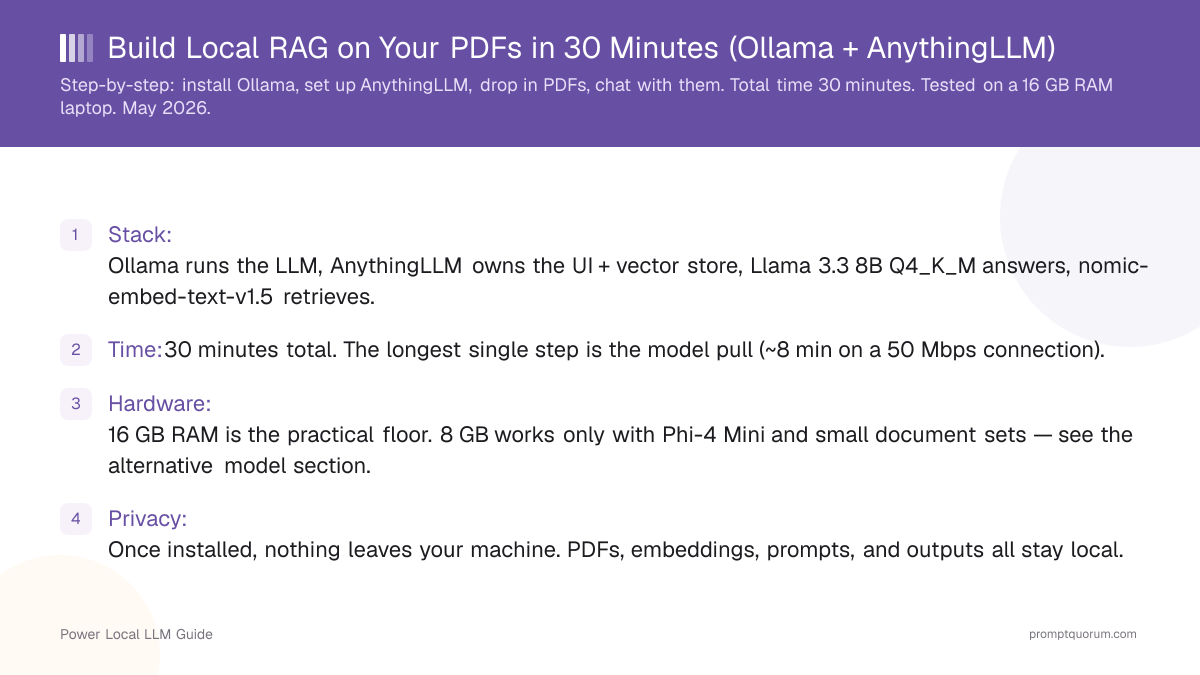
- Stack: Ollama runs the LLM, AnythingLLM owns the UI + vector store, Qwen3 8B Q4_K_M answers, nomic-embed-text-v1.5 retrieves.
- Time: 30 minutes total. The longest single step is the model pull (~8 min on a 50 Mbps connection).
- Hardware: 16 GB RAM is the practical floor. 8 GB works only with Phi-4 Mini and small document sets — see the alternative model section.
- Privacy: Once installed, nothing leaves your machine. PDFs, embeddings, prompts, and outputs all stay local.
- No code: Zero Python, zero terminal beyond the two Ollama commands. AnythingLLM is a desktop app with drag-and-drop document import.
- Default embedder is wrong: AnythingLLM ships with a tiny default embedder. Switch to nomic-embed-text-v1.5 in Step 4 — retrieval quality jumps measurably.
- Default chunk size is also wrong for PDFs: 1000-token chunks with 200-token overlap is a better starting point than the 512/0 default. Tuned in Step 7.
What You Will Build
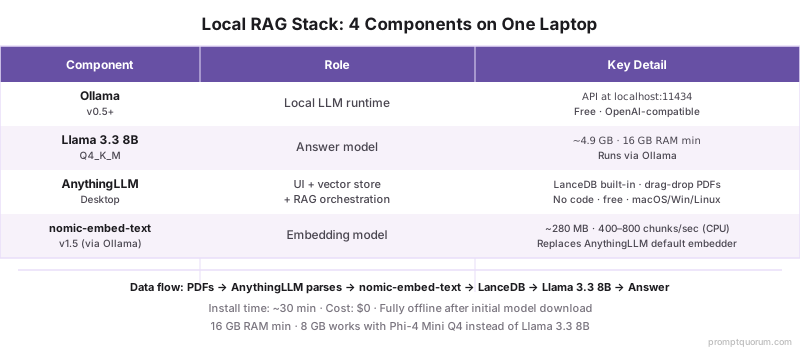
A self-contained desktop RAG system: a chat window where you drop PDFs and ask questions about them. Four open-source pieces, all free, all running on your laptop:
📍 In One Sentence
A local RAG system is four pieces — a runtime (Ollama), an answer model (Qwen3 8B), a UI plus vector store (AnythingLLM), and an embedding model (nomic-embed-text-v1.5) — wired together on one machine with no cloud calls.
💬 In Plain Terms
Drop a PDF, ask a question, get a grounded answer with citations — fully offline. The four pieces split the work: Ollama runs the models, Qwen3 8B writes the answer, AnythingLLM handles the chunks and vectors, nomic-embed-text-v1.5 turns text into the vectors that make retrieval work. Total install: ~30 minutes; total cost: $0.
- Ollama — local LLM runtime. Manages model files, exposes an OpenAI-compatible API on localhost:11434. Provides the answer model.
- Qwen3 8B Instruct (Q4_K_M) — Meta's 8B-parameter chat model, quantized to fit in ~5 GB RAM. Good answer quality on document-grounded questions in 2026.
- AnythingLLM Desktop (v1.11.2) — the UI + vector store + RAG orchestration. Ships LanceDB embedded, parses PDFs/DOCX/TXT/MD natively, talks to Ollama as its LLM provider.
- nomic-embed-text-v1.5 — embedding model. 768-dim vectors, runs through Ollama at ~600 chunks/sec on a modern CPU. Replaces AnythingLLM's underpowered default.
📌Note: AnythingLLM also has a built-in default LLM and a built-in default embedder. Both are deliberately tiny so the app starts fast on weak hardware. We replace both in Steps 4 and 6 because retrieval quality is the entire game in a RAG system.
What You Need Before You Start
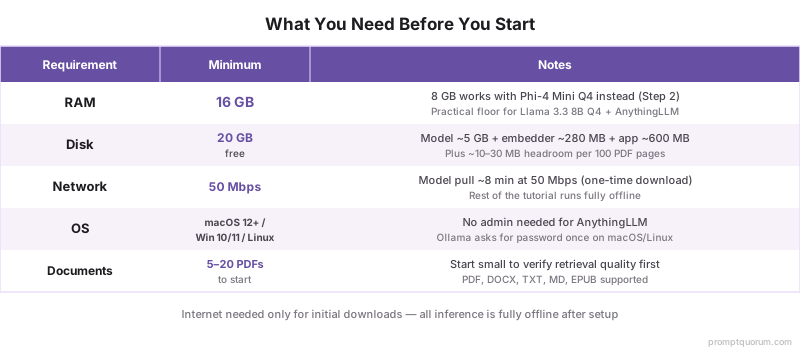
A laptop with 16 GB RAM, 20 GB free disk, an internet connection, and 30 minutes. Operating system can be macOS 12+, Windows 10/11, or any modern Linux desktop.
- RAM: 16 GB is the practical floor for Qwen3 8B Q4 + AnythingLLM + your usual desktop apps. 8 GB works with Phi-4 Mini Q4 instead — see Step 2 alternatives.
- Disk: 20 GB free. Qwen3 8B Q4_K_M is ~5 GB, the embedding model is ~274 MB, AnythingLLM is ~600 MB, and you need headroom for embeddings (~10–30 MB per 100 PDF pages).
- Network: ~50 Mbps minimum for the model pull. On 25 Mbps the same step takes ~16 minutes; the rest of the tutorial is unaffected.
- Permissions: No admin/root needed for AnythingLLM. Ollama installs to
/usr/local/binon macOS/Linux (asks for password once) or%LOCALAPPDATA%on Windows (no admin). - Documents ready: 5–20 PDFs to start. Anything larger works, but a small set is faster to test retrieval quality on.
Step 1: Install Ollama (3 min)
Download the Ollama installer for your OS from ollama.com/download and run it. The installer adds the ollama CLI to PATH and starts a background service. No configuration choices to make.
- macOS: download the
.dmg, drag Ollama to Applications, launch once to install the CLI helper. The menu bar shows a llama icon when the service is running. - Windows: download the
.exe, run it, accept the defaults. Ollama runs as a background service after install — no separate launch needed. - Linux: one-line install:
curl -fsSL https://ollama.com/install.sh | sh. The script registers a systemd unit; start withsudo systemctl start ollama. - Verify: open a terminal and run
ollama --version. You should see a version string. If the command is not found, restart the terminal so it picks up the updated PATH.
ollama --version
# ollama version is 0.33.1 (any 0.5.13+ build works; 0.33.x is current in August 2026)⚠️Warning: If ollama --version works but later steps fail with "connection refused on localhost:11434", the background service did not auto-start. macOS: launch the app from Applications. Linux: sudo systemctl start ollama. Windows: open the Ollama tray icon.
Step 2: Pull Qwen3 8B (8 min)
Run ollama pull qwen3:8b in a terminal. This downloads the quantized 5.2 GB GGUF and registers it with Ollama. Most of the 30-minute total is this single step on a typical home connection.
- Download size: ~5.2 GB (Q4_K_M quantization). At 50 Mbps you will wait roughly 8 minutes; at 100 Mbps roughly 4 minutes; at 25 Mbps roughly 16 minutes.
- Watch progress: Ollama prints a percentage and rate. The download resumes if it gets interrupted — re-run the same command.
- Smoke-test the model: after the pull finishes, run
ollama run qwen3:8band ask "What is 2+2?". Confirm you get a reasonable answer. Type/byeto exit. - Lower-RAM alternative: if you have 8 GB RAM instead of 16 GB, run
ollama pull phi4-mini(Phi-4 Mini, ~2.5 GB on disk). Use that model name in Step 3 instead. Quality is lower on long documents but the system works.
# Recommended for 16 GB RAM
ollama pull qwen3:8b

# Alternative for 8 GB RAM
ollama pull phi4-mini

# Quick smoke test (type /bye to exit)
ollama run qwen3:8b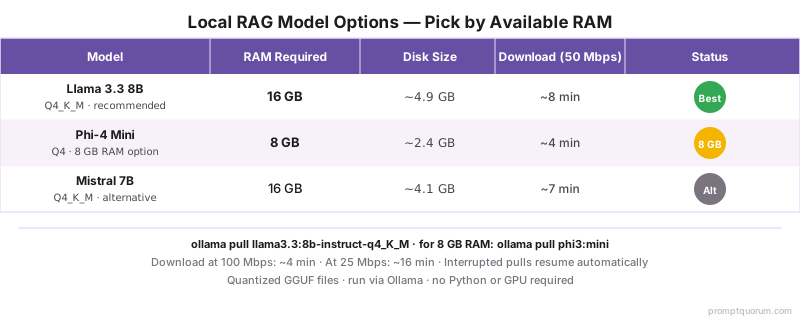
💡Tip: Already have other Ollama models? ollama list shows them all. You can keep multiple models installed and switch between them in AnythingLLM's workspace settings.
Step 3: Install AnythingLLM Desktop (4 min)
Download AnythingLLM Desktop from useanything.com (or anythingllm.com) and run the installer. Launch the app and skip the "create cloud account" prompt — Local-only mode is offered on the next screen. Installation is unattended.
- macOS: download the
.dmg, drag AnythingLLM to Applications, launch. macOS may ask you to confirm the app is from a recognized developer; click "Open" in System Settings → Privacy if prompted. - Windows: download the
.exeinstaller. Windows SmartScreen may flag it as "not commonly downloaded" — click "More info" → "Run anyway". The app installs to%LOCALAPPDATA%\anythingllm-desktop(no admin). - Linux: download the
.AppImage, mark it executable (chmod +x AnythingLLMDesktop.AppImage), double-click to run. - First-run choice: AnythingLLM offers a hosted cloud workspace OR a local-only setup. Pick Local Setup. This is the choice that keeps the entire system offline.
- Workspace creation: when prompted, name the first workspace something descriptive ("research-papers", "contracts", "personal-notes"). Each workspace gets its own document collection and embedding store.
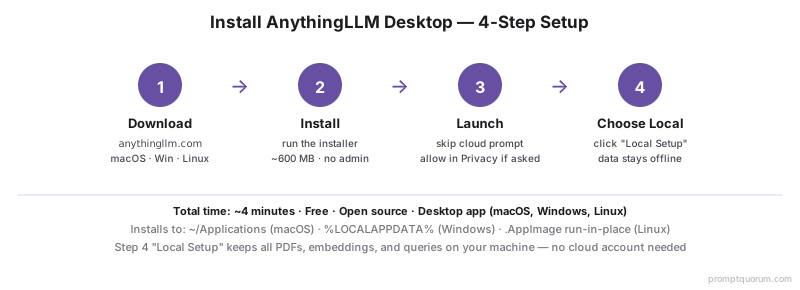
⚠️Warning: AnythingLLM's default LLM is a tiny built-in model meant only for the welcome demo. We point it at your local Ollama in the next step. Do not use the default for real queries — the answers will be unusably weak.
Step 4: Wire AnythingLLM to Ollama and Switch the Embedder (3 min)
Open AnythingLLM Settings → LLM Preference. Pick "Ollama" as the provider, set the URL to http://127.0.0.1:11434, and select qwen3:8b from the model dropdown. Save. Then go to Embedding Preference and switch from the default to nomic-embed-text via Ollama.
- LLM Preference panel: Provider = Ollama, Endpoint =
http://127.0.0.1:11434, Model =qwen3:8b. Click "Save Changes". A green checkmark confirms the connection. - Embedding Preference panel: the default is "AnythingLLM Native Embedder" — a tiny built-in. Change Provider to Ollama, then run
ollama pull nomic-embed-textin your terminal first (~274 MB), then refresh the model list in the panel and selectnomic-embed-text:latest. Click Save. - Re-embed warning: if you already added documents under the old embedder, AnythingLLM will prompt you to re-embed them. On a fresh install you have no documents yet, so the prompt does not appear.
- Vector DB: leave at the default (LanceDB). It is local, file-backed, and needs zero configuration. Switch only if you specifically need PGVector or Qdrant.
# Run this in your terminal before opening the Embedding Preference panel
ollama pull nomic-embed-text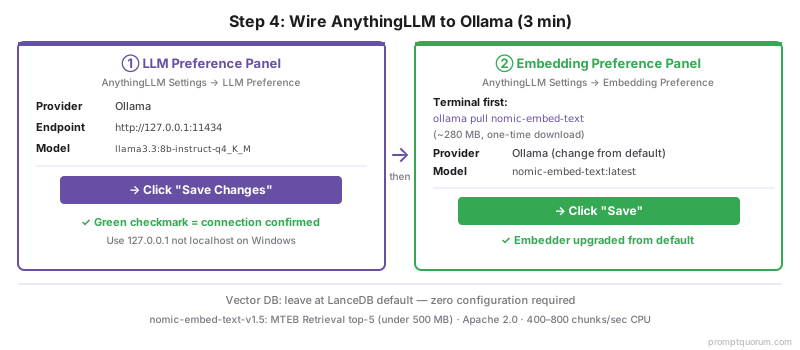
💡Tip: Why nomic-embed-text-v1.5 specifically? In August 2026 it scores in the top 5 of the MTEB Retrieval leaderboard for any model under 500 MB, runs at 400–800 chunks/sec on a modern CPU and 2000+ chunks/sec on Apple Silicon, and is Apache 2.0 licensed. It is the default first-upgrade for almost every local RAG stack — see the embedding model comparison for alternatives.
Step 5: Upload Your First PDFs (5 min)
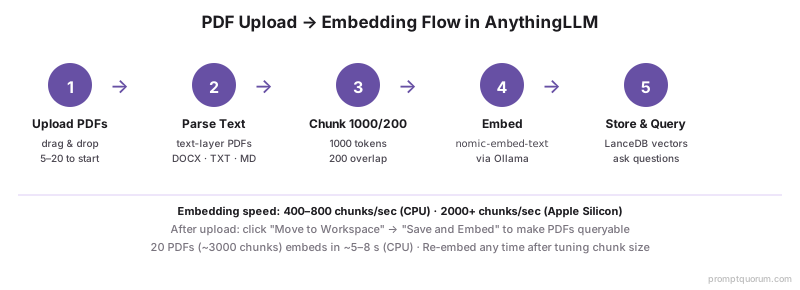
Open your workspace, click "Upload Documents", and drag in 5–20 PDFs. AnythingLLM extracts text, chunks it (default 512 tokens, 0 overlap), embeds each chunk through Ollama, and stores vectors in LanceDB. A progress bar shows pages parsed and chunks embedded.
- Supported formats: PDF (text-based), DOCX, TXT, MD, EPUB, plus URL scraping. Scanned-image PDFs need OCR first — see the troubleshooting section.
- Speed: 400–800 chunks/sec on a modern CPU and 2000+ chunks/sec on Apple Silicon once Ollama is warm. A 20-PDF set with ~50 pages each (~3000 chunks total) finishes in 5–8 seconds of embedding time on a modern CPU and 1–2 seconds on Apple Silicon, plus parsing time. Plan for ~5 minutes total to upload, parse, and embed 20 PDFs.
- RAM during embedding: Ollama loads the embedding model (~274 MB) on first request and keeps it cached. Subsequent embeds reuse the cache.
- "Move to Workspace": after upload, AnythingLLM places documents in a "limbo" pool. You must explicitly click "Move to Workspace" → "Save and Embed" to make them queryable. This two-step flow is intentional — it lets you preview before paying the embedding cost.
⚠️Warning: PDFs from older OCR scans often contain garbled or empty text layers — the file looks fine to human eyes but AnythingLLM extracts "[image]" or empty strings. Open the PDF in a text editor (or run pdftotext file.pdf - from poppler-utils) to confirm the text layer exists before uploading.
Step 6: Test Queries (5 min)
Type a question in the workspace chat. AnythingLLM embeds the question, retrieves the top-N chunks from LanceDB, builds a prompt with those chunks as context, sends to Ollama, and shows the answer. Latency on a 16 GB RAM laptop is roughly 3–10 seconds per query.
- Start with a fact-recall query: "What does [specific term from one of your PDFs] mean?" — this tests retrieval grounding. The answer should cite the PDF and quote the exact phrasing.
- Then a synthesis query: "Summarize the main argument of [author/document title]." — this tests how well the model integrates multiple chunks.
- Then a comparison query (only if your PDFs contain comparable content): "Compare how [doc A] and [doc B] handle [topic]." — this tests cross-document retrieval.
- Inspect citations: AnythingLLM shows the source chunks beneath each answer. Click them to verify the model is grounding on the right passages. If the citations are off-topic, retrieval is broken — see Step 7.
Step 7: Tune Chunk Size (2 min)
Open Workspace Settings → Vector Database. Change Chunk Size from 512 to 1000 and Chunk Overlap from 0 to 200. Click Save, then re-embed your documents (the UI prompts). This is the single biggest retrieval-quality lever in AnythingLLM.
- Why 1000/200 instead of 512/0: PDF paragraphs and sections rarely fit cleanly in 512 tokens. The 200-token overlap means a sentence that straddles a chunk boundary still appears whole in at least one neighbour, so retrieval picks it up.
- Re-embedding cost: the 20-PDF / 3000-chunk set re-embeds in ~5 seconds. Larger sets take proportionally longer. The chunk store is overwritten, not appended.
- Top-K retrieval: the default top-K is 4 (the 4 best-matching chunks become context). Bump to 6–8 if your answers feel under-grounded; drop to 2–3 if the model gets distracted by noisy chunks.
- Prompt template: AnythingLLM exposes the system prompt under Workspace → Chat Settings → Prompt. The default is fine; tune only if you have a specific failure mode.
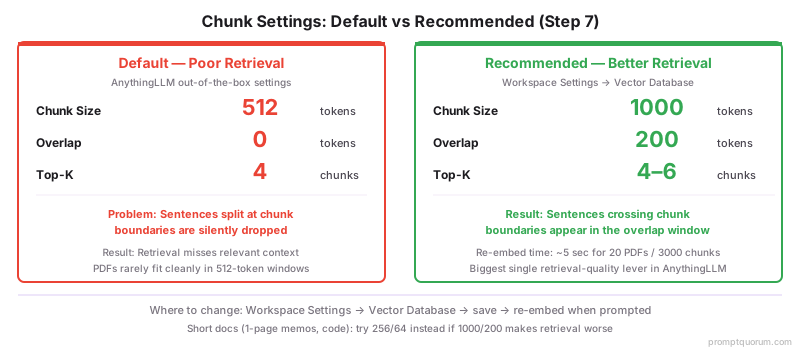
💡Tip: Empirical tuning beats theory: ask the same 5 test queries before and after the chunk-size change, and compare. If retrieval at 1000/200 is worse, you probably have very short documents (one-page memos, code docstrings) — try 256/64 instead.
What Should the Answers Actually Look Like?
A correctly-tuned local RAG system answers fact-recall questions verbatim from the source, synthesizes when asked, and cites the chunks it used. Three example queries on a research-paper workspace, with what a healthy system returns:
📍 In One Sentence
A healthy local RAG answer quotes the source chunk verbatim for fact recall, synthesises across chunks for summary questions, and cites the specific chunk IDs it used — generic answers without quotes signal a retrieval problem, not a model problem.
💬 In Plain Terms
If the answer reads like "typically researchers use 100-500 participants" instead of "Smith et al. used 287 participants (Methods, p.4)", retrieval is broken and the model is winging it from training data. Fix retrieval first (chunk size, embedder, similarity threshold) before changing the answer model.
Query type | Example | Healthy answer pattern | Failure pattern |
|---|---|---|---|
| Fact recall | What sample size did Smith et al. 2024 use? | Direct quote from the methods section + citation to the chunk | Generic answer ("typically researchers use 100–500 participants") with no quote |
| Synthesis | Summarize the main contribution of this paper. | 3–5 sentences pulling from abstract + conclusion chunks | Restates the title or quotes one sentence from the abstract |
| Cross-document | How do Smith and Jones disagree on chunk overlap? | Quotes from both papers with explicit attribution | Cites only one paper, or invents a disagreement that is not in the chunks |
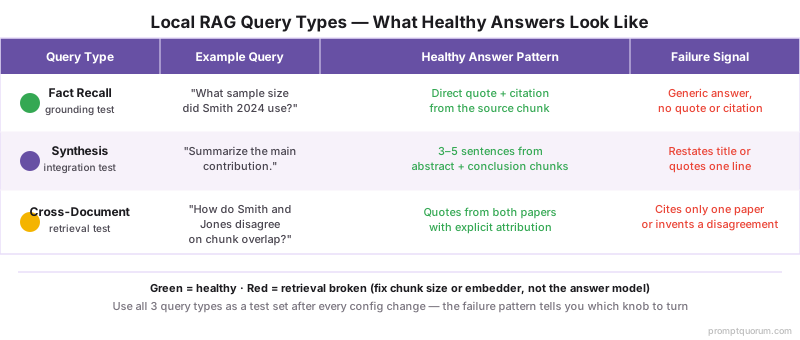
💡Tip: Use these three query patterns as your test set after every retrieval-config change. If fact-recall still misses but synthesis works, your chunks are too coarse. If synthesis misses but fact-recall works, your top-k is too low. The pattern of what fails tells you which knob to turn.
When Something Breaks: Six Common Failure Modes and Fixes
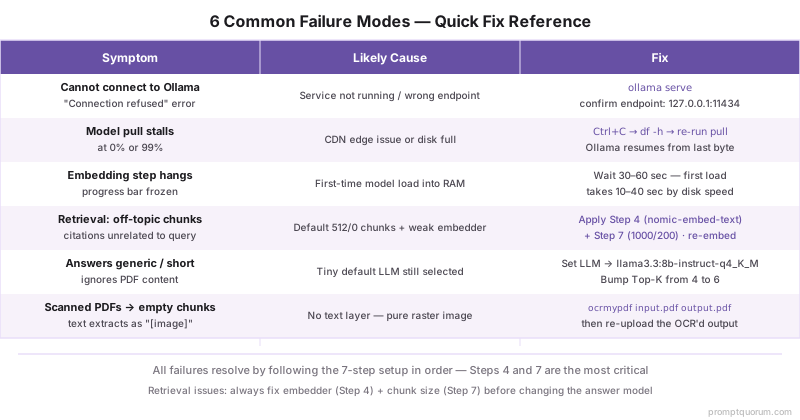
Most failures fall into one of six categories. Match the symptom to the row, apply the fix.
AnythingLLM shows "Cannot connect to Ollama"
- Likely cause:
- Ollama service not running, or wrong endpoint
- Fix:
- Run
ollama serve(or restart the app/service). Confirm endpoint ishttp://127.0.0.1:11434, notlocalhost:11434on Windows where the alias sometimes fails.
Model pull stalls at 0% or 99%
- Likely cause:
- CDN edge issue or disk full
- Fix:
- Cancel with Ctrl+C, run
df -hto confirm disk space, then re-run the sameollama pull— Ollama resumes from the last byte.
Embedding step appears to hang
- Likely cause:
- Ollama loading the embedding model for the first time
- Fix:
- Wait 30–60 seconds. First-time model load takes 10–40 seconds depending on disk speed. Subsequent embeds are fast.
Answers are short, generic, or refuse to engage with the source
- Likely cause:
- Wrong LLM still selected (tiny default) or context too small
- Fix:
- Confirm LLM Preference shows
qwen3:8b. Bump top-K from 4 to 6.
Scanned-image PDFs upload but produce empty chunks
- Likely cause:
- No text layer in the PDF — pure raster image
- Fix:
- OCR the PDF first. macOS:
ocrmypdf input.pdf output.pdf. Linux/Windows: install Tesseract + ocrmypdf. Then re-upload the OCR'd output.
Frequently Asked Questions
What if Ollama fails to install?
On macOS, the most common failure is Gatekeeper blocking an unsigned helper — open System Settings → Privacy & Security and click "Allow Anyway". On Windows, Defender SmartScreen may quarantine the installer; right-click → Properties → Unblock. On Linux, the install script needs sudo to write the systemd unit; if sudo is not available, download the static binary from github.com/ollama/ollama/releases and place it on your PATH manually.
Why is the embedding step slow?
The first embed of a session is slow because Ollama lazy-loads the embedding model into RAM (10–40 seconds depending on disk speed). After that, embedding runs at 400–800 chunks/sec on a modern CPU and 2000+ chunks/sec on Apple Silicon. If sustained throughput is below 100 chunks/sec, the model is probably running on disk-backed swap — close other apps to free RAM and retry.
How many PDFs can I upload at once?
AnythingLLM accepts hundreds of files in a single drag-and-drop. The practical limit is RAM during the parse step: ~1 GB peak for 100 medium-sized PDFs (50 pages each). Once embedded, the on-disk vector store is small (~10–30 MB per 100 PDF pages). For 1000+ PDFs, see the dedicated guide on chatting with 1000 PDFs locally.
Can I use this for password-protected PDFs?
AnythingLLM cannot decrypt password-protected PDFs directly. Decrypt them first with qpdf --password=YOURPASSWORD --decrypt input.pdf output.pdf (qpdf is free, available on all three OSes), then upload the unprotected output. Delete the unprotected copy after embedding if your threat model requires it — the embeddings themselves are not human-readable.
What if my retrieval returns wrong chunks?
Three knobs in order of impact: switch from the default embedder to nomic-embed-text (Step 4), change chunking from 512/0 to 1000/200 and re-embed (Step 7), and bump top-K from 4 to 6 in Workspace Settings. If retrieval is still off after all three, your documents may need pre-processing — strip headers/footers, normalize whitespace, or split very long PDFs into per-chapter files.
Should I use a different model than Qwen3 8B?
Qwen3 8B Q4_K_M is the best quality-per-RAM trade-off in 2026 for 16 GB systems. On 8 GB RAM use Phi-4 Mini Q4_K_M (~2.5 GB). On 24 GB+ try Qwen 3 14B Q4 for noticeably better synthesis on long documents. For multilingual workloads, Mistral Nemo 12B handles non-English better than Llama 3.3.
How do I update the model later?
Run ollama pull qwen3:8b again to get the latest build, then restart AnythingLLM so it re-detects the model version. To switch to a different model entirely, run ollama pull <new-model> then change the LLM Preference dropdown in AnythingLLM Settings — no re-embedding needed because embeddings depend only on the embedder, not the answer model.
Can I move this to a different computer?
Yes. Ollama models live in ~/.ollama/models (macOS/Linux) or %USERPROFILE%\.ollama\models (Windows) — copy the folder. AnythingLLM workspaces live in ~/.anythingllm/storage — copy that too. On the new machine, install Ollama and AnythingLLM Desktop, then drop the copied folders into place. Workspaces and embeddings come up identically.
Does this work if my PDFs are scanned images?
Not directly — AnythingLLM extracts text but cannot OCR images. Pre-process scanned PDFs with ocrmypdf input.pdf output.pdf (cross-platform, MIT-licensed, uses Tesseract). On Apple Silicon, ocrmypdf -l eng+deu+fra handles 70+ languages. After OCR, the output PDF has both the original images and a searchable text layer, and AnythingLLM extracts the text correctly.
How do I back up my document database?
AnythingLLM stores everything under ~/.anythingllm/storage (macOS/Linux) or %LOCALAPPDATA%\anythingllm-desktop\storage (Windows). Tar/zip that folder and copy it to a backup drive. The folder includes original documents, parsed chunks, vector indexes, and chat history. Restoring is a copy-back-and-restart — no special import flow needed.