Key Takeaways
- Local LLMs replace Grammarly's core function — grammar, clarity, and basic style correction — but not its real-time inline browser integration. The workflow shifts from "corrections appear as you type" to "paste text → get corrected version → paste back". For many users this is an acceptable trade for full privacy.
- Notion AI replacement is more complete. Obsidian with the Copilot plugin (or Smart Connections plugin) pointed at a local Ollama instance matches Notion AI's document drafting, content expansion, and AI Q&A over notes — with all document content processed locally.
- The privacy case is not theoretical. Grammarly's terms of service grant them a broad licence to use submitted text for product improvement. Notion AI sends document content to OpenAI's API. Local LLMs process the same text on your hardware with no external transmission.
- Qwen3 14B is the best local model for writing tasks on 16 GB systems. It produces the most natural prose rewrites and tone adjustments of the locally-runnable models. Phi-4 Mini is the practical alternative on 8 GB systems — adequate for grammar correction, weaker on nuanced style.
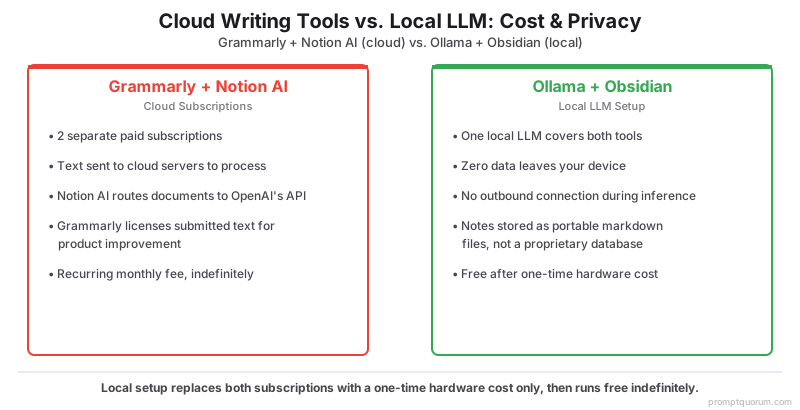
- Cost is a strong secondary argument. Grammarly Premium ($12–30/month) + Notion AI ($8–10/user/month) is $20–40/month. The local LLM equivalent is free after the one-time hardware cost of running Ollama.
- The capability gap narrows to two specific tasks. Grammarly has measurably better real-time integration (inline corrections in Gmail, Google Docs, browser fields) and better domain-specific writing style suggestions (legal, academic, business). Outside those two cases, a well-prompted local model is equivalent.
- Setup takes 20 minutes. Ollama installation + model download + Obsidian plugin configuration is a one-time setup. After that, the workflow is as fast as the cloud alternatives.
Quick Facts
- Grammarly cost: Free (limited), Premium $12/month, Business $15/user/month.
- Notion AI cost: $8/user/month (annual) on top of Notion subscription.
- Local LLM cost: Free (open-source models + Ollama) — hardware electricity only.
- Best local model for writing (quality): Qwen3 14B on 16 GB system.
- Best local model for writing (speed/VRAM): Phi-4 Mini on 8 GB system.
- Grammarly privacy: text submitted for correction is covered by a data licence for product improvement.
- Notion AI privacy: document content sent to OpenAI API; covered by Notion's data processing addendum.
What You Are Replacing (and What You Are Not)
The realistic replacement covers ~80% of typical Grammarly and Notion AI use, but the 20% it does not cover matters for some users. Understanding the gap before switching prevents disappointment.
📍 In One Sentence
A local LLM replaces Grammarly's grammar correction, style rewriting, and tone adjustment, and replaces Notion AI's document drafting and note Q&A — but does not replace Grammarly's real-time inline browser integration or Notion AI's native editor integration.
💬 In Plain Terms
Grammarly works by watching every keystroke in your browser and showing corrections as you type. A local LLM cannot do that unless you build a custom browser extension. What it can do is correct any text you paste into it — so the workflow becomes: draft your email, select all, copy, paste into your local AI app or prompt tool, get the corrected version back, paste it into Gmail. Slower than inline corrections, but private and free.
Feature | Grammarly | Local LLM Equivalent | Gap |
|---|---|---|---|
| Grammar correction | Inline, real-time | Prompt-based, on demand | No real-time inline; copy-paste workflow |
| Style suggestions | Inline with explanations | Prompt-based rewrite | No per-suggestion explanations by default |
| Tone detection | Automatic, named tones | Prompt-specified tone target | Requires explicit tone instruction |
| Browser extension | Works in Gmail, Google Docs, browser fields | Copy-paste or OS-level hotkey app | No native browser integration |
| Notion AI: document drafting | N/A | Obsidian + Copilot plugin → Ollama | Not embedded in Notion UI; separate app |
| Notion AI: Q&A over notes | N/A | Obsidian Smart Connections → Ollama | Requires Obsidian vault; no Notion DB search |
💡Tip: The integration gap matters most if you write in Gmail, Google Docs, or other browser-based editors where Grammarly shows inline corrections. If you write primarily in desktop apps (Word, Obsidian, VS Code, Scrivener), the copy-paste workflow with a local LLM is barely slower than inline suggestions. Know your writing environment before deciding.
Replacing Grammarly: Grammar and Style Correction
The Grammarly replacement workflow is two prompt templates and a keyboard shortcut app. One template for grammar-only correction; one for full style rewrite. Both take 2–5 seconds on Phi-4 Mini, 1–3 seconds on Qwen3 14B.
Grammar Correction Only (Grammarly Basic Replacement)
“Correct the grammar, spelling, and punctuation of the following text. Return only the corrected text — no explanation, no markup, no summary. [paste your text]”
Style and Clarity Rewrite (Grammarly Premium Replacement)
“Rewrite the following text for clarity and professional tone. Fix grammar, remove passive voice, tighten long sentences, and eliminate filler phrases. Return only the rewritten text. Target tone: [professional / casual / academic / persuasive] Target audience: [general / technical / executive] [paste your text]”
Tone Adjustment Prompt
“Rewrite the following email to be [more formal / more casual / more concise / more diplomatic]. Keep all factual content identical. Return only the rewritten email. [paste your email]”
- System prompt for writing sessions: set your local AI app's system prompt to "You are a professional editor. Return only corrected or rewritten text — no preamble, no explanation, no commentary." This prevents the model from adding "Great text! Here is my correction..." before the output.
- Keyboard shortcut integration: use Raycast (macOS) or AutoHotkey (Windows) to create a hotkey that sends selected text to Ollama and pastes the result. This reduces the copy-paste workflow to a single keystroke.
- Grammar-only vs. style rewrite: use separate prompts for grammar-only and full style rewrites. Grammar-only is safer for legal, technical, or structured documents where changing phrasing could change meaning. Style rewrite is appropriate for emails, blog posts, and general correspondence.
- For academic writing: add "Preserve all citations, technical terms, and domain vocabulary unchanged" to the style rewrite prompt. Without this instruction, models will sometimes simplify or paraphrase technical language.
- For business email: add "The sender is [Name], [Role] at [Company]. The email should reflect their professional voice without personalisation details in the output." This anchors the register to the sender's professional context.
💡Tip: The most efficient Grammarly replacement workflow on macOS: install Ollama, pull Qwen3 14B, and create a Raycast AI command with the grammar correction prompt. Highlight any text in any app, trigger the Raycast hotkey, and the corrected version replaces the selection. This matches the speed of Grammarly inline corrections for most paragraph-length corrections.
Replacing Notion AI: Document Drafting and Notes
Obsidian with a local Ollama backend is the closest functional equivalent to Notion AI for note-takers and knowledge workers. It does not replicate the Notion database structure, but for document drafting and AI Q&A over your notes, the capability is equivalent — with all processing local.
📍 In One Sentence
Obsidian with the Copilot or Smart Connections plugin pointed at a local Ollama instance replaces Notion AI for document drafting, content expansion, and AI Q&A over your notes — with all processing local and no content transmitted to any external server.
💬 In Plain Terms
The setup: install Obsidian, install Ollama, pull Qwen3 14B, install the Copilot community plugin in Obsidian, point it at localhost:11434. That's the full replacement for Notion AI's AI features. Your notes stay in your vault folder (plain markdown files, fully portable). The AI chat runs on your machine. Nothing leaves your computer.
- Install Obsidian from obsidian.md. Free for personal use. Create a vault for your notes — this is the directory that the AI plugins will index.
- Install the Copilot plugin (Community Plugins → search "Copilot"). In plugin settings, select "Ollama" as the LLM provider, enter
http://localhost:11434as the base URL, and select your model. Copilot adds a chat sidebar to Obsidian where you can ask questions and generate content in context of the current note. - Install the Smart Connections plugin for Q&A over your full vault. Smart Connections indexes all your notes as embeddings using a local embedding model (nomic-embed-text via Ollama) and lets you ask questions that retrieve relevant notes before sending to the LLM. This is the direct Notion AI "ask about my notes" replacement.
- Document drafting: in the Copilot chat, type "Draft a [document type] about [topic] based on these notes: [paste key points]". The plugin includes the current note context automatically. Output appears in the chat; copy-paste into the note.
- Content expansion: select a bullet-point outline in the note, open the Copilot command palette, and use "Expand selection" — the model converts the outline to prose in the note's writing register.
- Weekly review generation: "Summarise my notes from this week into a weekly review format: wins, blockers, and next actions." Smart Connections retrieves notes from the last 7 days and passes them to the LLM automatically.

💡Tip: Obsidian stores notes as plain markdown files in a folder you control. Unlike Notion's proprietary database format, your notes are readable in any text editor and exportable at any time. This is a secondary privacy and portability advantage over Notion — your knowledge base is not locked into a cloud platform.
Integration Options
Three integration levels: basic (copy-paste), intermediate (hotkey app), and advanced (browser extension or OS-level AI layer). Start at the level that matches your technical comfort.
Integration Level | How | Apps | Best For |
|---|---|---|---|
| Basic (copy-paste) | Open local AI app, paste text, copy result | LM Studio chat, Ollama CLI, Open WebUI | Occasional corrections; any OS |
| Intermediate (hotkey) | Select text → hotkey → corrected version replaces selection | Raycast AI (macOS), AutoHotkey + Ollama (Windows) | Frequent corrections in any app; minimal workflow change |
| Intermediate (writing app) | AI assistant built into the writing tool | Obsidian + Copilot plugin, VS Code + Continue.dev | Writers and developers who live in these apps |
| Advanced (browser extension) | Custom extension sends selected text to local Ollama API | Custom Chrome/Firefox extension (open-source templates on GitHub) | Power users who want Grammarly-style browser integration |
💡Tip: On macOS, Raycast with a custom AI command is the fastest intermediate integration. Install Raycast (free), go to Extensions → AI Commands → New Command, paste the grammar correction prompt, and assign a hotkey. Select any text in any app → press the hotkey → corrected text replaces the selection. Achieves ~80% of Grammarly's speed benefit with full local privacy.
Model Recommendations for Writing Tasks
Writing assistance favours models with strong instruction following and coherent prose output. The ranking differs from the coding or math model rankings.
Task | Best Model | Alternative (lower VRAM) | Why |
|---|---|---|---|
| Grammar correction | Qwen3 14B | Phi-4 Mini | Accurate, minimal unnecessary changes, correct punctuation |
| Style rewrite | Qwen3 14B or Llama 3.3 70B | Mistral Small | Natural prose output; avoids AI-register drift |
| Tone adjustment | Llama 3.3 70B | Qwen3 14B | Best at maintaining factual content while changing register |
| Document drafting (Notion AI replacement) | Qwen3 14B | Phi-4 Mini | Good structure generation, follows document-format instructions |
| Note summarisation / Q&A | Qwen3 14B | Phi-4 Mini | Adequate for summarisation at any model size above 3B |
💡Tip: Set a "no AI-sounding phrases" instruction in your system prompt. Models default to hedged, AI-register language ("Certainly! Here is the corrected version..."). A system prompt of "Return only the corrected text, no preamble, no commentary" eliminates this. For style rewrites, add "Do not use the phrases 'delve into', 'tapestry', 'fostering', 'realm of', or 'it's worth noting'".
Privacy Comparison
The privacy difference between cloud writing assistants and local LLMs is structural. Cloud services cannot process your text without receiving it; local LLMs cannot send your text anywhere without an explicit outbound connection.
- Grammarly data licence: Grammarly's Terms of Service (Section 5) grant them "a worldwide, non-exclusive, royalty-free licence [...] to use, reproduce, modify, adapt, publish, translate, distribute" submitted text for product improvement and safety. This is not hidden, but it means every sentence you correct in Grammarly is potentially in their training pipeline.
- Notion AI data flow: Notion sends document content to OpenAI's API for AI features. Covered by Notion's Data Processing Addendum, which provides contractual protections — but the data still leaves Notion's servers and enters OpenAI's infrastructure.
- Local LLM data flow: zero. Ollama binds to localhost by default. No outbound connection is made during inference. The model weights are static files on disk. Your text is tokenised in memory, processed, and discarded. No log, no cache, no external service.
- GDPR / professional privilege implications: legal professionals, medical practitioners, and anyone subject to confidentiality obligations cannot use Grammarly or Notion AI for client-related content without specific contractual protections. Local LLMs have no such constraint because no data leaves the machine.
- Telemetry: Grammarly collects typing behaviour, document metadata, and usage patterns in addition to text content. Notion collects interaction data and feature usage. Ollama has optional anonymous crash reporting (opt-out). Local AI apps (LM Studio, Jan) have opt-out telemetry for analytics — chat content is never included.
⚠️Warning: If you use Grammarly for work correspondence, contract drafts, or any content under confidentiality obligations — check your organisation's data policy and Grammarly's enterprise data agreements before assuming the content is protected. Grammarly Business includes a Zero-Data Retention option, but it requires the Business tier and explicit opt-in.
Cost Comparison
Replacing both tools eliminates $20–40/month in subscription costs. The local LLM setup is free for software; the only ongoing cost is electricity.
Tool | Monthly Cost | Annual Cost | Notes |
|---|---|---|---|
| Grammarly Free | $0 | $0 | Limited to basic grammar; no style or tone features |
| Grammarly Premium | $12–30/mo | $144–360/yr | Full grammar + style + tone; browser extension |
| Notion AI | $8–10/user/mo | $96–120/yr | Add-on to existing Notion subscription |
| Ollama (local LLM) | $0 | $0 | Free and open-source; electricity ~$1–5/month depending on usage |
| Obsidian (Notion replacement) | $0 (personal) | $0 | Free for personal; $50/yr for commercial use |
💡Tip: If you are on the fence about switching, start by moving just grammar correction to a local model for 30 days. Keep Grammarly active for the browser integration. Evaluate whether the local correction quality and copy-paste workflow is acceptable for your writing. Only then decide whether to cancel Grammarly. The Notion AI switch is lower-friction if you are willing to use Obsidian as the note-taking layer.
Common Mistakes
- No system prompt for output format. Without a system prompt, models prefix corrections with "Certainly! Here is the corrected text:", add explanations, and use AI-register phrasing. Always set a system prompt that specifies "return only the corrected text".
- Using Phi-4 Mini for complex style rewrites. Phi-4 Mini handles grammar correction well but produces more formulaic style rewrites than Qwen3 14B. For style-heavy work, use the larger model.
- Expecting Notion UI equivalence from Obsidian. Obsidian is a Markdown editor, not a database. If your Notion workflow depends on databases, views, and relations, Obsidian is not a full Notion replacement — only the AI features transfer. Evaluate whether the database features are critical before switching.
- Not setting a word ceiling on style rewrites. Without a ceiling, the model pads rewrites. Add "Keep the rewritten text within 10% of the original word count" to any style rewrite prompt.
- Sending full documents to a small model. Phi-4 Mini (3.8B) loses coherence on documents over ~3,000 words. For long documents, break them into sections and correct each section independently. Qwen3 14B handles 8,000+ words reliably.
Sources
- Grammarly Terms of Service — Section 5 (data licence) — grammarly.com/terms
- Notion AI Data Processing Addendum — notion.so/help/notion-ai
- Obsidian Copilot plugin documentation — GitHub: logancyang/obsidian-copilot
- Obsidian Smart Connections plugin — GitHub: brianpetro/obsidian-smart-connections
- Ollama data handling and telemetry — ollama.com/privacy
Frequently Asked Questions
Is a local LLM as good as Grammarly at grammar correction?
For most everyday grammar, punctuation, and spelling errors: yes, Qwen3 14B is equivalent to Grammarly Premium. Where Grammarly maintains an advantage: real-time inline corrections as you type, domain-specific style guides (Grammarly supports APA, MLA, Chicago), and the browser extension that works across Gmail, Google Docs, and other web apps. A local LLM requires a copy-paste workflow for text in browser fields.
Can I use Obsidian as a full Notion replacement?
Obsidian replaces Notion's note-taking and knowledge-base features well. It does not replace Notion's database, project management, and relational data features. If your Notion use is primarily notes, documents, and wikis — Obsidian is a full replacement. If you rely on Notion databases, board views, or relational properties — you would need additional tools (Anytype, Capacities, or Notion itself for the database layer with Obsidian for writing).
Which local model is closest to Grammarly's writing suggestions?
Qwen3 14B produces the most Grammarly-like output for grammar and style corrections — it is precise, avoids unnecessary changes, and maintains the original voice. Llama 3.3 70B produces slightly more natural prose in complex rewrites but requires more VRAM. Phi-4 Mini is adequate for simple grammar correction but over-simplifies on style rewrites.
Does the Obsidian Copilot plugin send my notes to the cloud?
Not when configured to use a local Ollama instance. The plugin supports both cloud LLMs (OpenAI, Anthropic) and local Ollama. When you select Ollama as the LLM provider and enter the localhost URL, all AI processing is done locally. No note content is transmitted externally. Confirm this by monitoring network traffic with a tool like Little Snitch (macOS) or Wireshark if you need audit-grade verification.
Can I use a local LLM in Google Docs or Gmail?
Not directly — there is no local LLM browser extension equivalent to Grammarly that integrates natively into browser text fields. The workaround options are: (1) select text in Google Docs, copy, paste into your local AI app, copy the corrected version, paste back into Google Docs; (2) on macOS, use Raycast with a custom AI command that processes selected text and replaces it; (3) a custom Chrome extension that reads selected text and calls the local Ollama API (open-source templates exist on GitHub). None of these matches Grammarly's seamless inline experience.
Is this setup HIPAA or GDPR compliant for professional use?
A local LLM that processes data exclusively on your machine without external transmission addresses the core data-transfer concern for both HIPAA and GDPR. However, compliance depends on your full technology stack, security controls, and specific regulatory requirements. A local LLM is not automatically compliant — you need to assess endpoint security, physical device protection, and access controls. For formal compliance, consult your compliance officer. Local processing removes the "third-party data processor" concern but does not substitute for a complete compliance programme.
What is the best local writing assistant for academic papers?
Qwen3 14B with a system prompt that specifies "Correct grammar and punctuation only — do not change vocabulary, sentence structure, or content. Preserve all citations, technical terms, and field-specific language unchanged." This matches Grammarly's grammar-only mode, which is the safest setting for academic writing where changing phrasing could inadvertently alter meaning or appear to modify cited content.
Can I replace Notion AI's meeting notes summarisation locally?
Yes. Export meeting notes as a text or markdown file (or paste transcript text directly). Use the prompt: "Summarise these meeting notes into: (1) Key decisions made, (2) Action items with owners, (3) Open questions. Use bullet points for each section. Keep it under 300 words." Any model from Phi-4 Mini upward handles meeting summarisation reliably. For recurring meetings, create a saved prompt template in your local AI app.
What LLM does Grammarly use?
Grammarly does not publish a single underlying model name. Its core grammar, spelling, and style checks run on proprietary in-house NLP and machine-learning models Grammarly has developed since before generative AI existed. For its generative-AI features (GrammarlyGO), Grammarly has stated it draws on a combination of its own fine-tuned models and third-party large language models, and its Enterprise plan lets administrators choose or restrict which model providers may process their organisation's text. Unlike Notion AI, which sends document content to a named third party (OpenAI), Grammarly does not commit to one fixed external LLM. That is exactly why the underlying model matters less than the data-handling model: regardless of which model sits behind a given feature, the text is processed on Grammarly's servers under its Terms of Service licence. A local LLM avoids that entirely — the text never leaves your machine.