Key Takeaways
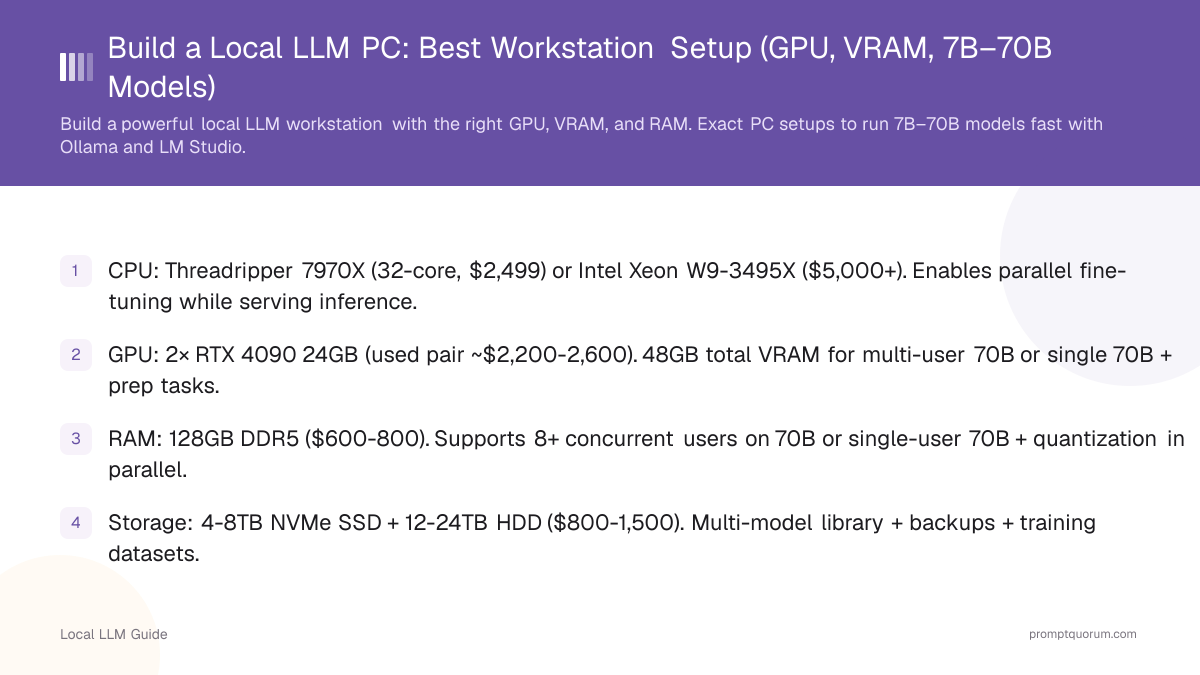
- CPU: Threadripper 7970X (32-core, $2,499) or Intel Xeon W9-3495X ($5,000+). Enables parallel fine-tuning while serving inference.
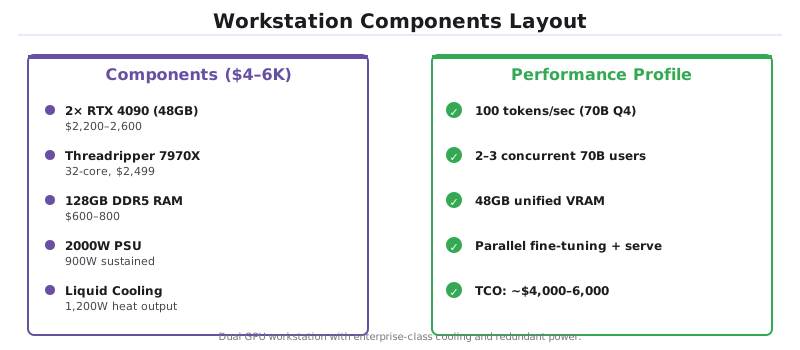
- GPU: 2× RTX 4090 24GB (used pair ~$2,200-2,600). 48GB total VRAM for multi-user 70B or single 70B + prep tasks.
- RAM: 128GB DDR5 ($600-800). Supports 8+ concurrent users on 70B or single-user 70B + quantization in parallel.
- Storage: 4-8TB NVMe SSD + 12-24TB HDD ($800-1,500). Multi-model library + backups + training datasets.
- PSU: 2× 1200W or 1× 2000W ($800-1,200). Dual 4090s draw 900W sustained; headroom for spikes essential.
- Cooling: Custom liquid loop or dual AIO ($1,000-2,000). Single large GPU + CPU = 1,200W heat output.
- Network: 10Gbps Ethernet optional ($200-400). LAN multi-user access without bottlenecking.
- Total: $4,000-6,000. Supports 8+ concurrent 70B users or 1 user fine-tuning + serving simultaneously.
- Apple alternative: Mac Studio M5 Max ($2,499, up to 128GB unified memory) or Mac Studio M5 Ultra ($5,499, up to 512GB) ships Sept 22, 2026 (512GB config late October 2026). Quieter, lower power draw, no PC build required — trades raw multi-user throughput for simplicity.
Who Needs a $4K-6K Workstation?
This tier is for:
- SMBs/Enterprises: Running internal LLM API for 5+ employees simultaneously. On-prem data control required.
- AI researchers: Fine-tuning large models (70B LoRA) while serving inference to team. Single $2K rig can't parallelize.
- MLOps engineers: Building internal inference clusters. Start with one workstation as the server node.
- Content studios (serious): Running 24/7 video captioning, code generation, summarization without API costs.
What's the Workstation Parts List?
A professional workstation starts with dual RTX 4090s ($2,200–2,600 for used pair) and a Threadripper CPU ($2,800–3,200), paired with 128GB DDR5 RAM and custom liquid cooling. Here's the complete parts list and cost breakdown:
Component | Model | Price | Notes |
|---|---|---|---|
| GPU | 2× RTX 4090 24GB (used) | $2,200-2,600 | NVLink bridges optional. Test both cards before pairing. |
| CPU | Threadripper 7970X (32-core) | $2,400-2,500 | Enables 32 parallel cores for fine-tuning while serving inference on both GPUs. |
| Motherboard | TRX850 or Xeon W90 | $400-800 | Dual GPU support, PCIe 5.0, enterprise-grade power delivery. |
| RAM | 128GB DDR5 6000 MHz | $600-800 | Corsair Dominator Platinum. Enables 8+ concurrent users. |
| Storage | 4TB NVMe + 12TB HDD | $800-1,200 | NVMe for hot models, HDD for backup & datasets. |
| PSU | 2000W 80+ Platinum or 2× 1200W | $1,000-1,500 | Dual 4090s = 900W sustained, need 2000W+ headroom. |
| Cooling | Custom loop or 2× 360mm AIO | $1,500-2,500 | CPU + 2 GPUs = 1,200W heat. Air cooling insufficient. |
| Case | Lian Li O11 Dynamic or Corsair Crystal | $200-300 | Supports dual GPU + large AIO or loop. |
| Total | -- | $4,000-6,000 | Scales with GPU market prices & cooling choice. |
How Do You Configure Dual GPUs for Maximum Performance?
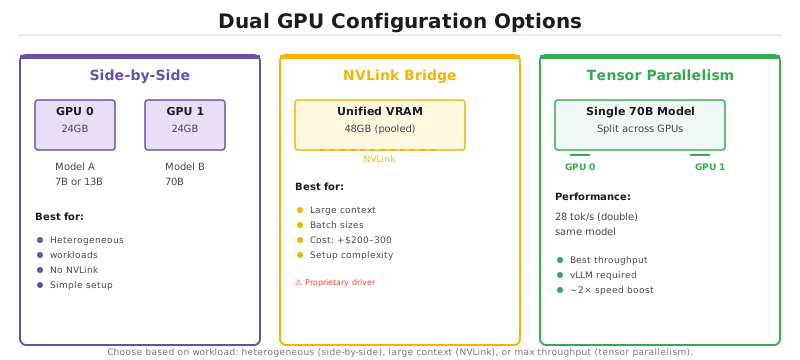
Two RTX 4090s give you 48GB VRAM and ~2× throughput for inference. You have three configuration options: side-by-side independent operation, NVLink fusion for unified VRAM, or tensor parallelism for single-model acceleration.
📍 In One Sentence
Dual GPUs either run independent models per card (simplest) or pool their VRAM via NVLink (complex but enables larger models).
💬 In Plain Terms
Think of it like two separate computers (side-by-side) vs. one shared super-computer (NVLink). Side-by-side is easier to set up; shared gives more power for huge models.
- 1Side-by-side (no NVLink): Each GPU runs independently. Model A on GPU 0, Model B on GPU 1. Best for heterogeneous workloads (fine-tuning 7B + serving 70B).
- 2NVLink bridge: Fuse VRAM (48GB appears as single 48GB pool). Enables larger batch sizes or massive context windows. Cost: $200-300 for bridge + setup complexity.
- 3Dual-GPU inference: Shard a single 70B model across 2 GPUs for 2× throughput (28 tok/s instead of 14). Requires vLLM or llama.cpp tensor-parallel support.
•💡 Pro Tip: Skip NVLink for heterogeneous workloads. Independent operation is simpler, lower cost ($200 saved), and eliminates bridge firmware bugs.
•⚠️ Warning: NVLink bridge requires NVIDIA proprietary driver support. Open-source ROCm or AMD equivalents do not support bridging across different GPUs.
Dual RTX 5090 vs Dual RTX 4090: Performance & Value
Dual RTX 4090 used ($2,200–2,600) remains the value choice for Q4 70B at 100 tok/s. Dual RTX 5090 new ($4,000) wins for higher VRAM (64 GB) and quality (Q8 format) but costs $1,400–1,800 more. Single RTX 5090 ($2,000 new) fits 70B Q4 at 40–50 tok/s without complexity.
Configuration | VRAM | 70B Speed | Cost |
|---|---|---|---|
| Dual RTX 4090 (used) | 48 GB | 100 tok/s (Q4) | $2,200–2,600 |
| Single RTX 5090 (new) | 32 GB | 40–50 tok/s (Q4) | $2,000 |
| Dual RTX 5090 (new) | 64 GB | 120 tok/s (Q4) | $4,000 |
•💡 Pro Tip: For Q4 70B inference at maximum throughput: dual 4090 used ($2,200–2,600) delivers the best April 2026 value. New 5090s cost 50%+ more.
•📌 Key Point: Dual 5090 wins for Q8 70B (higher quality output) or future-proofing. Single 5090 eliminates dual-GPU complexity for solo users.
How Do You Cool 1,200W of Heat?
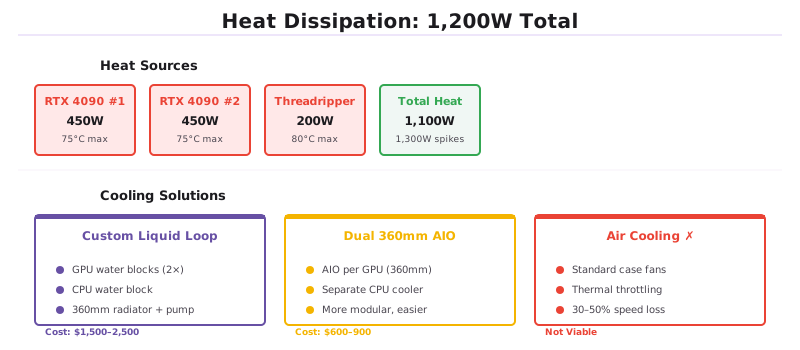
RTX 4090 (450W) + RTX 4090 (450W) + CPU (200W) = 1,100W sustained, spikes to 1,300W.
- Custom liquid loop: $1,500-2,500. CPU water block + GPU water blocks + 360mm radiator. Keeps GPUs <75°C, CPU <80°C.
- Dual 360mm AIO: $600-900. One AIO per GPU + separate CPU cooler. More modular, easier maintenance than custom loop.
- Air cooling: Not viable. Thermal throttling guaranteed on sustained 70B inference.
•🛠️ Best Practice: Use thermal paste with 5+ W/mK conductivity (Noctua NT-H2, Corsair TM30). Cheap paste can add 10–15°C to temps and void GPU warranty.
What's the Right Power Supply & Electrical Setup?
Dual 4090s (900W sustained, spikes to 1,300W) demand a 2000W PSU minimum — anything less causes voltage sag and crashes under load. You can choose a single 2000W PSU or dual 1200W PSUs for redundancy, but must verify your home/office circuit can handle 2000W at peak draw.
- Option 1: Single 2000W PSU: Seasonic, Corsair, or EVGA 80+ Platinum. Cleaner cable routing, single point of failure.
- Option 2: Dual 1200W PSU: One PSU per GPU + shared motherboard. Redundancy (one fails, inference continues at 50% speed). Complex setup.
- Capacity rule: 2000W for dual 4090 is minimum. Anything less causes voltage sag under load.
- Circuit planning: A dual-GPU rig pulls 2000W at peak. Ensure 20A circuit (typical home/office outlet is 15A, insufficient). Use dedicated 240V line if available.

•⚠️ Warning: Home outlets are typically 15A at 120V (1,800W max). A dual-4090 rig will trip the breaker. Install a dedicated 240V 20A circuit ($200–400 electrician fee).
•📌 Key Point: Always use modular PSUs. Dual GPUs have dozens of power pins; non-modular cables create fire hazards due to contact resistance on multi-pin connectors.
What Multi-User Inference Performance Can You Expect?
With 128GB RAM and dual 4090s, you can serve 2–3 concurrent 70B users at 14 tok/s each, or 8+ concurrent 7B users at 30+ tok/s each. The following benchmarks assume Q4 quantization and vLLM for multi-user scheduling:
- Single user, 70B model: 28 tokens/sec (2× 14 tok/s per GPU via tensor parallelism).
- Two concurrent users, 70B each: 14 tokens/sec per user (time-multiplexing requests).
- Four concurrent users, 7B each: 120 tokens/sec total (each user gets 30 tok/s).
- Fine-tuning 7B LoRA + serving 70B: Fine-tuning on GPU 0 (100W), inference on GPU 1 (450W). No interference.
What Are Common Workstation Build Mistakes?
- Buying two different GPU models (5090 + 4090). Asymmetry causes load balancing issues. Stick to identical cards.
- Skimping on PSU to save $300. A 1500W PSU + dual 4090s will throttle or crash under load.
- Using air cooling instead of liquid. Thermal throttling cuts throughput 30-50% on sustained inference.
- Forgetting electricity cost in TCO calculations. Dual RTX 4090s at sustained inference draw 900 W. At US average ($0.14/kWh) running 24/7: ~$1,100/year electricity. EU average (~$0.32/kWh): ~$2,500/year. Over 3 years: $3,300–7,500 in electricity alone. Factor this into ROI vs cloud API decisions.
- Underestimating networking for multi-user setups. Standard gigabit Ethernet (1 Gbps = 125 MB/s) is the bottleneck when serving 5+ concurrent users with long context responses. Upgrade to 2.5 Gbps or 10 Gbps Ethernet for production workstations serving teams. Cost: $200–400 for NIC + switch.
•⚠️ Warning: Mismatched GPUs (different models or VRAM sizes) break tensor parallelism. vLLM will fall back to single-GPU inference, halving throughput.
•💡 Pro Tip: Buy used RTX 4090 pairs (verified working together by previous owner) instead of new single cards. Save $500–800 and avoid hardware lottery.
Frequently Asked Questions
•🔍 Did You Know?: Dual RTX 4090s at full inference load consume 900W sustained. Your electricity bill: ~$2,000/year at US average rates ($0.13/kWh), 24/7 operation.
Is a Threadripper CPU necessary, or can I use Ryzen 9?
For inference alone: Ryzen 9 works fine. For inference + parallel fine-tuning: Threadripper's extra cores (64 vs. 16) are essential.
Should I use NVLink to fuse the two 4090s?
Optional. Skip it if running separate models on each GPU (7B + 70B). Use it if sharding a single 70B across both GPUs for higher batch sizes.
How many concurrent users can a dual-4090 rig handle?
For 70B: 2-3 users (each getting 14 tok/s). For 7B: 8+ users (each getting 30+ tok/s).
Can I upgrade to RTX 5090 instead of dual 4090?
Single 5090: Similar performance to dual 4090, half the VRAM (24GB vs. 48GB), $1,999. Dual 5090: $4,000 (overkill, worse value).
What's the ROI on a $5,000 workstation vs. cloud LLM API?
Cloud: $0.001 per 1K tokens. Workstation: $5,000 amortized over 2 years = $2,500/year, ~$0.000001 per token. Break-even at 2.5B tokens/year (light use).
Does a workstation need data center cooling?
No. Consumer-grade liquid cooling (2× 360mm AIO or custom loop) is sufficient. Data center cooling (in-row, overhead) is designed for density; a single workstation's 1,200W fits within office HVAC.
Should I wait for the RTX 6090 instead of buying dual 4090s now?
NVIDIA's RTX 60-series is expected late 2026 to 2027 based on historical 2-year refresh cycles. If you need a workstation now: dual RTX 4090 used ($2,200–2,600) delivers the best 70B inference value in April 2026. If you can wait 12–18 months: RTX 6090 will likely have 48 GB VRAM single-card, eliminating the need for dual GPUs entirely.
What is the noise level of a dual-4090 workstation?
Under sustained 70B inference: 50–60 dB at 1 meter with custom liquid cooling. Comparable to a normal office conversation. With dual 360mm AIO: 55–65 dB (audibly louder under load). Air cooling: 65–75 dB (loud, impractical for office use). For desk-side placement: custom loop or quiet AIO is essential. For server-room placement: noise is irrelevant.
Sources
- PCPartPicker — Live component pricing for Threadripper, RTX 4090/5090, and DDR5 RAM.
- TechPowerUp CPU Database — Official Threadripper 7970X power consumption and core count specifications.
- NVIDIA NVLink Documentation — Official NVLink specs for memory pooling and tensor parallelism across dual RTX cards.
- vLLM Distributed Serving — Multi-GPU tensor parallelism configuration for 70B models on consumer hardware.