Key Takeaways
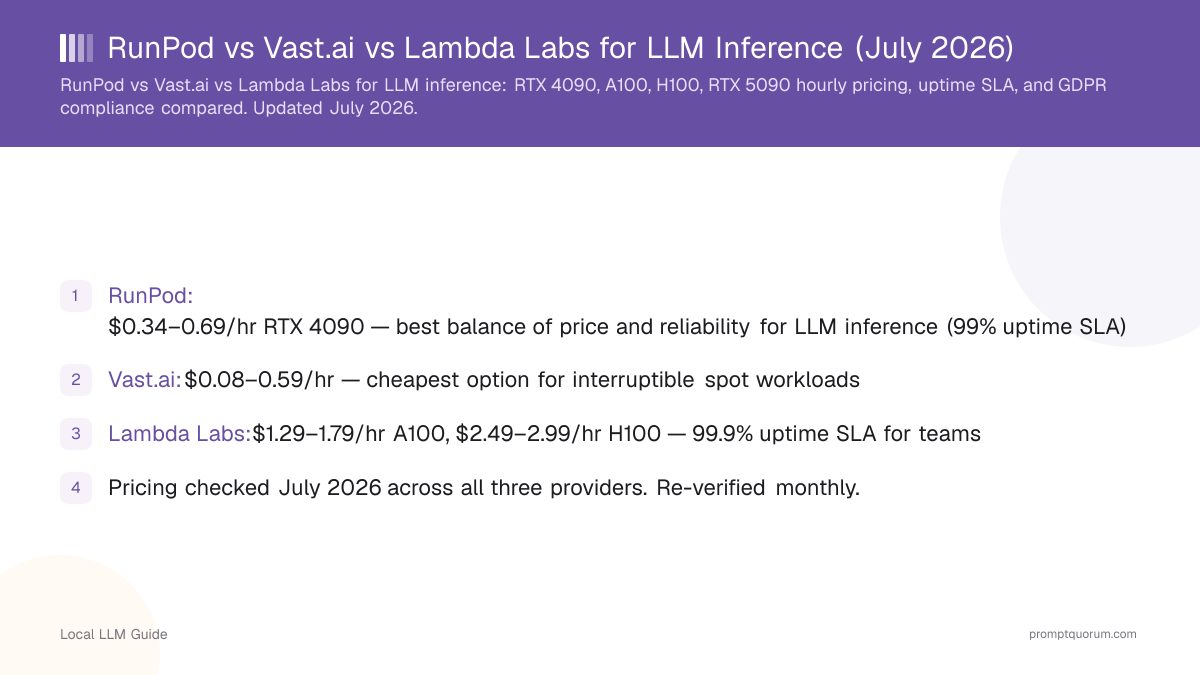
- RunPod: $0.34–0.69/hr RTX 4090 — best balance of price and reliability for LLM inference (99% uptime SLA)
- Vast.ai: $0.08–0.59/hr — cheapest option for interruptible spot workloads
- Lambda Labs: $1.99–2.79/hr A100, $3.29–3.99/hr H100 — 99.9% uptime SLA for teams
- Pricing checked August 2026 across all three providers. Re-verified monthly.
📍 In One Sentence
Cloud GPU rental prices for LLM inference: RunPod ($0.34–0.69/hr RTX 4090, best reliability), Vast.ai ($0.08–0.59/hr, cheapest interruptible), Lambda Labs ($1.99–2.79/hr A100, $3.29–3.99/hr H100, 99.9% uptime for teams).
💬 In Plain Terms
Cloud GPU rental lets you pay by the hour to use a powerful graphics card on someone else's server — no hardware to buy. Interruptible instances are cheaper but can be reclaimed at any time; reserved instances are stable and cost more. RTX 4090 and RTX 5090 handle LLM inference; A100/H100 handle training or very high throughput.
🔄 August 2026 Update
This pass reconciled pricing that had drifted out of sync between the comparison table, provider sections, and pricing breakdown table below — all three now show the same RunPod, Vast.ai, and Lambda Labs figures. Added RTX 5090 availability notes and a Stable Diffusion/image-generation FAQ (several readers search for GPU rental pricing for image generation, not just LLM inference). This page now runs on a monthly fact-check cadence; the title and meta description were also revised this pass to spell out the RunPod vs Vast.ai vs Lambda Labs comparison explicitly for search.
•📋 Verified Data: All pricing and uptime claims in this guide are checked against provider pricing pages monthly. Confirm exact current rates on each provider's dashboard before committing to a plan, since spot pricing in particular changes by the hour.
Source Verification
Pricing checked: RunPod (runpod.io), Vast.ai (vast.ai), Lambda Labs (lambdalabs.com). Last checked: July 15, 2026. Re-verified monthly. This page is maintained as a canonical reference.
🏆 Our Picks
Three distinct winners for three different priorities.
•🥇 BEST OVERALL: RunPod: Why: Best balance of price ($0.34–0.69/hr RTX 4090), reliability (99% uptime), and ease of use for LLM inference. Secure Cloud tier recommended for production. ✓ EU regions available
•💰 BEST BUDGET: Vast.ai: Why: 30–50% cheaper than competitors if you tolerate spot interruptions. RTX 4090 from $0.08/hr. Largest GPU catalog. ⚠ Peer-to-peer (variable quality)
•🏢 BEST FOR TEAMS: Lambda Labs: Why: 99.9% uptime SLA, dedicated support (Slack/email/phone), A100/H100 focus. Premium pricing ($1.99–$3.99/hr) justified for production AI workloads.
Quick Comparison Table
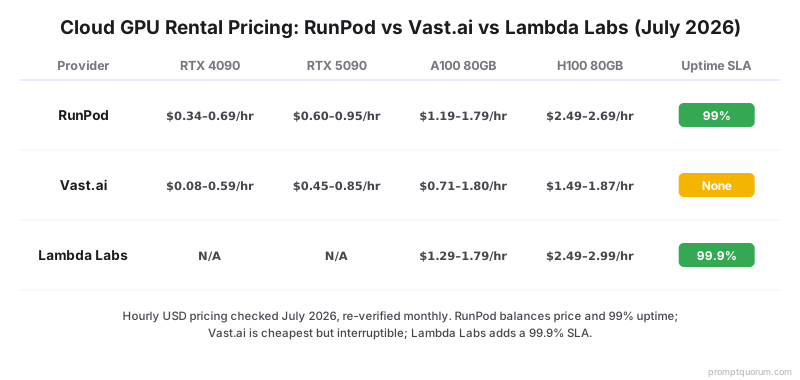
Head-to-head pricing and features for LLM inference, checked August 2026. Prices are hourly rates; most providers bill per-second, so actual costs depend on runtime. RTX 5090 listings are newer and less consistently available than RTX 4090 — check current stock on each provider's dashboard.
Provider | RTX 4090 | RTX 5090 | A100 80GB | H100 80GB | Uptime SLA | Billing | Free Credits | EU Region |
|---|---|---|---|---|---|---|---|---|
| RunPod | $0.34–0.69/hr | $0.60–0.95/hr* | $1.19–1.79/hr | $2.49–2.69/hr | 99% | per-second | $10 | ✓ Yes |
| Vast.ai | $0.08–0.59/hr* | $0.45–0.85/hr* | $0.71–1.80/hr* | $1.49–1.87/hr* | None | per-second | $5 (varies) | Per host |
| Lambda Labs | N/A | N/A | $1.99–2.79/hr | $3.29–3.99/hr | 99.9% | per-minute | $15 | ✗ No |
Why Rent Cloud GPUs?
Cloud GPU rental makes sense when you: need occasional compute (weekly fine-tuning runs), want to avoid $2,000–$10,000 hardware upfront costs, require multiple GPU types for experimentation, or need 100+ GPUs for distributed training without buying infrastructure. The same pricing logic applies whether the workload is LLM inference, fine-tuning, or Stable Diffusion / image-generation rendering — all three run on the same RTX 4090, RTX 5090, A100, and H100 instances covered in this guide.
- No hardware maintenance or electricity costs
- Scale up/down instantly (minutes, not weeks)
- Test expensive GPUs (H100, A100, RTX 5090) before buying
- Pay only for compute time used — no idle costs
- Access GPUs in multiple regions globally
Decision Matrix: Which Provider Fits Your Need?
Match your use case to the best provider.
- 1Budget is primary concern → Vast.ai (spot instances, $0.08/hr for RTX 4090)
- 2Beginner, need simplicity → RunPod (unified dashboard, clear pricing, $10 free credit)
- 3Team with managed workflows → Lambda Labs (API support, Slack support, 99.9% SLA)
- 4Multiple GPU types, experimentation → Vast.ai (largest catalog: 500+ GPU models)
- 5Fine-tuning only (stable workload) → RunPod Secure Cloud (99% SLA, no interruptions)
- 6Long-term production inference → Lambda Labs (reserved instances, cost guarantees)
- 7EU GDPR compliance required → RunPod (EU data centers + DPA)
- 8Sub-5-minute setup urgency → Lambda Labs (most polished onboarding)
- 9Want to compare multiple providers → Use this page's comparison table
- 10Unsure → Start with RunPod ($10 free, most flexible, safest default)
RunPod: The Balanced Choice
RunPod is a marketplace for GPU compute with two pricing tiers: Secure Cloud (reserved, stable, 99% uptime) and On-Demand (cheaper, interruptible). For LLM inference, the RTX 4090 tier covers most 7B–34B models comfortably.
- RTX 4090: $0.34–0.69/hr — On-Demand starts near $0.34/hr, Secure Cloud (reserved, no interruptions) runs $0.50–0.69/hr (August 2026)
- RTX 5090: listed on some regions from ~$0.60/hr; availability is newer and less consistent than RTX 4090 — check current stock before planning around it
- A100 80GB: $1.19–1.79/hr (On-Demand to Secure Cloud)
- H100 80GB: $2.49–2.69/hr (On-Demand to Secure Cloud)
- Billing: per-minute, no hourly minimum
- Free tier: $10 signup credit
- Setup time: 5 minutes
- DPA available: Yes (GDPR-compliant for EU instances)
- EU regions: Yes (Netherlands, Romania)
- Free community: Strong Discord ecosystem
Is RunPod Secure Cloud reliable?
Yes. Secure Cloud instances have 99% uptime SLA and are not interrupted unless the provider cancels the instance (very rare). On-Demand instances can be interrupted with 5 minutes notice.
Can I use custom Docker images?
Yes. RunPod allows custom Docker images; upload to Docker Hub or a registry and reference by URL. One-click template deployment with pre-installed ML frameworks also available.
How do I pause an instance?
Pause button in the dashboard. Snapshot is saved. While paused, you pay storage only (negligible cost).
Can I scale to multiple GPUs?
Yes. RunPod supports multi-GPU instances and distributed training via API.
Vast.ai: Maximum Savings
Vast.ai is a peer-to-peer GPU marketplace where individuals and data centers rent excess GPU capacity. Pricing is dynamic and often 30–50% cheaper than RunPod or Lambda Labs. Spot instances can be interrupted with 15 seconds notice.
- RTX 4090 spot: $0.08–0.59/hr — median around $0.21/hr; the low end ($0.08/hr) is real but rare (off-peak demand), the high end applies to stable/on-demand listings
- RTX 5090: appearing on Vast.ai from roughly $0.45/hr on some hosts; inventory is thinner and less consistent than RTX 4090 — filter by "Verified" hosts if you need reliability
- A100 80GB: $0.71–1.80/hr (median $0.71/hr)
- H100 80GB: $1.49–1.87/hr (median $1.49/hr)
- Billing: per-second (no minimums)
- Largest GPU inventory: 500+ unique GPU models
- Free tier: $5 credit (varies by promotion)
- Setup time: 10 minutes (more technical)
- DPA: Case-by-case (peer-to-peer, not available universally)
- EU regions: Mixed (depends on individual host location)
What if my spot instance is interrupted?
Spot instances can be interrupted with 15 seconds notice if the provider reclaims the GPU. Use "Interruptible: Off" filter for stable instances (higher prices, more stable).
Do I have root/sudo access?
Most providers give sudo; some don't. Check instance details before renting. Not guaranteed by Vast.ai.
How do I upload data?
Use rsync or scp over SSH. For large datasets (>100GB), store on /mnt/ attached drive (small surcharge) or use cloud storage bridge (S3, Google Drive).
Are prices really that much cheaper?
Yes, but spot prices fluctuate. $0.08/hr is real but rare (peak demand). Median $0.21/hr is more typical. Monitor before committing to spot for production.
Does Vast.ai pricing work the same for Stable Diffusion as for LLM inference?
Yes — the same RTX 4090 and RTX 5090 spot instances used for LLM inference also run Stable Diffusion and other image-generation workloads. Image generation is typically more VRAM-bound and less latency-sensitive than chat inference, so spot/interruptible instances (cheaper, can be reclaimed) are usually a good fit for batch image-generation jobs; reserve stable "Interruptible: Off" instances only if you need an uninterrupted long render queue.
Lambda Labs: Managed Premium
Lambda Labs is a managed GPU cloud provider focused on simplicity, uptime, and customer support. Pricing is higher than competitors but includes managed infrastructure, A100/H100 focus, and live support.
- A100 80GB: $1.99–2.79/hr (on-demand starts at $1.99/hr)
- H100 80GB: $3.29–3.99/hr (on-demand starts at $3.29/hr)
- RTX 4090 / RTX 5090: Not offered (A100/H100 focus — consumer-tier GPUs are not part of Lambda Labs' catalog)
- Reserved instances: 12-month discount available
- Billing: per-hour (with per-minute final billing)
- Uptime SLA: 99.9%
- Free tier: $15 signup credit
- Setup time: 3 minutes (most polished UX)
- Team features: Multiple users per account
- Support: Slack, email, phone (live humans)
- DPA: Yes, but US-only infrastructure (not GDPR for EU personal data)
Is Lambda Labs worth the premium price?
Yes, if you need 99.9% uptime SLA, US infrastructure is acceptable, and you value live support. For experimentation, RunPod or Vast.ai are cheaper. For production, Lambda Labs SLA justifies cost.
Can I scale to multiple GPUs?
Yes. Lambda Labs allows multi-GPU instances and distributed training. Jupyter environment handles setup.
What is your refund policy?
30-day refund if unsatisfied. Most users don't need it after trying free $15 credit.
Why no RTX 4090 or RTX 5090?
Lambda Labs focuses on the enterprise A100/H100 market, not the consumer GPU tier. Strategy is deliberate.
EU GDPR & Data Residency: Your Critical Checklist
For EU customers processing personal data through LLMs, GDPR compliance is non-negotiable. Most global cloud GPU providers are US-based and do NOT meet EU data residency requirements by default.
- Data residency (where your data physically lives) is GDPR Article 32 requirement
- Standard Contractual Clauses (SCCs) for US transfers are post-Schrems II uncertain
- Some providers offer EU data centers but process data in US (not compliant)
- DPA (Data Processing Agreement) alone is NOT sufficient without EU residency
GDPR-Compliant Cloud GPU Providers (EU Native)
These providers have EU data centers and can sign DPAs for EU personal data processing.
Provider | Location | DPA | Note |
|---|---|---|---|
| Hetzner GPU | Germany (Falkenstein, Nuremberg) | ✓ German law | German-owned infrastructure, EU-native by default |
| Scaleway | France (Paris, Amsterdam) | ✓ Available | French AI specialist, competitive pricing |
| OVHcloud | France, Germany, UK | ✓ Available | Largest EU cloud provider, enterprise focus |
| STACKIT (Schwarz Group) | Germany | ✓ German law | Enterprise focus, Gaia-X certified |
| Nebius | Finland, Iceland | ✓ Available | New, AI-specialized, high performance |
| RunPod (EU regions) | Netherlands, Romania | ✓ Available | US company, but EU data centers available |
| Hyperstack (NexGen Cloud) | Sweden, Norway | ✓ Available | UK company, but EU data centers available |
NOT Suitable for EU Personal Data
These providers have no EU data residency or cannot guarantee GDPR compliance.
- Lambda Labs — US-only infrastructure, no EU regions, no DPA
- Vast.ai — Peer-to-peer; host location varies (mostly US), no centralized DPA
- CoreWeave — Primarily US; limited EU presence, infrastructure primarily US
What This Actually Means for Your Workload
GDPR compliance applies if you process ANY personal data (employee names, customer emails, identifiers, biometrics, location data, IP addresses, behavioral data). Non-personal data (anonymized, aggregated, synthetic) is exempt.
- Employee data (HR, payroll, performance reviews): GDPR applies
- Customer PII (names, emails, addresses, payment info): GDPR applies
- Healthcare data (HIPAA overlap): GDPR applies + stricter
- Financial data (SOX, GDPR overlap): GDPR applies + stricter
- Anonymized benchmarks (aggregated model outputs): GDPR does NOT apply
- Synthetic data (AI-generated, not real PII): GDPR does NOT apply
- EU AI Act high-risk category (automated decisions affecting humans): GDPR applies + extra rules
Pre-Signup GDPR Verification Checklist
Before signing up with any cloud GPU provider, verify these 5 points.
- 1Confirm EU data center location in provider's terms (not "available" — actually located)
- 2Request and review DPA in writing; it must reference GDPR Article 28 and 32
- 3Check for Standard Contractual Clauses (SCCs) if any US data flow occurs
- 4Verify provider's privacy policy explicitly covers GDPR Article 32 (security) and Article 28 (processor obligations)
- 5Ask provider: "Can you guarantee all data remains in [country] and never flows to US?" Get written answer.
When Cloud GPU Rental Is NOT the Right Choice
Cloud rental isn't always optimal. Buying hardware or staying local makes more economic sense in these situations:
You Run LLMs >4 Hours Daily
At the RunPod RTX 4090 midpoint rate ($0.50/hr): $0.50/hr × 4 hours × 30 days = $60/month. Over 18 months that's $1,080 — less than half the cost of an actual RTX 4090 (roughly $2,000–2,600 retail, EOL pricing). If your usage is consistent and predictable, buying is cheaper long-term.
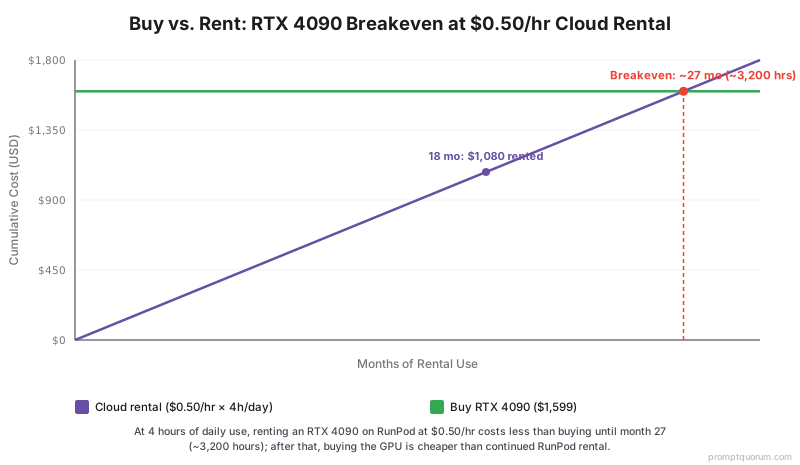
•💡 The Math: Breakeven point: at $0.50/hr and 4 hours/day, that's roughly 4,600 rental hours — about 38 months of daily 4-hour usage. If you're past that, calculate ROI: GPU cost ($2,000–2,600) ÷ hourly rate ($0.50) = breakeven hours.
You Need <100ms Latency
Network round-trip to a cloud GPU adds 30–150ms depending on your location and the provider's region. For interactive applications (real-time chat, voice transcription, live gaming AI), this latency is noticeable. Local GPU has zero network overhead.
Your Data Is in Regulated Industries
Healthcare (HIPAA), finance (SOX, MiFID II), legal (attorney-client privilege), or government work often can't legally use cloud — even GDPR-compliant cloud. On-premises hardware is the only compliant path.
You Want Zero Recurring Costs
Once you buy a GPU, electricity is the only ongoing cost (~$0.05–$0.15/hr in most countries). No subscription, no usage surprises, no rate changes. Hardware ownership has a clear cost ceiling.
You're Learning, Not Producing
If you're still figuring out what models work for you, the experimentation phase benefits from cloud's flexibility. But once you've settled on a workflow, local hardware tends to be more economical.
The Hybrid Approach (Recommended)
The right answer for most users is hybrid: local hardware for daily work, cloud GPU for occasional heavy lifting (fine-tuning runs, 70B model inference, multi-GPU experiments). Don't default to cloud-only or local-only — use both strategically.
- Local: daily inference, stable workflows, cost-predictable loads
- Cloud: experimentation, 70B+ models, distributed training, burst capacity
- This approach minimizes both hardware investment AND cloud overspend
Quick-Start: Rent Your First GPU in 10 Minutes
Follow this step-by-step guide to get a GPU running on any platform.
- 1Sign up with email + credit card (RunPod) or GitHub (Vast.ai)
- 2Select a GPU type and region (filter by availability and price)
- 3Choose the OS image (Ubuntu 22.04 + CUDA is standard)
- 4Set disk size (50 GB minimum for most ML workloads)
- 5Click "Start" and wait 30–60 seconds for the instance to boot
- 6SSH into the IP provided (credentials in your dashboard)
- 7Install dependencies: apt update && apt install -y python3-pip
- 8Clone your repo and run your workload
- 9Monitor usage in provider dashboard (watch the clock)
- 10Stop the instance when done (billing stops immediately)
Pricing Breakdown by GPU
Hourly rental rates for common GPUs across the three platforms — these match the figures in the comparison table and provider sections above. Actual cost depends on runtime (RunPod per-minute, Vast.ai per-second, Lambda Labs per-hour with per-minute final billing).
Frequently Asked Questions
Common questions about cloud GPU rental providers.
RunPod vs Vast.ai vs Lambda Labs: which is cheapest for LLM inference?
Vast.ai is cheapest on paper ($0.08–0.59/hr RTX 4090) but interruptible. RunPod ($0.34–0.69/hr RTX 4090) is the best balance of price and stability for LLM inference. Lambda Labs ($1.99–3.99/hr A100/H100) has no consumer GPU tier and costs more, but includes managed support and a 99.9% SLA.
Does this comparison cover Stable Diffusion and image generation, or only LLM inference?
The pricing, GPU tiers, and providers in this guide apply to both. Stable Diffusion and other image-generation workloads run on the same RTX 4090/RTX 5090/A100/H100 instances as LLM inference. See the Vast.ai section above for image-generation-specific guidance on spot vs. stable instances.
Is the RTX 5090 available for cloud rental yet?
Yes, on a growing but still limited number of RunPod and Vast.ai listings. Availability and pricing are less consistent than the established RTX 4090 tier — check current listings on the provider dashboard rather than assuming stock. Lambda Labs does not offer any consumer-tier GPU, including RTX 5090.
Can I pause and resume my instance?
Yes. RunPod and Vast.ai allow you to pause instances (snapshot saved). Lambda Labs can pause via API. While paused, you pay storage only (negligible cost, typically <$0.01/day).
What happens if my instance runs out of disk space?
The instance will crash. Add an extra disk via provider dashboard and mount to /mnt/ before it fills. Standard practice: monitor disk usage weekly.
Can I use these for commercial AI inference?
Yes, but check provider terms. RunPod and Lambda Labs allow commercial workloads. Vast.ai individual providers may have restrictions — read the listing carefully.
How do I transfer large datasets (>100 GB)?
For <100 GB: rsync over SSH. For >100 GB: (1) store on cloud (S3, Google Drive), download on instance, or (2) request attached /mnt/ disk from provider (small surcharge).
Which provider is best for distributed training across multiple GPUs?
Lambda Labs (simplest setup, support included). RunPod (good API for multi-node). Vast.ai (cheapest, requires manual cluster setup).
Do these providers offer free credits?
RunPod $10, Vast.ai $5 (varies), Lambda Labs $15. Use credits to test pricing and provider UX before committing budget.
Can I use custom Docker images?
RunPod: yes (upload to registry). Vast.ai: yes (tools pre-installed). Lambda Labs: limited (predefined images for simplicity).
What is the best provider for 24/7 production inference?
Lambda Labs (99.9% SLA, reserved instances). RunPod Secure Cloud (99% SLA, cheaper). Avoid Vast.ai spot for 24/7 (interruptible).
How do I minimize costs with spot instances?
Use Vast.ai with "Interruptible: On" (cheapest), keep instances running continuously (not start-stop), monitor price trends before committing.
Which has the best API for automation?
RunPod (robust Python API). Lambda Labs (REST API with webhooks). Vast.ai (older API, web interface primary).
Can I get a dedicated IP?
RunPod: yes (on request). Lambda Labs: yes (managed). Vast.ai: depends on provider.
What is the pricing if I rent for exactly 1 hour?
RunPod: 60-minute minimum (rounded up). Lambda Labs: full hour charged. Vast.ai: billed per-second (you pay exactly for 1 hour, not more).
Which cloud GPU rental is cheapest?
Vast.ai spot instances cost 30–50% less but are interruptible. RunPod is 40% cheaper than Lambda Labs. Price depends on GPU type and market demand.
Is cloud GPU rental GDPR-compliant?
RunPod with EU regions is GDPR-compliant. Lambda Labs is US-only (not compliant for EU personal data). Vast.ai is peer-to-peer (depends on host location). See GDPR section for compliant alternatives.