Key Takeaways
- Local LLM support is the binding criterion for privacy work. If your code is proprietary, NDA-bound, or regulated, the question is not autocomplete quality — it is whether the tool can run on a local LLM so the code never leaves your machine.
- Best for local LLMs: Continue.dev — free, open source (Apache 2.0), and built with Ollama, LM Studio, and llama.cpp as native targets. All features work locally with no account required.
- Most polished editor: Cursor — roughly $20/month for the Pro tier, the best autocomplete experience, and local LLM support through a custom OpenAI-compatible endpoint. Closed source.
- GitHub ecosystem default: GitHub Copilot — roughly $10/month, tight GitHub integration, but cloud-only: it has no local LLM mode, so code context is sent to the provider.
- Best codebase context for teams: Sourcegraph Cody — codebase-wide context for refactoring, plus team admin and audit logs. Local LLM support via Ollama; the standard tier runs about $9/user/month and an enterprise tier costs more.
- A local LLM needs a GPU. Local coding models want roughly 8 GB of VRAM or more — Qwen2.5-Coder 7B fits smaller systems, 14B is the mid-size default, and 33B-class models want 24 GB. With no GPU, a cloud tool is the only option.
- Cloud tools still win on raw quality and setup speed. Top cloud coding models lead local options on hard problems, and a cloud tool is productive in minutes versus the longer setup of a local LLM stack.
- Prices change with plan revisions. Treat every figure here as a July 2026 snapshot and confirm the current rate and tier on the vendor pricing page.
Quick Facts
- Best local LLM support: Continue.dev — native Ollama, LM Studio, and llama.cpp integration; setup is roughly 5 minutes.
- Best autocomplete UX: Cursor — a VS Code fork; local LLM via a custom endpoint takes roughly 15 minutes to configure.
- Only cloud-only tool here: GitHub Copilot — no local LLM mode; code context goes to the provider.
- Best for teams: Sourcegraph Cody — codebase-wide context, admin console, and audit logs.
- Local LLM hardware floor: roughly 8 GB of VRAM; Qwen2.5-Coder 14B is the mid-size default coding model.
- Open source: only Continue.dev (Apache 2.0); Cursor, GitHub Copilot, and Cody IDE extensions are closed.
- 2026 pricing reality: developer-tool subscriptions change with plan revisions — treat figures as a July 2026 snapshot.
Sponsored
Editor's Choice: Continue.dev
For developers who want an AI coding tool that runs on a local LLM, Continue.dev is the pick — it is free, open source, and built with Ollama and LM Studio as primary targets. It supports VS Code, JetBrains IDEs, and Vim equally, all features work fully offline with local models, and no account is required for local-only use. If you want the most polished editor experience and will pay for it, Cursor is the better choice; if your code is public and you live in the GitHub ecosystem, GitHub Copilot is the simplest path. Choose Continue.dev when keeping code on your own machine and paying nothing are both priorities.
📌Note: This Editor's Choice reflects local-LLM capability and price only. PromptQuorum is not enrolled in any affiliate program and the links below carry no affiliate tags — they are plain reference links that earn no commission.
How the Four AI Coding Tools Compare in 2026
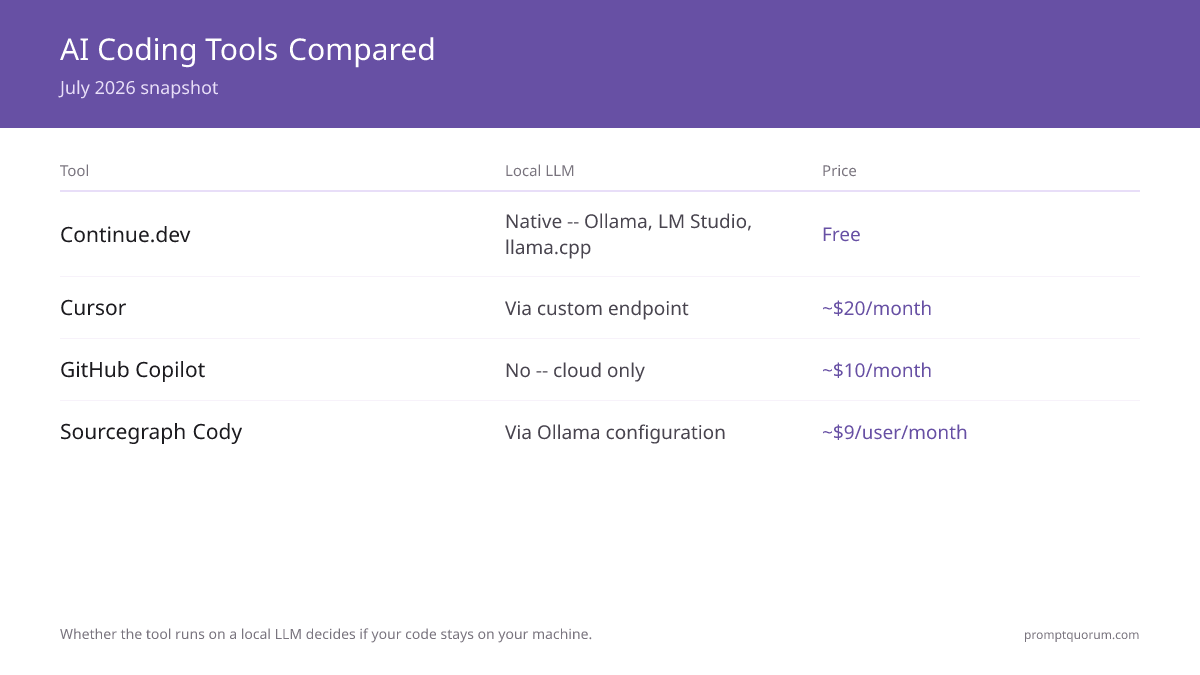
Local LLM support, IDE coverage, and open-source status are taken from each vendor's published documentation. Pricing is a July 2026 snapshot of the standard individual or per-user tier — vendors revise plans, so confirm the current figure and tier on the vendor pricing page before subscribing. Local LLM support ranges from native (Continue.dev) to custom-endpoint configuration (Cursor) to Ollama configuration (Cody) to none (GitHub Copilot).
📍 In One Sentence
For AI coding tools, whether the tool runs on a local LLM decides if your code stays on your machine — check that first, then compare autocomplete quality and price.
💬 In Plain Terms
Every AI coding tool needs a model to think with. Some can use a model running on your own computer, so your code never leaves the building. Others only use the vendor's cloud model, which means your code is uploaded. Decide which of those you need before comparing anything else.
Tool | Local LLM | Price | Open source | IDEs | Best for |
|---|---|---|---|---|---|
| Continue.dev | Native — Ollama, LM Studio, llama.cpp | Free | Yes — Apache 2.0 | VS Code, JetBrains, Vim | Local-first developers |
| Cursor | Via custom OpenAI-compatible endpoint | ~$20/month (Pro) | No — closed | Cursor (VS Code fork) | Most polished editor experience |
| GitHub Copilot | No — cloud only | ~$10/month | No — closed | VS Code, JetBrains, Vim | GitHub ecosystem integration |
| Sourcegraph Cody | Via Ollama configuration | ~$9/user/month standard; enterprise tier costs more | Partial — CLI open, IDE extensions closed | VS Code, JetBrains, Neovim | Teams needing codebase-wide context |
Which Tool Should You Choose?
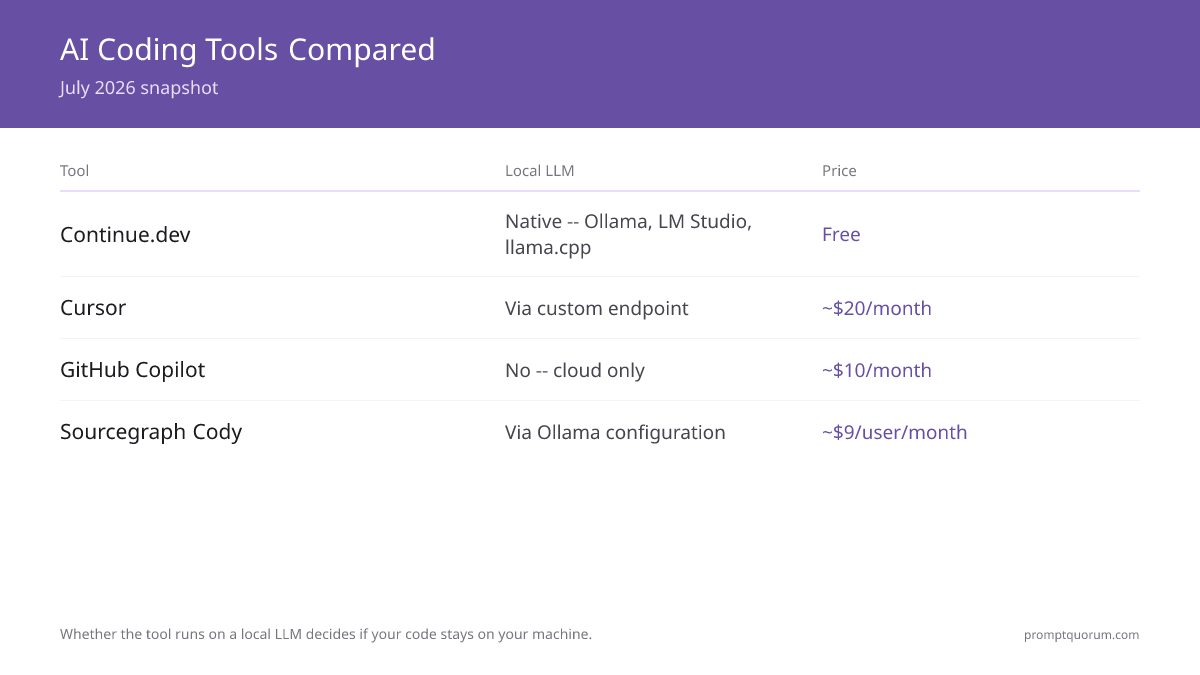
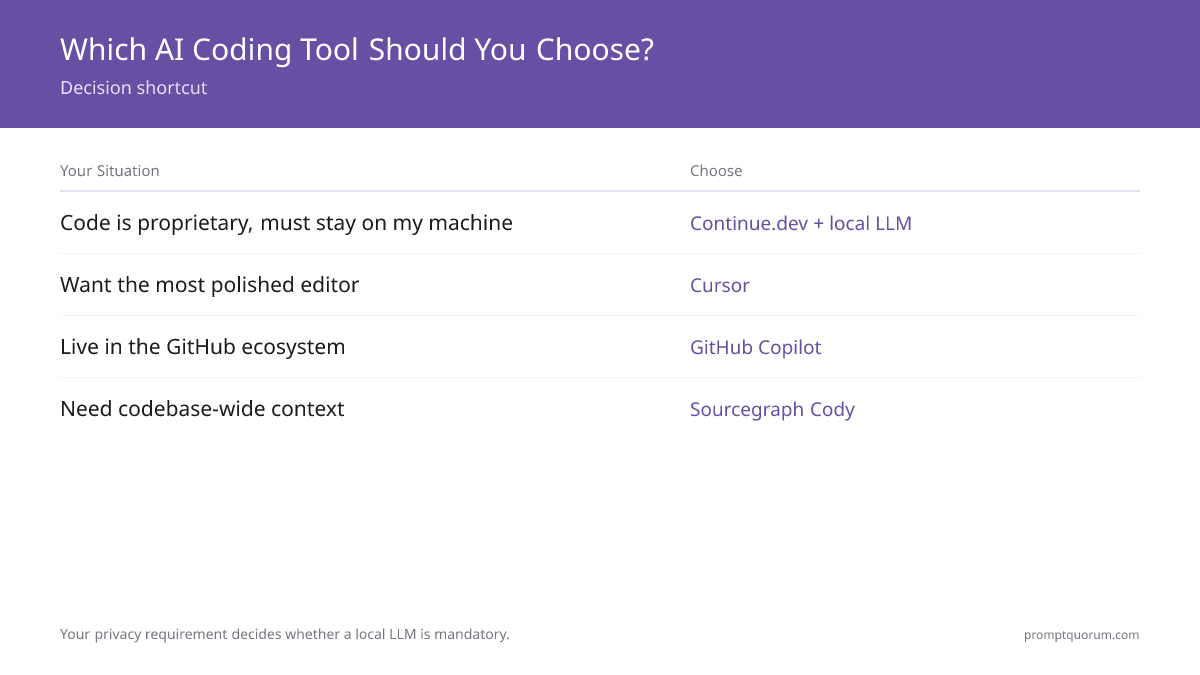
Your privacy requirement decides whether a local LLM is mandatory; budget and team size break the remaining ties. Find the row that matches your situation.
Your situation | Choose this |
|---|---|
| My code is proprietary and must stay on my machine | Continue.dev + a local LLM |
| I want the best free option with no account | Continue.dev |
| I want the most polished editor and will pay for it | Cursor (~$20/month) |
| My code is public and I live in the GitHub ecosystem | GitHub Copilot (~$10/month) |
| My team needs codebase-wide context for refactoring | Sourcegraph Cody |
| I have no GPU and cannot run a local LLM | GitHub Copilot or Cursor (cloud models) |
| I am unsure and want a safe, zero-cost starting point | Continue.dev — free, then add a paid tool if you outgrow it |
Continue.dev: The Best Local LLM Coding Tool
Continue.dev is the pick when you want an AI coding tool that runs on a local LLM, because it was built with Ollama, LM Studio, and llama.cpp as native targets rather than afterthoughts. It is free, open source under Apache 2.0, and works in VS Code, JetBrains IDEs, and Vim — all features run fully offline with a local model.
- Local LLM support: native integration with Ollama, LM Studio, llama.cpp, and any OpenAI-compatible endpoint — point it at your local endpoint in a config file and it works, in roughly 5 minutes.
- Price: free, with no premium tier; open source under the Apache 2.0 license.
- IDEs: VS Code, JetBrains (IntelliJ, PyCharm, GoLand, and others), and Vim are all supported equally.
- Privacy: in local-models mode there are zero network calls — suitable for air-gapped and NDA-bound work; no account is required for local-only use.
- Why choose Continue.dev: you own a GPU, value keeping code on your machine, and want to pay nothing.
- Why skip Continue.dev: if you want the most polished IDE experience or strong team-collaboration features, Cursor or Cody fit better; advanced setups require editing a JSON config.
💡Tip: Pair Continue.dev with Qwen3 Coder for local coding. The 7B model fits smaller GPUs, the 14B model is the mid-size default, and a 33B-class model wants roughly 24 GB of VRAM. Match the model to your GPU first.
Cursor: The Most Polished Editor
Cursor is the pick when you want the most polished AI coding experience and will pay roughly $20/month for it. It is a VS Code fork with AI built in, the autocomplete quality is the strongest of the four, and it supports a local LLM through a custom OpenAI-compatible endpoint.
- Price: a limited free tier and a Pro tier at roughly $20/month as a July 2026 snapshot.
- Local LLM support: available by configuring your local model as a custom OpenAI-compatible API endpoint — workable, but fiddlier than Continue.dev, roughly 15 minutes to set up.
- Editor: a VS Code fork, highly optimized; the autocomplete is the most polished in this comparison, and the agentic Composer mode handles multi-step edits.
- Privacy caveat: with cloud models, code context and selections are sent to Cursor's servers; its Privacy Mode reduces but does not eliminate data sharing, and some agentic features prefer cloud models.
- Why choose Cursor: you want the best editor experience and accept a per-person subscription.
- Why skip Cursor: if you need a fully local, zero-cost, open-source workflow, Continue.dev is the better fit; Cursor is closed source and IDE choice is limited to its own fork.
📌Note: Cursor supports a local LLM, but some agentic features (such as Composer) work better with cloud models and may fall back to them. For a strictly local workflow with no cloud fallback, Continue.dev is the more predictable choice.
GitHub Copilot: The GitHub Ecosystem Default
GitHub Copilot is the pick when your code is public or already on GitHub and you want the simplest cloud option — but it is cloud-only, with no local LLM mode. At roughly $10/month it is the lowest-priced paid tool here, and it integrates tightly with the GitHub workflow.
- Price: roughly $10/month for the individual plan as a July 2026 snapshot — the cheapest paid tool in this comparison.
- Local LLM support: none. GitHub Copilot runs only on cloud models, so code context is sent to the provider — this is the decisive limitation for proprietary or regulated code.
- IDEs: VS Code, JetBrains, and Vim are supported, with the tightest fit inside the GitHub-centered workflow.
- Privacy: code context is sent to the provider; an enterprise tier adds compliance commitments but data still leaves your network.
- Why choose GitHub Copilot: your code is public or open source, privacy is not the constraint, and you want low-friction GitHub integration.
- Why skip GitHub Copilot: if your code must stay local, GitHub Copilot cannot do that — choose Continue.dev or Cursor with a local LLM instead.
⚠️Warning: GitHub Copilot has no local LLM mode. If your work involves proprietary code, NDAs, or a regulated industry, GitHub Copilot is the wrong tool — its code context always leaves your machine. Use a local-capable tool for that work.
Sourcegraph Cody: The Codebase-Wide Pick for Teams
Sourcegraph Cody is the pick when a team needs codebase-wide context — it understands the whole project, which is what large refactorings and multi-file changes depend on. It supports a local LLM through Ollama configuration and adds team admin controls and audit logs.
- Codebase context: Cody reads across the entire project, making it the strongest of the four for refactoring and multi-file edits.
- Price: a standard tier at roughly $9/user/month as a July 2026 snapshot, with an enterprise tier that costs more — confirm the current tiers on the vendor pricing page.
- Local LLM support: available via Ollama configuration; chat and completions can run locally, though Cody's design is cloud-first and local is the secondary path.
- Team features: an admin console, audit logs, and seat management — the reason Cody fits compliance-sensitive teams.
- IDEs: VS Code, JetBrains, and Neovim; the CLI is open source while the IDE extensions are closed.
- Why choose Cody: you run a team of several developers that needs codebase-wide context, admin controls, and audit logs.
- Why skip Cody: a solo developer gets a better local-LLM experience from Continue.dev and a better editor from Cursor — Cody's strengths are team-scale.
💡Tip: Cody supports a local LLM via Ollama, but it is cloud-first by design — inline completions default to cloud and you must select the local model. For a local-first solo workflow, Continue.dev is the cleaner fit; Cody earns its place on team-scale codebase context.
Decision Flowchart: Pick Your AI Coding Tool in Four Questions
Four questions, in order, route most developers to one tool.
📍 In One Sentence
Choose an AI coding tool by deciding whether code must stay local first, whether you have a GPU second, solo-versus-team third, and whether you need codebase-wide context last.
💬 In Plain Terms
Start with the hard rule: does the code have to stay on your machine? If yes, you need a tool that runs a local model and a GPU to run it on. If no, the only questions left are how polished an editor you want and whether your team needs project-wide understanding.
- 1. Must your code stay on your own machine? Yes: you need local LLM support — continue to question 2. No: a cloud tool is fine — skip to question 3.
- 2. Do you have a GPU for a local LLM? Yes: Continue.dev (free) or Cursor (paid, with a custom endpoint). No: a local LLM is not possible — a cloud tool is the only option.
- 3. Solo developer or a team? Solo: Cursor for the best editor, GitHub Copilot for the cheapest GitHub-integrated option. Team: continue to question 4.
- 4. Does the team need codebase-wide context and audit logs? Yes: Sourcegraph Cody. No: GitHub Copilot for ecosystem fit, or Continue.dev if local LLM support is still wanted.
Where to Sign Up & Pricing
Sign up for each tool on the vendor's own site, and check which tier the advertised price covers. The links below go straight to each vendor; they carry no affiliate tags and earn no commission.
- Continue.dev: install from continue.dev — free and open source, no account needed for local-only use.
- Cursor: subscribe at cursor.com — a limited free tier exists; the Pro tier is roughly $20/month as a July 2026 snapshot.
- GitHub Copilot: subscribe at github.com/features/copilot — roughly $10/month for the individual plan; cloud-only, with no local LLM mode.
- Sourcegraph Cody: sign up at sourcegraph.com/cody — a standard tier near $9/user/month and an enterprise tier that costs more; confirm the current tiers.
- Try free first: Continue.dev is free, and Cursor and Cody have free tiers — test against your real workflow before paying.
⚠️Warning: Developer-tool pricing changes with plan revisions. Every figure in this guide is a July 2026 snapshot — open the vendor pricing page before subscribing and confirm which tier (individual, per-user, or enterprise) the price covers.
Common Mistakes When Choosing an AI Coding Tool
- Ranking on autocomplete quality before checking local LLM support. For proprietary or regulated code, whether the tool can run locally is the decisive criterion. Confirm that first, then compare quality.
- Assuming GitHub Copilot has a local mode. It does not — GitHub Copilot is cloud-only. For code that must stay on your machine, choose Continue.dev or Cursor with a local LLM.
- Buying a paid tool to run a local LLM that Continue.dev runs for free. If a fully local, open-source workflow is the goal, Continue.dev does it at zero cost. Pay for Cursor or Cody for their editor or team features, not for local capability alone.
- Trying to run a local LLM with no GPU. Local coding models want roughly 8 GB of VRAM or more. On a machine with no dedicated GPU, a local LLM is not viable — use a cloud tool instead.
- Mismatching the local model to the GPU. Qwen2.5-Coder 7B fits smaller GPUs, 14B is the mid-size default, and a 33B-class model wants roughly 24 GB of VRAM. Pick the model your GPU can actually hold.
- Anchoring on an old price or the wrong tier. Developer-tool plans change, and a per-user price is not an individual price. Confirm the current figure and tier on the vendor pricing page.
- Picking a team tool for solo work. Sourcegraph Cody's strengths are codebase-wide context and audit logs — team-scale features. A solo developer is better served by Continue.dev or Cursor.
Sources
- Best AI Coding Assistant for Local LLM — PromptQuorum comparison of AI coding tools by local-LLM support, with verified pricing and setup testing.
- Continue.dev — Documentation — official Continue.dev documentation, including Ollama and LM Studio configuration.
- Cursor — Pricing — official Cursor pricing and tier details.
- GitHub Copilot — Plans — official GitHub Copilot plan and pricing details.
- Sourcegraph Cody — Pricing — official Sourcegraph Cody pricing and tier details.
Frequently Asked Questions
What is the best autocomplete model for Continue.dev?
Qwen2.5-Coder 14B — it is the mid-size default and the best all-around pick for most GPUs. Drop to Qwen2.5-Coder 7B if you have a smaller (8–12 GB) card, or move up to a 33B-class model on a 24 GB GPU for stronger completions. Pull it with Ollama and point Continue.dev at your local endpoint — setup takes about 5 minutes.
Which AI coding tool has the best local LLM support?
Continue.dev. It was built with local LLMs — Ollama, LM Studio, and llama.cpp — as primary targets, not afterthoughts. Setup takes roughly 5 minutes: point it at your local endpoint in a config file. All features work locally, it is free and open source under Apache 2.0, and no account is required for local-only use.
Can Cursor run on a local LLM?
Yes, by configuring your local model as a custom OpenAI-compatible API endpoint. Completions then route to your local model. This works but is fiddlier than Continue.dev — roughly 15 minutes to set up — and some agentic features such as Composer may prefer or fall back to cloud models.
Does GitHub Copilot support local LLMs?
No. GitHub Copilot is cloud-only and has no local LLM mode, so code context is always sent to the provider. For proprietary code, NDA-bound work, or regulated industries, that rules GitHub Copilot out — choose Continue.dev or Cursor with a local LLM instead. GitHub Copilot suits public or open-source code where privacy is not the constraint.
Is Continue.dev really free?
Yes. Continue.dev is genuinely free and open source under the Apache 2.0 license, with no premium tier. For a solo developer using a local LLM there is no catch — no account, no subscription. The project funds development through optional hosted services and enterprise contracts, not by charging individual local users.
What hardware do I need to run a local LLM for coding?
A GPU with roughly 8 GB of VRAM or more. Qwen2.5-Coder 7B fits smaller systems, the 14B model is the mid-size default, and a 33B-class model wants roughly 24 GB of VRAM. On a machine with no dedicated GPU, running a local coding LLM is not viable, and a cloud tool is the only practical option.
Which tool is best for a development team?
Sourcegraph Cody, when the team needs codebase-wide context. Cody reads across the whole project, which is what large refactorings depend on, and adds an admin console and audit logs for compliance-sensitive teams. Its standard tier runs about $9/user/month as a July 2026 snapshot, with an enterprise tier that costs more.
Cursor or Continue.dev — which should I pick?
Pick Continue.dev if a free, fully local, open-source workflow is the priority — it runs on Ollama with no cost and no account. Pick Cursor (roughly $20/month) if you want the most polished editor and the strongest autocomplete and accept a per-person subscription. Cursor can use a local LLM, but Continue.dev is the more predictable local-first choice.
When is a cloud AI coding tool the better choice?
When your code is public or open source so privacy is not a constraint, when you have no GPU to run a local model, or when setup speed matters more than locality — a cloud tool is productive in minutes. Top cloud coding models also lead local options on hard algorithmic problems. For that work, GitHub Copilot or Cursor with cloud models is the practical pick.