Key Takeaways
- VRAM is the binding constraint. A model that does not fit in VRAM either fails to load or spills to system RAM and becomes too slow for interactive use. Choose the tier whose VRAM fits your target model, then optimize for speed within that tier.
- Prices surged in 2026. A memory shortage pushed GPU prices 1.5-2x above MSRP across every market — an RTX 5090 is ~$3,949, not its $1,999 launch price. Treat every price here as a snapshot and lean on the used market.
- Budget pick: NVIDIA RTX 3060 12 GB ($150-220 used, $350-680 new) — runs every 7B model at 15-20 tok/s and most 13B models at Q4. The best value entry point for local LLMs in 2026.
- Mid pick: NVIDIA RTX 4060 Ti 16 GB (~$424 new, $290 used) — 16 GB of VRAM clears 14B models with context headroom, and it is the GPU closest to its MSRP, so the surge hit it least.
- High pick: NVIDIA RTX 4080 Super 16 GB (~$1,100-1,200) — the fastest 16 GB card, and after 2026 price moves it costs about the same as the slower RTX 4070 Ti Super ($1,179).
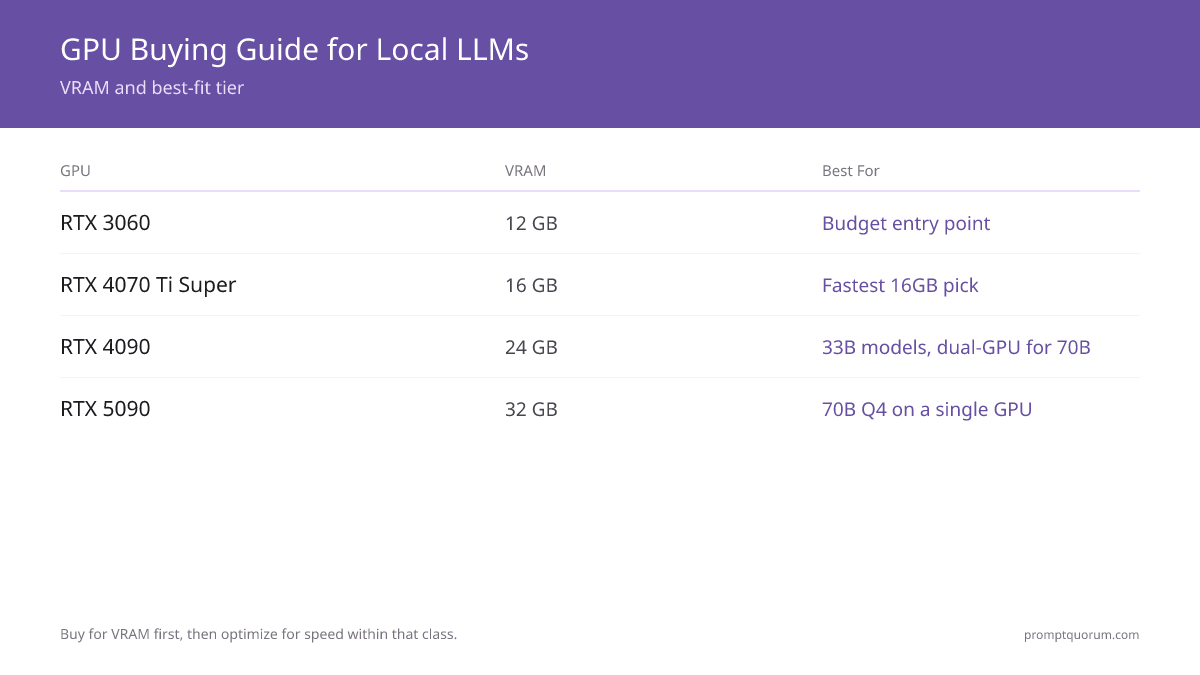
- Enthusiast pick: NVIDIA RTX 4090 24 GB / RTX 5090 32 GB — the RTX 4090 (~$2,268-2,755 used/new) runs 33B models; the RTX 5090 (~$3,949) is the only single consumer card that fits a 70B model at Q4 without a dual-GPU build.
- AMD is viable but higher-friction. The RX 6700 XT (12 GB) and RX 7800 XT (16 GB) deliver competitive VRAM per dollar, but ROCm setup adds hours of work versus NVIDIA CUDA.
- Power draw scales with the tier. An RTX 3060 draws 170 W; an RTX 5090 draws 575 W and needs an 850-1000 W power supply. Budget the power supply alongside the card.
Quick Facts
- Budget tier ($130-680): RTX 3060 12 GB or RX 6700 XT 12 GB — runs 7B and most 13B models.
- Mid tier ($420-520): RTX 4060 Ti 16 GB or RX 7800 XT 16 GB — runs 14B models comfortably.
- High tier ($1,100-1,200): RTX 4080 Super 16 GB or RTX 4070 Ti Super 16 GB — fast 14B inference, light 22B work.
- Enthusiast tier ($2,480+): RTX 4090 24 GB or RTX 5090 32 GB — 33B models, and 70B at Q4 on the 5090.
- VRAM rule of thumb at Q4_K_M: roughly 0.6 GB per billion parameters, plus 2-4 GB for context and tooling.
- Power draw range: RTX 3060 170 W, RTX 4060 Ti 165 W, RTX 4070 Ti Super 285 W, RTX 4080 Super 320 W, RTX 4090 450 W, RTX 5090 575 W.
- 2026 price reality: a memory shortage pushed prices 1.5-2x above MSRP; the used market is often the better value.
Sponsored
Editor's Choice: RTX 4080 Super 16 GB
For buyers who want a card that lasts and can stretch past $1,000, the NVIDIA RTX 4080 Super 16 GB is the pick that balances VRAM, speed, and price. Its 16 GB of VRAM clears every 14B model with context headroom, it is the fastest 16 GB card here at roughly 120 tok/s, and at ~$1,100-1,200 it costs about the same as the slower RTX 4070 Ti Super ($1,179) after 2026 price moves — making it the clear high-tier value. If your budget is fixed below $600, the RTX 4060 Ti 16 GB is the value pick — it was hit least by the 2026 surge. Spend more only if you specifically need 33B or 70B models.
📌Note: This Editor's Choice reflects price-to-capability only. PromptQuorum is not enrolled in any affiliate program and the links below carry no affiliate tags — they are plain reference links that earn no commission.
How the Eight GPUs Compare for Local LLMs in 2026
VRAM and power figures are manufacturer specifications. Inference speeds for the RTX 3060, RTX 4080 Super, RTX 4090, and RTX 5090 are measured 7B Q4 figures from PromptQuorum hardware testing; figures for the RTX 4060 Ti 16 GB, RX 7800 XT, and RTX 4070 Ti Super are family-level estimates. Prices are a US snapshot — the 2026 memory shortage pushed them 1.5-2x above MSRP, so re-check before buying.
📍 In One Sentence
For local LLMs, a GPU's VRAM decides which models you can run and its tokens-per-second decides how fast they answer — buy for the first, then optimize the second.
💬 In Plain Terms
Think of VRAM as the size of the desk and the model as the thing you put on it. A faster GPU clears the desk quicker, but if the model does not fit on the desk at all, speed never enters the picture. Pick the tier whose desk is big enough first.
GPU | VRAM | Speed (7B Q4) | Power | Price (Jul 2026) | Best for |
|---|---|---|---|---|---|
| RTX 3060 12 GB | 12 GB | 15-20 tok/s | 170 W | $350-680 new / $150-220 used | Budget entry — any 7B model |
| RX 6700 XT | 12 GB | 10-14 tok/s | 230 W | $130-200 used (discontinued new) | Cheapest VRAM, accepts AMD setup |
| RTX 4060 Ti 16 GB | 16 GB | ~20-25 tok/s | 165 W | $424 new / $290 used | Mid tier — 14B models, low power |
| RX 7800 XT | 16 GB | ~18-24 tok/s (est.) | 263 W | ~$480-520 new | 16 GB on AMD, accepts ROCm setup |
| RTX 4070 Ti Super | 16 GB | ~80-90 tok/s (est.) | 285 W | $1,179 new / $770 used | Fast 14B, lower power draw |
| RTX 4080 Super | 16 GB | ~120 tok/s | 320 W | ~$1,100-1,200 new / ~$900 used | Editor's Choice — fastest 16 GB |
| RTX 4090 | 24 GB | ~150 tok/s | 450 W | $2,755 new / ~$2,268 used | 33B models, dual-GPU 70B |
| RTX 5090 | 32 GB | ~160 tok/s | 575 W | $3,949 new / $3,999 used | Single-GPU 70B at Q4 |
Which GPU Should You Buy?
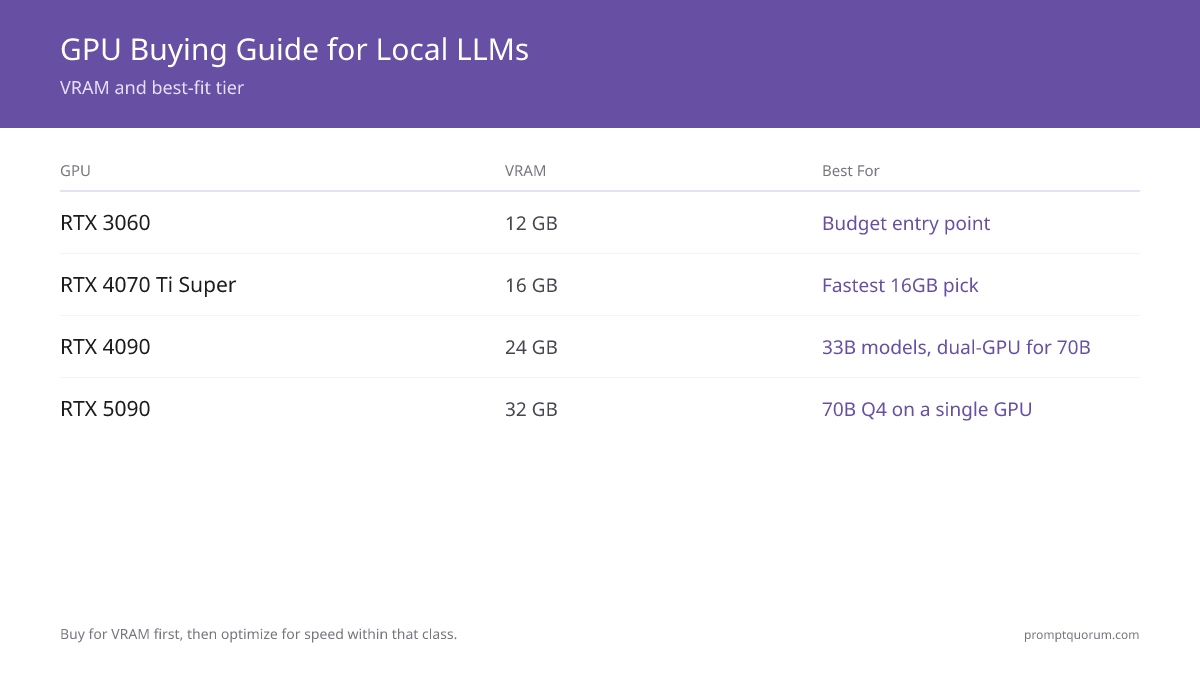
Your largest target model decides your tier; your budget decides NVIDIA versus AMD inside that tier. Find the row that matches your situation.
Your situation | Buy this |
|---|---|
| I have under $400 and want to run 7B models | RTX 3060 12 GB (used) |
| I want the cheapest card that runs LLMs at all and accept setup work | RX 6700 XT (used) |
| I want to run 14B models on a tight power budget | RTX 4060 Ti 16 GB |
| I want a card that runs 14B fast and lasts several years | RTX 4070 Ti Super 16 GB |
| I want the fastest 16 GB card and price is secondary | RTX 4080 Super 16 GB |
| I need 33B models or plan a future dual-GPU 70B build | RTX 4090 24 GB |
| I need a single card that runs 70B models at Q4 | RTX 5090 32 GB |
| I am unsure and want the safest first GPU | RTX 3060 12 GB — upgrade later if you outgrow it |
Budget Tier ($130-680): RTX 3060 12 GB and RX 6700 XT
The budget tier runs every 7B model and most 13B models — and for most first-time local-LLM users, that is all the capability they need. The RTX 3060 12 GB is the recommended pick; the RX 6700 XT is the cheaper alternative if you accept AMD setup friction. The used market matters most in this tier — new prices have risen sharply with the 2026 surge.
- RTX 3060 12 GB ($150-220 used, $350-680 new): 12 GB VRAM, 170 W, 15-20 tok/s on 7B models at Q4. Runs Mistral Small, Qwen3 8B, DeepSeek-R1 7B, and most 13B models. The 12 GB variant is the one to buy — avoid the 6 GB variant, which is limited to 3B models. Buy used — new stock is discontinued and inflated. (DeepSeek has since released DeepSeek-V4 — Flash/Pro — as a newer open-weight generation; R1/V3 remain valid to run locally.)
- RX 6700 XT ($130-200 used, discontinued new): 12 GB VRAM, 230 W, 10-14 tok/s on 7B models. The cheapest way into local LLMs, but slower than the RTX 3060 and dependent on AMD ROCm, which adds setup time.
- Why buy this tier: lowest cost of entry, low power draw on the RTX 3060, and enough VRAM for the 7B-13B models that cover general chat, coding assistance, and summarization.
- Why skip this tier: if you already know you want 14B or larger models, the budget tier will frustrate you within weeks — start at the mid tier instead.
💡Tip: Buy the RTX 3060 in its 12 GB version specifically. The 6 GB RTX 3060 looks similar in listings but only fits 3B models — half the parameter count is the difference between a usable assistant and a toy.
⚠️Warning: The RX 6700 XT is the cheapest card here, but budget 3-5 hours for ROCm setup on Linux. If your time is worth more than the $30-80 you save versus a used RTX 3060, buy the NVIDIA card.
Mid Tier ($420-520): RTX 4060 Ti 16 GB and RX 7800 XT
The mid tier exists for one reason: 16 GB of VRAM clears 14B models that 12 GB cards cannot fit with usable context. If 14B-class models are your target, this is the cheapest tier that runs them properly — and the RTX 4060 Ti 16 GB is notable for staying close to its MSRP through the 2026 surge.
- RTX 4060 Ti 16 GB ($424 new / $290 used): 16 GB VRAM, 165 W, roughly 20-25 tok/s on 7B models. It uses the same GPU die as the 8 GB RTX 4060 Ti, so per-token speed is similar — the 16 GB version buys capacity, not raw speed. Its 165 W draw is the lowest in this guide relative to capability, and it is the GPU least inflated by the surge.
- RX 7800 XT (~$480-520 new): 16 GB VRAM, 263 W. It was not individually benchmarked for this guide; expect speed in the RTX 4060 Ti range, with AMD ROCm setup as the trade-off.
- Why buy this tier: you want 14B models, you want low power draw (RTX 4060 Ti), or you want 16 GB at the lowest possible price.
- Why skip this tier: if 7B models are enough, the budget tier saves $200; if you want fast 14B inference, the high tier is meaningfully quicker.
📌Note: The RTX 4060 Ti 16 GB is a capacity upgrade, not a speed upgrade, over the 8 GB version. Buy it because you need to fit 14B models, not because you expect more tokens per second.
High Tier ($1,100-1,200): RTX 4080 Super and RTX 4070 Ti Super
The high tier keeps 16 GB of VRAM but adds the speed that makes 7B-14B models feel instant and 22B models usable. Both cards fit the same models as the mid tier — you are paying for tokens per second, not capacity. The 2026 surge widened the gap between this tier and the mid tier sharply.
- RTX 4080 Super 16 GB (~$1,100-1,200): 16 GB VRAM, 320 W, roughly 120 tok/s on 7B models. The Editor's Choice — the fastest 16 GB card, and after 2026 price moves it costs about the same as the slower RTX 4070 Ti Super.
- RTX 4070 Ti Super 16 GB ($1,179 new / $770 used): 16 GB VRAM, 285 W. Slightly slower than the RTX 4080 Super at a near-identical new price — pick it for the lower 285 W power draw, or buy it used at ~$770 for the cheapest fast 16 GB card.
- Why buy this tier: you run 14B models constantly and want them instant, or you do light 22B work and want headroom.
- Why skip this tier: if you need 33B or 70B models, no 16 GB card will fit them — move to the enthusiast tier instead of overspending here.
💡Tip: Within this tier, default to the RTX 4080 Super — at a near-identical new price it is meaningfully faster than the RTX 4070 Ti Super. Pick the 4070 Ti Super only to save ~35 W of power draw, or buy it used at a discount.
Enthusiast Tier ($2,480+): RTX 4090 and RTX 5090
The enthusiast tier is the only tier that runs models above 22B — and the RTX 5090 32 GB is the only single consumer card that fits a 70B model at Q4. Buy here for VRAM capacity, not speed; the speed is a side effect. The 2026 surge hit this tier hardest, so prices move week to week.
- RTX 4090 24 GB ($2,755 new / ~$2,268 used): 24 GB VRAM, 450 W, roughly 150 tok/s on 7B models and 36 tok/s on a 70B Q4 model. Runs 33B models comfortably. Note that the surge has pushed used RTX 4090 prices close to a new RTX 5090.
- RTX 5090 32 GB ($3,949 new / $3,999 used): 32 GB GDDR7 VRAM, 575 W, roughly 160 tok/s on 7B and 45 tok/s on 70B Q4. The 32 GB capacity is the headline — it is the only consumer card that runs a 70B model at Q4 without a second GPU. Used prices currently sit above new because of scalping.
- Why buy this tier: you need 33B or 70B models, you run batch inference, or you want a card that will not need replacing for years.
- Why skip this tier: for 7B-14B models it is overkill — the high tier delivers instant responses on those sizes for less than half the price and power draw.
⚠️Warning: The RTX 5090 draws 575 W on its own. Pair it with an 850-1000 W power supply — a 750 W unit will sag under load. Budget the power supply upgrade into the purchase, not as an afterthought.
📌Note: Before the 2026 surge, two used RTX 4090s were cheaper than one RTX 5090. That has reversed: at ~$2,268-2,755 each, a pair of RTX 4090s now costs well above a single RTX 5090. For a new 70B build, the single RTX 5090 is now both simpler and cheaper.
How Much VRAM Do You Need?
At Q4_K_M quantization, a model needs roughly 0.6 GB of VRAM per billion parameters, plus 2-4 GB for context and tooling overhead. That formula maps directly onto the four tiers.
- 7B models — 8-9 GB: fit any tier. A 12 GB card leaves comfortable headroom.
- 13-14B models — 11-13 GB: need 16 GB in practice once context and tooling are counted. Mid tier and up.
- 22B models — 14-16 GB: tight on a 16 GB card; comfortable from the high tier up.
- 33B models — 19-22 GB: need a 24 GB card. RTX 4090 territory.
- 70B models — 39-42 GB at Q4: need an RTX 5090 32 GB pushed hard, or a dual-GPU build. A single 24 GB card cannot fit a 70B model at Q4.
💡Tip: Context length is a hidden VRAM cost — long prompts and large context windows consume VRAM on top of the model weights. Always leave 2-4 GB of headroom. For the full method, see the VRAM requirements guide linked in Related Reading.
Why GPU Prices Surged in 2026
GPU prices rose sharply in 2026 because of a memory shortage, pushing consumer cards 1.5-2x above their original MSRP. This changes the buying math, so plan around it rather than around launch prices.
📍 In One Sentence
GPU prices in 2026 run 1.5-2x above MSRP because of a memory-chip shortage, so a local-LLM buyer should favor the used market and the smallest card that fits the target model.
💬 In Plain Terms
The cards did not get better — the memory inside them got scarce and expensive. Until that eases, treat MSRP as a historical number, buy second-hand when you can, and do not pay for more VRAM than your model actually needs.
- The cause is memory, not GPUs. A GDDR and HBM supply shortage raised the cost of every card with fast memory — and LLM-capable GPUs are exactly the high-VRAM cards affected most.
- The RTX 5090 is the clearest example: a $1,999 launch price, but ~$3,949 in retail — nearly double.
- Lower-end cards held up better. The RTX 4060 Ti 16 GB sits near its $399 MSRP; the surge scales with how much fast memory a card carries.
- The used market is now the value play. A used RTX 3060 12 GB or RX 6700 XT escapes most of the surge — used pricing rose far less than new.
- Decision: if you can wait, watch for the shortage to ease; if you cannot, buy used where possible and buy the smallest card that fits your target model.
Decision Flowchart: Pick Your GPU in Four Questions
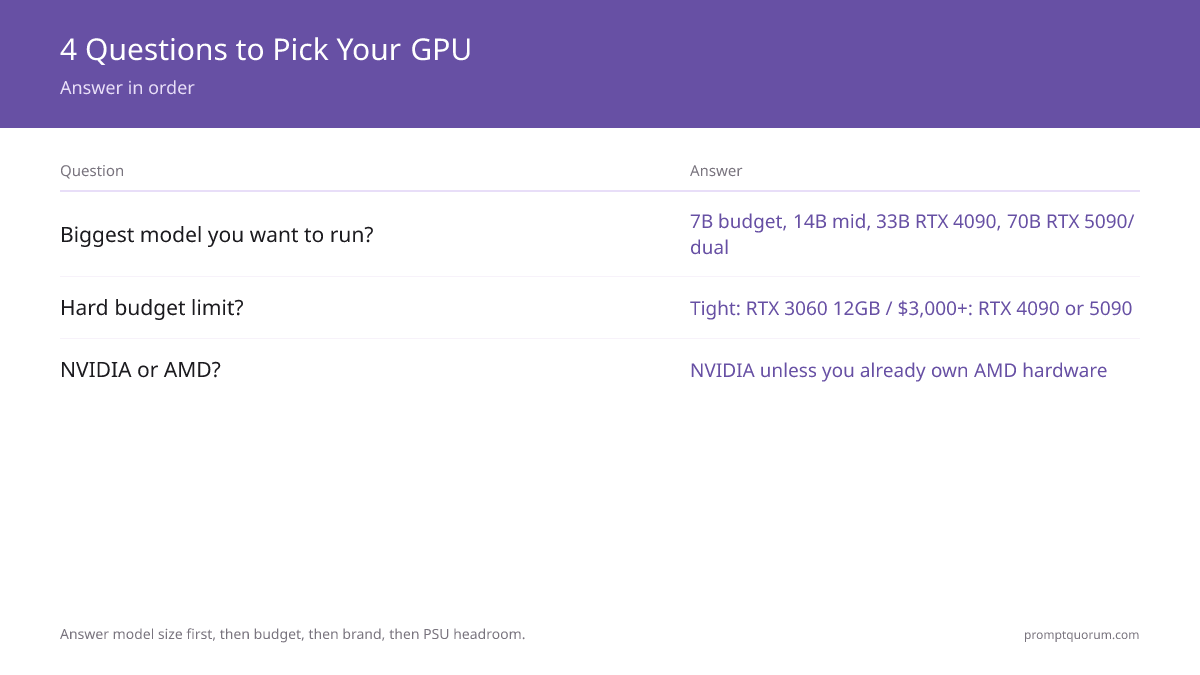
Four questions, in order, route most buyers to one card.
📍 In One Sentence
Pick a GPU for local LLMs by answering largest model size first, budget ceiling second, NVIDIA-versus-AMD third, and power-supply headroom last.
💬 In Plain Terms
Start with the biggest model you actually want to run and let that set your tier. Only then look at price, brand, and whether your power supply can handle the card. Doing it in the other order is how people overspend or buy a card that cannot run their model.
- 1. What is the largest model you want to run? 7B: budget tier. 14B: mid tier. 22B: high tier. 33B: RTX 4090. 70B: RTX 5090 or dual-GPU.
- 2. What is your hard budget ceiling? Under ~$250 (used): RTX 3060 12 GB. Under $520: RTX 4060 Ti 16 GB. ~$1,100-1,200: RTX 4080 Super or 4070 Ti Super. $2,480+: RTX 4090 or RTX 5090.
- 3. NVIDIA or AMD? Choose NVIDIA unless you already own AMD hardware or find a steep RX 7800 XT discount — CUDA removes hours of ROCm setup.
- 4. Does your power supply have headroom? Cards above the mid tier need 285-575 W; confirm your PSU and case cooling before buying enthusiast-tier hardware.
Regional Pricing & Where to Buy
GPU prices vary by region — US prices are usually the lowest, EU prices add VAT, and the 2026 surge has hit every market. The links below are plain product-search links per region; they carry no affiliate tags and earn no commission.
- United States: Amazon and Newegg have the widest stock. Used RTX 3060 and RTX 4090 cards are common; new flagship stock is thin.
- Germany: Amazon.de and Mindfactory.de; expect roughly 19% VAT in listed prices, and German GPU prices that run above US figures.
- France: Amazon.fr and LDLC; pricing is similar to Germany with 20% VAT, and flagship stock has been intermittent.
- Japan: Amazon.co.jp and Kakaku.com for price comparison; new-card pricing tracks the US, with thinner used-card supply.
- China: JD.com is the reference marketplace; high-end GPU availability and pricing differ substantially from Western markets.
⚠️Warning: Because of the 2026 surge, every dollar figure in this guide is a fast-moving snapshot. Always open the current retailer listing before buying — prices have moved week to week.
Common Mistakes When Buying a GPU for Local LLMs
- Buying for tokens per second instead of VRAM. A faster card that cannot fit your model is useless. Confirm the model fits in VRAM with 2-4 GB of headroom first, then compare speed within that tier.
- Buying the 6 GB RTX 3060 instead of the 12 GB version. They share a name but not a use case — the 6 GB card tops out at 3B models. Always confirm the 12 GB variant in the listing.
- Assuming the RTX 4060 Ti 16 GB is faster than the 8 GB version. It is not — it is the same GPU die with more memory. Buy it for capacity (14B models), not speed.
- Anchoring on MSRP instead of current price. The 2026 surge means launch prices no longer reflect reality. Budget against the live retailer price, and prefer the used market where it escapes the surge.
- Ignoring power supply requirements. An RTX 5090 draws 575 W and needs an 850-1000 W PSU. A card that browns out under load is worse than a slower card that runs stably.
- Choosing AMD without budgeting setup time. The RX 6700 XT and RX 7800 XT are good value, but ROCm setup costs hours. Factor that time against the money saved versus an NVIDIA card.
- Overbuying for 7B models. If 7B models cover your use case, an RTX 4090 is wasted money and power. Match the tier to the model, not to the budget you happen to have.

Sources
- NVIDIA GeForce RTX 40 Series Specifications — Official VRAM capacity and power (TGP) figures for the RTX 4060 Ti, 4070 Ti Super, 4080 Super, and 4090.
- NVIDIA GeForce RTX 5090 Specifications — Official 32 GB GDDR7 VRAM and 575 W power figures for the RTX 5090.
- Best Value GPU — RTX 5090 / 4090 / 4080 Super price trackers — US new and used price history used for the price snapshot.
- AMD Radeon Specifications — Official VRAM and power figures for the RX 7800 XT and RX 6700 XT.
- Best GPUs for Local LLMs 2026 — PromptQuorum hardware testing: measured 7B Q4 inference speeds for the RTX 3060, 4080, 4090, and 5090.
Frequently Asked Questions
What is the cheapest GPU that can run local LLMs well?
A used NVIDIA RTX 3060 12 GB at $150-220 is the cheapest GPU that runs local LLMs well. Its 12 GB of VRAM fits every 7B model and most 13B models at Q4 quantization, at 15-20 tokens per second. The cheaper RX 6700 XT works too, but it is slower and requires AMD ROCm setup. Buy used — new prices roughly doubled in the 2026 surge.
Why are GPU prices so high in 2026?
A memory-chip shortage drove the 2026 GPU price surge. GDDR and HBM supply tightened, raising the cost of every graphics card with fast memory, and high-VRAM LLM-capable cards were hit hardest. Most cards now sell 1.5-2x above their original MSRP — an RTX 5090 launched at $1,999 but retails near $3,950. The used market escaped most of the increase.
How much VRAM do I need for local LLMs?
At Q4_K_M quantization, plan for roughly 0.6 GB of VRAM per billion parameters plus 2-4 GB of overhead. That means 8-9 GB for 7B models, 11-13 GB for 14B, 19-22 GB for 33B, and 39-42 GB for 70B. A 12 GB card covers 7B comfortably; 70B needs an RTX 5090 32 GB or a dual-GPU build.
Is the RTX 4060 Ti 16 GB faster than the 8 GB version?
No. The RTX 4060 Ti 16 GB and 8 GB versions use the same GPU die, so per-token inference speed is similar — roughly 20-25 tokens per second on 7B models. The 16 GB version buys capacity, letting you run 14B models that do not fit in 8 GB. Buy it for VRAM, not speed.
Should I buy NVIDIA or AMD for local LLMs?
Buy NVIDIA unless you already own AMD hardware or find a steep discount. NVIDIA CUDA works out of the box with Ollama, LM Studio, and llama.cpp. AMD cards like the RX 6700 XT and RX 7800 XT offer competitive VRAM per dollar, but ROCm setup typically costs several hours on Linux.
Can a single GPU run a 70B model?
Only the RTX 5090 32 GB, and only at Q4 quantization where a 70B model needs roughly 39-42 GB — meaning aggressive quantization or partial offload. A 24 GB RTX 4090 cannot fit a 70B model at Q4 alone; the common solution is two RTX 4090s for combined VRAM, though the 2026 price surge has made that pair more expensive than a single RTX 5090.
Is the RTX 5090 worth it over the RTX 4090 for local LLMs?
Only if you specifically need to run 70B models on a single card. The RTX 5090 has 32 GB of VRAM versus the RTX 4090's 24 GB, which is the deciding factor. For 7B-33B models, the RTX 4090 fits the same models; after the 2026 surge the two are priced close, so the 5090's extra 8 GB and slightly higher speed make it the better new buy if budget allows.
What power supply do I need for these GPUs?
Match the power supply to the tier: a 550 W unit suits the RTX 3060, 650-750 W suits the RTX 4060 Ti and 4070 Ti Super, 850 W suits the RTX 4090, and 850-1000 W is needed for the RTX 5090, which draws 575 W on its own. Undersized power supplies cause instability under load.