Key Takeaways
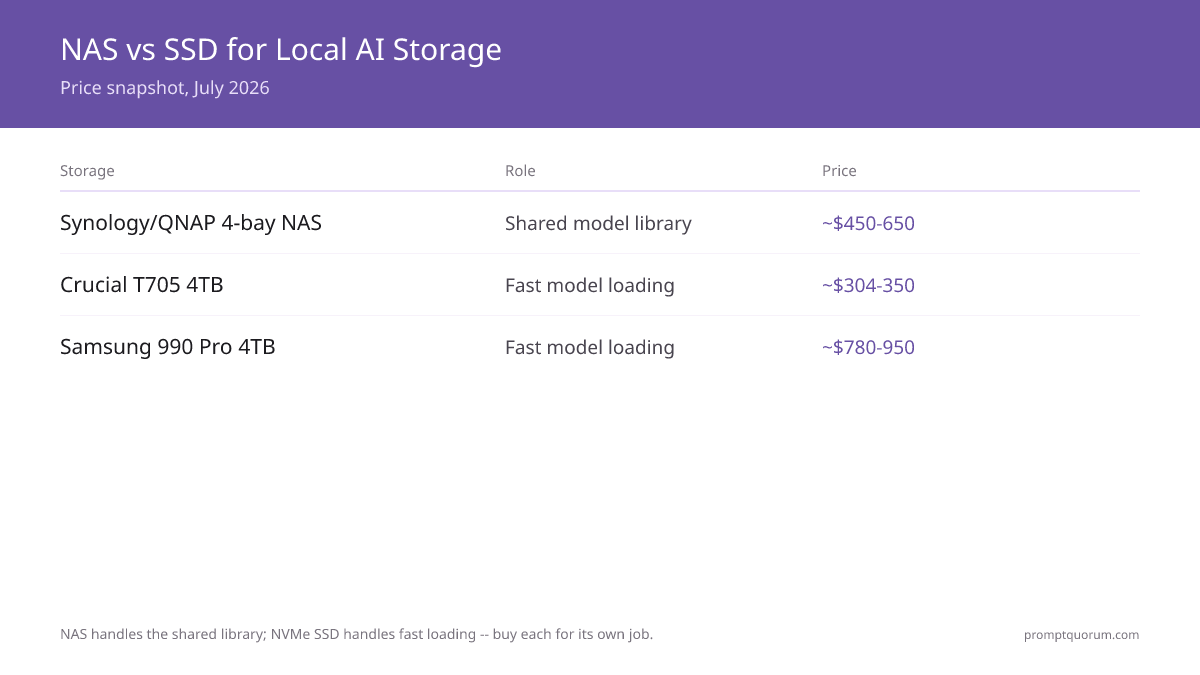
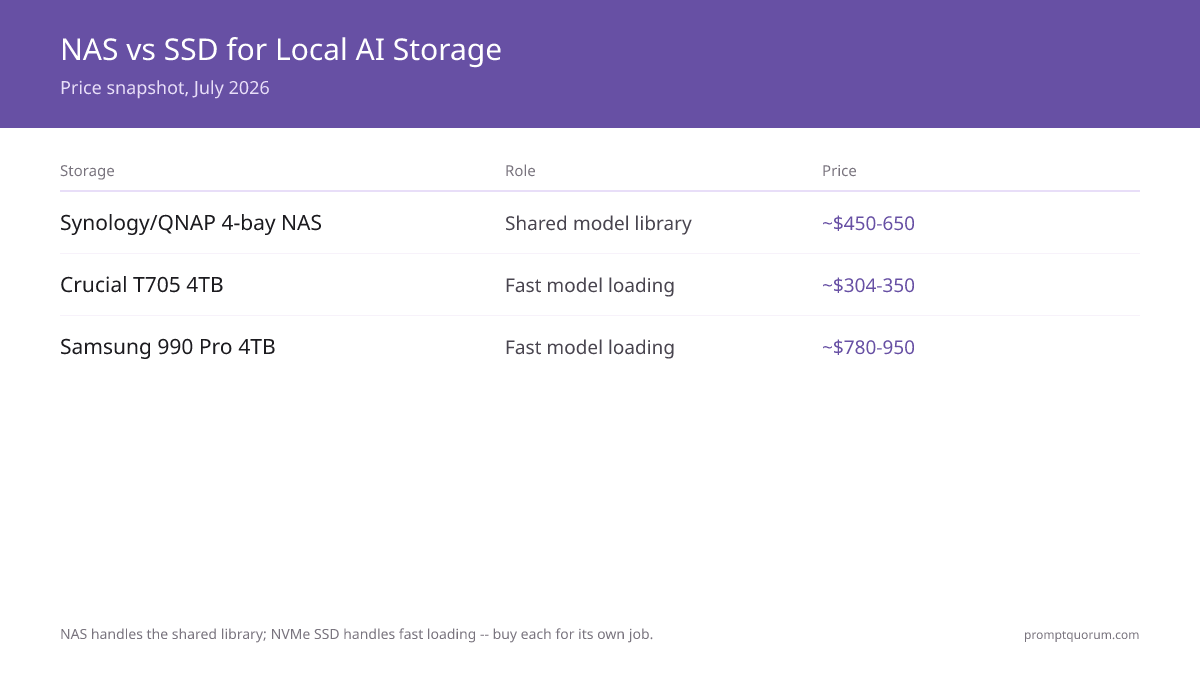
- Storage for local AI is two jobs, not one. A fast NVMe SSD on the inference machine loads model weights into memory quickly; a NAS stores the shared, backed-up model library. Buy for the job you actually have — buying the wrong one is the most common mistake.
- A NAS does not run inference. Never load models for inference over the network — it is too slow. The NAS holds the library; the SSD on the GPU machine does the loading. Keep those roles separate.
- Fast-loading pick: Samsung 990 Pro or WD Black SN850X. A high-end PCIe 4.0 NVMe SSD shortens the wait when a model loads from disk into VRAM. A 70B model at Q4 is roughly 35-42 GB, so loading speed is felt on every model switch.
- Shared-library pick (easiest): Synology 4-bay NAS. Synology's DSM software is the simplest for non-specialist teams — backup, snapshots, and user management are point-and-click.
- Shared-library pick (more hardware per dollar): QNAP 4-bay NAS. QNAP typically offers a stronger CPU and more ports at a similar price, at the cost of a slightly steeper learning curve.
- Run the NAS in RAID 6. RAID 6 survives two simultaneous drive failures and is the production default; RAID 5 on large drives risks a second failure during the 24-48 hour rebuild.
- RAID is not a backup. RAID protects against drive failure, not ransomware, theft, or deletion. Follow the 3-2-1 rule: 3 copies, 2 media types, 1 offsite.
- Prices rose in 2026. The memory-chip shortage pushed NAND and SSD prices up. Treat every price here as an estimate and re-check before buying.
Quick Facts
- Two roles: NVMe SSD = fast model loading on the GPU machine; NAS = shared, backed-up library.
- Model size reference: a 7B model at Q4 is roughly 4-5 GB; a 70B model at Q4 is roughly 35-42 GB.
- RAID 6: survives 2 simultaneous drive failures; usable capacity is about 50% of raw (4x 4 TB = ~8 TB usable).
- Network speed: a NAS on the same gigabit LAN is fine for transferring a 35 GB model (about 1 hour); 10 GbE matters only for teams above ~20 users.
- Backup rule: 3-2-1 — 3 copies, 2 media types, 1 offsite. RAID alone is not a backup.
- Solo developer: a fast internal SSD plus one external backup drive usually beats buying a NAS.
- 2026 price reality: the memory-chip shortage raised SSD prices; treat every figure here as an estimate.
Sponsored
Editor's Choice: Synology 4-Bay NAS + Samsung 990 Pro SSD
For a small team building a local AI model library, the pairing that does both storage jobs well is a Synology 4-bay NAS for the library and a Samsung 990 Pro NVMe SSD on the inference machine. Synology's DSM software makes RAID 6, scheduled snapshots, and backup configuration approachable without a storage specialist, and a 4-bay unit gives roughly 8 TB usable in RAID 6 — enough for a large library of quantized models. The Samsung 990 Pro handles the other job: fast loading of model weights from disk into VRAM on each model switch. A solo developer can skip the NAS entirely and pair the SSD with a single external backup drive. Choose QNAP over Synology only if you specifically want more CPU and ports per dollar and accept a steeper setup.
📌Note: This Editor's Choice reflects capability-to-price only. PromptQuorum is not enrolled in any affiliate program and the links below carry no affiliate tags — they are plain reference links that earn no commission.
How NAS and SSD Storage Compare for Local AI in 2026
The table separates the two storage jobs. NAS rows cover the shared-library role; SSD rows cover the fast-loading role. Capacity and RAID figures are based on standard 4-bay configurations. Prices below are estimates — the 2026 memory-chip shortage pushed SSD pricing up, so confirm the current figure before buying. NAS prices are hardware-only and exclude drives.
📍 In One Sentence
For local AI models, an NVMe SSD does the fast loading at inference time and a NAS holds the shared backed-up library — buy each for its own job, not one for both.
💬 In Plain Terms
Think of the SSD as the kitchen counter where you actually cook and the NAS as the pantry where everything is stored. You cook fast on the counter; you keep the stock safe in the pantry. Trying to cook in the pantry is slow, and a counter with no pantry runs out of room.
Storage | Role | Capacity | Redundancy | Price | Best for |
|---|---|---|---|---|---|
| Synology 4-bay NAS | Shared model library | ~8 TB usable in RAID 6 (4x 4 TB) | RAID 6 — survives 2 drive failures | ~$450-650 hardware only | Teams wanting the easiest software |
| QNAP 4-bay NAS | Shared model library | ~8 TB usable in RAID 6 (4x 4 TB) | RAID 6 — survives 2 drive failures | ~$450-650 hardware only | Teams wanting more CPU and ports |
| Crucial T705 NVMe SSD | Fast model loading | 1-4 TB per drive | None — pair with a backup | ~$304–$350 for 4 TB | Value pick — Gen5 speed at lowest price |
| WD Black SN850X NVMe SSD | Fast model loading | 1-4 TB per drive | None — pair with a backup | ~$615–$740 for 4 TB | Fast loading, proven PCIe 4.0 |
| Samsung 990 Pro NVMe SSD | Fast model loading | 1-4 TB per drive | None — pair with a backup | ~$780–$950 for 4 TB | Premium pick, highest TBW endurance |
| External USB drive | Offline backup | 2-8 TB | None — it is the backup | ~$80-200 | Solo developers, offsite copy |
Which Storage Should You Buy?
Your team size decides whether you need a NAS at all; the inference machine always needs a fast SSD. Find the row that matches your situation.
Your situation | Buy this |
|---|---|
| I am a solo developer with one machine | Fast NVMe SSD + one external backup drive — skip the NAS |
| I want the fastest possible model loading | Samsung 990 Pro NVMe SSD on the GPU machine |
| I want fast loading at a slightly lower price | WD Black SN850X NVMe SSD |
| My team of 3-10 shares a model library | Synology 4-bay NAS in RAID 6 |
| I want more CPU and ports per dollar and accept a steeper setup | QNAP 4-bay NAS in RAID 6 |
| I need the simplest backup and snapshot software | Synology — DSM is the most point-and-click |
| I am unsure and want a safe default | Samsung 990 Pro SSD now; add a Synology NAS when the team grows |
Synology NAS: The Easiest Shared Library
A Synology 4-bay NAS is the pick when you want a shared model library that a non-specialist can set up and maintain — its DSM software makes RAID 6, snapshots, and backup point-and-click. The library role is exactly what a NAS is for: many machines reach the same set of GGUF model files, and the NAS keeps them redundant and backed up.
- Software: Synology DSM is the most approachable NAS operating system — RAID configuration, scheduled snapshots, and cloud backup are guided wizards, not config files.
- Capacity: a 4-bay unit with four 4 TB drives gives roughly 8 TB usable in RAID 6 — room for a large library of quantized models (a 70B Q4 model is roughly 35-42 GB).
- Network: a NAS on the same gigabit LAN transfers a 35 GB model in about an hour; that is fine for the library role. 10 GbE only matters above roughly 20 users.
- Price: roughly $450-650 hardware-only as an estimate; budget separately for NAS-rated drives.
- Why buy Synology: you want a shared, backed-up library and the lowest setup and maintenance effort.
- Why skip Synology: a solo developer with one machine does not need a NAS — an SSD plus an external drive is cheaper and simpler.
💡Tip: Use NAS-rated drives in a NAS, not desktop drives. NAS drives are built for continuous operation and vibration tolerance in a multi-bay enclosure. Budget the drives separately — NAS list prices are hardware-only.
QNAP NAS: More Hardware Per Dollar
A QNAP 4-bay NAS is the pick when you want a stronger CPU and more connectivity per dollar than Synology, and you accept a slightly steeper setup. It fills the same shared-library role — redundant, backed-up GGUF storage reachable across machines — with more headroom for extra services.
- Hardware: QNAP units commonly ship a faster CPU and more ports (including faster networking options) at a price similar to the comparable Synology model.
- Software: QTS is capable but less guided than Synology DSM — expect more menus and a steeper first-time setup.
- Capacity: a 4-bay unit in RAID 6 with four 4 TB drives gives roughly 8 TB usable — the same library headroom as the Synology equivalent.
- Price: roughly $450-650 hardware-only as an estimate, drives separate.
- Why buy QNAP: you want more CPU and faster networking options per dollar, and you are comfortable with a less hand-held setup.
- Why skip QNAP: if the team has no storage specialist and wants the simplest possible software, Synology DSM is the easier path.
📌Note: Synology and QNAP fill the identical role for a local AI model library. Choose QNAP for more hardware per dollar, Synology for the gentler software learning curve — the storage outcome is the same.
Fast SSDs for Model Loading: Samsung 990 Pro and WD Black SN850X
A high-end PCIe 4.0 NVMe SSD on the inference machine is what shortens the wait when a model loads from disk into VRAM — the Samsung 990 Pro and WD Black SN850X are the two picks. This is the other storage job: not the library, but the drive the GPU machine reads weights from on every model switch.
- Samsung 990 Pro: a high-end PCIe 4.0 NVMe SSD; the recommended pick for fastest model loading. A 70B Q4 model is roughly 35-42 GB, so read speed is felt every time you switch models.
- WD Black SN850X: a comparable high-end PCIe 4.0 NVMe SSD; the value alternative when the Samsung is priced higher in the moment.
- Capacity: 2 TB is the practical sweet spot for an on-machine working set; 4 TB if you keep many large models loaded locally rather than on the NAS.
- Price: roughly $304–$350 for the Crucial T705 4TB (best value), $615–$740 for the WD Black SN850X 4TB, or $780–$950 for the Samsung 990 Pro 4TB as an estimate — supply constraints pushed PCIe 4.0 SSDs significantly higher than the Gen5 Crucial, so compare all three before buying.
- Why buy a high-end NVMe SSD: model loading time is felt on every switch, and a fast SSD removes seconds from each one.
- Why skip the top tier: if you load one model and rarely switch, a mid-range NVMe SSD is sufficient — the top-tier read speed matters most under frequent switching.
💡Tip: The SSD is for loading models into VRAM, not for inference itself — inference runs in VRAM once the model is loaded. A fast SSD shortens the load wait; it does not change tokens per second once a model is running.
Best NVMe SSD for AI Inference Workloads: Picks and Prices
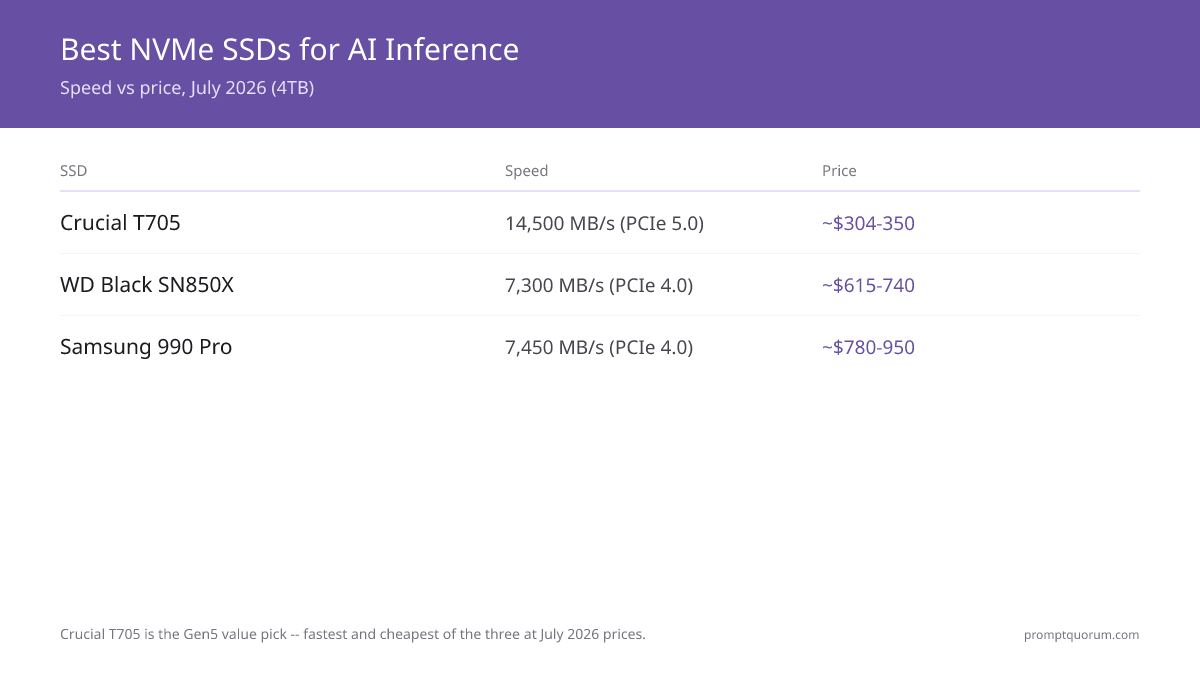
The best internal NVMe SSD for hosting a local AI inference workload is one with sequential read speed at or above 5 GB/s and at least 2 TB capacity — 4 TB if you rotate between multiple large models. A 70B model at Q4 quantization is roughly 35-42 GB; a single model swap reads the entire weight file from disk. Read speed is the bottleneck between a model switch and the first output token. The picks below all clear 5 GB/s sequential read on PCIe 4.0 or PCIe 5.0 interfaces and are available in 4 TB configurations. Note: 2026 tariff and supply constraints pushed PCIe 4.0 SSDs (Samsung, WD) significantly higher than the faster PCIe 5.0 Crucial T705 — the Gen5 drive is the clear value pick at current prices.
📍 In One Sentence
The best internal NVMe SSD for a self-hosted local AI inference workload needs sequential read speed at or above 5 GB/s and at least 2-4 TB capacity — the Crucial T705 4TB (~$304–$350) is the value pick at Gen5 speed, while the WD Black SN850X 4TB (~$615–$740) and Samsung 990 Pro 4TB (~$780–$950) cost significantly more due to 2026 supply constraints.
💬 In Plain Terms
Think of the NVMe SSD as the loading dock between your model library and your GPU. The faster the loading dock, the less you wait each time you switch models. Once the model is in GPU memory (VRAM), the SSD speed no longer matters — but you feel it on every model switch.
- Crucial T705 4TB (~$304–$350): PCIe 5.0 NVMe, sequential reads up to 14,500 MB/s. The clear value pick despite being the fastest — Gen5 delivers roughly double the peak throughput of PCIe 4.0, and the Crucial T705 4TB is the least expensive of the three despite that speed advantage. Current inference runtimes (llama.cpp, Ollama) load sequentially and benefit from the faster read; the gap over the 990 Pro narrows once the model is in VRAM. Requires a PCIe 5.0 M.2 slot. Stores model weights only; VRAM runs inference once loaded.
- WD Black SN850X 4TB (~$615–$740): PCIe 4.0 NVMe, sequential reads up to 7,300 MB/s, 5-year warranty. The mid-tier option — significantly more expensive than the Crucial T705 4TB due to 2026 supply constraints on PCIe 4.0 NAND, but well-stocked and proven across inference workloads.
- Samsung 990 Pro 4TB (~$780–$950): PCIe 4.0 NVMe, sequential reads up to 7,450 MB/s, 5-year warranty with 2,400 TBW endurance rating. The premium pick — the most expensive of the three currently due to tariff and supply pressures (Samsung MSRP $1,099, street $780–$950). Consistent high-end performance, but the Crucial T705 4TB delivers more speed at a much lower price.
📌Note: SSD vs NAS for AI models: use an internal NVMe SSD on the inference machine for fast weight loading at each model switch. Use a NAS as the shared, backed-up model library when multiple machines need the same model files. The SSD is the kitchen counter; the NAS is the pantry. Never load model weights into VRAM directly over the network from a NAS — latency makes it impractical for real-time inference.
💡Tip: SandDisk Data Center SSDs and Micron 9550 are enterprise U.2/E1.S drives optimized for mixed random read/write and sustained throughput in server racks — they are overkill for a local AI inference machine and require adapters most consumer motherboards lack. For a self-hosted local inference workload, a Samsung 990 Pro or WD Black SN850X in the standard M.2 slot delivers comparable sequential read performance at a fraction of the cost.
RAID and Backup: Why RAID 6 and the 3-2-1 Rule
Run a NAS in RAID 6, and treat RAID as protection against drive failure — never as a backup. RAID 6 keeps data safe through two simultaneous drive failures; a real backup protects against the things RAID cannot.
📍 In One Sentence
RAID 6 protects a local-AI model library against two simultaneous drive failures, but it is not a backup — the 3-2-1 rule still applies because RAID cannot stop ransomware, deletion, or theft.
💬 In Plain Terms
RAID is like having spare tires on the car: a flat does not strand you. But spare tires do not help if the whole car is stolen. A backup is the separate copy kept somewhere else, and you need both.
- RAID 6 is the production default. It survives 2 simultaneous drive failures and gives about 50% usable capacity (4x 4 TB = ~8 TB usable).
- Avoid RAID 5 on large drives. A RAID 5 rebuild on large drives takes 24-48 hours, and a second drive failing during that window loses everything. RAID 6 absorbs that second failure.
- RAID is not a backup. RAID does nothing against ransomware, accidental deletion, theft, or a failed enclosure. You still need real backups.
- Follow the 3-2-1 rule. Keep 3 copies of the model library, on 2 media types, with 1 copy offsite — for example NAS plus external USB plus a cloud copy.
- Verify with checksums. Store a SHA-256 hash for each model file and verify on download and restore — large GGUF files can corrupt silently.
Decision Flowchart: Pick Your Storage in Four Questions
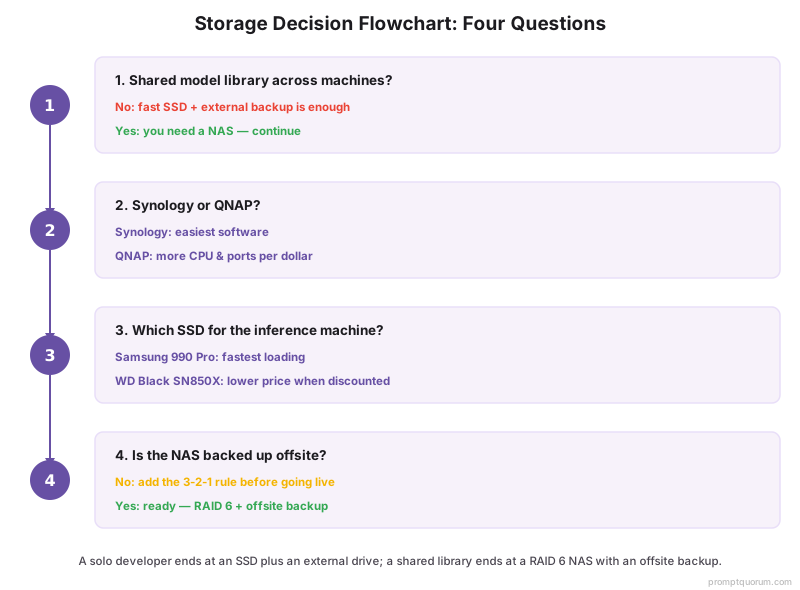
Four questions, in order, route most buyers to the right storage.
📍 In One Sentence
Choose local-AI storage by deciding whether the library is shared first, Synology-versus-QNAP second, which SSD third, and whether the NAS is backed up offsite last.
💬 In Plain Terms
Start with whether more than one machine touches the model library. If not, an SSD and an external drive cover you. If so, you need a NAS, and the only open questions are which brand, which SSD for the GPU machine, and whether you have a real offsite backup.
- 1. Do multiple machines or people share the model library? No: a fast SSD plus an external backup drive is enough. Yes: you need a NAS — continue.
- 2. Synology or QNAP? Easiest software for a non-specialist team: Synology. More CPU and ports per dollar: QNAP.
- 3. Which SSD for the inference machine? Fastest loading: Samsung 990 Pro. Same class at a lower price when discounted: WD Black SN850X.
- 4. Is the NAS backed up offsite? If not, add the third copy — RAID 6 is not a backup; apply the 3-2-1 rule before going live.
Where to Buy & Pricing
NAS units and SSDs are widely stocked on major retailers — buy from a seller with a clear returns policy because storage is one component you cannot test before installing. The links below are plain product-search links; they carry no affiliate tags and earn no commission.
- Where to buy: Amazon and Newegg carry Synology, QNAP, Samsung, and WD storage. NAS units are usually sold hardware-only — budget the drives separately.
- Buy NAS-rated drives for a NAS: desktop drives are not built for continuous multi-bay operation. Match drive count to your RAID 6 plan.
- SSD prices moved in 2026: the memory-chip shortage raised NAND pricing — compare the Samsung 990 Pro, WD Black SN850X, and Crucial T705 on the day, since the cheaper one shifts.
- Check the warranty: high-end NVMe SSDs typically carry a 5-year warranty with a stated endurance rating (TBW). Confirm both for your chosen model.
- Capacity headroom: model libraries grow. Buy more NAS capacity than you think you need today — re-sizing a RAID array later is disruptive.
⚠️Warning: Because the 2026 memory-chip shortage moved SSD prices, every figure in this guide is an estimate. Open the current retailer listing before buying, and compare the Samsung 990 Pro, WD Black SN850X, and Crucial T705 on the day — the better value alternates.
Common Mistakes When Buying Storage for Local AI Models
- Loading models for inference over the network. A NAS holds the library; it does not feed inference. Network latency makes loading weights over the LAN at inference time too slow. Load from a local SSD; keep the library on the NAS.
- Buying a NAS when an SSD was the need. A solo developer with one machine rarely needs a NAS. The need is fast loading and a backup — that is a good SSD plus an external drive.
- Using RAID 5 on large drives. A RAID 5 rebuild on large drives runs 24-48 hours, and a second failure during that window is fatal. Use RAID 6 for any production library.
- Treating RAID as a backup. RAID protects against drive failure only — not ransomware, deletion, or theft. Follow the 3-2-1 rule: 3 copies, 2 media types, 1 offsite.
- Putting desktop drives in a NAS. NAS-rated drives are built for continuous multi-bay operation. Desktop drives fail sooner in that environment.
- Undersizing capacity. Model libraries grow steadily. Buy more NAS capacity than today's library needs — expanding a RAID array later is disruptive.
- Anchoring on one SSD brand. The 2026 memory shortage moved prices, so the cheaper pick among the Samsung 990 Pro, WD Black SN850X, and Crucial T705 alternates. Compare all three on the day you buy.
Sources
- Best NAS and Storage for Local AI Models — PromptQuorum guide to NAS sizing, RAID levels, and the 3-2-1 backup rule for local-LLM model libraries.
- Synology — NAS Product Documentation — official Synology specifications for bay count, supported RAID levels, and DSM software.
- QNAP — NAS Product Documentation — official QNAP specifications for CPU, networking, and QTS software.
- Samsung — 990 Pro NVMe SSD Specifications — official Samsung NVMe SSD capacity, interface, and endurance figures.
- Western Digital — WD Black SN850X Specifications — official WD NVMe SSD capacity, interface, and warranty figures.
Frequently Asked Questions
Do I need a NAS for local AI models, or just an SSD?
It depends on whether the model library is shared. A solo developer with one machine usually needs only a fast NVMe SSD for loading models plus an external drive for backup — a NAS adds cost without benefit. A team of several people sharing one model library needs a NAS for redundant, backed-up, network-reachable storage. The SSD and the NAS do different jobs.
Can I run inference directly from a NAS?
No — a NAS is for storage, not inference. Loading model weights into VRAM over the network is too slow for real-time use. Keep the model library on the NAS, copy or load the model you need onto the inference machine's local SSD, and run inference from there. Inference itself runs in GPU VRAM once the model is loaded.
Synology or QNAP for a local AI model library?
Both fill the same shared-library role. Choose Synology if you want the easiest software — its DSM operating system makes RAID 6, snapshots, and backup point-and-click, which suits a team without a storage specialist. Choose QNAP if you want a stronger CPU and more ports per dollar and accept a steeper setup. The storage outcome is identical.
What SSD is fastest for loading local LLMs?
A high-end PCIe 4.0 NVMe SSD — the Samsung 990 Pro or the WD Black SN850X. Both deliver high sequential read speeds, which is what shortens the wait when a large model loads from disk into VRAM. A 70B model at Q4 is roughly 35-42 GB, so read speed is felt on every model switch. The Samsung is the default pick; the WD is the value alternative.
Why RAID 6 instead of RAID 5 for a NAS?
RAID 6 survives two simultaneous drive failures; RAID 5 survives only one. A RAID 5 rebuild on large drives takes 24-48 hours, and if a second drive fails during that window the whole array is lost. RAID 6 absorbs that second failure, which is why it is the production default for a model library you cannot afford to lose.
Is RAID a backup?
No. RAID protects against drive failure only. It does nothing against ransomware, accidental deletion, theft, or a failed enclosure. You still need real backups. Follow the 3-2-1 rule: keep 3 copies of the model library, on 2 different media types, with 1 copy stored offsite.
How much storage do I need for a local AI model library?
Size it from your model sizes. A 7B model at Q4 is roughly 4-5 GB; a 70B model at Q4 is roughly 35-42 GB. A 4-bay NAS in RAID 6 with four 4 TB drives gives about 8 TB usable, enough for a large library of quantized models. Model libraries grow, so buy more capacity than today's set needs.
Did SSD prices change in 2026?
Yes. The 2026 memory-chip shortage pushed NAND and SSD prices above prior levels. Every price in this guide is an estimate. Confirm current pricing on the retailer listing before buying, and compare the Samsung 990 Pro, WD Black SN850X, and Crucial T705 on the day — the cheapest of the three alternates with the market.
What is a sensible storage mix for a small AI lab — fast local NVMe, shared storage, and archive — without overspending?
Split into three tiers and size each one by how often it is touched, not by how much data theoretically exists. Fast local NVMe (1-4 TB per machine) holds the model weights currently loaded for inference or the active training run — this is the tier where speed matters and capacity should stay lean. Shared NAS storage (a 4-bay unit in RAID 6) holds the full model library, datasets, and checkpoints that the whole team needs — this is where you buy real capacity, because NAS drives cost far less per terabyte than NVMe. Long-term archive is the cheapest tier: bulk HDDs or a cold cloud tier for models and datasets you are not actively using but do not want to delete. The overspending mistake is buying NVMe capacity for the archive tier — pay premium prices only for the drives that are actually on the hot path.
Should I use NAS-rated drives or enterprise data center drives for a 24/7 AI NAS with multiple users?
NAS-rated drives (e.g., Seagate IronWolf, WD Red Plus) are built for continuous 24/7 operation, multi-bay vibration, and moderate multi-user workloads — they are the right default for a small team's model-library NAS. Step up to enterprise data center drives (e.g., Seagate Exos, WD Gold) when the NAS serves many concurrent users, runs sustained heavy read/write beyond typical NAS workload ratings, or when the extra endurance and longer warranty justify the higher cost per drive. For most local-AI teams under about 10 users, NAS-rated drives in RAID 6 are sufficient; enterprise drives are an upgrade for scale, not a requirement to get started.
How much SSD space do I need for an LLM inference box, accounting for model weights, quantized variants, and a rollback copy?
Budget for more than just the model you run today. A single 70B model at Q4 is roughly 35-42 GB, but a working setup typically keeps at least two quantization levels of the same model (for quality-vs-speed testing) plus the previous model version as a rollback copy before switching — that is roughly 3x a single model's footprint as a rule of thumb. For a library of several model families at 7B-70B, a 2-4 TB NVMe SSD on the inference machine covers active use comfortably, with the full historical library kept on the NAS rather than local disk.
What should I check before buying drives for a multi-bay NAS used for AI or LLM datasets?
Confirm four things before buying: workload rating (NAS-rated drives list an annual workload limit in TB/year — check it covers your actual read/write volume, not just capacity), vibration tolerance (multi-bay enclosures create more vibration than a single external drive, and non-NAS-rated drives can throttle or fail early in that environment), compatibility (check the NAS vendor's drive compatibility list — some NAS firmware restricts non-approved drives or disables features on them), and warranty length (NAS-rated drives typically carry 3-5 year warranties; match that to how long you expect to run the array before a refresh).
For an on-prem AI server, is a single huge drive, RAID, or a mix of SSD and HDD the more reliable setup?
A single drive of any size is the least reliable option — one failure loses everything, with no redundancy and no path to a fast rebuild. RAID (specifically RAID 6 on a NAS) is the right default for the shared model library because it survives drive failure without data loss. A mixed SSD-plus-HDD setup is not an alternative to RAID — it describes a different split of roles: fast local NVMe SSD for active inference, RAID-protected HDDs on the NAS for the bulk library. For reliability specifically, RAID 6 plus a real backup (the 3-2-1 rule) beats any single-drive configuration regardless of drive type.
In an AI pipeline, when does it make sense to use local NVMe scratch disks versus a shared NAS for training or inference data?
Use local NVMe scratch disks for anything read repeatedly during an active run — training data being streamed into the GPU, or a model's weights during inference. Local NVMe has no network hop, so it is faster and removes the shared NAS as a bottleneck when multiple jobs run at once. Use the shared NAS for the library that persists between runs and that other machines or team members need: the full model collection, completed checkpoints, and datasets not currently in use. A common pattern is to copy a dataset or model from the NAS to local NVMe scratch space at the start of a job, then write results back to the NAS afterward — the NAS is for storage and sharing, not for serving an active training loop.