Key Takeaways
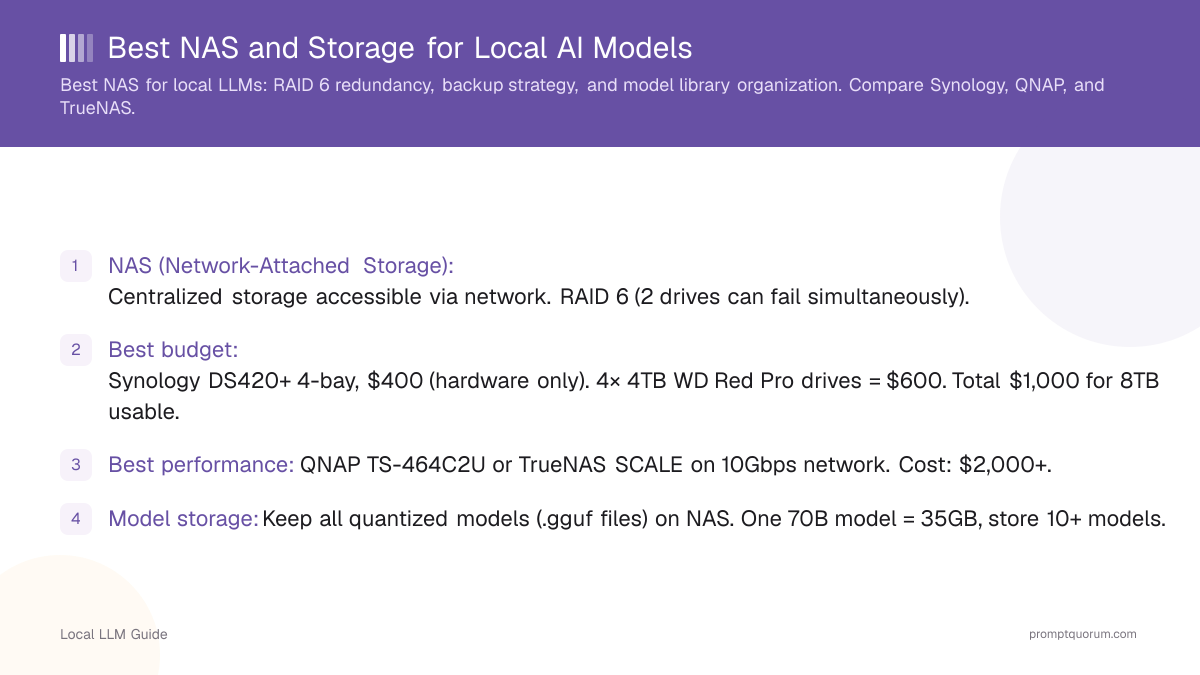
- NAS (Network-Attached Storage): Centralized storage accessible via network. RAID 6 (2 drives can fail simultaneously).
- Best budget: Synology DS420+ 4-bay, $400 (hardware only). 4× 4TB WD Red Pro drives = $600. Total $1,000 for 8TB usable.
- Best performance: QNAP TS-464C2U or TrueNAS SCALE on 10Gbps network. Cost: $2,000+.
- Model storage: Keep all quantized models (.gguf files) on NAS. One 70B model = 35GB, store 10+ models.
- Backup: Daily backup to cloud (Backblaze B2 = $6/month for unlimited). Or external USB drives (offline, offline-safe).
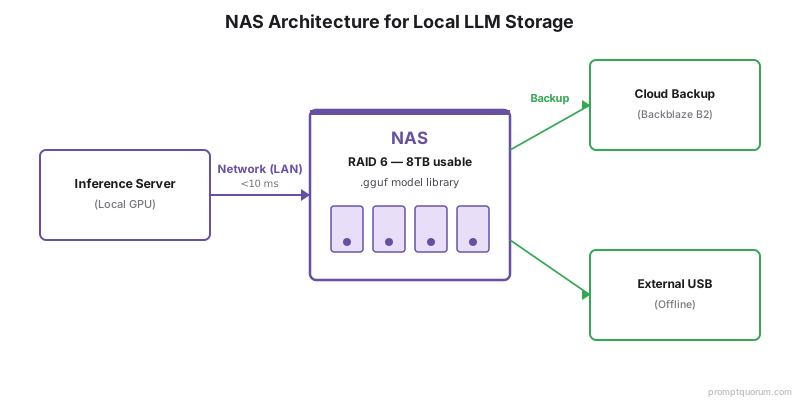
- Network latency: NAS on same LAN as inference server = <10ms latency (acceptable). Over internet = too slow.
- Redundancy: RAID 6 protects against 2 drive failures. Still do external backups (ransomware, theft).
- Cost comparison: 8TB NAS = $1,000 one-time, $6/mo backup. Cloud storage = $50-100/mo indefinitely.
📍 In One Sentence
A NAS keeps a local LLM model library organized, backed up, and accessible from multiple machines, and RAID 6 storage (surviving two simultaneous drive failures) with automated backups is the recommended setup for production local LLM teams.
💬 In Plain Terms
If you're running local models across more than one machine, or your model library is getting large, a NAS is worth having: it's a shared drive on your network that all your machines can pull models from. RAID 6 means two drives can fail at once without losing data, which matters since a single model file can be tens of gigabytes and re-downloading a whole library is a pain.
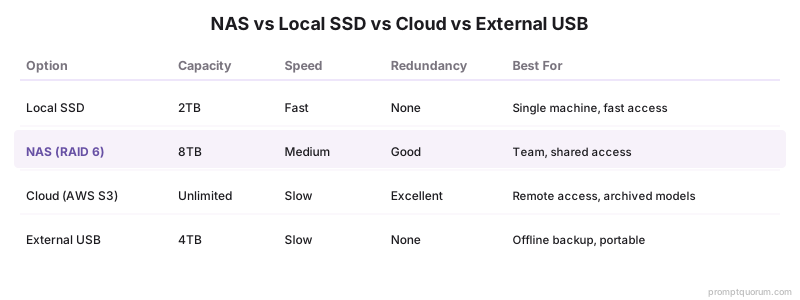
NAS vs Local SSD vs Cloud Storage
Option | Capacity | Cost | Speed | Redundancy | Best For |
|---|---|---|---|---|---|
| Option | Capacity | Cost | Speed | Redundancy | Best For |
| Local SSD | 2TB | $200 | Fast | None | Single machine, fast access |
| NAS (RAID 6) | 8TB | $1,000 | Medium | Good | Team, shared access |
| Cloud (AWS S3) | Unlimited | $50+/mo | Slow | Excellent | Remote access, archived models |
| External USB | 4TB | $150 | Slow | None | Offline backup, portable |
NAS Recommendations by Use Case
Solo dev (1-5 machines): Skip NAS. Use local SSD + external USB backup.
Small team (5-10 users): Synology DS420+ or QNAP TS-432PX. 4-bay, 10Gbps optional. $1,000-1,500.
Medium team (10-50): Synology DS720+ or QNAP TS-464C2U. Dual 10Gbps, SSD cache. $1,500-2,500.
Large team (50+): TrueNAS SCALE on enterprise hardware. Custom build. $3,000+.
For teams with compliance needs (healthcare, finance): TrueNAS (open-source, auditable). Synology/QNAP are proprietary.
RAID Setup & Redundancy
RAID 1 (mirroring): 2 drives, data copied. If 1 fails, use the other. Usable = 50% (2× 4TB = 4TB usable).
RAID 5 (striping + parity): 3+ drives. If 1 fails, rebuild from parity. Usable = 67% (3× 4TB = 8TB usable). Slow rebuild.
RAID 6 (dual parity): 4+ drives. If 2 fail, data safe. Usable = 50% (4× 4TB = 8TB usable). Recommended for production.
RAID 10 (mirror + stripe): 4 drives mirrored in pairs. Fast, expensive. 50% usable.
Recommendation: RAID 6 for teams. Balances redundancy, cost, and speed.
Backup Strategy
Backup rule: 3-2-1 (3 copies, 2 media types, 1 offsite).
- NAS = primary (on-site).
- External USB = secondary (on-site, but physically separate).
- Cloud (Backblaze B2) = offsite backup.
Frequency: Daily incremental, weekly full. Automated via rsync + cron job.
Recovery test: Monthly recovery drill. Restore sample model from backup, verify integrity.
Model Library Organization
/models/
/llama3/
/llama3-7b-instruct-q4.gguf
/llama3-13b-instruct-q4.gguf
/llama3-70b-instruct-q4.gguf
/mistral/
/mistral-7b-instruct-q4.gguf
/quantization-sources/
/llama3-70b-f32.safetensors (full precision backup)
Naming convention: [model]-[params]-[format]-[quantization].gguf
Checksums: Store SHA256 hashes for each model. Verify on download to catch corruption.
Common NAS Mistakes
- RAID 5 on large drives. Rebuild time is 24-48 hours; high chance of 2nd drive failure during rebuild. Use RAID 6.
- No backups. NAS hardware failure = loss of all models. External backups are mandatory.
- Undersizing RAID. Buy 8TB when you think 4TB is enough. Models grow quickly.
Frequently Asked Questions
Should I use NAS for inference, or just storage?
Just storage. Keep inference on local GPU. NAS over network is too slow for real-time inference.
Can I use an old laptop as a NAS?
Yes, but power consumption is high (20W+). Purpose-built NAS uses 10-15W. Cost-effective over 3+ years.
Is cloud backup (Backblaze) secure for model files?
Yes, with encryption. Backblaze uses AES-256 at rest. Data is private (Backblaze can't read it).
How long does RAID 6 rebuild take?
~24 hours for 8TB. During rebuild, if 2nd drive fails, data is lost. Rare but possible; monitor actively.
Can I use Synology + TrueNAS together?
Yes. Synology for speed/ease, TrueNAS for compliance/auditing. But overkill unless you have both.
Do I need 10Gbps network for NAS?
No. Gigabit (1Gbps) is fine for model transfers (1 hour for 35GB 70B model). 10Gbps is for teams >20 users.
What is a NAS and why do I need one for local LLMs?
A NAS (Network-Attached Storage) keeps your model library organized, backed up, and accessible across machines. It is essential for production local LLM teams managing multiple models and users.
What is RAID 6 and why is it recommended for NAS?
RAID 6 provides redundancy where 2 drives can fail simultaneously without data loss. It is essential for production systems to protect against drive failures.
Best NAS for local LLMs: Synology, QNAP, or TrueNAS?
Synology DS420+ is best for budget teams ($1,000 total with drives). QNAP TS-464C2U for performance needs. TrueNAS SCALE for advanced ZFS features and open-source deployment.
Sources
- Synology & QNAP official documentation: RAID setup and rebuild times
- TrueNAS documentation: ZFS redundancy and backup strategies
- Backblaze B2 pricing and encryption specifications