What Is dograh?
dograh is a platform for building "voice agents" — AI systems that answer or make phone calls (or handle web-based voice sessions), listen to what a caller says, decide what to do, and speak a response back in real time. Its own GitHub repository describes it as an open-source, self-hosted alternative to platforms like Vapi and Retell, aimed at teams that want the same category of product without handing conversation audio and transcripts to a third-party vendor by default.
- Core function: a visual workflow builder for designing multi-turn voice conversations, wired to a telephony provider on one side and to LLM/STT/TTS providers on the other
- Deployment model: a Docker Compose stack you run yourself, on a laptop for development or on a server (dograh's own docs specify a minimum of 8 GB RAM and 4 vCPUs for a remote deployment) for production
- Provider architecture: "bring your own" LLM, STT, and TTS — configure a cloud API key, a local OpenAI-compatible endpoint, or one of dograh's own managed models, per workflow
- Developer: dograh-hq on GitHub; the repository's LICENSE file lists the copyright holder as Zansat Technologies Private Limited
- Canonical repository: github.com/dograh-hq/dograh, created September 2025 per GitHub's own repository metadata
Install dograh: Self-Hosted Docker Deployment
dograh is deployed with Docker Compose using a one-line install script, per its own deployment documentation. There is no packaged desktop installer to download — self-hosting means running this script on your own machine or server.
- Local/development install opens the app at
http://localhost:3010once the containers finish starting, per dograh's own documentation - Windows uses an equivalent PowerShell script (
start_docker.ps1) fetched the same way, per the same documentation page - A separate
setup_remote.shscript targets a production server deployment and requires root/sudo access, Docker, and Docker Compose already installed - dograh's own documentation states a remote server deployment needs a minimum of 8 GB RAM and 4 vCPUs, plus inbound TCP ports 80, 443, 3478, and 5349, and UDP ports 3478, 5349, and 49152–49200 for telephony (WebRTC/SIP) traffic
- Running multiple FastAPI workers behind nginx for higher throughput is documented separately in dograh's scaling guide
Local install (macOS/Linux)
Run this from a terminal in an empty directory:
curl -o docker-compose.yaml https://raw.githubusercontent.com/dograh-hq/dograh/main/docker-compose.yaml && curl -o start_docker.sh https://raw.githubusercontent.com/dograh-hq/dograh/main/scripts/start_docker.sh && chmod +x start_docker.sh && ./start_docker.shLocal Model Support: LLM, STT, and TTS
dograh does not require any cloud AI provider — a self-hosted deployment can run its LLM, speech-to-text, and text-to-speech entirely on your own hardware, though it takes a bit more setup than dropping in a hosted API key. dograh's own documentation is specific about how this works, and PromptQuorum did not find claims of local support beyond what is documented below — this is not a "supports everything" platform out of the box.
Local LLM: Ollama and vLLM
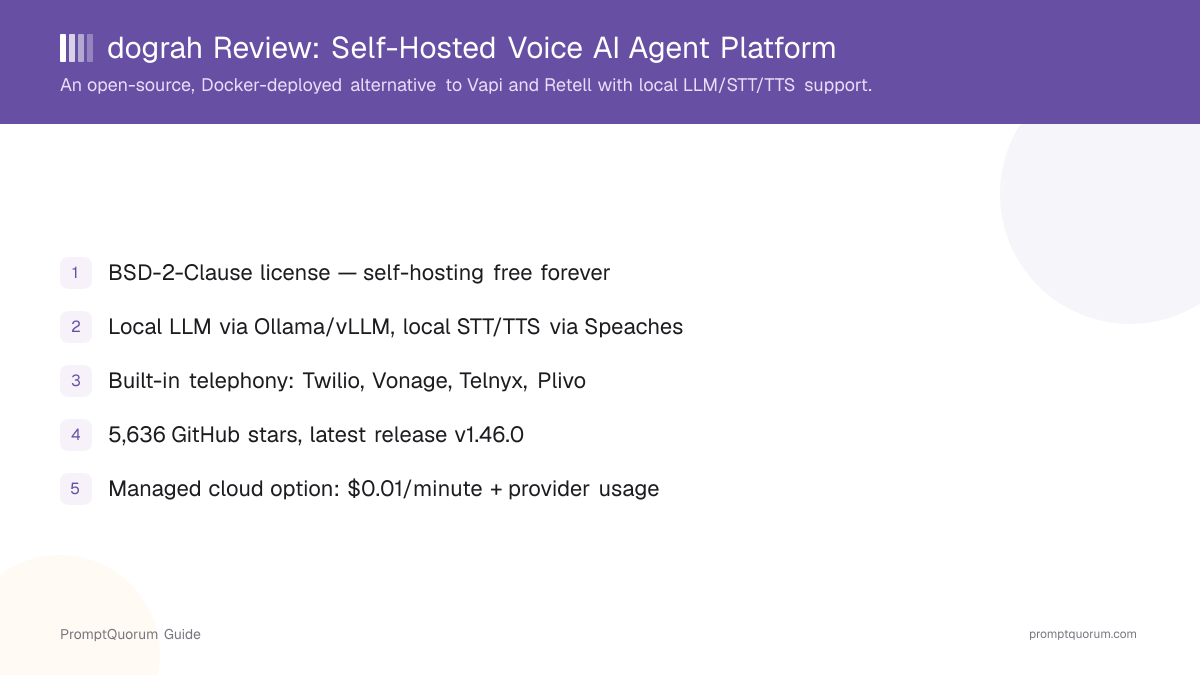
dograh's LLM configuration docs state that alongside cloud providers (OpenAI, Google AI Studio, Google Vertex AI, Azure OpenAI, AWS Bedrock, Groq, OpenRouter, Hugging Face, and others), dograh "supports OpenAI-compatible endpoints such as Ollama and vLLM" — meaning any model you can serve behind an OpenAI-compatible API on your own hardware, through either of those two projects, can act as the reasoning model for a dograh agent.
Local STT and TTS: Speaches
dograh's own voice and transcriber documentation names one specific local, self-hosted option for both speech-to-text and text-to-speech: Speaches, described in dograh's docs as "an OpenAI API-compatible server" for streaming transcription and speech generation. Per Speaches' own project page, Speaches itself is built on faster-whisper for transcription and on Piper and Kokoro for speech generation — so a dograh deployment wired to a self-hosted Speaches instance is, under the hood, running Whisper-family transcription and Kokoro/Piper speech synthesis, with no request leaving your infrastructure.
What dograh's docs do not name
dograh's own documentation does not enumerate specific local LLM checkpoints (it defers that choice to whatever you run behind Ollama or vLLM), and it does not name Coqui TTS or XTTS directly — those are not documented dograh integrations. Anyone evaluating dograh specifically for a named local model should confirm current support against docs.dograh.com before committing, since self-hosted AI tooling documentation changes between releases.
What Can You Build With dograh?
dograh's feature set centers on the pipeline a voice agent needs end to end: a call comes in, speech is transcribed, an LLM decides what to say, speech is synthesized, and the call is transferred or ended — with a visual builder for the logic in between. Per dograh's own GitHub README and documentation.
- Visual workflow builder — design multi-turn conversation logic (what the agent asks, how it branches on the answer) without writing a full state machine by hand
- Telephony integrations — built-in connectors for Twilio, Vonage, Telnyx, Plivo, Cloudonix, Exotel, Vobiz, and Asterisk ARI, per dograh's integration docs
- Bring-your-own LLM/STT/TTS — configure providers per workflow, mixing cloud and local/self-hosted components as needed
- Speech-to-speech mode — per dograh's configuration docs, an alternative pathway that skips separate STT/LLM/TTS steps in favor of a single speech-to-speech model, where the underlying provider supports it
- Call disposition tracking — as of the v1.46.0 release, dograh can derive a structured call disposition (e.g., "resolved," "transferred," "no answer") directly from the conversation
- Warm transfer to a human — hand a call off to a human agent mid-conversation, with configurable dispositions after a successful transfer
- MCP-native tool use, per dograh's own repository description, for connecting an agent to external tools during a call
- Self-hosted authentication and custom domains — dograh's own deployment docs cover configuring login and SSL for a self-hosted instance, separate from the managed cloud product
dograh Pricing: Free Self-Hosted vs. Managed Cloud
Self-hosting dograh via Docker is free, under the BSD-2-Clause license, with no feature gate PromptQuorum could find in the open-source repository. A separate managed cloud product at app.dograh.com exists for teams that want the same software without operating their own server.
Option | Cost | What it includes |
|---|---|---|
| Self-hosted (Docker) | Free | Full open-source platform; BSD-2-Clause; you provide the server and any provider API keys/local models |
| Managed cloud (app.dograh.com) | $0.01/min + provider usage | Hosted infrastructure; you still bring or pay for LLM/STT/TTS/telephony usage separately |
The $0.01/minute figure and self-hosted-is-free-forever positioning come from dograh's own directory listing and public materials — confirm current managed-cloud pricing directly at app.dograh.com before budgeting, since usage-based pricing on a young product can change. Provider costs (a cloud LLM, STT, TTS, or telephony vendor billed separately) apply on both the self-hosted and managed paths unless you use fully local models via Ollama/vLLM and Speaches.
Usage Examples
These are workflows built from dograh's documented features above, not hypothetical use cases.
Run a fully local voice agent for testing
Deploy dograh with the Docker quick-start, point the LLM configuration at a locally served model through Ollama, and configure the voice and transcriber settings to use a self-hosted Speaches instance for TTS/STT. No conversation audio or transcript needs to reach a third-party AI provider during development.
Replace a hosted voice-agent vendor for a support line
Connect a Twilio number to a self-hosted dograh deployment, build the call-handling logic in the visual workflow builder, and configure warm transfer to a human agent for calls the bot cannot resolve, using the call-disposition tracking added in v1.46.0 to route follow-up work.
Use dograh's managed cloud to skip infrastructure ops
For a team that wants dograh's workflow builder and telephony integrations without running Docker in production, app.dograh.com's per-minute pricing avoids self-hosting while keeping the same underlying open-source platform.
Who Should Use dograh?
Whether dograh fits depends on whether you need a self-hostable voice-agent platform specifically, and whether your team is comfortable operating a Docker deployment.
Use dograh if
- You want a voice-agent platform (phone-answering bot, IVR replacement, or similar) that you can run on your own infrastructure instead of a closed hosted vendor
- You want the option to run the LLM, STT, and TTS components fully locally — via Ollama/vLLM and Speaches — for conversations that should never leave your own servers
- You want a permissive open-source license (BSD-2-Clause) with no vendor lock-in on the self-hosted path
- You are comfortable running and maintaining a Docker Compose stack, including opening the telephony ports (WebRTC/SIP) its own docs specify
- You want built-in telephony integrations (Twilio, Vonage, Telnyx, and others) rather than wiring one up from scratch
Wait, or look elsewhere, if
- You want a downloadable desktop voice assistant rather than a platform for building phone agents — see Voxa or Jarvis for Mac
- You only need speech-to-text or text-to-speech in isolation, not a full agent/telephony platform — see the dedicated faster-whisper or whisper.cpp reviews
- You need a fully managed, zero-ops product from day one and do not want to evaluate self-hosting at all — dograh's managed cloud exists for this, but it is a young, usage-priced product rather than an established enterprise SLA vendor
- You need a large, long-established support organization behind the product — dograh is a young project (its GitHub repository was created in September 2025), so support runs through GitHub Issues and community channels on the self-hosted tier
dograh vs. Other Voice Agent and Speech Tools
dograh sits in the real-time voice-agent segment, next to tools that focus on speech input/output rather than full call-handling platforms. Here is how it compares to other options in PromptQuorum's coverage — see the Local LLM Software Directory for the full catalog.
- Voxa — a real-time voice assistant focused on personal/desktop use rather than telephony call-handling; see the Voxa review if you want a conversational voice assistant, not a phone-agent builder.
- Jarvis for Mac — a macOS-native voice assistant; see the Jarvis review for a desktop-first alternative to dograh's server-deployed, telephony-oriented platform.
- faster-whisper — the transcription engine that Speaches (dograh's documented local STT/TTS option) itself runs on; see the faster-whisper review if you only need local speech-to-text, not a full agent platform.
- Whisper.cpp — another local, self-hosted speech-to-text engine; see the Whisper.cpp review for a lighter-weight transcription-only option than deploying dograh's full stack.
Common Mistakes When Evaluating dograh
Most confusion about dograh comes from treating it as a downloadable app, or assuming it works fully offline out of the box without any configuration.
Mistake 1: Looking for a desktop installer
dograh is a self-hosted platform deployed via Docker Compose, not a downloadable end-user application. There is no installer for macOS/Windows/Linux to click — the install path is the Docker quick-start script covered above.
Mistake 2: Assuming self-hosting is automatically fully local/offline
A self-hosted dograh deployment still needs an LLM, STT, and TTS provider configured — by default that could be a cloud API key. Fully local operation requires explicitly configuring Ollama/vLLM for the LLM and Speaches for STT/TTS, per dograh's own documentation.
Mistake 3: Confusing the self-hosted and managed cloud tiers on pricing
Self-hosting dograh via Docker is free under the BSD-2-Clause license. The $0.01/minute charge applies only to the separate managed cloud product at app.dograh.com, and provider usage (LLM/STT/TTS/telephony) is billed separately from either tier unless using fully local models.
Mistake 4: Assuming any local LLM checkpoint is documented as supported
dograh's own docs support local inference through the Ollama and vLLM serving layers, not a fixed list of model names. Whether a specific local model performs well as a real-time voice-agent reasoning engine is a separate question from whether dograh can technically connect to it.
Frequently Asked Questions
What is dograh?
dograh (dograh.com, source at github.com/dograh-hq/dograh) is an open-source, self-hosted platform for building voice AI agents — phone or web-based conversational bots — positioned as an alternative to hosted platforms like Vapi and Retell.
Is dograh free?
Self-hosting dograh via Docker is free, under the BSD-2-Clause license. A separate managed cloud product at app.dograh.com charges $0.01/minute plus whatever the connected LLM/STT/TTS providers bill.
Is dograh open source? What license does it use?
Yes. The repository's own LICENSE file is the BSD 2-Clause "Simplified" License, copyright Zansat Technologies Private Limited.
Does dograh support local, offline AI models?
Yes, for the LLM component, dograh connects to any OpenAI-compatible local endpoint, explicitly including Ollama and vLLM, per its own documentation. For local speech-to-text and text-to-speech, dograh integrates with Speaches, an open-source local server that itself runs on faster-whisper for transcription and Piper/Kokoro for speech generation.
How do I install dograh?
Run the official one-line Docker Compose install script from a terminal: curl -o docker-compose.yaml https://raw.githubusercontent.com/dograh-hq/dograh/main/docker-compose.yaml && curl -o start_docker.sh https://raw.githubusercontent.com/dograh-hq/dograh/main/scripts/start_docker.sh && chmod +x start_docker.sh && ./start_docker.sh. The local deployment opens at http://localhost:3010.
What telephony providers does dograh support?
Built-in integrations for Twilio, Vonage, Telnyx, Plivo, Cloudonix, Exotel, Vobiz, and Asterisk ARI, per dograh's own integration documentation.
How many GitHub stars does dograh have?
dograh had 5,636 stars and 1,398 forks on GitHub, verified via the GitHub API on 2026-09-12. Check the live repository for the current count, since star counts change continuously.
What is the latest dograh release?
As of 2026-09-12, the latest tagged release on GitHub was v1.46.0, dated September 3, 2026, which added call-disposition derivation from conversation content and Cartesia's Sonic-3.6 TTS model, among other changes — check GitHub Releases for the current version.
What are the minimum server requirements to self-host dograh?
dograh's own deployment documentation specifies a minimum of 8 GB RAM and 4 vCPUs for a remote server deployment, plus inbound TCP ports 80, 443, 3478, and 5349, and UDP ports 3478, 5349, and 49152–49200 for telephony traffic.
Who develops dograh?
dograh is developed by dograh-hq on GitHub; the repository's LICENSE file lists the copyright holder as Zansat Technologies Private Limited. The repository was created in September 2025, per GitHub's own metadata.