Key Takeaways
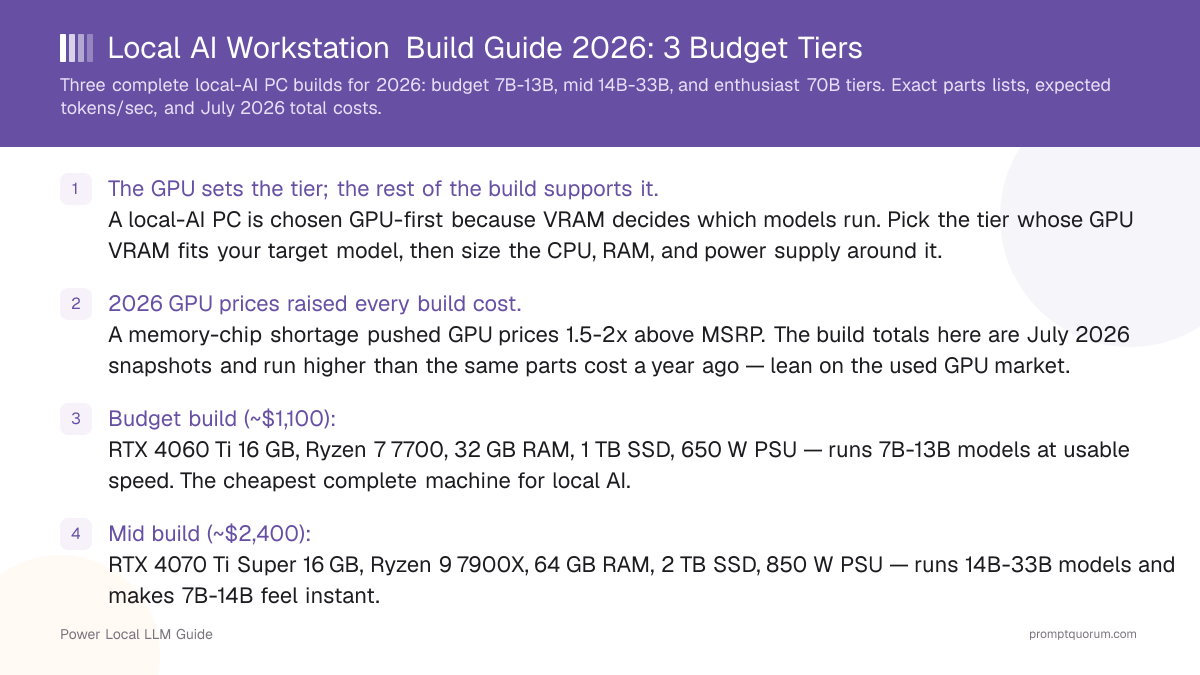
- The GPU sets the tier; the rest of the build supports it. A local-AI PC is chosen GPU-first because VRAM decides which models run. Pick the tier whose GPU VRAM fits your target model, then size the CPU, RAM, and power supply around it.
- 2026 GPU prices raised every build cost. A memory-chip shortage pushed GPU prices 1.5-2x above MSRP. The build totals here are July 2026 snapshots and run higher than the same parts cost a year ago — lean on the used GPU market.
- Budget build (~$1,100): RTX 4060 Ti 16 GB, Ryzen 7 7700, 32 GB RAM, 1 TB SSD, 650 W PSU — runs 7B-13B models at usable speed. The cheapest complete machine for local AI.
- Mid build (~$2,400): RTX 4070 Ti Super 16 GB, Ryzen 9 7900X, 64 GB RAM, 2 TB SSD, 850 W PSU — runs 14B-33B models and makes 7B-14B feel instant.
- Enthusiast build (~$5,000): RTX 5090 32 GB, Ryzen 9 7950X, 128 GB RAM, 4 TB SSD, 1000 W PSU — the only single-GPU build that fits a 70B model at Q4.
- RAM is not a substitute for VRAM. System RAM lets a model spill out of VRAM, but a model running from RAM is too slow for interactive use. Buy enough VRAM for the model; buy RAM for the operating system and tooling.
- The power supply scales with the GPU. A budget build needs 650 W, the mid build 850 W, and the enthusiast build 1000 W because the RTX 5090 alone draws 575 W. Budget the PSU alongside the card.
- Used GPUs are the value play in 2026. A used RTX 4090 or RTX 4060 Ti escapes most of the price surge — buy a verified-working used card to keep the build total down.
Quick Facts
- Budget build (~$1,100): RTX 4060 Ti 16 GB GPU — runs 7B and most 13B models.
- Mid build (~$2,400): RTX 4070 Ti Super 16 GB GPU — runs 14B comfortably, light 22B-33B work.
- Enthusiast build (~$5,000): RTX 5090 32 GB GPU — runs 33B comfortably and 70B at Q4.
- VRAM rule of thumb at Q4_K_M: roughly 0.6 GB per billion parameters, plus 2-4 GB for context and tooling.
- System RAM guidance: 32 GB for the budget build, 64 GB for the mid build, 128 GB for the enthusiast build.
- Power supply by tier: 650 W budget, 850 W mid, 1000 W enthusiast — the RTX 5090 draws 575 W on its own.
- 2026 price reality: GPU prices run 1.5-2x above MSRP on a memory shortage — confirm live prices and consider used cards.
Sponsored
Editor's Choice: The Mid Build (~$2,400)
For most buyers building a PC for local AI, the mid build is the tier that balances capability, cost, and headroom. Built around an RTX 4070 Ti Super 16 GB, it runs every 14B model with context room, handles light 22B-33B work, and makes 7B-14B models feel instant — for roughly $2,400 all in. It is the build that will not frustrate you within months and will not need replacing within a year. Drop to the budget build only if your ceiling is firmly 7B-13B models; step up to the enthusiast build only if you specifically need 70B work. The mid build is the safe default for a machine you want to keep.
📌Note: This Editor's Choice reflects price-to-capability only. PromptQuorum is not enrolled in any affiliate program and the links below carry no affiliate tags — they are plain reference links that earn no commission.
How the Three Build Tiers Compare in 2026
GPU VRAM and power figures are manufacturer specifications. Inference speeds are family-level estimates from PromptQuorum GPU testing for the tier's GPU. Build totals are July 2026 US snapshots — the 2026 GPU price surge pushed cards 1.5-2x above MSRP, so the GPU line dominates each total and moves week to week. Buying the GPU used lowers every total.
📍 In One Sentence
For a local-AI PC build, the GPU's VRAM decides which models the machine can run and the rest of the parts list is sized to support that GPU — choose the tier by model size first.
💬 In Plain Terms
Think of the build as a team built around one star player, the GPU. The CPU, RAM, and power supply are the supporting cast — useful, but they exist to keep the GPU fed. Pick the GPU your model needs first, then assemble the rest around it.
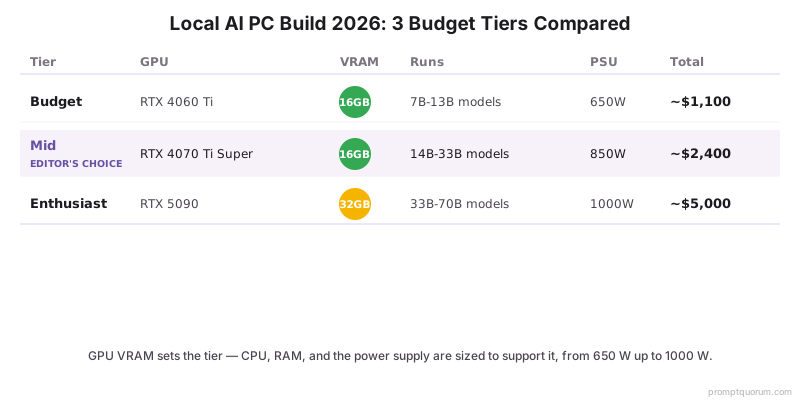
Build tier | GPU | VRAM | Runs | PSU | Total (July 2026) |
|---|---|---|---|---|---|
| Budget | RTX 4060 Ti 16 GB | 16 GB | 7B-13B models | 650 W | ~$1,100 |
| Mid | RTX 4070 Ti Super 16 GB | 16 GB | 14B comfortably, light 22B-33B | 850 W | ~$2,400 |
| Enthusiast | RTX 5090 32 GB | 32 GB | 33B comfortably, 70B at Q4 | 1000 W | ~$5,000 |
Which Build Should You Choose?
Your largest target model decides the tier; your budget confirms it. Find the row that matches your situation.
Your situation | Build this |
|---|---|
| I run 7B-13B models and want the cheapest complete machine | Budget build (~$1,100) |
| I want a first local-AI PC and am not sure how far I will go | Budget build, or mid build for headroom |
| I run 14B models constantly and want them instant | Mid build (~$2,400) |
| I do light 22B-33B work and want a machine that lasts | Mid build (~$2,400) |
| I run 33B models heavily or want strong future headroom | Enthusiast build (~$5,000) |
| I need a single-GPU machine that runs 70B models at Q4 | Enthusiast build (~$5,000) |
| I want to keep the total down despite the 2026 surge | Any tier — buy the GPU used |
| I am unsure and want the safest build to keep for years | Mid build — the Editor's Choice |
Budget Build (~$1,100): RTX 4060 Ti 16 GB
The budget build is the cheapest complete local-AI PC and runs every 7B model plus most 13B models — enough capability for most first-time users. It is built around the RTX 4060 Ti 16 GB, the GPU least inflated by the 2026 surge, which keeps the total reasonable.
- GPU — RTX 4060 Ti 16 GB (~$420-450): 16 GB VRAM, 165 W. Runs 7B models at roughly 20-25 tok/s and fits 14B models with context headroom. The 16 GB capacity is the reason to pick it over the 8 GB version.
- CPU — AMD Ryzen 7 7700 (~$250-280): 8 cores, modest power draw. The CPU does little work during GPU inference, so a mid-range chip is correct here — do not overspend on the CPU in this tier.
- Motherboard — B650 chipset (~$130-160): supports the Ryzen 7 and a single full-size GPU on PCIe. No need for high-end power delivery at this tier.
- RAM — 32 GB DDR5 (~$90-120): enough for the operating system, tooling, and a 7B-13B model running in VRAM. RAM is not a VRAM substitute — 32 GB is sufficient here.
- Storage — 1 TB NVMe SSD (~$70-90): holds the operating system and several models (a 7B Q4 model is roughly 4-5 GB).
- PSU — 650 W 80+ Gold (~$80-100): comfortable headroom for a 165 W GPU and an 8-core CPU.
- Case and cooling — mid-tower with a tower air cooler (~$80-120): the budget tier produces little heat; air cooling is sufficient.
- Why build this tier: lowest cost of entry, low power draw, and enough capability for the 7B-13B models that cover general chat, coding help, and summarization. Why skip it: if you already want 14B or larger models, start at the mid build.
💡Tip: Buy the RTX 4060 Ti in its 16 GB version specifically. The 8 GB version uses the same GPU die and runs at similar speed, but 8 GB cannot fit a 14B model — the extra memory is the entire point of this pick.
Mid Build (~$2,400): RTX 4070 Ti Super 16 GB
The mid build is the Editor's Choice — it runs 14B models instantly, handles light 22B-33B work, and is the tier you build to keep. It is built around the RTX 4070 Ti Super 16 GB, fast enough that response latency stops being noticeable on 14B-class models.
- GPU — RTX 4070 Ti Super 16 GB (~$1,150-1,200): 16 GB VRAM, 285 W. Same model capacity as the budget tier but far faster — 7B-14B models feel instant, and light 22B-33B work is usable.
- CPU — AMD Ryzen 9 7900X (~$330-370): 12 cores. More headroom than the budget CPU for data preparation and running tooling alongside inference.
- Motherboard — B650 or X670 chipset (~$180-240): solid power delivery for the 12-core CPU and a 285 W GPU.
- RAM — 64 GB DDR5 (~$180-230): room for the operating system, larger context windows, and tooling such as a RAG pipeline running next to the model.
- Storage — 2 TB NVMe SSD (~$130-170): holds a sizeable model library — a 33B Q4 model is roughly 18-20 GB.
- PSU — 850 W 80+ Gold (~$120-150): comfortable headroom for the 285 W GPU and the 12-core CPU under sustained load.
- Case and cooling — mid-tower with a 240-280 mm AIO or high-end air cooler (~$150-220): the mid tier produces moderate heat; a quality cooler keeps the CPU stable during long inference runs.
- Why build this tier: you run 14B models constantly and want them instant, or you do light 22B-33B work and want headroom. Why skip it: if 7B-13B is enough, the budget build saves over $1,000; if you need 70B, no 16 GB GPU fits it — go enthusiast.
💡Tip: The mid build fits the same models as the budget build — you are paying for speed, not capacity. Build this tier if 14B models will be a daily workload and waiting on them would annoy you.
📌Note: A used RTX 4090 24 GB sometimes sells close to the price of a new RTX 4070 Ti Super after the 2026 surge. If you find one verified working, it adds 8 GB of VRAM and reaches 33B models — worth checking before you buy the 4070 Ti Super.
Enthusiast Build (~$5,000): RTX 5090 32 GB
The enthusiast build is the only single-GPU machine that fits a 70B model at Q4 — its RTX 5090 32 GB is the headline part. Build this tier for VRAM capacity, not raw speed; the speed is a side effect. The 2026 surge hit this tier hardest, so the GPU line dominates and moves week to week.
- GPU — RTX 5090 32 GB (~$3,650-3,900): 32 GB GDDR7 VRAM, 575 W. The only single consumer card that runs a 70B model at Q4 without a dual-GPU build. It runs 33B models comfortably with room to spare.
- CPU — AMD Ryzen 9 7950X (~$450-520): 16 cores. Enough to run data preparation, fine-tuning experiments, and tooling alongside heavy inference.
- Motherboard — X670E chipset (~$280-380): strong power delivery and PCIe 5.0, sized for a 575 W GPU and the 16-core CPU.
- RAM — 128 GB DDR5 (~$380-480): room for large context windows, multiple models loaded at once, and tooling — and the headroom to spill a model partially to RAM if needed.
- Storage — 4 TB NVMe SSD (~$260-340): a 70B Q4 model is roughly 40 GB; a 4 TB drive holds a large library of large models.
- PSU — 1000 W 80+ Platinum (~$180-240): required because the RTX 5090 draws 575 W on its own — a 750 W unit would sag under load. Do not undersize this part.
- Case and cooling — full-size case with a 360 mm AIO (~$280-380): the 575 W GPU and 16-core CPU produce real heat; a 360 mm liquid cooler keeps the CPU stable during sustained 70B inference.
- Why build this tier: you need 33B or 70B models, you run heavy batch inference, or you want a machine that will not need replacing for years. Why skip it: for 7B-14B models it is overkill — the mid build delivers instant responses on those sizes for less than half the cost.
⚠️Warning: The RTX 5090 draws 575 W on its own. Pair it with the 1000 W power supply in this parts list — a smaller unit will brown out under load. Confirm your wall circuit can supply the full draw before building.
📌Note: A 70B model at Q4 needs roughly 39-42 GB of VRAM, so even the RTX 5090 32 GB runs 70B at Q4 only with aggressive quantization or partial offload to system RAM. The 128 GB of RAM in this build gives that offload room to work.
How the 2026 Price Surge Changes the Build Math
The 2026 memory-chip shortage pushed GPU prices 1.5-2x above MSRP, and since the GPU is the largest line in every build, it raised every total above last year. Plan the build around current prices, not launch prices.
📍 In One Sentence
The 2026 memory shortage pushed GPU prices 1.5-2x above MSRP, raising every local-AI build total because the GPU is the largest single line in the parts list.
💬 In Plain Terms
The GPU is the most expensive part of the machine, and in 2026 the GPU is the part that got expensive. Until the memory shortage eases, treat launch prices as history, buy the GPU second-hand when you can, and do not buy more VRAM than your model needs.
- The GPU dominates the total. In all three tiers the GPU is the single biggest cost — the surge changes the build total more than any other part.
- The cause is memory, not GPUs. A GDDR and HBM supply shortage raised the cost of every card with fast memory; the higher the VRAM, the harder the card was hit. The RTX 5090 went from a $1,999 launch price to roughly $3,650-3,900.
- Lower-end GPUs held up better. The RTX 4060 Ti 16 GB sits near its MSRP, which is why the budget build total moved least.
- Used GPUs are the value play. A used RTX 4060 Ti or RTX 4090 escapes most of the surge — buying a verified-working used card is the simplest way to cut the build total.
- Non-GPU parts moved less. CPU, motherboard, SSD, and PSU prices rose modestly; DDR5 RAM also tightened with the memory shortage, but the GPU is still the line to watch.
Decision Flowchart: Pick Your Build in Four Questions
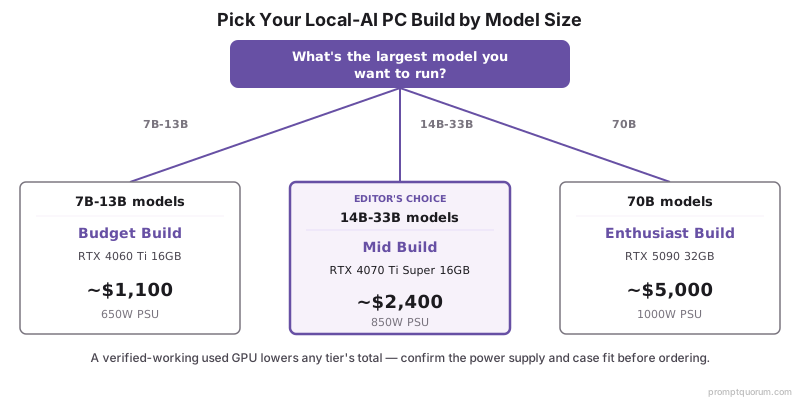
Four questions, in order, route most builders to one tier.
📍 In One Sentence
Pick a local-AI PC build by answering largest model size first, budget ceiling second, new-versus-used GPU third, and power and space planning last.
💬 In Plain Terms
Start with the biggest model you actually want to run and let that set your tier. Then check your budget, decide whether to buy the GPU used, and confirm your power supply and case fit the parts. Doing it in that order avoids a build that cannot run your model.
- 1. What is the largest model you want to run? 7B-13B: budget build. 14B-33B: mid build. 70B: enthusiast build.
- 2. What is your hard budget ceiling? Around $1,100: budget build. Around $2,400: mid build. Around $5,000: enthusiast build.
- 3. New or used GPU? A verified-working used GPU escapes most of the 2026 surge — choose used to lower any tier's total.
- 4. Does your power and space plan hold? Confirm the PSU matches the tier (650 W / 850 W / 1000 W) and the case fits the GPU and cooler before ordering parts.
Where to Buy Components
Major retailers carry every part in these builds; the used market is the value source for the GPU specifically. The links below are plain product-search links; they carry no affiliate tags and earn no commission.
- Amazon and Newegg: the widest stock of CPUs, RAM, SSDs, power supplies, and cases. New GPU stock is thinner and priced at the 2026 surge level.
- Used GPU market: the best value for the GPU line — a verified-working used RTX 4060 Ti, RTX 4070 Ti Super, or RTX 4090 escapes most of the surge.
- Micro Center (US, in-store): often the best new GPU and CPU pricing if a store is reachable; also useful for CPU-plus-motherboard bundles.
- Buy the GPU first. It is the largest, most volatile line — lock in the GPU at a price you accept, then buy the supporting parts around it.
⚠️Warning: Because of the 2026 GPU price surge, every total in this guide is a fast-moving July 2026 snapshot. Always open the current retailer listing for the GPU before building — its price has moved week to week and it dominates the build cost.
Common Mistakes When Building a Local-AI PC
- Choosing the CPU before the GPU. The GPU decides which models the machine runs; the CPU does little during inference. Pick the GPU first, then size the CPU to support it.
- Buying system RAM instead of VRAM. RAM lets a model spill out of VRAM, but a model running from RAM is too slow for interactive use. Buy enough VRAM for the model; buy RAM only for the operating system and tooling.
- Undersizing the power supply. The RTX 5090 alone draws 575 W. A power supply that browns out under load is worse than a slower GPU that runs stably — match the PSU to the tier.
- Anchoring on GPU MSRP. The 2026 surge means launch prices no longer reflect reality. Budget the GPU against the live retailer price and consider the used market.
- Buying the 8 GB RTX 4060 Ti for the budget build. It shares a name with the 16 GB version but cannot fit a 14B model. Confirm the 16 GB variant in the listing.
- Overbuilding for 7B models. If 7B models cover your use case, the enthusiast build wastes thousands of dollars and hundreds of watts. Match the tier to the model, not to the budget you happen to have.
- Skipping case and cooling planning. A 575 W GPU plus a 16-core CPU produces real heat. Confirm the case fits the GPU and cooler and has airflow before ordering parts.
Sources
- Best GPU Buying Guide for Local LLMs 2026 — PromptQuorum: July 2026 GPU prices and the 1.5-2x surge over MSRP used for the build totals here.
- Local LLM Workstation Build — PromptQuorum: dual-GPU 70B workstation parts list, cooling, and power-supply guidance behind the enthusiast tier.
- NVIDIA GeForce RTX 40 and 50 Series Specifications — Official VRAM capacity and power (TGP) figures for the RTX 4060 Ti, 4070 Ti Super, and 5090.
- PCPartPicker — Live component pricing for AMD Ryzen CPUs, DDR5 RAM, NVMe SSDs, and power supplies.
Frequently Asked Questions
How much does it cost to build a PC for local AI in 2026?
A budget local-AI PC costs roughly $1,100, a mid build roughly $2,400, and an enthusiast 70B build roughly $5,000. These are July 2026 snapshots — the 2026 memory-chip shortage pushed GPU prices 1.5-2x above MSRP, and since the GPU is the largest line in every build, it raised each total above what the same parts cost a year ago.
What GPU should I put in a local-AI PC build?
Pick the GPU by your largest target model. An RTX 4060 Ti 16 GB suits a budget build for 7B-13B models, an RTX 4070 Ti Super 16 GB suits a mid build for 14B-33B models, and an RTX 5090 32 GB suits an enthusiast build for 70B work. The GPU decides which models the machine can run, so it is chosen first and the rest of the parts list is built around it.
How much RAM do I need for a local-AI PC?
Plan 32 GB for a budget build, 64 GB for a mid build, and 128 GB for an enthusiast build. System RAM is not a substitute for VRAM — a model running from RAM is too slow for interactive use. RAM is for the operating system, context, and tooling; buy enough VRAM on the GPU for the model itself.
What power supply does a local-AI PC need?
Match the power supply to the tier: 650 W for the budget build, 850 W for the mid build, and 1000 W for the enthusiast build. The enthusiast tier needs 1000 W because the RTX 5090 draws 575 W on its own. An undersized power supply causes instability under load, so do not cut this part.
Should I buy GPU components new or used in 2026?
Buy the GPU used where you can, and other parts new. The 2026 surge pushed new GPU prices 1.5-2x above MSRP, but the used market escaped most of it — a verified-working used RTX 4060 Ti, RTX 4070 Ti Super, or RTX 4090 lowers the build total significantly. CPUs, RAM, SSDs, and power supplies are best bought new.
Can a single-GPU build run a 70B model?
Yes, the enthusiast build can. An RTX 5090 32 GB is the only single consumer card that fits a 70B model at Q4, which needs roughly 39-42 GB of VRAM — so it runs 70B with aggressive quantization or partial offload to system RAM. The 128 GB of RAM in the enthusiast build gives that offload the room it needs.
Is the mid build worth the extra cost over the budget build?
Yes, if you run 14B-class models regularly. The budget and mid builds fit similar models, but the mid build's RTX 4070 Ti Super is far faster — 14B models feel instant rather than sluggish, and light 22B-33B work becomes usable. If your ceiling is firmly 7B-13B models, the budget build saves over $1,000 and is the better value.
Do I need a Threadripper CPU for a local-AI PC?
No. A consumer Ryzen CPU is enough for all three builds in this guide — a Ryzen 7 for the budget tier, a Ryzen 9 for the mid and enthusiast tiers. A Threadripper is only worth its cost for a dual-GPU machine that runs fine-tuning and inference at the same time, which is beyond a single-GPU build.