Key Takeaways
- Unified memory is the binding constraint. On Apple Silicon the model shares one memory pool with the system — a model that does not fit in unified memory cannot run. Choose the Mac whose memory fits your target model, then optimize for bandwidth and form factor.
- Memory cannot be upgraded after purchase. Apple Silicon unified memory is soldered. Whatever you buy is permanent — size for the model you will want in two years, not just today.
- Budget pick: Mac Mini M6 32 GB (~$899) — Apple's Aug 25, 2026 refresh entry chip, 170 GB/s bandwidth, 32 GB memory ceiling covers 7B-14B models only; not enough for 30B or 70B.
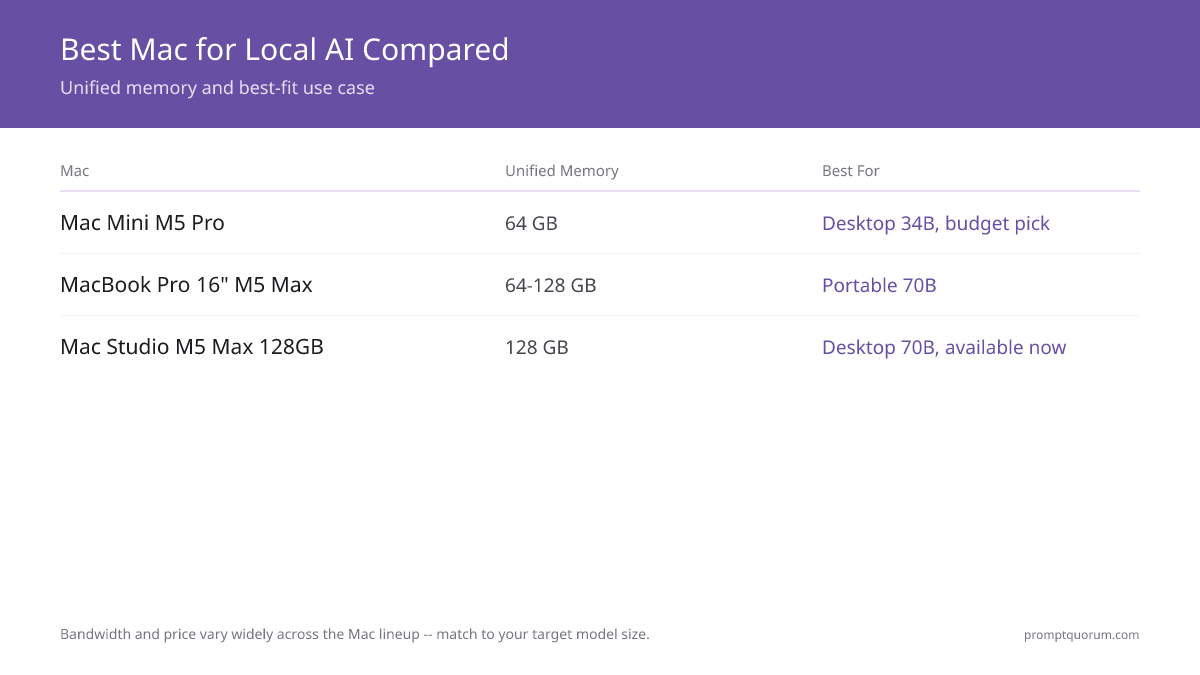
- Value / server pick: Mac Mini M5 Pro 64 GB (~$1,699) — silent, 25-55 W under load, ~$26-39/year electricity, and 64 GB runs 34B models and fits 70B Q4 tightly.
- Portable pick: MacBook Pro 16" M5 Pro 64 GB (~$3,499) or M5 Max 128 GB (~$4,499) — 307-614 GB/s bandwidth, runs 70B Q4 to Q5. Accepts a 10-15% sustained-load thermal throttle for portability.
- Desktop 70B pick: Mac Studio M5 Max 128 GB (from ~$2,499) — 460-614 GB/s bandwidth runs 70B at Q5. Ships September 22, 2026; no independent benchmarks exist yet.
- Extreme pick: Mac Studio M5 Ultra (from ~$5,499, up to 512 GB) — 1.2 TB/s bandwidth, base config ships September 22, 2026; the 512 GB configuration ships late October 2026 and is expected to price well above $10,000.
- Bandwidth, not chip name, sets speed. The M5 Max at 460-614 GB/s generates roughly 2x the tokens per second of the M5 Pro at 307 GB/s on the same model (Apple's own figures for the new M6/M5 Pro Mac Mini and M5 Max/M5 Ultra Mac Studio; independent measurement is not yet available).
- Apple Silicon trades raw speed for capacity and quiet. A desktop RTX GPU is faster on 7B-13B models, but its 24-32 GB VRAM cannot fit a 70B model that a 128 GB Mac runs comfortably, let alone the 512 GB the Mac Studio M5 Ultra can reach.
- Power draw is low across the line. A Mac Mini draws 25-55 W under LLM load and an M5 Max 60-100 W — versus 300-450 W for a desktop RTX card doing comparable work.
Quick Facts
- Budget tier (~$899): Mac Mini M6 32 GB — 170 GB/s bandwidth, covers 7B-14B models only.
- Server tier (~$1,699): Mac Mini M5 Pro 64 GB — silent, always-on, runs up to 34B and tight 70B Q4.
- Portable tier (~$3,499-4,499): MacBook Pro 16" M5 Pro 64 GB / M5 Max 128 GB — runs 70B on the move.
- Desktop tier (from ~$2,499): Mac Studio M5 Max 128 GB — runs 70B at Q5.
- Extreme tier (from ~$5,499): Mac Studio M5 Ultra, base 96 GB up to 512 GB — the largest local models.
- Unified memory rule of thumb at Q4_K_M: roughly 0.6 GB per billion parameters, plus 2-4 GB for context and tooling.
- Memory bandwidth: Mac Mini M6 170 GB/s, M5 Pro 307 GB/s, M5 Max 460-614 GB/s, M5 Ultra 1.2 TB/s.
- Power draw range: Mac Mini M5 Pro 25-55 W, MacBook Pro M5 Max 60-100 W under LLM load.
- Availability: the Aug 25, 2026 Mac Mini and Mac Studio refresh ships September 22, 2026, except the M5 Ultra 512 GB configuration, which ships late October 2026 — confirm current Apple Store pricing before buying.
Sponsored
Editor's Choice: Mac Mini M5 Pro 64 GB
For most buyers choosing a Mac specifically for local AI, the Mac Mini M5 Pro with 64 GB of unified memory is the pick that balances capability, price, and running cost. Its 64 GB clears every model up to 34B with context headroom and fits 70B Q4 tightly, it runs silently and draws only 25-55 W under inference load, and at roughly $1,699 it is the most capable Mac Mini configuration in Apple's August 25, 2026 refresh. It also makes an ideal always-on home or office AI server. Step down to the Mac Mini M6 32 GB (~$899) only if 7B-14B models genuinely cover your use case — its 32 GB ceiling cannot fit 30B or 70B models. Step up to the MacBook Pro 16" only if you need portability; step up to a Mac Studio M5 Max 128 GB only if you need 70B at higher quality on the desktop, or a Mac Studio M5 Ultra if you need the largest local models. The new Mac Mini configurations ship September 22, 2026.
📌Note: This Editor's Choice reflects price-to-capability only. PromptQuorum is not enrolled in any affiliate program and the links below carry no affiliate tags — they are plain reference links that earn no commission.
How the Macs Compare for Local AI in 2026
Memory and bandwidth figures are Apple specifications. MacBook Pro inference speeds are measured 8B and 70B Q4 figures from PromptQuorum Apple Silicon testing. Apple refreshed the Mac Mini and Mac Studio on August 25, 2026, shipping September 22, 2026 (the Mac Studio M5 Ultra 512 GB configuration ships late October 2026) — no independent tokens-per-second benchmarks exist yet for the M6, M5 Pro Mac Mini, M5 Max Mac Studio, or M5 Ultra, so those rows are marked accordingly rather than estimated. Prices are an August 2026 US snapshot; confirm current Apple Store pricing before buying.
📍 In One Sentence
For a Mac running local LLMs, unified memory decides which models you can load and memory bandwidth decides how fast they answer — buy for the first, then optimize the second.
💬 In Plain Terms
Think of unified memory as one shared table that the model, the app, and the system all share. A higher-bandwidth chip clears the table faster, but if the model does not fit on the table at all, speed never matters. Pick the Mac whose table is big enough first.
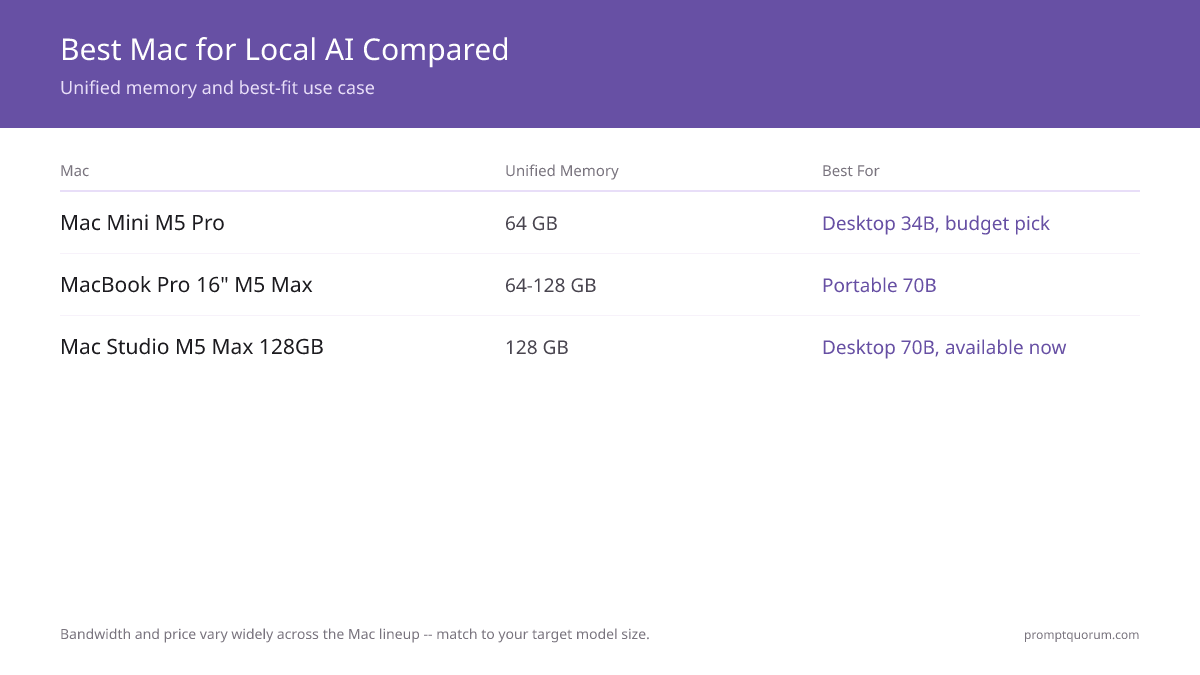
Mac | Unified memory | Bandwidth | Speed (8B Q4) | Speed (70B Q4) | Price (Aug 2026) | Best for |
|---|---|---|---|---|---|---|
| Mac Mini M6 32 GB | 32 GB | 170 GB/s | not yet benchmarked | cannot fit (32 GB max) | ~$899 | Budget entry, 7B-14B models only |
| Mac Mini M5 Pro 64 GB | 64 GB | 307 GB/s | not yet benchmarked | not yet benchmarked (tight fit) | ~$1,699 | Silent always-on server, 34B models |
| MacBook Pro 16" M5 Pro 64 GB | 64 GB | 307 GB/s | ~50-60 tok/s | ~6-9 tok/s | ~$3,499 | Portable 34B-70B Q4 (tight) |
| MacBook Pro 16" M5 Max 128 GB | 128 GB | 614 GB/s | ~110-120 tok/s | 12-16 tok/s | ~$4,499 | Portable 70B Q5, multi-model |
| Mac Studio M5 Max 128 GB | 128 GB | 460-614 GB/s | not yet benchmarked | not yet benchmarked | from ~$2,499 | Desktop 70B, ships Sept 22, 2026 |
| Mac Studio M5 Ultra | 96 GB (base) - 512 GB | 1.2 TB/s | not yet benchmarked | not yet benchmarked | from ~$5,499 | Extreme workstation, 512 GB ships Oct 2026 |
Which Mac Should You Buy?
Your largest target model and your form factor decide the Mac; your budget decides the memory tier inside it. Find the row that matches your situation.
Your situation | Buy this |
|---|---|
| I want the cheapest capable Mac, 7B-14B models only | Mac Mini M6 32 GB |
| I want a silent always-on AI server for home or office | Mac Mini M5 Pro 64 GB |
| I run 34B models on a desk and value low running cost | Mac Mini M5 Pro 64 GB |
| I need 70B Q4 and travel with the machine | MacBook Pro 16" M5 Pro 64 GB |
| I want 70B at Q5 quality and run multiple models at once | MacBook Pro 16" M5 Max 128 GB |
| I want a 70B desktop machine on the new lineup | Mac Studio M5 Max 128 GB |
| I need the largest local models possible (100B+, MoE) | Mac Studio M5 Ultra, up to 512 GB |
| I want a 70B desktop today, before the Sept 22 ship date | Previous-gen Mac Studio M4 Max, often discounted |
| I am unsure and want the safest first Mac for local AI | Mac Mini M5 Pro 64 GB — upgrade later if you outgrow it |
Mac Mini M6 vs M5 Pro: The Silent Always-On Server
Apple refreshed the Mac Mini on August 25, 2026 with two chips: the M6 (budget) and the M5 Pro (value pick for serious local AI). Both ship September 22, 2026. The M5 Pro is the best Mac for an always-on local AI server — silent, low-power, and able to run models up to 34B with a tight 70B Q4 fit. The M6 is capable but capped at 32 GB, which rules out 30B and 70B models.
- Mac Mini M6 (~$899, 32 GB max): 12-core CPU, 12-core GPU, dual 16-core Neural Engine, 170 GB/s bandwidth. Apple states roughly 40% faster CPU performance and up to 4x AI performance versus the outgoing M4 (Apple's own claim, not independently benchmarked). Handles 7B-14B models comfortably; 32 GB is a hard ceiling that rules out 30B and 70B models.
- Mac Mini M5 Pro (~$1,699, 64 GB max): the recommended pick. Up to 18-core CPU, 20-core GPU, 307 GB/s bandwidth, Thunderbolt 5. Fits 34B models with headroom and 70B at Q4 tightly. Enough memory to run an LLM, Whisper speech-to-text, and a RAG pipeline at the same time.
- Why buy this Mac: the M5 Pro is the lowest-cost entry to serious Apple Silicon AI, silent operation, 25-55 W power draw (~$26-39/year electricity), and a small footprint that fits in a closet as a server. The M6 undercuts it in price if 7B-14B genuinely covers your use case.
- Why skip this Mac: the M6's 32 GB ceiling cannot fit a 30B or 70B model, and neither Mac Mini is portable. If 70B at real headroom is your target, choose a MacBook Pro or a Mac Studio M5 Max instead.
💡Tip: Buy the 64 GB M5 Pro, not the 32 GB M6, if 34B or 70B models are on your roadmap. The extra memory is the difference between topping out at 14B models and comfortably running 34B — and Apple Silicon memory cannot be added later.
📌Note: The Mac Mini M5 Pro makes an excellent headless AI server: install Ollama, expose the API on the LAN, and every device in the house can use it. Running it 24/7 for a year costs less than one month of a cloud chat subscription.
⚠️Warning: Both new Mac Mini configurations ship September 22, 2026 — pre-order figures above are Apple's announced pricing, not yet independently benchmarked in the Mac mini chassis. The outgoing M4 Mac Mini (from $599) and M4 Pro Mac Mini (up to $2,299, 64 GB max) are the previous generation and may be discounted while stock lasts.
MacBook Pro 16" M5 Pro vs M5 Max: The Portable 70B Workstation
The MacBook Pro 16" (M5 Pro or M5 Max, launched March 2026 and unaffected by Apple's August 25 Mac Mini/Mac Studio refresh) is the pick for buyers who need 70B-class models in a portable form factor. The M5 Max is the only portable chip that comfortably clears 70B; the M5 Pro fits 70B at Q4 tightly. The trade-off versus a desktop with the same chip is a 10-15% thermal throttle under sustained inference.
- MacBook Pro 16" M5 Pro 64 GB (~$3,499): up to 18-core CPU, 20-core GPU, 307 GB/s bandwidth — 64 GB is this chip's memory ceiling. Runs 8B models at roughly 50-60 tok/s and Llama 3.3 70B Q4 at roughly 6-9 tok/s (tight fit). The portable entry point to 70B local AI.
- MacBook Pro 16" M5 Max 128 GB (~$4,499): up to 40-core GPU, 614 GB/s bandwidth. Runs 8B models at roughly 110-120 tok/s and 70B at Q5 (higher quality) at 12-16 tok/s, and supports running two models at once — for example a 70B model plus a 13B model.
- Why buy this Mac: you need 70B models and portability, you want a single machine for creative work and AI, or you present and travel and cannot leave a desktop behind.
- Why skip this Mac: if the machine never leaves a desk, a Mac Studio with the same memory costs less and runs cooler; if 34B models are enough, the Mac Mini M5 Pro saves over $1,800.
⚠️Warning: The MacBook Pro 16" M5 Pro/M5 Max throttles roughly 10-15% under sustained inference once the chassis heats up — typically after a few hours of continuous load. For 24/7 inference, a Mac Studio is the better tool; for portable bursts of 70B work, the MacBook Pro is fine.
📌Note: The M5 Pro (64 GB, 307 GB/s) and M5 Max (128 GB, 614 GB/s) are different chips, not just different memory configurations of the same chip — the M5 Max buys roughly double the bandwidth and double the memory ceiling, not just capacity.
Mac Studio M5 Max vs M5 Ultra: Desktop and Extreme
Apple refreshed the Mac Studio on August 25, 2026 with the M5 Max (desktop 70B pick) and M5 Ultra (extreme, up to 512 GB) — base configurations ship September 22, 2026, with the M5 Ultra 512 GB configuration following in late October 2026. A 128 GB Mac Studio M5 Max runs 70B at Q5 quality and stays quieter under sustained load than a MacBook Pro, because the desktop chassis has no laptop thermal ceiling. The M5 Ultra exists for buyers who need models larger than 128 GB can hold.
- Mac Studio M5 Max (from ~$2,499, 128 GB max): 460-614 GB/s bandwidth depending on GPU core count. The desktop pick for 70B models. Not yet independently benchmarked — it has not shipped as of this writing.
- Mac Studio M5 Ultra (from ~$5,499, 96 GB base, up to 256 or 512 GB): the 36-core CPU / 80-core GPU configuration supports up to 512 GB of unified memory at roughly 1.2 TB/s bandwidth. The 512 GB configuration ships late October 2026 and is expected to price well above $10,000. This is the tier for the largest local models — well beyond a single 70B model — not a mainstream buy.
- Why buy a Mac Studio: you want a 70B desktop machine on the current lineup, you want quieter sustained operation than a MacBook Pro, or (M5 Ultra specifically) you need to run models larger than 128 GB can hold.
- Why skip a Mac Studio: if you need portability, buy a MacBook Pro; if 34B models are enough, the Mac Mini M5 Pro is far cheaper; if you need a 70B desktop before September 22, 2026, look at the previous-generation Mac Studio M4 Max, which is likely to be discounted as the new lineup ships.
⚠️Warning: Neither Mac Studio configuration has shipped as of this writing — base configurations arrive September 22, 2026, and the M5 Ultra 512 GB configuration arrives late October 2026. Prices and specs above are Apple's own announced figures; there are no independent benchmarks yet. The previous-generation Mac Studio (M4 Max, M3 Ultra) ships today and is verified to run 70B models if you need a desktop Mac immediately.
How Much Unified Memory Do You Need?
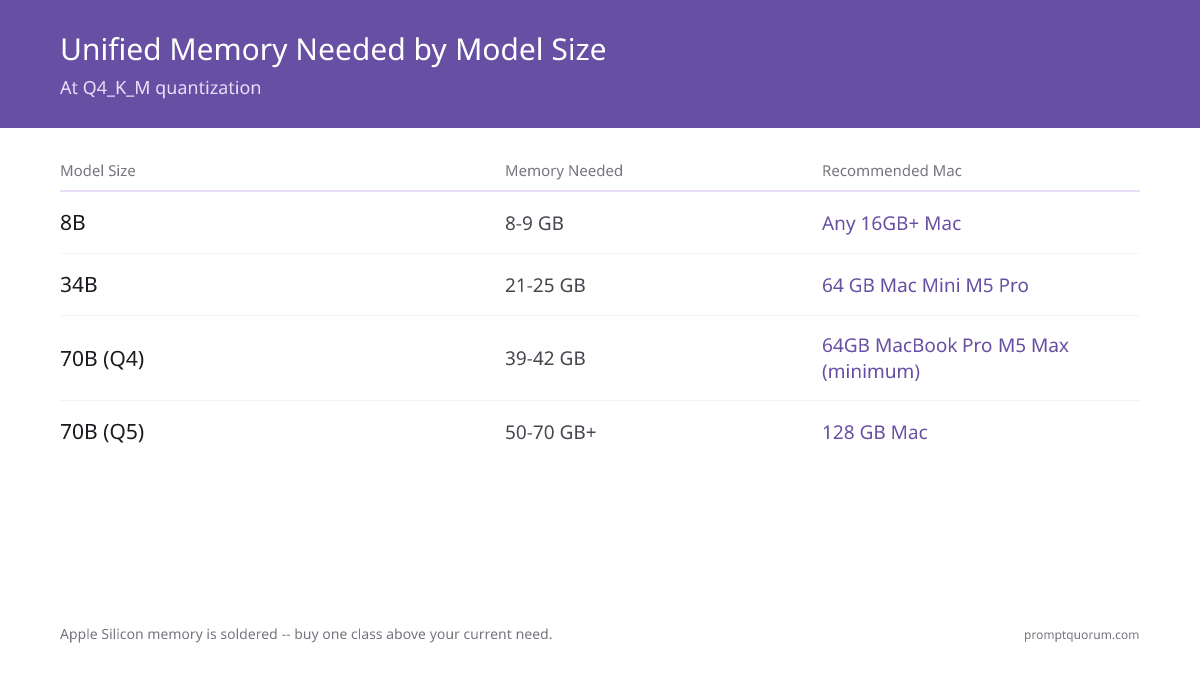
At Q4_K_M quantization a model needs roughly 0.6 GB of unified memory per billion parameters, plus 2-4 GB for context and tooling — and on a Mac that memory is also shared with macOS itself. Leave headroom for the operating system: a 16 GB Mac is not a 16 GB model budget.
- 8B models — 8-9 GB: fit any Mac with 16 GB or more, including the Mac Mini M6. A 32 GB Mac leaves comfortable headroom.
- 13-14B models — 11-13 GB: need 32 GB once macOS and context overhead are counted. Mac Mini M6 (32 GB) and up.
- 34B models — 21-25 GB: need 64 GB in practice. Mac Mini M5 Pro 64 GB is the value pick here — the M6's 32 GB ceiling cannot fit a 34B model.
- 70B models at Q4 — 39-42 GB: need 64 GB minimum, with 64 GB tight once context is added. Mac Mini M5 Pro 64 GB or MacBook Pro 16" M5 Pro 64 GB is the floor.
- 70B models at Q5 or concurrent models — 50-70 GB+: need 128 GB. MacBook Pro 16" M5 Max 128 GB or a Mac Studio M5 Max 128 GB.
- Models larger than a single 70B, or very large MoE models — 100 GB+: need the Mac Studio M5 Ultra, which reaches up to 512 GB unified memory (the 512 GB configuration ships late October 2026).
💡Tip: Apple Silicon memory is soldered and cannot be upgraded. Buy one tier above your current need: if you run 34B models today, 64 GB is the floor, not the comfortable choice. For the full method, see the unified memory guide in Related Reading.
Decision Flowchart: Pick Your Mac in Four Questions
Four questions, in order, route most buyers to one Mac.
📍 In One Sentence
Pick a Mac for local AI by answering largest model size first, portability second, always-on server use third, and availability last.
💬 In Plain Terms
Start with the biggest model you actually want to run and let that set the memory you need. Then decide whether it must travel, whether it runs around the clock, and whether you can wait for the M5 Mac Studio. Doing it in that order is how people avoid buying a Mac that cannot fit their model.
- 1. What is the largest model you want to run? 7-14B: Mac Mini M6 32 GB. 34B: Mac Mini M5 Pro 64 GB. 70B Q4: 64 GB Mac Mini M5 Pro or MacBook Pro M5 Pro. 70B Q5 or concurrent: 128 GB MacBook Pro M5 Max or Mac Studio M5 Max. 100B+ or huge MoE: Mac Studio M5 Ultra, up to 512 GB.
- 2. Does the machine need to move? Yes: MacBook Pro 16" M5 Pro or M5 Max. No: Mac Mini (up to 34B/70B Q4) or Mac Studio (70B and up).
- 3. Is it an always-on server? Yes: Mac Mini M5 Pro 64 GB — silent, 25-55 W, cheapest to run 24/7. No: pick by model size above.
- 4. Do you need the machine before September 22, 2026? The new Mac Mini and Mac Studio configurations ship that date (M5 Ultra 512 GB ships late October 2026). If you need a desktop today, buy the previous-generation Mac Studio M4 Max, likely to be discounted as the new lineup ships, or wait.
Where to Buy
Apple sells every configuration directly; Amazon and other retailers stock common configurations, sometimes below Apple list price. The links below are plain product-search links; they carry no affiliate tags and earn no commission.
- Apple Store (apple.com): the only source for every memory and storage configuration, including build-to-order. Required if you want a non-standard config, and the only place to order the new Mac Mini and Mac Studio configurations ahead of their September 22, 2026 ship date.
- Amazon: stocks popular fixed configurations of the Mac Mini and MacBook Pro, sometimes discounted below Apple list. Selection of high-memory build-to-order configs is limited.
- Apple refurbished: previous-generation Macs (M4 Max Mac Studio, M4 Pro Mac Mini, earlier MacBook Pros) at a discount with full warranty — a sensible option for a 70B desktop before the new lineup ships.
- B&H Photo and authorized resellers: carry common configs and occasionally beat Apple pricing; useful for the MacBook Pro 16".
⚠️Warning: Apple announced the Mac Mini and Mac Studio refresh on August 25, 2026; base configurations ship September 22, 2026, and the Mac Studio M5 Ultra 512 GB configuration ships late October 2026. The dollar figures here are an August 2026 snapshot — open the current Apple Store listing before buying, and check whether the memory upgrade you need has moved.
Common Mistakes When Buying a Mac for Local AI
- Buying for the chip name instead of unified memory. A faster M5 Max with too little memory cannot fit your model. Confirm the model fits in unified memory with 2-4 GB of headroom first, then compare bandwidth.
- Assuming the Mac Mini M6's 32 GB ceiling covers 30B or 70B models. It does not. 32 GB is a hard limit at roughly 14B models — the M5 Pro (64 GB) is the floor for 34B and up.
- Forgetting that Apple Silicon memory cannot be upgraded. The memory is soldered. Underbuy and the only fix is a new Mac — size one tier above today's need.
- Assuming the new Mac Mini and Mac Studio configurations are shipping immediately. Apple announced them August 25, 2026; base configurations ship September 22, 2026, and the Mac Studio M5 Ultra 512 GB configuration ships late October 2026. If you need hardware sooner, buy the previous-generation model or wait.
- Buying a MacBook Pro for a desk-bound 24/7 server. It throttles under sustained load. For an always-on server, the Mac Mini M5 Pro or a Mac Studio runs cooler and quieter.
- Overbuying for 8B models. If 8B models cover your use case, a 128 GB Mac is wasted money. Match the memory tier to the model, not to the budget you happen to have.
- Treating Apple's "up to 4x AI performance" claim as a measured benchmark. It is Apple's own figure for the M6 versus the outgoing M4, not an independent measurement — treat it as directional until third-party benchmarks exist.
Sources
- Apple Mac Mini Specifications — Official unified memory, chip, and power figures for the Mac Mini M6 and M5 Pro line.
- Apple MacBook Pro Specifications — Official M5 Pro and M5 Max unified memory, GPU core, and memory bandwidth figures.
- Apple Mac Studio — Mac Studio lineup and configuration options (M5 Max and M5 Ultra, announced August 25, 2026).
- M5 Pro vs M5 Max LLM Benchmarks 2026 — PromptQuorum hardware testing: measured tokens-per-second for 8B and 70B models on the M5 Pro and M5 Max MacBook Pro.
- Mac Mini M5 as Local AI Server — PromptQuorum testing: Mac Mini M5 Pro power draw, electricity cost, and always-on server performance.
Frequently Asked Questions
What is the cheapest Mac that can run local LLMs well?
For serious use, the Mac Mini M5 Pro 64 GB at roughly $1,699 is the cheapest Mac that runs local LLMs well. Its 64 GB of unified memory fits every model up to 34B at Q4 quantization and fits 70B Q4 tightly, and it draws only 25-55 W. For lighter use, the Mac Mini M6 32 GB (~$899) is cheaper still and covers 7B-14B models, but its 32 GB ceiling cannot fit 30B or 70B models — that ceiling is the trade-off for the lower price. Both are part of Apple's August 25, 2026 refresh and ship September 22, 2026.
Is the Mac Studio M5 available yet?
Not quite yet, but it has been announced. Apple introduced the Mac Studio M5 Max and M5 Ultra on August 25, 2026. Base configurations ship September 22, 2026; the M5 Ultra's 512 GB configuration follows in late October 2026 and is expected to price well above $10,000. If you need a 70B desktop Mac before then, the previous-generation Mac Studio (M4 Max) is still available, often at a discount as retailers clear stock.
How much unified memory do I need for local LLMs on a Mac?
At Q4_K_M quantization, plan for roughly 0.6 GB per billion parameters plus 2-4 GB of overhead, and remember macOS shares the same pool. That means about 8-9 GB for 8B models, 21-25 GB for 34B, and 39-42 GB for 70B. A 64 GB Mac (Mac Mini M5 Pro or MacBook Pro M5 Pro) comfortably runs 34B and just fits 70B Q4; 128 GB (MacBook Pro M5 Max or Mac Studio M5 Max) is needed for 70B at Q5 or running multiple models; the Mac Studio M5 Ultra reaches up to 512 GB for models beyond a single 70B.
Mac Mini or MacBook Pro for local AI?
Choose the Mac Mini M5 Pro if the machine stays on a desk and 34B models are your ceiling — it is far cheaper, silent, and ideal as an always-on server. Choose a MacBook Pro 16" (M5 Pro or M5 Max) if you need to run 70B models or carry the machine. The MacBook Pro M5 Max is the most capable portable chip for 70B, but it throttles under sustained load, so a desk-bound server is still better served by a Mac Mini or Mac Studio.
Can a Mac run 70B models?
Yes. A MacBook Pro 16" M5 Pro with 64 GB runs Llama 3.3 70B Q4 at roughly 6-9 tokens per second (a tight fit), and the M5 Max 128 GB version runs 70B at Q5 at 12-16 tokens per second. A Mac Studio M5 Max 128 GB also runs 70B comfortably once independently benchmarked. The Mac Mini M6 cannot — its 32 GB ceiling is too small; the Mac Mini M5 Pro at 64 GB fits 70B Q4 tightly.
Is a Mac faster than an NVIDIA GPU for local LLMs?
No, not on raw speed for small models — a desktop RTX card generates more tokens per second on 7B-13B models. The Mac advantage is capacity and efficiency: a 128 GB Mac fits a 70B model that a 24-32 GB RTX card cannot, and the Mac Studio M5 Ultra reaches up to 512 GB, all while running silently at 60-100 W versus 300-450 W. Buy a Mac for capacity, quiet, and low running cost, not for raw speed.
Can I upgrade the memory in a Mac later?
No. Apple Silicon unified memory is soldered to the chip package and cannot be changed after purchase. Whatever memory you buy is permanent for the life of the machine. Size for the largest model you expect to run in the next two to three years, not just today.
How much does it cost to run a Mac as an AI server?
Very little. A Mac Mini M5 Pro draws 25-55 W under LLM load and idles around 8 W. Running it 24/7 for a full year costs roughly $26-39 in US electricity — less than one month of a typical cloud AI subscription. That low running cost is a core reason the Mac Mini is the value pick for an always-on server.