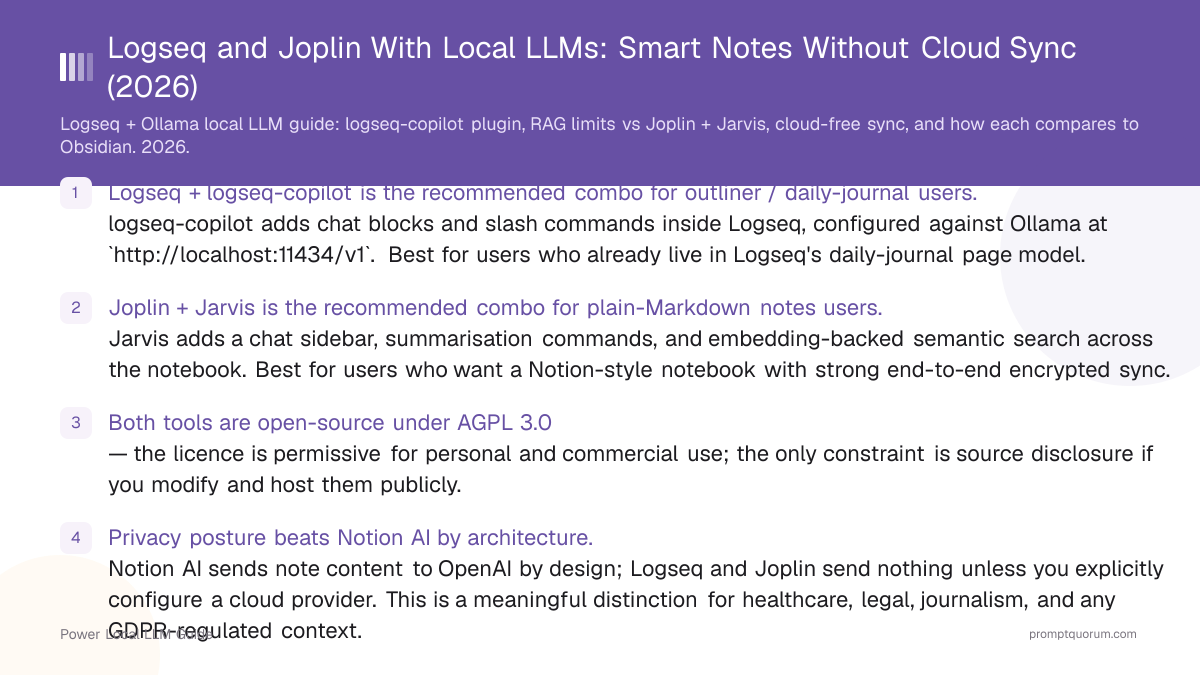
Key Takeaways
- Logseq + logseq-copilot is the recommended combo for outliner / daily-journal users. logseq-copilot adds chat blocks and slash commands inside Logseq, configured against Ollama at
http://localhost:11434/v1. Best for users who already live in Logseq's daily-journal page model. - Joplin + Jarvis is the recommended combo for plain-Markdown notes users. Jarvis adds a chat sidebar, summarisation commands, and embedding-backed semantic search across the notebook. Best for users who want a Notion-style notebook with strong end-to-end encrypted sync.
- Both tools are open-source under AGPL 3.0 — the licence is permissive for personal and commercial use; the only constraint is source disclosure if you modify and host them publicly.
- Privacy posture beats Notion AI by architecture. Notion AI sends note content to OpenAI by design; Logseq and Joplin send nothing unless you explicitly configure a cloud provider. This is a meaningful distinction for healthcare, legal, journalism, and any GDPR-regulated context.
- Mobile plugin gap is the biggest constraint in 2026. Neither Logseq Mobile nor Joplin Mobile supports plugins. AI features run only on desktop — mobile becomes a capture surface (write notes), and processing (summarise, chat, retrieve) happens later on desktop.
- Sync without cloud is straightforward but each tool takes a different approach. Logseq has built-in Git sync and works cleanly with Syncthing or iCloud Drive. Joplin has end-to-end encrypted Joplin Cloud, self-hosted Joplin Server, or any WebDAV / Nextcloud / Dropbox backend with E2EE on top.
- Notion AI migration is a one-way trip both tools handle. Logseq imports Notion's Markdown export with cleaner block fidelity; Joplin imports content but flattens nested blocks. Once migrated, no notes leave your machine unless you choose to.
Quick Facts
- Tools covered: Logseq (outliner, daily-journal-first) and Joplin (plain-Markdown notebook). Obsidian is referenced for context — its dedicated guide is linked at the end.
- Primary AI plugins: logseq-copilot for Logseq; Jarvis (and similar Ollama-aware plugins) for Joplin.
- LLM backend: Ollama (recommended) at
http://localhost:11434/v1, or any OpenAI-compatible local endpoint (LM Studio, llama.cpp server, vLLM). - Recommended chat models: Llama 3.2 3B, Phi-4 Mini, Gemma 3 4B (16 GB RAM systems); Qwen3 1.7B (8 GB RAM).
- Recommended embedding models (Joplin Jarvis only): nomic-embed-text (768-dim, fast), mxbai-embed-large (1024-dim, more accurate).
- Licences: Logseq AGPL 3.0; Joplin AGPL 3.0; logseq-copilot AGPL 3.0 (same author as Copilot for Obsidian, Logan Yang); Jarvis (Joplin) AGPL 3.0.
- Sync paths: Logseq — built-in Git, Syncthing, iCloud Drive, Logseq Sync (paid). Joplin — Joplin Cloud (paid, E2EE), self-hosted Joplin Server, WebDAV, Nextcloud, Dropbox, OneDrive (all support E2EE).
- Mobile plugins: not supported on either tool in 2026 — desktop-only AI.
Logseq or Joplin: Which Should You Pick?
Pick Logseq if your note workflow is daily-journal-first or graph-shaped; pick Joplin if your notes are plain-Markdown documents with strong sync needs. The two tools have different mental models — Logseq is an outliner with bidirectional links and a daily journal as the default capture surface; Joplin is a notebook of Markdown files with tags, search, and end-to-end encrypted sync. The AI plugin ecosystem in 2026 reflects this: logseq-copilot fits inside outliner blocks; Jarvis fits inside the Joplin sidebar.
📍 In One Sentence
Logseq + logseq-copilot suits outliner / daily-journal workflows; Joplin + Jarvis suits plain-Markdown notebook workflows with strong end-to-end encrypted sync.
💬 In Plain Terms
Both tools are private alternatives to Notion AI. The choice is mostly about how you write notes. Logseq treats notes as nested bullet points and gives you a daily journal page automatically — good for thinking-in-public, time-stamped capture, and graph-style cross-referencing. Joplin treats notes as full Markdown documents in notebooks — good for longer-form writing, structured documentation, and devices that need encrypted sync. Both work with a local LLM via Ollama, both are open-source, both stop sending data to anyone the moment you switch from Notion.
Decision: Logseq or Joplin?
Use a local LLM if:
- •You write a daily journal and want AI to summarise / cluster / link days → Logseq + logseq-copilot
- •You want graph-style backlinks and outliner blocks with chat in-line → Logseq + logseq-copilot
- •You write longer-form Markdown notes (research, documentation, drafts) → Joplin + Jarvis
- •You need end-to-end encrypted sync across devices → Joplin (better E2EE story)
- •You want embedding-backed semantic search across the whole notebook → Joplin + Jarvis (Logseq has no equivalent in 2026)
- •You are migrating from Notion and want the cleanest block-level fidelity → Logseq
Use a cloud model if:
- •You need AI features on iOS or Android (not just capture) → neither tool supports plugins on mobile in 2026; consider Obsidian Mobile + LAN Ollama with Tailscale
- •You need real-time multi-user collaboration on the same vault → both Logseq and Joplin are single-user-by-design; collaborative editing is not in their model
- •You need GPT-5.5 quality on every chat response → cloud equivalents (the local stack is ~70% as capable)
Quick decision:
- →Daily journal + outliner: Logseq + logseq-copilot
- →Plain-Markdown notebook + E2EE sync: Joplin + Jarvis
- →Mobile AI features: not feasible in 2026 — capture on mobile, process on desktop
💡Tip: A common pattern is to run both: Logseq for daily journal and rapid capture (everything time-stamped), Joplin for permanent reference notes (longer-form, tagged, encrypted-synced). The two tools do not share a database, but neither is heavy — running both adds about 200–400 MB combined RAM. Use Logseq for "thinking" and Joplin for "knowledge", with the local LLM available in both.
Tool Comparison Table
The four axes that matter most: AI plugin depth, sync without cloud, mobile plugin support, and best-fit workflow. Obsidian is included as a reference — readers comparing all three should also read the dedicated Obsidian guide linked at the end.
📍 In One Sentence
Logseq leads on outliner-native AI and Git sync; Joplin leads on end-to-end encrypted sync and embedding-backed retrieval; Obsidian leads on plugin breadth at the cost of paid sync and a non-OSI licence.
Logseq
- AI plugins:
- logseq-copilot (chat blocks, slash commands), GPT-3 Plugin variants
- Sync (no cloud):
- Built-in Git, Syncthing, iCloud Drive, Logseq Sync (paid E2EE)
- Mobile:
- Mobile app available; plugins not supported on mobile (2026)
- Best for:
- Daily-journal + outliner workflow
Joplin
- AI plugins:
- Jarvis (chat, summarise, embedding-backed Q&A), Ollama-aware integrations
- Sync (no cloud):
- Joplin Cloud (paid E2EE), self-hosted Joplin Server, WebDAV, Nextcloud, Dropbox, OneDrive (all E2EE-capable)
- Mobile:
- Mobile app available; plugins not supported on mobile (2026)
- Best for:
- Markdown notebook + E2EE sync
Obsidian (reference)
- AI plugins:
- Smart Connections, Copilot, Text Generator, Local GPT, BMO Chatbot
- Sync (no cloud):
- Git, Syncthing, iCloud Drive, Obsidian Sync (paid E2EE)
- Mobile:
- Mobile app supports most plugins; LAN access to Ollama required
- Best for:
- Power users with paid plugins / paid sync
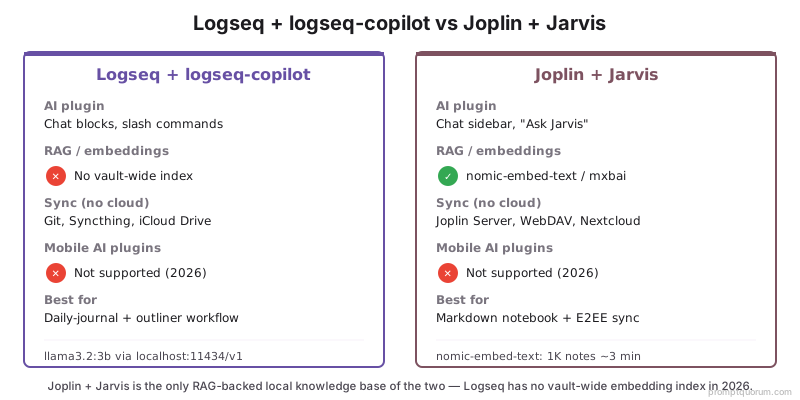
💡Tip: The mobile plugin column is the single biggest 2026 differentiator. Obsidian Mobile runs most plugins (including Smart Connections and Copilot) when Ollama is reachable on the LAN or via Tailscale. Logseq Mobile and Joplin Mobile do not run plugins at all — AI features are strictly desktop. If mobile AI matters, plan for capture-on-mobile + process-on-desktop, or look at Obsidian Mobile.
Logseq AI Plugins With Ollama
The recommended Logseq AI plugin in 2026 is logseq-copilot — same author as Copilot for Obsidian, configured to point at Ollama. It adds chat blocks (/copilot slash command), inline rewriting, and journal-aware prompts directly inside Logseq's outliner. Logseq does not currently have an equivalent of Smart Connections (vault-wide embedding index), so semantic linking across the graph is not yet a solved problem in 2026.
- What it does: chat blocks via slash commands, inline content generation, journal-aware prompts that pull the active page or selected blocks as context.
- Install: Settings → Plugins → Marketplace → search "logseq-copilot" → Install + Enable. Author: Logan Yang (same as Copilot for Obsidian).
- Configure for Ollama: Settings → logseq-copilot → API Provider → "Custom OpenAI" or "Ollama" → API base URL
http://localhost:11434/v1→ modelllama3.2:3b(or any Ollama model name). - Slash commands: type
/copilotin any block to start a chat. Output appears as nested blocks under the prompt — outliner-native, so responses become first-class outline content. - Selection-based prompts: select blocks → run a custom prompt template ("Summarise these into three bullets") → result appended below the selection.
- Daily-journal integration: point a template at the daily journal page → end-of-day summarisation, weekly review questions, or backlink expansion become single-keystroke actions.
- Is Logseq a RAG-based local knowledge base? No — not out of the box. There is no graph-wide embedding index in 2026. Logseq backlinks remain explicit; semantic (RAG-style) discovery across pages is not yet supported by any open-source Logseq plugin. For a local knowledge base with retrieval-augmented generation, use Joplin + Jarvis instead.
💡Tip: Logseq-copilot output is just blocks — the same primitive as everything else in Logseq. This is the key advantage over Obsidian: AI responses are not floating sidebar text; they are graph nodes you can backlink, tag, query, and re-edit. Make heavy use of /copilot for capture, then refactor the response blocks the way you would any other note.
Joplin AI Plugins With Ollama
The recommended Joplin AI plugin in 2026 is Jarvis — it provides chat, summarisation, and embedding-backed semantic search across the entire notebook, all configurable to use Ollama. Jarvis is the closest Joplin equivalent to Smart Connections + Copilot for Obsidian combined: one plugin, one config, two jobs.
- What it does: chat sidebar, "Ask Jarvis" command across the whole notebook (embedding-backed retrieval), summarise selected note, generate notes from prompts, custom prompts on selections.
- Install: Tools → Options → Plugins → search "Jarvis" → Install + Enable. Author: Alon Bukai.
- Configure for Ollama (chat): Options → Jarvis → Model Provider → "OpenAI" with custom base URL → URL
http://localhost:11434/v1→ modelllama3.2:3b→ API key any non-empty string (Ollama ignores it). - Configure for Ollama (embeddings): Options → Jarvis → Notes Database → enable Database → Embedding Model → "OpenAI" with custom base URL → URL
http://localhost:11434/v1→ modelnomic-embed-text. - Initial indexing: Jarvis embeds every note in the database when first enabled. Time on Mac M3 Pro with nomic-embed-text: 1K notes ~3 min, 5K notes ~15 min, 10K notes ~35 min. Re-embedding is incremental on save.
- "Ask Jarvis" workflow: Tools → Jarvis → Ask Jarvis → type a question → Jarvis retrieves relevant notes via embedding similarity and sends the chunks plus your question to the chat model. Equivalent to Copilot for Obsidian's vault QA.
- Best for: users who want a single plugin covering chat + retrieval inside Joplin without managing two separate plugins.
⚠️Warning: Jarvis stores its embedding database inside Joplin's SQLite database. The database file grows ~150–250 MB per 5,000 notes embedded with nomic-embed-text. If you sync the Joplin profile via Joplin Cloud or WebDAV, the embedding database is included in sync — plan for the bandwidth and sync-time cost. The embedding database itself is encrypted in transit when using Joplin's E2EE.
The Privacy Case Against Notion AI
Notion AI sends note content to OpenAI by design — that is the architecture, not a configuration choice. When you use Notion AI features on a page, Notion ships the page content to OpenAI servers, OpenAI processes it, and the response comes back through Notion. The data is governed by OpenAI's and Notion's privacy policies, not by your local file system. For users in regulated contexts (healthcare, legal, financial advice, journalism, GDPR-covered EU data) this is a structural problem that no setting fixes.
- Notion AI architecture: notes leave your machine to be processed by OpenAI. Subject to OpenAI Enterprise data-handling terms (better than standard OpenAI API), but still off your infrastructure.
- Logseq + logseq-copilot architecture: Logseq runs as a local app, the plugin sends prompts to your local Ollama, no note content reaches a third party unless you explicitly configure a cloud provider in the plugin.
- Joplin + Jarvis architecture: Joplin runs as a local app, Jarvis sends prompts to your local Ollama, embedding generation runs locally, no note content reaches a third party unless you explicitly configure a cloud provider in Jarvis.
- Data residency: with Logseq or Joplin + Ollama, every byte of note content stays on your machine. With Notion AI, note content transits to US-based OpenAI servers regardless of where you are.
- Audit trail: with local LLMs, you can run a packet capture (Wireshark, Little Snitch, etc.) once after install and verify that the plugins make zero outbound calls during AI use. With Notion AI, outbound calls are inherent — there is nothing to verify.
- Subprocessor risk: Notion AI inherits all of OpenAI's subprocessors (Microsoft Azure as primary infrastructure, plus support vendors). Logseq and Joplin + Ollama have zero subprocessors for the AI layer.
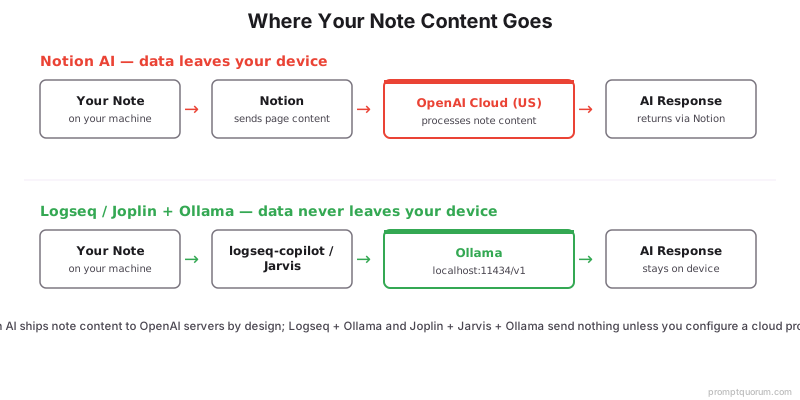
💡Tip: The clearest test of "is my notes app actually private?" is to disconnect the network and try AI features. Logseq + logseq-copilot + Ollama: works fully offline. Joplin + Jarvis + Ollama: works fully offline. Notion AI: returns an error. Run this test once after setup to confirm your stack does what you think it does.
Sync Without Cloud: Git, Syncthing, Joplin Server
Both Logseq and Joplin have multiple sync paths that never require trusting a third-party cloud with note content. The right choice depends on whether you want zero-config (paid sync), Git-tracked history (developer-friendly), or peer-to-peer (no server).
- Logseq — built-in Git sync: Settings → Sync → enable Git auto-commit. Logseq commits the graph to a configured Git remote on a schedule. Works with GitHub / GitLab / self-hosted Gitea. Plain-Markdown commits make history readable by humans.
- Logseq — Syncthing (peer-to-peer): install Syncthing on each device, point it at the Logseq graph folder. End-to-end encrypted, no central server, no third party. Excellent for desktop-to-desktop sync; works on Logseq Mobile when Syncthing-Fork (Android) or Möbius Sync (iOS) keeps the folder current.
- Logseq — iCloud Drive: keep the graph folder inside iCloud Drive on macOS / iOS. Cleanest path on Apple devices; data is at-rest encrypted by Apple but Apple holds the keys (not zero-knowledge).
- Logseq Sync (paid E2EE): the Logseq team's end-to-end encrypted sync. Trade-off: pay (~ to /year for the Pro tier including sync; pricing varies — check logseq.com), but get zero-config E2EE across devices including mobile.
- Joplin — Joplin Cloud (paid E2EE): the Joplin team's hosted sync with end-to-end encryption. Free for small note counts; paid tiers scale up. Hosted in the EU. Convenient and audit-friendly.
- Joplin — self-hosted Joplin Server: run the Joplin Server Docker image on a NAS / VPS / home server. End-to-end encryption from client to client; the server stores ciphertext. Best path for organisations wanting full ownership of the sync infrastructure.
- Joplin — WebDAV / Nextcloud / Dropbox / OneDrive: Joplin supports any WebDAV endpoint, plus first-class support for Nextcloud, Dropbox, OneDrive. Always enable Joplin's built-in E2EE on top — these providers see only ciphertext.
💡Tip: Self-hosted Joplin Server is the answer for organisations that want auditable, on-premises sync without trusting a third-party cloud. Run it on a small VPS or home server, point all clients at it, enable E2EE — the server holds only ciphertext, and you control the host. This is significantly easier than self-hosting Notion (which is not officially supported) or Obsidian Sync infrastructure.
Mobile Plugin Gap: What Works and What Does Not
Neither Logseq Mobile nor Joplin Mobile supports plugins in 2026 — this is the single biggest constraint compared to Obsidian. The mobile apps are functional capture and reading surfaces, but logseq-copilot and Jarvis run only on desktop. Any AI workflow has to assume mobile is for capture, desktop is for processing.
- Logseq Mobile (iOS / Android): view, edit, and capture notes; backlinks and graph view work; sync works. Plugins do not run — including logseq-copilot. AI features are unavailable on mobile.
- Joplin Mobile (iOS / Android): view, edit, and capture notes; tags and search work; sync works (including E2EE). Plugins do not run — including Jarvis. AI features are unavailable on mobile.
- Workaround pattern: capture on mobile, process on desktop. Write notes freely on mobile. When you reach a desktop, run logseq-copilot or Jarvis to summarise, expand, link, or query the captured content.
- Workaround pattern: home server + remote desktop. Run logseq-copilot or Jarvis on a desktop in your home, access that desktop via Tailscale + a remote desktop / SSH tunnel from mobile when AI is needed. Adds setup cost; rarely worth it for casual users.
- Workaround pattern: switch to Obsidian Mobile for AI use cases. Obsidian Mobile runs most plugins. If mobile AI is critical, this is the simplest answer — at the cost of switching tools.
- Why the gap exists: both Logseq and Joplin run their plugin engines as desktop-only Node.js / Electron contexts. Mobile apps are native (Logseq Capacitor, Joplin React Native) and do not embed the plugin runtime. Removing the gap requires rewriting the plugin architecture — neither team has signalled this for 2026.
⚠️Warning: If your AI use case is mobile-first (e.g., dictating notes on the go and wanting AI to summarise them immediately), Logseq and Joplin are not currently the right tools — Obsidian Mobile + LAN Ollama is. If your AI use case is desktop-first with mobile capture (the more common pattern), Logseq and Joplin both work well and the mobile gap is a minor inconvenience rather than a blocker.
GDPR and EU Data Residency
For EU and DACH users, Logseq + logseq-copilot + Ollama and Joplin + Jarvis + Ollama are GDPR-friendlier than Notion AI by default architecture. Note content never leaves the data controller's machine, so the data flows that GDPR Article 28 (processor agreements), Article 44 (international transfers), and the BSI-Grundschutz-Kataloge require to be documented for SaaS tools simply do not exist for the local stack.
- Article 28 (Processor agreements): with Notion AI, Notion + OpenAI are processors and require a Data Processing Agreement (DPA) plus Standard Contractual Clauses for the OpenAI international transfer. With Logseq / Joplin + Ollama, there is no third-party processor — just the data controller running local software.
- Article 44 (International transfers): Notion AI ships data to US-based OpenAI servers; this is a Schrems II "international transfer" requiring SCCs and a Transfer Impact Assessment. Local Ollama processing eliminates the transfer entirely.
- BSI-Grundschutz-Kataloge (DACH): the German federal IT security guidelines treat cloud AI services as outsourcing requiring formal risk assessment. Local AI processing falls under the much simpler "in-house IT" baseline.
- Right to erasure (Article 17): with Notion AI, deleting note content from your account does not necessarily delete it from OpenAI's training pipeline or logs (depends on enterprise terms). With local Ollama, deletion is filesystem deletion — verifiable and complete.
- Auditability: local stacks are easier to audit. Run a packet capture once, verify zero outbound traffic during AI use, document the result. Cloud AI services require relying on the vendor's SOC 2 / ISO 27001 reports.
- EU-friendly hosting (when sync involves a server): Joplin Cloud is hosted in the EU; self-hosted Joplin Server can be hosted on EU infrastructure (Hetzner, OVH, IONOS). Logseq Sync is operated by Logseq Inc. (US-based) — for strict EU residency, prefer Git or Syncthing for Logseq sync.
💡Tip: For organisations needing a defensible AI-features story under GDPR, the local-LLM-on-Logseq-or-Joplin stack is the simplest answer. The DPA discussion goes from "we use Notion + OpenAI as subprocessors with these clauses" to "we use local software running on the controller's endpoint, no processor involved". The compliance team's job becomes much easier.
Migrating From Notion AI to Logseq or Joplin
Notion offers a native Markdown export that both Logseq and Joplin can import — Logseq preserves block-level structure better, Joplin preserves content but flattens nested blocks. Either way, the migration is a one-time export-import, not an ongoing sync, and it stops the data flow to OpenAI immediately.
- 1Export from Notion: Settings → Settings & members → Settings → "Export all workspace content" → choose "Markdown & CSV" → download the ZIP. The export contains one .md file per page plus folders for nested pages.
- 2Unzip and clean up: Notion's export uses long page-ID suffixes in filenames (e.g.,
My Page 1f8b2a3c4d5e6f7g8h9i.md). Run a quick rename script to drop the IDs if filenames matter for your new tool. - 3Logseq import path: open Logseq → File → New Graph → point at a new folder → copy the unzipped Notion files into the graph's
pages/folder. Logseq picks them up; backlinks (Notion's `[[Page]]` style) survive when files match. Block-level nesting is preserved because both Notion and Logseq use list-style block indentation. - 4Joplin import path: Tools → Import → "MD - Markdown directory" → select the unzipped Notion folder. Joplin creates one note per .md file inside a notebook structure mirroring Notion's page hierarchy. Block-level nesting flattens — Notion's nested toggle lists become flat Markdown lists.
- 5Verify the migration: spot-check 10–20 pages — confirm content, links, and tags survived. If you used Notion databases extensively, the CSV export is separate; both Logseq and Joplin treat it as a flat file rather than a structured database, so plan for some manual restructuring.
- 6Stop Notion AI: disable the Notion AI subscription in account settings. Future AI work happens via logseq-copilot or Jarvis on your local machine.
- 7Verify privacy posture: disconnect the network → run AI features in your new tool → confirm they work. This is the test that proves the migration achieved its goal.
💡Tip: If you used Notion databases as structured data (project trackers, CRMs, etc.), the migration is more involved than for prose pages. Consider keeping those specific databases in Notion (without AI) while moving prose-heavy content to Logseq or Joplin — or migrate the databases to AnythingLLM's structured RAG, where the local LLM can query them as documents.
Sample Workflows: Daily Journal, Meeting Notes, Research
Three concrete workflows that show the local stack in action. The first two are Logseq-centric (outliner / journal native); the third is Joplin-centric (longer-form notes).
- Logseq daily-journal summarisation: end of day → open today's journal page →
/copilot Summarise this day in three bullets focused on decisions, blockers, and tomorrow's actions→ response appears as nested blocks. Save the prompt as a logseq-copilot template for one-keystroke runs. - Logseq weekly review: Sunday evening → open a fresh page named
Week 19 review→/copilot Summarise the past 7 daily journal pages into 3 bullets per category: progress, blockers, themes→ logseq-copilot retrieves recent journal pages via the page link mechanism. Result becomes the seed of next week's planning. - Joplin meeting-note expansion: during the meeting, capture rough bullets in a note → after the meeting, select all → Tools → Jarvis → "Expand and structure these notes" → output replaces or appends below. Save the prompt as a Jarvis preset.
- Joplin research Q&A: add 50–500 source notes (papers, articles, web clippings) into a single notebook → enable Jarvis Notes Database → wait for embedding → Tools → Jarvis → "Ask Jarvis" → ask cross-source questions ("Which sources discuss X?"). Equivalent to Obsidian Copilot vault QA but inside Joplin.
- Logseq + Joplin combined: capture in Logseq (fast, journal-native) → curate the durable items into Joplin (permanent reference). Run AI on each tool for its native strengths — quick chat / outline generation in Logseq, embedding-backed research Q&A in Joplin.
- Mobile capture, desktop processing: during the day, capture notes freely on Logseq Mobile or Joplin Mobile (no AI). At end-of-day on desktop, run logseq-copilot or Jarvis to summarise, link, and query — the AI catches up with what you captured offline.
💡Tip: The "mobile capture, desktop processing" pattern is the right way to think about Logseq + Joplin in 2026 given the mobile plugin gap. It is not a workaround — it matches how knowledge work actually happens. Mobile is for inputs (you have an idea, you capture it). Desktop is for synthesis (you process the captured material). The local LLM joins at synthesis time, which is exactly where its quality matters most.
Common Mistakes
- Configuring logseq-copilot or Jarvis with a cloud provider by accident. Both plugins offer "OpenAI" as a default provider. The local-only setup requires switching to a custom base URL pointing at
http://localhost:11434/v1. Forgetting this means the plugin silently sends notes to OpenAI — exactly the failure mode you migrated away from. Verify with a packet capture. - Expecting plugin support on mobile. Neither Logseq Mobile nor Joplin Mobile runs plugins in 2026. If you assume AI works everywhere your notes do, you will hit the wall the first time you try to summarise on the train. Plan for capture-on-mobile, process-on-desktop from day one.
- Pointing the plugin at
http://localhost:11434/v1from a different machine. Localhost is per-machine. If you run Ollama on a desktop and Logseq on a laptop, you need the desktop's LAN IP (http://192.168.1.20:11434/v1) plus Ollama bound to0.0.0.0:11434. - Syncing the Joplin Jarvis embedding database to a free WebDAV tier with a small quota. Embedding databases grow ~150–250 MB per 5,000 notes. Free tiers (Dropbox 2 GB) hit the limit fast at notebook scale. Plan for self-hosted Joplin Server or a paid tier when notebooks pass ~5,000 notes.
- Not running an audit packet capture once. Both plugins are open-source and well-behaved, but the only definitive proof that your stack is local-only is to run Wireshark / Little Snitch / equivalent during AI use and verify zero outbound traffic. Do this once after setup, document the result, move on.
- Trying to use Logseq + logseq-copilot for embedding-backed retrieval. logseq-copilot does not have a vault-wide embedding index in 2026. If you need "ask my whole graph", switch to Joplin + Jarvis or use Obsidian + Smart Connections. Logseq excels at outliner-native AI, not at semantic search.
Sources
- Logseq — logseq.com and github.com/logseq/logseq (open-source outliner; AGPL 3.0).
- logseq-copilot — github.com/logancyang/logseq-copilot (open-source Logseq plugin; AGPL 3.0).
- Joplin — joplinapp.org and github.com/laurent22/joplin (open-source notebook; AGPL 3.0).
- Jarvis (Joplin) — github.com/alondmnt/joplin-plugin-jarvis (open-source Joplin plugin; AGPL 3.0).
- Ollama — ollama.com and github.com/ollama/ollama (local LLM runtime; MIT).
- Notion AI privacy and data handling — notion.com/help/notion-ai-faqs (vendor documentation for the comparison context).
Frequently Asked Questions
Can Logseq replace Notion for AI users?
Yes for prose pages and daily-journal workflows. Install logseq-copilot, point it at Ollama, and you have chat, summarisation, and template-based generation inside Logseq — no data leaving your machine. The gap is structured databases: Notion's database views (project trackers, CRMs) do not have a clean Logseq equivalent. Prose-heavy users replace Notion fully; database-heavy users either accept manual restructuring or keep specific databases in Notion (without AI) while moving prose to Logseq.
Does Joplin support local AI plugins?
Yes. The recommended plugin in 2026 is Jarvis, which provides chat, summarisation, and embedding-backed semantic search across the notebook. Configure Jarvis to use Ollama at http://localhost:11434/v1 for chat and http://localhost:11434/v1 with nomic-embed-text for embeddings. Other Ollama-aware Joplin plugins exist but Jarvis is the most actively maintained and feature-complete.
Which has better sync without cloud — Logseq or Joplin?
Joplin has the broader and more polished cloud-free sync story. Joplin supports self-hosted Joplin Server, WebDAV, Nextcloud, plus first-class E2EE on top of any backend. Logseq has built-in Git sync (excellent for developers) and works with Syncthing or iCloud Drive, but lacks a self-hosted equivalent of Joplin Server. For teams that want auditable on-premises sync, Joplin Server is the better path; for developers who want Git-tracked history, Logseq Git sync is the better path.
Can I migrate from Notion to Logseq with AI features intact?
Migration moves content, not the Notion AI subscription. Export from Notion as Markdown, import into Logseq, then install logseq-copilot and configure it with Ollama — the AI layer is rebuilt locally. Logseq preserves Notion's block-level nesting better than Joplin does because both tools use list-indented blocks as their primitive. Notion AI features (auto-fill, smart properties on databases) do not have direct Logseq equivalents — those workflows need to be rebuilt with logseq-copilot prompts or scripts.
Does Logseq work fully offline?
Yes. Logseq is a local desktop app with no required cloud component. The graph is a folder of Markdown files; the app reads and writes them locally. Network access is needed only for syncing to a remote (Git push, Syncthing peer discovery, Logseq Sync) and for running logseq-copilot against a cloud LLM provider — the latter is optional. With Ollama as the LLM provider, the entire stack runs offline.
Are Joplin AI plugins as mature as Obsidian's?
Obsidian has more AI plugins and more concurrent maintainers. Joplin has fewer plugins but Jarvis is feature-complete and actively maintained — covering chat, summarisation, and embedding-backed retrieval in a single plugin. For most users, Jarvis matches or exceeds the Obsidian Copilot + Smart Connections combination on Joplin's plain-Markdown notebooks; for power users wanting plugin variety (template engines, character chat, MOC generators), Obsidian still has more options.
Which is better for daily journaling with AI — Logseq or Joplin?
Logseq. The daily journal is a built-in primitive in Logseq — every day automatically gets a journal page, blocks become first-class, and logseq-copilot output becomes nested blocks under the prompt. Daily-journal AI workflows (end-of-day summary, weekly review, mood tagging) feel native. Joplin can replicate this with notebooks-per-month and Jarvis prompts, but the friction is higher.
Can I use the same vault on multiple devices?
Yes — both tools support multi-device use via their sync layer. Logseq: Git, Syncthing, iCloud Drive, or Logseq Sync. Joplin: Joplin Cloud, self-hosted Joplin Server, WebDAV, Nextcloud, Dropbox, or OneDrive. Caveat: AI plugins run only on desktop. The vault content syncs to mobile, but logseq-copilot and Jarvis do not run there. Plan for desktop-AI, mobile-capture.
Do AI plugins work with Joplin Mobile or Logseq Mobile?
No — neither tool supports plugins on mobile in 2026. Logseq Mobile and Joplin Mobile are read/write surfaces for the synced vault, but the plugin runtime (Node.js / Electron) does not exist on the mobile apps. AI features (logseq-copilot, Jarvis) run only on desktop. If mobile AI matters, the alternatives are Obsidian Mobile + LAN Ollama, or capture-on-mobile + process-on-desktop.
Is open-source local AI integration safer than Notion AI?
Yes by default architecture. Notion AI sends note content to OpenAI by design — that is structural, not a configuration choice. Logseq + logseq-copilot + Ollama and Joplin + Jarvis + Ollama send nothing to a third party unless you explicitly configure a cloud LLM provider. For GDPR-covered EU data, healthcare, legal, and journalism contexts, this distinction is meaningful: local stacks have no processor, no international transfer, no subprocessor risk. The auditability is also simpler — a one-time packet capture proves zero outbound traffic during AI use.
Does Logseq support RAG or work as a local knowledge base?
Not out of the box in 2026. Logseq has no vault-wide embedding index, so logseq-copilot cannot do retrieval-augmented generation (RAG) — semantic search across your whole graph. Its AI relies on explicit backlinks and the active page or selected blocks passed as context, not embeddings. If you need a searchable local knowledge base with RAG, use Joplin + Jarvis, which embeds every note with nomic-embed-text or mxbai-embed-large and retrieves the relevant chunks for chat. Logseq stays the stronger pick for outliner-native AI (chat blocks, daily-journal summarisation) — just not for cross-graph semantic Q&A.