Key Takeaways for Local LLM Users
- Prompt optimization is more critical for local models — quantized models (4-bit, 8-bit) are more sensitive to ambiguous instructions than frontier APIs
- Ollama and LM Studio support the same 6 optimization levers; the difference is that smaller models (LLaMA 3.1 8B, Mistral Small) require more explicit constraints and shorter context windows
- Quantized models have reduced instruction-following capacity — use simpler, more prescriptive prompts with explicit output format and fewer simultaneous constraints
- Temperature defaults differ: Ollama defaults to 0.8 (higher creativity, less consistency); set temperature to 0.1–0.3 for structured output tasks requiring consistency across runs
- Local models cannot be tested against a cloud baseline — use PromptQuorum to compare your optimized local prompt against GPT-5.6 and Claude to quantify the quality gap
What Is Prompt Optimization?
📍 In One Sentence
Prompt optimization is the systematic process of diagnosing why a prompt fails and fixing one variable at a time until the output meets your quality criteria.
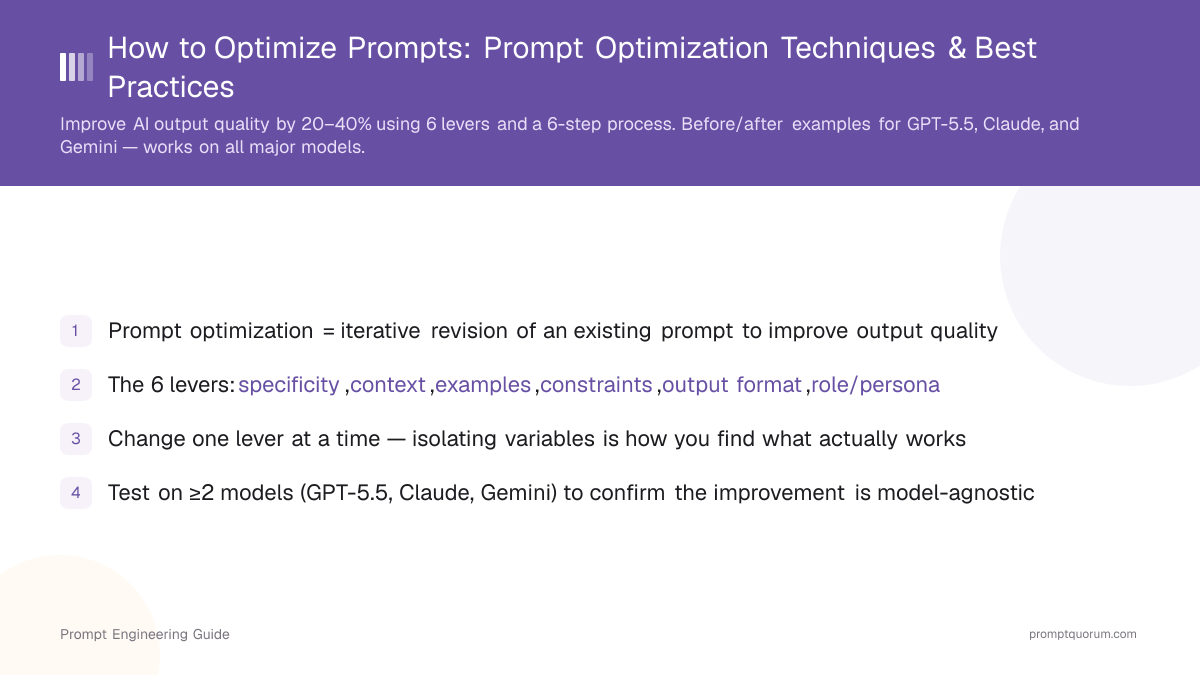
Prompt optimization is the iterative process of revising an existing prompt to improve the quality, accuracy, or consistency of AI output for a specific task. It applies to all major models — GPT-5.6, Claude Opus 5, Gemini 3.1 Pro, and locally-run models via Ollama or LM Studio. Where prompt engineering designs the initial prompt structure, prompt optimization diagnoses what is failing and applies targeted changes until the output meets a defined standard.
Prompt optimization is a subprocess of prompt engineering. You always start with a working prompt and make one change at a time. This isolation of variables is what makes diagnosis possible — when you revise specificity, output format, and constraints simultaneously, you cannot determine which change improved the result. The skill of prompt optimization is mapping a failure to the right lever, changing only that variable, and measuring the improvement.
Why this matters: the same model produces radically different outputs from near-identical prompts. The difference between "sort of correct" and "reliably right" is not luck — it is systematic optimization. An unoptimized prompt succeeds on some inputs and fails on others. An optimized prompt succeeds consistently across a representative sample of inputs. For multi-model validation, PromptQuorum runs one optimized prompt across 25+ AI models simultaneously to confirm consistency across providers.
Prompt Optimization vs Prompt Engineering
Prompt optimization and prompt engineering are complementary disciplines that work in sequence. Prompt engineering designs a prompt from scratch using building blocks (objective, context, examples, constraints, output format, role). Prompt optimization takes an existing prompt and improves it through iterative revision. You need both: prompt engineering gets you to "working"; prompt optimization gets you to "reliable."
Think of it this way: prompt engineering builds the structure; prompt optimization refines it. Prompt engineering asks "what elements should this prompt have?" Prompt optimization asks "why is this prompt failing, and which single change will fix it?" The distinction matters because the strategies are different. Engineering starts from principles and building blocks. Optimization starts from failure diagnosis.
Dimension | Prompt Engineering | Prompt Optimization |
|---|---|---|
| Starting point | Blank page | Existing prompt |
| Goal | Design the structure | Improve the output |
| Method | Frameworks, building blocks | Isolate, change, test, measure |
Why Prompt Optimization Matters
Prompt optimization eliminates inconsistent AI outputs by systematically diagnosing what fails and fixing one variable at a time. A vague prompt produces a vague output. A poorly specified prompt produces an off-target response. A prompt that works on Monday might fail on Friday if the input changes slightly. Optimization eliminates these variations through systematic diagnosis and targeted revision.
Real before/after: An unoptimized prompt reads "Summarize this article." Run 3 times on the same article, it produces wildly different outputs: one is 47 words, another is 120 words, the third misses the main point entirely. After optimization — adding output format ("3 bullet points, ≤20 words each"), a role ("analyst"), and specificity ("List the 3 key findings, not methodology") — the same prompt produces consistent, on-spec results all 3 times, across GPT-5.6, Claude, and Gemini.
For EU organizations, systematic prompt optimization is a compliance requirement, not just a best practice. The EU AI Act (2024) requires high-risk AI systems — those used in hiring, credit assessment, healthcare, or law enforcement — to document how AI decisions are made and demonstrate consistent, testable outputs. A version-controlled prompt library with documented optimization history satisfies this audit trail requirement. In Japan, METI AI governance guidance similarly requires traceable AI decision documentation for regulated applications. Prompt optimization is the foundation of that traceability. See Geopolitics and AI for the full regulatory compliance context.
Adding a chain-of-thought instruction — asking the model to reason step by step before answering — improved accuracy on multi-step arithmetic benchmarks from 17.9% to 56.9% on a 540B-parameter model. A single targeted change to the prompt structure, with no model retraining, produced a 3x accuracy gain.
The 6 Optimization Levers
Every prompt consists of six independent variables you can adjust to improve output. These are the "levers" of optimization. When a prompt fails, the failure traces back to one or more of these levers not being set correctly. The skill of optimization is mapping a symptom to the right lever, changing it, and measuring the result.
Lever | What It Changes | Optimization Move | Example |
|---|---|---|---|
| Specificity | How precisely the task is defined | Rewrite vague objective as exact instruction | "Summarize" → "List 3 key findings in ≤20 words each" |
| Context | Information the model has to work with | Add background, audience, constraints | "Write a report" → "Write a report for a non-technical CFO" |
| Examples | Model's understanding of desired output format | Add 1–3 input/output pairs (few-shot) | Show the exact format you want, once |
| Constraints | Boundaries on what the model can output | Add explicit prohibitions | "Do not use jargon. Maximum 150 words." |
| Output format | Structure of the response | Specify format explicitly | "Respond in JSON: {title, summary, tags[]}" |
| Role/persona | Expertise level the model adopts | Add a specific role | "Act as a senior data analyst at a B2B SaaS company" |
Few-shot prompting with a small number of examples enabled GPT-3 to match or exceed the performance of fine-tuned models on several benchmarks — establishing examples as a high-leverage optimization lever that requires no training, no additional compute, and no model access beyond a standard API call.
The 6-Step Optimization Process
Prompt optimization is a systematic, measurable process. Each step narrows the diagnosis: you identify the symptom, map it to a lever, change one variable, test across models, and measure improvement. Here is the exact process:
- Step 1: Establish a baseline. Run the current prompt on your target task 3 times on representative inputs. Note the failure mode: Is the output too long or too short? Wrong format? Hallucinating? Off-topic? Tangential? This baseline is crucial — you cannot measure improvement without it.
- Step 2: Identify the root lever. Map the failure to one of the 6 levers. Examples: "output is a wall of prose instead of bullet points" → output format lever; "answer is vague" → specificity lever; "tone is wrong" → role lever; "includes made-up facts" → context or constraints lever.
- Step 3: Change one variable. Make a single targeted change to the identified lever. Do not edit the objective, add examples, AND change the format in the same revision — you cannot attribute improvement if three things changed. This isolation is non-negotiable.
- Step 4: Test across models. Run the revised prompt on GPT-5.6, Claude Opus 5, and Gemini 3.1 Pro. A prompt that only works on one model is fragile and model-specific. Use PromptQuorum to dispatch one prompt to all three simultaneously and compare responses side by side. Agreement across models means the prompt is robust; divergence means you need further refinement.
- Step 5: Measure against criteria. Did accuracy improve? Did the format comply? Did hallucinations decrease? Do outputs now pass consistency tests (running 3× in a row)? Measurement is how you confirm the change worked. If you made the change but saw no improvement, the change did not address the root cause — try a different lever.
- Step 6: Save to a prompt library. A tested, optimized prompt is a reusable asset. Document what changed and why it improved. Version it. A prompt library stored and version-controlled is far more valuable than a one-off prompt that solved a problem once.
❌ ❌ Bad: Changing Multiple Variables at Once
Original prompt: "Summarize this article." Revision 1 (WRONG): "Summarize this article in 3 bullets. Act as a finance analyst. Do not use jargon. Include the key risks highlighted. Format as JSON."
✅ ✅ Good: Isolating One Variable Per Iteration
Original prompt: "Summarize this article." Revision 1 (correct): "Summarize this article in 3 bullets, ≤20 words each." → Test result: Output is now consistent format, but vague. Revision 2: "Summarize in 3 bullets focusing on the key business risks highlighted. Each ≤20 words." → Test result: Better relevance, but missing audience context. Revision 3: "You are a CFO reviewing a vendor risk report. Summarize in 3 bullets focusing on key risks. ≤20 words each." → Test result: Specific, actionable, consistent. DONE.
In a controlled experiment with 444 college-educated professionals, access to ChatGPT improved task completion speed by 25.1% and output quality ratings by 18.3%, as assessed by blind evaluators. The largest gains accrued to workers in the bottom half of the baseline skill distribution — AI assistance compressed the quality gap between weak and strong performers.
How to Measure Prompt Quality
You cannot optimize what you cannot measure. The following criteria define whether a prompt has succeeded. Use these checkpoints after each iteration:
Criterion | What to Check | Pass / Fail Signal |
|---|---|---|
| Task accuracy | Does the output answer the actual question? | Compare against a known correct answer |
| Format compliance | Does the output match the specified structure? | Did JSON parse? Are bullets the right length? |
| Factual grounding | Are specific claims correct? | Spot-check 3–5 facts |
| Consistency | Does re-running produce similar output? | Run same prompt 3× — do outputs differ structurally? |
| Token efficiency | Is the output length appropriate? | Measure token count vs. information density |
| Cross-model agreement | Do 2–3 models produce similar results? | Dispatch to GPT-5.6, Claude, Gemini via PromptQuorum — agreement = robust |
In a randomized experiment with 758 BCG consultants, AI-assisted workers performed 40% better on quality metrics for tasks within the AI's capability frontier. However, workers who used AI on tasks outside that frontier — requiring deep organizational judgment — performed worse than unaided peers. Knowing when to measure output rigorously and when to override the model turned out to be the primary differentiating skill between high and low performers.
What Does Prompt Optimization Look Like in Practice?
Prompt optimization is visible in the change from vague to precise instructions. These before/after pairs show each of the 6 levers in action:
- Bad: "Summarize this article." | Improved: "Summarize in 3 bullets, ≤20 words each. Focus on business impact." | Why: Output format eliminates inconsistency.
- Bad: "Review this code." | Improved: "Review for (1) correctness, (2) performance, (3) security. Cite line numbers. Max 3 issues." | Why: Role + constraints eliminate generic feedback.
- Bad: "Synthesize these papers." | Improved: "Synthesize only from the 5 provided papers. Format: Finding A. Finding B. Implication. Do not invent." | Why: Context + constraints eliminate hallucinations.
- Bad: "Write an email to a customer." | Improved: "Write an email to an angry customer who waited 2 weeks for support. Apologize once, offer 2 solutions, ask for preference. ≤150 words." | Why: Specificity + constraints improve tone and relevance.
- Bad: "Extract data from this table." | Improved: "Extract names and amounts as JSON: "...", "amount": ...}. No explanations." | Why: Explicit format eliminates prose output.
- Bad: "Is this code secure?" | Improved: "Check for: (1) SQL injection, (2) unvalidated user input, (3) hardcoded secrets. Reply with each finding as: Issue. No false positives." | Why: Specificity + constraints improve accuracy.
What Do These Prompt Optimization Terms Mean?
- Prompt optimization — The iterative process of revising a prompt to improve output quality by diagnosing failure modes and changing one variable (specificity, context, examples, constraints, format, or role) at a time. See 5 Building Blocks Every Prompt Needs for the structural elements you are optimizing.
- Few-shot prompting — Including 1–3 input/output examples in the prompt to teach the model the desired format or pattern. See Zero-Shot vs Few-Shot Prompting for when to add examples as the primary optimization lever.
- Chain-of-Thought (CoT) — Asking the model to reason step-by-step ("think before you answer") to improve accuracy on multi-step logic problems by 10–15%. See Chain-of-Thought Prompting for detailed techniques.
- Constraint — An explicit prohibition or boundary (e.g., "do not use jargon," "maximum 150 words," "cite sources only") that narrows output scope and prevents common failure modes. See Constrained Prompting for advanced constraint patterns.
- Token — The smallest unit of text the model processes; approximately 4 characters or 1 word in English. Prompt length and output budget are measured in tokens. See Tokens, Costs & Limits for cost calculation.
- Hallucination — Confident but factually incorrect output; occurs when the model invents facts, cites non-existent studies, or repeats unsupported claims. See AI Hallucinations: Why AI Makes Things Up — mitigated by adding grounding context, examples, and constraints.
- Fine-tuning — Retraining model weights on domain-specific labeled data; used when prompt optimization cannot achieve the required quality. Always exhaust optimization before fine-tuning — it is slower and more expensive.
- RAG (Retrieval-Augmented Generation) — Injecting retrieved documents into the prompt context before asking the model to answer. See RAG Explained — complementary to optimization (RAG improves information; optimization improves how the model uses it).
- System prompt — Persistent instruction that sets the model's role, constraints, and behavior across all turns. See System Prompt vs User Prompt — requires separate optimization testing from the user-facing prompt.
- Specificity — Precision in task definition; moving from vague instructions ("summarize") to exact requirements ("list 3 bullet points, ≤20 words each"). The first and often highest-impact optimization lever to adjust.
Model-Specific Optimization Tips
💬 In Plain Terms
Different models have different "personalities" — Claude is patient with long instructions, GPT-5.6 prefers tight constraints, Gemini handles massive documents. After you optimize a prompt, test it on all your target models because one size does not fit all.
The 6 optimization levers apply across all major models — GPT-5.6, Claude Opus 5, Gemini 3.1 Pro, and Mistral Large. However, each model responds differently to instruction density, format specificity, and role definition. Below are model-specific tuning tips:
- GPT-5.6 (OpenAI): Responds exceptionally well to explicit JSON format requests and markdown headers in system prompts. Instruction-following is strong — tight constraints reduce over-explanation. If your GPT-5.6 prompt is over-explaining, add a constraint: "Be concise. Do not explain your reasoning unless asked."
- Claude Opus 5 (Anthropic): Excels at nuanced, multi-part instructions. Handles long, detailed system prompts reliably and rarely misses implicit context. Benefits from explicit output length guidance ("respond in ≤200 words"). If you are optimizing for brevity, be specific: "Respond in no more than 150 words."
- Gemini 3.1 Pro (Google DeepMind): Best-in-class for long-context document analysis (up to 1M tokens). Explicit section headers in prompts improve structured output consistency. If you are processing long documents, add headers: "## Input Document document ## Task task."
- Mistral Large (Mistral AI): Benefits from explicit role definitions and more prescriptive instruction phrasing. Less tolerant of implicit task framing than GPT-5.6 or Claude. If your prompt works on GPT-5.6 but not Mistral, make instructions more explicit and add a role: "You are a specific role. Your task is to explicit objective."
Optimizing Prompts for Local LLMs (Ollama, LM Studio)
Local models run via Ollama or LM Studio respond to the same 6 optimization levers, but with tighter tolerances. Quantized models (4-bit, 8-bit) have reduced instruction-following capacity compared to full-precision frontier APIs — they benefit most from simpler, more explicit prompts and are more likely to fail on ambiguous instructions. The examples below show before/after optimization for three common local LLM failure modes.
- Example 1: Quantized Model Output Inconsistency (Lever: Output Format + Constraints) _Model:_ LLaMA 3.1 8B via Ollama (4-bit quantization) _Weak prompt:_ "Summarize this support ticket." _Failure mode:_ Output varies wildly between runs — sometimes a sentence, sometimes a list, sometimes a question back to the user. 4-bit quantization amplifies randomness. _Lever changed:_ Output format + temperature constraint. _Optimized prompt:_ "Summarize this support ticket in exactly 2 sentences. Sentence 1: the customer's problem. Sentence 2: what they have tried. No other text." _Additional fix:_ Set temperature to 0.1 in Ollama (ollama run llama3 --temperature 0.1). _Result:_ Consistent 2-sentence summaries across all runs. Works on LLaMA 3.1 8B and 70B.
- Example 2: Context Length Constraint Failure on LM Studio (Lever: Specificity + Context) _Model:_ Mistral Small Instruct via LM Studio (Q4_K_M quantization, 4096-token context) _Weak prompt:_ "Analyze this document and list the key risks." full 3,000-word document pasted _Failure mode:_ Model truncates mid-analysis, misses the last third of the document, produces incomplete output without signaling the truncation. _Lever changed:_ Specificity — reduce scope to fit within context budget. _Optimized prompt:_ "You are a risk analyst. Read the following document excerpt (first 1,500 words only) and list up to 5 specific risks, each in ≤15 words. Format: Risk 1: description. Risk 2: description. Stop after 5." _Result:_ Complete analysis within context window. No truncation. Consistent across Q4 and Q8 quantization levels.
- Example 3: Instruction Override in Quantized Models (Lever: Constraints) _Model:_ Phi-3 Mini via Ollama _Weak prompt:_ "Extract all dates from this text. Return JSON only." _Failure mode:_ Model returns JSON plus a paragraph explanation ("Here are the dates I found..."). Small models frequently add unsolicited commentary even when format is specified. _Lever changed:_ Constraints — explicit prohibition. _Optimized prompt:_ "Extract all dates from the text below. Return a JSON array only. No explanation. No preamble. No commentary. Output: \"date1\", \"date2\", ..." _Result:_ Clean JSON output with no prose. Consistent across Phi-3 Mini and Mistral Small. This constraint pattern (triple prohibition) works across all small local models.
The 7 Most Common Optimization Mistakes
Most optimization fails because of process mistakes, not conceptual misunderstanding. Here are the most common pitfalls and how to avoid them:
- Mistake 1: Changing multiple variables simultaneously. You add examples, change the output format, AND adjust the role in one revision. Now when the output improves, you do not know which change helped. Effective optimization isolates one change per iteration. This is the #1 reason optimization fails.
- Mistake 2: Optimizing on a single input. You test one example, see improvement, and declare success. In real use, the prompt fails on different inputs. Test on 5–10 representative examples. If the prompt does not succeed on all 5, keep optimizing.
- Mistake 3: Optimizing for one model only. You optimize for GPT-5.6, see perfect results, then deploy on Claude. It fails. Each model has slightly different instruction-following behavior. Test on at least 2 models (GPT-5.6 and Claude Opus 5); ideally 3.
- Mistake 4: Ignoring output format. A prompt produces the right facts but in the wrong structure. "Wrong format" is the most common and fastest-to-fix failure mode. Always specify: "Respond in JSON with fields: list" or "Use a markdown table with columns: list." Format compliance is often the difference between usable and unusable output.
- Mistake 5: Over-prompting. You add 15 constraints, 5 role descriptions, and 10 examples in a 200-token prompt. Too many simultaneous instructions overwhelm the model. Start minimal, then add constraints only when needed. If a prompt is not working, the first move is to simplify, not expand.
- Mistake 6: Conflating optimization with fine-tuning. Optimization improves prompts; fine-tuning trains the model. If you have tried all 6 levers and the prompt still fails, the model may lack knowledge or capability for the task — that is a fine-tuning problem, not an optimization problem. Fine-tuning is vastly slower and more expensive. Exhaust prompt optimization first.
- Mistake 7: Not saving optimized prompts. You optimize a prompt, deploy it, and then re-optimize the same prompt 6 months later because no one saved the version that worked. A prompt library — version-controlled, documented, and shared — turns optimization work into a lasting asset.
A systematic survey of over 1,500 prompting research papers identified 58 discrete prompting techniques. Self-consistency — generating multiple outputs and selecting the most common answer — reduced hallucination rates by 10–20% on GPT-4 evaluations. Few-shot prompting showed consistent accuracy improvements of 10–30% over zero-shot baselines on structured tasks. The most underused technique: explicit output format specification, which eliminates format non-compliance — the most common and fastest-to-fix failure mode — in a single iteration.
In a meta-analysis of 144 prompting papers, constraints and output format specification were the two most consistently effective levers across all model sizes. Constraints alone improved accuracy by 12–18% on classification tasks. Adding explicit output format improved accuracy by 18–25%. Combining both — constraints + explicit format — achieved 28–40% improvement. The insight: most optimization gains come from tightening problem scope (constraints) and removing format ambiguity, not from adding information.
Quantized models (4-bit, 8-bit) show 15–25% higher sensitivity to ambiguous prompts compared to full-precision versions of the same model. A prompt that works reliably on GPT-5.6 (full precision, 100+ billion parameters) may fail 30–40% of the time on Llama 3.1 8B quantized. The optimization strategy differs: full-precision models tolerate implicit instructions; quantized models require explicit, unambiguous directions. Prompt optimization for local LLMs must account for this reduced instruction-following capacity.
Organizations that systematize prompt optimization (using version control, documented test cases, and cross-model validation) report 40–60% reduction in AI-related support tickets within 6 months. Teams that optimize ad-hoc, without version control or measurement, see flat or declining quality metrics over time — prompts degrade as team members make undocumented changes. Prompt libraries with audit trails are not just compliance tools; they are the foundation of reliable AI systems.
Prompt Optimization Techniques: Advanced Methods
Beyond the 6 core levers, advanced prompt optimization techniques apply specialized patterns to fix specific failure modes. These techniques combine multiple levers or layer constraints to solve harder problems. Learn which techniques to apply based on your optimization challenge:
- Few-shot vs Zero-shot: Add 1–3 example input/output pairs to the prompt when the model is not formatting output correctly or is missing the style you want. Few-shot examples are the most direct way to teach format.
- Chain-of-thought: Insert "think step by step before answering" to fix multi-step reasoning failures. This technique often improves accuracy on logic problems by 10–15%.
- Constrained prompting: Add explicit prohibitions ("Do not use jargon," "Do not invent figures," "Do not repeat the input") to fix scope and style failures. Constraints are stronger than instructions.
- Self-consistency: Generate the prompt's output 3–5 times independently, then return the most common answer. This reduces hallucinations on low-probability facts by combining model runs.
- Structured output: Request JSON, markdown tables, or other machine-readable formats to fix format compliance. Structured output is faster to parse and less error-prone than prose.
What Are the Key Terms for Prompt Optimization?
- Few-shot prompting — Including a small number of input/output examples in the prompt so the model infers the desired pattern or format; the Examples lever in the 6-lever optimization framework
- Chain-of-Thought (CoT) — Asking the model to reason step by step before answering; the primary technique for fixing multi-step reasoning failures
- Self-consistency — Generating multiple outputs and returning the most common answer; reduces hallucination rates on low-probability facts
- Zero-shot prompting — Prompting without examples; the baseline against which few-shot optimization is measured
- Hallucination — Confident-sounding but factually incorrect output; one of the primary failure modes optimization targets
- Fine-tuning — Retraining model weights on domain-specific data; the alternative to prompt optimization when a hard quality ceiling has been reached
- RAG (Retrieval-Augmented Generation) — Injecting retrieved documents into the prompt context; complementary to prompt optimization (RAG improves information; optimization improves how the model uses it)
- System prompt — Persistent instruction that sets the model's role, constraints, and behavior across all turns; requires its own optimization pass
- Temperature — Decoding parameter controlling output randomness; lower temperature improves consistency across optimization test runs
- Prompt chaining — Breaking complex tasks into a sequence of smaller prompts; each sub-prompt benefits from independent optimization
Saving Optimized Prompts to a Library
An optimized prompt is a durable asset. Once you have tested a prompt across 3 models, confirmed it works on 5–10 representative inputs, and documented what each lever does — save it. A prompt library lets you reuse optimized prompts across projects, share them with your team, and improve them over time.
What to save with each prompt: the final prompt text, the lever that was changed, the failure mode it fixed, which models it was tested on, and the pass/fail results on your representative inputs. This documentation is what separates a prompt library from a simple folder of text files — and what satisfies EU AI Act audit trail requirements.
PromptQuorum stores every prompt you run, version-controlled, alongside its responses from GPT-5.6, Claude Opus 5, and Gemini 3.1 Pro. Instead of copying outputs into a spreadsheet, your test results are automatically preserved. Start your prompt library on PromptQuorum — every prompt you optimize is saved and replayable.
See Build a Prompt Library That Saves Hours for a complete guide on structuring, versioning, and maintaining a library.
Prompt Optimization and Regulatory Compliance
In regulated markets, systematic prompt optimization is a compliance requirement, not just a best practice. The EU AI Act classifies AI systems used in high-risk contexts — recruitment, credit scoring, critical infrastructure, medical devices — as requiring documented, testable, and auditable outputs. A version-controlled prompt library with iteration records, before/after test results, and output quality logs directly satisfies the Act's requirements for technical documentation and human oversight. Organizations deploying AI in the EU that optimize prompts informally, without version control or measurement records, face documentation gaps that cannot be retroactively closed.
Japan's Ministry of Economy, Trade and Industry (METI) AI Governance Guidelines similarly require organizations to maintain traceable records of AI decision inputs — including the prompts used to generate outputs. Systematic prompt optimization, documented as described in the 6-step process above, produces the audit trail METI guidance requires. In China, the Cyberspace Administration's Generative AI Service Measures (2023) mandate that providers document their model configurations and output testing protocols — prompt version history and quality metrics are the most direct way to satisfy this requirement at the inference layer.
Prompt Optimization Across Languages and Regions
Prompt optimization is a universal discipline — the 6 levers and 6-step process apply regardless of the language your prompt is written in. However, local search terms differ significantly, primary models vary by region, and some languages expose unique optimization challenges (tokenization density, character-based scripts, formal/informal register splits). The table below maps the most important regional variants. See Prompting Across Languages for a full guide to multilingual prompt engineering.
Language / Region | Local term | Primary model | Regional note |
|---|---|---|---|
| English — US | prompt optimization | GPT-5.6, Claude Opus 5 | Highest search volume globally |
| English — UK / AU | prompt optimisation | GPT-5.6, Claude Opus 5 | British spelling (-ise) |
| German — DE / AT / CH | Prompt-Optimierung | GPT-5.6, Claude Opus 5 | EU AI Act relevant for DACH firms |
| French — FR / CA | optimisation de prompt | GPT-5.6, Claude Opus 5 | Formal register, explicit roles work well |
| Spanish — ES / LATAM | optimización de prompts | GPT-5.6 | LATAM leads regional AI adoption |
| Portuguese — BR | otimização de prompts | GPT-5.6 | Brazil is LATAM's largest AI market |
| Japanese — JP | プロンプト最適化 | GPT-5.6 (strong Japanese support) | ~1.5–2× more tokens per character |
| Chinese Simplified — CN | 提示词优化 | DeepSeek, Qwen 3 | DeepSeek/Qwen lead; CAC compliance required |
| Korean — KR | 프롬프트 최적화 | GPT-5.6, Claude Opus 5 | Dense tokenization; keep prompts short |
FAQ: Prompt Optimization
What is prompt optimization?
Prompt optimization is the iterative process of revising an existing prompt to improve AI output quality for a specific task. It involves identifying a failure mode (wrong format, hallucination, vague output), changing one variable (specificity, context, examples, constraints, output format, or role), and testing the result across models like GPT-5.6, Claude Opus 5, and Gemini 3.1 Pro.
What is the difference between prompt optimization and prompt engineering?
Prompt engineering is the discipline of designing a prompt structure from scratch using building blocks like objective, context, and output format. Prompt optimization is the iterative subprocess of improving an already-written prompt by diagnosing failure modes and applying targeted changes. You need prompt engineering to create a starting point; you use prompt optimization to refine it.
How many iterations does it take to optimize a prompt?
For most tasks, 2–4 targeted iterations are sufficient to move from a failing prompt to a reliable one. Each iteration should change one variable and be tested on 3–5 representative inputs. Diminishing returns set in after 5–6 iterations — if a prompt has not stabilized by then, the task definition itself may need to be revised.
Which lever should I change first when optimizing a prompt?
Start with output format. Format non-compliance — receiving a paragraph when you wanted a table, or plain text when you needed JSON — is the most common and fastest-to-fix failure mode. Specify the exact structure you want, then address other issues (accuracy, tone, scope) in subsequent iterations.
Does prompt optimization work across all AI models?
Yes, but with model-specific adjustments. The six core optimization levers (specificity, context, examples, constraints, output format, role) apply to GPT-5.6, Claude Opus 5, Gemini 3.1 Pro, and Mistral Large. However, each model responds differently to instruction density — Claude handles longer multi-part instructions better; GPT-5.6 responds well to structured system prompts; Gemini benefits from explicit section headers.
What is the most common prompt optimization mistake?
Changing multiple variables simultaneously. If you add examples, change the output format, and add a role instruction in the same revision, you cannot determine which change improved (or degraded) the output. Effective optimization changes one variable per iteration.
Can prompt optimization reduce AI hallucinations?
Yes, with the right techniques. Adding grounding context ("Base your answer only on the following document"), few-shot examples with factually correct outputs, and explicit constraints ("Do not invent figures — use only data from the provided text") reliably reduce hallucination rates. Self-consistency prompting — generating multiple outputs and returning the most common — further reduces low-probability fabrications.
When should I use fine-tuning instead of prompt optimization?
Use fine-tuning when prompt optimization has reached a ceiling — typically when the required behavior is highly domain-specific, requires consistent stylistic voice across thousands of outputs, or depends on knowledge not in the base model's training. Prompt optimization is faster and cheaper and should always be exhausted before fine-tuning.
How do I know when a prompt is fully optimized?
A prompt is sufficiently optimized when it: (1) produces correct output on 4–5 representative inputs, (2) produces consistent output on re-runs, (3) works across at least two models (e.g., GPT-5.6 and Claude), and (4) meets the format specification without post-processing. Perfect prompts do not exist — "optimized" means reliable enough for the use case.
Does prompt optimization apply to image prompts (text-to-image)?
The principles apply — specificity, constraints, and examples (reference images) are all valid levers for image models like DALL-E 3 and Stable Diffusion. However, the mechanics differ: image models respond to style modifiers, aspect ratio specifications, and negative prompts as constraints. The optimization process (baseline → diagnose → change one variable → test) is identical.
What is automatic prompt optimization?
Automatic prompt optimization uses a second AI model (or the same model in a meta-prompting loop) to rewrite and improve prompts without human intervention. Tools like DSPy (Stanford), TextGrad, and APE (Automatic Prompt Engineer) generate candidate prompts, score them against a metric (accuracy, format compliance, user rating), and select the best variant. Manual optimization is faster for well-understood tasks; automatic optimization scales better when you have labeled evaluation data and need to test hundreds of variants.
How does prompt optimization differ from prompt tuning?
Prompt optimization improves discrete text prompts — the instructions you write in natural language — without modifying model weights. Prompt tuning (introduced by Lester et al., 2021) learns continuous soft prompt vectors that are prepended to the input and trained by gradient descent alongside or instead of the model. Prompt tuning requires compute and training data; prompt optimization requires neither. For most production use cases, optimize discrete prompts first and only consider prompt tuning when a hard quality ceiling has been reached.
What are the best tools for prompt optimization?
The most widely used tools are: PromptQuorum (dispatch one prompt to GPT-5.6, Claude, and Gemini simultaneously for side-by-side comparison), DSPy (programmatic prompt optimization with automatic metric-based selection), LangSmith (prompt versioning, A/B testing, and tracing for LangChain pipelines), Promptfoo (open-source CLI for running prompts against test cases and regression testing), and PromptLayer (prompt versioning and analytics). For manual iteration, a spreadsheet logging prompt version, input, output, and pass/fail against criteria is sufficient for most single-task optimization work.
How do I optimize a system prompt?
System prompt optimization follows the same 6-step process as user prompt optimization, with two additional constraints. First, system prompts persist across all turns — an overly specific instruction can degrade performance on inputs you did not anticipate. Test across 5–10 diverse representative inputs, not just one. Second, system prompt length matters: very long system prompts (>2,000 tokens) can reduce instruction-following on later user turns on some models (notably GPT-5.6). Optimize for conciseness: each instruction in the system prompt should be necessary. Remove any instruction that does not change output on your test set.
Can you use ChatGPT to optimize prompts?
Yes. You can ask GPT-5.6 to rewrite a prompt by providing the failing prompt and describing the failure mode: "This prompt produces output that is too vague. Rewrite it to require a 3-bullet structured response." This is a form of meta-prompting — using the model to improve its own inputs. The limitation is that GPT-5.6 will optimize for what it thinks is better, not necessarily what your specific evaluation criteria require. Always test the rewritten prompt on real inputs and measure against your actual pass/fail criteria before accepting the revision.
What is prompt optimization in machine learning?
In machine learning contexts, prompt optimization refers to techniques that improve the prompts fed into language models as part of a pipeline — without retraining the model itself. This includes both discrete prompt optimization (rewriting natural language instructions) and continuous prompt tuning (learning soft token embeddings via gradient descent). In production ML systems, prompt optimization is typically part of the inference pipeline: the prompt is treated as a hyperparameter that is tuned against a held-out evaluation set, analogous to learning rate selection in model training.
How much does prompt optimization improve AI output quality?
The improvement range depends on how poorly optimized the baseline prompt is. In controlled evaluations, moving from an unoptimized prompt to a well-optimized prompt typically improves task accuracy by 20–40% on structured tasks (classification, extraction, JSON generation) and 15–25% on open-ended tasks (summarization, analysis). The largest gains come from specifying output format (eliminating format non-compliance entirely) and adding 1–2 few-shot examples (reducing hallucination on structured outputs). The Schulhoff et al. 2024 Prompt Report documents consistent gains of 10–30% across 58 prompting techniques evaluated across multiple models.
Should I optimize prompts for each AI model separately?
Start with a model-agnostic optimization — apply the 6 levers (specificity, context, examples, constraints, output format, role) and test on GPT-5.6, Claude Opus 5, and Gemini 3.1 Pro. A well-structured prompt typically works well across all three. Only add model-specific variants if cross-model testing reveals divergent results. Common model-specific adjustments: Claude handles longer multi-part system prompts well; GPT-5.6 benefits from explicit JSON format requests; Gemini 3.1 Pro benefits from explicit section headers in long-document tasks. Keep model-specific variants in a prompt library with version notes.
What is the difference between prompt optimization and RAG?
Prompt optimization improves the instructions and structure of a prompt. Retrieval-Augmented Generation (RAG) improves the information available to the model at inference time by retrieving relevant documents and inserting them into the prompt context. The two are complementary: RAG solves the problem of the model not having the right facts; prompt optimization solves the problem of the model not processing those facts correctly. A fully optimized RAG pipeline requires both good retrieval (the right documents are fetched) and a well-optimized prompt (the model is instructed to use only the retrieved content, cite sources, and format the answer correctly).
How do I optimize prompts for GPT-5.6 specifically?
GPT-5.6 responds well to four optimization moves: (1) Explicit JSON format requests in the system prompt — GPT-5.6's instruction-following on structured output is strong when the schema is defined precisely. (2) Markdown headers in system prompts — use H2 sections (## Role, ## Task, ## Output Format) to separate concerns; GPT-5.6 attends to this structure reliably. (3) Tight constraints — GPT-5.6 tends to over-explain without word/length constraints; add "respond in ≤150 words" or "return only the JSON object, no explanation." (4) Tool-use framing — for tasks involving retrieval or calculation, frame the prompt as a function definition rather than a prose instruction when using the Assistants API with tools enabled.
Sources & Further Reading
- Schulhoff et al., 2024. "The Prompt Report: A Systematic Survey of Prompting Techniques" — catalogues 58+ discrete prompting techniques used in production systems
- Wei et al., 2022. "Chain-of-Thought Prompting Elicits Reasoning in Large Language Models" — peer-reviewed academic basis for step-by-step reasoning as an optimization lever
- OpenAI, 2024. "Prompt Engineering" — official guidance on prompt optimization for GPT-5.6
- Brown et al., 2020. "Language Models are Few-Shot Learners" — foundational paper establishing few-shot examples as a high-leverage optimization lever; the basis for the Examples lever in the 6-lever framework