Key Takeaways
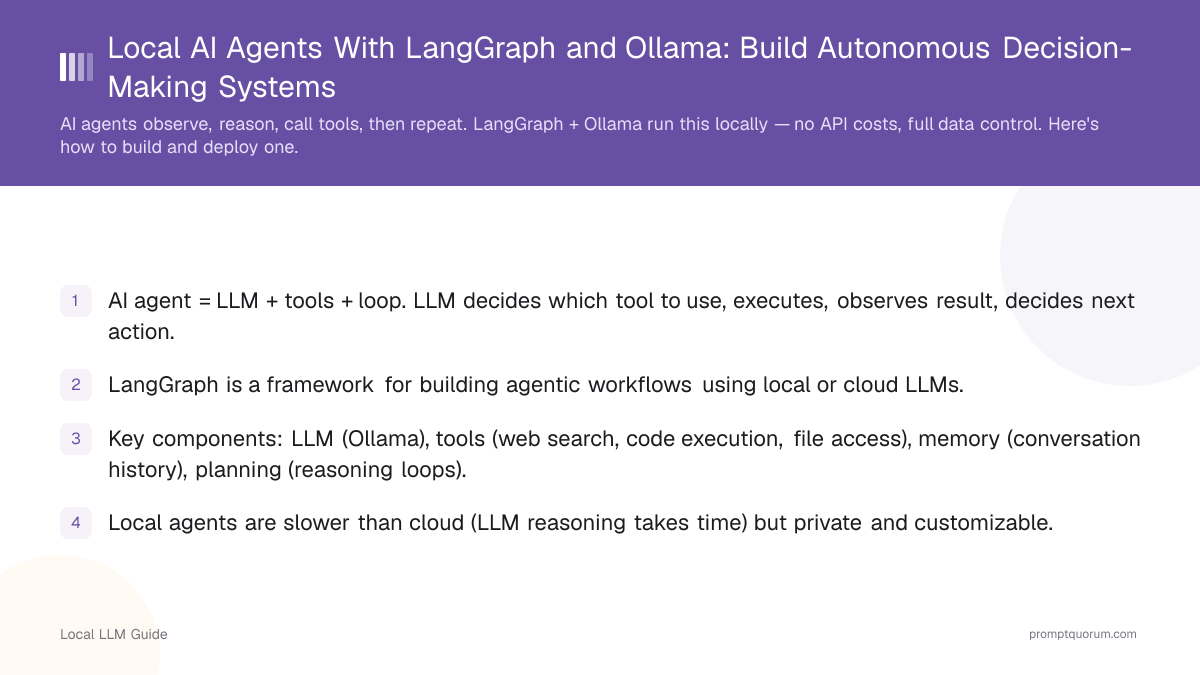
- AI agent = LLM + tools + loop. LLM decides which tool to use, executes, observes result, decides next action.
- LangGraph is a framework for building agentic workflows using local or cloud LLMs.
- Key components: LLM (Ollama), tools (web search, code execution, file access), memory (conversation history), planning (reasoning loops).
- Local agents are slower than cloud (LLM reasoning takes time) but private and customizable.
- Local agents work best for tasks that benefit from reasoning over speed.
📍 In One Sentence
An AI agent combines an LLM, a set of tools, and a loop -- the model decides which tool to call, executes it, observes the result, and decides the next action -- and LangGraph is the framework for building this entirely on local hardware via Ollama.
💬 In Plain Terms
An agent is different from a normal chatbot because it doesn't just answer -- it can take actions, check the result, and decide what to do next on its own. LangGraph gives that loop a clear structure (nodes and edges) so it doesn't run forever or get confused, and running it locally through Ollama means no API costs and no data leaving your machine.
How Does an AI Agent Work?
An agent follows this loop: (1) observe state/context, (2) LLM reasons about best action, (3) execute action (tool call), (4) observe result, (5) repeat until done.
Example: Research agent given task "Compare Llama 3.2 vs Qwen 3 on coding tasks".
- Observation: Task received.
- Reasoning: Need to find benchmarks, search for HumanEval scores.
- Action: Use web_search tool to find "Llama 3.2 HumanEval benchmark".
- Observation: Retrieved text with scores.
- Action: Search for "Qwen 3 HumanEval".
- Reasoning: Both models found. Qwen is faster, Llama is more general.
- Final Action: Synthesize answer and return.
📍 In One Sentence
An AI agent is a program that uses an LLM to decide which tool to call next, observes the result, then decides again — repeating until the task is complete.
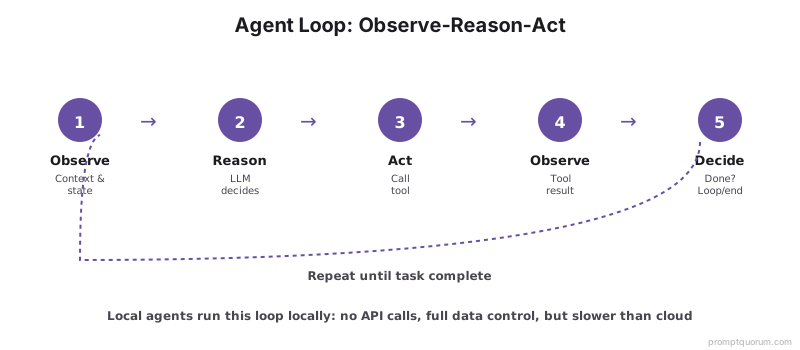
💡Tip: The key difference from a chain is that agents use the LLM's output to *decide* what happens next, not follow a predetermined path.
What Is the Difference Between Agents and Chains?
Agents make dynamic decisions at runtime; chains follow a predetermined sequence. Use agents when the task requires reasoning or error recovery — use chains for fixed, predictable workflows.
Aspect | Chains | Agents |
|---|---|---|
| Decision-making | Predetermined sequence | Dynamic, LLM decides |
| Loops | No loops | Reasoning loop (repeat until done) |
| Error recovery | Manual error handling | LLM can recover from failures |
| Use case | Fixed workflows (summarize → email) | Complex reasoning (research, automation) |
| Complexity | Simple, predictable | Complex, unpredictable behavior |
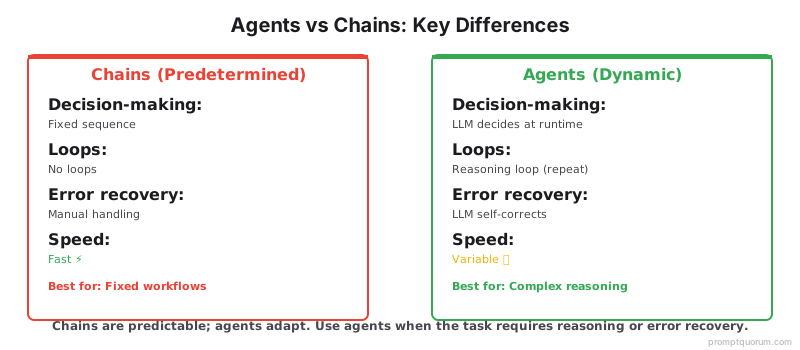
📌Note: Agents are slower and more unpredictable than chains because the LLM must make a decision at each step. If speed is critical and your workflow is known in advance, use a chain.
How Does LangGraph Architecture Work?
LangGraph defines agents as directed acyclic graphs (DAGs) with nodes (states) and edges (transitions).
- State: Information agent holds (context, observations, decisions).
- Nodes: Functions that process state (LLM reasoning, tool execution).
- Edges: Transitions between nodes (conditional based on LLM output).
- Tools: Functions the LLM can call (web search, code execution, database queries).
💬 In Plain Terms
LangGraph is like a flowchart where the LLM decides which arrow to follow at each decision box — and can loop back when something goes wrong.

What Tools Can Agents Use?
An agent's capability is defined entirely by its tools — the functions it can call to interact with the world. Limit to 5–10 tools per agent to avoid decision paralysis.
- Web search: Search the internet for information (duckduckgo, Google, Bing).
- Code execution: Run Python code and return results.
- File operations: Read/write files, list directories.
- Database queries: Query local or remote databases.
- Document retrieval: Search RAG vector database for documents.
- Calculator: Perform arithmetic and symbolic math.
- Email: Send messages (with caution, verify permissions).
- API calls: Interact with external services.
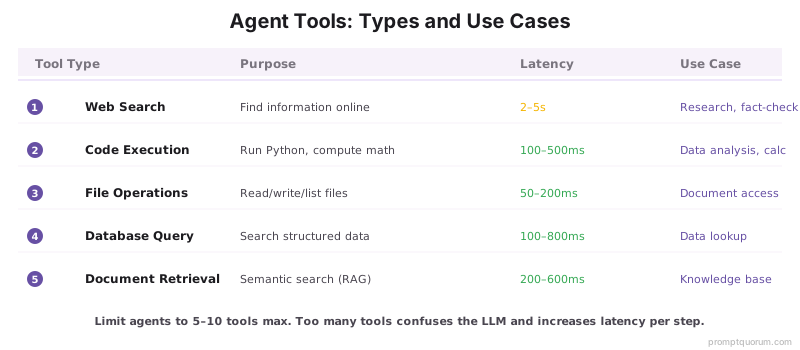
⚠️Warning: Too many tools confuses the LLM — per-step latency increases and the agent selects the wrong tool more often. Start with 3–5 core tools.
🛠️Practice: Write every tool description in under 50 words and state exactly when to use it. A clear description helps the LLM choose the right tool.
How Do Agents Reason and Plan?
Agent reasoning depends on the LLM model size and prompt quality.
- Small models (3-7B): Limited reasoning. Work best with deterministic tasks (tool lookup, classification).
- Medium models (13-30B): Decent reasoning. Can handle 2-3 step reasoning chains.
- Large models (70B+): Strong reasoning. Can solve complex problems with multi-step planning.
Prompting technique: Chain-of-Thought (CoT) helps agents think through steps before deciding. Make sure Ollama is installed and running before testing reasoning performance.
❌ Bad Prompt
“You are a helpful AI assistant. A user will ask you to do research. Do your best.”
✅ Good Prompt
“You are a research agent. For each task: (1) break it into 2–3 sub-questions, (2) search for each using the web_search tool, (3) synthesize findings, (4) cite sources. Always explain your reasoning before calling a tool. Hard limit: 10 reasoning steps max.”
# Example: CoT reasoning prompt for agent
system_prompt = """
You are a research agent. Break complex tasks into steps:
1. Identify what information you need
2. Call appropriate tools to gather information
3. Analyze results and determine next steps
4. Return the final answer with sources
Always reason step-by-step before calling tools.
"""🔍Insight: Chain-of-Thought prompts work well for agents — explicit step-by-step reasoning helps the LLM make better tool choices.
⚠️Warning: Generic "helpful assistant" prompts fail for autonomous agents. You need explicit step limits, output format rules, and tool reasoning instructions.
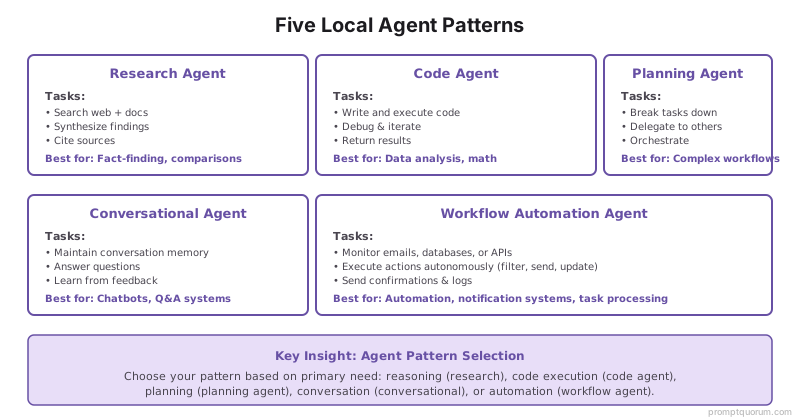
Which Local Agent Patterns Work Best?
Five patterns cover most local agent use cases. Choose based on whether the primary need is reasoning, code execution, planning, conversation, or automation.
- Research agent: Searches documents and web, synthesizes findings.
- Code agent: Writes and executes code to solve problems.
- Planning agent: Breaks complex tasks into subtasks, delegates to other agents.
- Conversational agent: Maintains memory, answers questions, learns from feedback.
- Workflow automation: Reads emails, executes tasks, sends confirmations.
What Are the Most Common Agent Implementation Mistakes?
Most local agent failures trace back to five root causes: tool overload, vague tool descriptions, infinite loops, missing error handling, and model size mismatch.
- Too many tools: Agent gets confused with too many options. Limit to 5-10 relevant tools.
- Poor tool descriptions: LLM won't use tools correctly if descriptions are vague. Write clear, specific descriptions.
- Infinite loops: Agent can get stuck in reasoning loops. Add max iteration limit (e.g., 10 steps).
- No error handling: Tool calls may fail. Have agent handle failures gracefully.
- Using small models: 3B models cannot reason well enough for complex agents. Use 13B+ for autonomous agents.
⚠️Warning: The biggest mistake is deploying an agent without a hard iteration limit. Agents can loop forever if the LLM gets stuck. Always set max_iterations to 10–20.
Common Questions About Local AI Agents
🛠️Practice: Test agents with a max iteration count first (e.g., 5 steps) to catch bugs before deploying to production where they might waste resources.
How much faster are cloud agents vs local agents?
Cloud agents: ~1 sec per reasoning step. Local agents: ~3–5 sec per step depending on model size and hardware. Local inference adds latency but eliminates API costs and keeps all data on your own hardware.
Can local agents access the internet?
Yes, if you provide a web_search tool. The agent calls that tool the same way it calls any other function. Popular options include the DuckDuckGo search API and SerpAPI for structured results.
How do I ensure an agent doesn't break things (e.g., delete files)?
Run tools inside a Docker container with strict filesystem and network permissions. Log every tool call with its inputs and outputs for audit trails. Add a confirmation step before any destructive action (file delete, email send).
Can I run multiple agents in parallel?
Yes. Use async frameworks like FastAPI to handle concurrent agent requests. Each request gets its own conversation state. Note that each parallel agent requires its own LLM inference thread, so VRAM limits how many you can run simultaneously.
What is the minimum hardware needed to run a local AI agent?
A 13B+ parameter model is recommended for reliable autonomous reasoning. That requires at least 16GB RAM and preferably a GPU with 8GB+ VRAM for a quantized 13B model. On CPU-only hardware, expect 5–15 seconds per reasoning step.
When should I use LangGraph instead of plain LangChain?
Use LangGraph when your workflow requires loops, conditional branching, or recovery from tool failures. Plain LangChain works well for linear pipelines (step A → B → C) without decision points. If your agent needs to retry or reason again after a failed step, LangGraph's graph structure handles this cleanly.
Is LangGraph the same as LangChain?
No. LangChain is a general-purpose LLM toolkit for building chains and pipelines. LangGraph is a separate framework built on top of LangChain specifically for agents and stateful workflows — it adds the graph structure (nodes, edges, state) needed for reliable reasoning loops.
How many tools should a local agent have?
Limit agents to 5–10 tools. With too many options, the LLM struggles to select the right tool and per-step latency increases. Start with 3–5 core tools and expand only when you hit a specific capability gap. Write each tool description in under 50 words and state exactly when to use it.
Quick Facts
- Local agent latency: ~3–5 sec per reasoning step (vs ~1 sec for cloud agents)
- Model minimum: 13B+ parameters for reliable autonomous multi-step agents
- Tool limit: 5–10 tools per agent — beyond 10, decision quality drops
- Max iterations: Set a hard cap of 10–20 steps to prevent infinite loops
- Hardware: 8GB+ VRAM for a quantized 7B model; 16GB+ for 13B agents
- Reasoning latency on CPU: 5–15 sec per step at 13B (Ollama default)
Regional Context and Deployment Regulations
Local agents are the default choice for GDPR-regulated workflows in the EU. When agents process personal data — customer records, medical files, legal documents — local inference keeps data within your own infrastructure and satisfies GDPR Articles 25 and 32 without requiring a data processing agreement with a cloud provider.
In Japan, the Act on Protection of Personal Information (APPI), amended in 2022, restricts cross-border data transfers. Local agents running on-premises satisfy APPI requirements by default for enterprises handling sensitive customer data without further regulatory burden.
In China, the 2021 Data Security Law and the Personal Information Protection Law (PIPL) require that certain categories of data remain within Chinese borders. Local agents using Qwen3 or other locally-hosted models satisfy these residency requirements where cloud inference would not.
Sources
- LangGraph Documentation — Official repository and documentation for the LangGraph agent framework.
- LangChain Agents Documentation — LangChain's agent module guide with tool integration patterns.
- ReAct: Synergizing Reasoning and Acting in Language Models (Yao et al., 2022) — Foundational paper introducing the observe–reason–act loop used in LangGraph agents.