Key Takeaways
- Memory is the binding constraint, not the GPU name. A model that does not fit in VRAM or unified memory either fails to load or spills to swap and becomes too slow for interactive use. Buy for the memory your target model needs, then optimize speed.
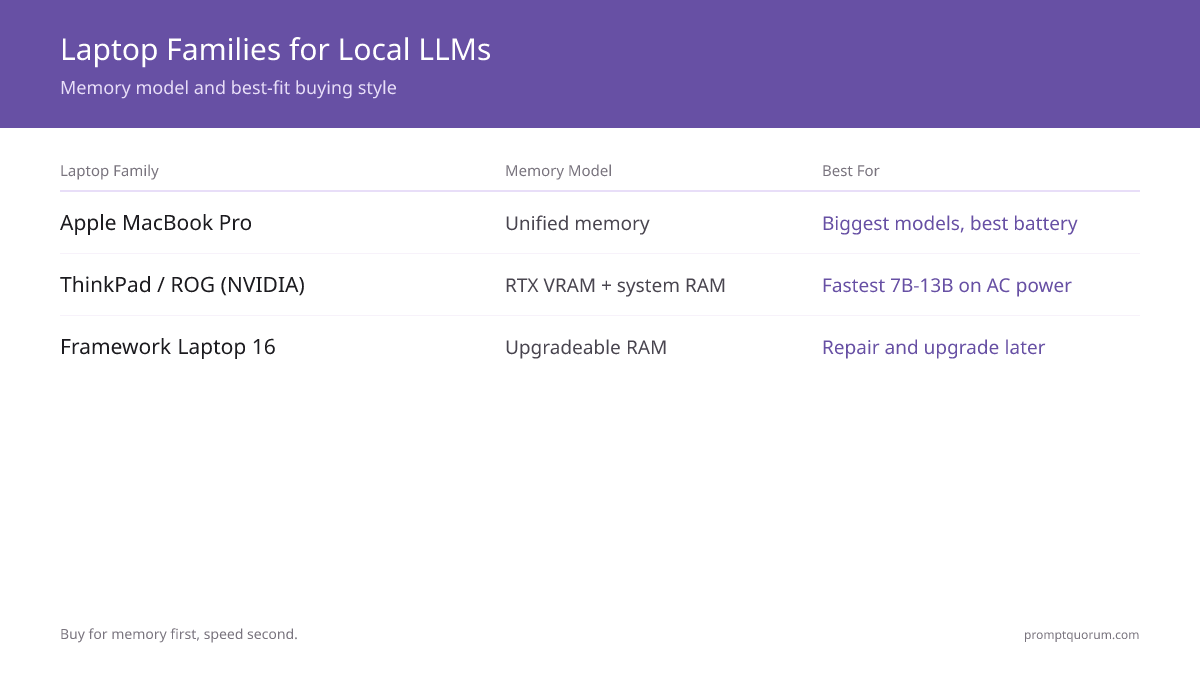
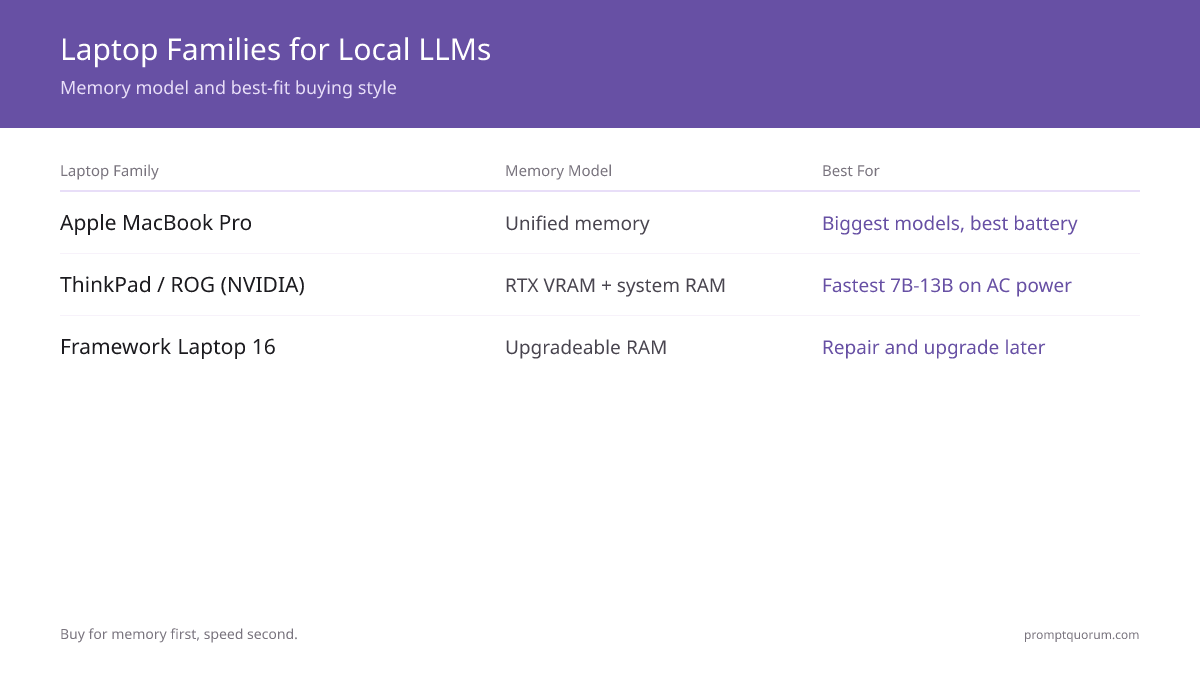
- Most portable memory: an Apple MacBook Pro. Apple Silicon shares one unified memory pool between CPU and GPU, so a configuration with large memory fits bigger models than a comparable gaming laptop — with the best battery efficiency.
- Fastest 7B-13B: a high-VRAM NVIDIA gaming laptop. A Lenovo ThinkPad workstation or ASUS ROG laptop with an RTX GPU runs 7B-13B models fastest when plugged in. An RTX 4060 (8 GB) laptop runs a 7B model around 60-90 tok/s; an RTX 4070 (12 GB) laptop handles 13B comfortably.
- Repairable pick: the Framework Laptop 16. It has upgradeable RAM and storage and a modular design, so you can raise memory later instead of replacing the whole machine — a hedge against outgrowing your first configuration.
- Memory minimums: 8 GB runs 7B models at Q4_K_M, 16 GB runs 13B comfortably, and large MacBook Pro configurations reach much larger models. Always leave 2-4 GB of headroom for the operating system.
- Expect a desktop gap. A laptop runs roughly 20-30% slower than a desktop with the same chip because thermal limits keep clock speeds down under sustained load.
- Battery changes everything on Windows. A gaming laptop typically disables or throttles the discrete GPU on battery, dropping inference to a crawl — plan to run plugged in. Apple Silicon stays usable on battery and is far more efficient.
- Prices are a July 2026 snapshot. Laptop pricing moves with model-refresh cycles and sales — treat every figure here as a range and confirm the live price before buying.
Quick Facts
- Apple MacBook Pro: unified memory shared by CPU and GPU — large configurations fit the biggest models portably.
- Lenovo ThinkPad / workstation: durable build with an NVIDIA RTX GPU option — strong for plugged-in 7B-13B inference.
- ASUS ROG gaming laptop: high-VRAM RTX GPU with gaming-grade cooling — the fastest 7B-13B option when on AC power.
- Framework Laptop 16: modular, repairable design with upgradeable RAM and storage — buy memory you can raise later.
- Memory rule at Q4_K_M: 8 GB runs 7B models, 16 GB runs 13B; always keep 2-4 GB free for the OS.
- Speed reference: a 7B model runs 10-25 tok/s on a laptop CPU, 30-80 tok/s on Apple Silicon, and 60-90 tok/s on an RTX 4060 laptop GPU.
- Desktop gap: expect roughly 20-30% lower sustained speed on a laptop than a desktop with the same chip, due to thermal throttling.
Sponsored
Editor's Choice: An Apple MacBook Pro With Large Unified Memory
For most buyers who want one laptop that runs local LLMs well and stays portable, an Apple MacBook Pro with large unified memory is the balanced pick. Apple Silicon shares a single memory pool between the CPU and GPU, so a high-memory configuration fits larger models than a gaming laptop with the same memory split into VRAM and system RAM. It also stays usable on battery and runs far more efficiently — an M-series MacBook Pro draws roughly 12-18 W during 7B inference versus 25-45 W on a Windows laptop. If you specifically need the fastest 7B-13B inference and will keep the laptop plugged in, a high-VRAM NVIDIA gaming laptop is quicker. If you want hardware you can repair and upgrade, choose the Framework Laptop 16. Configure the MacBook Pro with as much unified memory as your budget allows — memory cannot be upgraded after purchase. Prices span a wide range, so check the current price before buying.
📌Note: This Editor's Choice reflects fit-for-purpose only. PromptQuorum is not enrolled in any affiliate program and the links below carry no affiliate tags — they are plain reference links that earn no commission.
How the Four Laptop Families Compare for Local LLMs
Speed figures are reused from PromptQuorum on-site laptop testing — a 7B model runs 10-25 tok/s on a laptop CPU, 30-80 tok/s on Apple Silicon, and 60-90 tok/s on an RTX 4060 laptop GPU. The "best for" column reflects buying style, not a single SKU. Prices are a July 2026 snapshot expressed as ranges — laptop pricing moves with model cycles and sales, so confirm before buying.
📍 In One Sentence
For a local-LLM laptop, the memory pool — VRAM on Windows or unified memory on Apple Silicon — decides which models fit, and the cooling decides how fast they run before thermal throttling.
💬 In Plain Terms
Think of memory as the size of the workbench and the model as the project on it. A faster chip finishes work quicker, but if the project does not fit on the bench at all, speed never matters. A laptop also has a smaller cooling system than a desktop, so it slows down under long jobs.
Laptop family | Memory model | 7B speed (reused data) | Best for | Price (Jul 2026) |
|---|---|---|---|---|
| Apple MacBook Pro | Unified memory (CPU + GPU shared) | 30-80 tok/s on Apple Silicon | Biggest models portably, best battery life | Mid to premium; check current price |
| Lenovo ThinkPad / workstation | NVIDIA RTX VRAM + system RAM | 60-90 tok/s on an RTX 4060 GPU | Durable build, plugged-in 7B-13B work | Mid to premium; check current price |
| ASUS ROG gaming laptop | NVIDIA RTX VRAM + system RAM | 60-90 tok/s on an RTX 4060 GPU | Fastest 7B-13B on AC power | Mid range; check current price |
| Framework Laptop 16 | Upgradeable system RAM + GPU module | Comparable to an RTX laptop on AC | Repairability, upgrading memory later | Mid range; check current price |
Which Laptop Should You Buy?
Your buying style decides the family; your largest target model decides the memory configuration. Find the row that matches your situation.
Your situation | Buy this |
|---|---|
| I want the biggest models in a portable body with great battery | Apple MacBook Pro with large unified memory |
| I want the fastest 7B-13B inference and will keep it plugged in | ASUS ROG laptop with a high-VRAM NVIDIA RTX GPU |
| I want a durable, business-grade build with an RTX GPU | Lenovo ThinkPad workstation with an RTX GPU |
| I want to repair and upgrade the laptop myself over time | Framework Laptop 16 |
| I mostly run 7B models and want a balanced everyday laptop | MacBook Pro with mid-range unified memory |
| I am unsure and want the safest first laptop | Apple MacBook Pro — best balance of memory, efficiency, and battery |
Apple MacBook Pro: The Most Portable Memory
An Apple MacBook Pro is the pick for fitting the largest local LLMs in a portable body, because Apple Silicon shares one unified memory pool between the CPU and GPU. That means a high-memory configuration runs bigger models than a gaming laptop with the same total memory split into separate VRAM and system RAM.
- Why buy it: unified memory fits larger models than a comparable VRAM split, Apple Silicon stays usable on battery, and it is the most power-efficient option — roughly 12-18 W during 7B inference versus 25-45 W on a Windows laptop.
- Use a MacBook Pro if you want one portable laptop for the biggest models, value battery life, and prefer a quiet machine that does not need to be plugged in to run inference.
- Reused speed data: a 7B model runs 30-80 tok/s on Apple Silicon depending on the chip tier and memory; a configuration with large unified memory fits 13B models entirely in fast memory.
- Configure carefully: unified memory cannot be upgraded after purchase. Buy as much memory as your budget allows — it is the spec that decides your largest model permanently.
- Why skip it: for the fastest possible 7B-13B inference on AC power, a high-VRAM NVIDIA gaming laptop is quicker; and a MacBook Pro is not user-repairable.
💡Tip: On a MacBook Pro, unified memory is the one spec you cannot change later. Prioritize it over storage — an external SSD can hold your model library, but no external part can add unified memory.
Lenovo ThinkPad and Workstation Laptops: The Durable NVIDIA Pick
A Lenovo ThinkPad mobile workstation with an NVIDIA RTX GPU is the pick for buyers who want NVIDIA inference speed in a durable, business-grade build. ThinkPad workstation models pair an RTX GPU with a sturdy chassis and serviceable internals.
- Why buy it: an NVIDIA RTX GPU runs CUDA-accelerated inference out of the box with Ollama and LM Studio, in a chassis built for years of daily use with replaceable parts.
- Use a ThinkPad workstation if you want NVIDIA GPU speed, value a durable build and a strong keyboard, and the laptop doubles as a work machine.
- Reused speed data: an RTX 4060 (8 GB) laptop GPU runs a 7B model around 60-90 tok/s; an RTX 4070 (12 GB) laptop handles 13B models comfortably. Speed is around 20-30% below an equivalent desktop GPU.
- Configure for memory: pick at least 16 GB of system RAM and a 12 GB-VRAM GPU if you want 13B headroom; the GPU is soldered, so choose VRAM correctly at purchase.
- Why skip it: the discrete GPU is typically throttled on battery, so plan to run plugged in; and for raw price-to-speed an ASUS ROG gaming laptop often costs less.
📌Note: A laptop GPU is soldered to the board and cannot be upgraded. Choose the VRAM amount for the largest model you intend to run — an 8 GB GPU fits 7B comfortably, a 12 GB GPU is the safer floor for 13B.
ASUS ROG and Gaming Laptops: The Fastest 7B-13B on AC
An ASUS ROG gaming laptop with a high-VRAM NVIDIA RTX GPU is the fastest pick for 7B-13B local LLMs when the laptop stays on AC power. Gaming laptops pair an RTX GPU with cooling designed for sustained load, which holds clock speeds up longer than a thin-and-light chassis.
- Why buy it: a high-VRAM RTX GPU plus gaming-grade cooling delivers the fastest sustained 7B-13B inference of the Windows options, often at a lower price than a workstation laptop.
- Use an ASUS ROG laptop if you want maximum 7B-13B speed, will keep the laptop plugged in, and accept louder fans and a gaming aesthetic.
- Reused speed data: an RTX 4060 (8 GB) laptop runs a 7B model at 60-90 tok/s; an RTX 4070 (12 GB) laptop runs 13B comfortably. Better cooling delays thermal throttling, which typically starts after 10-15 minutes of sustained generation.
- Configure for memory: choose at least 16 GB of system RAM and a 12 GB-VRAM GPU for 13B headroom; an 8 GB-VRAM model is fine if 7B is your ceiling.
- Why skip it: the discrete GPU is disabled or throttled on battery, dropping inference to a crawl; and fan noise and battery drain are noticeably higher than a MacBook Pro.
⚠️Warning: A Windows gaming laptop typically disables the discrete GPU on battery to save power, so inference falls to CPU-only speed. If you need to run models away from a power outlet, an Apple MacBook Pro is the better fit.
Framework Laptop 16: The Repairable, Upgradeable Pick
The Framework Laptop 16 is the pick for buyers who want a laptop they can repair and upgrade themselves over time. Its modular design uses upgradeable RAM and storage and replaceable parts, so outgrowing your first memory configuration does not mean buying a whole new machine.
- Why buy it: user-upgradeable RAM and storage and a modular, repairable design — a hedge against the soldered-memory limit on a MacBook Pro or a gaming laptop.
- Use a Framework Laptop 16 if you value repairability and the option to raise memory later, and you want to avoid replacing the whole laptop when your needs grow.
- Memory advantage: because the RAM is upgradeable, you can start with a smaller configuration for 7B models and add memory later for 13B work — the only family here where that is possible.
- Configure for now, plan for later: buy enough memory for your current target model, knowing you can raise it. Confirm the current GPU module options and supported RAM capacity on the manufacturer site before buying.
- Why skip it: if you want the absolute most unified memory in a portable body, a high-memory MacBook Pro fits larger models; and gaming laptops may offer more raw GPU speed per dollar.
💡Tip: The Framework Laptop 16 is the only family in this guide with upgradeable RAM. If you are unsure how large your models will get, it lets you start modest and add memory later instead of overspending up front.
How Much Memory Do You Need in a Laptop?
At Q4_K_M quantization, a local LLM needs roughly 0.6 GB of memory per billion parameters, plus 2-4 GB for the operating system and tooling. On a laptop, "memory" means VRAM plus system RAM on Windows, or unified memory on Apple Silicon.
📍 In One Sentence
For a local-LLM laptop, plan for roughly 0.6 GB of memory per billion model parameters plus 2-4 GB of overhead — 8 GB covers 7B models and 16 GB covers 13B.
💬 In Plain Terms
Every model needs a certain amount of memory to load, and the operating system needs its own share on top. If the model does not fit, the laptop falls back on disk-based swap and slows to a crawl. Buy enough memory for your largest model with a few gigabytes to spare.
- 8 GB — 3B and 7B models: a 7B model at Q4_K_M needs about 4.5 GB, leaving room for the OS. 8 GB is the practical floor; close the browser before loading a 7B model.
- 16 GB — 7B and 13B models: a 13B model at Q4_K_M needs roughly 9 GB, which fits in 16 GB with normal multitasking. 16 GB is the recommended starting point.
- 32 GB+ — 13B with heavy multitasking, or larger models: comfortable for 13B alongside other apps, and the entry point for stepping beyond 13B.
- Large MacBook Pro unified memory — biggest portable models: because the GPU shares the full memory pool, a high-memory MacBook Pro fits models well beyond a 16 GB Windows laptop.
- Use 8 GB if 7B models cover your work; choose 16 GB+ if you want 13B models or run a browser and editor alongside inference.
- 6 GB VRAM (e.g. RTX 3050 laptop): fits 7B models at Q4_K_M (~4.5 GB needed) — barely. System RAM (DDR4) does not extend VRAM; CUDA cannot use it for model weights. 13B models (need ~9 GB VRAM) will not load at any quantization.
- 8 GB VRAM (RTX 3060 8GB, RTX 4060 laptop): fits any 7B model comfortably. 13B at Q4_K_M needs ~9 GB and will not fit. The practical VRAM floor for a no-frustration Windows gaming laptop AI setup.
- 12–16 GB VRAM (RTX 3080 12GB, RTX 4060 Ti 16GB, RTX 4080/4090 laptop): 13B models fit comfortably; 30B+ possible at aggressive quantization.
⚠️Warning: If you already own a gaming laptop: your GPU's VRAM is the binding limit, not your system RAM. An RTX 3050 laptop almost always has 6 GB VRAM — enough for 7B models, not 13B. Open Task Manager → Performance → GPU to see your VRAM. System RAM (DDR4) cannot be used as VRAM for CUDA inference.
Decision Flowchart: Pick Your Laptop in Three Questions
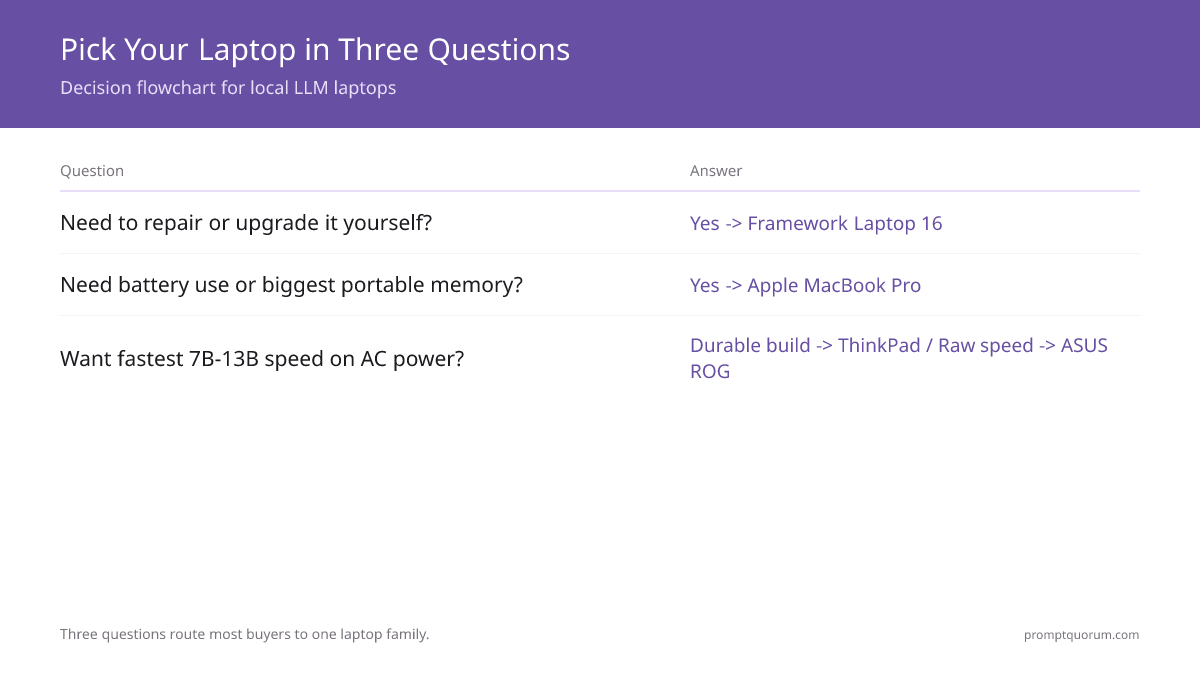
Three questions, in order, route most buyers to one family.
📍 In One Sentence
Pick a local-LLM laptop by answering repairability need first, battery and portable-memory need second, and durable build versus raw speed per dollar last.
💬 In Plain Terms
Start with whether you want to upgrade the laptop yourself — if so, get a Framework. If you need to run models unplugged or want the most memory, get a MacBook Pro. Otherwise pick a gaming or workstation laptop based on whether durability or price-to-speed matters more.
- 1. Do you need to repair and upgrade the laptop yourself? Yes: a Framework Laptop 16. No: continue.
- 2. Do you need to run models on battery, or want the biggest portable memory? Yes: an Apple MacBook Pro with large unified memory. No: continue.
- 3. Do you want the fastest 7B-13B speed on AC, in a durable build? Durable build matters most: a Lenovo ThinkPad workstation. Raw speed per dollar matters most: an ASUS ROG gaming laptop.
Where to Buy a Laptop for Local LLMs
Laptop prices move with model-refresh cycles and sales — US prices are usually lowest, EU prices add VAT. The links below are plain product-search and manufacturer links per region; they carry no affiliate tags and earn no commission.
- United States: Amazon and the manufacturer stores (Apple, Lenovo, ASUS, Framework) carry the widest configuration choice. Manufacturer stores let you pick exact memory.
- Germany: Amazon.de and the manufacturer German stores; expect roughly 19% VAT included in listed prices.
- France: Amazon.fr and the manufacturer French stores; pricing is similar to Germany with 20% VAT included.
- Japan: Amazon.co.jp and the manufacturer Japanese stores; configuration options track the US.
- Buy near a model refresh if you can wait — the previous generation often drops in price when a new one launches, and a used or refurbished gaming laptop escapes much of the new-model premium.
⚠️Warning: Every price band in this guide is a July 2026 snapshot. Laptop pricing moves with model cycles and sale events — always open the current retailer or manufacturer listing before buying.
Common Mistakes When Buying a Laptop for Local LLMs
- Buying for the GPU name instead of memory. A fast GPU that lacks the VRAM for your model is useless. Confirm the model fits in memory with 2-4 GB of headroom first, then compare speed.
- Buying a thin ultrabook expecting it to run 7B models well. An ultrabook with integrated graphics and a small thermal envelope handles only light 3B-7B CPU inference. Choose a MacBook Pro or a properly cooled laptop instead.
- Expecting desktop speed from a laptop. Thermal limits keep clock speeds down under sustained load — a laptop runs roughly 20-30% slower than a desktop with the same chip.
- Planning to run a gaming laptop on battery. A Windows gaming laptop throttles or disables the discrete GPU on battery, dropping inference to CPU-only speed. Plan to run plugged in, or buy a MacBook Pro.
- Under-configuring soldered memory. On a MacBook Pro or a gaming laptop, memory cannot be upgraded later. Buy enough at purchase for your largest target model.
- Ignoring thermal management. Running inference in a closed bag, or without a stand for airflow, forces the GPU to throttle hard within minutes. Use a stand and keep vents clear.
- Overbuying for 7B models. If 7B models cover your work, a top-tier configuration is wasted money and battery. Match the memory to the model, not to the budget you happen to have.
Sources
- Best Laptops for Running Local LLMs — PromptQuorum on-site laptop guide: GPU tiers, model size limits, and the desktop-versus-laptop speed gap reused here.
- Run Local LLMs on a Laptop: RAM, Speed & Thermals — PromptQuorum on-site source for the 7B speed figures (CPU, Apple Silicon, RTX laptop GPU) and battery and thermal data reused here.
- Apple MacBook Pro specifications — official reference for Apple Silicon unified memory configurations.
- Framework Laptop 16 — official reference for the modular, upgradeable RAM and GPU module design.
Frequently Asked Questions
What is the best laptop for running local LLMs in 2026?
There is no single best laptop — it depends on your buying style. An Apple MacBook Pro with large unified memory fits the biggest models in a portable, efficient body and is the best all-round pick. A high-VRAM NVIDIA gaming laptop, such as an ASUS ROG or a Lenovo ThinkPad workstation, runs 7B-13B models fastest when plugged in. A Framework Laptop 16 is the pick if you want repairable, upgradeable hardware. Buy for memory first, then speed.
How much RAM do I need in a laptop for local LLMs?
Plan for 8 GB as a practical minimum and 16 GB as the recommended starting point. At Q4_K_M quantization, a 7B model needs about 4.5 GB and runs on an 8 GB laptop if you keep other apps light. A 13B model needs roughly 9 GB, which fits comfortably in 16 GB. Always leave 2-4 GB of headroom for the operating system.
Is a MacBook Pro or a gaming laptop better for local LLMs?
It depends on your priority. A MacBook Pro shares one unified memory pool between CPU and GPU, so it fits larger models, runs far more efficiently, and stays usable on battery. A gaming laptop with a high-VRAM NVIDIA RTX GPU runs 7B-13B models faster when plugged in. Choose the MacBook Pro for portability and big models, the gaming laptop for raw plugged-in speed.
Can a laptop run local LLMs as fast as a desktop?
No. A laptop runs roughly 20-30% slower than a desktop with the same chip because a smaller cooling system forces clock speeds down under sustained load. Thermal throttling typically begins after 10-15 minutes of continuous generation. A laptop is the right choice for portability; a desktop is faster for sustained or large-model workloads.
Is the Framework Laptop 16 good for local LLMs?
Yes, if repairability and upgrades matter to you. The Framework Laptop 16 has upgradeable RAM and storage and a modular design, so you can start with a memory configuration for 7B models and raise it later for 13B work. It is the only family in this guide where memory is user-upgradeable. For the most unified memory in a portable body, a high-memory MacBook Pro still fits larger models.
Can I run local LLMs on a laptop on battery power?
It depends on the laptop. Apple Silicon MacBooks stay usable on battery and run efficiently — roughly 12-18 W during 7B inference. A Windows gaming laptop typically disables or throttles the discrete GPU on battery, dropping inference to slow CPU-only speed. If running models away from a power outlet matters, choose a MacBook Pro.
How fast does a 7B model run on a laptop?
Speed depends on the hardware. A 7B model at Q4_K_M runs about 10-25 tokens per second on a laptop CPU, 30-80 tokens per second on Apple Silicon using unified memory, and 60-90 tokens per second on an NVIDIA RTX 4060 laptop GPU. These figures are from PromptQuorum on-site laptop testing.
Can I upgrade the GPU in a laptop later?
In almost all laptops, no — the GPU is soldered to the motherboard and cannot be changed. That makes VRAM a permanent choice you must get right at purchase: an 8 GB GPU fits 7B models, a 12 GB GPU is the safer floor for 13B. The Framework Laptop 16 is modular for RAM and some components, but the GPU is still chosen at configuration time.
What is the best computer for running AI models locally — laptop or desktop?
A desktop wins on raw capability for the same money: you can put a 24GB card in one, run it at full power, and cool it properly. A laptop wins when the machine has to travel, and the gap has narrowed enough that it is no longer a compromise for most work. If you want one computer for running AI models locally and it must be portable, the deciding number is unified memory or VRAM, not the CPU. The picks above are ranked on exactly that, with measured token speeds for large language models at each price tier.