Key Takeaways
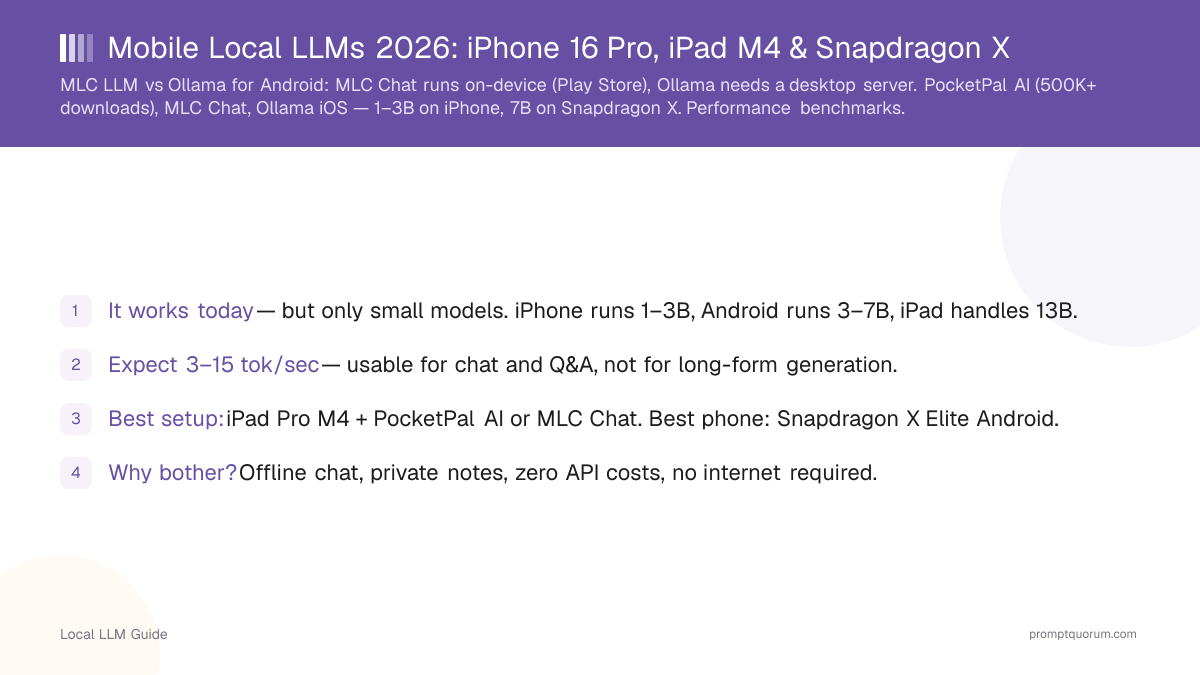
- It works today — but only small models. iPhone runs 1–3B, Android runs 3–7B, iPad handles 13B.
- Expect 3–15 tok/sec — usable for chat and Q&A, not for long-form generation.
- Best setup: iPad Pro M4 + PocketPal AI or MLC Chat. Best phone: Snapdragon X Elite Android.
- Why bother? Offline chat, private notes, zero API costs, no internet required.
- Skip if: You need desktop-quality speed, 70B models, or real-time latency under 500ms.
📍 In One Sentence
You can run a local LLM directly on your phone in 2026, but only small models -- 1-3B on iPhone, up to 7B on flagship Android with Snapdragon X -- at 3-15 tokens per second, far slower than the 80-150 tok/sec of a desktop GPU.
💬 In Plain Terms
Yes, your phone can run AI models without an internet connection, but expect a much smaller and slower model than what you'd run on a computer. It's a real trade-off: slower responses in exchange for complete privacy, zero API cost, and offline access -- useful for chatting, private note-taking, or lightweight tasks when you don't have signal or don't want your data leaving the device.
Quick Facts
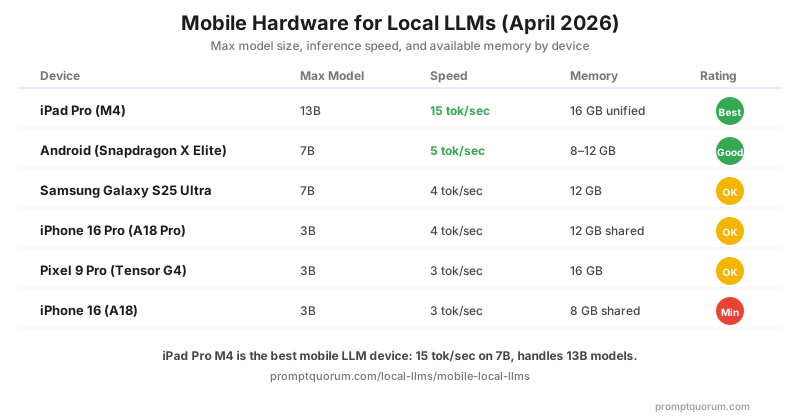
- iPhone 16 Pro (A18 Pro): 3–4 tok/sec on 3B models, 12 GB shared RAM, practical for Q&A and summarization
- iPad Pro M4: 15 tok/sec on 7B models, runs 13B models, 16 GB unified memory — best Apple mobile LLM device
- Android Snapdragon X Elite: 5 tok/sec on 7B models, 8–12 GB RAM, best Android option for local inference
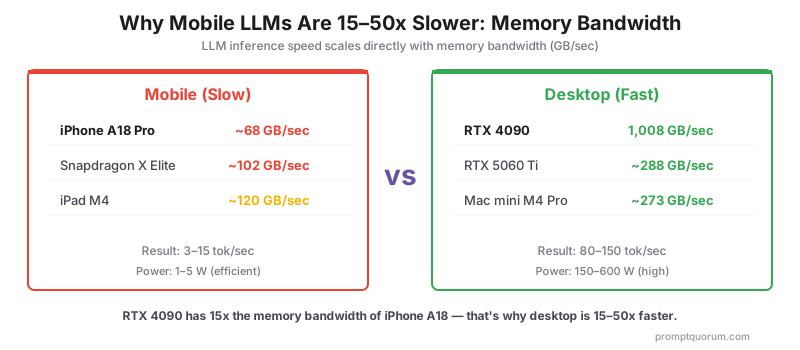
- Memory bandwidth gap: iPhone A18 ~68 GB/sec vs RTX 4090 1,008 GB/sec — explains 15–50× speed difference
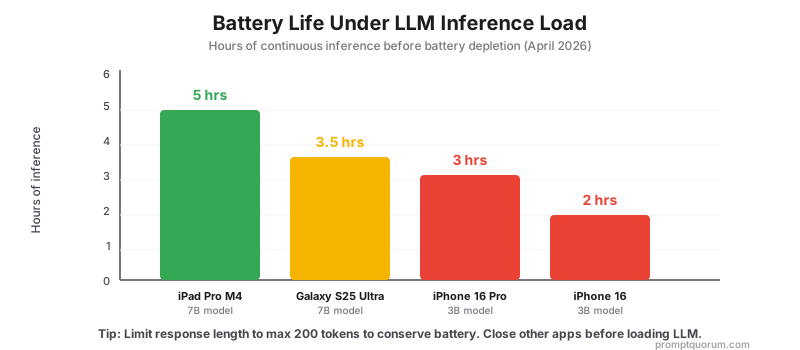
- Battery drain: iPhone drains in 2–4 hours under sustained inference; iPad lasts 4–6 hours
What Actually Works on Mobile (2026)
iPhone (A18/A18 Pro): Runs 1–3B models only. Llama 3.2 1B and Phi-4 Mini 3.8B are the practical choices. Speed: 3–4 tok/sec. Good for quick Q&A, short summaries, offline dictionary-style lookups. Not usable for long conversations or code generation.
Android (Snapdragon X Elite): Runs 3–7B models. Llama 3.2 3B and Mistral Small work at 5 tok/sec. Galaxy S25 Ultra and flagship Snapdragon devices are the best Android options. Practical for chat, summarization, and offline assistants.
iPad Pro (M4): The only mobile device where local LLMs feel usable. Runs 7–13B models at 15 tok/sec with 16 GB unified memory. Handles Llama 3.2 3B comfortably and can run 13B models for quality close to GPT-4o mini level.
What does NOT work: 70B models on any mobile device. 7B models on iPhone (crashes). Any model on phones with under 8 GB RAM. Real-time voice assistants (latency too high).
What Mobile Hardware Runs Local LLMs in 2026?
iPhone 16 Pro (A18 Pro) is the minimum practical iPhone for local LLMs — 12 GB shared RAM runs Llama 3.2 3B at 4 tok/sec. Standard iPhone 16 (8 GB) handles 1B models only.
Device | Max Model Size | Speed | Memory |
|---|---|---|---|
| iPhone 16 (A18) | 3B | 3 tok/sec | Shared 8 GB |
| iPhone 16 Pro (A18 Pro) | 3B | 4 tok/sec | Shared 12 GB |
| Android (Snapdragon X Elite) | 7B | 5 tok/sec | 8–12 GB |
| Pixel 9 Pro (Tensor G4) | 3B | 3 tok/sec | 16 GB |
| Samsung Galaxy S25 Ultra | 7B | 4 tok/sec | 12 GB |
| iPad Pro (M4) | 13B | 15 tok/sec | Shared 16 GB |
Pixel 9 Pro runs Gemini Nano natively via Google's AICore API — access via Android AICore not exposed to third-party apps yet. Samsung Galaxy S25 Ultra offers Samsung Galaxy AI (on-device + cloud hybrid) — pure on-device inference via MLC Chat or LLaMa Lite.
Best Current Setups: Apps & Frameworks
App | Platform | Supported Models | Cost |
|---|---|---|---|
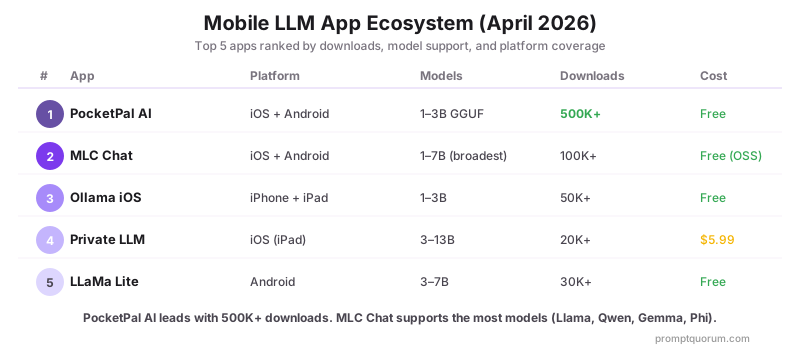
| PocketPal AI | iOS, Android | 1–3B GGUF | Free |
| MLC Chat | iOS, Android | 1–7B | Free (open source) |
| Ollama iOS | iPhone, iPad | 1–3B | Free |
| Layla | iOS | 1–3B + RAG | Free + Pro |
| Chatlize | iOS, Android | 1–3B | Free + Pro |
| Private LLM | iOS (Apple Silicon iPad) | 3–13B | $5.99 one-time |
| LLaMa Lite | Android | 3–7B | Free |
| MLC LLM (dev) | Android | 1–7B via MLC | Free (developer) |
PocketPal AI (January 2025 launch) is now the most popular mobile local LLM app with 500K+ downloads across iOS and Android. MLC Chat from MLC-AI delivers the broadest model support (Llama, Qwen, Gemma, Phi) with identical interfaces across iOS and Android.
What Frameworks Support Mobile LLM Development?
iOS: Core ML and Metal Performance Shaders handle model optimization. llama.cpp provides the underlying inference engine for most iOS LLM apps.
Android: TensorFlow Lite, ONNX Runtime, and Snapdragon Neural Processing Engine. MLC LLM provides cross-platform mobile inference.
Developers can convert Llama, Qwen, and Mistral models to mobile-optimized GGUF or Core ML formats using llama.cpp or coremltools.
MLC LLM vs Ollama: Android On-Device Inference Compared
MLC LLM wins for Android on-device inference. Ollama is not a native Android solution. Ollama runs as a server on desktop/macOS/Linux — you access it from Android via a client app over Wi-Fi. MLC LLM (via MLC Chat app) compiles models to native device code using TVM, making it the only major framework with true on-device Android inference where the model runs entirely on your phone without any network connection.
Why MLC LLM outperforms Ollama on Android: MLC Chat uses TVM (Tensor Virtual Machine) to compile models into Vulkan or OpenCL shaders optimized for each Android GPU chipset. Ollama uses llama.cpp, designed for CPU/GPU inference on desktop — no Vulkan optimization, no Android app packaging. The result: MLC Chat delivers 5 tok/sec on Llama 3.2 3B on Snapdragon X Elite, while Ollama performance on Android depends entirely on the desktop server it connects to over your local network.
Factor | MLC LLM (MLC Chat) | Ollama on Android |
|---|---|---|
| Native Android app | Yes — Play Store | No — server only |
| True on-device inference | Yes — fully offline | No — requires desktop server |
| Inference engine | TVM (Vulkan/OpenCL) | llama.cpp via server |
| Supported models | Llama, Qwen, Gemma, Phi | All GGUF (via desktop) |
| Speed on Snapdragon X Elite | 5 tok/sec (7B) | Network-dependent |
| Works without Wi-Fi | Yes | No (needs server) |
| iOS support | Yes (App Store) | Via Ollama iOS app only |
MLC Chat vs PocketPal AI: both are fully on-device Android apps. MLC Chat uses TVM-compiled models (faster on Snapdragon GPUs, Vulkan acceleration), while PocketPal AI uses GGUF format (broader model compatibility, direct HuggingFace downloads). For Snapdragon X Android, MLC Chat delivers better raw speed. PocketPal AI wins on model variety and simpler downloads.
Mobile vs Laptop vs Mini PC: Which Should You Use?
Mobile phones are the weakest option for local LLMs — but the only one that fits in your pocket. Here is how they compare to laptops and mini PCs for on-device AI:
Factor | Phone | Laptop (M4 Pro) | Mini PC (M4 Pro) |
|---|---|---|---|
| Max model size | 3–7B | 70B | 70B |
| Speed (7B) | 3–5 tok/sec | 30–40 tok/sec | 35–45 tok/sec |
| RAM available | 6–12 GB usable | 24–48 GB | 24–64 GB |
| Portability | Bag | Desk only | |
| Battery life (inference) | 2–5 hours | 6–10 hours | Plugged in |
| Cost | $0 (existing phone) | $1,999+ | $799+ |
| Best for | Quick offline Q&A | Portable dev work | Always-on server |
For most users: use your phone for quick offline queries, a laptop for serious work, and a mini PC as a local LLM server accessible from all devices via Wi-Fi.
How Fast Are Mobile LLMs vs Desktop?
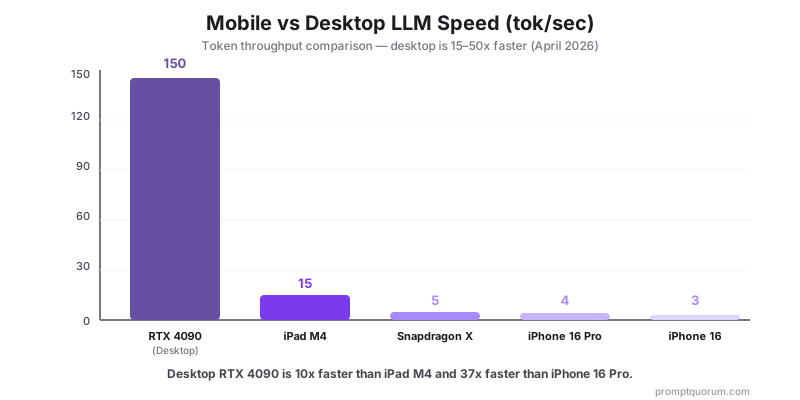
Mobile is 15–50× slower than desktop due to memory bandwidth. An iPhone A18 has ~68 GB/sec bandwidth; an RTX 4090 has 1,008 GB/sec. LLM inference speed scales directly with memory bandwidth.
Device | Model | Tokens/Sec |
|---|---|---|
| Desktop RTX 4090 | Llama 7B | 150 tok/sec |
| iPad M4 | Llama 7B | 15 tok/sec |
| Android (Snapdragon X) | Llama 7B | 5 tok/sec |
| iPhone 16 Pro | Llama 3B | 4 tok/sec |
Regional Considerations
EU/UK: GDPR Article 5 compliance is a key driver for mobile local LLMs — on-device inference keeps personal data on the user's phone with zero cross-border transfer. Enterprise MDM policies in Germany and France increasingly require on-device AI for healthcare and legal apps.
Japan: APPI (Act on Protection of Personal Information) requirements favor on-device inference for mobile business apps. Japanese carriers (NTT Docomo, SoftBank) are partnering with chipset vendors to optimize on-device AI for domestic models.
China: Mobile local LLMs running Qwen3 comply with China's 2021 Data Security Law without CAC registration. Huawei Kirin 9000S and MediaTek Dimensity 9300 support on-device inference for Chinese-language models.
Best Use Cases for Mobile LLMs
Mobile LLMs are not a replacement for desktop AI. They excel in specific scenarios where offline capability, privacy, or zero cost matters more than speed or quality.
- Offline chat assistant — Q&A on flights, subway, rural areas with no internet. Llama 3.2 1B on iPhone handles simple questions at 3 tok/sec.
- Private note-taking — Summarize meeting notes, rewrite drafts, brainstorm ideas without sending data to any server. GDPR/HIPAA-compatible architecture by design (no cross-border data transfer at inference time; your organisation's controls and lawful basis still determine full compliance).
- Lightweight coding helper — Phi-4 Mini 3.8B on iPad provides decent code completion and explanation for Python, JavaScript, and SQL.
- Language learning — Practice conversations in any language offline. 1–3B models handle basic dialogue well.
- Field work — Healthcare workers, field inspectors, and legal professionals can query documents locally without cloud connectivity or data transfer concerns.
- Personal journaling — AI-assisted reflection and writing prompts with complete privacy — nothing leaves your device.
Limitations You Should Know
- RAM constraints: A "12 GB RAM" iPhone has only 6–8 GB usable for LLM after iOS overhead. Close Safari, Mail, and background apps before loading a model. A 4 GB model on a 12 GB phone can still crash under memory pressure.
- Battery drain: Sustained inference drains iPhone in 2–4 hours, iPad in 4–6 hours. Limit response length to 200 tokens max. Do not run inference while charging — thermal throttling reduces speed by 30–50%.
- Thermal throttling: Phones throttle CPU/GPU after 5–10 minutes of continuous inference. Speed drops 20–40% as the device heats up. Take breaks between long sessions.
- Model quality: 1–3B models are noticeably worse than GPT-5.5 or Claude. Expect factual errors, shorter context windows (2K–4K tokens practical), and weaker reasoning. Good for drafts, not final output.
- No 7B on iPhone: Max practical model on any iPhone is 3B. Attempting 7B causes crashes or minutes-per-response speed. If you need 7B, use Android Snapdragon X Elite or iPad.
- Shared memory reality: Mobile devices share RAM between OS, apps, and the LLM — you never get the full advertised RAM for inference.
When Will Mobile LLMs Become Practical?
Late 2027 is the inflection point. Apple A19 Pro and Snapdragon X2 will bring 7–13B models to phones at 15–25 tok/sec — fast enough for real-time chat. Until then, mobile LLMs are a niche tool for specific use cases.
2027 phones: 7–13B models at 15–25 tok/sec. Practical for most chat and Q&A tasks. Still no 70B.
2028+ phones: 13–24B models expected. Quality approaching GPT-4o mini level on-device. Battery and thermal constraints remain the bottleneck.
Best option today: Use your phone for quick offline queries and run a Mac mini M6 or Mac mini M5 Pro as a local server accessible from your phone via Wi-Fi — the 64 GB M5 Pro configuration is the more useful tier if you plan to run larger models as your phone's backend — or a desktop GPU. This gives you mobile convenience with desktop-quality inference.
Watch: Running Local AI Models on Your Phone with PocketPal AI
In this hands-on walkthrough, a developer demonstrates how to run Small Language Models completely offline on a smartphone using PocketPal AI. The video covers searching and downloading Hugging Face models directly on-device, optimizing memory usage and token generation speed, and unlocking vision capabilities — all with zero internet connection and full data privacy.
Frequently Asked Questions
Can I run a local LLM on my iPhone?
Yes, but only small models (1–3B parameters). iPhone 16 with A18 chip runs Llama 3.2 1B at ~3 tokens/sec. Llama 3.2 3B runs at ~2 tokens/sec. Models larger than 3B cause crashes or require minutes per response. For practical use, Ollama iOS and Chatlize support 1–3B models on iPhone.
What Android devices can run local LLMs?
Android devices with Snapdragon X Elite or Snapdragon X Plus processors can run 7B models at ~5 tokens/sec. Standard mid-range Android phones (Snapdragon 8 Gen 3) handle 3B models at ~3 tokens/sec. Devices with less than 8 GB RAM are impractical for any local LLM inference.
How does iPad compare to iPhone for local LLMs?
iPad Pro M4 significantly outperforms iPhone for local LLMs: 15 tokens/sec on Llama 3.2 3B vs 3–4 tokens/sec on iPhone 16 Pro. The iPad M4 chip also handles 13B models comfortably (16 GB unified memory), which iPhone cannot run at all. For mobile AI work, iPad is the recommended Apple device.
What is the best app for running LLMs on mobile?
For iOS, Ollama iOS and Chatlize are the most reliable options — both support 1–3B models offline. For Android, LLaMa Lite and Jan AI (beta) support 3–7B models on Snapdragon X devices. All are free. App quality varies more than desktop software; test before committing to a workflow.
Why is mobile LLM inference so much slower than desktop?
Mobile chips have lower memory bandwidth and fewer compute units than desktop GPUs. An iPhone A18 has ~68 GB/sec memory bandwidth; an RTX 4090 has 1,008 GB/sec — nearly 15× more. LLM inference speed scales with memory bandwidth, so desktop is 15–50× faster depending on the comparison. Mobile excels on efficiency (1–5W vs 300–600W), not throughput.
Does mobile local LLM inference drain the battery?
Yes — sustained inference at full load drains iPhone battery in 2–4 hours. Set response length limits (max 200 tokens) to reduce energy use. iPad M4 has a larger battery and lasts 4–6 hours under inference load. Apple Silicon devices are significantly more efficient than Snapdragon X for sustained inference.
Can I use Gemini Nano for local LLM on my Pixel?
Yes, but indirectly. Gemini Nano is Google's on-device model running natively on Pixel 9 Pro via the AICore API. Third-party apps cannot directly invoke Gemini Nano — it powers system features (Magic Compose, Recorder summaries). For user-controlled local LLM on Pixel, install PocketPal AI or MLC Chat and load Llama 3.2 3B or Phi-4 Mini instead.
Will 2027 smartphones run 70B models locally?
No. Current roadmaps (Apple A19 Pro, Snapdragon X2, Tensor G5) suggest 2027 phones will handle 7–13B models at 15–25 tok/s — not 70B. The memory bandwidth and thermal constraints on phones limit practical model size. For 70B local inference on mobile form factor, iPad Pro M6 or Mac mini M5 Pro (connected via Wi-Fi as a local server) remains the 2027 practical option.
MLC LLM vs Ollama: which is better for Android on-device inference?
MLC LLM (via MLC Chat) is better for Android on-device inference. Ollama is not a native Android app — it runs as a server on desktop and requires your Android phone to connect via Wi-Fi. MLC Chat compiles models using TVM to Vulkan shaders optimized for Android GPUs, delivering true offline inference at 5 tok/sec on Snapdragon X Elite for 7B models. Use MLC Chat for offline Android LLM inference. Use Ollama if you want to run it on a desktop server and access it remotely from your Android device.
What are the best PocketPal AI alternatives for Android?
The top PocketPal AI alternatives for Android are: MLC Chat (TVM-compiled models, faster on Snapdragon X Elite, Vulkan acceleration), LLaMa Lite (lightweight Android-only GGUF, 3–7B), and Chatlize (iOS and Android, free tier). On iOS, alternatives include Ollama iOS, Layla (with RAG), and Private LLM ($5.99, best for iPad M4). All run on-device without internet.
MLC Chat vs PocketPal AI: which should I choose?
Choose MLC Chat if you want faster inference on Snapdragon X Android (TVM-compiled Vulkan shaders, 5 tok/sec on 7B) and need Llama, Qwen, Gemma, and Phi support in one app. Choose PocketPal AI if you want broader GGUF model compatibility, easier model downloads directly from HuggingFace, or the same app across iPhone, iPad, and Android. Both are free and fully offline.
Sources
- Apple A18 Chip Specifications — Official iPhone 16 hardware specs including Neural Engine and memory bandwidth
- Qualcomm Snapdragon X Elite Platform — AI inference capabilities for Android and Windows devices
- Ollama iOS (SwiftUI) — Open-source iOS client for running local LLMs on iPhone and iPad
- TensorFlow Lite — Google's framework for on-device machine learning inference
- Mobile models are smaller and have limitations beyond hardware constraints. Even the largest mobile models have fundamental reasoning gaps: what LLMs can't do explains these boundaries.