PromptQuorum hands-on test · BoBe · 7 October 2026
BoBe Alpha on a 24 GB Mac: Easy to Install, Restarted When Deleted
Hands-on test on a MacBook Pro with M3 Pro. The in-app assistant did not name the macOS setting it needs, and the app restarted itself when the tester tried to delete it.
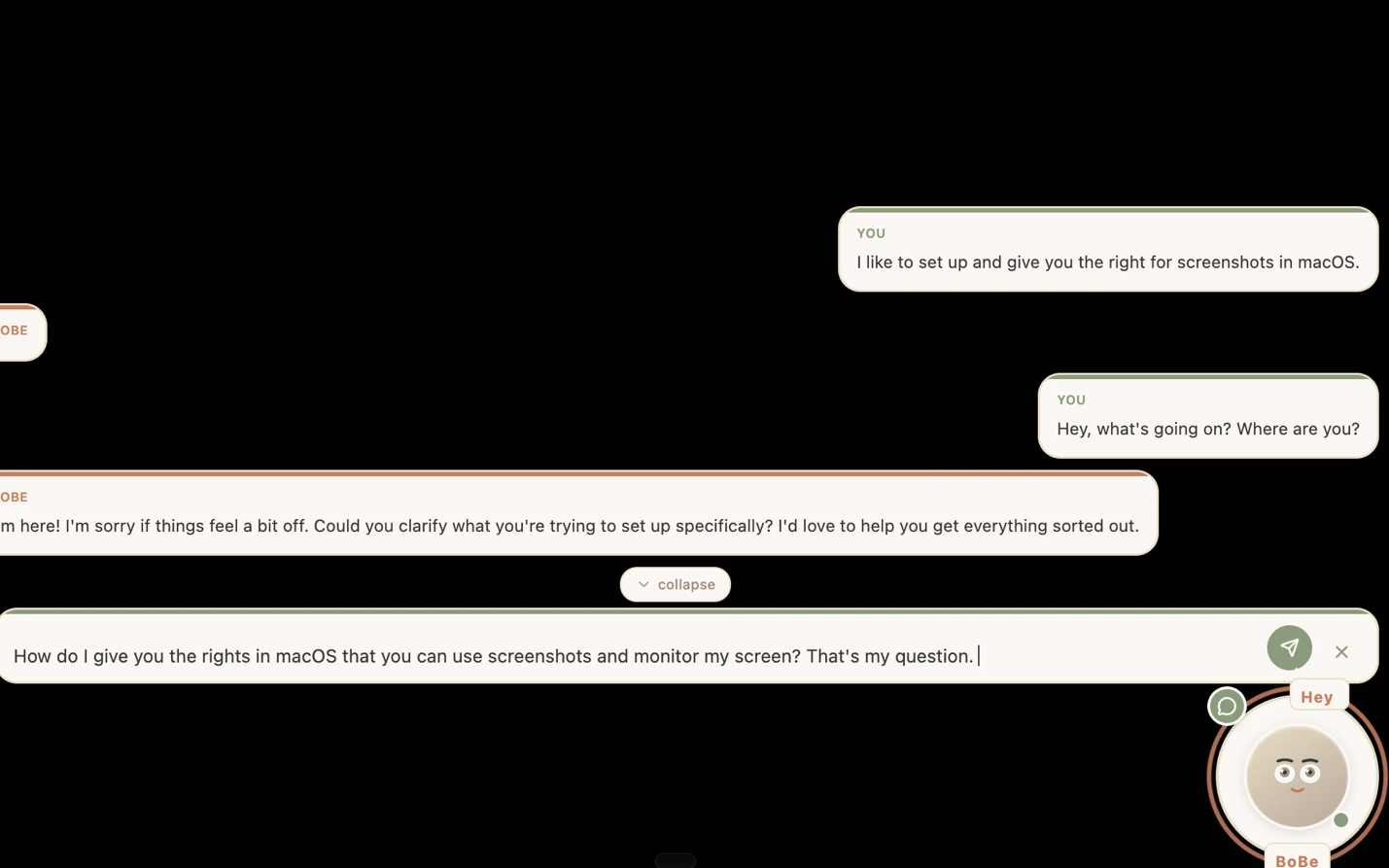
Figure 1The user asks which macOS setting to change. The visible BoBe reply asks him to clarify what he is trying to accomplish. Top strip and a document preview were removed or blurred for privacy.
Verdict
General assessment
An early alpha (v0.1.0-alpha per the website). Installation is easy and the model choice is clear. The core idea, an assistant that watches the screen to help, could not be shown working in this test: the app's own assistant did not name the macOS setting needed to grant screen recording, and the check whether screen awareness works returned no usable answer. Removal needed Activity Monitor.
Fit for the tester's use
Uninstalled after setup. 'Concept I like. Concept is interesting. Implementation is missing.' The tester may retry in 3 to 6 months, or after talking to the founder.
ObservedInstalls easily (312 MB DMG, one macOS approval). Setup then downloads 4.9 GB and 5.7 GB against an announced 11 GB, with no time estimate, and the macOS screen-recording step is unclear.
ObservedThe in-app assistant did not name the macOS setting to change. The reply to 'is screen reporting working?' is recorded in the notes as 'Bobe'.
Tester viewThe tester uninstalled it: alpha, concept interesting, implementation missing. The app restarted itself when he tried to delete it.
Scorecard Status: Abandoned
Installation4/5312 MB DMG, one macOS approval, 'so smooth', per the tester.
Onboarding and model choice2/5Clear three-model dialog with RAM needs. But 11 GB announced against 4.9 GB and 5.7 GB downloaded, no time estimate, and an unclear permission step.
Core function1/5Screen awareness could not be confirmed working. The visible chat replies did not give usable answers.
Guidance and iteration1/5The in-app assistant did not name the macOS setting after two questions. No iteration tested.
Performancen/aNot measured.
Documentationn/aA step-by-step setup guide exists (positive). Its content was not evaluated.
Trust and privacyn/aNot audited. A screen-recording app; the ChatGPT check was inconclusive; the app says analysis stays on the Mac.
Uninstall1/5The app restarted itself. It had to be quit in Activity Monitor before it could be deleted.
Scores are proposals derived from the evidence below (1 = poor, 5 = very good). They are the tester's to confirm.
Test details
App
BoBe, a local AI assistant that watches the screen (bobebot.com) Observed
Version
v0.1.0-alpha, from the website's download banner as pasted by the tester. The installed version was not recorded. Vendor claim
Tester
Hans Kuepper, founder of PromptQuorum
Started
7 October 2026 (notes say '7 October'; year from the file name and document properties). Time not recorded. Observed
Ended
Not recorded. The test ended with the app uninstalled.
Hardware
MacBook Pro, Apple M3 Pro, 24 GB unified memory (the notes say '24 GB RAM machine') Observed
System
macOS, current release at the test date; exact version not recorded
312 MB DMG from the website (tester). Setup then downloaded a 4.9 GB language model and a 5.7 GB vision model (qwen3-vl:8b). Measured
Local model
Medium (8B), listed at about 11 GB and 24 GB+ RAM. Which downloaded file corresponds to it is not recorded. Observed
Why tested
Not recorded.
Objective
Not stated in the notes. Derived from them: see whether an assistant that records the screen and reasons over it installs and works on a 24 GB Mac with a local model. Assumption
AI help used
ChatGPT (a security question before installing). BoBe's own chat assistant was tested. Observed
Every statement carries a label:ObservedMeasuredTester estimateVendor claimThird partyAssumptionTester viewTester errorWhat the labels mean
Disclosure. The tester founded PromptQuorum (promptquorum.com), a content site and directory about local AI apps. The notes record no contact with the vendor, no payment and no sponsorship. The tester says he may retry after talking to the founder.
A system that cannot even give me an answer on this question, how should I trust it with anything?
Tester notes, lightly edited from voice transcription.
How the test went
The website
Observed
The tester downloaded the app from bobebot.com/#download: a 312 MB DMG for the Mac.
Vendor claim
The download banner, as pasted by the tester: 'v0.1.0-alpha · Requires macOS 13+ · Apple Silicon · M2 or higher recommended for local models'.
Observed
The site offers a step-by-step setup guide (bobebot.com/getting-started). The tester calls this positive. Its content was not evaluated.
Assumption
The tester's impression: BoBe does not connect to LM Studio or Ollama (the notes say 'Llama'). It downloads a model and integrates it directly. Not verified.
Tester view
The idea of an assistant that records the screen and understands the user from it appeals to him. 'So cool function.'
Before installing: a security question
Observed
The tester asked ChatGPT about security risks before installing.
Third party
As the tester paraphrases it, ChatGPT found nothing negative and nothing positive, so no information either way. The ChatGPT answer itself is not in the notes.
Observed
The tester decided to take the risk and install anyway. No independent security review was part of this test.
Installation
Observed
Installed from the DMG. The only step before use was approving in macOS that the app comes from the internet. The tester: 'so smooth as hell, no problems'.
Observed
The first screen asks which kind of model to use. The tester selected a local model.
Choosing a model
Observed
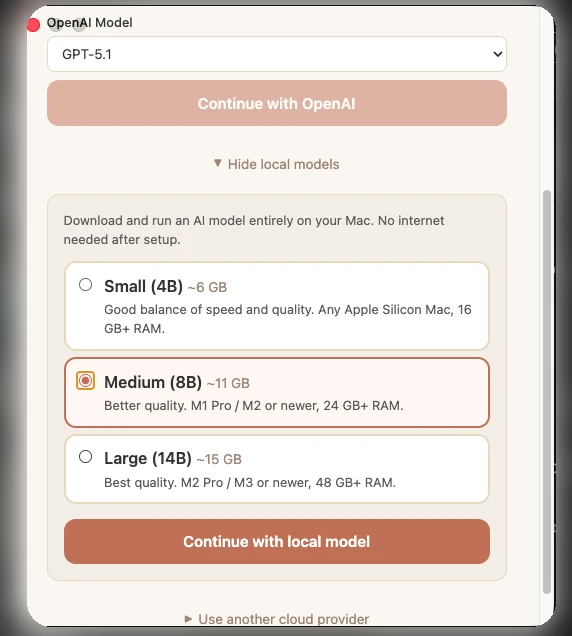
The dialog puts a cloud option first (a GPT-5.1 dropdown with 'Continue with OpenAI'). Below it, three local models: Small (4B) about 6 GB for any Apple Silicon Mac with 16 GB+ RAM; Medium (8B) about 11 GB for M1 Pro / M2 or newer with 24 GB+ RAM; Large (14B) about 15 GB for M2 Pro / M3 or newer with 48 GB+ RAM.
Figure 2Model choice: three local models. Medium (8B, about 11 GB) is selected and matches the tester's 24 GB. Large states 48 GB+ RAM. Background outside the dialog blurred.
Observed
The tester chose Medium, which matches his 24 GB. He notes that there are only three models.
Tester error
The tester wrote that the 15 GB model 'should also run' on a 24 GB machine. The dialog states that Large needs 48 GB+ RAM. This had no effect, because he took Medium.
Downloads
Measured
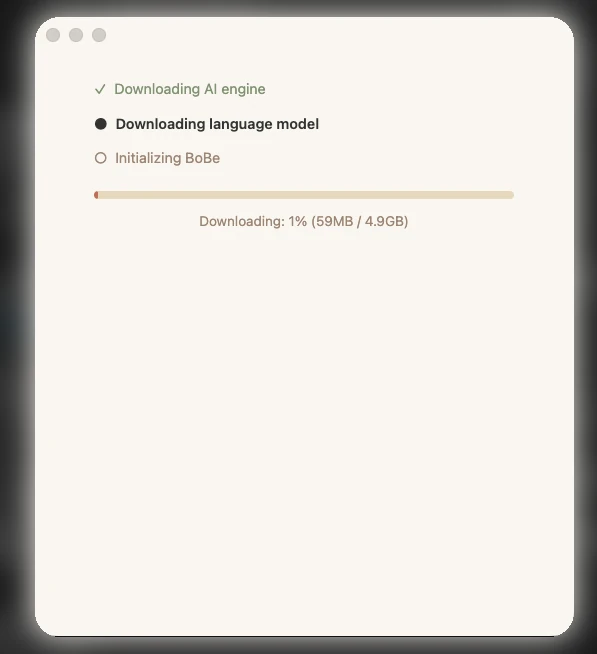
Setup runs in three steps: AI engine, language model, initializing. The language model download is 4.9 GB. The screenshot shows 59 MB done, 1 percent.
Figure 3Setup downloads in three steps. The language model is 4.9 GB, while the model dialog had said about 11 GB. The bar shows percentage and size only. Background blurred.
Observed
The model dialog had announced about 11 GB for Medium.
Measured
When the first download ended, a second one started: a vision model, qwen3-vl:8b, 5.7 GB (the notes say 'another five gigabytes').
Assumption
4.9 GB and 5.7 GB add up to 10.6 GB, which would match the announced 11 GB. The app does not say so.
Observed
The progress bars show percentage and size, not time remaining. The tester saw the same in another app.
Tester view
For files this large a time estimate should be shown, and the 11 GB, 4.9 GB, then another download is poor communication.
Granting screen recording
Vendor claim
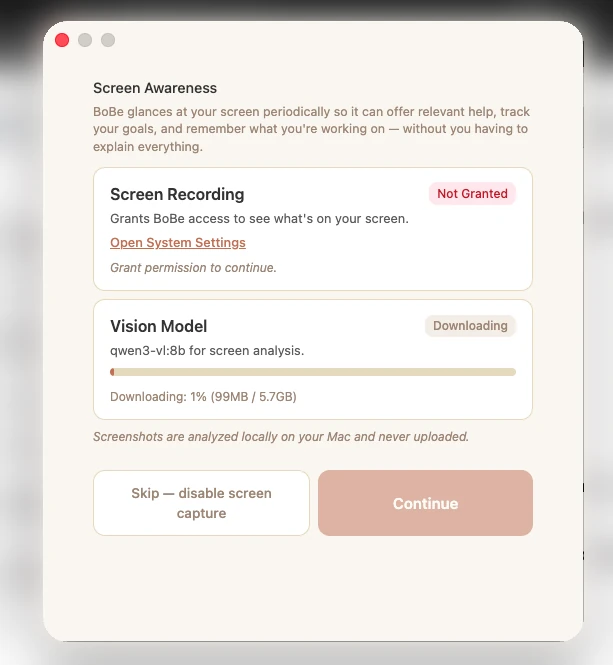
The Screen Awareness dialog says BoBe 'glances at your screen periodically so it can offer relevant help, track your goals, and remember what you're working on', and that 'screenshots are analyzed locally on your Mac and never uploaded'. Not verified; no network check was made.
Figure 4Screen Awareness step: Screen Recording is 'Not Granted' and a second model, qwen3-vl:8b (5.7 GB), is downloading. A link to System Settings is present. Background blurred.
Observed
Screen Recording shows 'Not Granted', with an 'Open System Settings' link and the text 'Grant permission to continue'. A 'Skip: disable screen capture' button exists.
Tester view
The tester expected the screen setup to be easy once the app ran. He found no clear route and had to search the macOS settings himself.
Observed
Whether the 'Open System Settings' link was used, and where it led, is not recorded. The tester states he found the setting himself and enabled it.
Asking BoBe for help
Observed
The tester asked BoBe in chat how to give it the macOS rights for screenshots and screen monitoring. In the visible replies BoBe asked him to clarify what he wanted to set up and offered to help.
Figure 5The user asks how to give BoBe the macOS screen rights. The visible replies ask him to clarify instead of naming the setting.
Observed
He asked again, more precisely: 'I don't know where I need to click in the Apple system to change this. Tell me please which setting this is.' The visible reply asked what he was trying to accomplish (top of this page).
Observed
He wrote: 'Is this supposed to be an answer or a joke?'
Figure 6The tester's reaction to the replies: 'Is this supposed to be an answer or a joke?'
Tester view
He asks how a system that cannot answer this question can be trusted with anything, and says an honest 'I cannot answer this' would be better.
Does screen awareness work?
Observed
After setup the tester asked BoBe whether screen reporting was working. The notes record the answer as 'Bobe'. He treats this as no answer.
Observed
No further test of the screen-aware features is recorded.
Tester view
BoBe is 'not even usable as a chat agent'.
Assumption
The tester wonders what a roughly 5 GB model can do. A small model may limit the assistant; not tested.
Removal
Observed
When the tester tried to delete the app, it restarted automatically and could not be deleted. He quit it in Activity Monitor and then deleted it.
Tester view
'Just even for alpha level, this is not acceptable.'
Is the project alive?
Vendor claim
The website banner says 'M2 or higher recommended'. The downloaded file refers to 'February 26'. The notes do not say whether that is a day or a year.
Assumption
The tester's impression is that the project may be dead. 'M2 or higher' also covers newer chips, the build date is unclear, and no repository or release history was checked, so the inference is weak.
Decision
Tester view
'This is alpha.' A concept that could be implemented in future; he wonders whether anything works today or whether it is a concept app. 'Concept is beyond. Implementation is missing.'
Observed
The tester deleted the app. He may try again in three or six months, or after talking to the founder.
Claims versus what the tester saw
Claim
Source
Observed
Label
'Screenshots are analyzed locally on your Mac and never uploaded'
Screen Awareness dialog
Not tested. No network monitoring or independent check was done.
Vendor claim
'Download and run an AI model entirely on your Mac. No internet needed after setup.'
Model dialog
The model was downloaded through the app. Offline operation was not tested.
Vendor claim
Medium (8B) is about 11 GB
Model dialog
Setup downloaded a 4.9 GB language model, then a 5.7 GB vision model. The sum, 10.6 GB, may be the announced figure (assumption).
Measured
Requires macOS 13+, Apple Silicon, M2 or higher recommended
Website banner, as pasted
The app ran on an M3 Pro. The tester read the 'M2' wording as dated. 'Or higher' includes newer chips.
Observed
Offers relevant help from what is on your screen
Screen Awareness dialog
The tester asked whether screen reporting works; the reply is recorded as 'Bobe'. No screen-aware help was demonstrated in the notes.
Observed
A step-by-step setup guide
Website
The guide exists. Its content was not evaluated. The tester found the macOS permission step unclear.
Observed
Which local model fits 24 GB?
24 GB RAM
Small (4B), about 6 GB download16 GB+ RAM needed within 24 GBObserved
Medium (8B), about 11 GB download24 GB+ RAM needed within 24 GBObserved
Large (14B), about 15 GB download48 GB+ RAM needed needs more than 24 GBObserved
RAM needs are as stated by the app in its model dialog. The tester's assumption that Large 'should also run' on 24 GB is contradicted by that text. None of this was tested beyond Medium.
Usage log
#
Task
Model
Result
Time
Status
Figures
1
Install from the DMG
-
Installed; one macOS approval for an app from the internet
Not recorded
Pass
-
2
Choose a local model and download
Medium (8B), about 11 GB listed
Downloaded 4.9 GB language model and 5.7 GB vision model (completion implied by later use)
App restarted itself; quit in Activity Monitor, then deleted
Not recorded
Partial
-
Where the tester got it wrong
Tester errorAssumed the 15 GB Large model would run on 24 GB. The dialog states 48 GB+ RAM for it. No effect, as Medium was chosen.
Tester errorWrote that there is no clear way to set up screen access. The dialog shows an 'Open System Settings' link. Whether it was tried is not recorded.
Tester errorLeft gaps in the record: installed version, macOS version, start and end time, which download belongs to which model, and the exact reply to the screen-reporting question.
AssumptionThe 'project is dead' impression rests on wording ('M2 or higher') that also covers newer chips, and on an unclear 'February 26'. No release history was checked.
Tester viewInstalled a screen-recording alpha after a security check that returned no information either way. The tester accepted the risk knowingly.
Findings register
ID
Finding
Category
Label
Severity
Figures
BB-01
Installation is simple: a 312 MB DMG and one macOS approval.
Installation
Observed
Positive
-
BB-02
A step-by-step setup guide exists on the website. Content not evaluated.
Documentation
Observed
Positive
-
BB-03
The model dialog is clear: three local models with download size, chip and RAM needs.
Screen Recording is 'Not Granted'; the tester found no clear route and searched macOS himself. An 'Open System Settings' link is present; use not recorded.
A pre-install security check with ChatGPT was inconclusive; the tester installed anyway.
Trust
Third party
Medium
-
BB-13
The tester suspects an inactive project. The evidence is thin and partly contradicted by the 'or higher' wording.
Maintenance
Assumption
Low
-
BB-14
The app seems not to connect to LM Studio or Ollama; it downloads its own model.
Integration
Assumption
Low
-
Severity is the impact on a first-time user. Proposed, not measured.
Who it is for
Likely fit
AssumptionTinkerers who want to try an early local, screen-aware assistant and accept alpha quality.
Likely poor fit
AssumptionAnyone who needs a working assistant today.
Tester viewPeople who are uneasy about an app that records the screen without an independent security review.
Retest. Retest in 3 to 6 months, after talking to the founder, or when a version newer than v0.1.0-alpha is released (the tester's plan, plus one trigger added).
Concept I like. Concept is interesting. [...] Implementation is missing.
Tester notes, lightly edited from voice transcription.
Frequently asked questions
Does BoBe run on a 24 GB Mac?
The tester installed BoBe Alpha on a MacBook Pro with an M3 Pro and 24 GB. He chose the Medium (8B) local model, listed at about 11 GB and 24 GB+ RAM. Whether screen awareness works could not be confirmed in this test. Observed
Is BoBe Alpha easy to install?
Installation was a 312 MB DMG and one macOS approval ('so smooth', per the tester). Setup then downloaded 4.9 GB and 5.7 GB against an announced 11 GB, with no time estimate. Observed
Can BoBe be uninstalled normally?
Not in this test: the app restarted itself when the tester tried to delete it. He quit it in Activity Monitor first and then deleted it. Only one install was tried, and the installed version was not recorded. Observed
Does BoBe upload screenshots?
BoBe's Screen Awareness dialog says screenshots are analyzed locally on the Mac and never uploaded. This test did not check that claim: no network monitoring or independent check was done. Vendor claim