PromptQuorum hands-on test · Page Assist · 8 to 9 October 2026
Page Assist on a 24 GB Mac: Sidebar Found, Page Not Understood
Hands-on test of the Ollama-based browser extension on an M3 Pro Mac. The toolbar icon opened a full-screen page instead of a sidebar. Once the sidebar was found, it counted words but did not read a Search Console page or act on a page.
Figure 1Search Console performance page with Page Assist beside it. The reply says the provided context contains no CTR information and describes the page as 'a graphical representation of time intervals on a timeline'. The page itself shows an Average CTR card (1.5%). The tester's question is not visible. The screenshot shows the tester's own site metrics.
Verdict
General assessment
A feature-rich front end for local models, with settings for models, knowledge, prompts, MCP servers, Page Action, WebMCP and memory. The toolbar icon opens a full-screen chat page; the tester found the side panel only later, through a right-click and with help from ChatGPT. In the side panel, counting the words of a page worked. A Search Console page was not understood, a site search failed, context did not follow a page change, and the tester could not get Page Action to scroll or click. Two early chats with gemma4:latest returned empty replies. Because models differed between tests, the extension and the model cannot be separated here.
Fit for the tester's use
Not for his use. He wanted a sidebar that works like Claude in Chrome: take a task, click through pages, enter data. He saw chat only, and plans to uninstall. 'For now, stay with Claude Chrome extension.'
ObservedThe toolbar icon opens a full-screen page, not a sidebar. The tester found the side panel through a right-click, after help from ChatGPT. Ctrl+Shift+Y, from the welcome video, did not work for him.
ObservedIn the side panel, counting words on a page worked. A Search Console page was not understood (reply: no CTR information), a site search failed, and context did not follow a page change.
Tester viewHe is uninstalling. He wanted a sidebar that acts like Claude in Chrome and got a chat. 'The sidebar would be the jackpot.'
Scorecard Status: Abandoned
Installation3/5Store install is one dialog. The README leads with a source build that needs Bun and a terminal; the tester's first attempt failed on PATH and the store link sits lower on the page.
Onboarding and discoverability2/5The toolbar icon opens a full-screen page, the sidebar is reached another way, and the shortcut named in the welcome video did not work for him.
Core function2/5Word counting worked. A Search Console page, site search, page-to-page context and Page Action did not. Two early chats returned empty replies.
Guidance and iteration2/5Powerful model settings, with a description on only two of the pasted fields. An 'Add MCP server' button leads nowhere until set up in settings.
Performancen/aNot measured. No timings recorded.
Documentation3/5README steps are clear for terminal users. The feature list promises a sidebar, a web UI and chat with webpage. The welcome video's shortcut did not work.
Trust and privacyn/aNot audited. The store dialog asks to read and change all data on all websites; whether data stays local was not tested.
Uninstalln/aThe tester plans to uninstall. Not recorded whether it was done.
Scores are proposals derived from the evidence below (1 = poor, 5 = very good). They are the tester's to confirm.
Test details
App
Page Assist, 'A Web UI for Local AI Models': a Chrome extension with a sidebar, a full-page web UI and 'chat with webpage' (github.com/n4ze3m/page-assist) Observed
Version
Not recorded (neither the extension nor Chrome, Ollama or macOS)
Tester
Hans Kuepper, founder of PromptQuorum
Started
8 October 2026, 11:00 (time zone not stated; assumed local, Germany) Observed
Ended
9 October 2026, 19:00. Elapsed time about 32 hours; active testing time was not recorded. Observed
Hardware
MacBook Pro, Apple M3 Pro, 24 GB unified memory (the notes say 'M3 24 GB') Observed
System
macOS, current release at the test date; exact version not recorded. Browser: Chrome.
Install routes
Two. First built from source (git, Bun, 'load unpacked'). Later installed from the Chrome Web Store. Observed
Local models
Ollama, running. Models seen in screenshots: gemma4:latest and qwen3-coder:30b. Observed
Why tested
The tester likes the sidebar concept, uses Claude in Chrome daily and built a sidebar for the PromptQuorum app. Observed
Objective
'The main objective was the sidebar and to see what the sidebar can do.' Observed
AI help used
An AI assistant for the Bun setup (not named in the notes); ChatGPT to find the sidebar. Observed
Every statement carries a label:ObservedMeasuredTester estimateVendor claimThird partyAssumptionTester viewTester errorWhat the labels mean
Disclosure. The tester founded PromptQuorum (promptquorum.com), a content site and directory about local AI apps. PromptQuorum already carries a Page Assist review (the notes call it 'my Page Assist review'); this test rests only on the tester's own session. The tester has built competing tools (a sidebar for the PromptQuorum app and a Chrome extension, the PromptQuorum Optimizer) and uses Claude in Chrome, a product of Anthropic, as his yardstick. The notes record no contact with the Page Assist author, no payment and no sponsorship.
Sort of traces of the sidebar in the settings, but really the sidebar would be the jackpot. The rest is another interface with different functionality.
Tester notes, lightly edited from voice transcription.
How the test went
Why this app
Tester view
'So interesting idea to basically have a sidebar.' He built a sidebar for the PromptQuorum app and finds it useful for connecting to a local model. He also uses the Claude Chrome extension 'always when I am lost'.
Observed
Objective in his words: the sidebar, and what it can do.
Installation from source
Vendor claim
The README (pasted by the tester) lists prerequisites: Bun, Ollama, or any OpenAI-compatible endpoint such as LM Studio or llamafile. Steps: git clone, bun install, bun run build ('by default it will build for Chrome, Edge and Firefox'), then load the build directory as an unpacked extension. A note says to use npm if Bun causes problems.
Tester view
'Very straightforward, but not for people who don't like terminals.'
Observed
git clone completed (14,361 objects, 9.93 MiB). The first 'bun install' failed with 'zsh: command not found: bun'. The tester asked an AI assistant, which said the Bun install had worked and the terminal had not loaded the updated PATH; the fix was 'exec /bin/zsh'.
Observed
After that the install 'took a while', about a minute in the terminal, and the extension ran. The 'load unpacked' step is not described in the notes.
Assumption
The extension ID in the address bar of the first screenshots (ofcf...) differs from the store version's (jfgf...), which is consistent with an unpacked build. Not confirmed.
First launch: a full-screen page
Observed
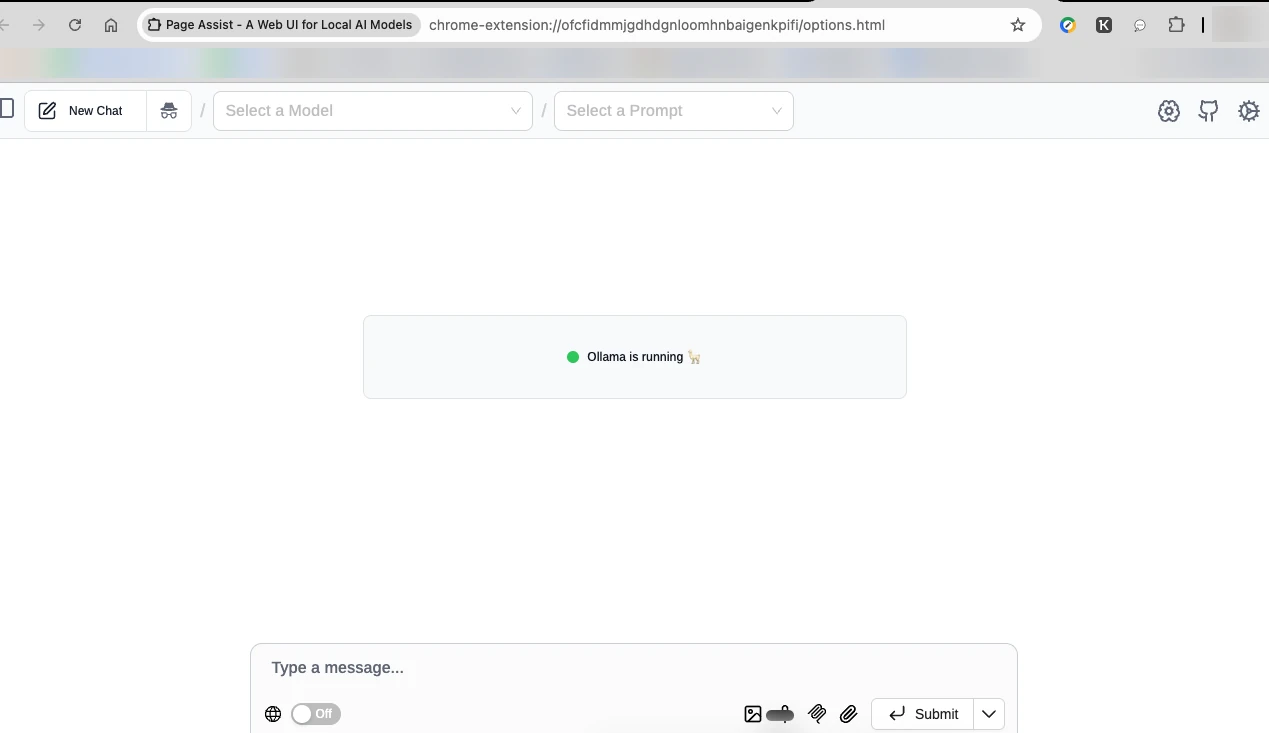
Clicking the extension opens 'Page Assist - A Web UI for Local AI Models' as a full browser tab. It shows 'Ollama is running', empty model and prompt pickers and a message box.
Figure 2What the toolbar icon opens: a full-page chat UI (here the source-built version). Ollama is detected, no model is selected yet. Bookmarks bar and profile photo blurred.
Tester view
'It's sold as a sidebar, but it's not a sidebar.'
Observed
The settings menu is long: General, Pipeline, Ollama, Chrome AI, OpenAI Compatible API, MCP Servers, Page Action, WebMCP, Memory, Manage Models, Manage Knowledge, Manage Prompts, Manage Share, About. Several carry a Beta badge. 'Chrome AI Settings' offers a Gemini Nano download of about 4 GB with a toggle that is off.
Figure 3Settings menu of the source-built version. 'Chrome AI Settings' offers a Gemini Nano download (about 4 GB) with a toggle that is off. MCP Servers, Page Action, WebMCP and Memory carry a Beta badge. Bookmarks bar and profile photo blurred.
Tester view
'The system settings look very impressive.'
The Chrome Web Store route
Observed
The README lists the Chrome Web Store link lower on the page. The tester missed it and took the source route. 'It was listed below and I missed it.'
Observed
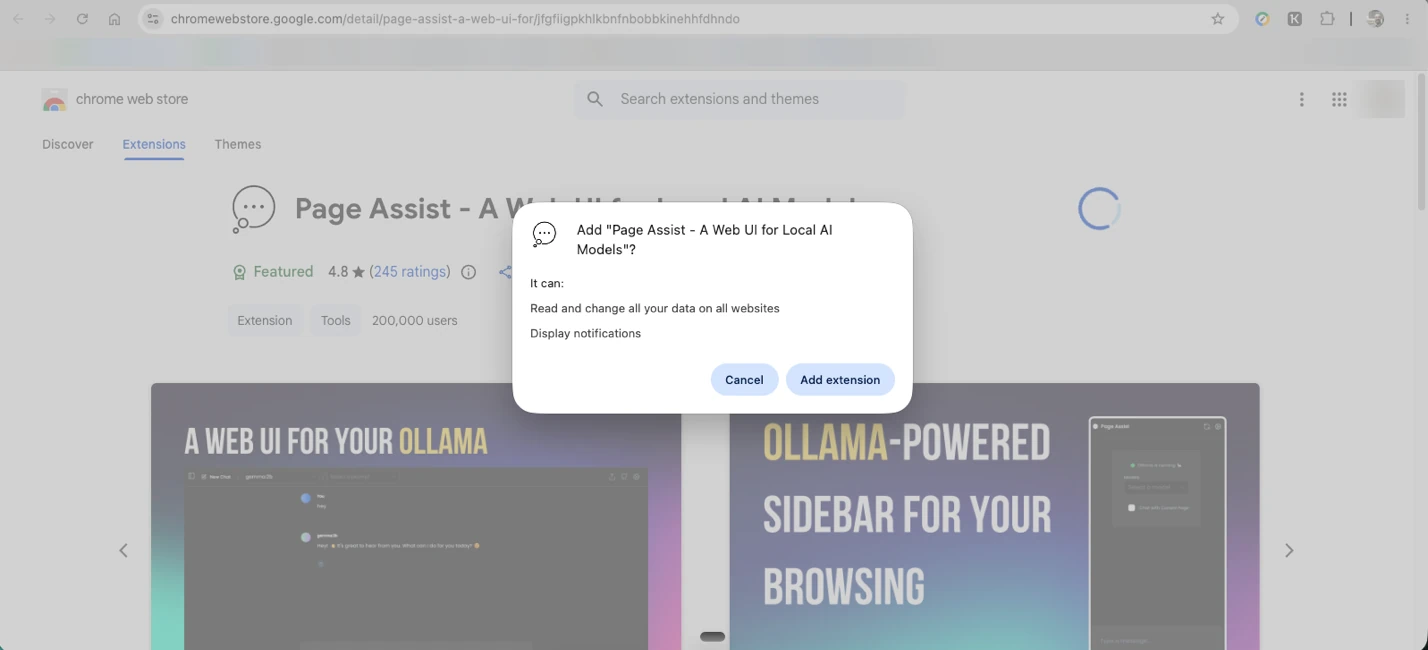
The install dialog says the extension can 'Read and change all your data on all websites' and 'Display notifications'.
Figure 4Chrome Web Store listing: 'Featured', 4.8 stars from 245 ratings, 200,000 users (store figures, not verified). The install dialog lists 'Read and change all your data on all websites' and 'Display notifications'. Tab titles, bookmarks and profile photo hidden.
Third party
The store listing shows 'Featured', 4.8 stars from 245 ratings and 200,000 users, as seen at the test date. Not verified.
Observed
Per the tester, the repository's latest update was 4 October 2026, four days before the test. Not captured in a screenshot.
Tester view
'This Chrome extension download, so easy compared to GitHub.'
First chats: empty replies
Observed
In the store version the tester wrote: 'Okay, I'm principle lost. Can you tell me what page assist actually does?' and explained that he expected a sidebar next to a web page. Model: gemma4:latest. The reply is a collapsed 'Thought for 0ms' box with no answer text.
Figure 5First chat in the store version. The user asks what Page Assist actually does and says he expected a sidebar. The reply is only a 'Thought for 0ms' box. Two toggles at the bottom are On; their meaning was not checked. Bookmarks bar and profile photo blurred.
Observed
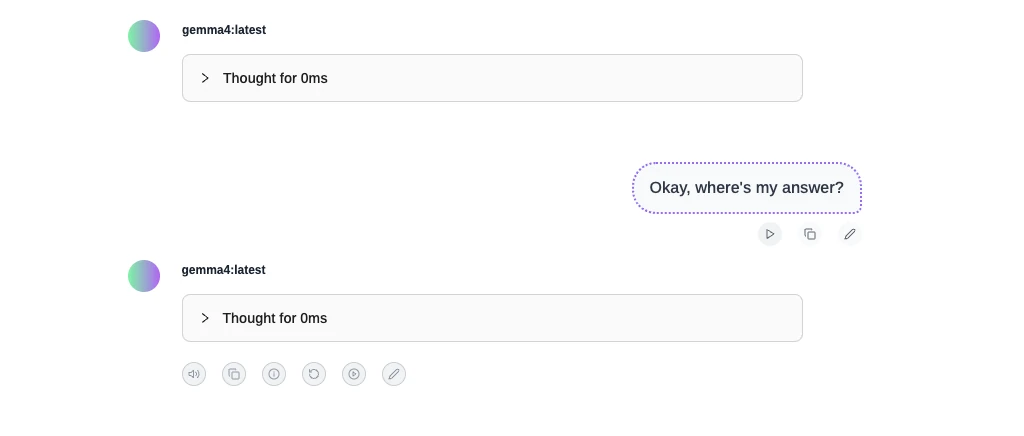
He asked 'Okay, where's my answer?'. The second reply was again an empty 'Thought for 0ms' box.
Figure 6Second attempt. Both gemma4:latest replies are empty 'Thought for 0ms' boxes. The cause was not isolated.
Assumption
The cause is not isolated. The model, the thinking toggles or the connection to Ollama could each play a part. Not tested.
Looking for the sidebar
Observed
A welcome window with a video appeared. Per the tester, it showed that this is not an extension that opens a sidebar taking over the browser, and said a shortcut is needed to open it. The tester tried Ctrl+Shift+Y. It did not work. The video itself is not in the notes.
Observed
He found 'sort of traces of the sidebar in the settings' (a Sidebar Position setting is in the pasted settings list). He could not open it.
Observed
The README feature list, pasted by the tester, says: Sidebar ('can be opened on any webpage'), Web UI ('like a ChatGPT website') and Chat With Webpage.
Observed
For comparison he showed his own PromptQuorum Optimizer extension: a toolbar popup that was offline ('Start the PromptQuorum desktop app to enable optimization'). The notes call it his sidebar and say 'it works'; the screenshot shows the offline state.
Figure 7Not Page Assist. This is the tester's own PromptQuorum Optimizer extension, shown for comparison. It is a toolbar popup in an offline state ('Start the PromptQuorum desktop app to enable optimization'); the notes call it his sidebar. The surrounding page was cropped out.
Observed
An article on aihubmix.com, found through his Ahrefs alerts, referred to his Page Assist review and gave him the energy to try again. The tester has not said whether he read the article.
Observed
He worked with ChatGPT and found that there is no switch for the sidebar. On his Mac in Chrome the side panel opens from a right-click on the page; clicking the extension icon opens the full-screen UI, 'a totally different function'.
Assumption
The settings list also has two Beta entries, 'Set Default Action for Extension Icon Clicks' and 'Set Default action for Context Menu'. They may control this behavior. Not tested.
Using the sidebar
Observed
The first question in the side panel was 'what does the text talk about'. Model shown: gemma4:latest. No answer appeared, only a cursor.
Figure 8First question in the side panel: 'what does the text talk about'. Model shown: gemma4:latest. Only a cursor appears. The tester then checked whether the local model was working. The article page beside the panel (third-party) was cropped out.
Observed
The tester compares: his own Chrome app checks every 20 seconds whether the local model is reachable. Here nothing told him whether the model was working. 'Now I need to find out if the local LLM is working or what the issue is.'
Observed
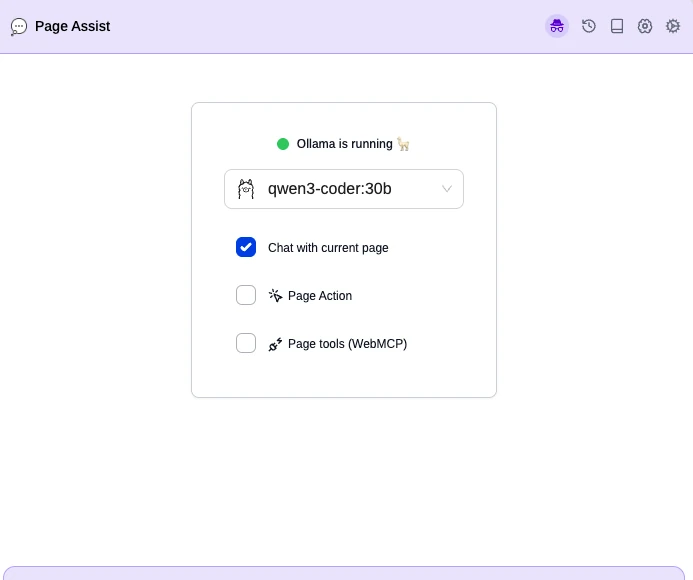
After 'some more clicks' it worked. The notes do not say what fixed it. Later screenshots show qwen3-coder:30b selected instead of gemma4:latest.
Figure 9Side-panel start screen with qwen3-coder:30b selected. 'Chat with current page' is on; 'Page Action' and 'Page tools (WebMCP)' are off in this screenshot.
Assumption
Switching the model may have been the fix. Not stated in the notes.
Observed
The start screen shows 'Chat with current page' ticked, and 'Page Action' and 'Page tools (WebMCP)' unticked.
Reading and acting on pages
Observed
He asked it to count words on the page. 'It counted well.' Which page and which model: not recorded.
Observed
On the Search Console performance page the reply said the provided context did not contain any CTR information and described the content as a graphical representation of time intervals on a timeline (top of this page). The page shows an Average CTR card of 1.5%. The tester summarizes: 'could not read data, did not understand it'.
Assumption
Dynamic chart and card content may not reach the model as text. A small context window may also play a part. Neither was tested.
Observed
He asked it to find instructions on a website. 'And no. Failed.'
Tester view
'If you load a new page, the system does not understand it and still works on the old page.' He calls it a refresh issue and concludes that jumping from page to page is not possible. Number of tries and pages used: not recorded; not captured in a screenshot.
Observed
He found a setting that suggests the tool can click, search and fill in data (Page Action). 'Nothing like this': he could not get it even to scroll the page.
Assumption
Whether Page Action or WebMCP was switched on during that test is not recorded. In the screenshot both are off. If they were off, this is a setup miss rather than a product limit.
Tester view
'It seems that now only the chat function works, no active manipulation like with the Claude Chrome extension.'
Interface details
Observed
Read aloud was silent. Whether text-to-speech was switched on and a voice chosen is not recorded.
Observed
The 'Current Chat Model Settings' panel lists Keep Alive, Temperature, Seed, Context Window Size (num_ctx), Max Tokens (num_predict), Top K, Top P, Num GPU, Min P, Repeat Penalty, Repeat Last N, TFS-Z, Num Keep, Num Thread, useMmap, useMlock and Reasoning Effort. In the text pasted by the tester only Keep Alive and Seed have a description line. Tooltips were not checked.
Tester view
'Great model settings, but no explanations so most will miss what all this is.'
Observed
The 'Add MCP server' button in the chat does nothing visible; it expects that a server was added in settings first. The tester calls this a UI issue.
Decision
Tester view
'I will deinstall now all of this because it's not relevant. I don't need another search tool, search engine, or another interface to work with local LLMs. I have many of them.'
Tester view
He wanted a sidebar to the pages he surfs, where he asks questions and gets answers from a local model, sometimes from the internet, and that clicks through tasks like Claude's sidebar. 'This is not a sidebar. This is a new browser.'
Tester view
'For now, stay with Claude Chrome extension. There I can do all.'
Claims versus what the tester saw
Claim
Source
Observed
Label
Sidebar: 'can be opened on any webpage'
README feature list
A side panel exists and showed a chat. It opens from a right-click, not from the toolbar icon. The shortcut in the welcome video did not work for the tester.
Observed
Web UI: 'like a ChatGPT website'
README feature list
A full-page chat UI opened. Two chats with gemma4:latest returned empty replies.
Observed
Chat With Webpage: 'ask questions about the content'
README feature list
Counting words worked. A Search Console page was not understood, and context did not follow a page change.
Observed
Builds for Chrome, Edge and Firefox
README
Only Chrome was used. Edge and Firefox were not tested.
Observed
Featured, 4.8 stars, 245 ratings, 200,000 users
Chrome Web Store listing
Seen as stated at the test date. Not verified.
Third party
Page Action (Beta): the tool acts on the page
Settings menu
The tester could not get it to scroll or click. Not recorded whether it was switched on.
Observed
Needs Ollama or an OpenAI-compatible endpoint
README prerequisites
Ollama was running and detected. Other endpoints were not tried.
Observed
Usage log
#
Task
Model
Result
Time
Status
Figures
1
Clone the repository
-
Completed
Not recorded
Pass
-
2
bun install
-
First run: 'command not found: bun' (PATH). After 'exec /bin/zsh' it ran for about a minute
About 1 min
Partial
-
3
Build and load the extension
-
Extension ran (build steps not itemised in the notes)
Tester errorMissed the Chrome Web Store link in the README and took the longer source route first. The tester says so himself.
Tester errorLooked for the sidebar through the toolbar icon, which opens the full-screen UI, and did not find the right-click route for a long time. The product's own welcome video named a shortcut that did not work, so the miss is shared.
AssumptionPage Action and WebMCP may have been off during the click and scroll test. The only screenshot shows both unticked. If so, that finding is a setup miss, not a product limit.
AssumptionThe comparison with Claude in Chrome mixes extension and model: Page Assist ran local models (gemma4:latest, qwen3-coder:30b, a code-oriented model by name), Claude in Chrome runs a cloud model. The README says Page Assist can use OpenAI-compatible endpoints; none was tried. The gap may come partly from the model.
Tester errorLeft gaps in the record: extension, Chrome, Ollama and macOS versions; the model used in each test after the first screenshots; what fixed the stuck reply; the page used for the word count and the page-switch test.
Tester viewThe tester called his own PromptQuorum Optimizer a sidebar that 'works'. The screenshot shows a toolbar popup that was offline at that moment. The comparison point is therefore weaker than stated.
Findings register
ID
Finding
Category
Label
Severity
Figures
PA-01
README has clear source-build steps (git clone, bun install, bun run build) but needs a terminal, Bun and Ollama.
Installation
Observed
Medium
-
PA-02
The Chrome Web Store link is listed lower in the README; the tester missed it and took the source route.
Severity is the impact on a first-time user. Proposed, not measured.
Who it is for
Likely fit
AssumptionOllama users who want a full-page chat UI and are comfortable with settings, and who may find the side panel through the right-click menu.
AssumptionPeople who want a local chat with the current page and accept that it may miss data-heavy pages.
Likely poor fit
Tester viewAnyone who expects a sidebar agent that clicks through pages like Claude in Chrome.
AssumptionPeople who do not want to open a terminal: use the store version instead of the source build.
Retest. Retest with Page Action and WebMCP switched on and recorded, with one model per test, and with the same page tried with a larger or cloud-based model. Not planned by the tester, who is uninstalling.
Hope in the future Page Assist gets closer to this level of support.
Tester notes, lightly edited from voice transcription.
Frequently asked questions
Does Page Assist work as a sidebar?
A side panel exists, but the toolbar icon opens a full-screen chat page instead. The tester found the side panel through a right-click, with help from ChatGPT. The shortcut named in the welcome video (Ctrl+Shift+Y) did not work for him. Observed
Can Page Assist read the page I am on?
Partly, in this test. Counting the words of a page worked. A Search Console page was not understood (the reply said there was no CTR information, though the page shows a CTR card), and in the tester's impression context did not follow a page change. Models differed between tests. Observed
Can Page Assist click, scroll or fill in pages?
The tester could not get Page Action to scroll or click. In the only screenshot, Page Action and WebMCP are switched off, so this may be a setup miss rather than a product limit. Observed
Does Page Assist need Ollama?
Its README lists Bun, plus Ollama or any OpenAI-compatible endpoint, as prerequisites for the source build. In this test Ollama was running and detected; other endpoints were not tried. Vendor claim
Background on the maker
Not part of the hands-on session; not verified.
Third partyAn article on aihubmix.com, with a title taken from its address as 'Page Assist in practice: four everyday browser workflows with local and cloud models', links to the PromptQuorum Page Assist review. Its content was not reviewed for this test.