Figure 1Neuschwanstein Castle with Haring-inspired figures. The prompt asked for exactly four colors; the castle, forest and sky keep natural tones. A gray rectangle covers part of the canvas (cause not recorded).
Verdict
General assessment
Capable, and its pricing page lists a free edition. On a 24 GB M3 Pro it produced good-looking images quickly once a suitable model was installed. The first-run experience is the weak point: the model list the tester saw gave no size, task type or hardware fit, and he could not find how to iterate on a result.
Fit for the tester's use
Not continuing for now ('not for me, not for now'). The tester found no clear way to refine an existing image and could not make sense of the controls, and he keeps cloud chat models for iterative work. Features that appear in screenshots but were not evaluated: Version History, Edit tools, Image Interpreter.
Tester estimateWorks well once the right model is installed: the tester reports under a minute per image on the M3 Pro.
ObservedGetting there is the hard part: a model list with no sizes or hardware fit, downloads of 11 to 16 GiB with no time estimate, and no warning when a video-restoration model was used for a text prompt.
Tester viewThe tester will not continue. He could not find a way to revise an image or understand the controls, but did not evaluate several features visible in his screenshots.
Scorecard Status: Completed
Installation4/5Mac App Store install, 471 MB. No problems noted.
Onboarding and model choice2/5Names only in the model list; no size, task or hardware fit; FLUX.1 was suggested at first launch with no memory note.
Core function4/5Good images once a suitable model ran. Text inside images is garbled; a strict four-color instruction was not followed.
Guidance and iteration2/5Controls unclear to the tester; revision workflow not found.
Performance4/5Under a minute per image (tester estimate); the app's 10 to 20 minute estimates were shown for a different model (SeedVR2 7B).
Documentation2/5Placeholder image, leftover '[old version]' text, shallow in the tester's view.
Trust and privacyn/aNot audited. The app claims local generation; offline operation was not tested.
Uninstalln/aNot tested.
Scores are proposals derived from the evidence below (1 = poor, 5 = very good). They are the tester's to confirm.
Test details
App
Draw Things by Draw Things, Inc. Store title at test time: 'Offline AI Art' Observed
Version
Not recorded
Tester
Hans Kuepper, founder of PromptQuorum
Started
6 October 2026, 20:00 (Europe/Berlin) Observed
Ended
Not recorded
Hardware
MacBook Pro, Apple M3 Pro, 24 GB unified memory (the notes say '24 GB VRAM'; Apple Silicon shares one memory pool) Observed
System
macOS, current release at the test date; exact version not recorded
Source
Mac App Store. Pricing page: drawthings.ai/pricing Observed
Store listing
4.6 stars from 175 ratings, age 18+, #8 in Photo & Video, 471 MB Observed
Why tested
Draw Things ranked #4 in clicks over the last 28 days in the tester's Google Search Console data (scope of the ranking not recorded). Japanese-language clicks exceeded English; Korean was third and Chinese fourth. Tester estimate
Objective
Not stated in the notes. Derived from them: install Draw Things on a 24 GB Mac, get a model running, generate images, and try one real task (a hero image for PromptQuorum). Assumption
AI help used
ChatGPT (company research, prompt writing), Perplexity (model advice for 24 GB), Grok (no answer obtained) Observed
Every statement carries a label:ObservedMeasuredTester estimateVendor claimThird partyAssumptionTester viewTester errorWhat the labels mean
Disclosure. The tester founded PromptQuorum (promptquorum.com), a content site and directory about local AI apps. Draw Things receives clicks on that site. The notes record no contact with the vendor, no payment and no sponsorship.
Overall, very unsatisfying process. [...] You're hunting blind.
Tester notes, lightly edited from voice transcription.
How the test went
The store listing
Observed
The tester downloaded Draw Things from the Mac App Store. The listing read 'Offline AI Art', developer Draw Things, Inc., 4.6 stars from 175 ratings, age 18+, #8 in Photo & Video, 471 MB.
Observed
The listing does not say plainly that the app runs locally beyond 'Offline AI Art'. It names optimization for M1, M2 and M3 and does not mention newer chips (as read by the tester).
Tester view
Technical specifications are listed without explanation, and limitations are not visible.
First launch: three steps and one long list
Observed
A welcome dialog (step 1 of 3, English) asks for a model source: Cloud Compute (needs an Apple sign-in), download via Draw Things, or import from local storage. It suggests FLUX.1 as 'mighty and popular'.
Figure 2First launch, step 1 of 3. The dialog suggests FLUX.1 as a 'mighty and popular' model; it says nothing about memory needs.
Observed
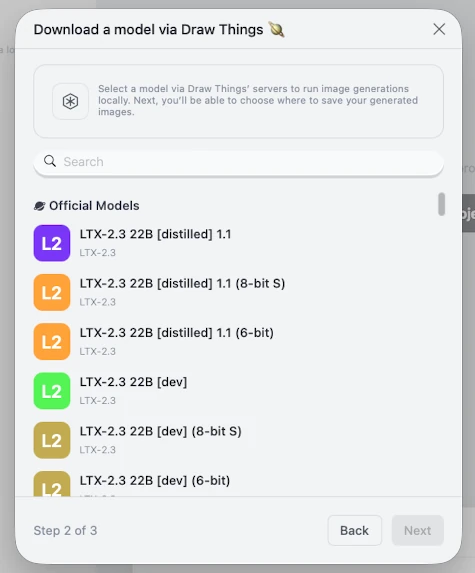
Step 2 of 3 lists official models by name and family. File size, task type and hardware hints do not appear in the rows. A search field sits above the list.
Figure 3Step 2 of 3. Each row shows a name and a family label. File size, task type and hardware fit are not shown. A search field is present.
Tester view
Nothing explains which models make pictures and which make video, how they differ, or whether they fit in memory. The tester called the list 'endless' and the process 'hunting blind'.
Observed
Correction to the tester's notes: the notes say there is no search window; the screenshot shows one. The finding is therefore limited to missing filters by size, task and hardware.
The memory wall
Observed
The tester looked for a model that fits 24 GB. As read from the download dialogs: a FLUX model of about 32 GB, Chrono Edit 14B of about 25 GB, and LTX 2.3 22B distilled (6-bit) of about 57 GB. The dialogs for these three are not in the notes.
Measured
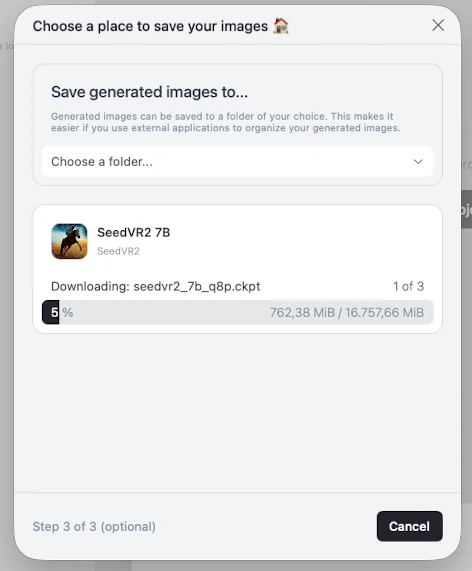
SeedVR2 7B looked small enough at 16,757.66 MiB (about 16.4 GiB) and was downloaded.
Figure 4SeedVR2 7B downloading: 762 of 16,757 MiB (about 16.4 GiB). The dialog shows percentage and MiB, no remaining time. The optional 'where to save images' step sits inside it.
Observed
The download dialog shows percentage and MiB, and no remaining time. According to the tester, the rest of the app could not be used while the model downloaded.
Tester view
A download of this size should show a time estimate, as most apps do.
Observed
Setup step 3 of 3 asks where generated images should be saved, inside the same window as the model download. The step is marked optional. The tester asked why it sits in setup.
Pricing, releases and documentation
Vendor claim
The pricing page lists a Free Edition: 'Create prompts and download models from our servers to generate images locally and privately on your own device', with local compute, model downloads, an infinite canvas and local LoRA training.
Assumption
The tester could not tell how a free account ('Community') differs from the Free Edition. His reading: the Free Edition runs on your Mac and Community adds cloud compute with usage limits. Not verified.
Observed
Release history looked active: roughly one release every two months, by the tester's reading. Exact dates were not recorded.
Observed
The documentation has pages for Basic UI, Models, LoRA, ControlNet, Textual inversion, Others, CoreML and Scripts. The Basic UI page shows an image placeholder, and its outline carries an '[old version]' line.
Figure 5Documentation, 'Basic UI' page: image placeholder instead of a screenshot, and an '[old version]' line in the page outline.
Tester view
The documentation is shallow and assumes you know what a LoRA is.
First generation: a gray square
Observed
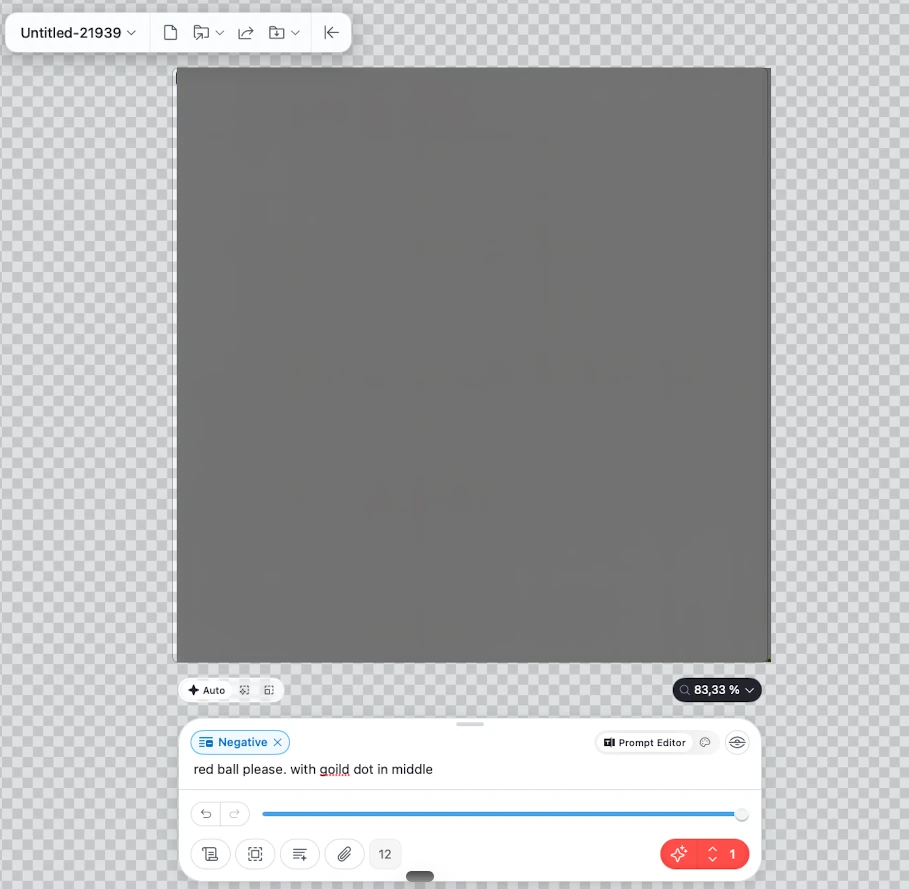
Prompt: 'red ball please. with gold dot in middle'. The app showed an estimated time of 11 minutes and the tester could hear the computer working. The result was a flat gray square.
Figure 6First generation. Prompt: 'red ball please. with gold dot in middle'. Result: a flat gray square. The app's estimate had been about 11 minutes.
Observed
A 'Negative' prompt field was active. The tester did not add it and did not know why it was there.
Observed
A second attempt used a long ChatGPT-written prompt (Neuschwanstein Castle, Keith Haring style, exactly four colors). Time estimates across the attempts were about 11, 10 and 20 minutes. The notes do not state the result of this attempt; the tester then went looking for the cause.
Assumption
The tester infers that the estimate does not depend on the prompt. Three data points; the estimate may also reflect the model that was selected.
Finding the cause
Observed
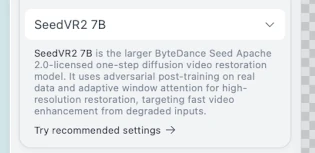
The app describes SeedVR2 7B as a one-step diffusion video restoration model. It had been selected for both picture attempts.
Figure 7The app's own description of the model used for the first two attempts: 'one-step diffusion video restoration model'.
Tester error
The tester selected a restoration model for a text-to-image prompt.
Tester view
The app should have flagged that the model does not fit a text prompt. The notes report no warning.
Asking other AIs
Third party
Grok did not answer. Perplexity did. For a 24 GB MacBook it named ERNIE Image Turbo 1.0 (6-bit S and 8-bit S) as the safest image models and SeedVR2 7B for upscaling and restoration. It rated LTX-2.3 22B distilled (6-bit) as experimental for short, low-resolution video and advised against the [dev] LTX models and the full ERNIE Base model. Its sources were not checked here.
Figure 8Model dropdown after the first download: SeedVR2 7B is the only local model; official models are listed by name with a cloud download icon.
Tester view
The app should offer this: enter your hardware and get a pre-filtered list.
It works
Measured
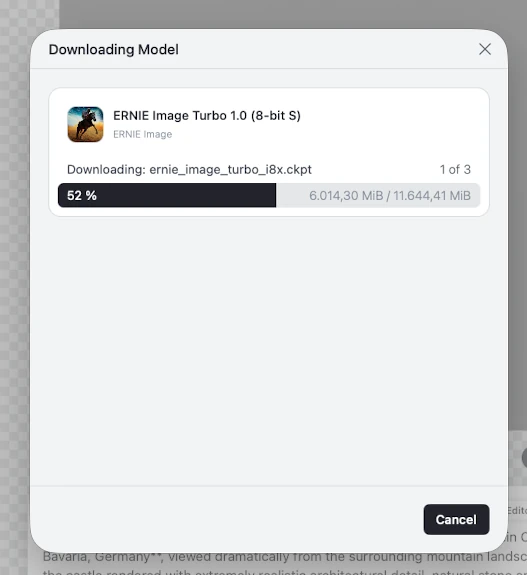
The tester downloaded ERNIE Image Turbo 1.0 (8-bit S): 11,644.41 MiB, about 11.4 GiB, in 3 files.
Figure 9ERNIE Image Turbo 1.0 (8-bit S): 6,014 of 11,644 MiB (about 11.4 GiB), file 1 of 3. Again no remaining-time display.
Assumption
This is taken to be the model behind the later images. The notes do not name it.
Tester estimate
Images took under a minute each. Times were not recorded.
Observed
The Neuschwanstein prompt produced a recognizable castle with Haring-style figures and radiating lines (top of this page). Natural stone, forest and sky tones remain, so the 'exactly four colors' instruction was not met.
Observed
A generated motorhome looks convincing, but the lettering on its side is nonsense text. The prompt was not recorded.
Figure 10Generated motorhome. The body and setting look convincing; the lettering on the side is not real text. Prompt not recorded.
Tester view
Picture quality is great. Text inside pictures is weak.
A real job: a hero image for PromptQuorum
Observed
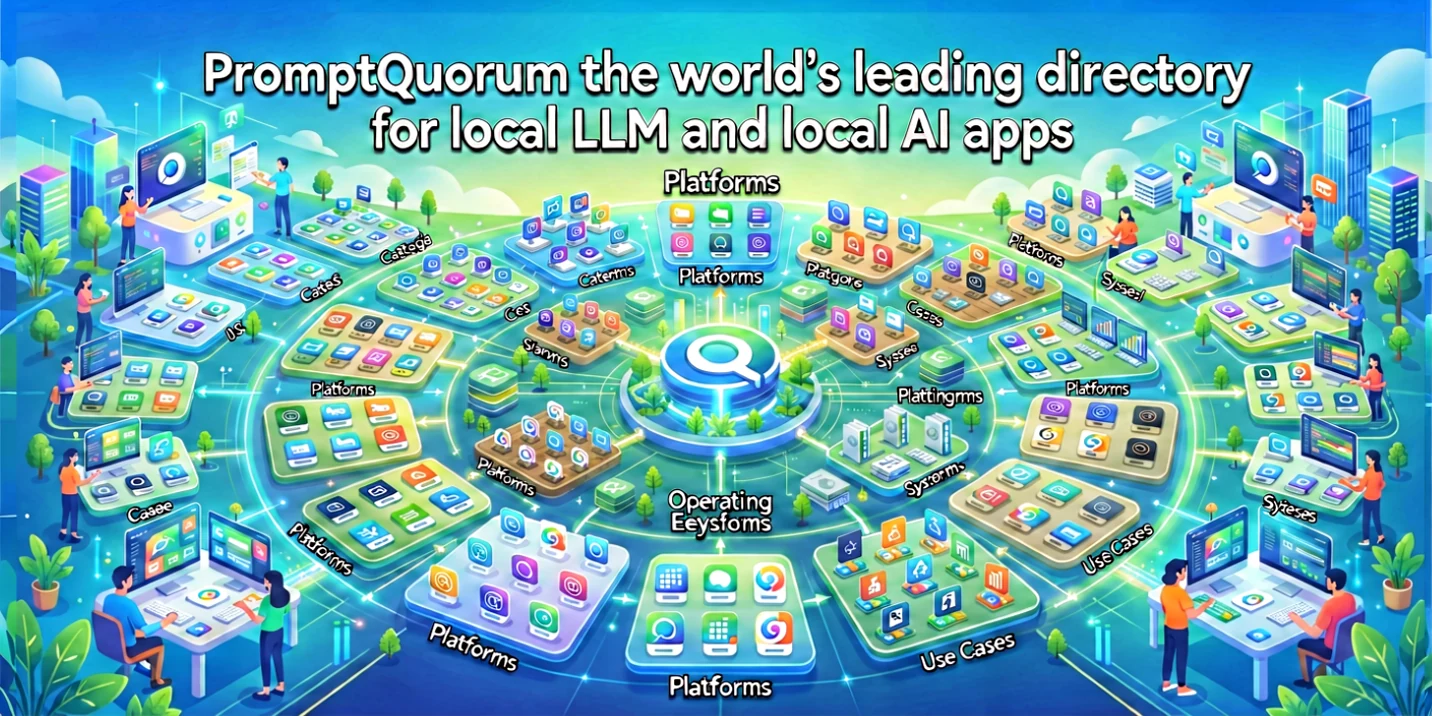
The tester asked for a hero image presenting PromptQuorum as 'the world's leading directory for local LLM and local AI apps'. The first attempt used a long prompt (length counter 3,670) and produced a dark interface collage with several garbled labels.
Observed
After settings were changed the output became multicolored noise. Text Guidance reads 45.5 in the panel.
Figure 11After settings were changed the output was multicolored noise. Text Guidance reads 45.5 in the panel. The cause was not isolated.
Assumption
The high guidance value caused the noise. The cause was not isolated.
Tester estimate
Turning the 'iteration' setting down helped, in the tester's words.
Observed
With a shorter prompt (counter 51) the headline became readable. Smaller labels stayed garbled.
Figure 12Final PromptQuorum hero attempt: a clean illustration with a correct headline. Smaller labels such as 'Platforms' and 'Operating Systems' are still partly garbled.
Iteration and controls
Tester view
The tester could not find a way to say 'keep this picture and change this', as frontier chat models allow. To start a new image he deleted the old prompt by hand.
Observed
Version History (with 'Generated image' and 'Cleared canvas' entries), an 'Edit' button, Canvas Tools, Image Interpreter and CLIP Score are visible in the screenshots. None of them was evaluated.
Tester view
A first-time user would not understand the controls, and the link between controls and models is unclear. The panel does carry explanatory text, and notes that controls are additional files added on top of models.
Figure 13Control Inputs panel. Explanatory text is present; the tester still found the controls and their link to models unclear.
Decision
Tester view
The tester will not continue to use the app, even though it is free. Reasons: no easy mode, results are hard to adapt, and it is unclear how to apply a house style or guide the system toward one exact picture.
Assumption
The tester's view that a local model can produce pictures a cloud model would refuse was not tested.
Tester view
'Not for me, not for now.' He may lack the know-how to manage such a tool.
Claims versus what the tester saw
Claim
Source
Observed
Label
'Offline AI Art'; generate images privately on your own device
Store listing; pricing page
Models are downloaded from Draw Things' servers through the app. Generation ran on the Mac (the tester could hear it working). Offline operation was not tested.
Observed
Optimized for Apple Silicon, especially M1, M2 and M3
Store listing, as read by the tester
Newer chips are not mentioned in the text the tester read. The app ran on an M3 Pro.
Observed
FLUX.1 is 'mighty and popular'
Welcome dialog
FLUX downloads were about 32 GB for a tester with 24 GB of memory. The dialog shows no fit warning.
Observed
Free Edition generates locally
Pricing page
The notes mention no paywall. The tester's reading is that all functions are in the free app. Not verified.
Assumption
Estimated time of about 11 minutes
App, first generation
The first result was a gray square. With a different model the tester reports under a minute per image.
Tester estimate
Does it fit in 24 GB?
24 GB memory
FLUX (variant not recorded)about 32 GB above 24 GBObserved
Download size is not runtime memory. The app may load weights on demand, and results depend on quantization and resolution (assumption, based on the third-party answer above). The first three sizes are as read aloud by the tester, in GB.
Severity is the impact on a first-time user. Proposed, not measured.
Who it is for
Likely fit
AssumptionMac users who already know which diffusion model they want and want a free local image generator.
Vendor claimPeople who want an infinite canvas and local LoRA training (as listed on the pricing page).
Likely poor fit
AssumptionFirst-time users who expect the app to guide them to a model that fits their hardware.
Tester viewUsers who want to refine a picture step by step in a chat-like flow, as the tester found it.
Retest. Retest when the model list shows size or hardware fit, or after the next major release. The tester says 'maybe later'; a 3 to 6 month interval would cover several releases (assumption).
It's a simple picture generator, which it does very well on my 24-gigabyte MacBook. It went very fast. It's fine, but that's about it.
Tester notes, lightly edited from voice transcription.
Frequently asked questions
Does Draw Things run on a 24 GB Mac?
Yes, once a suitable model was installed. On a MacBook Pro with an M3 Pro and 24 GB, ERNIE Image Turbo 1.0 (8-bit S, about 11.4 GiB) produced images in under a minute, per the tester. Downloads of about 25 to 57 GB (FLUX, Chrono Edit 14B, LTX 2.3 22B distilled) were larger than his memory; download size is not the same as runtime memory. Tester estimate
Which model should I start with in Draw Things?
The test does not recommend one. The tester's first choice, SeedVR2 7B, is a video restoration model and returned a gray square for a text prompt. ERNIE Image Turbo 1.0 (8-bit S) worked. A third-party assistant named it among the safest image models for 24 GB; that was not verified. Observed
Is Draw Things free?
Its pricing page lists a Free Edition that generates images locally. The tester noticed no paywall but could not tell how the free 'Community' account differs from it. Not verified. Vendor claim
Can Draw Things refine an existing image?
The tester did not find a way to say 'keep this picture and change this'. Version History and Edit tools are visible in the app but were not evaluated. Observed
Background on the maker
Not hands-on. This comes from ChatGPT research the tester pasted into his notes, and none of it was verified for this test.
Third partyDraw Things, Inc. is described as founder-led by Liu Liu. The app launched in November 2022 as a free iPhone app running Stable Diffusion locally (as cited by ChatGPT, source given as Ars Technica).
Third partyA company database profile calls it bootstrapped, with 1 to 5 employees, based in San Francisco. No publicly disclosed institutional funding was found. ChatGPT itself cautions that private funding can be undisclosed (source given as ToolJunction).
Third partyA community GitHub repository is reported at about 578 stars, 2,100+ commits and 71 releases (source given as Swift Package Index).
Third partyEngineering articles are cited for a custom Swift inference stack and Metal FlashAttention work (source given as Medium).
More from the test
Figure 14Generated Gothic cathedral on a tropical beach. Prompt not recorded.Figure 15First PromptQuorum hero attempt with a long prompt (the length counter reads 3,670). The layout is attractive; several labels are garbled.Figure 16Shorter prompt (counter reads 51). The headline is now readable; the smaller labels are still garbled.