History: From a Research Paper to a Local AI Standard
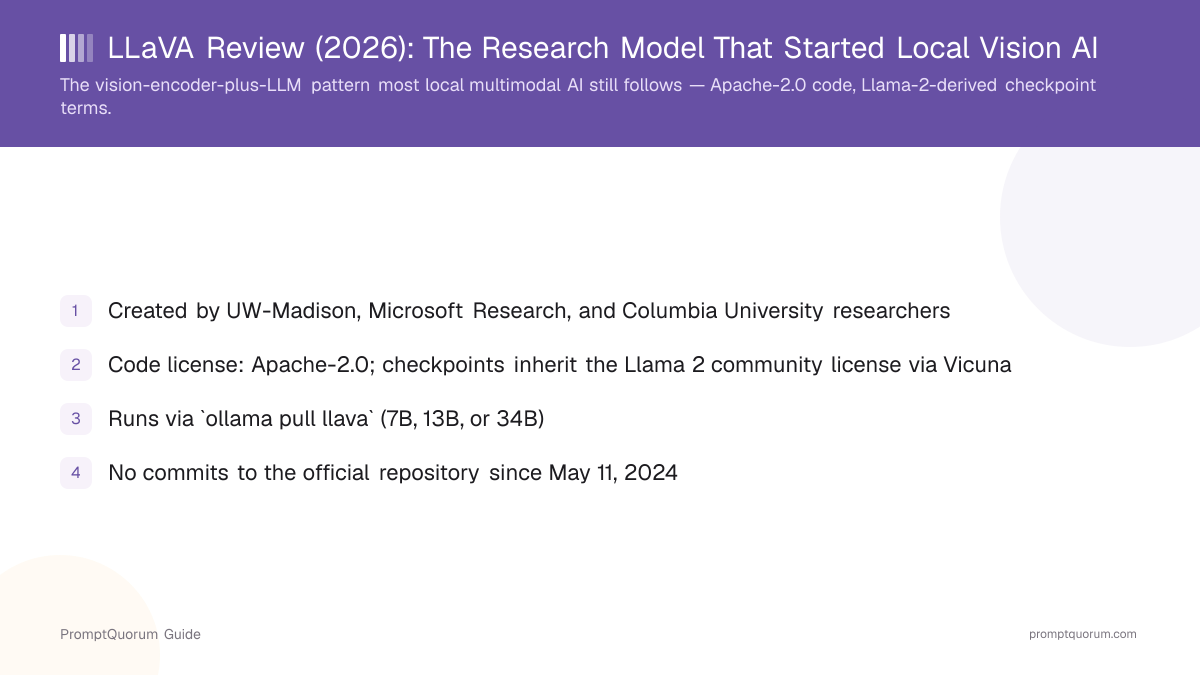
LLaVA was created by Haotian Liu, Chunyuan Li, Qingyang Wu, and Yong Jae Lee, researchers affiliated with the University of Wisconsin-Madison, Microsoft Research, and Columbia University, and introduced in the 2023 paper "Visual Instruction Tuning," accepted as a NeurIPS 2023 oral presentation.
The paper's core idea was to generate multimodal instruction-following training data using GPT-4, then use that data to teach an open-source vision encoder and language model to follow visual instructions — describing images, answering questions about them, and reasoning about visual content in a conversational format, at a fraction of the training cost of building a proprietary multimodal model from scratch.
LLaVA-1.5, released in October 2023, achieved state-of-the-art results on 11 benchmarks with only simple modifications to the original architecture — mainly a higher-capacity vision-language connector and academic-task-oriented training data — while training in about one day on 8 A100 GPUs, according to the project's own page.
LLaVA-NeXT (also called LLaVA-1.6), released in January 2024, added support for higher-resolution image input via dynamic patching (up to 672×672, or 336×1344 for wide/tall images), along with improved OCR and visual reasoning, and support for additional base LLMs beyond Vicuna.
The public haotian-liu/LLaVA GitHub repository has accumulated over 25,000 stars, and is not marked archived — but PromptQuorum found no commits to its main branch since May 11, 2024, based on the project's own public commit history. This is consistent with a university research release that accomplished its goal (establishing and popularizing the architecture) rather than an ongoing commercial product.
Who created LLaVA?
LLaVA was created by Haotian Liu, Chunyuan Li, Qingyang Wu, and Yong Jae Lee, researchers affiliated with the University of Wisconsin-Madison, Microsoft Research, and Columbia University, and introduced in the 2023 paper "Visual Instruction Tuning," a NeurIPS 2023 oral presentation.
What LLaVA Actually Does
LLaVA connects a vision encoder to a large language model so the combined system can accept an image and text prompt together, then generate a natural-language response about the image — answering questions, describing scenes, reading visible text, and reasoning about visual content conversationally.
- CLIP encoder plus LLM decoder. LLaVA uses a CLIP ViT-L/14 vision encoder to convert an image into a sequence of visual features, projects those features into the same embedding space as the language model's text tokens via a connector module, and feeds the combined sequence into a Vicuna (Llama 2-based) or, in later versions, Mistral or other base LLM to generate a response.
- Visual instruction tuning. Instead of training on raw image-caption pairs, LLaVA was fine-tuned on LLaVA-Instruct-150K, a dataset of multi-turn visual conversations generated by prompting GPT-4 with image captions and object-detection annotations — teaching the model to follow open-ended visual instructions rather than just generate captions.
- Three model sizes via Ollama. The Ollama library packages LLaVA in 7B (4.7 GB), 13B (8.0 GB), and 34B (20 GB) sizes — larger models generally produce more detailed and accurate descriptions at the cost of more VRAM and slower inference.
- LLaVA-1.6 (LLaVA-NeXT) resolution improvements. The current version supported through Ollama and the official repository handles higher input resolutions via dynamic patching, which noticeably improves text-reading and fine-detail tasks compared to the original 2023 release.
- English-centric training. LLaVA-Instruct-150K and the underlying benchmarks it was evaluated on are predominantly English-language, so out-of-the-box performance on non-English text within images is weaker than models specifically trained on multilingual document data.
Install and Run LLaVA: Step by Step
This walkthrough covers the fastest, most common path (Ollama) and notes the original repository's own path for reference.
- 1Install Ollama.
Why it matters: Download and install [Ollama](https://ollama.com) for macOS, Linux, or Windows. This is the officially listed way to run LLaVA per its [Ollama library page](https://ollama.com/library/llava), and takes under two minutes. - 2Pull a LLaVA model size.
Why it matters: Run `ollama pull llava` for the default 7B model (~4.7 GB), or `ollama pull llava:13b` (~8.0 GB) or `ollama pull llava:34b` (~20 GB) for higher quality at the cost of more VRAM and disk space. - 3Run it with an image from the CLI.
Why it matters: Run `ollama run llava "describe this image: ./photo.jpg"`, referencing a local image file path directly in the prompt text — no separate flag is required. - 4(Alternative) Use the original repository for research-grade control.
Why it matters: Clone [haotian-liu/LLaVA](https://github.com/haotian-liu/LLaVA), install its `requirements.txt`, and download a checkpoint from Hugging Face for full access to training scripts, evaluation harnesses, and the Gradio web demo — useful for research or fine-tuning, but a meaningfully higher setup bar than Ollama. - 5(Optional) Call it programmatically via the Ollama API.
Why it matters: POST to `http://localhost:11434/api/generate` with the image as a base64-encoded string in an `images` array, or use the official `ollama` Python or JavaScript library — see the code example below.
Real Usage Examples
These examples use Ollama's documented CLI syntax and HTTP API — the primary supported way to run LLaVA today.
- Referencing a file path in the CLI prompt is enough — Ollama detects the
.jpg/.pngpath and attaches the image automatically; no separate--imageflag exists. - Larger model sizes cost more VRAM and time. The 7B model is the fastest and lowest-VRAM option; use 13B or 34B when description accuracy matters more than speed.
# Install and pull the model
# (download Ollama from https://ollama.com first)
ollama pull llava

# CLI: describe an image by referencing its file path in the prompt
ollama run llava "describe this image: ./photo.jpg"

# --- HTTP API (documented in Ollama's own docs/api.md) ---
# /api/generate with a base64-encoded image
curl http://localhost:11434/api/generate -d '{
  "model": "llava",
  "prompt": "What is in this picture?",
  "stream": false,
  "images": ["<base64-encoded image data>"]
}'

# /api/chat with a base64-encoded image (multi-turn conversations)
curl http://localhost:11434/api/chat -d '{
  "model": "llava",
  "messages": [
    { "role": "user", "content": "What is in this image?", "images": ["<base64-encoded image data>"] }
  ]
}'

# --- Python example using the official ollama library ---
import ollama

response = ollama.chat(
    model="llava",
    messages=[{
        "role": "user",
        "content": "What is in this image?",
        "images": ["photo.jpg"],
    }],
)
print(response["message"]["content"])
License and Cost
LLaVA's code, in the official GitHub repository, is licensed under Apache-2.0, confirmed via the repository's LICENSE file and its GitHub-reported license metadata. Apache-2.0 is a permissive license: you may use, modify, and redistribute the code, including commercially, with attribution and a patent grant, and minimal other restriction.
The pre-trained checkpoints are a different story: they inherit conditions from their base LLM. The officially released LLaVA checkpoints are fine-tuned from Vicuna, an instruction-tuned chatbot itself built on Meta's Llama 2, and the project's own documentation states that users "must comply with all terms and conditions" of the original licenses — specifically naming the license terms of Llama 2, Vicuna, CLIP, and the OpenAI terms of use (because GPT-4 was used to generate the training data). This means the checkpoint's permitted use is governed by the Llama 2 community license's terms (including its acceptable-use restrictions and the requirement that very large commercial deployments obtain a separate license from Meta), not by Apache-2.0 alone.
LLaVA's original project page (a separate site from the GitHub repository) adds a stricter, older statement: it describes the "data, code, and checkpoint" as "intended and licensed for research use only," and separately notes the training dataset's CC BY-NC 4.0 (non-commercial) designation. This predates, and is stricter than, the Apache-2.0 code license now shown on GitHub — a genuinely confusing combination of statements from the same project across two different pages, which is itself worth flagging rather than picking whichever statement is most convenient.
None of this is legal advice. Before shipping LLaVA — or any fine-tuned checkpoint built on it — in a commercial product, read the GitHub LICENSE file, the project page's stated terms, the Llama 2 community license, and consult a lawyer for your specific base model and deployment.
What license does LLaVA use?
LLaVA's code on GitHub is licensed under Apache-2.0, a permissive license that allows commercial use. Its officially released pre-trained checkpoints are fine-tuned from Vicuna (built on Meta's Llama 2), so their use is also governed by the Llama 2 community license's terms. The project's separate homepage additionally describes the data, code, and checkpoints as intended for research use only, and the training dataset as CC BY-NC 4.0 (non-commercial) — a stricter, older statement that predates the GitHub Apache-2.0 license. This is not legal advice; read all of the above yourself before commercial use of a specific checkpoint.
What LLaVA Is Not Good For
LLaVA remains a genuinely useful, well-documented model, but it is not the strongest choice for every vision task in 2026. It is the wrong tool for the following situations:
- Text-only tasks. LLaVA is a vision-language model; for a pure text conversation with no image involved, use a dedicated text LLM (through Ollama or otherwise) — running a multimodal model for text-only chat wastes the VRAM its vision encoder occupies for no benefit.
- Needing the strongest available local OCR or document understanding. As of 2026, models released after LLaVA-NeXT — MiniCPM-V, Qwen2.5-VL, and Llama 3.2 Vision — outperform it on document OCR, tables, and structured extraction, per PromptQuorum's local vision models comparison. LLaVA's vision encoder was designed and trained before this generation of higher-resolution, document-focused training data existed.
- Reading non-English text in images. LLaVA-Instruct-150K and the model's core training data are predominantly English. For Chinese, Japanese, Korean, or other non-Latin-script document OCR, a model trained specifically on multilingual document corpora (Qwen2.5-VL) will meaningfully outperform it.
- Precise numeric extraction from charts and graphs. Like essentially every local vision-language model in 2026, LLaVA is unreliable at reading exact values off complex charts — verify any extracted numbers against the source data regardless of which model you use.
- Assuming ongoing active development. With no commits to the official repository since May 11, 2024, do not expect new features, bug fixes, or newer checkpoints from the original project — Ollama's own multimodal engine updates and newer model families have effectively superseded it as the actively developed option.
- A single, simple license story. Because the code (Apache-2.0) and the officially released checkpoints (Apache-2.0 plus inherited Llama 2 community license terms, plus a stricter research-only statement on the project's separate homepage) are governed by three overlapping, not fully aligned statements, LLaVA does not offer the one-line license clarity that a project like Bark (fully MIT, no extra conditions) does.
Alternatives to LLaVA
Llama 3.2 Vision (via Ollama)
- Best fit:
- Best general local image Q&A quality; 11B and 90B sizes
- License:
- Llama 3.2 community license
Qwen2.5-VL (via Ollama)
- Best fit:
- Strongest local OCR and multilingual document understanding
- License:
- Qwen license (Apache-2.0 for smaller sizes)
MiniCPM-V (via Ollama)
- Best fit:
- High document-OCR accuracy at low (~6 GB) VRAM
- License:
- Apache-2.0-derived (OpenBMB)
Idefics3 (Hugging Face)
- Best fit:
- Open research VLM with strong document/OCR benchmarks, not yet packaged for Ollama
- License:
- Apache-2.0 (base-model terms apply to the Llama3 variant)
Cloud VLM APIs (GPT-4o, Claude, Gemini vision)
- Best fit:
- Highest available multimodal capability, no local hardware needed
- License:
- Proprietary (paid API)
Frequently Asked Questions
What is LLaVA?
LLaVA (Large Language and Vision Assistant) is an open-source vision-language model created by researchers at the University of Wisconsin-Madison, Microsoft Research, and Columbia University that combines a vision encoder with a large language model to answer questions about images, introduced in the 2023 paper "Visual Instruction Tuning."
Can I use LLaVA commercially?
LLaVA's code on GitHub is licensed under Apache-2.0, which permits commercial use. However, its officially released pre-trained checkpoints are fine-tuned from Vicuna, built on Meta's Llama 2, so their use is also governed by the Llama 2 community license's terms. A separate project homepage additionally describes the data, code, and checkpoints as research-use-only and the training data as non-commercial (CC BY-NC 4.0) — an older, stricter statement than the GitHub license. This is not legal advice; read all applicable licenses before commercial deployment of a specific checkpoint.
How do I run LLaVA?
The most common way is via Ollama: install Ollama, run ollama pull llava, then ollama run llava "describe this image: ./photo.jpg". The original repository also offers its own Python inference scripts and a Gradio demo for research-grade control.
What is the difference between LLaVA, LLaVA-1.5, and LLaVA-NeXT (LLaVA-1.6)?
LLaVA (2023) was the original architecture. LLaVA-1.5 (October 2023) improved benchmark results with a higher-capacity connector and better training data. LLaVA-NeXT, also called LLaVA-1.6 (January 2024), added higher-resolution image input via dynamic patching and improved OCR and visual reasoning. The version distributed through Ollama and the current GitHub repository reflects the LLaVA-1.6/NeXT improvements.
Is LLaVA still actively maintained?
The official GitHub repository is not marked archived, but PromptQuorum found no commits since May 11, 2024. Treat it as a completed research release rather than actively developed software — newer models and Ollama's own multimodal engine updates have largely superseded it for new projects.
How does LLaVA compare to newer models like Qwen2.5-VL or Llama 3.2 Vision?
LLaVA established the architecture these newer models also use, but as of 2026 it is outperformed by Qwen2.5-VL and Llama 3.2 Vision on document OCR, chart reading, and (for Qwen2.5-VL specifically) non-English text, per PromptQuorum's local vision models comparison. LLaVA remains relevant for its ease of setup, large community, and extensive tutorial coverage.
Does Ollama actually support running LLaVA?
Yes — ollama run llava is an officially listed model on the Ollama library, available in 7B, 13B, and 34B sizes, and is one of the most common ways people run LLaVA today, alongside the original repository's own inference scripts.
What hardware do I need to run LLaVA?
The 7B model requires roughly 4.7 GB of disk space and can run on a GPU with 6-8 GB of VRAM (or CPU, more slowly); the 13B and 34B models need proportionally more VRAM and disk space for better description quality.
Verdict
LLaVA earned its place in local AI history: it proved that a modest vision encoder connected to an open-source LLM, fine-tuned on GPT-4-generated instruction data, could deliver genuinely useful image understanding without a proprietary training budget — and the vision-encoder-plus-LLM pattern it established is still how most local multimodal models work today. Its code license (Apache-2.0) is permissive, but its officially released checkpoints carry Llama-2-derived terms through their Vicuna base, plus an older, stricter research-only statement on the project's separate homepage — read all three before commercial use. On raw 2026 capability, LLaVA is no longer the strongest local vision model: no commits since May 2024, and newer options like Qwen2.5-VL, Llama 3.2 Vision, and MiniCPM-V outperform it on OCR, charts, and multilingual documents. If you want the easiest setup, the largest community, and the most existing tutorials, ollama run llava remains a genuinely good starting point. If document accuracy or non-English text matters, pair this review with PromptQuorum's local vision models comparison and Ollama vision models guide before choosing a model.
Sources
- LLaVA on GitHub — the official repository: README, LICENSE, install instructions, and commit history.
- "Visual Instruction Tuning" paper (NeurIPS 2023) — the project homepage with paper links, licensing statements, and version history.
- LLaVA on Ollama — the officially listed model page: sizes, description, and library metadata.
- Ollama API documentation — the documented
/api/generateand/api/chatrequest/response shape for multimodal models. - Local Vision Models 2026: LLaVA, Llama 3.2 Vision, Qwen3-VL & Ollama Multimodal Setup — PromptQuorum's broader comparison across current local vision models.