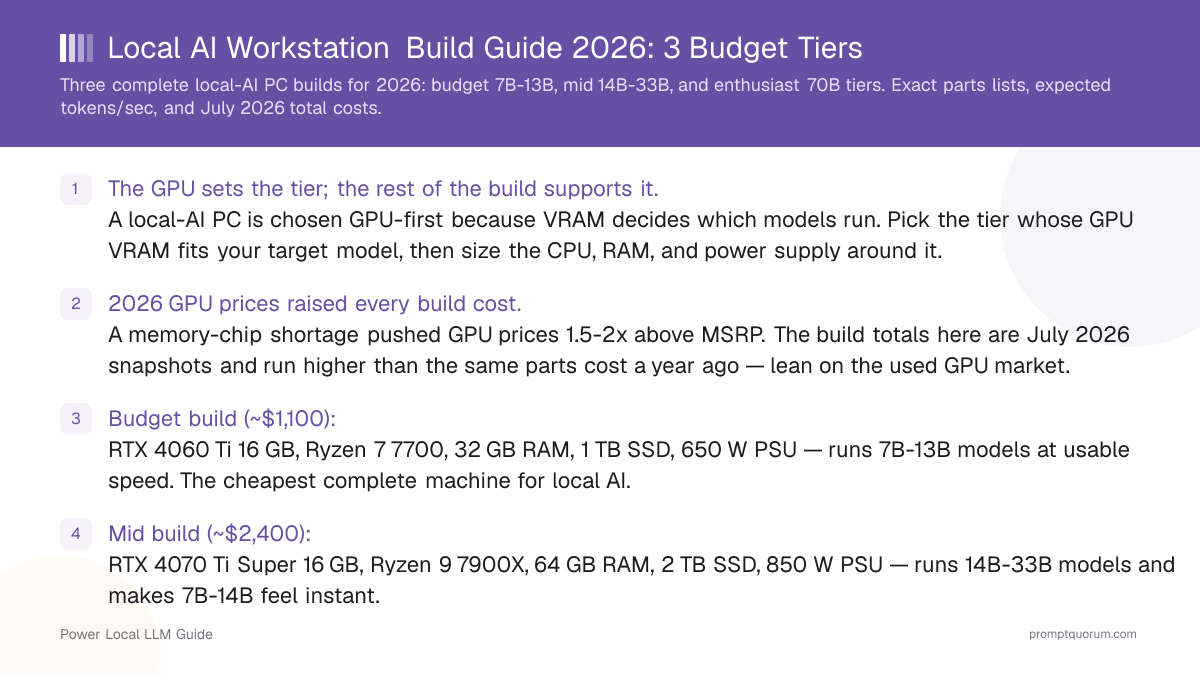
Quick Facts
- Budget build (~$2,000): RTX 4060 Ti 16 GB GPU — runs 7B and most 13B models.
- Mid build (~$3,100): RTX 4070 Ti Super 16 GB GPU — runs 14B comfortably, light 22B-33B work.
- Enthusiast build (~$9,600): RTX 5090 32 GB GPU — runs 33B comfortably and 70B at Q4.
- VRAM rule of thumb at Q4_K_M: roughly 0.6 GB per billion parameters, plus 2-4 GB for context and tooling.
- System RAM guidance: 32 GB for the budget build, 64 GB for the mid build, 128 GB for the enthusiast build.
- Power supply by tier: 650 W budget, 850 W mid, 1000 W enthusiast — the RTX 5090 draws 575 W on its own.
- 2026 price reality: GPUs, DDR5 RAM, and SSDs all surged on the memory shortage — confirm live prices and compare new against used.
Editor's Choice: The Mid Build (~$3,100)
For most buyers building a PC for local AI, the mid build is the tier that balances capability, cost, and headroom. Built around an RTX 4070 Ti Super 16 GB, it runs every 14B model with context room, handles light 22B-33B work, and makes 7B-14B models feel instant — for roughly $3,100 all in. It is the build that will not frustrate you within months and will not need replacing within a year. Drop to the budget build only if your ceiling is firmly 7B-13B models; step up to the enthusiast build only if you specifically need 70B work. The mid build is the safe default for a machine you want to keep.
📌Note: This Editor's Choice reflects price-to-capability only. PromptQuorum is not enrolled in any affiliate program and the links below carry no affiliate tags — they are plain reference links that earn no commission.
How the Three Build Tiers Compare in 2026
GPU VRAM and power figures are manufacturer specifications. Inference speeds are family-level estimates from PromptQuorum GPU testing for the tier's GPU. Build totals are US estimates that sum the midpoint of each price range shown in the build sections, built from current asking-price floors — the 2026 memory shortage pushed GPUs, DDR5 RAM, and SSDs far above normal, so the GPU and RAM lines dominate each total and move week to week. Compare new and used GPU listings: used no longer always costs less.
📍 In One Sentence
For a local-AI PC build, the GPU's VRAM decides which models the machine can run and the rest of the parts list is sized to support that GPU — choose the tier by model size first.
💬 In Plain Terms
Think of the build as a team built around one star player, the GPU. The CPU, RAM, and power supply are the supporting cast — useful, but they exist to keep the GPU fed. Pick the GPU your model needs first, then assemble the rest around it.
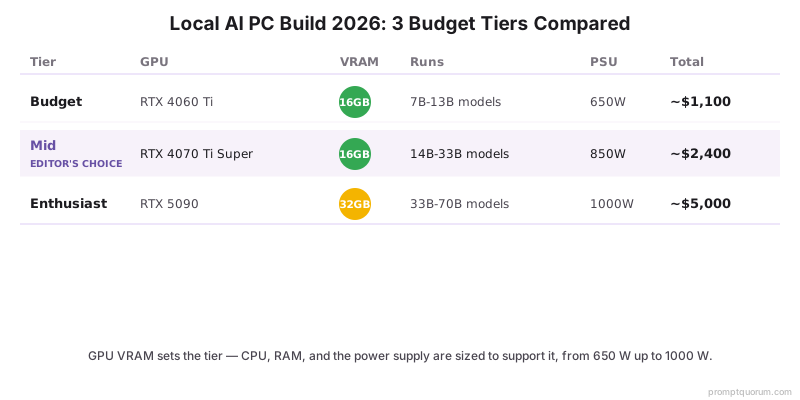
Build tier | GPU | VRAM | Runs | PSU | Total (2026) |
|---|---|---|---|---|---|
| Budget | RTX 4060 Ti 16 GB | 16 GB | 7B-13B models | 650 W | ~$2,000 |
| Mid | RTX 4070 Ti Super 16 GB | 16 GB | 14B comfortably, light 22B-33B | 850 W | ~$3,100 |
| Enthusiast | RTX 5090 32 GB | 32 GB | 33B comfortably, 70B at Q4 | 1000 W | ~$9,600 |
Which Build Should You Choose?
Your largest target model decides the tier; your budget confirms it. Find the row that matches your situation.
Your situation | Build this |
|---|---|
| I run 7B-13B models and want the cheapest complete machine | Budget build (~$2,000) |
| I want a first local-AI PC and am not sure how far I will go | Budget build, or mid build for headroom |
| I run 14B models constantly and want them instant | Mid build (~$3,100) |
| I do light 22B-33B work and want a machine that lasts | Mid build (~$3,100) |
| I run 33B models heavily or want strong future headroom | Enthusiast build (~$9,600) |
| I need a single-GPU machine that runs 70B models at Q4 | Enthusiast build (~$9,600) |
| I want to keep the total down despite the 2026 surge | Any tier — compare new and used GPU listings |
| I am unsure and want the safest build to keep for years | Mid build — the Editor's Choice |
Budget Build (~$2,000): RTX 4060 Ti 16 GB
The budget build is the cheapest complete local-AI PC and runs every 7B model plus most 13B models — enough capability for most first-time users. It is built around the RTX 4060 Ti 16 GB, the lowest-priced 16 GB card in this guide, which keeps the total as low as the 2026 shortage allows.
- GPU — RTX 4060 Ti 16 GB (~$650-800): 16 GB VRAM, 165 W. Runs 7B models at roughly 20-25 tok/s and fits 14B models with context headroom. The 16 GB capacity is the reason to pick it over the 8 GB version. The range runs from the cheapest used listing to the cheapest new one.
- CPU — AMD Ryzen 7 7700 (~$250-280): 8 cores, modest power draw. The CPU does little work during GPU inference, so a mid-range chip is correct here — do not overspend on the CPU in this tier.
- Motherboard — B650 chipset (~$130-160): supports the Ryzen 7 and a single full-size GPU on PCIe. No need for high-end power delivery at this tier.
- RAM — 32 GB DDR5 (~$430-575): enough for the operating system, tooling, and a 7B-13B model running in VRAM. RAM is not a VRAM substitute — 32 GB is sufficient here, but DDR5 is now the second-largest line in this build.
- Storage — 1 TB NVMe SSD (~$145-240): holds the operating system and several models (a 7B Q4 model is roughly 4-5 GB).
- PSU — 650 W 80+ Gold (~$80-100): comfortable headroom for a 165 W GPU and an 8-core CPU.
- Case and cooling — mid-tower with a tower air cooler (~$80-120): the budget tier produces little heat; air cooling is sufficient.
- Why build this tier: lowest cost of entry, low power draw, and enough capability for the 7B-13B models that cover general chat, coding help, and summarization. Why skip it: if you already want 14B or larger models, start at the mid build.
💡Tip: Buy the RTX 4060 Ti in its 16 GB version specifically. The 8 GB version uses the same GPU die and runs at similar speed, but 8 GB cannot fit a 14B model — the extra memory is the entire point of this pick.
Mid Build (~$3,100): RTX 4070 Ti Super 16 GB
The mid build is the Editor's Choice — it runs 14B models instantly, handles light 22B-33B work, and is the tier you build to keep. It is built around the RTX 4070 Ti Super 16 GB, fast enough that response latency stops being noticeable on 14B-class models.
- GPU — RTX 4070 Ti Super 16 GB (~$900-1,000): 16 GB VRAM, 285 W. Same model capacity as the budget tier but far faster — 7B-14B models feel instant, and light 22B-33B work is usable.
- CPU — AMD Ryzen 9 7900X (~$330-370): 12 cores. More headroom than the budget CPU for data preparation and running tooling alongside inference.
- Motherboard — B650 or X670 chipset (~$180-240): solid power delivery for the 12-core CPU and a 285 W GPU.
- RAM — 64 GB DDR5 (~$815-1,200): room for the operating system, larger context windows, and tooling such as a RAG pipeline running next to the model. This is the biggest line after the GPU — if budget is tight, 32 GB (~$430-575) still runs every model in this tier, because the model lives in VRAM.
- Storage — 2 TB NVMe SSD (~$255-355): holds a sizeable model library — a 33B Q4 model is roughly 18-20 GB.
- PSU — 850 W 80+ Gold (~$120-150): comfortable headroom for the 285 W GPU and the 12-core CPU under sustained load.
- Case and cooling — mid-tower with a 240-280 mm AIO or high-end air cooler (~$150-220): the mid tier produces moderate heat; a quality cooler keeps the CPU stable during long inference runs.
- Why build this tier: you run 14B models constantly and want them instant, or you do light 22B-33B work and want headroom. Why skip it: if 7B-13B is enough, the budget build saves over $1,000; if you need 70B, no 16 GB GPU fits it — go enthusiast.
💡Tip: The mid build fits the same models as the budget build — you are paying for speed, not capacity. Build this tier if 14B models will be a daily workload and waiting on them would annoy you.
📌Note: A used RTX 4090 24 GB now lists far above this tier (roughly $2,800 for the cheapest used listing), so it no longer works as a shortcut. Used listings for the RTX 4070 Ti Super itself sit at or above the cheapest new one — compare both before you buy.
Enthusiast Build (~$9,600): RTX 5090 32 GB
The enthusiast build is the only single-GPU machine that fits a 70B model at Q4 — its RTX 5090 32 GB is the headline part. Build this tier for VRAM capacity, not raw speed; the speed is a side effect. The 2026 surge hit this tier hardest — the RTX 5090 listed far above its $1,999 launch price — so the GPU and RAM lines dominate and move week to week.
- GPU — RTX 5090 32 GB (~$4,900-5,900): 32 GB GDDR7 VRAM, 575 W. The only single consumer card that runs a 70B model at Q4 without a dual-GPU build. It runs 33B models comfortably with room to spare. The range runs from the cheapest new listing to the cheapest used one; some retailers list it higher still.
- CPU — AMD Ryzen 9 7950X (~$450-520): 16 cores. Enough to run data preparation, fine-tuning experiments, and tooling alongside heavy inference.
- Motherboard — X670E chipset (~$280-380): strong power delivery and PCIe 5.0, sized for a 575 W GPU and the 16-core CPU.
- RAM — 128 GB DDR5 (~$1,650-2,400, estimated): room for large context windows, multiple models loaded at once, and tooling — and the headroom to spill a model partially to RAM if needed. Few 128 GB kits list reliably, so this range doubles the 64 GB range; a 64 GB kit (~$815-1,200) is the budget-saving alternative.
- Storage — 4 TB NVMe SSD (~$700-1,000): a 70B Q4 model is roughly 40 GB; a 4 TB drive holds a large library of large models. 4 TB drives rose the most of any SSD size in 2026.
- PSU — 1000 W 80+ Platinum (~$180-240): required because the RTX 5090 draws 575 W on its own — a 750 W unit would sag under load. Do not undersize this part.
- Case and cooling — full-size case with a 360 mm AIO (~$280-380): the 575 W GPU and 16-core CPU produce real heat; a 360 mm liquid cooler keeps the CPU stable during sustained 70B inference.
- Why build this tier: you need 33B or 70B models, you run heavy batch inference, or you want a machine that will not need replacing for years. Why skip it: for 7B-14B models it is overkill — the mid build delivers instant responses on those sizes for less than half the cost.
⚠️Warning: The RTX 5090 draws 575 W on its own. Pair it with the 1000 W power supply in this parts list — a smaller unit will brown out under load. Confirm your wall circuit can supply the full draw before building.
📌Note: A 70B model at Q4 needs roughly 39-42 GB of VRAM, so even the RTX 5090 32 GB runs 70B at Q4 only with aggressive quantization or partial offload to system RAM. The 128 GB of RAM in this build gives that offload room to work.
How the 2026 Price Surge Changes the Build Math
The 2026 memory-chip shortage pushed GPU, DDR5 RAM, and SSD prices far above normal, and since the GPU and RAM are the two largest lines in every build, they raised every total well above last year. Plan the build around current asking prices, not launch prices.
📍 In One Sentence
The 2026 memory shortage pushed GPU, DDR5 RAM, and SSD prices far above normal, raising every local-AI build total because the GPU and RAM are the two largest lines in the parts list.
💬 In Plain Terms
The GPU is the most expensive part of the machine, and in 2026 the RAM got expensive too. Until the memory shortage eases, treat launch prices as history, compare new and used before you buy, and do not buy more VRAM or RAM than your model needs.
- The GPU and RAM dominate the total. In every tier the GPU is the biggest line and DDR5 RAM is now the second — the surge changes the build total more through those two parts than any other.
- The cause is memory, not GPUs. A GDDR, HBM, and DRAM supply shortage raised the cost of every card with fast memory and of system RAM itself; the higher the VRAM, the harder the card was hit. The RTX 5090 went from a $1,999 launch price to roughly $4,900 at the cheapest new listing — more than double.
- Lower-end GPUs held up better. The 16 GB mid-range cards rose less than the RTX 5090 — the RTX 4070 Ti Super sits near $900 new — which is why the budget and mid totals moved least in percentage terms.
- Used is no longer a reliable discount. In late 2026 the cheapest used RTX 4070 Ti Super and RTX 5090 listings sit at or above the cheapest new ones, and a used RTX 4090 lists around $2,800. Compare new and used listings for every card; a verified-working used card is only worth it when it is clearly cheaper.
- RAM and SSDs moved a lot; CPU, motherboard, and PSU moved little. A 32 GB DDR5 kit now costs roughly $430-575 and 64 GB roughly $815-1,200, several times the 2025 price, and 4 TB SSDs rose the most. The CPU, motherboard, and power-supply ranges in this guide are unchanged from the previous pricing pass, so recheck them too.
Decision Flowchart: Pick Your Build in Four Questions
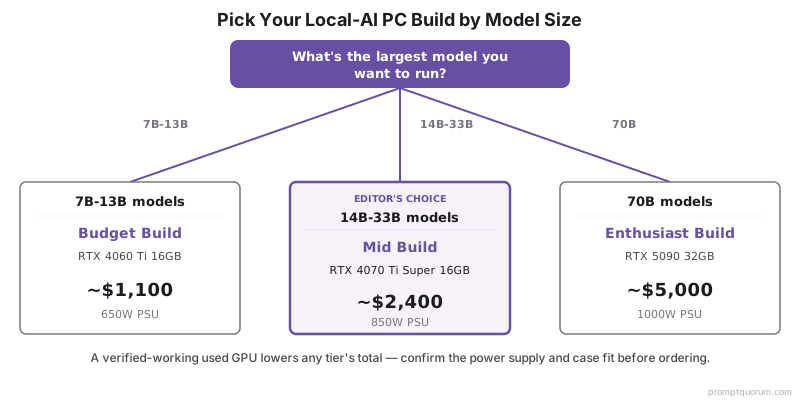
Four questions, in order, route most builders to one tier.
📍 In One Sentence
Pick a local-AI PC build by answering largest model size first, budget ceiling second, new-versus-used GPU third, and power and space planning last.
💬 In Plain Terms
Start with the biggest model you actually want to run and let that set your tier. Then check your budget, decide whether to buy the GPU used, and confirm your power supply and case fit the parts. Doing it in that order avoids a build that cannot run your model.
- 1. What is the largest model you want to run? 7B-13B: budget build. 14B-33B: mid build. 70B: enthusiast build.
- 2. What is your hard budget ceiling? Around $2,000: budget build. Around $3,100: mid build. Around $9,600: enthusiast build.
- 3. New or used GPU? Compare both — in late 2026 used cards often list at or above the cheapest new listing, so a used card is only the right choice when it is clearly cheaper.
- 4. Does your power and space plan hold? Confirm the PSU matches the tier (650 W / 850 W / 1000 W) and the case fits the GPU and cooler before ordering parts.
Where to Buy Components
Major retailers carry every part in these builds; compare new and used listings for the GPU specifically. The links below are plain product-search links; they carry no affiliate tags and earn no commission.
- Amazon and Newegg: the widest stock of CPUs, RAM, SSDs, power supplies, and cases. New GPU and DDR5 stock is thinner and priced at the 2026 surge level.
- Used GPU market: worth checking, but no longer a guaranteed saving — in late 2026 used RTX 4070 Ti Super and RTX 5090 listings often sit at or above the cheapest new ones. Buy used only when it is clearly cheaper and verified working.
- Micro Center (US, in-store): often the best new GPU and CPU pricing if a store is reachable; also useful for CPU-plus-motherboard bundles.
- Buy the GPU first. It is the largest, most volatile line — lock in the GPU at a price you accept, then buy the supporting parts around it.
⚠️Warning: Because of the 2026 price surge, every total in this guide is built from fast-moving asking-price floors. Always open the current retailer listing for the GPU and the RAM before building — their prices have moved week to week and together they dominate the build cost.
Common Mistakes When Building a Local-AI PC
- Choosing the CPU before the GPU. The GPU decides which models the machine runs; the CPU does little during inference. Pick the GPU first, then size the CPU to support it.
- Buying system RAM instead of VRAM. RAM lets a model spill out of VRAM, but a model running from RAM is too slow for interactive use. Buy enough VRAM for the model; buy RAM only for the operating system and tooling.
- Undersizing the power supply. The RTX 5090 alone draws 575 W. A power supply that browns out under load is worse than a slower GPU that runs stably — match the PSU to the tier.
- Anchoring on launch prices. The 2026 surge means GPU MSRPs and last year's RAM prices no longer reflect reality. Budget the GPU and the RAM against live retailer prices, and compare the used market instead of assuming it is cheaper.
- Buying the 8 GB RTX 4060 Ti for the budget build. It shares a name with the 16 GB version but cannot fit a 14B model. Confirm the 16 GB variant in the listing.
- Overbuilding for 7B models. If 7B models cover your use case, the enthusiast build wastes thousands of dollars and hundreds of watts. Match the tier to the model, not to the budget you happen to have.
- Skipping case and cooling planning. A 575 W GPU plus a 16-core CPU produces real heat. Confirm the case fits the GPU and cooler and has airflow before ordering parts.
Sources
- Best GPU Buying Guide for Local LLMs 2026 — PromptQuorum: GPU buying guidance and the 2026 surge context behind the build totals here.
- Local LLM Workstation Build — PromptQuorum: dual-GPU 70B workstation parts list, cooling, and power-supply guidance behind the enthusiast tier.
- NVIDIA GeForce RTX 40 and 50 Series Specifications — Official VRAM capacity and power (TGP) figures for the RTX 4060 Ti, 4070 Ti Super, and 5090.
- PCPartPicker — Live component pricing for AMD Ryzen CPUs, DDR5 RAM, NVMe SSDs, and power supplies.
Frequently Asked Questions
Is a 1000 W power supply overkill for a single-GPU build?
Not for an RTX 5090, which is rated at 575 W and can spike above that for milliseconds, so NVIDIA's reference guidance is a 1000 W unit. For the budget and mid builds in this guide it is overkill: 650 W and 850 W (80+ Gold) cover the RTX 4060 Ti 16 GB and RTX 4070 Ti Super 16 GB with headroom. Prefer an ATX 3.1 unit with a native 12V-2x6 connector over simply buying more watts.
How much does it cost to build a PC for local AI in 2026?
A budget local-AI PC costs roughly $2,000, a mid build roughly $3,100, and an enthusiast 70B build roughly $9,600. These totals are built from current asking-price floors — the 2026 memory-chip shortage pushed GPUs, DDR5 RAM, and SSDs far above last year's prices, and since the GPU and RAM are the largest lines in every build, they raised each total well above what the same parts cost a year ago.
What GPU should I put in a local-AI PC build?
Pick the GPU by your largest target model. An RTX 4060 Ti 16 GB suits a budget build for 7B-13B models, an RTX 4070 Ti Super 16 GB suits a mid build for 14B-33B models, and an RTX 5090 32 GB suits an enthusiast build for 70B work. The GPU decides which models the machine can run, so it is chosen first and the rest of the parts list is built around it.
How much RAM do I need for a local-AI PC?
Plan 32 GB for a budget build, 64 GB for a mid build, and 128 GB for an enthusiast build. System RAM is not a substitute for VRAM — a model running from RAM is too slow for interactive use. RAM is for the operating system, context, and tooling; buy enough VRAM on the GPU for the model itself.
What power supply does a local-AI PC need?
Match the power supply to the tier: 650 W for the budget build, 850 W for the mid build, and 1000 W for the enthusiast build. The enthusiast tier needs 1000 W because the RTX 5090 draws 575 W on its own. An undersized power supply causes instability under load, so do not cut this part.
Should I buy GPU components new or used in 2026?
Compare new and used before you decide; do not assume used is cheaper. In late 2026 several used cards — including the RTX 4070 Ti Super and RTX 5090 — list at or above the cheapest new listing, and a used RTX 4090 lists around $2,800. A verified-working used card is worth buying only when it is clearly cheaper. CPUs, RAM, SSDs, and power supplies are best bought new.
Can a single-GPU build run a 70B model?
Yes, the enthusiast build can. An RTX 5090 32 GB is the only single consumer card that fits a 70B model at Q4, which needs roughly 39-42 GB of VRAM — so it runs 70B with aggressive quantization or partial offload to system RAM. The 128 GB of RAM in the enthusiast build gives that offload the room it needs.
Is the mid build worth the extra cost over the budget build?
Yes, if you run 14B-class models regularly. The budget and mid builds fit similar models, but the mid build's RTX 4070 Ti Super is far faster — 14B models feel instant rather than sluggish, and light 22B-33B work becomes usable. If your ceiling is firmly 7B-13B models, the budget build saves over $1,000 and is the better value.
Do I need a Threadripper CPU for a local-AI PC?
No. A consumer Ryzen CPU is enough for all three builds in this guide — a Ryzen 7 for the budget tier, a Ryzen 9 for the mid and enthusiast tiers. A Threadripper is only worth its cost for a dual-GPU machine that runs fine-tuning and inference at the same time, which is beyond a single-GPU build.