Key Takeaways
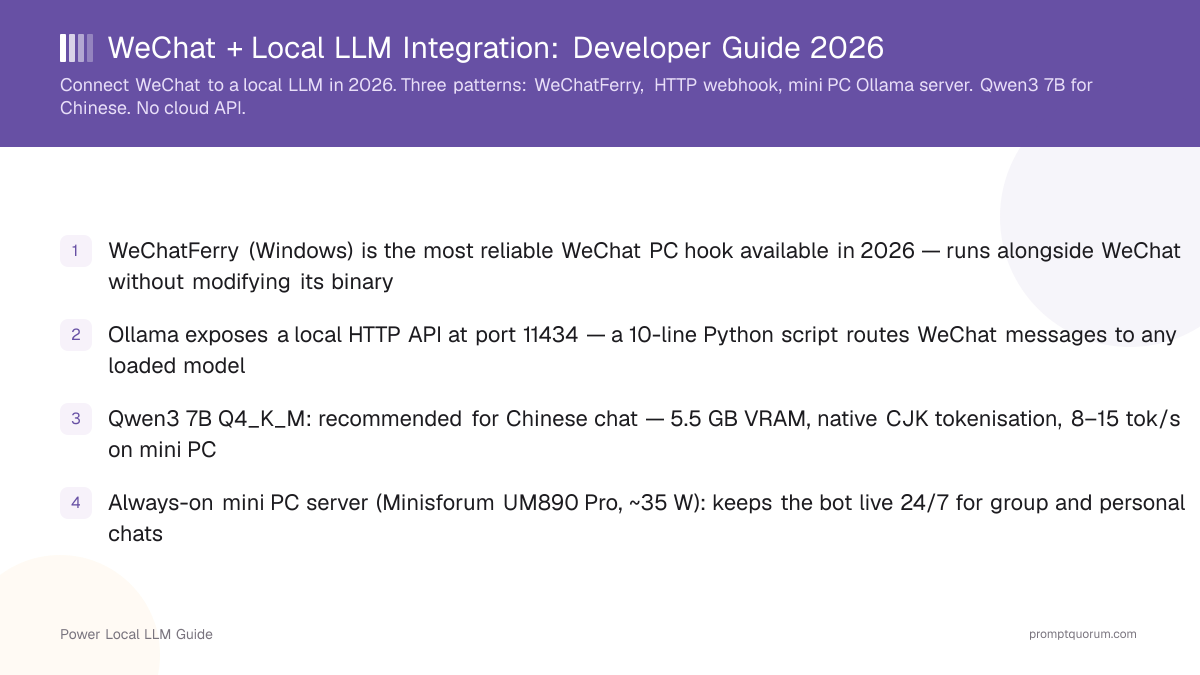
- WeChatFerry (Windows) is the most reliable WeChat PC hook available in 2026 — runs alongside WeChat without modifying its binary
- Ollama exposes a local HTTP API at port 11434 — a 10-line Python script routes WeChat messages to any loaded model
- Qwen3 8B Q4_K_M: recommended for Chinese chat — 6 GB VRAM, native CJK tokenisation, 8–15 tok/s on mini PC
- Always-on mini PC server (Minisforum UM890 Pro, ~35 W): keeps the bot live 24/7 for group and personal chats
- Local inference: zero data transmitted to cloud — satisfies China Data Security Law Article 31 for personal data
Three WeChat + LLM Integration Patterns
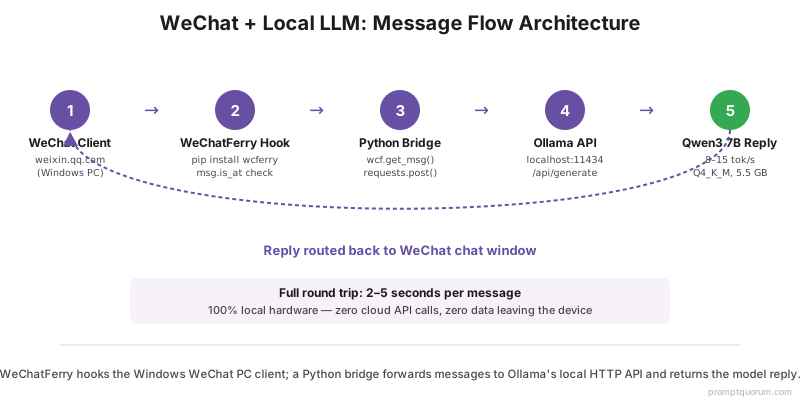
Pattern 1 — WeChatFerry + Ollama (Windows): Most stable. WeChatFerry hooks the official WeChat PC client and exposes a Python SDK. Messages arrive as events; your script calls Ollama's HTTP API and sends the reply back. Works for personal and group chats. Requires Windows with WeChat PC installed.
Pattern 2 — HTTP webhook bridge: Run a local HTTP server that receives webhook callbacks from a third-party WeChat gateway. More complex to set up but works cross-platform. Suitable for businesses with existing WeChat Official Account infrastructure.
Pattern 3 — Ollama + Open WebUI forwarding: Use Open WebUI's built-in WeChat notification feature (where available) to push summaries or responses back to a personal WeChat account. Lightweight and no hook required, but only supports one-way notifications.
For most users — especially in China on personal accounts — Pattern 1 (WeChatFerry + Ollama) is the right choice for 2026.
WeChatFerry Setup: Step-by-Step
- 1Install the WeChat PC 3.9.12.x build that matches your WeChatFerry release on Windows — WeChatFerry hooks specific 3.9.x builds and does not support the current WeChat 4.x client
- 2Install WeChatFerry:
pip install wcferry(Python 3.10+) - 3Start WeChatFerry daemon:
python -m wcferry.daemon - 4Write message handler:
from wcferry import Wcf; wcf = Wcf(); wcf.enable_receiving_msg() - 5In the message loop, POST to Ollama:
requests.post("http://localhost:11434/api/generate", json={"model":"qwen3:8b","prompt":msg.content}) - 6Send reply: `wcf.send_text(response["response"], msg.roomid or msg.sender)`
- 7Test with a personal message; verify response appears in WeChat within 2–5 seconds
import requests
from wcferry import Wcf

wcf = Wcf()
wcf.enable_receiving_msg()

while True:
    msg = wcf.get_msg()
    if msg and msg.from_self() is False:
        resp = requests.post(
            "http://localhost:11434/api/generate",
            json={"model": "qwen3:8b", "prompt": msg.content, "stream": False}
        ).json()
        wcf.send_text(resp["response"], msg.roomid or msg.sender)
Ollama HTTP API: Key Endpoints
Ollama runs a local REST server at http://localhost:11434 after ollama serve. No authentication is required for local connections.
Generate (single turn): POST /api/generate — body: {model, prompt, stream: false} — returns {response, done}
Chat (multi-turn): POST /api/chat — body: `{model, messages: [{role, content}]}` — maintains conversation context across calls
List models: GET /api/tags — returns all installed models with their sizes
For WeChat integration, use /api/chat with a rolling conversation history (last 10 messages) to maintain context across a session.
Mini PC as Always-On WeChat LLM Server
A dedicated always-on mini PC keeps your WeChat bot live without tying up a laptop or workstation.
Minisforum UM890 Pro (Recommended): AMD Ryzen 9 8945HS, 32–64 GB DDR5, AMD Radeon 780M iGPU. Runs Qwen3 8B at ~8 tok/s via ROCm on Linux. Power draw: ~35 W idle, ~65 W under inference. Price: ~$350–$450.
Mac Mini M6: Apple Silicon M6, 16–32 GB unified memory, not yet independently benchmarked. Power draw: under 5W idle. Quietest option. Price: from $899.
Setup tip: Enable auto-start — add ollama serve and your WeChatFerry bridge script to systemd (Linux) or Windows Task Scheduler. The bot then recovers automatically after power cycles.
Best Models for Chinese WeChat Chat
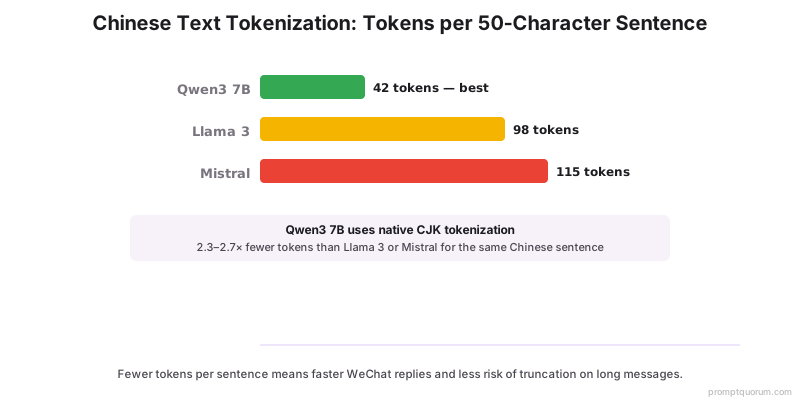
Qwen3 8B Q4_K_M (Top Pick): Built by Alibaba with native CJK tokenisation. 6 GB VRAM, 8–15 tok/s. Understands Chinese idioms, classical references, and colloquial phrasing far better than Western-first models. Install: ollama pull qwen3:8b.
Qwen3 14B Q4_K_M: For richer conversations where a mini PC with 12–16 GB RAM is available. 9.5 GB VRAM, 4–8 tok/s. Noticeably better at nuanced Chinese reasoning and multi-turn context.
DeepSeek-R1-0528-Qwen3-8B: Good for question-answering and step-by-step explanations in Chinese. Slightly weaker at casual conversation than Qwen3 8B.
Avoid: Llama 3 and Mistral — Western-first tokenisers use 2–3× more tokens for Chinese text, leading to slower responses and truncation on long messages.
Group Chat Handling
WeChat group chats require explicit @mention handling. WeChatFerry exposes msg.is_at to detect when the bot is mentioned.
Best practice: only respond when msg.is_at is True or when the message starts with a trigger keyword. Responding to every group message creates noise and triggers WeChat's anti-bot rate limits.
Rate limiting: WeChat may throttle accounts sending more than ~30 messages per minute. Add a 2–3 second delay between bot replies in group contexts.
Context management: for group chats, maintain separate conversation histories per user (keyed by msg.sender) to avoid context bleed between participants.
Privacy and China Data Security Law Compliance
Local inference means prompts, responses, and conversation history never leave your hardware. Neither WeChat Tencent servers nor any LLM cloud API processes the content.
China Data Security Law (DSL, 2021) Article 31: Requires that personal data collected or used domestically stays within China's jurisdiction. Running your own local LLM ensures inference does not route through foreign cloud providers (OpenAI, Anthropic, Google).
Cybersecurity Law Article 37: Critical information infrastructure operators must store data domestically. Local inference satisfies this for personal and SMB use cases.
What this does NOT cover: WeChat message metadata (who messaged whom, timestamps) remains on Tencent servers per WeChat's Terms of Service — local inference cannot change this. For full privacy, use a local messaging platform instead of WeChat.
Note for EU readers: GDPR Article 28 requires data processor agreements. Running local LLMs avoids the need for a DPA with any LLM vendor — a compliance simplification.
Frequently Asked Questions
Does WeChatFerry work with WeChat for Mac?
No. WeChatFerry hooks the Windows WeChat PC client DLLs and does not support WeChat for Mac. On Mac, use a Windows VM or one of the HTTP webhook patterns instead.
Will Tencent ban my account for using a bot?
WeChat's ToS prohibits automated messaging at scale. Personal bots with human-like response rates (1–5 messages per minute) rarely trigger bans. Avoid bulk messaging, group spam, or using the bot for commercial outreach.
Which Ollama model is best for Chinese text?
Qwen3 8B Q4_K_M. Built by Alibaba with native CJK tokenisation — 30–40% more efficient on Chinese text than Llama or Mistral models.
Can I run this on a laptop?
Yes. A 16 GB RAM laptop runs Qwen3 8B comfortably at 8–15 tok/s CPU-only. Response latency is 3–8 seconds per message — acceptable for chat.
Does local inference satisfy China Data Security Law?
For inference content (prompts and responses), yes — no data leaves your hardware. WeChat message metadata still resides on Tencent servers per WeChat ToS.
How do I handle multi-turn conversations?
Store conversation history as a Python list of {role, content} dicts keyed by sender. Pass the last 10–15 messages to /api/chat on each request to maintain context.
Does WeChatFerry support WeChat 4.x?
No. WeChatFerry hooks specific WeChat PC 3.9.12.x builds only. The WeChat 4.x client uses a rewritten architecture with no stable hook, so keep the matching 3.9.12.x build installed on the bot machine and disable WeChat auto-updates.