Key Takeaways
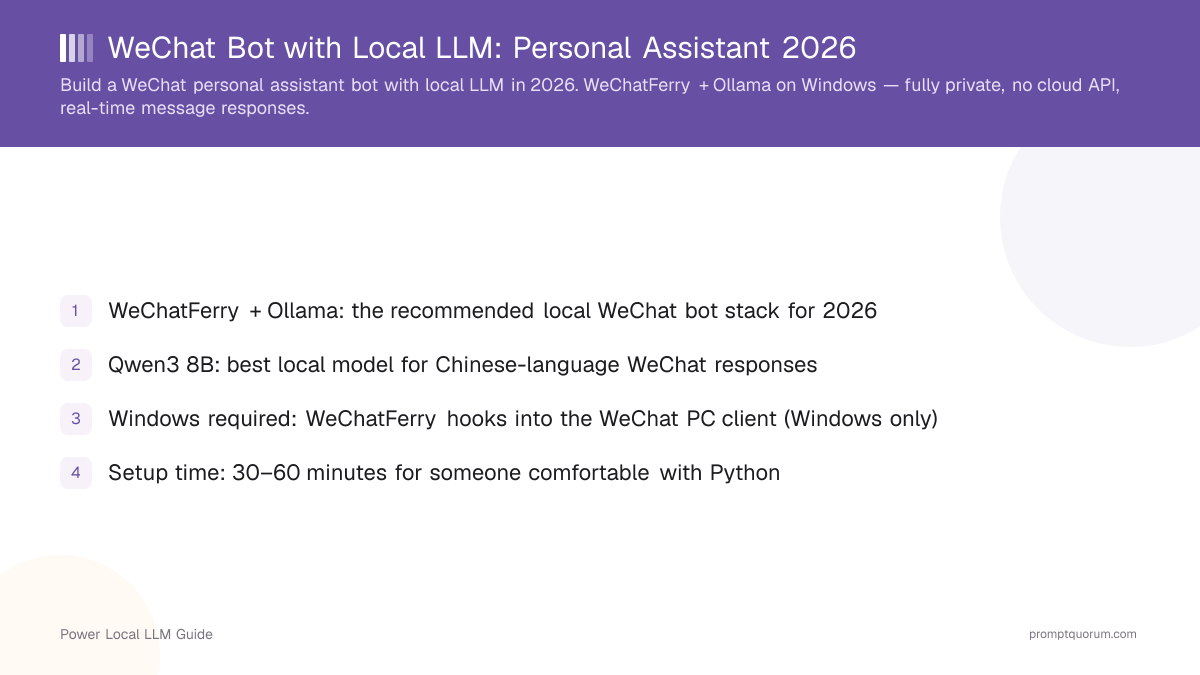
- WeChatFerry + Ollama + Qwen3 is the working 2026 stack for a local-LLM WeChat assistant — Windows only, no cloud API involved
- Buy hardware for the job you actually want: a budget N150 box (GMKtec G3 Plus, from €159.99/$140–200) is enough for a light Qwen3 3B assistant
- For an always-on local AI server that can grow past a simple bot, the Minisforum UM890 Pro (from $439 barebones/~$649 with 32GB) is the better spend — roughly 3–4x the price, a different class of headroom
- Qwen3 8B is the recommended starting model for Chinese-language quality; setup takes about 30–60 minutes for someone comfortable with Python
- Real risk: WeChat's Terms of Service prohibit automated bots — this is personal-productivity territory, not a mass-messaging tool
- Privacy claim, stated precisely: message content does not go to a cloud LLM API — WeChat itself still runs through Tencent's infrastructure regardless
- Get a budget N150 mini PC (GMKtec G3 Plus or Beelink EQ14) if: the WeChat assistant is your only serious local-AI workload, you're fine with a Qwen3 3B model, and low power draw for 24/7 operation matters more than speed.
- Get a Ryzen-class box (Minisforum UM890 Pro) if: you want Qwen3 8B or 14B to feel responsive, you plan to add RAG, a document search, or other local services later, or you want real headroom instead of buying twice.
- Skip building this at all if: you need this to run on macOS/Linux natively (WeChatFerry is Windows-only), you're not comfortable accepting some account risk from an unofficial integration, or you need message volume higher than personal-assistant scale.
- A budget setup (16 GB RAM, any modern CPU) is genuinely sufficient for a small, low-volume assistant — don't over-buy for this use case.
- The recommended tier (32 GB, Ryzen-class CPU) is where most people building a real personal assistant should land — it gives Qwen3 8B room to run comfortably alongside the WeChat bridge and Ollama itself.
- The heavy tier is for readers whose actual goal is a general local AI server, with the WeChat bot as one interface among several — RAG, document search, and multiple services need the extra headroom, not the bot itself.
Tier | RAM | Model it fits | Best for |
|---|---|---|---|
| Budget | 16 GB | Qwen3 3B | Experimenting with the concept, low-volume personal use, simple Chinese-language replies |
| Recommended | 32 GB | Qwen3 8B | Most serious installs — longer history, 24/7 use, faster replies |
| Heavy local-AI | 64 GB+ | Qwen3 14B and larger | Multiple concurrent users, RAG, document search, agent workflows, additional local AI services |
- RAM headroom is the actual reason to choose it, not raw CPU speed. A local AI server needs memory for the OS, Ollama, the model itself, conversation history, and — if you add it later — embeddings and a database. 96 GB of ceiling gives real room to grow; a budget N150 box tops out far lower.
- Two SSD slots let you dedicate one to the OS and applications and a second to models and data, which matters once you're running more than one local AI service.
- Dual 2.5GbE is unnecessary for a simple WeChat bot but genuinely useful if the machine eventually becomes a broader local server on your network.
- The honest downside: you do not need this much machine for Qwen3 3B or light 8B usage. If "I want a cheap WeChat bot" is the whole goal, this is overkill — see the budget option below instead. If the goal is "an always-on local AI server that starts with WeChat and can grow," the UM890 Pro is the more defensible spend.
- Choose an N150 machine if: price matters most, a Qwen3 3B model is genuinely enough for your use case, you want very low power consumption, and the box might also run Home Assistant or other light services alongside the bot.
- Choose the UM890 Pro instead if: local AI is the primary workload, you want Qwen3 8B+ to feel responsive, you want 32 GB+ RAM, or you plan to run RAG or multiple local AI services on the same box.
- See the full GMKtec G3 Plus review and Beelink EQ14 review for the complete spec breakdowns, or the best mini PCs for local AI roundup to compare more options.
- 1Install Ollama and pull Qwen3 8B
Why it matters: Download Ollama from ollama.com and run: `ollama pull qwen3:8b` - 2Log in to WeChat PC
Why it matters: Open WeChat on Windows and scan the QR code to log in. Keep it logged in and running in the background. - 3Install WeChatFerry
Why it matters: Install via pip: `pip install wcferry`. WeChatFerry injects into the WeChat process to expose a message API — check its GitHub repo for the WeChat client version it currently supports before you proceed. - 4Create the Python message handler
Why it matters: Create `wechat_bot.py` with a WeChatFerry client, Ollama HTTP API calls, and message routing logic, including the trigger-keyword check. - 5Test with a self-message
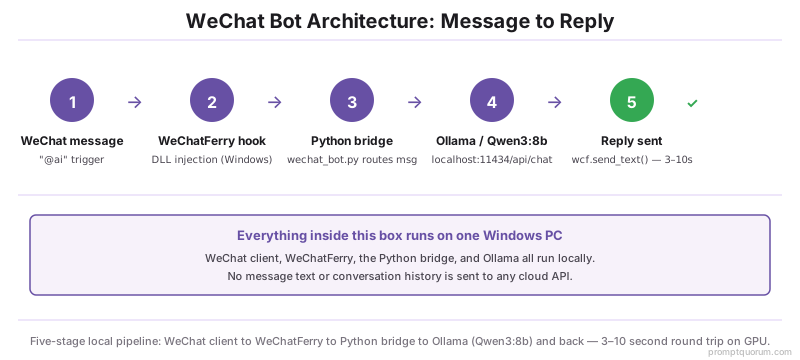
Why it matters: Send a WeChat message to yourself starting with "@ai" and verify the bot responds within roughly 10–15 seconds on CPU. - 6Add conversation history
Why it matters: Store the last 10–20 messages per contact to enable multi-turn conversation context. - 7Run as a background service
Why it matters: Use NSSM (Non-Sucking Service Manager) to run the Python script as a Windows service that starts automatically, so the bot survives reboots.
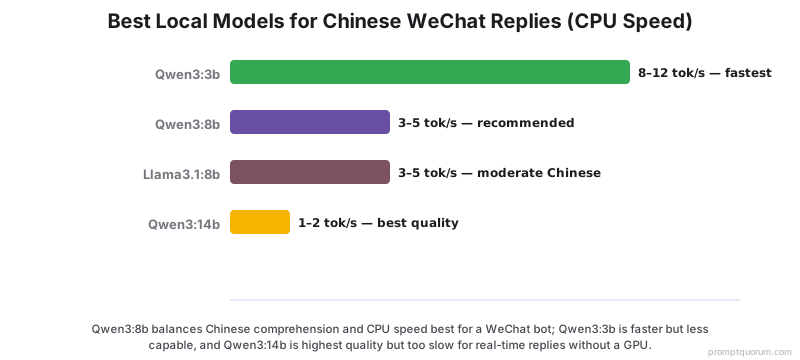
- Qwen3:8b is the sensible first model for most users — enough capability for Chinese conversation, summarization, rewriting, question answering, and simple personal-productivity automations.
- Don't choose a model purely because the file "fits" in RAM — fit does not mean fast. For a conversational assistant, response latency matters; a model that technically loads but replies in 20+ seconds feels broken in a chat app.
- On CPU-only hardware (an N150 box), expect noticeably slower generation than the figures above suggest for an 8B+ model — this is exactly the gap the Minisforum UM890 Pro closes.
Model | Approx. size (Q4) | Chinese quality | Speed (CPU) | Speed (8GB VRAM) |
|---|---|---|---|---|
| Qwen3:3b | ~2 GB | Good | 8–12 tok/s | 60+ tok/s |
| Qwen3:8b | ~4.7 GB | Excellent — best starting point | 3–5 tok/s | 30–45 tok/s |
| Qwen3:14b | ~9 GB | Best | 1–2 tok/s | 15–20 tok/s |
| Llama3.1:8b | ~4.7 GB | Moderate | 3–5 tok/s | 30–45 tok/s |
- Local RAG: ask questions about your own documents without them leaving your network.
- Personal knowledge base: search notes, PDFs, and saved information through the same WeChat interface.
- Automation: trigger scripts and local services from a WeChat message.
- Home Assistant: send commands to your smart home — see Connect Ollama to Home Assistant.
- Scheduled tasks: generate daily summaries or reports.
- This reframes the project from "a WeChat bot" to a private local AI server with WeChat as one interface into it — see Local AI Agents with MCP for the next step.
- The precise, defensible claim: local LLM inference means the content you send to your assistant is not forwarded to a third-party cloud LLM provider for processing. That is a real, specific privacy benefit.
- The claim this setup does NOT support: that your WeChat communications generally are private or that Tencent cannot see message metadata or content through its own platform — that is a separate question this project does not change.
- Windows-only: WeChatFerry uses Windows DLL injection to hook into the WeChat process. It does not work natively on macOS or Linux; running Windows in a VM (Parallels, VMware Fusion) is a possible workaround with added complexity.
- WeChat client version dependency: WeChatFerry tracks specific WeChat PC client versions (currently 3.9.12.17). Check the WeChatFerry GitHub repository's compatible-version list before updating WeChat, or the bot can silently stop working.
- Latency: CPU-only inference on an 8B model takes roughly 5–15 seconds per response, which can feel slow in a chat context. An 8 GB-class GPU or a Ryzen-class iGPU brings this down meaningfully.
- Account risk is real, not theoretical. Keep message volume low and personal, and understand you are accepting some risk by using an unofficial automation approach — this is not an official, sanctioned integration.
Does this WeChat bot work on Mac?
Not natively. WeChatFerry requires Windows and hooks into the WeChat Windows PC client via DLL injection. macOS users can run Windows in a virtual machine (Parallels or VMware Fusion) to use this setup, at the cost of added complexity.
Will my WeChat account get banned for using a bot?
WeChat's Terms of Service prohibit automated bots. Accounts detected using automation tools risk temporary suspension or a permanent ban. Use this only for personal productivity at low message volumes — the account risk is real, and this is not an officially sanctioned integration.
What is the best Ollama model for Chinese WeChat messages?
Qwen3 8B is the best balance of quality and speed for Chinese-language WeChat responses for most users — strong Chinese comprehension, and the roughly 4.7 GB (Q4) model fits in 8 GB of VRAM or runs at an acceptable pace on 16 GB of CPU RAM.
Can the bot handle group chats?
Yes. WeChatFerry exposes group messages with a room ID. Filter which groups the bot responds in via msg.roomid, and require an explicit trigger keyword (e.g. "@ai") so the bot doesn't reply to every message in a group.
What hardware do I actually need for this?
For a light Qwen3 3B assistant, any modern 16 GB Windows PC is enough — a budget N150 mini PC like the GMKtec G3 Plus (from €159.99/$140–200) covers this. For Qwen3 8B to feel responsive and for 24/7 always-on operation, 32 GB RAM and a Ryzen-class CPU is the better spend — the Minisforum UM890 Pro (from $439 barebones/~$649 with 32 GB) is our pick for that tier.
Is the Minisforum UM890 Pro overkill for a WeChat bot?
For a simple WeChat bot running Qwen3 3B, yes — a budget N150 box is enough and roughly a third of the price. For a general-purpose local AI server with 32–96 GB RAM, multiple models, RAG, and other services running alongside the bot, the UM890 Pro is much easier to justify.
Does running the LLM locally make WeChat private?
No, and this is an important distinction. Local inference means your message content is not sent to a third-party cloud LLM provider for processing. It does not make WeChat itself a private communications platform — WeChat still operates through Tencent's own infrastructure regardless of where the AI model runs.
Is this an official WeChat integration?
No. WeChatFerry is an unofficial automation/integration approach, not an official WeChat bot API. Use it cautiously, keep message volume low and personal, and understand the account risk that comes with any unofficial automation tool.
How do I build a WeChat bot with a local LLM?
Use WeChatFerry (Windows) to hook into the WeChat PC client, connect to Ollama via its local HTTP API, and route incoming messages to a Qwen3 model. Total setup time is roughly 30–60 minutes for someone comfortable with Python.