Sponsored
Buy If / Skip If
Quick decision guide — does the G3 Plus fit your needs? PromptQuorum's verdict: recommended for Home Assistant, light local models, and 24/7 low-power use.
Buy the G3 Plus if:
- You want Home Assistant on a cheap, always-on box
- You want the lowest electricity draw in this class (~6 W idle)
- You value upgradeable RAM over a fixed-memory rival
- You want to experiment with a small (1B–4B) local model
- You need two separate storage drives (NVMe + SATA)
- You do not need USB-C or a second Ethernet port
- You do not need fast 7B+ local inference
Skip the G3 Plus if:
- You want a genuinely fast local AI assistant — get a Beelink SER8 instead
- You need GPU-class or vision-model AI performance
- You need dual 2.5GbE Ethernet — the Beelink EQ14 has it, this doesn't
- You need a USB-C port for anything (display, fast storage, charging)
- You want gaming performance
GMKtec G3 Plus Scorecard
PromptQuorum's assessment, based on manufacturer specifications and independent review sources — not a hands-on lab test of a physical unit. Scores reflect fit for a Home Assistant + light-AI hub role specifically, not general PC performance.
Category | Score | Why |
|---|---|---|
| Home Assistant | 9/10 | Runs the hub and add-ons comfortably at very low idle power |
| Local AI | 4/10 | Small models only; single-channel DDR4 and no NPU cap it hard |
| Power efficiency | 10/10 | ~6 W idle is best-in-class for this hardware tier |
| Upgradeability | 8/10 | RAM and both storage slots are user-accessible, unlike soldered rivals |
| Storage expansion | 9/10 | NVMe (up to 4 TB) plus a separate SATA M.2 (up to 2 TB) |
| Networking | 5/10 | Single 2.5GbE port and no USB-C — the EQ14 beats it here |
| Noise | 9/10 | Small fan, low thermal load at idle-heavy hub workloads |
| Value | 8/10 | Good price for the role, though the 32 GB upgrade path is pricier than in 2025 |
| 24/7 server use | 9/10 | Low power draw and passable thermals make always-on use cheap |
| Overall | 7.9/10 | A strong budget Home Assistant hub that can dabble in small local AI — not an AI box |
These scores are PromptQuorum's editorial assessment derived from verified specifications and independent reviews (see "How We Evaluate" below) — they are not the result of PromptQuorum physically testing this unit.
Key Takeaways
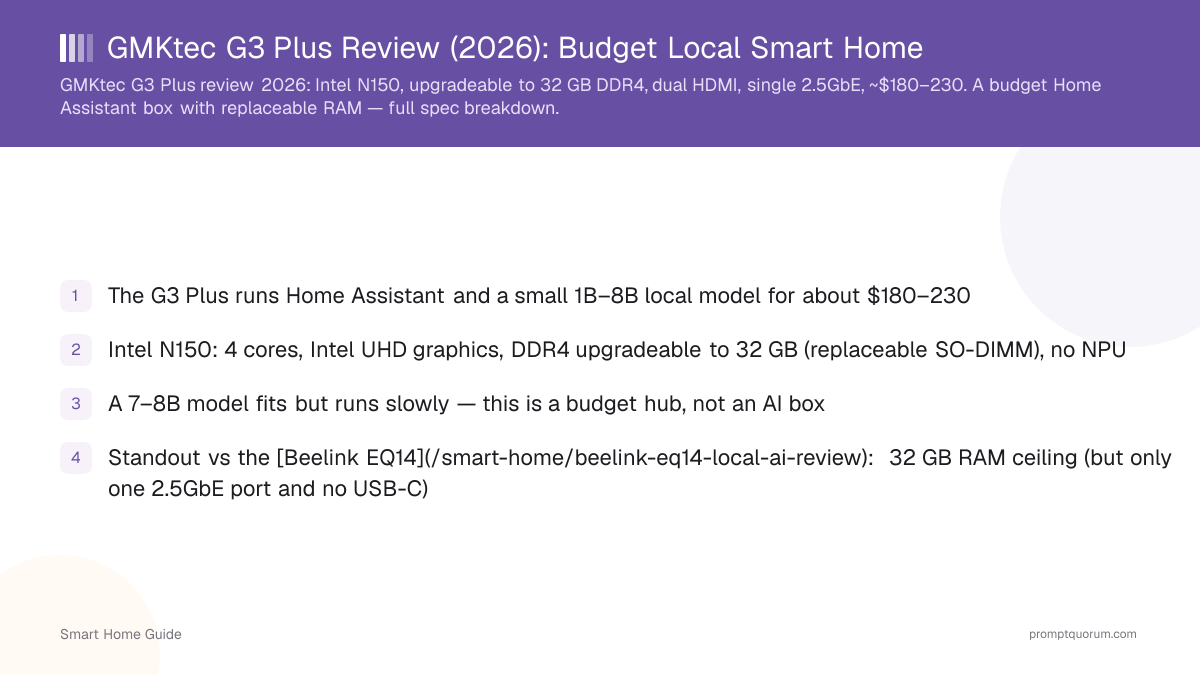
- The G3 Plus runs Home Assistant and a small 1B–4B local model for about $180–200 (16 GB / 512 GB, checked August 25, 2026)
- Intel N150: 4 cores, Intel UHD graphics, DDR4 upgradeable to 32 GB (replaceable SO-DIMM), no NPU
- A 7–8B model fits but runs slowly — this is a budget hub, not an AI box
- Standout vs the Beelink EQ14: 32 GB RAM ceiling (but only one 2.5GbE port and no USB-C)
- The 32 GB upgrade is real but no longer cheap — a DDR4-3200 32 GB SO-DIMM runs roughly $200 in August 2026 due to a memory-market shortage, versus about $48 in April 2025
- For a responsive 7B assistant, step up to a Beelink SER8
- Made in China — landed cost reflects 2026 import measures; check the live price before buying
Verdict — Who Should Buy It
Buy the GMKtec G3 Plus if you want a cheap, low-power Home Assistant box and you value a replaceable RAM slot that reaches 32 GB. For about $180–200 it is a solid budget entry to a local-first smart home. Do not expect a fast local assistant — the Intel N150 with single-channel DDR4 handles small models only.
Why the G3 Plus is different: upgradeable RAM. Most budget N150 boxes solder their memory. The G3 Plus uses a replaceable DDR4 SO-DIMM instead, supporting up to 32 GB. That matters for a Home Assistant server because the same machine can later host more add-ons, a database, and a bit more local-AI context as your setup grows — without buying a new machine.
The GMKtec G3 Plus isn't the best local-AI computer. It's one of the best cheap Home Assistant computers that can also run local AI. If you want two network ports, the Beelink EQ14 is the better hub for that. If you want real local-AI speed, move up to a Ryzen box like the SER8.
Which Configuration Should You Buy?
GMKtec sells the G3 Plus barebone, or pre-configured with 8 GB/256 GB or 16 GB/512 GB–1 TB — there is no factory 32 GB SKU; that's a self-install upgrade. Prices below checked directly against GMKtec's EU store and independent US retailers on August 25, 2026 — always confirm the live price before buying.
- This is the configuration PromptQuorum would buy: the 16 GB / 512 GB pre-built SKU — it's the best balance of price and headroom for Home Assistant plus a small local model, without needing to source or install RAM yourself.
- On the 32 GB upgrade specifically: a single 32 GB DDR4-3200 SO-DIMM (e.g. Crucial CT32G4SFD832A) has been trading around $200–205 in August 2026, after spiking to roughly $415 in June 2026 during the 2026 DDR4/NAND memory shortage — up from about $48 in April 2025. At current prices, a self-installed 32 GB upgrade can cost close to the price of the whole mini PC. Price the RAM module before deciding this upgrade is worth it for your use case.
- GMKtec's own US storefront has shown a $499.99 list price for the 16 GB/512 GB SKU marked "sold out" — that figure is far above every independent retailer price found and should not be treated as the real market price; use it only as a ceiling, not a reference.
Configuration | Approx. Price (Aug 2026) | Best For |
|---|---|---|
| Barebone (no RAM/SSD/OS) | ~€160 / ~$170 | Only if you already own a DDR4 SO-DIMM and NVMe SSD — otherwise the pre-built SKUs are better value |
| 8 GB / 256 GB | Cheapest configured SKU — check current price | Home Assistant only, very light add-on load; skip if you plan to try local AI at all |
| 16 GB / 512 GB | ~$180–200 | Recommended for most buyers — Home Assistant, Docker, AdGuard, MQTT, Node-RED, and a small 1B–4B local model |
| 16 GB / 1 TB | ~$195–230 | Same as above with more storage headroom — worth it if you plan to add Frigate camera recordings |
| 32 GB (self-install DDR4 SO-DIMM) | + ~$200 for the module alone (2026 DDR4 shortage) | Only if local AI experimentation matters to you — check the RAM price before committing, it moves quickly |
G3 Plus vs Beelink EQ14 — Which Should You Buy?
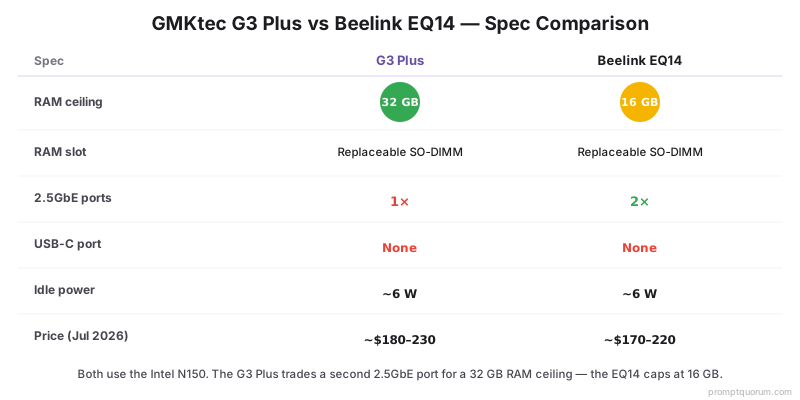
Both use the same Intel N150 and cost about the same — the decision comes down to RAM ceiling versus networking.
- Our pick: choose the G3 Plus if you value RAM headroom and don't need a second Ethernet port. Choose the EQ14 if you need dual 2.5GbE or a USB-C port — see the full Beelink EQ14 review.
- Neither box meaningfully outruns the other on Home Assistant or small-model AI performance — the CPU and iGPU are identical.
Feature | G3 Plus | Beelink EQ14 | Winner |
|---|---|---|---|
| CPU | Intel N150 | Intel N150 | Tie |
| Max RAM | 32 GB (replaceable) | 16 GB (capped) | G3 Plus |
| Ethernet | 1× 2.5GbE | 2× 2.5GbE | EQ14 |
| USB-C | None | Yes (10 Gbps, data-only) | EQ14 |
| Storage | 1× NVMe + 1× SATA M.2 | 2× NVMe (PCIe 3.0) | Depends on use |
| Idle power | ~6 W | ~6 W | Tie |
| Price (Aug 2026) | ~$180–200 | ~$189–199 | Roughly tied |
| Best for | Upgradeable RAM, single-LAN setups | Network-heavy Home Assistant, e.g. as a secondary router-adjacent box | Depends on your priority |
Specifications
Manufacturer-confirmed specifications below, verified against GMKtec's own listings and cross-checked with independent reviews as of August 25, 2026. The RAM is a replaceable DDR4 SO-DIMM (not soldered) that reaches 32 GB via self-install — GMKtec does not sell a factory-configured 32 GB SKU. There is no USB-C port on this model.
- Two storage slots — one NVMe (PCIe 3.0) and one SATA (M.2 2242) — allow a fast OS drive plus bulk storage.
- USB-A port speed varies by source and SKU (5–10 Gbps); confirm on the listing you buy.
- PromptQuorum assessment (not manufacturer-stated): the single 2.5GbE port and absence of USB-C are the two clearest hardware gaps versus the Beelink EQ14 at a similar price.
Spec | GMKtec G3 Plus (N150) |
|---|---|
| CPU | Intel N150 (Twin Lake / Alder Lake-N) |
| Cores / threads | 4 cores / 4 threads, up to 3.6 GHz |
| iGPU | Intel UHD Graphics, 24 EU, up to 1000 MHz |
| NPU | None |
| RAM | DDR4-3200, single SO-DIMM, upgradeable to 32 GB (replaceable, not soldered; self-install only) |
| Storage | M.2 2280 PCIe 3.0 NVMe (up to 4 TB) + M.2 2242 SATA (up to 2 TB) |
| Ports | 4× USB-A 3.2 (up to 10 Gbps), 2× HDMI 2.0, 3.5 mm — no USB-C |
| Networking | 1× 2.5GbE (Intel i226-V), Wi-Fi 6, Bluetooth 5.2 |
| TDP | ~6 W base; ~5–10 W idle, ~21–26 W under load |
| Dimensions | 114 × 106 × 42.5 mm, ~361 g |
| OS | Windows 11 Pro (Linux/Home Assistant OS supported) |
| Price (16 GB / 512 GB) | ~$180–200 (checked August 25, 2026 — volatile, verify before buying) |
Local AI & LLM Performance
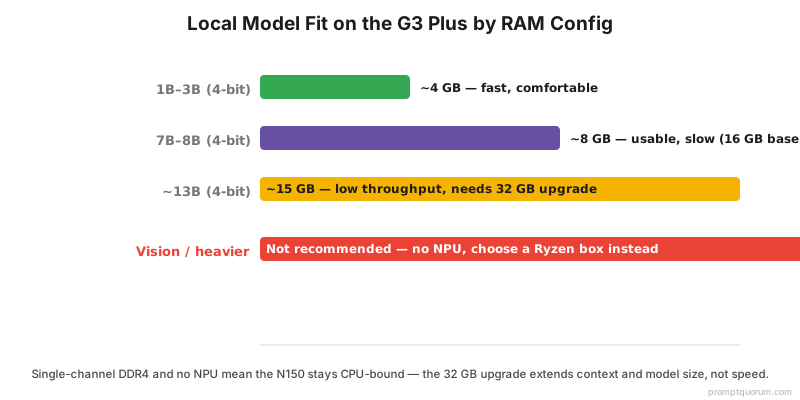
The GMKtec G3 Plus is a Home Assistant computer that can run local AI — not a local AI computer that happens to run Home Assistant. A 1B–4B model at 4-bit runs comfortably; a 7–8B model is usable but slow; the 32 GB RAM option allows a larger context or a ~13B model at low throughput. All figures below are estimated from the verified hardware specs, not a measured benchmark on a physical unit.
- Good for lightweight local assistants, summarization, and automations on small models.
- Upgrading to 32 GB helps context length and model size more than raw token speed — memory bandwidth is unchanged, so throughput stays similar.
- No NPU and limited iGPU acceleration, so inference is entirely CPU-bound.
- For heavier local AI (vision, a fast 7B assistant), choose a Ryzen box instead — see the Beelink SER8 review.
- See how to install Ollama to try a small model, and the local LLM hardware guide for context.
Model size | Fit on G3 Plus | Recommendation |
|---|---|---|
| 1–3B | Good | Runs responsively — the sweet spot for this hardware |
| 4B | Good/light | Comfortable on 16 GB, still responsive |
| 7–8B | Works, slow | Usable for non-interactive tasks (summaries, batch automations) |
| 13B | Experimental | Only realistic with the 32 GB upgrade, and only at low throughput |
| 20B+ | Don't buy this PC | Get a Ryzen box (SER8/UM890 Pro) or a GPU-equipped machine instead |
What You Can Build With It
Four realistic setups on the G3 Plus, from comfortable to "buy different hardware."
- Configuration 1 — Home Assistant hub: Home Assistant OS, Zigbee2MQTT, Mosquitto, Node-RED, AdGuard. Excellent fit — this is the box's core job and it handles it with headroom to spare.
- Configuration 2 — Home Assistant + light local AI: Home Assistant, Ollama with a 1B–4B model, Node-RED. Good fit — the 16 GB configuration handles this comfortably.
- Configuration 3 — Home Assistant + Frigate: Home Assistant, Frigate camera detection, Ollama. Possible, but not ideal — CPU-only Frigate detection is limited; expect to keep camera count and resolution modest, and consider the 32 GB upgrade for extra headroom.
- Configuration 4 — Serious local AI (7B+, vision, multiple concurrent services): Buy a Ryzen mini PC instead — see the Beelink SER8 review for a box built for this.
Power Consumption & Annual Cost
A Home Assistant server does not run occasionally — it typically runs all 8,760 hours in a year, so idle efficiency is a real purchasing criterion, not a footnote. At roughly 6 W idle, the G3 Plus is one of the cheapest boxes in this class to leave on permanently.
- The calculation: 6 W × 24 hours × 365 days ÷ 1000 = 52.6 kWh/year. Multiply by your local electricity price to get an actual annual figure — the $/kWh figures above are illustrative only, not a specific-market claim.
- The gap between N150-class and Ryzen-class idle power is real but small in absolute dollar terms over a year — the bigger cost driver between these classes is the purchase price and AI capability, not electricity.
Scenario | Annual energy | Approx. annual cost (illustrative) |
|---|---|---|
| G3 Plus, mostly idle (~6 W avg.) | ~52.6 kWh/year | ~$13–16 at $0.25–0.30/kWh (varies widely by region and local tariff) |
| Beelink EQ14, mostly idle (~6 W avg.) | ~52.6 kWh/year | Essentially the same as the G3 Plus |
| Ryzen mini PC (e.g. SER8-class, ~8 W avg.) | ~70 kWh/year | Modestly higher, but still small in absolute terms |
Pros & Cons
The G3 Plus trades networking for memory headroom versus the EQ14. Balanced view below.
Pros
- Very affordable — about $180–200 for the 16 GB / 512 GB Home Assistant box
- Replaceable DDR4 SO-DIMM upgradeable to 32 GB — more headroom than 16 GB-capped rivals
- Two storage slots: NVMe plus a separate SATA M.2 for bulk storage
- Low power: roughly 6 W idle, cheap to run 24/7
- Very compact (114 × 106 mm) and light (~361 g)
Cons
- Only a single 2.5GbE port (the EQ14 has two)
- No USB-C port at all
- Single-channel DDR4 and no NPU — slow beyond a small model
- The 32 GB RAM upgrade is real but currently expensive (~$200 for the module alone, August 2026) due to the DDR4 memory shortage
- USB-A port speed is inconsistent across listings; verify before buying
Where to Buy & Current Price
Prices move week to week — check the live price rather than trusting a fixed figure. Price checked: August 25, 2026. Configuration checked: 16 GB RAM / 512 GB SSD.
- Confirm the RAM and storage capacity of the exact SKU — and that you can upgrade the SO-DIMM to 32 GB if you want the headroom.
- Ignore any listing showing $499.99 or similar for this configuration — that figure has appeared as a "sold out" placeholder price on GMKtec's own US storefront and is far above every independent retailer price found.
- Shipping, tax & availability: as a China-manufactured product, US and EU landed cost includes 2026 import measures (Section 301 tariffs in the US, the end of the EU's €150 duty-free parcel threshold) — factor this into the price you actually pay, not just the listed price.
Signal | Guidance |
|---|---|
| Good deal | Below ~$170 for 16 GB / 512 GB |
| Fair price | ~$170–210 for 16 GB / 512 GB |
| Too expensive | Above ~$230 for 16 GB / 512 GB — wait or compare the EQ14 |
Alternatives to Consider
Under about $250, the G3 Plus and Beelink EQ14 are the two budget picks. Above that, the decision changes.
- Under ~$250, need upgradeable RAM → the GMKtec G3 Plus (this page).
- Under ~$250, need dual Ethernet or USB-C → Beelink EQ14 — same N150 CPU, capped at 16 GB.
- Want fast 7B local AI → Beelink SER8 — Ryzen 7 8845HS, about $650, a real step up in AI speed.
- Want serious local AI or larger models → Minisforum UM890 Pro (Ryzen 9, dual 2.5GbE, eGPU port) or GEEKOM A9 Max (128 GB RAM ceiling).
- Still comparing? Start from the best mini PCs for Home Assistant + local AI roundup.
How We Evaluate Mini PCs
This review has not been hands-on tested by PromptQuorum on a physical unit. It is built from manufacturer-published specifications and independent third-party reviews, clearly separated below so you know what's confirmed versus estimated.
- Manufacturer-confirmed: CPU, RAM type and ceiling, storage interfaces, ports, dimensions, official pricing tiers — sourced directly from GMKtec's product listings.
- Independent observations (third-party reviews, not PromptQuorum): idle/load power draw figures, thermal and noise behavior, and real-world benchmark scores — cross-referenced from independent reviewers who have physically tested units.
- PromptQuorum assessment: Home Assistant suitability, local-AI suitability, the scorecard, and the buy/skip recommendations — PromptQuorum's editorial judgment applied to the confirmed specs and independent findings above, not a new physical test.
- We evaluate mini PCs for local smart-home use on: Home Assistant compatibility, RAM expandability, storage expansion, networking, idle power, sustained CPU performance, local LLM capability, thermal/noise characteristics, Docker/server suitability, and price/value.
Frequently Asked Questions
Is the GMKtec G3 Plus good for Home Assistant?
Yes. It runs Home Assistant and common add-ons (Zigbee2MQTT, Node-RED, AdGuard) comfortably at low idle power. Its single 2.5GbE port makes it less of a networking box than the dual-LAN Beelink EQ14.
Can the GMKtec G3 Plus run Ollama?
Yes. Ollama installs and runs normally on the G3 Plus; a 1B–4B model responds well, and 7–8B models work but run slowly. This is estimated from its verified hardware, not a fixed benchmark.
Can the GMKtec G3 Plus run Llama or Qwen models?
Yes, at the small end. A 1B–4B Llama or Qwen model at 4-bit quantization runs comfortably; a 7–8B variant is usable but slow because of single-channel DDR4 bandwidth and the four-core N150.
Can the G3 Plus run a 7B model?
It fits and runs, but slowly — expect it to be usable for non-interactive tasks (summaries, batch jobs) rather than snappy back-and-forth chat. For a responsive 7B assistant, a Ryzen box like the Beelink SER8 is the better fit.
How much RAM does the G3 Plus support?
Up to 32 GB via a single DDR4-3200 SO-DIMM. GMKtec ships it pre-configured at 8 GB or 16 GB — there is no factory 32 GB SKU, so reaching 32 GB means buying and installing the module yourself.
Is the G3 Plus RAM upgradeable, or is it soldered?
Upgradeable. The G3 Plus uses a single replaceable DDR4 SO-DIMM slot, not soldered memory. That is a real advantage over budget boxes with fixed RAM — though a 32 GB DDR4-3200 SO-DIMM costs roughly $200 due to a memory-market shortage, so price the upgrade before assuming it is cheap.
Can I install 32 GB of RAM myself?
Yes — it is a standard SO-DIMM swap. Buy a single DDR4-3200 32 GB SO-DIMM module (the slot is single-channel, so one module is all it takes) and replace the stock stick.
Does the G3 Plus have a USB-C port?
No. This model has four USB-A ports and two HDMI outputs but no USB-C port at all. The Beelink EQ14, by comparison, has one USB-C port (10 Gbps, data-only).
Does the G3 Plus have dual LAN?
No — it has a single 2.5GbE port. The Beelink EQ14 has two 2.5GbE ports, which makes it the better pick if you want the mini PC to also do network-adjacent duty.
Can the G3 Plus run Frigate?
It can, but CPU-only detection with no NPU limits it to a small number of cameras at modest resolution/frame rate. It is possible, not ideal — a Ryzen box with a stronger iGPU handles Frigate more comfortably.
Is the GMKtec G3 Plus better than the Beelink EQ14?
Neither is strictly better — they trade differently. The G3 Plus wins on RAM ceiling (32 GB vs 16 GB); the EQ14 wins on networking (dual 2.5GbE, plus a USB-C port). Pick based on which trade-off matters to your setup.
GMKtec G3 Plus vs Raspberry Pi 5 for Home Assistant?
The G3 Plus has far more RAM headroom, x86 compatibility, and room to add a local LLM — the Pi 5 is cheaper and smaller but far more RAM- and CPU-constrained for anything beyond Home Assistant itself.
Is the G3 Plus good for 24/7 operation?
Yes. At roughly 6 W idle it is inexpensive to leave running continuously, and independent reviews report modest thermals under sustained light load. No long-term durability data is available since PromptQuorum has not run one continuously itself.
How much electricity does the G3 Plus use?
About 6 W at idle and roughly 21–26 W under load. Left mostly idle for a full year, that works out to around 52.6 kWh — a small, predictable addition to a home electricity bill regardless of local rates.
Is the GMKtec G3 Plus worth buying in 2026?
For its stated job — a cheap, low-power Home Assistant hub with room to try a small local model — yes. For anyone who actually wants fast local AI, no; that budget is better spent on a Ryzen box like the Beelink SER8.
Where is the GMKtec G3 Plus made, and does that affect price?
It is manufactured in China. In 2026, US import measures (Section 301 tariffs, the end of the sub-$800 de minimis exemption) and the EU's removal of the €150 low-value parcel exemption can affect landed cost, so check the current retailer price rather than relying on a fixed number.