Sponsored
Buy If / Skip If
Quick decision guide — does the UM890 Pro fit your needs?
Buy the UM890 Pro if:
- You want to start with a 7B local LLM on Home Assistant and upgrade to fast 13B–30B inference later with an external GPU
- You need more than one network link (dual 2.5GbE or Wi-Fi 6E) for a reliable home server
- You value a user-upgradeable path — RAM and storage are both easy to swap
- The OCuLink eGPU port is worth the $150–200 step-up over a Beelink SER8
Skip the UM890 Pro if:
- You only run a 7B model and never plan an external GPU — a Beelink SER8 saves money for the same iGPU performance
- You need a truly compact box — the 67 mm height is bulkier than most mini PCs
- Your network is already maxed out — a single 1GbE or 2.5GbE link is enough
- You are budget-constrained — the SER8 and smaller N150 boxes cost less
Key Takeaways
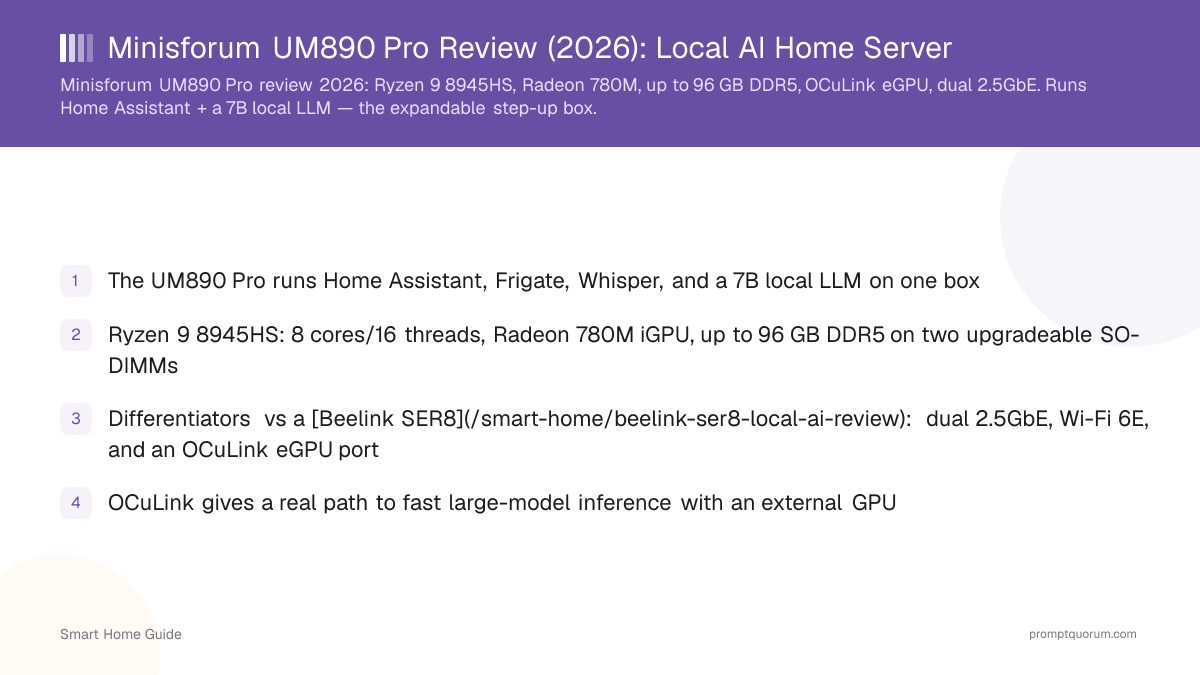
- The UM890 Pro runs Home Assistant, Frigate, Whisper, and a 7B local LLM on one box
- Ryzen 9 8945HS: 8 cores/16 threads, Radeon 780M iGPU, up to 96 GB DDR5 on two upgradeable SO-DIMMs
- Differentiators vs a Beelink SER8: dual 2.5GbE, Wi-Fi 6E, and an OCuLink eGPU port
- OCuLink gives a real path to fast large-model inference with an external GPU
- Priced from ~$439 barebones to ~$649 with 32 GB — the expandable step-up
- Made in China — factor 2026 US/EU import measures into landed cost (see trade note)
Verdict — Who Should Buy It
Buy the Minisforum UM890 Pro if you want a SER8-class local-AI box with room to grow — more RAM headroom, dual 2.5GbE, and an OCuLink port for an external GPU. For a 7B model on Home Assistant it performs like a Beelink SER8; the reason to pay a little more is expansion. If you never plan to add a GPU or a second network link, the SER8 saves money for similar day-to-day performance.
Its single strongest use case is an expandable home server — start with the iGPU, and add an OCuLink external GPU later when you want fast 13B–30B inference. The barebones SKU also lets you supply your own RAM and SSD.
Specifications
All specs below were verified against Minisforum and independent review sources in August 2026. The RAM ceiling is 96 GB on the official page (some retailers still list 64 GB). It ships barebones or pre-built by SKU.
- The OCuLink port (PCIe 4.0 ×4, ~64 Gbps) connects an external GPU dock — a faster path than USB4/Thunderbolt for a discrete GPU.
- Two user-upgradeable SO-DIMM slots and two M.2 slots make it easy to expand RAM and storage.
Spec | Minisforum UM890 Pro (8945HS) |
|---|---|
| CPU | AMD Ryzen 9 8945HS (Zen 4) |
| Cores / threads | 8 cores / 16 threads, up to 5.2 GHz |
| iGPU | AMD Radeon 780M — 12 CU, RDNA 3 |
| NPU | Ryzen AI, 16 TOPS (39 TOPS platform total) |
| RAM | DDR5-5600 dual channel; 2 SO-DIMM slots; up to 96 GB (user-upgradeable) |
| Storage | 2× M.2 2280 PCIe 4.0; up to 8 TB |
| Ports | 2× USB4 (40 Gbps, 100 W PD-in), 4× USB-A 10 Gbps, HDMI 2.1, DP 1.4, OCuLink (PCIe 4.0 ×4), 3.5 mm |
| Networking | 2× 2.5GbE, Wi-Fi 6E, Bluetooth 5.3 |
| TDP | 45 W base, configurable to ~70 W |
| Dimensions | 127 × 130 × 67 mm |
| OS | Windows 11 Pro on pre-built SKUs (Linux/Proxmox supported) |
| Price (indicative) | ~$439 barebones / ~$649 with 32 GB (August 2026 — volatile, check current price) |
Which Configuration Should You Buy?
The UM890 Pro comes in barebones and pre-configured SKUs. This table shows who each tier suits.
- Estimated from specs, not measured. All RAM/model combinations assume Ollama with Q4_K_M quantization.
- Prices move week to week; check the retailer before buying. These are August 2026 snapshots.
- SSD speed matters less for local LLMs than for OS boot; a SATA SSD works fine, NVMe is better.
Configuration | Typical Price (Aug 2026) | Best For | Next Step |
|---|---|---|---|
| Barebones (no RAM/SSD) | ~$439 | You already own DDR5 SO-DIMMs and NVMe SSD; saves $50–100 vs pre-built | Add 32–64 GB DDR5 and fast 1 TB NVMe (budget ~$100–180 total) |
| 32 GB DDR5 + 1 TB SSD | ~$649 | Comfortable 7B model, entry-level expansion, single system buy | Upgrade to 64 GB RAM later or add an OCuLink GPU within a year |
| 64 GB DDR5 + 1 TB SSD | ~$799 | Run 13B–14B models comfortably, or a 7B model with much room to grow | Ready for an OCuLink GPU when you want 30B+ speed |
| 96 GB DDR5 + 2 TB SSD | ~$1,099 | Max out the iGPU with 30B models, or reserve for future OS/apps bloat | Just add an OCuLink GPU — no RAM upgrade needed for years |
Local AI & LLM Performance
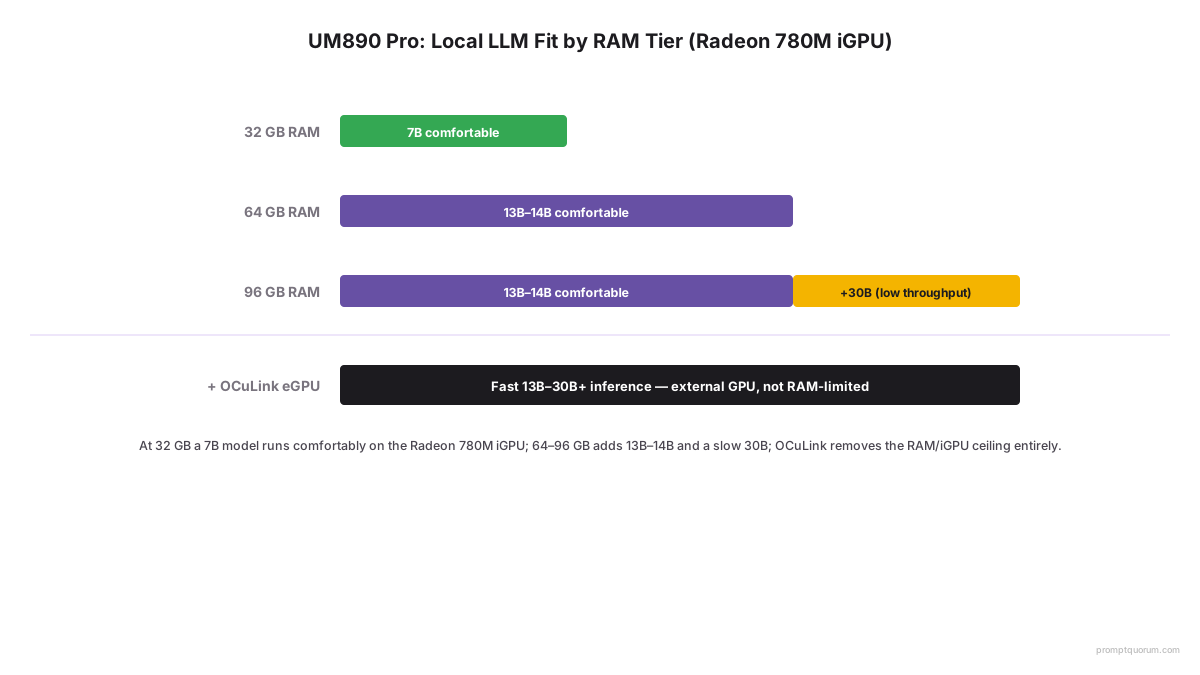
On the iGPU the UM890 Pro comfortably runs a 7B model and fits 13B–14B with more RAM; its real advantage is the OCuLink port, which connects an external GPU for genuinely fast large-model inference — all figures estimated from the verified hardware, not a measured benchmark. Without an external GPU, large models are limited by memory bandwidth like any shared-memory box.
- With 32 GB, a 7B model is comfortable; 64–96 GB opens 13B–14B comfortably and a 30B model at low throughput.
- OCuLink adds an external desktop GPU for large-model speed the iGPU cannot reach — a differentiator over USB4-only boxes.
- Ollama, LM Studio, and llama.cpp run well; the 16-TOPS NPU is not used by mainstream LLM runtimes.
- Dual 2.5GbE suits a wired, reliable home server; see Ollama on Home Assistant.
- For VRAM and quantization depth, see the cross-cluster local LLM hardware guide.
UM890 Pro vs Beelink SER8 — Which Should You Choose?
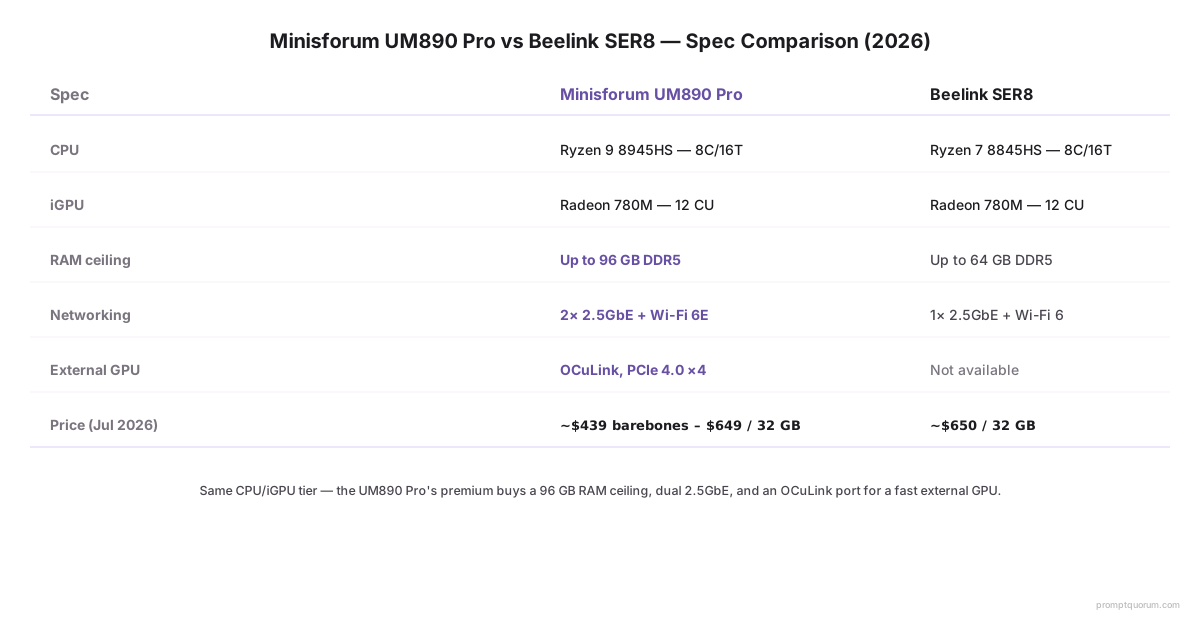
Both run a 7B local LLM on the same iGPU tier (Radeon 780M). The UM890 Pro adds expansion, dual networking, and a clear upgrade path.
- Estimated from specs, not measured. Real-world performance on 7B models is virtually identical on the iGPU.
- Prices move week to week — check both retailers before deciding.
- See the full Beelink SER8 review for details.
Feature | UM890 Pro | SER8 | Winner |
|---|---|---|---|
| CPU/GPU tier | Ryzen 9 8945HS, Radeon 780M | Ryzen 8845HS, Radeon 780M | Tie (iGPU same; 8945 is slightly faster) |
| Max RAM | 96 GB (upgradeable SO-DIMM) | 64 GB (upgradeable SO-DIMM) | UM890 Pro |
| Networking | Dual 2.5GbE, Wi-Fi 6E | Single 2.5GbE, Wi-Fi 6E | UM890 Pro (dual LAN) |
| eGPU expansion | OCuLink (PCIe 4.0 ×4) | USB4 only | UM890 Pro (OCuLink faster for GPUs) |
| Price (barebones) | ~$439 | ~$449 | Tie / check current price |
| Price (32 GB configured) | ~$649 | ~$649 | Tie |
| Best for | Expandable home server, future GPU upgrade path | Value pick, no expansion needed | Depends on your growth plans |
What We Verified vs What We Estimate vs What We Did Not Test
This review is built on verified specs and educated estimates — not independent testing or PromptQuorum-measured benchmarks.
- Verified (against specs and independent sources): CPU/GPU/RAM architecture, storage, OCuLink, networking, ports, power base spec
- Estimated from hardware (not independently measured on this unit): Local LLM suitability (7B/13B-14B fit), typical throughput ~8–18 tok/sec (7B Q4_K_M from third-party Vulkan reports), sustained power draw 50–65 W iGPU-only, thermal and noise behavior
- Not independently tested: Real-world token/sec on this specific unit, sustained 24/7 reliability, thermal throttling under very high loads, actual OCuLink eGPU performance (no user test data available)
Pros & Cons
The UM890 Pro is the expandable choice; you pay a little more for growth room. Balanced view below.
Pros
- OCuLink port for a fast external GPU — a genuine large-model upgrade path
- Up to 96 GB DDR5 on two user-upgradeable SO-DIMM slots
- Dual 2.5GbE and Wi-Fi 6E — better connectivity than a Beelink SER8
- Two USB4 ports (100 W PD-in) and up to four simultaneous displays
- Barebones SKU lets you supply your own RAM and SSD
Cons
- Costs more than a Beelink SER8 for similar iGPU-only performance
- Larger chassis (67 mm tall) than most boxes here
- An external GPU means extra cost, space, and noise — not truly "mini" once added
- The NPU does not accelerate local LLMs
Who Should NOT Buy the UM890 Pro
A useful companion to the "Buy if" section — honest reasons to pick something else.
- You are running only a 5B or 7B model and do not plan to expand — a Beelink SER8 or budget N150 box is cheaper and takes up less space. You will not use the extra RAM, networking, or OCuLink, so there is no reason to pay a premium.
- You have a hard physical space constraint (desk, shelf, closet) — the 67 mm height and metal chassis make it larger than pill-shaped mini PCs. If 50 mm or less is a hard requirement, look at Beelink EQ or GMKtec G3 Plus.
- You need true fanless or ultra-quiet operation — the UM890 Pro has a small active fan. It is not loud, but it does spin under load. Fanless is not an option with this thermal envelope.
- You want maximum on-board storage — two M.2 slots (8 TB max) are enough for Home Assistant + models, but if you need petabyte-scale local storage, use a NAS and run services on the UM890 via network.
- Your router does not support 2.5GbE — a single Gigabit link will work fine for Home Assistant and LLMs, so the dual 2.5GbE is a nice-to-have, not a must-have. If networking is the deciding factor, a cheaper box will do.
Pricing & Availability (2026)
Prices move week to week. Check the live price at the retailer before buying. The figures below are August 2026 snapshots and reflect current import tariffs on goods from China.
- Prices range from ~$439 barebones to ~$799 for a 64GB+1TB SKU. Exact cost depends on retailer, country, and current tariff pass-through.
- Made in China: US Section 301 tariffs (consumer electronics), EU low-value parcel fee (August 2026 onwards), and similar measures in other regions affect landed cost.
- Stock is typically available from Minisforum.com and major retailers in the US, EU, and Asia-Pacific.
- No affiliate program: this review does not earn a commission. The CTA links to Minisforum for price transparency.
Where to Buy
Check the current price at Minisforum.com — prices change frequently and depend on your region and import tariffs. Stock availability also fluctuates; as of this review's last check (August 2026), Minisforum.com listed every configuration of this model as sold out across its US, UK, EU, and JP storefronts, so budget extra time or check Amazon/Newegg resellers if you need one now.
- Barebones ($~439) is cheaper if you already have DDR5 SO-DIMMs and an NVMe SSD.
- 32GB+1TB ($~649) is the entry-level configured option; ready to run Home Assistant and a 7B model out of the box.
- 64GB+1TB ($~799) and 96GB+2TB ($~1,099) are available for buyers who want more model headroom now.
- Minisforum.com direct is currently sold out on all SKUs (checked August 2026) — Amazon and Newegg have carried the same barebones and 32 GB configurations, sometimes at different prices, so compare before buying.
- See the Pricing & Availability section for tariff context and regional differences.
Alternatives to Consider
If the UM890 Pro is not the right fit, these bracket it on price and expansion.
- Beelink SER8 — the value pick with similar iGPU performance for less, minus OCuLink and dual LAN
- GEEKOM A9 Max — premium headroom box with a 128 GB RAM ceiling and Wi-Fi 7
- Beelink EQ14 — budget Intel N150 box for Home Assistant plus a tiny model
- GMKtec G3 Plus — another budget N150 option with upgradeable RAM
- Still comparing? Start from the best mini PCs for Home Assistant + local AI roundup.
Frequently Asked Questions
Can the Minisforum UM890 Pro run local LLMs?
Yes. On its Radeon 780M iGPU it comfortably runs a 7B model on Ollama and fits 13B–14B with more RAM. With an external GPU over OCuLink it runs large models much faster. These figures are estimated from its verified hardware, not a fixed benchmark.
How big a model fits in its RAM?
With 32 GB, a 7B model is comfortable. Upgrading to 64–96 GB fits 13B–14B comfortably and a 30B model at low throughput on the iGPU. For fast large-model inference, add a GPU through the OCuLink port.
What is the OCuLink port for?
OCuLink is a PCIe 4.0 ×4 connector (about 64 Gbps) that links an external GPU dock. It is faster than USB4/Thunderbolt for a discrete GPU, giving the UM890 Pro a real upgrade path to fast large-model inference — the main reason to choose it over a Beelink SER8.
Is the UM890 Pro good for Home Assistant and always-on use?
Yes. It runs Home Assistant, Ollama, Whisper, and Frigate together, and its dual 2.5GbE and Wi-Fi 6E make it a well-connected home server. Base draw is 45 W, configurable up to about 70 W.
Is the RAM upgradeable?
Yes. The UM890 Pro uses two user-upgradeable DDR5 SO-DIMM slots and supports up to 96 GB (some retailers list 64 GB). It also has two M.2 slots for storage.
How much power does the UM890 Pro use?
It runs at 45 W base and up to about 70 W under load in performance mode, with much less at idle. Adding an external GPU over OCuLink increases total draw substantially.
UM890 Pro or Beelink SER8?
Day to day they perform alike on a 7B model. Choose the UM890 Pro for its OCuLink eGPU path, dual 2.5GbE, Wi-Fi 6E, and 96 GB RAM ceiling; choose the SER8 to save money if you do not need that expansion.
Where is the Minisforum UM890 Pro made, and does that affect price?
It is manufactured in China. In 2026 US import measures (Section 301 tariffs, the end of the sub-$800 de minimis exemption) and the EU removal of the €150 low-value parcel exemption can affect landed cost, so check the current retailer price rather than relying on a fixed number.
Is 32 GB enough, or should I go for 64 GB?
For a single 7B model, 32 GB is comfortable. If you want to run multiple models, a second app alongside LLMs (like Frigate), or prepare for 13B–14B models, go to 64 GB. The mid-tier provides more room without the cost of 96 GB.
Is the barebones SKU worth buying?
Yes, if you already own DDR5 SO-DIMMs and an NVMe SSD (from a prior upgrade or laptop purchase). Barebones saves $50–150 compared to a configured SKU, but requires you to assemble and test it. If you do not have spare RAM/SSD, the pre-configured options are simpler.
Can I add an NVIDIA GPU via the OCuLink port?
Yes. OCuLink (PCIe 4.0 x4) supports external GPU docks that can hold an NVIDIA RTX or similar card. You will need an OCuLink dock (e.g., Sonnet eGPU), which adds $150–400. This is the UM890 Pro's main upgrade path for genuinely fast 13B–30B inference.
Is it good for 24/7 operation?
Yes, the 45 W base draw and efficient Ryzen 8945HS make it suitable for always-on Home Assistant and LLM use. It is not completely silent (small fan under load), but it is quieter than a desktop. No long-term durability testing has been done by us.
What is the difference between the Ryzen 8945HS and 8845HS (vs Beelink SER8)?
The 8945HS is slightly newer and has a 200 MHz higher base clock than the 8845HS, but real-world performance for LLMs is nearly identical. Both have the same Radeon 780M iGPU.