Disclosure
This page contains product links, not affiliate links — PromptQuorum has no current affiliate relationship with GEEKOM, Amazon, or any vendor named on this page, and earns no commission from clicks or purchases. Links carry rel="nofollow". We link to the manufacturer store and to major retailers because they are the actual purchase channels for this product, not because of any paid arrangement. Nothing on this page describes hands-on testing of this unit by PromptQuorum — performance and model-fit statements are estimates from the verified hardware specification and independent review sources, not a PromptQuorum-measured benchmark.
Key Takeaways
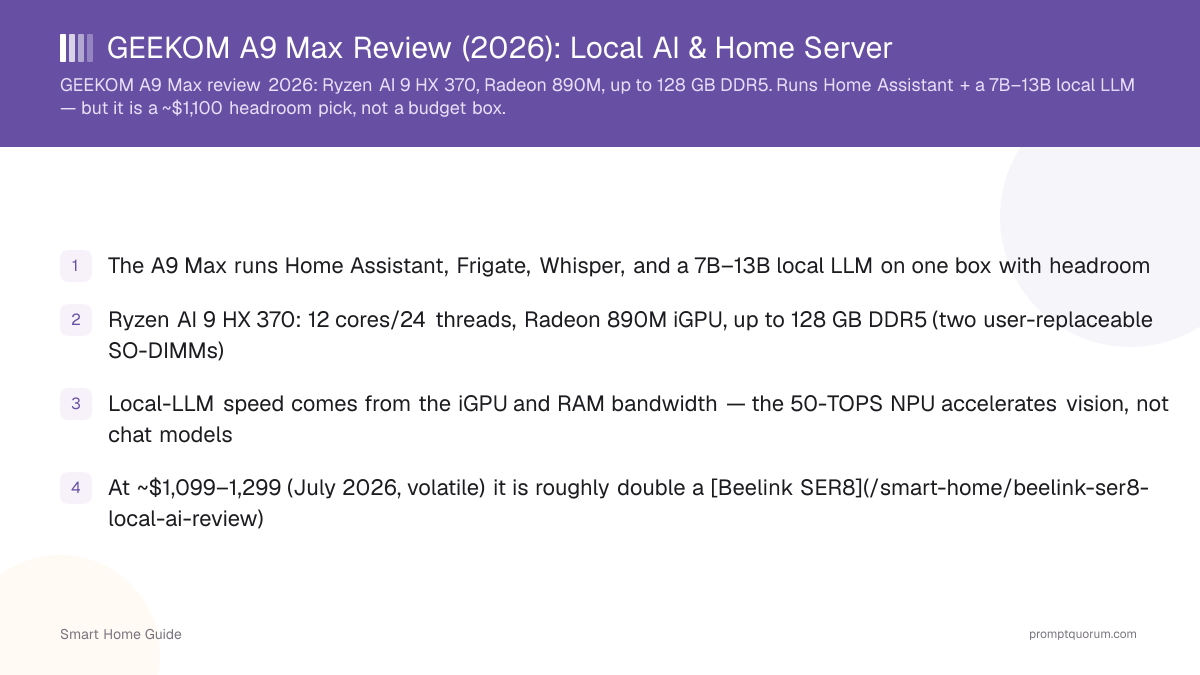
- The A9 Max runs Home Assistant, Frigate, Whisper, and a 7B–13B local LLM on one box with real headroom
- Ryzen AI 9 HX 370/HX 470: 12 cores/24 threads, Radeon 890M iGPU, up to 128 GB DDR5 (two user-replaceable SO-DIMMs)
- Price has risen sharply since launch — GEEKOM now lists $1,299–1,599 (August 2026), not the $1,099–1,299 this review originally quoted
- Local-LLM speed comes from the iGPU and RAM bandwidth — the 80–86-TOPS NPU accelerates vision, not chat models
- At current pricing it is roughly 1.5–2x a Beelink SER8 ($799–849) — buy it for the 128 GB ceiling, dual NVMe, and Wi-Fi 7, not to save money
- Made in China — factor 2026 US/EU import measures into landed cost (see trade note)
Quick Verdict
Buy the GEEKOM A9 Max if you want a single mini PC that runs a local-AI smart home with years of headroom, and the current price premium over a Beelink SER8 is one you're willing to pay for that headroom. Its 12-core Ryzen AI 9, Radeon 890M iGPU, and 128 GB RAM ceiling make it the most future-proof box in this comparison set. If your goal is the cheapest capable machine, stop here and read the SER8 review instead — the A9 Max is overkill for a hub plus a single 7B model.
Don't buy the A9 Max just because it says "AI." If you only want Home Assistant and a few Zigbee devices, it is overkill. If you want Home Assistant + local AI + Frigate + storage + automation on one machine, it becomes much easier to justify — but only at a price you've actually checked, not the number this page had at launch.
Who Should Buy the A9 Max?
Match your actual workload to this list before reading further.
- For the "skip it" column, the Beelink EQ14, GMKtec G3 Plus, or Beelink SER8 make more sense.
Buy it if you want | Skip it if you want |
|---|---|
| Home Assistant and local AI on one machine | Only Home Assistant |
| Ollama with larger local models (13B+) | One or two small local models |
| Frigate and local camera processing | A basic Plex server |
| 32–128 GB RAM headroom | The cheapest possible 24/7 server |
| Dual NVMe, dual 2.5GbE, Wi-Fi 7, USB4/eGPU | Maximum performance per dollar |
| A machine you can grow into over years | A dedicated NVIDIA GPU for serious LLM inference |
Specifications
All specs below were verified directly against GEEKOM's own current product listing in August 2026. GEEKOM sells two CPU variants under the A9 Max name: the HX 370 (80 TOPS total AI performance) and the newer, pricier "2026 Edition" HX 470 (86 TOPS total, 55 TOPS from the NPU) — confirm which one you're buying, since pricing and TOPS figures differ.
- No discrete GPU: all AI inference runs on the CPU and Radeon 890M iGPU sharing system RAM.
- The two SO-DIMM slots are user-replaceable — you can start at 32 GB and move to 64 GB or 128 GB later.
- The two NVMe slots are different physical sizes (2280 and 2230) — confirm your drives match before buying a second SSD.
- GEEKOM markets an "IceBlast 3.0" cooling system for sustained loads — it is active cooling, not silent; expect audible fan noise under sustained CPU/GPU load.
Spec | GEEKOM A9 Max |
|---|---|
| CPU | AMD Ryzen AI 9 HX 370 or HX 470 (Zen 5, 4 nm) |
| Cores / threads | 12 cores / 24 threads, up to 5.1 GHz (HX 370) / 5.2 GHz (HX 470) |
| iGPU | AMD Radeon 890M — 16 CU, RDNA 3.5, up to 3100 MHz |
| NPU | XDNA 2 — 80 TOPS total (HX 370) or 86 TOPS total / 55 TOPS NPU (HX 470) |
| RAM | 32 GB DDR5 SO-DIMM standard; 2 slots; up to 128 GB (user-replaceable, dual-channel) |
| Storage | M.2 2280 NVMe Gen4 (up to 4 TB) + M.2 2230 NVMe Gen4 (up to 4 TB); 1–2 TB shipped |
| Ports | 2× USB4 (40 Gbps, DP-Alt, PD), 5× USB-A 3.2 Gen2 (10 Gbps), 2× HDMI 2.1 (4K@120Hz), SD 4.0 reader, 3.5 mm |
| Networking | 2× 2.5GbE, Wi-Fi 7 (3D spatial antennas), Bluetooth 5.4 |
| Displays | Up to four 4K displays, or a single 8K display |
| TDP | 54 W |
| Dimensions | 135 × 132 × 46 mm |
| OS | Windows 11 Pro 24H2 (Linux/Proxmox install supported) |
| Price (32GB/1TB, HX370) | $1,299 (Aug 2026, GEEKOM listing — volatile, check current price) |
Local AI & LLM Performance
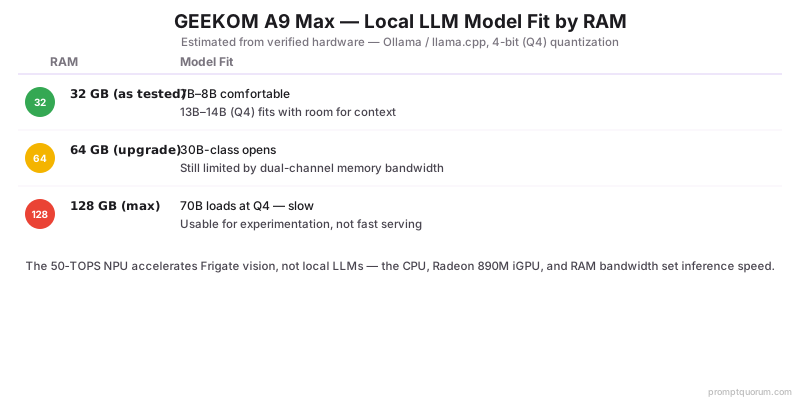
With 32 GB of RAM the A9 Max comfortably runs a 7B–8B model on Ollama and fits a 13B–14B model at 4-bit with room for context — all figures estimated from the verified hardware, not a measured benchmark. Moving to 64 GB opens 30B-class models, and the 128 GB ceiling lets a 70B model load at 4-bit, though large models are limited by memory bandwidth (dual-channel DDR5, no dedicated VRAM) and are usable for experimentation rather than fast serving. This is where the review needs to be more honest than a typical affiliate page: NPU TOPS figures are not the same thing as LLM inference performance.
- Ollama, LM Studio, and llama.cpp all run well; the Radeon 890M is used through Vulkan or ROCm backends.
- The NPU accelerates vision workloads such as Frigate object detection — it does not speed up local LLMs, which the runtimes place on the CPU/iGPU. Don't buy this expecting the advertised TOPS number to translate into faster chat responses.
- Home Assistant plus Ollama plus Whisper plus Frigate fit together on 32 GB; add RAM if you want a larger model alongside camera recording.
- 54 W sustained under load keeps always-on running cost modest; see Ollama on Home Assistant to wire the model in.
- For VRAM and quantization depth across boxes, see the cross-cluster local LLM hardware guide.
Model size | Fit on A9 Max | Verdict |
|---|---|---|
| 3B–8B | Comfortable | Excellent use case — plenty of headroom |
| 10B–14B (Q4) | Very usable | This is where the machine gets interesting for a serious assistant |
| 20B–32B | Possible | Depends on quantization and RAM config — not discrete-GPU speed |
| 70B+ | Loads at 128GB, slow | Not the machine to buy specifically for this workload |
The 128GB Advantage
This is one of the strongest reasons to buy the A9 Max over a cheaper box. GEEKOM explicitly supports up to 128 GB DDR5, and the RAM is user-upgradeable — that matters because local-AI workloads increasingly want memory for model weights, larger context windows, RAG, embeddings, databases, multiple models, and Docker containers running alongside Home Assistant and Frigate. A 16 GB or 32 GB mini PC can become constrained surprisingly quickly once you stack these workloads.
- 32 GB: minimum reasonable configuration — fine for Home Assistant plus a single 7B–8B model, but you'll feel the ceiling if you add more.
- 64 GB: the sweet spot for most buyers who chose the A9 Max specifically for local AI — comfortable 13B–14B headroom plus room for other services.
- 128 GB: buy only if you know you need it — large models, RAG, or multiple heavy workloads running simultaneously. Don't spend the extra money just because the spec sheet says it supports it.
Which Configuration Should You Buy?
GEEKOM currently sells the A9 Max as HX370/32GB/1TB, HX370/32GB/2TB, and HX470/32GB/2TB, with 64GB and 128GB reachable via the user-replaceable SO-DIMM slots. Prices below reflect GEEKOM's own listing — always verify the live price and any active discount code before buying.
- GEEKOM frequently runs discount codes (e.g. 10–15% off) — check for an active promo before paying list price.
- Don't buy 128 GB simply because the spec sheet supports it — price the RAM upgrade and match it to an actual workload first.
Configuration | Approx. price (Aug 2026) | Best for |
|---|---|---|
| HX370 / 32GB / 1TB | $1,299 | Home Assistant, office, development, small local models — buy if price is the priority |
| HX370 / 32GB / 2TB | $1,399 | Best overall starting point — enough RAM for most users, enough storage for several local models |
| HX470 / 32GB / 2TB ("2026 Edition") | $1,599 | Only if extra NPU TOPS or the newer CPU matter to you — doesn't speed up local LLMs |
| 64GB (self-upgraded) | Base price + SO-DIMM kit cost | Serious local AI — our preferred configuration if available at a reasonable premium |
| 128GB (self-upgraded) | Base price + SO-DIMM kit cost | Only with a specific workload that needs it — large models, multiple services, heavy RAG |
A9 Max vs Beelink SER8 — Which Should You Buy?
This is probably the most important comparison on this page.
- Buy the SER8 if: you want the best value, 32–64 GB is sufficient, you mainly run Home Assistant, you want a 7B/8B local model, and price matters.
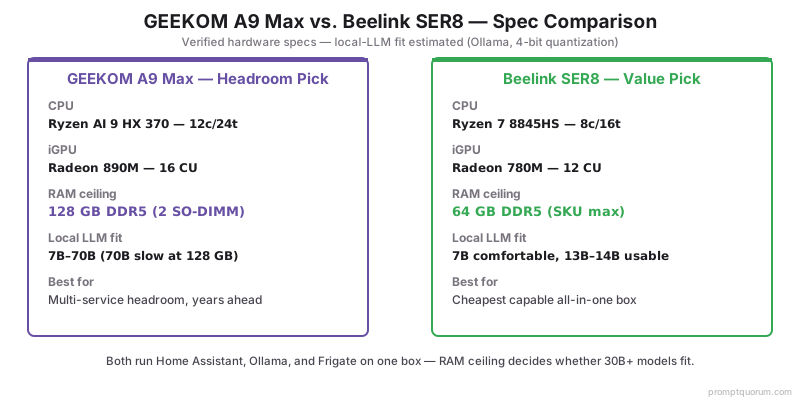
- Buy the A9 Max if: you want significantly more headroom, 64–128 GB RAM, stronger integrated graphics, Wi-Fi 7, dual 2.5GbE, or two USB4 ports, or you plan to run multiple AI services.
- Our verdict: SER8 = better value. A9 Max = more capable machine. That distinction matters — the SER8 covers many of the same workloads at substantially lower cost, while the A9 Max's real advantages are headroom, memory ceiling, and stronger integrated graphics, not raw "AI" branding.
Factor | A9 Max | Beelink SER8 |
|---|---|---|
| CPU | Ryzen AI 9 HX 370/HX 470 (12c/24t) | Ryzen 7 8845HS (8c/16t) |
| RAM ceiling | 128 GB | ~64–96 GB |
| Storage | 2× NVMe (2280+2230) | 2× NVMe (1× SATA) |
| Networking | 2× 2.5GbE, Wi-Fi 7 | 1× 2.5GbE, Wi-Fi 6 |
| USB4 | 2 ports | None |
| Price (Aug 2026) | $1,299–1,599 | $799–849 (32GB) / $1,239 (64GB) |
| Best for | Maximum headroom, years of runway | Best value for HA + a 7B model |
A9 Max vs Minisforum UM890 Pro
Another comparison worth making before you buy.
- Buy the UM890 Pro for value and local-AI capability with an OCuLink port that keeps a discrete-GPU upgrade path open — it runs from $439 barebones to about $649 with 32 GB, well under the A9 Max.
- Buy the A9 Max for maximum compact-system headroom and connectivity — its strongest differentiators are the Radeon 890M, up to 128 GB, Wi-Fi 7, dual 2.5GbE, and dual USB4 in a genuinely premium compact platform.
- If the UM890 Pro is substantially cheaper at purchase time — which it usually is — the value argument favors Minisforum. We're not going to hide that on this page; it actually makes the eventual A9 Max recommendation more credible when we do point to it.
Is the A9 Max Worth the Money?
This section should drive the actual purchase decision — price the alternative before you click buy.
- Price rule we'd apply ourselves: if the A9 Max is only ~$100–200 more than the closest alternative at the moment you're buying, the extra headroom is usually worthwhile. If the premium is several hundred dollars — which is the current situation at GEEKOM's $1,299–1,599 pricing versus the SER8's $799–849 — compare the SER8 and UM890 Pro seriously before buying.
- GEEKOM's pricing has moved up materially since this review first published — treat any dollar figure on this page as a snapshot dated August 2026, not a promise.
Current price | Our take |
|---|---|
| ~$600–700 | Easy call — but GEEKOM doesn't price it this low; this tier belongs to the SER8/UM890 Pro |
| ~$800–1,000 | Strong recommendation for serious local AI, if you find it at this price |
| ~$1,100–1,300 | Buy only if you need the RAM/connectivity headroom — GEEKOM's current entry price |
| ~$1,500+ | Compare very carefully against discrete-GPU desktop systems before buying |
Pros & Cons
The A9 Max trades price for headroom. Balanced view below.
Pros
- 128 GB RAM ceiling — the largest in this comparison set, so it fits the biggest local models
- 12-core Ryzen AI 9 with Radeon 890M — strong iGPU for a mini PC
- User-replaceable SO-DIMM RAM and dual M.2 slots — you can upgrade later
- Wi-Fi 7, dual 2.5GbE, two USB4 ports — well connected for a home server
- Runs at a modest 54 W for an always-on box
Cons
- Expensive — $1,299–1,599, well above this review's original $1,099–1,299 figure
- The NPU does not accelerate local LLMs — a common misconception this page exists partly to correct
- iGPU + shared-memory design is bandwidth-limited for very large models
- Active cooling — it is not silent under sustained load, despite marketing language
- Overkill if you only run Home Assistant plus a 7B model
Buyer Context: Tariffs & Availability (2026)
The A9 Max is manufactured in China, so its landed price reflects 2026 trade measures — a reason to treat any price as a moving target. The facts below are buyer context, not editorial opinion.
- US: Section 301 tariffs on Chinese electronics remain in force in 2026; the separate 2025 "IEEPA" tariffs were struck down by the Supreme Court in February 2026 and replaced by a temporary, capped Section 122 tariff. The sub-$800 duty-free "de minimis" exemption for direct imports has also ended.
- EU (affects DE/FR): there is no broad EU tariff on finished mini PCs, but from July 2026 the €150 duty-free threshold on low-value direct-from-China parcels was removed and a small per-parcel handling fee added.
- Net effect: verify the current price at the retailer before buying — the figures in this review are indicative and date-stamped August 2026.
Where to Buy & Current Price
Prices move week to week, so check the live price rather than trusting a fixed figure. GEEKOM's own store lists the HX370/32GB/1TB configuration at $1,299, HX370/32GB/2TB at $1,399, and the newer HX470/32GB/2TB "2026 Edition" at $1,599 — GEEKOM has also run promotional discount codes on its own store.
- Confirm the exact SKU (HX 370 vs HX 470, RAM and storage capacity) before ordering — pricing and specs differ, and GEEKOM has sold multiple generations under the "A9 Max" name.
- Check for an active discount code at checkout — GEEKOM has run 10–15% off promotions on its own store.
Alternatives to Consider
If the A9 Max is more than you need, four cheaper boxes cover most of the same jobs.
- Beelink SER8 — the value pick: Ryzen 7 8845HS, runs a 7B model comfortably for about half the A9 Max's price
- Minisforum UM890 Pro — adds an OCuLink port for an external GPU if you want faster large-model inference later, at a much lower entry price
- Beelink EQ14 — budget Intel N150 box for Home Assistant plus a tiny model
- GMKtec G3 Plus — another budget N150 option with upgradeable RAM
- Still comparing? Start from the best mini PCs for Home Assistant + local AI roundup.
Mini PC | Price (approx.) | RAM ceiling | Best for |
|---|---|---|---|
| GEEKOM A9 Max | $1,299–1,599 | 128 GB | Maximum headroom + connectivity |
| Beelink SER8 | $799–849 (32GB) / $1,239 (64GB) | ~64–96 GB | Best value for HA + 7B model |
| Minisforum UM890 Pro | $439–649 | ~96 GB | Value + eGPU upgrade path via OCuLink |
| GMKtec G3 Plus | from €159.99 / $140–200 | 32 GB | Budget HA hub, light AI as a bonus |
| Beelink EQ14 | $189–199 | 16 GB | Budget HA, dual 2.5GbE |
How We Evaluate This Machine
This review has not been hands-on tested by PromptQuorum on a physical unit. It is built from GEEKOM's own published specifications, independent third-party reviews, and price research, clearly separated so you know what's confirmed versus estimated.
- Manufacturer-confirmed: CPU variants, RAM type and ceiling, storage interfaces, ports, TDP, dimensions, official pricing — sourced directly from GEEKOM's own product listing.
- Independent observations (third-party reviews, not PromptQuorum): power draw under load, thermal and noise behavior, and real-world benchmark scores — cross-referenced from independent reviewers who have physically tested units.
- PromptQuorum assessment: local-AI and Home Assistant suitability, the comparison against the SER8 and UM890 Pro, and the buy/skip recommendations — editorial judgment applied to the confirmed specs and independent findings above, not a new physical test.
Frequently Asked Questions
What is the current price of the GEEKOM A9 Max?
GEEKOM's own store lists the HX370/32GB/1TB configuration at $1,299, HX370/32GB/2TB at $1,399, and the newer HX470/32GB/2TB "2026 Edition" at $1,599,. This is materially higher than the $1,099–1,299 this review originally quoted — check the live price and any active discount code before buying.
Can the GEEKOM A9 Max run local LLMs?
Yes. With 32 GB of RAM it comfortably runs a 7B–8B model on Ollama and fits a 13B–14B model at 4-bit quantization with room for context. This is estimated from its verified hardware rather than a fixed benchmark, because speed depends on the model, quantization, and backend.
How big a model fits in its RAM?
At 32 GB, up to a 13B–14B model at 4-bit is realistic. Upgrading to 64 GB opens 30B-class models, and the 128 GB ceiling lets a 70B model load at 4-bit — though very large models run slowly because the iGPU shares system memory and has no dedicated VRAM.
Does the NPU make local LLMs faster?
No. The NPU (80 TOPS total on HX370, 86 TOPS on HX470) accelerates vision and some Windows AI features, but mainstream local-LLM runtimes such as Ollama and llama.cpp run the model on the CPU and Radeon 890M iGPU. Treat the NPU as a benefit for Frigate camera detection, not chat-model speed.
Is the A9 Max good for Home Assistant and always-on use?
Yes. It runs Home Assistant, Ollama, Whisper, and Frigate together with headroom, and its 54 W sustained draw keeps always-on running cost modest. Its dual 2.5GbE and Wi-Fi 7 also suit a wired home-server role.
Is the RAM upgradeable?
Yes. The A9 Max uses two standard DDR5 SO-DIMM slots that are user-replaceable, so you can start at 32 GB and move to 64 GB or 128 GB later. This is a genuine advantage over mini PCs with soldered memory.
Is the A9 Max worth it over a Beelink SER8?
Only if you want the extra headroom. The SER8 runs Home Assistant plus a 7B model for roughly half to two-thirds of the A9 Max's current price. The A9 Max is worth the premium if you need the 128 GB RAM ceiling, dual NVMe, Wi-Fi 7, or vision headroom for the years ahead — not by default.
Is the A9 Max better than the Minisforum UM890 Pro?
Not universally. The A9 Max's advantages are the Radeon 890M platform, 128 GB memory ceiling, Wi-Fi 7, dual 2.5GbE, and dual USB4. The UM890 Pro, at $439–649, is very often the better value choice — check current pricing on both before deciding.
Can it run 70B models?
A 128 GB configuration gives you enough system memory to experiment with large quantized models, but that does not mean 70B inference will be fast. If 70B performance is a primary requirement, a dedicated high-VRAM GPU system is generally the better choice.
Where is the GEEKOM A9 Max made, and does that affect price?
It is manufactured in China. In 2026 US import measures (Section 301 tariffs, the end of the sub-$800 de minimis exemption) and the EU removal of the €150 low-value parcel exemption can affect landed cost, so check the current retailer price rather than relying on a fixed number.